小组件:微博热搜
GPT老师改的Scriptable脚本 by:iMarkr
AI生成不一定完美,有朋友手动调整过的可把修改更完美的版本发出来给大伙用用
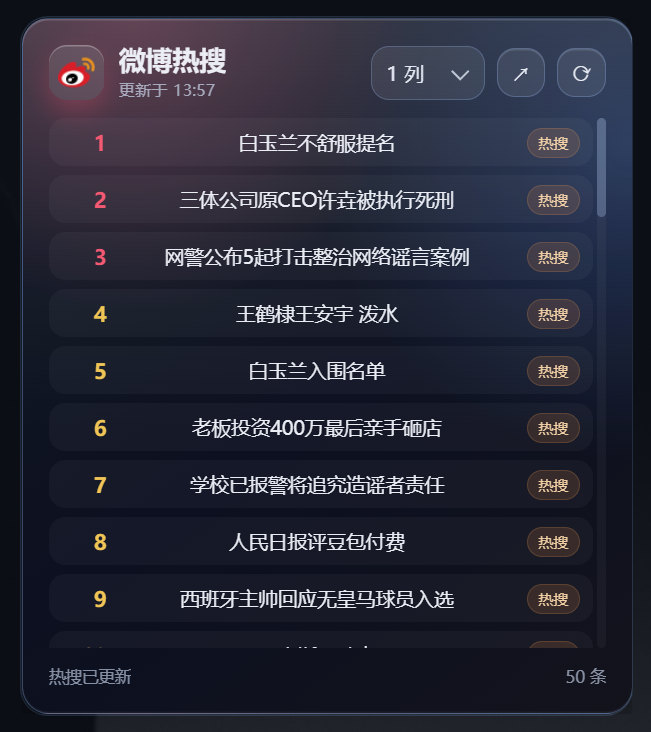
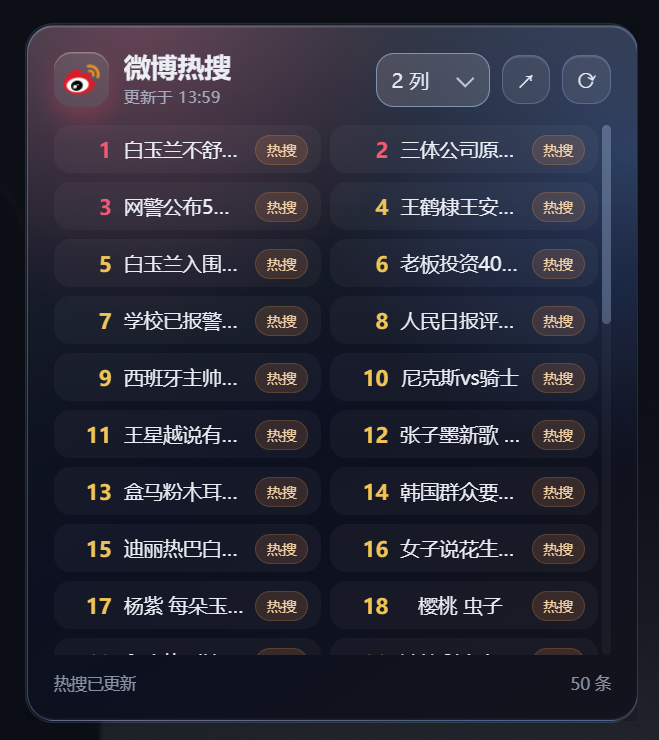
<!doctype html><html lang="zh-CN"><head> <meta charset="utf-8"> <meta name="viewport" content="width=device-width, initial-scale=1"> <title>微博热搜</title> <style> html, body { margin: 0; width: 100%; height: 100%; overflow: hidden; background: transparent; }
* { box-sizing: border-box; }
body { font-family: "Microsoft YaHei", sans-serif; color: rgba(245, 248, 255, 0.94); -webkit-font-smoothing: antialiased; user-select: none; }
button, select { font-family: inherit; }
.card { position: relative; width: 100%; height: 100%; overflow: hidden; padding: clamp(12px, 4.2vw, 18px); border-radius: 18px; border: 1px solid rgba(138, 185, 255, 0.32); background: linear-gradient(180deg, rgba(255, 255, 255, 0.12), rgba(255, 255, 255, 0.03) 34%, rgba(255, 255, 255, 0) 60%), radial-gradient(circle at 18% 0%, rgba(255, 95, 130, 0.26), transparent 34%), radial-gradient(circle at 100% 18%, rgba(75, 144, 255, 0.24), transparent 38%), linear-gradient(145deg, #131a27 0%, #0b1020 52%, #13131c 100%); box-shadow: inset 0 1px 0 rgba(255, 255, 255, 0.16), inset 0 -1px 0 rgba(255, 255, 255, 0.05), 0 18px 44px rgba(0, 0, 0, 0.34); display: grid; grid-template-rows: auto 1fr auto; gap: clamp(8px, 2.4vh, 12px); }
.topbar { min-width: 0; display: flex; align-items: center; justify-content: space-between; gap: 10px; }
.brand { min-width: 0; display: flex; align-items: center; gap: 10px; }
.mark { flex: 0 0 auto; width: clamp(30px, 9vw, 38px); height: clamp(30px, 9vw, 38px); border-radius: 12px; display: grid; place-items: center; padding: 6px; background: rgba(255, 255, 255, 0.1); box-shadow: inset 0 1px 0 rgba(255, 255, 255, 0.28), 0 8px 18px rgba(255, 78, 105, 0.28); }
.mark img { width: 100%; height: 100%; display: block; object-fit: contain; }
.titlebox { min-width: 0; }
.title { margin: 0; font-size: clamp(16px, 4.4vw, 22px); line-height: 1.1; letter-spacing: 0; white-space: nowrap; overflow: hidden; text-overflow: ellipsis; }
.meta { margin-top: 4px; font-size: clamp(10px, 2.7vw, 12px); line-height: 1.25; color: rgba(201, 214, 235, 0.72); white-space: nowrap; overflow: hidden; text-overflow: ellipsis; }
.actions { flex: 0 0 auto; display: flex; align-items: center; gap: 8px; }
.icon-btn { width: clamp(30px, 8vw, 36px); height: clamp(30px, 8vw, 36px); padding: 0; border: 1px solid rgba(151, 190, 255, 0.28); border-radius: 12px; color: rgba(244, 248, 255, 0.92); background: rgba(255, 255, 255, 0.08); box-shadow: inset 0 1px 0 rgba(255, 255, 255, 0.12); cursor: pointer; transition: transform 140ms ease, border-color 140ms ease, background 140ms ease; }
.icon-btn:hover { border-color: rgba(171, 207, 255, 0.54); background: rgba(255, 255, 255, 0.13); }
.icon-btn:active { transform: scale(0.94); background: rgba(255, 255, 255, 0.18); }
.icon-btn:disabled { cursor: default; opacity: 0.56; transform: none; }
.select-wrap { position: relative; width: 76px; height: 36px; }
.select-wrap::after { content: ""; position: absolute; right: 12px; top: 50%; width: 7px; height: 7px; border-right: 1.5px solid rgba(232, 239, 252, 0.75); border-bottom: 1.5px solid rgba(232, 239, 252, 0.75); transform: translateY(-65%) rotate(45deg); pointer-events: none; }
select { width: 100%; height: 100%; appearance: none; border: 1px solid rgba(151, 190, 255, 0.26); border-radius: 12px; padding: 0 26px 0 10px; color: rgba(241, 246, 255, 0.92); background: rgba(255, 255, 255, 0.08); outline: none; cursor: pointer; transition: border-color 140ms ease, background 140ms ease; }
select:hover, select:focus { border-color: rgba(171, 207, 255, 0.54); background: rgba(255, 255, 255, 0.13); }
option { color: #101727; }
.list { min-height: 0; overflow-y: auto; overflow-x: hidden; padding-right: 3px; display: grid; align-content: start; gap: 6px; }
.list::-webkit-scrollbar { width: 6px; }
.list::-webkit-scrollbar-track { background: rgba(255, 255, 255, 0.04); border-radius: 999px; }
.list::-webkit-scrollbar-thumb { background: rgba(150, 174, 212, 0.36); border-radius: 999px; }
.item { width: 100%; min-width: 0; min-height: 32px; display: grid; grid-template-columns: 30px minmax(0, 1fr) auto; align-items: center; gap: 8px; border: 1px solid transparent; border-radius: 11px; padding: 6px 8px; color: inherit; background: rgba(255, 255, 255, 0.035); cursor: pointer; transition: transform 140ms ease, border-color 140ms ease, background 140ms ease; }
.item:hover { border-color: rgba(159, 198, 255, 0.24); background: rgba(255, 255, 255, 0.08); }
.item:active { transform: scale(0.985); background: rgba(255, 255, 255, 0.12); }
.rank { text-align: right; font-size: clamp(13px, 3.4vw, 16px); font-weight: 800; color: #f4c64c; font-variant-numeric: tabular-nums; }
.item:nth-child(-n+3) .rank { color: #ff5b73; }
.topic { min-width: 0; font-size: clamp(12px, 3.2vw, 14px); line-height: 1.25; white-space: nowrap; overflow: hidden; text-overflow: ellipsis; }
.tag { max-width: 58px; min-width: 0; height: 20px; display: inline-flex; align-items: center; padding: 0 7px; border-radius: 999px; color: rgba(255, 218, 171, 0.95); background: rgba(255, 145, 58, 0.14); border: 1px solid rgba(255, 168, 80, 0.18); font-size: 10px; white-space: nowrap; overflow: hidden; text-overflow: ellipsis; }
.foot { display: flex; align-items: center; justify-content: space-between; gap: 8px; font-size: 11px; color: rgba(195, 210, 235, 0.66); min-height: 15px; }
.status, .count { min-width: 0; white-space: nowrap; overflow: hidden; text-overflow: ellipsis; }
.count { flex: 0 0 auto; }
@media (max-width: 330px), (max-height: 260px) { .card { padding: 10px; gap: 7px; }
.meta, .tag, .select-wrap { display: none; }
.item { grid-template-columns: 26px minmax(0, 1fr); min-height: 29px; } } </style></head><body> <main class="card" aria-label="微博热搜浮岛组件"> <header class="topbar"> <div class="brand"> <div class="mark" aria-hidden="true"> <img src="https://s.weibo.com/favicon.ico" alt=""> </div> <div class="titlebox"> <h1 class="title">微博热搜</h1> <div class="meta" id="updatedAt">本地兜底内容</div> </div> </div> <div class="actions"> <label class="select-wrap" title="列数"> <select id="columns" aria-label="列数"> <option value="1">1 列</option> <option value="2">2 列</option> <option value="3">3 列</option> </select> </label> <button class="icon-btn" id="openHot" type="button" title="打开热搜" aria-label="打开热搜">↗</button> <button class="icon-btn" id="refresh" type="button" title="刷新" aria-label="刷新">⟳</button> </div> </header>
<section class="list" id="list" aria-live="polite"></section>
<footer class="foot"> <span class="status" id="status">等待浮岛宿主初始化</span> <span class="count" id="count">0 条</span> </footer> </main>
<script> (function () { var API_URL = 'https://weibointl.api.weibo.cn/portal.php?ct=feed&a=search_topic'; var HOT_H5 = 'https://m.weibo.cn/p/index?containerid=' + encodeURIComponent('106003&filter_type=realtimehot'); var defaults = { columns: '1' }; var state = { settings: Object.assign({}, defaults), items: [ { rank: 1, title: '微博热搜组件已就绪', keyword: '微博热搜', tag: '热' }, { rank: 2, title: '等待浮岛宿主连接后自动刷新', keyword: '微博热搜', tag: '新' }, { rank: 3, title: '点击条目可打开微博搜索', keyword: '微博搜索', tag: '' }, { rank: 4, title: '刷新按钮会重新请求热搜榜', keyword: '微博热搜榜', tag: '' } ], updatedAt: '', loading: false, hostReady: false };
var listEl = document.getElementById('list'); var statusEl = document.getElementById('status'); var countEl = document.getElementById('count'); var updatedAtEl = document.getElementById('updatedAt'); var refreshBtn = document.getElementById('refresh'); var openHotBtn = document.getElementById('openHot'); var columnsSelect = document.getElementById('columns');
function invoke(method, args) { return window.fudao.invoke(method, args || {}); }
function nowText() { var date = new Date(); var h = String(date.getHours()).padStart(2, '0'); var m = String(date.getMinutes()).padStart(2, '0'); return h + ':' + m; }
function normalizeText(value) { return String(value == null ? '' : value).trim(); }
function getKeyword(item) { if (item.keyword) return item.keyword; if (item.scheme && item.scheme.indexOf('?') > -1) { var query = item.scheme.split('?')[1].split('&'); for (var i = 0; i < query.length; i += 1) { var pair = query[i].split('='); if (pair[0] === 'keyword') { return decodeURIComponent(pair.slice(1).join('=')); } } } return item.title || ''; }
function normalizeItems(raw) { var source = raw && raw.data && Array.isArray(raw.data) ? raw.data : []; return source.map(function (item, index) { var title = normalizeText(item.title || item.word || item.desc || item.keyword); if (!title) return null; var rank = Number(item.pic_id || item.rank || index + 1); var tag = normalizeText(item.label_name || item.icon_desc || item.category || ''); return { rank: Number.isFinite(rank) && rank > 0 ? rank : index + 1, title: title, keyword: normalizeText(getKeyword(item)) || title, tag: tag }; }).filter(Boolean); }
function searchUrl(keyword) { return 'https://m.weibo.cn/search?containerid=' + encodeURIComponent('100103type=1&t=10&q=' + keyword); }
function hotUrl() { return HOT_H5; }
function setStatus(text) { statusEl.textContent = text; }
function renderSettings() { columnsSelect.value = state.settings.columns; listEl.style.gridTemplateColumns = 'repeat(' + state.settings.columns + ', minmax(0, 1fr))'; }
function renderList() { var fragment = document.createDocumentFragment(); state.items.forEach(function (item) { var button = document.createElement('button'); button.type = 'button'; button.className = 'item'; button.dataset.keyword = item.keyword; button.title = item.title;
var rank = document.createElement('span'); rank.className = 'rank'; rank.textContent = item.rank;
var topic = document.createElement('span'); topic.className = 'topic'; topic.textContent = item.title;
var tag = document.createElement('span'); tag.className = 'tag'; tag.textContent = item.tag || '热搜';
button.appendChild(rank); button.appendChild(topic); button.appendChild(tag); fragment.appendChild(button); }); listEl.replaceChildren(fragment); countEl.textContent = state.items.length + ' 条'; updatedAtEl.textContent = state.updatedAt ? '更新于 ' + state.updatedAt : '本地兜底内容'; }
function render() { renderSettings(); renderList(); refreshBtn.disabled = state.loading; refreshBtn.textContent = state.loading ? '…' : '⟳'; }
function parseJSON(value, fallback) { try { if (typeof value !== 'string' || !value) return fallback; return JSON.parse(value); } catch (err) { return fallback; } }
function readState(key, defaultValue) { return invoke('state.read', { key: key, defaultValue: JSON.stringify(defaultValue) }).then(function (res) { return parseJSON(res, defaultValue); }); }
function writeState(key, value) { return invoke('state.write', { key: key, value: JSON.stringify(value) }).catch(function () {}); }
function saveSettings() { return writeState('settings', state.settings); }
function loadCachedData() { return readState('trendingCache', null).then(function (cache) { if (cache && Array.isArray(cache.items) && cache.items.length) { state.items = cache.items; state.updatedAt = cache.updatedAt || ''; render(); } }); }
function refresh() { if (!state.hostReady || state.loading) return; state.loading = true; setStatus('正在刷新热搜'); render();
invoke('http.get', { url: API_URL, headers: {}, timeoutMs: 10000 }).then(function (result) { if (!result || !result.ok) { var status = result && result.status ? 'HTTP ' + result.status : '请求失败'; throw new Error(status); } var json = JSON.parse(result.text || '{}'); var items = normalizeItems(json); if (!items.length) throw new Error('热搜数据为空'); state.items = items; state.updatedAt = nowText(); setStatus('热搜已更新'); return writeState('trendingCache', { items: state.items, updatedAt: state.updatedAt }); }).catch(function () { setStatus(state.items.length ? '已显示上次可用数据' : '刷新失败'); }).then(function () { state.loading = false; render(); }); }
function openUrl(url) { if (!state.hostReady) return; invoke('url.open', { url: url, closeAfterOpen: true }).catch(function () { setStatus('打开失败'); }); }
function bindEvents() { refreshBtn.addEventListener('click', refresh); openHotBtn.addEventListener('click', function () { openUrl(hotUrl()); }); listEl.addEventListener('click', function (event) { var item = event.target.closest('.item'); if (!item) return; openUrl(searchUrl(item.dataset.keyword || item.title)); }); columnsSelect.addEventListener('change', function () { state.settings.columns = columnsSelect.value; renderSettings(); saveSettings(); }); }
function initWhenReady() { if (!window.fudao || typeof window.fudao.invoke !== 'function') { setTimeout(initWhenReady, 120); return; }
state.hostReady = true; setStatus('浮岛宿主已连接'); Promise.all([ readState('settings', defaults), loadCachedData() ]).then(function (values) { state.settings = Object.assign({}, defaults, values[0] || {}); render(); refresh(); }).catch(function () { setStatus('读取状态失败,使用默认设置'); refresh(); }); }
bindEvents(); render(); setTimeout(initWhenReady, 0); })(); </script></body></html>

 京公网安备 11010502053266号