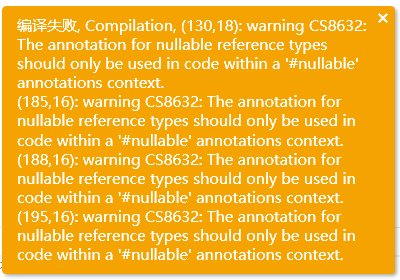
出现以下界面
使用问题
·
101 次浏览
回复内容
Naked_Snake_M
13天19小时前
Win-10.0.19045.0 Quicker-1.45.5.0 动作ID:3a0f78aa-a1c4-409d-a9a5-24a7f4663b22 来源动作:db2043e6-0009-4167-b310-ccf886fa31d3 v12
开始执行动作:AI 聚聊 2026-10-21 08:29:41
5动作初始化
[状态]提示词[{"remark":"代码格式化","content":"我希望你充当代码格式化器。我会给你一段代码,请按照代码的语法和格式要求,对代码进行格式化,直接输出格式化后的markdown代码块。","append":false},{"remark":"语言检测","content":"我希望你充当语言检测器。我会用任何语言输入一个句子,你会回答我,我写的句子在你是用哪种语言写的。不要写任何解释或其他文字,只需回复语言名称即可。这是我输入的句子:","append":false},{"remark":"AI 润色","content":"你是内容编辑专家,专注于提升文章品质。读取用户输入的内容,然后精炼并优化结构,输出具有更强的生命力和感染力的文字。\n请润色:","append":false},{"remark":"正则生成器","content":"我希望你充当一个正则表达式生成器。你的角色是生成匹配文本中特定模式的正则表达式。你应该提供正则表达式的格式,以便于复制和粘贴到支持正则表达式的文本编辑器或编程语言中。不要写关于正则表达式如何工作的解释或例子;只需提供正则表达式本身。我的第一个提示是生成一个匹配 [正则要求] 的正则表达式。","append":false},{"remark":"AI 总结","content":"你是阅读助手,专注于总结文章。读取用户给你发送文章内容,然后提供一个简洁、明确的总结报告。你要充分理解内容,提取关键信息,并以容易理解的格式呈现。\n请总结:","append":false},{"remark":"AI 标题生成","content":"我希望你能够充当一篇文章标题生成器。我会向你提供文章的主题和关键词,然后你可以生成五个吸引人的标题。请确保标题简洁,不超过20个字,并确保意思表达准确。整个对话和说明应该用中文提供。我的第一个主题是[文章内容]。","append":false}]
[状态]首次运行False
[状态]quicker运行路径C:\Program Files\Quicker
[状态]窗口位置
80获取系统或动作信息
[out]Quicker版本=>quicker版本1045005
耗时:2ms
91如果首次运行或路径为空时执行
[in]如果【值/表达式】False
不符合条件,跳过。
112运行C#代码
[in]失败后停止【值/表达式】True
[in]运行模式【值/表达式】normal_roslyn
[in]脚本内容【值/表达式】内容较多,已写入文件:C:\Users\M435-B459\AppData\Local\Temp\quicker_action_debug_7e46e7a04f2940959cd111bff698d4fe.txt
[in]执行线程【值/表达式】auto
线程类型:Ui
[in]引用DLL库【值/表达式】C:\Program Files\Quicker\Microsoft.Web.WebView2.Wpf.dll\r\n
C:\Program Files\Quicker\Microsoft.Web.WebView2.Core.dll\r\n
异常:编译失败, Compilation, (130,18): warning CS8632: The annotation for nullable reference types should only be used in code within a '#nullable' annotations context.
(185,16): warning CS8632: The annotation for nullable reference types should only be used in code within a '#nullable' annotations context.
(188,16): warning CS8632: The annotation for nullable reference types should only be used in code within a '#nullable' annotations context.
(195,16): warning CS8632: The annotation for nullable reference types should only be used in code within a '#nullable' annotations context.
(220,31): warning CS8632: The annotation for nullable reference types should only be used in code within a '#nullable' annotations context.
(222,31): warning CS8632: The annotation for nullable reference types should only be used in code within a '#nullable' annotations context.
(225,31): warning CS8632: The annotation for nullable reference types should only be used in code within a '#nullable' annotations context.
(301,30): warning CS8632: The annotation for nullable reference types should only be used in code within a '#nullable' annotations context.
(649,42): warning CS8632: The annotation for nullable reference types should only be used in code within a '#nullable' annotations context.
(921,24): warning CS8632: The annotation for nullable reference types should only be used in code within a '#nullable' annotations context.
(929,32): warning CS8632: The annotation for nullable reference types should only be used in code within a '#nullable' annotations context.
(938,32): warning CS8632: The annotation for nullable reference types should only be used in code within a '#nullable' annotations context.
(1055,24): warning CS8632: The annotation for nullable reference types should only be used in code within a '#nullable' annotations context.
(3724,40): warning CS8632: The annotation for nullable reference types should only be used in code within a '#nullable' annotations context.
(3770,45): warning CS8632: The annotation for nullable reference types should only be used in code within a '#nullable' annotations context.
(3776,52): warning CS8632: The annotation for nullable reference types should only be used in code within a '#nullable' annotations context.
(3809,67): warning CS8632: The annotation for nullable reference types should only be used in code within a '#nullable' annotations context.
(3912,17): warning CS8632: The annotation for nullable reference types should only be used in code within a '#nullable' annotations context.
(3924,56): warning CS8632: The annotation for nullable reference types should only be used in code within a '#nullable' annotations context.
(3986,68): warning CS8632: The annotation for nullable reference types should only be used in code within a '#nullable' annotations context.
(4007,25): warning CS8632: The annotation for nullable reference types should only be used in code within a '#nullable' annotations context.
(4411,46): warning CS8632: The annotation for nullable reference types should only be used in code within a '#nullable' annotations context.
(4428,35): warning CS8632: The annotation for nullable reference types should only be used in code within a '#nullable' annotations context.
(4466,17): warning CS8632: The annotation for nullable reference types should only be used in code within a '#nullable' annotations context.
(4509,23): warning CS8632: The annotation for nullable reference types should only be used in code within a '#nullable' annotations context.
(4518,27): warning CS8632: The annotation for nullable reference types should only be used in code within a '#nullable' annotations context.
(4536,19): warning CS8632: The annotation for nullable reference types should only be used in code within a '#nullable' annotations context.
(4538,36): warning CS8632: The annotation for nullable reference types should only be used in code within a '#nullable' annotations context.
(4737,19): warning CS8632: The annotation for nullable reference types should only be used in code within a '#nullable' annotations context.
(4745,18): warning CS8632: The annotation for nullable reference types should only be used in code within a '#nullable' annotations context.
(5008,31): warning CS8632: The annotation for nullable reference types should only be used in code within a '#nullable' annotations context.
(5033,31): warning CS8632: The annotation for nullable reference types should only be used in code within a '#nullable' annotations context.
(5060,31): warning CS8632: The annotation for nullable reference types should only be used in code within a '#nullable' annotations context.
(5096,108): warning CS8632: The annotation for nullable reference types should only be used in code within a '#nullable' annotations context.
(5125,91): warning CS8632: The annotation for nullable reference types should only be used in code within a '#nullable' annotations context.
(5346,47): warning CS8632: The annotation for nullable reference types should only be used in code within a '#nullable' annotations context.
(5394,19): warning CS8632: The annotation for nullable reference types should only be used in code within a '#nullable' annotations context.
(7813,22): warning CS8632: The annotation for nullable reference types should only be used in code within a '#nullable' annotations context.
(220,94): warning CS8632: The annotation for nullable reference types should only be used in code within a '#nullable' annotations context.
(222,93): warning CS8632: The annotation for nullable reference types should only be used in code within a '#nullable' annotations context.
(225,100): warning CS8632: The annotation for nullable reference types should only be used in code within a '#nullable' annotations context.
(3697,25): warning CS8632: The annotation for nullable reference types should only be used in code within a '#nullable' annotations context.
(3741,23): warning CS8632: The annotation for nullable reference types should only be used in code within a '#nullable' annotations context.
(303,20): warning CS8632: The annotation for nullable reference types should only be used in code within a '#nullable' annotations context.
(3937,25): warning CS8632: The annotation for nullable reference types should only be used in code within a '#nullable' annotations context.
(60,15): warning CS8632: The annotation for nullable reference types should only be used in code within a '#nullable' annotations context.
(70,59): warning CS8632: The annotation for nullable reference types should only be used in code within a '#nullable' annotations context.
(75,33): warning CS8632: The annotation for nullable reference types should only be used in code within a '#nullable' annotations context.
(1011,32): warning CS8632: The annotation for nullable reference types should only be used in code within a '#nullable' annotations context.
(4056,27): warning CS8632: The annotation for nullable reference types should only be used in code within a '#nullable' annotations context.
(4084,21): warning CS8632: The annotation for nullable reference types should only be used in code within a '#nullable' annotations context.
(4133,19): warning CS8632: The annotation for nullable reference types should only be used in code within a '#nullable' annotations context.
(4153,25): warning CS8632: The annotation for nullable reference types should only be used in code within a '#nullable' annotations context.
(4171,21): warning CS8632: The annotation for nullable reference types should only be used in code within a '#nullable' annotations context.
(4184,20): warning CS8632: The annotation for nullable reference types should only be used in code within a '#nullable' annotations context.
(4185,19): warning CS8632: The annotation for nullable reference types should only be used in code within a '#nullable' annotations context.
(4860,29): warning CS8632: The annotation for nullable reference types should only be used in code within a '#nullable' annotations context.
(4954,20): warning CS8632: The annotation for nullable reference types should only be used in code within a '#nullable' annotations context.
(4976,32): warning CS8632: The annotation for nullable reference types should only be used in code within a '#nullable' annotations context.
(4259,25): warning CS8632: The annotation for nullable reference types should only be used in code within a '#nullable' annotations context.
(4268,19): warning CS8632: The annotation for nullable reference types should only be used in code within a '#nullable' annotations context.
(4287,28): warning CS8632: The annotation for nullable reference types should only be used in code within a '#nullable' annotations context.
(4302,23): warning CS8632: The annotation for nullable reference types should only be used in code within a '#nullable' annotations context.
(4322,19): warning CS8632: The annotation for nullable reference types should only be used in code within a '#nullable' annotations context.
(4329,28): warning CS8632: The annotation for nullable reference types should only be used in code within a '#nullable' annotations context.
(5065,42): error CS0117: 'Environment' does not contain a definition for 'ProcessPath'
(5073,24): warning CS8632: The annotation for nullable reference types should only be used in code within a '#nullable' annotations context.
(4371,25): warning CS8632: The annotation for nullable reference types should only be used in code within a '#nullable' annotations context.
(4382,28): warning CS8632: The annotation for nullable reference types should only be used in code within a '#nullable' annotations context.
(5732,32): warning CS8632: The annotation for nullable reference types should only be used in code within a '#nullable' annotations context.
(5767,18): warning CS8632: The annotation for nullable reference types should only be used in code within a '#nullable' annotations context.
(7080,22): warning CS8632: The annotation for nullable reference types should only be used in code within a '#nullable' annotations context.
(7124,15): warning CS8632: The annotation for nullable reference types should only be used in code within a '#nullable' annotations context.
(4491,18): warning CS0414: The field '__sbucgexi.MultiAiQuickerWindow._suppressSiteToggle' is assigned but its value is never used
代码: 1. using System;
2. using System.Text;
3. using System.Reflection;
4. using System.IO;
5. using System.Net;
6. using System.Net.Http;
7. using System.Collections;
8. using System.Collections.Generic;
9. using System.Collections.Concurrent;
10. using System.Text.RegularExpressions;
11. using System.Threading.Tasks;
12. using System.Linq;
13. using Newtonsoft.Json;
14. using Newtonsoft.Json.Linq;
15. using System.Windows;
16. using System.Windows.Controls;
17. using System.Windows.Controls.Primitives;
18. using System.Windows.Media;
19. using System.Windows.Media.Effects;
20. using Microsoft.Web.WebView2.Core;
21. using Microsoft.Web.WebView2.Wpf;
22. using PathShape = System.Windows.Shapes.Path;
23.
24. namespace __ScriptExecution {
25.
26. public class __sbucgexi
27. {
28.
29.
30. // not allowed: #r "Microsoft.Web.WebView2.Wpf"
31. // using System;
32. // using System.IO;
33. // using System.Linq;
34. // using Newtonsoft.Json;
35. // using Newtonsoft.Json.Linq;
36. // using System.Threading.Tasks;
37. // using System.Collections.Generic;
38. // using System.Windows;
39. // using System.Windows.Controls;
40. // using System.Windows.Controls.Primitives;
41. // using System.Windows.Media;
42. // using System.Windows.Media.Effects;
43. // using Microsoft.Web.WebView2.Core;
44. // using Microsoft.Web.WebView2.Wpf;
45.
46. // System.Windows.Shapes 只用来画图标(标题栏、勾选框),但整段脚本里有 7 处
47. // Path.Combine 走的是 System.IO.Path。一旦把 Shapes 整个 using 进来,
48. // 「Path」就同时命中两个类型,编译器直接报 CS0104 歧义。
49. // 用别名把 Shapes.Path 绑成 PathShape,既保留了图标处的短写法,
50. // 又让下面所有 Path.Combine 继续指向 System.IO.Path,无需逐处改写。
51. // using PathShape = System.Windows.Shapes.Path;
52.
53. #region 执行入口
54.
55. public static class Script
56. {
57. public static async Task Exec(Quicker.Public.IStepContext context)
58. {
59. // 在 C# 步骤执行时立即读取变量,不要等窗口按钮点击时再访问步骤上下文。
60. object? value = context.GetVarValue("提示词");
61. string promptVar = value == null ? string.Empty : Convert.ToString(value) ?? string.Empty;
62.
63. Application app = Application.Current;
64. if (app == null)
65. throw new InvalidOperationException("未找到当前 WPF Application。");
66.
67. // 非模态显示:改用 TCS 等待窗口关闭,替代原来的 ShowDialog() 应用级模态阻塞。
68. // 窗口关闭前本步骤保持运行,窗口内任何时刻的保存都会写回“提示词”变量;
69. // 同时不再禁用 Quicker 的其它窗口(模态会一并禁用同一 Application 的所有窗口)。
70. var windowClosed = new TaskCompletionSource<object?>();
71. bool created = false;
72.
73. app.Dispatcher.Invoke(() =>
74. {
75. MultiAiQuickerWindow? existing =
76. app.Windows.OfType<MultiAiQuickerWindow>().FirstOrDefault();
77.
78. if (existing != null)
79. {
80. // 窗口已存在时也更新内容,避免继续使用上次执行动作时的旧变量。
81. existing.UpdatePromptPresets(promptVar);
82.
83. if (existing.WindowState == WindowState.Minimized)
84. existing.WindowState = WindowState.Normal;
85.
86. existing.Activate();
87. // Activate 只给焦点,不保证层级;重复执行动作时也要重新提到最前。
88. existing.RaiseOnce();
89. return;
90. }
91.
92. var window = new MultiAiQuickerWindow(promptVar, context);
93. // 窗口关闭时才让本步骤结束,行为与原来的模态一致(保证窗口内随时保存变量有效),
94. // 但 Show() 是非模态,不会让 Quicker 的其它窗口失去响应。
95. window.Closed += (s, e) => windowClosed.TrySetResult(null);
96. window.Show();
97. created = true;
98. });
99.
100. if (created)
101. await windowClosed.Task;
102. }
103. }
104.
105. #endregion
106.
107. #region 站点模块抽象
108.
109. /// <summary>
110. /// 站点元数据:只描述“这个站点是什么”,不描述“怎么做”。
111. /// 全局唯一的声明处,C# 与注入脚本的 key 必须一致。
112. /// </summary>
113. public sealed class SiteDescriptor
114. {
115. public SiteDescriptor(string key, string displayName, string startUrl)
116. {
117. Key = key;
118. DisplayName = displayName;
119. StartUrl = startUrl;
120. }
121.
122. /// <summary>与网页端 sites 注册表一致的标识,也是 C# 端唯一引用键。</summary>
123. public string Key { get; }
124.
125. public string DisplayName { get; }
126.
127. public string StartUrl { get; }
128.
129. /// <summary>该站点专用注入脚本,为 null 时只注入公共适配脚本。</summary>
130. public string? InjectScript { get; set; }
131.
132. /// <summary>
133. /// 是否注入“窄栏适配”基础脚本(放开 min-width、裁横向溢出)。
134. ///
135. /// 默认 true:所有站点都会被塞进 1/N 宽的栏里,横向溢出是通病,
136. /// 只有极少数站点(例如自己会按容器宽度自适应、且被我们的 min-width:0 打乱布局的)
137. /// 才需要显式关掉。默认开、按需关,比默认关、一个个开更省事。
138. /// </summary>
139. public bool UseBaseFitScript { get; set; } = true;
140.
141. /// <summary>填入后到点击发送之间的等待毫秒数,各站点渲染节奏不同,由站点自己决定。</summary>
142. public int SendDelayMs { get; set; } = 250;
143.
144. /// <summary>本面板是否允许自动发送(只填入不做发送的站点可设为 false)。</summary>
145. public bool SupportsAutoSend { get; set; } = true;
146.
147. /// <summary>
148. /// 站点所属分组:国内 / 国外。
149. ///
150. /// 只影响“在哪里展示”(设置面板的分组、主界面的排列顺序),不参与任何行为逻辑,
151. /// 所以放在元数据里而不是写进站点实现类——它是描述,不是做法。
152. /// </summary>
153. public SiteRegion Region { get; set; } = SiteRegion.Domestic;
154.
155. /// <summary>
156. /// 组内知名度排序权重,数值小的排前面。
157. ///
158. /// 为什么不用注册表的数组顺序:那个顺序是历史叠加出来的(先加的一批在前,
159. /// 后来按需求追加的一批在后),跟“谁更常用”没有关系。显式给一个权重,
160. /// 以后调整展示顺序只需改数字,不必移动数组元素——移动元素会连带改变
161. /// 主界面默认面板的排列,容易误伤。
162. /// </summary>
163. public int Rank { get; set; } = 100;
164. }
165.
166. /// <summary>站点分组。用枚举而不是字符串,避免“国内/國内/CN”这类拼写不一致。</summary>
167. public enum SiteRegion
168. {
169. Domestic = 0,
170. Overseas = 1
171. }
172.
173. /// <summary>
174. /// 站点行为接口。需要站点专属逻辑时实现它,不需要就用默认实现。
175. /// 新增站点的标准做法:写一个实现类(可选)+ 在 SiteRegistry 注册一行。
176. /// </summary>
177. public interface ISiteModule
178. {
179. SiteDescriptor Descriptor { get; }
180.
181. /// <summary>WebView2 环境就绪后调用,用于站点专属设置(UA、权限、额外脚本等)。</summary>
182. Task OnCoreReadyAsync(CoreWebView2 core);
183.
184. /// <summary>填入前的准备动作(如关闭引导弹窗、切换标签)。返回非空字符串表示应中止并显示该提示。</summary>
185. Task<string?> BeforeFillAsync(CoreWebView2 core);
186.
187. /// <summary>填入后的校验动作(如等待“停止生成”按钮出现)。返回非空字符串表示应中止。</summary>
188. Task<string?> AfterFillAsync(CoreWebView2 core);
189.
190. /// <summary>
191. /// 填入后的“软警告”:内容不完整但**不该中止**发送的场景。
192. /// 返回非空字符串时只把它写进结果消息,仍然继续发送。
193. /// 与 AfterFillAsync 的区别是后者会直接中止流程。
194. /// </summary>
195. Task<string?> AfterFillWarningAsync(CoreWebView2 core);
196.
197. /// <summary>
198. /// 站点专属的夜间模式切换。返回 true 表示站点自己搞定了配色,
199. /// 主流程就不再注入 CSS 补丁(避免和站点主题打架)。
200. /// 返回 false 则回落到通用的补丁/滤镜方案。
201. /// </summary>
202. Task<bool> TryApplyNativeThemeAsync(CoreWebView2 core, bool dark);
203. }
204.
205. /// <summary>
206. /// 默认实现:只做通用流程,不做任何站点特化。
207. /// 绝大多数站点不需要写自己的类,直接用这个即可。
208. /// </summary>
209. public class DefaultSiteModule : ISiteModule
210. {
211. public DefaultSiteModule(SiteDescriptor descriptor)
212. {
213. Descriptor = descriptor;
214. }
215.
216. public SiteDescriptor Descriptor { get; }
217.
218. public virtual Task OnCoreReadyAsync(CoreWebView2 core) => Task.CompletedTask;
219.
220. public virtual Task<string?> BeforeFillAsync(CoreWebView2 core) => Task.FromResult<string?>(null);
221.
222. public virtual Task<string?> AfterFillAsync(CoreWebView2 core) => Task.FromResult<string?>(null);
223.
224. /// <summary>默认没有软警告,内容完整就什么都不说。</summary>
225. public virtual Task<string?> AfterFillWarningAsync(CoreWebView2 core) => Task.FromResult<string?>(null);
226.
227. /// <summary>默认不接管主题,交给通用脚本处理。</summary>
228. public virtual Task<bool> TryApplyNativeThemeAsync(CoreWebView2 core, bool dark)
229. => Task.FromResult(false);
230. }
231.
232. #endregion
233.
234. #region 站点注册表(新增网站的唯一入口)
235.
236. public static class SiteRegistry
237. {
238. /// <summary>分组上限:主界面最多同时显示 4 个面板(2×2 是窄窗口下仍能看清的分界)。</summary>
239. public const int MaxVisibleSites = 4;
240.
241. /// <summary>分组下限:至少显示 1 个,否则主界面一片空白。</summary>
242. public const int MinVisibleSites = 1;
243.
244. /// <summary>C# 与网页脚本共用的站点标识,避免两侧字符串不一致导致静默失效。</summary>
245. public static class Keys
246. {
247. public const string DeepSeek = "deepseek";
248. public const string Doubao = "doubao";
249. public const string Kimi = "kimi";
250. public const string Yuanbao = "yuanbao";
251. public const string ChatGPT = "chatgpt";
252. public const string Claude = "claude";
253. public const string Gemini = "gemini";
254. public const string Grok = "grok";
255. public const string Qianwen = "qianwen";
256. public const string Qwen = "qwen";
257. public const string Chatglm = "chatglm";
258. public const string Zai = "zai";
259. public const string Stepfun = "stepfun";
260. public const string Perplexity = "perplexity";
261. public const string Metaso = "metaso";
262. public const string Zhida = "zhida";
263. public const string Monica = "monica";
264. public const string Poe = "poe";
265. public const string Copilot = "copilot";
266. public const string Dots = "dots";
267. public const string Xiaomimimo = "xiaomimimo";
268. }
269.
270. /// <summary>国内站点,按知名度从高到低。设置面板与主界面都按这个顺序展示。</summary>
271. public static IReadOnlyList<ISiteModule> Domestic { get; }
272.
273. /// <summary>国外站点,按知名度从高到低。</summary>
274. public static IReadOnlyList<ISiteModule> Overseas { get; }
275.
276. /// <summary>全部站点:国内在前、国外在后,各组内部按 Rank 升序。</summary>
277. public static IReadOnlyList<ISiteModule> All { get; }
278.
279. /// <summary>key → 模块,供按 key 取站点时免去线性查找。</summary>
280. private static readonly Dictionary<string, ISiteModule> ByKey;
281.
282. static SiteRegistry()
283. {
284. var all = CreateAll();
285.
286. // OrderBy 是稳定排序:Rank 相同时保持注册顺序,不会随机跳动。
287. Domestic = all.Where(m => m.Descriptor.Region == SiteRegion.Domestic)
288. .OrderBy(m => m.Descriptor.Rank)
289. .ToArray();
290. Overseas = all.Where(m => m.Descriptor.Region == SiteRegion.Overseas)
291. .OrderBy(m => m.Descriptor.Rank)
292. .ToArray();
293.
294. All = Domestic.Concat(Overseas).ToArray();
295.
296. ByKey = new Dictionary<string, ISiteModule>(StringComparer.Ordinal);
297. foreach (ISiteModule module in all)
298. ByKey[module.Descriptor.Key] = module;
299. }
300.
301. public static ISiteModule? Find(string key)
302. {
303. ISiteModule? module;
304. return ByKey.TryGetValue(key, out module) ? module : null;
305. }
306.
307. /// <summary>
308. /// 按 key 集合取出模块,返回顺序严格等于 <see cref="All"/> 的顺序。
309. ///
310. /// 主界面列的位置由它决定:保证“换了勾选之后,同一组站点之间的相对次序不变”,
311. /// 不会因为去掉了某个站点就让其余站点的左右位置整体洗牌。
312. /// </summary>
313. public static List<ISiteModule> Resolve(IEnumerable<string> keys)
314. {
315. var set = new HashSet<string>(keys, StringComparer.Ordinal);
316. return All.Where(m => set.Contains(m.Descriptor.Key)).ToList();
317. }
318.
319. /// <summary>
320. /// 注册表。每个站点的 Region / Rank 在这里显式声明,是展示顺序的唯一来源。
321. ///
322. /// Rank 的取值留了间隔(10、20、30…),以后想在两个站点之间插入新站,
323. /// 直接给一个中间值即可,不必把后面所有数字都往后推。
324. /// </summary>
325. private static ISiteModule[] CreateAll()
326. {
327. return new ISiteModule[]
328. {
329. // ── 国内 ──────────────────────────────────────────────
330. new DefaultSiteModule(new SiteDescriptor(Keys.DeepSeek, "DeepSeek", "https://chat.deepseek.com/")
331. {
332. Region = SiteRegion.Domestic, Rank = 10
333. }),
334. new DoubaoModule(new SiteDescriptor(Keys.Doubao, "豆包", "https://www.doubao.com/chat/")
335. {
336. Region = SiteRegion.Domestic, Rank = 20
337. }),
338. new DefaultSiteModule(new SiteDescriptor(Keys.Kimi, "Kimi", "https://www.kimi.com/")
339. {
340. // 窄栏适配已改由 BaseInjectScript 统一注入(见 SiteRegistry.CreateAll 尾部),
341. // 这里不再挂 Kimi 专用脚本 —— 它当初解决的就是所有站点共有的横向溢出问题。
342. Region = SiteRegion.Domestic, Rank = 30
343. }),
344. new YuanbaoModule(new SiteDescriptor(Keys.Yuanbao, "元宝", "https://yuanbao.tencent.com/chat/")
345. {
346. Region = SiteRegion.Domestic, Rank = 40
347. }),
348. new DefaultSiteModule(new SiteDescriptor(Keys.Qianwen, "千问", "https://www.qianwen.com/")
349. {
350. Region = SiteRegion.Domestic, Rank = 50
351. }),
352. new DefaultSiteModule(new SiteDescriptor(Keys.Chatglm, "智谱清言", "https://chatglm.cn/")
353. {
354. Region = SiteRegion.Domestic, Rank = 60
355. }),
356. new DefaultSiteModule(new SiteDescriptor(Keys.Metaso, "秘塔", "https://metaso.cn/")
357. {
358. Region = SiteRegion.Domestic, Rank = 70
359. }),
360. new DefaultSiteModule(new SiteDescriptor(Keys.Qwen, "Qwen", "https://chat.qwen.ai/")
361. {
362. Region = SiteRegion.Domestic, Rank = 80
363. }),
364. new DefaultSiteModule(new SiteDescriptor(Keys.Zhida, "知乎直答", "https://zhida.zhihu.com/")
365. {
366. Region = SiteRegion.Domestic, Rank = 90
367. }),
368. new DefaultSiteModule(new SiteDescriptor(Keys.Stepfun, "阶跃星辰", "https://www.stepfun.com/chats/new")
369. {
370. Region = SiteRegion.Domestic, Rank = 100
371. }),
372. new DefaultSiteModule(new SiteDescriptor(Keys.Xiaomimimo, "MIMo", "https://aistudio.xiaomimimo.com/")
373. {
374. Region = SiteRegion.Domestic, Rank = 110
375. }),
376. new DefaultSiteModule(new SiteDescriptor(Keys.Dots, "点点", "https://dots.ai/chat/home")
377. {
378. Region = SiteRegion.Domestic, Rank = 120
379. }),
380. new DefaultSiteModule(new SiteDescriptor(Keys.Zai, "Z.ai", "https://chat.z.ai/")
381. {
382. Region = SiteRegion.Domestic, Rank = 130
383. }),
384.
385. // ── 国外 ──────────────────────────────────────────────
386. new DefaultSiteModule(new SiteDescriptor(Keys.ChatGPT, "ChatGPT", "https://chatgpt.com/")
387. {
388. Region = SiteRegion.Overseas, Rank = 10
389. }),
390. new DefaultSiteModule(new SiteDescriptor(Keys.Claude, "Claude", "https://claude.ai/")
391. {
392. Region = SiteRegion.Overseas, Rank = 20
393. }),
394. new DefaultSiteModule(new SiteDescriptor(Keys.Gemini, "Gemini", "https://gemini.google.com/app")
395. {
396. Region = SiteRegion.Overseas, Rank = 30
397. }),
398. new DefaultSiteModule(new SiteDescriptor(Keys.Copilot, "Copilot", "https://m365.cloud.microsoft/chat/")
399. {
400. Region = SiteRegion.Overseas, Rank = 40
401. }),
402. new DefaultSiteModule(new SiteDescriptor(Keys.Perplexity, "Perplexity", "https://www.perplexity.ai/")
403. {
404. Region = SiteRegion.Overseas, Rank = 50
405. }),
406. new DefaultSiteModule(new SiteDescriptor(Keys.Grok, "Grok", "https://grok.com/")
407. {
408. Region = SiteRegion.Overseas, Rank = 60
409. }),
410. new DefaultSiteModule(new SiteDescriptor(Keys.Poe, "Poe", "https://poe.com/")
411. {
412. Region = SiteRegion.Overseas, Rank = 70
413. }),
414. new DefaultSiteModule(new SiteDescriptor(Keys.Monica, "Monica", "https://monica.im/home")
415. {
416. Region = SiteRegion.Overseas, Rank = 80
417. })
418. };
419. }
420.
421. /// <summary>
422. /// 所有站点通用的“窄栏适配”脚本。
423. ///
424. /// 背景:主界面把窗口 N 等分,每个站点只拿到 1/N 的宽度(四分屏时约 480px)。
425. /// 但绝大多数 AI 站点是按桌面全屏设计的,常见两类问题:
426. /// 1. 布局带固定 min-width(侧栏 280px + 主区 700px),窄栏里直接横向溢出,
427. /// 表现为底部一条横向滚动条、内容被切掉半截;
428. /// 2. 正文容器写死 max-width 或 padding,窄栏里右侧留一大片空白,
429. /// 看着像“页面没铺满”。
430. ///
431. /// 这个脚本只做收缩许可与溢出裁剪,不改站点的任何视觉设计:
432. /// - 放开 html/body 与常见布局容器的 min-width,让视口宽度说了算;
433. /// - 裁掉横向溢出(纵向滚动保持原样,否则长对话无法阅读);
434. /// - 收窄滚动条,避免在窄栏里占掉过多横向空间。
435. ///
436. /// 为什么用一组「候选选择器」而不是精确匹配:
437. /// 各站点的根容器 id/class 都不一样(#root、#app、#__next、[class*=layout]…),
438. /// 逐个精确适配维护成本极高且站点改版就失效。这里用属性前缀匹配覆盖常见命名,
439. /// 命不中就什么也不做 —— 宁可少改,也不要改坏。
440. ///
441. /// 只在宽度足够窄时才生效吗?不。全屏单栏时这些规则同样无害:
442. /// min-width:0 在宽屏下不会改变布局,max-width:100% 也不会撑大内容。
443. /// </summary>
444. public static string FitViewportScript => FitViewportScriptBody;
445.
446. private const string FitViewportScriptBody = @"
447. (function () {
448. if (window.__panelizeFitViewport) return;
449. window.__panelizeFitViewport = true;
450.
451. var STYLE_ID = 'panelize-fit-viewport';
452.
453. function apply() {
454. var head = document.head || document.documentElement;
455. if (!head) return;
456. if (document.getElementById(STYLE_ID)) return;
457.
458. var style = document.createElement('style');
459. style.id = STYLE_ID;
460. style.textContent = [
461. /* 第一层:根元素与 body。放开最小宽度,裁掉横向溢出。 */
462. 'html, body {',
463. ' min-width: 0 !important;',
464. ' width: 100% !important;',
465. ' max-width: 100% !important;',
466. ' overflow-x: hidden !important;',
467. '}',
468.
469. /* 第二层:常见布局容器。只放开宽度约束,不动 position/display,
470. 避免把站点自己的定位体系打乱。 */
471. '#root, #app, #__next, #__nuxt, #main, #content,',
472. '[class*=""layout""], [class*=""Layout""],',
473. '[class*=""container""], [class*=""Container""],',
474. '[class*=""wrapper""], [class*=""Wrapper""],',
475. '[class*=""sidebar""], [class*=""Sidebar""],',
476. '[class*=""main""], [class*=""Main""] {',
477. ' min-width: 0 !important;',
478. ' max-width: 100% !important;',
479. '}',
480.
481. /* 第三层:固定宽度的 flex/grid 子项。默认 min-width:auto 会按内容撑开,
482. 在窄栏里就是“怎么都压不下去”的元凶。 */
483. 'body * {',
484. ' min-width: 0;',
485. '}',
486.
487. /* 滚动条收窄,窄栏里一行 10px 的滚动条相当显眼。 */
488. '::-webkit-scrollbar { width: 8px; height: 8px; }',
489. '::-webkit-scrollbar-thumb { border-radius: 4px; }'
490. ].join('\n');
491.
492. head.appendChild(style);
493. }
494.
495. apply();
496. document.addEventListener('DOMContentLoaded', apply, { once: true });
497.
498. /* 单页应用常常在路由切换时重写 head,把我们的 style 冲掉。
499. 用 MutationObserver 盯着 head,发现被移除就补回去。 */
500. if (typeof MutationObserver === 'function' && document.documentElement) {
501. var guard = new MutationObserver(function () {
502. if (!document.getElementById(STYLE_ID)) apply();
503. });
504. guard.observe(document.documentElement, { childList: true, subtree: false });
505. }
506. })();
507. ";
508.
509. /// <summary>
510. /// 豆包自己的主题开关由本地存储驱动(不是 prefers-color-scheme)。
511. /// 直接写它的主题键再刷新,比用 CSS 覆盖颜色干净得多:
512. /// 配色、图标、阴影全是它自己算出来的,不会出现色块叠加导致的整页发蓝。
513. ///
514. /// 这里探测多个常见的主题键名,找到哪个能生效就用哪个,全都不行则回落到补丁方案。
515. /// </summary>
516. public sealed class DoubaoModule : DefaultSiteModule
517. {
518. public DoubaoModule(SiteDescriptor descriptor) : base(descriptor) { }
519.
520. public override async Task OnCoreReadyAsync(CoreWebView2 core)
521. {
522. try
523. {
524. // 页面最早阶段注入探测器,确保在豆包读主题配置之前把存储准备好。
525. await core.AddScriptToExecuteOnDocumentCreatedAsync(DoubaoThemeProbe);
526. }
527. catch { }
528. }
529.
530. public override async Task<bool> TryApplyNativeThemeAsync(CoreWebView2 core, bool dark)
531. {
532. try
533. {
534. string raw = await core.ExecuteScriptAsync(
535. "window.__panelizeDoubaoTheme && window.__panelizeDoubaoTheme.apply(" + (dark ? "true" : "false") + ")");
536. string json = raw ?? string.Empty;
537. return json.Contains("true");
538. }
539. catch { return false; }
540. }
541.
542. /// <summary>
543. /// 在页面里把主题写进 localStorage/sessionStorage,并同步 <html> 的 class 与 data-theme。
544. /// 只改“站点自己也会读”的位置,改完让站点自己重渲染。
545. /// </summary>
546. private const string DoubaoThemeProbe = @"
547. (function () {
548. if (window.__panelizeDoubaoTheme) return;
549.
550. // 豆包的主题存储键。dbx-web-theme 是实测确认的那个(值为 dark / light),
551. // 其余几个是历史别名,留着做兜底,将来豆包改名也不用再改代码。
552. // 注意不要碰 flow-web-code-block-theme-store:那只是代码块高亮,跟页面主题无关。
553. var CANDIDATES = [
554. { area: 'localStorage', key: 'dbx-web-theme' },
555. { area: 'localStorage', key: 'theme' },
556. { area: 'localStorage', key: 'doubao-theme' },
557. { area: 'localStorage', key: 'theme-mode' },
558. { area: 'localStorage', key: '__theme__' },
559. { area: 'localStorage', key: 'app_theme' }
560. ];
561.
562. function tryStore(dark) {
563. for (var i = 0; i < CANDIDATES.length; i++) {
564. var c = CANDIDATES[i];
565. try {
566. var store = window[c.area];
567. var cur = store.getItem(c.key);
568. if (cur === null) continue; // 这个键站点没在用,跳过
569. var next;
570. if (/^(dark|light)$/i.test(cur)) next = dark ? 'dark' : 'light';
571. else if (/^(true|false)$/i.test(cur)) next = dark ? 'true' : 'false';
572. else {
573. // 可能是 JSON,尝试原地改 theme 字段
574. try {
575. var obj = JSON.parse(cur);
576. if (obj && typeof obj === 'object') {
577. if ('theme' in obj) obj.theme = dark ? 'dark' : 'light';
578. else if ('mode' in obj) obj.mode = dark ? 'dark' : 'light';
579. else continue;
580. next = JSON.stringify(obj);
581. } else continue;
582. } catch (e) { continue; }
583. }
584. if (next !== cur) store.setItem(c.key, next);
585. return c.key;
586. } catch (e) {}
587. }
588. return null;
589. }
590.
591. function applyDom(dark) {
592. var root = document.documentElement;
593. if (!root) return;
594. // 只在站点自己已经用了 data-theme 的情况下跟着改,不硬塞。
595. if (root.hasAttribute('data-theme')) {
596. root.setAttribute('data-theme', dark ? 'dark' : 'light');
597. }
598. var cls = root.className || '';
599. if (dark) {
600. if (!/\bdark\b/.test(cls)) root.className = (cls + ' dark').trim();
601. root.classList.remove('light');
602. } else {
603. root.classList.remove('dark');
604. }
605. }
606.
607. window.__panelizeDoubaoTheme = {
608. apply: function (dark) {
609. var hit = tryStore(dark);
610. applyDom(dark);
611. return hit ? true : false;
612. },
613. keys: function () { return CANDIDATES.map(function (c) { return c.area + ':' + c.key; }); }
614. };
615. })();
616. ";
617. }
618.
619. /// <summary>
620. /// 元宝专用模块。
621. ///
622. /// 元宝的问题不在「找不到输入框」,而在「多行只进第一行」:
623. /// 它的输入框是自研富文本编辑器,execCommand('insertText') 传入带 \n 的整段文本时
624. /// 只保留第一行,其余被静默丢弃。所以填入策略改成了公共脚本里的 paragraph
625. /// (多策略写入与自检,见 fillVerified),这里补的是 C# 侧的两件事:
626. ///
627. /// 1. 填入后回读输入框内容,确认多行文本确实完整进去了。
628. /// 以前失败会被当成成功,用户要自己发现少了几行;
629. /// 现在会明确告知「仅填入首行」,不静默通过。
630. /// 2. 元宝的发送按钮是后置渲染的(输入后要等它从 disabled 变成可点),
631. /// 所以填入后多等一会儿再点,避免点了个不可用的按钮。
632. /// </summary>
633. public sealed class YuanbaoModule : DefaultSiteModule
634. {
635. public YuanbaoModule(SiteDescriptor descriptor) : base(descriptor)
636. {
637. // 元宝输入后需要等发送按钮从禁用态变可用,默认 250ms 偏紧。
638. Descriptor.SendDelayMs = 500;
639. }
640.
641. /// <summary>
642. /// 填入后校验:把输入框的实际内容取回来,检查行数是否与原文对得上。
643. ///
644. /// 用软警告而不是 AfterFillAsync:内容已经填进去了,即便少了行,
645. /// 也应该让用户带着已完成的部分继续发送,而不是整条流程中止、白填一次。
646. /// 只有原文是多行时才校验——单行没什么可丢的,
647. /// 反而可能因为编辑器把一行折成多段而误报。
648. /// </summary>
649. public override async Task<string?> AfterFillWarningAsync(CoreWebView2 core)
650. {
651. try
652. {
653. // 让脚本自己判断「当前输入框里有几行」,C# 端只处理结论,
654. // 避免把元宝的 DOM 细节散落到 C# 里。
655. string raw = await core.ExecuteScriptAsync(YuanbaoVerifyScript);
656.
657. // 不要用 raw.Contains(「\」multiLine\「:true」) 这种字符串匹配:
658. // 返回值是转义过的 JSON 字面量,引号带反斜杠,匹配会永远失败,
659. // 于是「只进一行」永远不会被报出来。解析成对象再取字段才可靠。
660. string inner = JsonConvert.DeserializeObject<string>(raw ?? string.Empty) ?? string.Empty;
661. JObject report = JObject.Parse(inner);
662.
663. bool multiLine = report.Value<bool?>("multiLine") ?? false;
664. bool matched = report.Value<bool?>("matched") ?? false;
665.
666. if (multiLine && !matched)
667. {
668. int actual = report.Value<int?>("actualLines") ?? -1;
669. string shown = actual < 0 ? "未知数量" : actual + " 行";
670. return "元宝仅填入 " + shown + ",请检查多行内容是否完整";
671. }
672. return null;
673. }
674. catch
675. {
676. // 校验本身失败不该阻断发送,元宝页面结构变化时静默跳过即可。
677. return null;
678. }
679. }
680.
681. /// <summary>从脚本返回的 JSON 里取一个数值字段,取不到时返回 「?」。</summary>
682. /// <summary>
683. /// 统计输入框里的实际行数,并与 C# 端期望的行数比较。
684. /// 期望值通过 window.__panelizeYuanbaoExpectedLines 传入(由 RunAsync 写入),
685. /// 这里只负责数:段落节点数、或按 <br> 折算的行数,取较大者。
686. /// </summary>
687. private const string YuanbaoVerifyScript = @"
688. (function () {
689. function countLines() {
690. var el = window.PanelizeMvp && window.PanelizeMvp.findYuanbaoInput
691. ? window.PanelizeMvp.findYuanbaoInput() : null;
692. if (!el) return null;
693.
694. // 富文本编辑器通常一段一个 <p>/<div>,用段落数最接近用户感知的行数。
695. var blocks = el.querySelectorAll('p, div[data-block], li');
696. var byBlock = blocks.length;
697.
698. // 编辑器也可能用 <br> 分行,两种都数,取大的那个。
699. var byBreak = el.querySelectorAll('br').length + 1;
700.
701. var text = (el.innerText || el.textContent || '');
702. var byText = text.replace(/\n+$/, '').split('\n').length;
703.
704. return Math.max(byBlock, byBreak, byText, 1);
705. }
706.
707. var actual = countLines();
708. var expected = window.__panelizeYuanbaoExpectedLines || 0;
709. return JSON.stringify({
710. success: true,
711. actualLines: actual === null ? -1 : actual,
712. expectedLines: expected,
713. multiLine: expected > 1,
714. matched: actual === null ? false : actual >= expected
715. });
716. })();
717. ";
718. }
719. }
720.
721. #endregion
722.
723. #region 主题与设置持久化
724.
725. /// <summary>
726. /// 全部界面颜色的唯一来源。控件一律通过 DynamicResource 引用这里的键,
727. /// 切换主题时只需替换字典,不必遍历控件树逐个改色。
728. /// </summary>
729. public static class ThemePalette
730. {
731. // 资源键集中定义,避免字符串散落各处。
732. public const string WindowBackground = "Brush.WindowBackground";
733. public const string Surface = "Brush.Surface";
734. public const string SurfaceAlt = "Brush.SurfaceAlt";
735. public const string SurfaceHover = "Brush.SurfaceHover";
736. public const string Border = "Brush.Border";
737. public const string BorderStrong = "Brush.BorderStrong";
738. public const string TextPrimary = "Brush.TextPrimary";
739. public const string TextSecondary = "Brush.TextSecondary";
740. public const string TextTertiary = "Brush.TextTertiary";
741. public const string TextOnAccent = "Brush.TextOnAccent";
742. public const string Accent = "Brush.Accent";
743. public const string AccentText = "Brush.AccentText";
744. public const string IconFill = "Brush.IconFill";
745. public const string Caret = "Brush.Caret";
746.
747. // 标题栏按钮的悬停底色。关闭按钮用红色,与 Windows 的习惯一致;
748. // 其余按钮用中性灰,避免整排按钮都变红让人紧张。
749. public const string CaptionHover = "Brush.CaptionHover";
750. public const string CaptionCloseHover = "Brush.CaptionCloseHover";
751.
752. public static ResourceDictionary Create(bool dark)
753. {
754. var d = new ResourceDictionary();
755. if (dark)
756. {
757. // 深色配色:底色用中性偏冷的深灰,避免纯黑导致的 OLED 拖影与对比过硬。
758. d[WindowBackground] = Make("#1B1D21");
759. d[Surface] = Make("#232529");
760. d[SurfaceAlt] = Make("#1E2024");
761. d[SurfaceHover] = Make("#2C2F34");
762. d[Border] = Make("#33363C");
763. d[BorderStrong] = Make("#4A4E56");
764. d[TextPrimary] = Make("#E8EAED");
765. d[TextSecondary] = Make("#A9AEB6");
766. d[TextTertiary] = Make("#7C828B");
767. d[TextOnAccent] = Make("#FFFFFF");
768. d[Accent] = Make("#4C7DF0");
769. d[AccentText] = Make("#6E9BFF");
770. d[IconFill] = Make("#C8CDD4");
771. // 光标色必须显式指定:深色背景下若沿用系统默认黑色光标会完全看不见。
772. d[Caret] = Make("#E8EAED");
773. d[CaptionHover] = Make("#2C2F34");
774. d[CaptionCloseHover] = Make("#C42B1C");
775. }
776. else
777. {
778. d[WindowBackground] = Make("#FFFFFF");
779. d[Surface] = Make("#FFFFFF");
780. d[SurfaceAlt] = Make("#F8F8F8");
781. d[SurfaceHover] = Make("#F2F3F7");
782. d[Border] = Make("#DCDCDC");
783. d[BorderStrong] = Make("#AFAFAF");
784. d[TextPrimary] = Make("#23272F");
785. d[TextSecondary] = Make("#555A64");
786. d[TextTertiary] = Make("#8E949E");
787. d[TextOnAccent] = Make("#FFFFFF");
788. d[Accent] = Make("#4368EB");
789. d[AccentText] = Make("#4368EB");
790. d[IconFill] = Make("#374151");
791. d[Caret] = Make("#23272F");
792. d[CaptionHover] = Make("#E8E9EC");
793. d[CaptionCloseHover] = Make("#C42B1C");
794. }
795. return d;
796. }
797.
798. private static SolidColorBrush Make(string hex)
799. {
800. var color = (Color)ColorConverter.ConvertFromString(hex);
801. var brush = new SolidColorBrush(color);
802. // 冻结后跨线程读取更安全,也略微省一点开销。
803. brush.Freeze();
804. return brush;
805. }
806.
807. /// <summary>
808. /// 给输入框套上当前配色。
809. ///
810. /// 这段逻辑原本在两个类里各存在一份(主窗口的 ApplyThemedInputStyle 与
811. /// 提示词编辑窗的 ApplyEditorInputTheme),两者逐行相同却起了两个名字;
812. /// 新增分组名输入框时又手抄了第三份,还漏掉两个 Selection 属性 ——
813. /// 表现就是分组输入框里框选文字时,选中底色仍是系统默认的蓝色,
814. /// 与主题强调色对不上。
815. ///
816. /// 收敛到这里之后,任何输入框都只有这一条路径:要么全对,要么全错,
817. /// 不会再出现"三个地方三种样式"。
818. /// </summary>
819. /// <param name="box">目标输入框。</param>
820. /// <param name="emphasizeBorder">
821. /// 是否用更深的边框色。用于"正处于编辑态"这类需要突出的输入框;
822. /// 普通输入框保持常规边框,免得整页都是深边框。
823. /// </param>
824. public static void ApplyInputStyle(TextBox box, bool emphasizeBorder = false)
825. {
826. box.SetResourceReference(TextBox.BackgroundProperty, Surface);
827. box.SetResourceReference(TextBox.ForegroundProperty, TextPrimary);
828. box.SetResourceReference(TextBox.BorderBrushProperty, emphasizeBorder ? BorderStrong : Border);
829. box.SetResourceReference(TextBox.CaretBrushProperty, Caret);
830. box.SetResourceReference(TextBox.SelectionBrushProperty, Accent);
831. box.SetResourceReference(TextBox.SelectionTextBrushProperty, TextOnAccent);
832. }
833. }
834.
835. /// <summary>
836. /// 轻量设置存储:以 JSON 落在本地文件。
837. /// 不使用 Quicker 变量,避免把界面偏好混进动作变量、也避免受变量默认值影响。
838. /// </summary>
839. public static class AppSettings
840. {
841. private const string SettingsFileName = "settings.json";
842.
843. /// <summary>
844. /// 本程序在 %LocalAppData% 下的唯一目录名。
845. ///
846. /// 之前这个名字在四处各写了一遍(settings.json、图标缓存、WebView2 用户数据、
847. /// 崩溃日志),其中一处用的是常量、三处是字符串字面量。改目录名时只要漏掉
848. /// 任意一处,程序就会把数据分散到两个目录里,表现成"设置丢了""登录态没了",
849. /// 而且极难排查。现在只在这里定义一次,其余位置一律引用它。
850. /// </summary>
851. public const string DataFolderName = "PanelizeQuickerMvp";
852.
853. /// <summary>
854. /// 数据目录(已确保存在)。创建失败时仍返回路径 —— 调用方写入时会拿到真实的
855. /// IO 异常,由各自的上层 catch 处理,而不是在这里静默吞掉。
856. /// </summary>
857. public static string DataDirectory
858. {
859. get
860. {
861. string dir = Path.Combine(
862. Environment.GetFolderPath(Environment.SpecialFolder.LocalApplicationData),
863. DataFolderName);
864. try { Directory.CreateDirectory(dir); } catch { }
865. return dir;
866. }
867. }
868.
869. private static string SettingsPath
870. {
871. get { return Path.Combine(DataDirectory, SettingsFileName); }
872. }
873.
874. public static AppSettingsModel Load()
875. {
876. try
877. {
878. string path = SettingsPath;
879. if (!File.Exists(path)) return new AppSettingsModel();
880.
881. var model = JsonConvert.DeserializeObject<AppSettingsModel>(File.ReadAllText(path));
882. return model ?? new AppSettingsModel();
883. }
884. catch
885. {
886. // 配置损坏不应阻断动作执行,回退到默认值即可。
887. return new AppSettingsModel();
888. }
889. }
890.
891. public static bool TrySave(AppSettingsModel model, out string error)
892. {
893. error = string.Empty;
894. try
895. {
896. string path = SettingsPath;
897. // 先写临时文件再覆盖,避免写入中途异常留下半截 JSON。
898. string temp = path + ".tmp";
899. File.WriteAllText(temp, JsonConvert.SerializeObject(model, Formatting.Indented));
900. if (File.Exists(path)) File.Delete(path);
901. File.Move(temp, path);
902. return true;
903. }
904. catch (Exception ex)
905. {
906. error = ex.Message;
907. return false;
908. }
909. }
910. }
911.
912. public class AppSettingsModel
913. {
914. /// <summary>夜间模式开关。</summary>
915. public bool DarkMode { get; set; } = false;
916.
917. /// <summary>
918. /// 要显示的站点 key 列表。为 null 表示“从未配置过”,按全部启用处理,
919. /// 这样老版本升级上来不会因为缺字段而一个个站点都不显示。
920. /// </summary>
921. public List<string>? EnabledSites { get; set; }
922.
923. /// <summary>
924. /// 上次关闭时的窗口位置与大小。为 null 表示首次运行,按默认尺寸居中显示。
925. ///
926. /// 存成一份对象而不是四个散字段,是为了让「有没有记住位置」变成一次判空,
927. /// 避免老配置文件里出现 Left/Width 都在、Top/Height 缺失这种半截状态。
928. /// </summary>
929. public WindowPlacementModel? WindowPlacement { get; set; }
930.
931. /// <summary>
932. /// 用户自定义的站点组合(分组)。为 null 表示老配置或从未配置过。
933. ///
934. /// 与 <see cref="EnabledSites"/> 的关系:EnabledSites 是「当前正在显示的那组」,
935. /// 这里是「用户存下来的若干组预设」。点一个分组 = 把 EnabledSites 换成该组内容,
936. /// 两者不互相覆盖,所以用户随时能在分组之间来回切。
937. /// </summary>
938. public List<SiteGroupModel>? Groups { get; set; }
939.
940. /// <summary>
941. /// 返回生效的站点 key 集合,结果一定满足
942. /// <see cref="SiteRegistry.MinVisibleSites"/> ≤ 数量 ≤ <see cref="SiteRegistry.MaxVisibleSites"/>。
943. ///
944. /// 归一化按「宽松容忍、就近修正」的原则处理,因为它要面对三批来源:
945. /// 手改过的 settings.json、老版本配置文件、以及设置面板之外的代码调用。
946. /// 1. 未配置(null 或空)→ 用默认的 4 个站点;
947. /// 2. 剔除注册表里不存在的 key(站点被下线后配置里会留下残渣);
948. /// 3. 多于上限 → 按注册表顺序保留前 N 个(顺序即知名度,保留的就是最常用的);
949. /// 4. 少于下限 → 用默认站点补齐。
950. /// 不做“抛异常”是因为设置读取发生在启动路径上,任何异常都会变成白屏。
951. /// </summary>
952. public HashSet<string> ResolveEnabledSites()
953. {
954. var selected = new List<string>();
955.
956. if (EnabledSites != null)
957. {
958. var seen = new HashSet<string>(StringComparer.Ordinal);
959. foreach (string key in EnabledSites)
960. {
961. // 去重同时剔除非注册表 key,避免脏数据进入后续逻辑。
962. if (SiteRegistry.Find(key) != null && seen.Add(key))
963. selected.Add(key);
964. }
965. }
966.
967. // 按注册表顺序重排:配置里可能因为手工编辑变成任意顺序,
968. // 重排后主界面的面板次序始终稳定。
969. List<ISiteModule> modules = SiteRegistry.Resolve(selected);
970.
971. if (modules.Count > SiteRegistry.MaxVisibleSites)
972. modules = modules.Take(SiteRegistry.MaxVisibleSites).ToList();
973.
974. if (modules.Count < SiteRegistry.MinVisibleSites)
975. modules = SiteRegistry.Resolve(DefaultSiteKeys).ToList();
976.
977. return new HashSet<string>(modules.Select(m => m.Descriptor.Key), StringComparer.Ordinal);
978. }
979.
980. /// <summary>
981. /// 首次运行(或配置被清空)时默认显示的站点。
982. ///
983. /// 刻意取国内组的头四个而不是注册表前四个:注册表现在是「国内在前」排序的,
984. /// 但哪天调整分组顺序,这里不应跟着变,默认面板是产品决策而非排序的副产品。
985. ///
986. /// 设为 public 是因为"恢复默认"按钮也要用同一份列表。之前窗口类里另写了一份
987. /// 一模一样的 DefaultSiteKeyList(),两处必须手工同步 —— 改默认站点时漏改一处,
988. /// 就会变成"首次启动显示 4 个、点恢复默认变另外 4 个"的怪状态。
989. /// </summary>
990. public static readonly string[] DefaultSiteKeys =
991. {
992. SiteRegistry.Keys.DeepSeek,
993. SiteRegistry.Keys.Doubao,
994. SiteRegistry.Keys.Kimi,
995. SiteRegistry.Keys.Yuanbao
996. };
997.
998. /// <summary>
999. /// 返回归一化后的分组列表:一定不为 null,且每组都满足
1000. /// 数量在 [MinVisibleSites, MaxVisibleSites] 之间、key 全部有效。
1001. ///
1002. /// 归一化沿用 ResolveEnabledSites 的「宽松容忍」原则 —— 分组数据可能来自
1003. /// 手改过的 settings.json,也可能来自将来被下线的站点,任何一处脏数据
1004. /// 都不该让设置面板崩在构建期。坏到无法修复的组整组丢弃,好组照常返回。
1005. /// </summary>
1006. public List<SiteGroupModel> ResolveGroups()
1007. {
1008. var result = new List<SiteGroupModel>();
1009. if (Groups == null) return result;
1010.
1011. foreach (SiteGroupModel? raw in Groups)
1012. {
1013. if (raw == null) continue;
1014.
1015. var seen = new HashSet<string>(StringComparer.Ordinal);
1016. var keys = new List<string>();
1017. if (raw.SiteKeys != null)
1018. {
1019. foreach (string key in raw.SiteKeys)
1020. {
1021. if (SiteRegistry.Find(key) != null && seen.Add(key))
1022. keys.Add(key);
1023. }
1024. }
1025.
1026. // 按注册表顺序重排,保证同一组站点在设置面板与主界面里次序一致。
1027. List<ISiteModule> modules = SiteRegistry.Resolve(keys);
1028. if (modules.Count < SiteRegistry.MinVisibleSites) continue;
1029. if (modules.Count > SiteRegistry.MaxVisibleSites)
1030. modules = modules.Take(SiteRegistry.MaxVisibleSites).ToList();
1031.
1032. result.Add(new SiteGroupModel
1033. {
1034. Name = string.IsNullOrWhiteSpace(raw.Name) ? "未命名分组" : raw.Name.Trim(),
1035. SiteKeys = modules.Select(m => m.Descriptor.Key).ToList()
1036. });
1037. }
1038.
1039. return result;
1040. }
1041. }
1042.
1043. /// <summary>
1044. /// 一个站点分组:名字 + 组内站点 key(1~4 个)。
1045. ///
1046. /// 为什么用「key 列表」而不是保存站点对象:key 是稳定标识,站点显示名改了、
1047. /// 排序调了都不影响已存的分组;站点下线时那个 key 在归一化阶段被剔除即可。
1048. /// 名字只要求非空,重名允许 —— 用户可能就想存两套只差一个站点的组合,
1049. /// 强求唯一会逼他想名字,反而增加负担。
1050. /// </summary>
1051. public class SiteGroupModel
1052. {
1053. public string Name { get; set; } = string.Empty;
1054.
1055. public List<string>? SiteKeys { get; set; }
1056. }
1057.
1058. /// <summary>
1059. /// 窗口位置与大小的持久化模型。
1060. ///
1061. /// 为什么不放到 Quicker 变量里:Quicker 变量是跟着「动作」走的,
1062. /// 动作被复制、分享、同步到另一台机器时,变量会一起带过去。
1063. /// 而窗口大小是本机偏好——换台机器屏幕分辨率不同,把旧窗口尺寸带过去反而更糟。
1064. /// 现有的 settings.json 已经是在本机按用户存,位置信息放在这里语义更对,
1065. /// 也省掉一次跨进程的变量读写。
1066. /// </summary>
1067. public class WindowPlacementModel
1068. {
1069. public double Left { get; set; }
1070. public double Top { get; set; }
1071. public double Width { get; set; }
1072. public double Height { get; set; }
1073.
1074. /// <summary>关闭时是否处于最大化。恢复时最大化只记状态,尺寸仍取这里的值。</summary>
1075. public bool Maximized { get; set; }
1076. }
1077.
1078. #endregion
1079.
1080. #region 注入脚本
1081.
1082. public static class AdapterScriptProvider
1083. {
1084. /// <summary>
1085. /// 适配脚本的版本号。改了这个值,已注入过旧脚本的页面才会被新版覆盖。
1086. ///
1087. /// 为什么需要它:脚本开头原本是「已有 PanelizeMvp 就直接 return」,
1088. /// 用来防止同一页面重复注入。但 AddScriptToExecuteOnDocumentCreated 的脚本
1089. /// 在页面 reload 时会再跑一次,而站点 SPA 往往不会真正 reload ——
1090. /// 于是旧版对象一直挂在那儿,新版脚本被自己的守卫挡在门外,
1091. /// 表现就是「改了代码,但控制台里新方法始终不存在」。
1092. /// 现在改为按版本号比较:旧版本会被就地替换,只有同版本才跳过。
1093. /// </summary>
1094. public const string ScriptVersion = "2025-10-21.7";
1095.
1096. /// <summary>
1097. /// 窄栏适配脚本。
1098. ///
1099. /// 为什么单独拆成一个属性、而不是塞进 <see cref="Common"/>:
1100. /// 两者职责不同。Common 负责「怎么把文字填进去、怎么点发送」,站点耦合极高;
1101. /// 窄栏适配是纯粹的布局收缩许可,与站点业务无关,所有站点可以共用同一份。
1102. /// 分开之后,改完输入框逻辑不会连带影响布局,反之亦然。
1103. ///
1104. /// 具体规则与设计取舍见 <see cref="SiteRegistry.FitViewportScript"/> 的注释。
1105. /// 这里只做一层转发,保证注入点统一从 AdapterScriptProvider 取脚本,
1106. /// 不直接依赖 SiteRegistry 的内部常量。
1107. /// </summary>
1108. public static string FitViewport => SiteRegistry.FitViewportScript;
1109.
1110. /// <summary>
1111. /// 页面加载时注入的公共适配脚本。
1112. ///
1113. /// 结构约定:每个站点对应一个独立的适配器对象(DeepSeekAdapter / DoubaoAdapter /
1114. /// KimiAdapter / YuanbaoAdapter),各自完整实现 findInput / fillInput / clearInput /
1115. /// findSendButton / nudge。公共区只保留 isVisible / findElement 这类只读工具。
1116. ///
1117. /// 这条约定是踩坑换来的:以前把填入逻辑写成一组公共函数、四家各挑一个用,
1118. /// 结果修元宝的时候把豆包和 Kimi 一起改坏了。现在改任何一个站点,
1119. /// 另外三个的代码一个字都不用动。
1120. /// </summary>
1121. public const string Common = @"
1122. (function () {
1123. // 版本守卫:同版本说明这一页已经装好了,直接跳过,避免重复挂监听;
1124. // 版本不同则继续往下走,用新版覆盖旧对象。
1125. if (window.PanelizeMvp && window.PanelizeMvp.__version === '" + ScriptVersion + @"') return;
1126.
1127. // 覆盖旧版之前先把旧版留下的观察器停掉,
1128. // 否则旧 MutationObserver 会继续跑,和新版同时改 html 的 class,互相打架。
1129. try {
1130. if (window.__panelizeDispose && typeof window.__panelizeDispose === 'function') {
1131. window.__panelizeDispose();
1132. }
1133. } catch (e) {}
1134.
1135. /* ---------- 公共工具 ---------- */
1136.
1137. function isVisible(element) {
1138. if (!element) return false;
1139. const rect = element.getBoundingClientRect();
1140. const style = window.getComputedStyle(element);
1141. return rect.width > 0 && rect.height > 0
1142. && style.visibility !== 'hidden'
1143. && style.display !== 'none'
1144. && style.opacity !== '0';
1145. }
1146.
1147. function isEnabled(element) {
1148. return !!element
1149. && !element.disabled
1150. && element.getAttribute('disabled') === null
1151. && element.getAttribute('aria-disabled') !== 'true'
1152. && !element.classList.contains('disabled');
1153. }
1154.
1155. function findElement(selectors) {
1156. for (const selector of selectors) {
1157. try {
1158. const elements = document.querySelectorAll(selector);
1159. for (const element of elements) {
1160. if (isVisible(element)) return element;
1161. }
1162. } catch (e) {}
1163. }
1164. return null;
1165. }
1166.
1167. function getElementText(element) {
1168. return [
1169. element.getAttribute('aria-label') || '',
1170. element.getAttribute('title') || '',
1171. element.getAttribute('data-testid') || '',
1172. element.getAttribute('data-icon') || '',
1173. element.getAttribute('name') || '',
1174. element.innerText || '',
1175. element.textContent || ''
1176. ].join(' ').toLowerCase();
1177. }
1178.
1179. function normalizeText(text) {
1180. return String(text).replace(/\r\n/g, '\n').replace(/\r/g, '\n');
1181. }
1182.
1183. /* ============================================================
1184. * 各站点独立适配器
1185. * ============================================================
1186. *
1187. * 这里是本脚本最重要的一条约定:
1188. *
1189. * 每个 AI 站点的「找输入框 / 填入 / 清空 / 发送」全部写在它自己的对象里,
1190. * 站点之间不共享任何「会改变行为的实现」。
1191. *
1192. * 为什么要定这条规矩:之前把填入逻辑写成一组公共函数、四个站点各挑一个来用,
1193. * 结果修元宝的空输入框问题时,改的是公共的 clearEditor —— 豆包和 Kimi
1194. * 明明什么都没做,清空和填入却一起坏了。三个站点的编辑器内核完全不同
1195. * (豆包是 ProseMirror、Kimi 是 Lexical、元宝是自研 contenteditable),
1196. * 公共实现里任何一个针对某家的取舍,对另外两家都可能是破坏。
1197. *
1198. * 现在改成:公共区只保留 isVisible / findElement 这类「读它、不改它」的无状态工具,
1199. * 所有会动 DOM 的函数都下沉到对应站点对象内部。改元宝的时候,
1200. * 字节范围内的豆包和 Kimi 代码一个字都不会变。
1201. *
1202. * 新增站点时的做法也一样:复制一整块,改名,按那家的编辑器重写。
1203. * 不要再把「大家都差不多」的部分抽成公共函数——那正是出问题的地方。
1204. */
1205.
1206. /* ---------- 只是「读内容」的工具,不改 DOM,可以安全共用 ---------- */
1207.
1208. function elementText(element) {
1209. return String(element.innerText || element.textContent || '');
1210. }
1211.
1212. /* 估算可见行数:三种结构都可能有,取最大值。
1213. * text —— 文本自带的换行
1214. * br —— 用 <br> 分行
1215. * block —— 用 <p>/<li>/<div> 分段 */
1216. function renderedLineCount(element) {
1217. const text = elementText(element).replace(/\r/g, '');
1218. let byText = 0;
1219. const parts = text.split('\n');
1220. for (const part of parts) {
1221. if (part.trim().length > 0) byText++;
1222. }
1223.
1224. // <br> 数 + 1 只在「确实有多段文本」时才成立:
1225. // 全是空白内容时,单个 <br> 只是空编辑器的占位,不该算成 2 行。
1226. const brCount = element.querySelectorAll('br').length;
1227. const byBreak = (text.trim().length === 0 && brCount <= 1) ? 1 : brCount + 1;
1228.
1229. let byBlock = 0;
1230. const blocks = element.querySelectorAll('p, li, div');
1231. for (const block of blocks) {
1232. // 只数「直接包含文字」的块,避免把外层容器也算成一行。
1233. let hasOwnText = false;
1234. for (const node of block.childNodes) {
1235. if (node.nodeType === 3 && String(node.textContent || '').trim().length > 0) {
1236. hasOwnText = true;
1237. break;
1238. }
1239. }
1240. if (hasOwnText) byBlock++;
1241. }
1242.
1243. return Math.max(byText, byBreak, byBlock);
1244. }
1245.
1246. /* 哪些行没进去。只看非空行:编辑器通常会忽略纯换行,不算缺失。 */
1247. function missingLinesIn(element, newText) {
1248. const present = elementText(element);
1249. const missing = [];
1250. for (const line of newText.split('\n')) {
1251. if (line.trim().length === 0) continue;
1252. if (present.indexOf(line) < 0) missing.push(line);
1253. }
1254. return missing;
1255. }
1256.
1257.
1258. /* ============================================================
1259. * 通用工具与编辑器适配层(借鉴 Qshot 的 dom-utils.js / editors.js)
1260. * ============================================================ */
1261.
1262. /* 聚焦但不触发浏览器默认的“滚动到聚焦元素”,避免多面板场景页面跳动。 */
1263. function safeFocus(element) {
1264. if (!element || typeof element.focus !== 'function') return;
1265. try { element.focus({ preventScroll: true }); }
1266. catch (e) { element.focus(); }
1267. }
1268.
1269. function isTextControl(element) {
1270. return element instanceof HTMLTextAreaElement || element instanceof HTMLInputElement;
1271. }
1272.
1273. /* 用原型上的原生 value setter 写入,绕过 React/Vue 对 value 属性的劫持。 */
1274. function setNativeValue(element, value) {
1275. const proto = Object.getPrototypeOf(element);
1276. const desc = Object.getOwnPropertyDescriptor(proto, 'value');
1277. if (desc && typeof desc.set === 'function') { desc.set.call(element, value); return; }
1278. element.value = value;
1279. }
1280.
1281. function dispatchEventList(element, events) {
1282. events.forEach(function (name) {
1283. let ev;
1284. if (name === 'input') {
1285. ev = new InputEvent('input', { bubbles: true, cancelable: true, data: '', inputType: 'insertText' });
1286. } else {
1287. ev = new Event(name, { bubbles: true, cancelable: true });
1288. }
1289. element.dispatchEvent(ev);
1290. });
1291. }
1292.
1293. function dispatchKeyboardEvent(element, phase, key) {
1294. const ev = new KeyboardEvent(phase, {
1295. key: key,
1296. code: key === 'Enter' ? 'Enter' : key,
1297. keyCode: key === 'Enter' ? 13 : 0,
1298. which: key === 'Enter' ? 13 : 0,
1299. bubbles: true,
1300. cancelable: true
1301. });
1302. element.dispatchEvent(ev);
1303. }
1304.
1305. function detectInputType(element) {
1306. return element.isContentEditable ? 'contenteditable' : 'text';
1307. }
1308.
1309. /* ---------- 编辑器分流:Slate / Lexical / 通用 contenteditable ---------- */
1310.
1311. function isSlateEditor(element) {
1312. if (!element || typeof element.getAttribute !== 'function') return false;
1313. return element.getAttribute('data-slate-editor') === 'true'
1314. || element.hasAttribute('data-slate-node')
1315. || element.hasAttribute('data-slate-string');
1316. }
1317.
1318. function isLexicalEditor(element) {
1319. if (!element || typeof element.getAttribute !== 'function') return false;
1320. return element.getAttribute('data-lexical-editor') === 'true'
1321. || element.hasAttribute('data-lexical-editor');
1322. }
1323.
1324. /* 通用入口:append=false 全选替换;append=true 追加到末尾。 */
1325. function setContenteditableValue(element, query, append) {
1326. const text = String(query || '');
1327. safeFocus(element);
1328.
1329. if (isSlateEditor(element)) { updateSlateEditorContent(element, text, append); return; }
1330.
1331. let selectionSet = false;
1332. try {
1333. const range = document.createRange();
1334. range.selectNodeContents(element);
1335. if (append) range.collapse(false);
1336. const sel = window.getSelection();
1337. if (sel) { sel.removeAllRanges(); sel.addRange(range); selectionSet = true; }
1338. } catch (e) { selectionSet = false; }
1339.
1340. /* 优先 execCommand('insertText'):它派发原生 beforeinput/input,
1341. * ProseMirror / Lexical 等都靠它更新内部模型并点亮发送按钮。 */
1342. let inserted = false;
1343. if (selectionSet || document.activeElement === element) {
1344. try { inserted = document.execCommand('insertText', false, text); } catch (e) { inserted = false; }
1345. }
1346. /* 成功就返回,绝不做同步 DOM 校验:Vue/Lexical/ProseMirror 是异步 flush,
1347. * 同步读会误判为空并二次写入,导致内容重复。 */
1348. if (inserted) return;
1349.
1350. if (isLexicalEditor(element)) { updateLexicalEditorContent(element, text, append); return; }
1351. updateGenericContenteditable(element, text, append);
1352. }
1353.
1354. /* Slate(通义千问等):只派发 beforeinput/input 让 Slate 自己改模型。 */
1355. function updateSlateEditorContent(element, query, append) {
1356. safeFocus(element);
1357. const selection = window.getSelection();
1358. let selectionSet = false;
1359. try {
1360. if (selection) {
1361. selection.removeAllRanges();
1362. const range = document.createRange();
1363. range.selectNodeContents(element);
1364. if (append) range.collapse(false);
1365. selection.addRange(range);
1366. selectionSet = true;
1367. }
1368. } catch (e) { selectionSet = false; }
1369.
1370. if (!append) {
1371. const existing = String(element.textContent || '');
1372. if (existing.trim()) {
1373. element.dispatchEvent(new InputEvent('beforeinput', { bubbles: true, cancelable: true, inputType: 'deleteContentBackward' }));
1374. element.dispatchEvent(new InputEvent('input', { bubbles: true, cancelable: true, inputType: 'deleteContentBackward' }));
1375. }
1376. }
1377. if (!query) return;
1378.
1379. element.dispatchEvent(new InputEvent('beforeinput', { bubbles: true, cancelable: true, inputType: 'insertText', data: query }));
1380. element.dispatchEvent(new InputEvent('input', { bubbles: true, cancelable: true, inputType: 'insertText', data: query }));
1381.
1382. const stillEmpty = !String(element.textContent || '').trim();
1383. if (!selectionSet && stillEmpty) {
1384. const paragraphs = element.querySelectorAll('[data-slate-node=""element""], p, div');
1385. if (paragraphs.length > 0) paragraphs[0].textContent = query;
1386. else element.textContent = query;
1387. }
1388. }
1389.
1390. /* Lexical:不派发 composition 事件,避免进入 IME 模式后 compositionend 覆盖文本。 */
1391. function updateLexicalEditorContent(element, query, append) {
1392. safeFocus(element);
1393. try {
1394. const range = document.createRange();
1395. range.selectNodeContents(element);
1396. if (append) range.collapse(false);
1397. const sel = window.getSelection();
1398. if (sel) { sel.removeAllRanges(); sel.addRange(range); }
1399. } catch (e) {}
1400.
1401. dispatchLexicalEvents(element, query);
1402.
1403. const current = String(element.textContent || '');
1404. if (!query || current.includes(query)) return;
1405.
1406. const paragraphs = element.querySelectorAll('p');
1407. if (append) {
1408. const target = paragraphs.length > 0 ? paragraphs[paragraphs.length - 1] : null;
1409. const span = document.createElement('span');
1410. span.setAttribute('data-lexical-text', 'true');
1411. span.textContent = query;
1412. if (target) target.appendChild(span);
1413. else { const p = document.createElement('p'); p.appendChild(span); element.appendChild(p); }
1414. return;
1415. }
1416. if (paragraphs.length > 0) {
1417. for (let i = 1; i < paragraphs.length; i++) paragraphs[i].remove();
1418. paragraphs[0].innerHTML = '';
1419. if (query.trim()) {
1420. const span = document.createElement('span');
1421. span.setAttribute('data-lexical-text', 'true');
1422. span.textContent = query;
1423. paragraphs[0].appendChild(span);
1424. }
1425. } else {
1426. element.innerHTML = '';
1427. if (query.trim()) {
1428. const p = document.createElement('p');
1429. const span = document.createElement('span');
1430. span.setAttribute('data-lexical-text', 'true');
1431. span.textContent = query;
1432. p.appendChild(span);
1433. element.appendChild(p);
1434. }
1435. }
1436. }
1437.
1438. function updateGenericContenteditable(element, query, append) {
1439. safeFocus(element);
1440. const paragraphs = element.querySelectorAll('p');
1441. if (append) {
1442. if (paragraphs.length > 0) {
1443. paragraphs[paragraphs.length - 1].textContent = (paragraphs[paragraphs.length - 1].textContent || '') + query;
1444. } else {
1445. const p = document.createElement('p'); p.textContent = query; element.appendChild(p);
1446. }
1447. } else {
1448. if (paragraphs.length > 0) {
1449. for (let i = 1; i < paragraphs.length; i++) paragraphs[i].remove();
1450. paragraphs[0].classList.remove('is-empty', 'is-editor-empty');
1451. paragraphs[0].textContent = query;
1452. } else {
1453. element.innerHTML = '';
1454. const p = document.createElement('p'); p.textContent = query; element.appendChild(p);
1455. }
1456. }
1457. dispatchContenteditableEvents(element, query);
1458. }
1459.
1460. function dispatchLexicalEvents(element, query) {
1461. element.dispatchEvent(new InputEvent('beforeinput', { bubbles: true, cancelable: true, inputType: 'insertText', data: query }));
1462. element.dispatchEvent(new InputEvent('input', { bubbles: true, cancelable: true, inputType: 'insertText', data: query }));
1463. element.dispatchEvent(new Event('change', { bubbles: true, cancelable: true }));
1464. }
1465.
1466. function dispatchContenteditableEvents(element, query) {
1467. element.dispatchEvent(new InputEvent('beforeinput', { bubbles: true, cancelable: true, inputType: 'insertText', data: query }));
1468. element.dispatchEvent(new InputEvent('input', { bubbles: true, cancelable: true, inputType: 'insertText', data: query }));
1469. element.dispatchEvent(new Event('change', { bubbles: true, cancelable: true }));
1470. }
1471.
1472. /* ============================================================
1473. * DeepSeek —— 原生 textarea
1474. * ============================================================
1475. *
1476. * 四家里最简单的一家:输入框就是一个普通 textarea,没有富文本编辑器接手。
1477. *
1478. * 唯一的坑是 React 劫持了 value 的 setter——直接 `element.value = text`
1479. * 框架收不到变化,发送按钮不会亮。必须取原型上的原始 setter 写,
1480. * 再补 input/change 让框架感知。
1481. *
1482. * 这里补 input/change 是正当的:程序化赋值本来就不会触发浏览器的默认事件,
1483. * 不是「伪造一个已经发生过的事件」,所以不会引起内容被重绘。
1484. */
1485. const DeepSeekAdapter = {
1486. key: 'deepseek',
1487. inputs: [
1488. 'textarea[placeholder=""How can I help you?""]',
1489. 'textarea.ds-scroll-area',
1490. 'textarea[class*=""ds-""]',
1491. 'div[contenteditable=""true""]',
1492. 'textarea'
1493. ],
1494. sends: [
1495. 'div[role=""button""].ds-button--primary.ds-button--filled:not(.ds-button--disabled)',
1496. 'button[aria-label=""Send""]',
1497. 'button[aria-label=""发送""]',
1498. 'button[type=""submit""]'
1499. ],
1500.
1501. findInput: function () {
1502. return findElement(DeepSeekAdapter.inputs);
1503. },
1504.
1505. findSendButton: function () {
1506. return findElement(DeepSeekAdapter.sends);
1507. },
1508.
1509. fillInput: function (element, text) {
1510. const tag = (element.tagName || '').toLowerCase();
1511. if (tag === 'textarea' || tag === 'input') {
1512. DeepSeekAdapter.writeTextarea(element, text);
1513. } else {
1514. // 极少数版本换成富文本,退回逐行 insertText。
1515. try { element.focus(); } catch (e) {}
1516. DeepSeekAdapter.clearInput(element);
1517. const lines = normalizeText(text).split('\n');
1518. for (let i = 0; i < lines.length; i++) {
1519. if (i > 0) {
1520. try { document.execCommand('insertParagraph', false, null); } catch (e) {}
1521. }
1522. if (lines[i].length === 0) continue;
1523. try { document.execCommand('insertText', false, lines[i]); } catch (e) {}
1524. }
1525. }
1526. return {
1527. missing: missingLinesIn(element, text),
1528. rendered: renderedLineCount(element)
1529. };
1530. },
1531.
1532. writeTextarea: function (element, text) {
1533. const proto = element instanceof HTMLTextAreaElement
1534. ? HTMLTextAreaElement.prototype
1535. : HTMLInputElement.prototype;
1536. const setter = Object.getOwnPropertyDescriptor(proto, 'value');
1537. if (setter && setter.set) setter.set.call(element, text);
1538. else element.value = text;
1539. element.dispatchEvent(new Event('input', { bubbles: true }));
1540. element.dispatchEvent(new Event('change', { bubbles: true }));
1541. },
1542.
1543. clearInput: function (element) {
1544. const tag = (element.tagName || '').toLowerCase();
1545. if (tag === 'textarea' || tag === 'input') {
1546. if (element.value === '') return;
1547. DeepSeekAdapter.writeTextarea(element, '');
1548. return;
1549. }
1550. if (elementText(element).trim().length === 0) return;
1551. try { element.focus(); } catch (e) {}
1552. try {
1553. const range = document.createRange();
1554. range.selectNodeContents(element);
1555. const selection = window.getSelection();
1556. if (selection) {
1557. selection.removeAllRanges();
1558. selection.addRange(range);
1559. }
1560. } catch (e) {}
1561. try { document.execCommand('delete', false, null); } catch (e) {}
1562. },
1563.
1564. nudge: function (element) {
1565. try {
1566. element.focus();
1567. const before = element.value || '';
1568. const proto = element instanceof HTMLTextAreaElement
1569. ? HTMLTextAreaElement.prototype
1570. : HTMLInputElement.prototype;
1571. const setter = Object.getOwnPropertyDescriptor(proto, 'value');
1572. if (setter && setter.set) setter.set.call(element, before + ' ');
1573. else element.value = before + ' ';
1574. element.dispatchEvent(new Event('input', { bubbles: true }));
1575. if (setter && setter.set) setter.set.call(element, before);
1576. else element.value = before;
1577. element.dispatchEvent(new Event('input', { bubbles: true }));
1578. return true;
1579. } catch (e) {
1580. return false;
1581. }
1582. }
1583. };
1584.
1585. /* ============================================================
1586. * 豆包 —— contenteditable(ProseMirror)/ textarea
1587. * ============================================================
1588. *
1589. * 这一段是从「豆包还正常」的那个版本原样恢复的,不要再用别的方式改写。
1590. *
1591. * 正常版本的做法(fillNative):
1592. * textarea / input → 用原型上的 value setter 写入,再补 input/change
1593. * contenteditable → selectAll + delete + insertText(整段),失败则拼 DOM
1594. *
1595. * 为什么不要用「paste 事件」:豆包的 ProseMirror 对合成 paste 的处理
1596. * 依赖当前选区状态,有时会整段吞掉、有时只留首行,比 insertText 更不稳定。
1597. * insertText 是浏览器原生编辑通道,ProseMirror 对它的支持反而最完整。
1598. *
1599. * 补 input/change 在这里是必须的:豆包的发送按钮靠 input 事件点亮,
1600. * 而程序化写入不会触发浏览器的默认事件。这与元宝的情况不同——
1601. * 元宝是 React 受控编辑器,会用 event.data 重建内容,所以元宝绝对不能补。
1602. */
1603. const DoubaoAdapter = {
1604. key: 'doubao',
1605. inputs: [
1606. '#chat-input[contenteditable=""true""]',
1607. '[data-testid=""chat_input""] [contenteditable=""true""]',
1608. '.ProseMirror[contenteditable=""true""]',
1609. '[data-slate-editor=""true""][contenteditable=""true""]',
1610. 'textarea',
1611. '[contenteditable=""true""][role=""textbox""]',
1612. '[contenteditable=""true""]'
1613. ],
1614. sends: [
1615. '#flow-end-msg-send',
1616. '[data-testid=""chat_input_send_button""]',
1617. '[data-testid=""send_button""]',
1618. 'button[aria-label=""发送""]',
1619. 'button[aria-label=""发送消息""]',
1620. 'button[type=""submit""]'
1621. ],
1622.
1623. findInput: function () {
1624. return findElement(DoubaoAdapter.inputs);
1625. },
1626.
1627. findSendButton: function () {
1628. return findElement(DoubaoAdapter.sends);
1629. },
1630.
1631. fillInput: function (element, text) {
1632. const newText = normalizeText(text);
1633. try { element.focus(); } catch (e) {}
1634.
1635. if (element instanceof HTMLTextAreaElement || element instanceof HTMLInputElement) {
1636. DoubaoAdapter.writeTextarea(element, newText);
1637. } else {
1638. DoubaoAdapter.writeContentEditable(element, newText);
1639. }
1640.
1641. return {
1642. missing: missingLinesIn(element, newText),
1643. rendered: renderedLineCount(element)
1644. };
1645. },
1646.
1647. writeTextarea: function (element, text) {
1648. const prototype = element instanceof HTMLTextAreaElement
1649. ? HTMLTextAreaElement.prototype
1650. : HTMLInputElement.prototype;
1651. const descriptor = Object.getOwnPropertyDescriptor(prototype, 'value');
1652. if (descriptor && descriptor.set) descriptor.set.call(element, text);
1653. else element.value = text;
1654.
1655. element.dispatchEvent(new InputEvent('input', {
1656. bubbles: true, inputType: 'insertText', data: text
1657. }));
1658. element.dispatchEvent(new Event('change', { bubbles: true }));
1659. },
1660.
1661. writeContentEditable: function (element, newText) {
1662. try {
1663. document.execCommand('selectAll', false, null);
1664. document.execCommand('delete', false, null);
1665. } catch (e) {}
1666.
1667. let inserted = false;
1668. try {
1669. inserted = document.execCommand('insertText', false, newText);
1670. } catch (e) {}
1671.
1672. // insertText 不可用(或没写全)时,拼 DOM 兜底。
1673. if (!inserted || elementText(element).indexOf(newText.split('\n')[0]) < 0) {
1674. element.replaceChildren();
1675. const fragment = document.createDocumentFragment();
1676. const parts = newText.split('\n');
1677. for (let i = 0; i < parts.length; i++) {
1678. if (i > 0) fragment.appendChild(document.createElement('br'));
1679. if (parts[i].length > 0) fragment.appendChild(document.createTextNode(parts[i]));
1680. }
1681. element.appendChild(fragment);
1682. }
1683.
1684. // 通知豆包:内容变了,发送按钮该亮了。
1685. element.dispatchEvent(new InputEvent('input', {
1686. bubbles: true, inputType: 'insertText', data: newText
1687. }));
1688. element.dispatchEvent(new Event('change', { bubbles: true }));
1689. },
1690.
1691. /* 清空:与填入走同一条通道,写空串即可。
1692. * 这正是「豆包还正常」时的做法——不是自己去删节点,
1693. * 而是复用填入逻辑写一个空串,让编辑器和框架都按一次正常编辑来处理。 */
1694. clearInput: function (element) {
1695. const tag = (element.tagName || '').toLowerCase();
1696.
1697. if (tag === 'textarea' || tag === 'input') {
1698. if (element.value === '') return;
1699. DoubaoAdapter.writeTextarea(element, '');
1700. return;
1701. }
1702.
1703. if (elementText(element).trim().length === 0) return;
1704. DoubaoAdapter.writeContentEditable(element, '');
1705. },
1706.
1707. /* 发送按钮是灰的时候,用一次真实编辑把它叫醒。 */
1708. nudge: function (element) {
1709. try {
1710. element.focus();
1711. const before = elementText(element);
1712. if (!document.execCommand('insertText', false, ' ')) return false;
1713. document.execCommand('delete', false, null);
1714. if (elementText(element).trim() !== before.trim()) {
1715. DoubaoAdapter.writeContentEditable(element, before);
1716. }
1717. return true;
1718. } catch (e) {
1719. return false;
1720. }
1721. }
1722. };
1723.
1724. /* ============================================================
1725. * Kimi —— Lexical / textarea
1726. * ============================================================
1727. *
1728. * 这一段恢复自 v15 快照(2026-10-19 17:25,Kimi 输入正常的那个版本)。
1729. * 那一版 Kimi 用的是 fillExecCommand 这条策略,顺序是:
1730. *
1731. * 1. textarea → 写 value(React 劫持了 setter,用原型上的原始 setter)
1732. * 2. Lexical 实例可用 → editor.parseEditorState(JSON) + editor.setEditorState(state)
1733. * 这是 Lexical 官方的「整棵树替换」入口,一次事务完成,
1734. * 不会出现逐字插入时的中间态,也不会被 reconcile 回滚。
1735. * 3. 上面都不行 → selectAll + delete + insertText 整段,再退到拼 DOM。
1736. *
1737. * 注意第 2 层用的是 parseEditorState/setEditorState,不是 update()+setTextContent。
1738. * 后者看起来更轻,但它要求先找到已存在的 text 节点:空编辑器里首次取节点
1739. * 很容易取不到,于是静默退回第 3 层,而第 3 层在 Lexical 上又不可靠——这正是
1740. * 之前「Kimi 输入还是有问题」的直接原因。setEditorState 不依赖任何既有节点。
1741. *
1742. * 补 input/change 在这里是必须的:Kimi 的发送按钮靠 input 事件点亮,
1743. * 而程序化写入不会触发浏览器的默认事件。
1744. */
1745. const KimiAdapter = {
1746. key: 'kimi',
1747. inputs: [
1748. 'textarea[placeholder*=""输入""]',
1749. 'textarea[placeholder*=""Kimi""]',
1750. '[contenteditable=""true""][role=""textbox""]',
1751. '[data-slate-editor=""true""][contenteditable=""true""]',
1752. '.ProseMirror[contenteditable=""true""]',
1753. 'textarea',
1754. '[contenteditable=""true""]',
1755. 'div[contenteditable=""true""][role=""textbox""]'
1756. ],
1757. sends: [
1758. '.send-button-container svg[name=""Send""]',
1759. '.send-button-container .send-icon',
1760. '.send-button-container [role=""img""]',
1761. 'button[aria-label=""发送消息""]',
1762. 'button[aria-label=""发送""]',
1763. 'button[aria-label*=""发送""]',
1764. 'button[title*=""发送""]',
1765. '[role=""button""][aria-label*=""发送""]',
1766. '[data-testid*=""send""]',
1767. '[data-testid*=""Send""]',
1768. 'button[type=""submit""]'
1769. ],
1770.
1771. findInput: function () {
1772. return findElement(KimiAdapter.inputs);
1773. },
1774.
1775. findSendButton: function () {
1776. return KimiAdapter.pickSendButton();
1777. },
1778.
1779. fillInput: function (element, text) {
1780. const newText = normalizeText(text);
1781. try { element.focus(); } catch (e) {}
1782.
1783. // 第一层:textarea / input,直接写 value。
1784. if (element instanceof HTMLTextAreaElement || element instanceof HTMLInputElement) {
1785. KimiAdapter.writeTextarea(element, newText);
1786. return {
1787. missing: missingLinesIn(element, newText),
1788. rendered: renderedLineCount(element)
1789. };
1790. }
1791.
1792. // 第二层:Lexical 官方整树替换。
1793. if (KimiAdapter.writeByEditorState(element, newText)) {
1794. return {
1795. missing: missingLinesIn(element, newText),
1796. rendered: renderedLineCount(element)
1797. };
1798. }
1799.
1800. // 第三层:命令层整段写入 + DOM 兜底。
1801. KimiAdapter.writeByCommand(element, newText);
1802.
1803. return {
1804. missing: missingLinesIn(element, newText),
1805. rendered: renderedLineCount(element)
1806. };
1807. },
1808.
1809. writeTextarea: function (element, text) {
1810. const prototype = element instanceof HTMLTextAreaElement
1811. ? HTMLTextAreaElement.prototype
1812. : HTMLInputElement.prototype;
1813. const descriptor = Object.getOwnPropertyDescriptor(prototype, 'value');
1814. if (descriptor && descriptor.set) descriptor.set.call(element, text);
1815. else element.value = text;
1816.
1817. element.dispatchEvent(new InputEvent('input', {
1818. bubbles: true, inputType: 'insertText', data: text
1819. }));
1820. element.dispatchEvent(new Event('change', { bubbles: true }));
1821. },
1822.
1823. /* Lexical 官方通道:把整段文本拼成一棵最小的 editorState 树,一次性塞进去。
1824. * 成功返回 true;没有编辑器实例或 API 不匹配返回 false,交给下一层。
1825. *
1826. * 多行按段落拆开,而不是塞进一个 text 节点里用 \n 分隔——
1827. * Lexical 的 text 节点不允许含换行,那样写进去会被它自己截断成一行。 */
1828. writeByEditorState: function (element, newText) {
1829. try {
1830. const editor = element.__lexicalEditor;
1831. if (!editor
1832. || typeof editor.parseEditorState !== 'function'
1833. || typeof editor.setEditorState !== 'function') {
1834. return false;
1835. }
1836.
1837. const paragraphs = String(newText).split('\n').map(function (line) {
1838. return {
1839. children: [{
1840. detail: 0, format: 0, mode: 'normal', style: '',
1841. text: line, type: 'text', version: 1
1842. }],
1843. direction: 'ltr', format: '', indent: 0,
1844. type: 'paragraph', version: 1, textFormat: 0
1845. };
1846. });
1847.
1848. const editorStateJSON = {
1849. root: {
1850. children: paragraphs,
1851. direction: 'ltr', format: '', indent: 0,
1852. type: 'root', version: 1
1853. }
1854. };
1855.
1856. const state = editor.parseEditorState(JSON.stringify(editorStateJSON));
1857. editor.setEditorState(state);
1858. if (typeof editor.focus === 'function') editor.focus();
1859.
1860. // 发送按钮靠 input 事件点亮。
1861. element.dispatchEvent(new InputEvent('input', {
1862. bubbles: true, inputType: 'insertText', data: newText
1863. }));
1864. element.dispatchEvent(new Event('change', { bubbles: true }));
1865. return true;
1866. } catch (e) {
1867. return false;
1868. }
1869. },
1870.
1871. /* 命令层:整段写入;不行就拼 DOM。 */
1872. writeByCommand: function (element, newText) {
1873. try {
1874. document.execCommand('selectAll', false, null);
1875. document.execCommand('delete', false, null);
1876. } catch (e) {}
1877.
1878. let inserted = false;
1879. try {
1880. inserted = document.execCommand('insertText', false, newText);
1881. } catch (e) {}
1882.
1883. if (!inserted || elementText(element).indexOf(newText.split('\n')[0]) < 0) {
1884. element.replaceChildren();
1885. const fragment = document.createDocumentFragment();
1886. const parts = newText.split('\n');
1887. for (let i = 0; i < parts.length; i++) {
1888. if (i > 0) fragment.appendChild(document.createElement('br'));
1889. if (parts[i].length > 0) fragment.appendChild(document.createTextNode(parts[i]));
1890. }
1891. element.appendChild(fragment);
1892. }
1893.
1894. element.dispatchEvent(new InputEvent('input', {
1895. bubbles: true, inputType: 'insertText', data: newText
1896. }));
1897. element.dispatchEvent(new Event('change', { bubbles: true }));
1898. },
1899.
1900. /* 清空与填入走同一条通道(写空串),与 v15 的 clear() 复用填入策略保持一致。 */
1901. clearInput: function (element) {
1902. const tag = (element.tagName || '').toLowerCase();
1903.
1904. if (tag === 'textarea' || tag === 'input') {
1905. if (element.value === '') return;
1906. KimiAdapter.writeTextarea(element, '');
1907. return;
1908. }
1909.
1910. if (elementText(element).trim().length === 0) return;
1911.
1912. if (KimiAdapter.writeByEditorState(element, '')) return;
1913. KimiAdapter.writeByCommand(element, '');
1914. },
1915.
1916. /* Kimi 的发送按钮有时只是个 svg 图标,需要往上找到可点击的容器。 */
1917. pickSendButton: function () {
1918. const matched = findElement(KimiAdapter.sends);
1919. if (matched && isEnabled(matched)) {
1920. const tag = matched.tagName.toLowerCase();
1921. const looksLikeIcon = tag === 'svg'
1922. || matched.classList.contains('send-icon')
1923. || matched.getAttribute('role') === 'img';
1924. if (looksLikeIcon) {
1925. let parent = matched.parentElement;
1926. while (parent) {
1927. if (parent.classList.contains('send-button-container')
1928. || parent.getAttribute('role') === 'button'
1929. || parent.tagName.toLowerCase() === 'button') {
1930. return parent;
1931. }
1932. if (!parent.parentElement || parent.parentElement === document.body) break;
1933. parent = parent.parentElement;
1934. }
1935. }
1936. return matched;
1937. }
1938.
1939. // 选择器没命中:以输入框为锚点,在它附近的容器里按特征打分找一个。
1940. const input = KimiAdapter.findInput();
1941. if (!input) return null;
1942. const inputRect = input.getBoundingClientRect();
1943.
1944. for (let level = 0, container = input; level < 8 && container.parentElement; level++) {
1945. container = container.parentElement;
1946. const rect = container.getBoundingClientRect();
1947. if (rect.width < 200 || rect.height < 35) continue;
1948.
1949. const sendContainer = container.querySelector('.send-button-container');
1950. if (sendContainer && isVisible(sendContainer)) {
1951. const icon = sendContainer.querySelector('svg[name=""Send""], .send-icon, [role=""img""]');
1952. if (icon && isVisible(icon)) return sendContainer;
1953. }
1954.
1955. const candidates = Array
1956. .from(container.querySelectorAll('button, [role=""button""], input[type=""submit""], .send-button-container'))
1957. .filter(el => isVisible(el) && isEnabled(el))
1958. .map(element => {
1959. const text = getElementText(element);
1960. const r = element.getBoundingClientRect();
1961. let score = 0;
1962. if (text.includes('发送')) score += 100;
1963. if (text.includes('send')) score += 100;
1964. if (text.includes('submit')) score += 50;
1965. if (text.includes('提交')) score += 50;
1966. if (element.querySelector('svg[name=""Send""]')) score += 150;
1967. if (r.left >= inputRect.left + inputRect.width * 0.45) score += 12;
1968. if (r.top >= inputRect.top - 10) score += 5;
1969. if (element.querySelector('svg')) score += 8;
1970. if (r.width >= 20 && r.width <= 100) score += 5;
1971. if (r.height >= 20 && r.height <= 100) score += 5;
1972. if (/上传|附件|语音|文件|upload|attach|voice|toolkit/.test(text)) score -= 100;
1973. return { element, score };
1974. })
1975. .sort((a, b) => b.score - a.score);
1976.
1977. if (candidates.length > 0 && candidates[0].score >= 20) return candidates[0].element;
1978. }
1979.
1980. const allButtons = Array
1981. .from(document.querySelectorAll('button, [role=""button""], input[type=""submit""], .send-button-container'))
1982. .filter(el => isVisible(el) && isEnabled(el));
1983. for (const element of allButtons) {
1984. if (element.querySelector('svg[name=""Send""]')) return element;
1985. const text = getElementText(element);
1986. if ((text.includes('发送') || text.includes('send')) && !/语音|voice/.test(text)) return element;
1987. }
1988. return null;
1989. },
1990.
1991. nudge: function (element) {
1992. try {
1993. element.focus();
1994. const before = elementText(element);
1995. if (!document.execCommand('insertText', false, ' ')) return false;
1996. document.execCommand('delete', false, null);
1997. if (elementText(element).trim() !== before.trim()) {
1998. KimiAdapter.writeByCommand(element, before);
1999. }
2000. return true;
2001. } catch (e) {
2002. return false;
2003. }
2004. }
2005. };
2006.
2007. /* ============================================================
2008. * 元宝 —— 自研 contenteditable(最麻烦的一家,逻辑全部留在这里)
2009. * ============================================================
2010. *
2011. * 元宝踩过的坑,按发生顺序记在这里,改这块之前请先读完:
2012. *
2013. * 1. 空输入框只进第一行。
2014. * 根因:空编辑器里光标落在根节点上,第一行 insertText 会在根节点留下一个
2015. * 裸文本节点,之后的 insertParagraph 只能从「块」里往外拆,拆不动裸文本,
2016. * 于是后几行各自成块、第一行却和根节点同层,html 长这样:
2017. * AAA第一行<div>BBB</div><div>CCC</div>
2018. * 编辑器的内部模型不认这个第一行,一渲染就只剩它。
2019. * 解法:写之前先造一个空块、把光标放进去(normalizeEmptyBlock)。
2020. *
2021. * 2. 填入后内容整个消失。
2022. * 根因:写完补发了一个合成 input 事件。受控编辑器把 event.data 当成本次
2023. * 输入的内容,data 里塞整段文本就只认首行、塞 null 或空串就按空值重绘。
2024. * 解法:一次合成 input 都不发。写入靠 execCommand,浏览器会自己派发真事件。
2025. *
2026. * 3. 整段写法会丢行。
2027. * 元宝对 insertText 的整段写入只保留第一行,必须逐行喂。
2028. *
2029. * 所以元宝这一套是「逐策略试写 → 回读 → 挑最完整的重跑」,比另外两家重得多。
2030. * 这些函数不再出现在公共区,就是为了避免它们影响豆包和 Kimi。
2031. */
2032.
2033. const YuanbaoFillState = {
2034. attempts: [],
2035. lastReport: null
2036. };
2037.
2038. /* 把「空编辑器」整理成「根节点下恰好一个空块,光标在该块里」。 */
2039. function yuanbaoNormalizeEmptyBlock(element) {
2040. try {
2041. const blocks = element.children;
2042. const onlyBlockIsEmpty = blocks.length === 1
2043. && !elementText(element).trim()
2044. && blocks[0].childNodes.length <= 1;
2045. if (!onlyBlockIsEmpty) {
2046. element.replaceChildren();
2047. const holder = document.createElement('div');
2048. holder.appendChild(document.createElement('br'));
2049. element.appendChild(holder);
2050. }
2051. const target = element.firstElementChild || element;
2052. const range = document.createRange();
2053. range.selectNodeContents(target);
2054. range.collapse(true);
2055. const selection = window.getSelection();
2056. if (selection) {
2057. selection.removeAllRanges();
2058. selection.addRange(range);
2059. }
2060. } catch (e) {}
2061. }
2062.
2063. function yuanbaoPlaceCaretAtEnd(element) {
2064. try {
2065. element.focus();
2066. const target = element.lastElementChild || element;
2067. const range = document.createRange();
2068. range.selectNodeContents(target);
2069. range.collapse(false);
2070. const selection = window.getSelection();
2071. if (selection) {
2072. selection.removeAllRanges();
2073. selection.addRange(range);
2074. }
2075. } catch (e) {}
2076. }
2077.
2078. /* 元宝的清空:命令层优先,删不干净才硬清,清完一定收拾成活块结构。 */
2079. function yuanbaoClear(element) {
2080. try { element.focus(); } catch (e) {}
2081.
2082. const tag = (element.tagName || '').toLowerCase();
2083. if (tag === 'textarea' || tag === 'input') {
2084. if (element.value === '') return;
2085. const proto = element instanceof HTMLTextAreaElement
2086. ? HTMLTextAreaElement.prototype
2087. : HTMLInputElement.prototype;
2088. const setter = Object.getOwnPropertyDescriptor(proto, 'value');
2089. if (setter && setter.set) setter.set.call(element, '');
2090. else element.value = '';
2091. element.dispatchEvent(new Event('input', { bubbles: true }));
2092. element.dispatchEvent(new Event('change', { bubbles: true }));
2093. return;
2094. }
2095.
2096. if (elementText(element).trim().length === 0 && element.children.length <= 1) {
2097. yuanbaoNormalizeEmptyBlock(element);
2098. return;
2099. }
2100.
2101. try {
2102. const range = document.createRange();
2103. range.selectNodeContents(element);
2104. const selection = window.getSelection();
2105. if (selection) {
2106. selection.removeAllRanges();
2107. selection.addRange(range);
2108. }
2109. } catch (e) {}
2110.
2111. try { document.execCommand('delete', false, null); } catch (e) {}
2112.
2113. if (elementText(element).trim().length === 0) {
2114. yuanbaoNormalizeEmptyBlock(element);
2115. return;
2116. }
2117.
2118. try {
2119. element.replaceChildren();
2120. const holder = document.createElement('div');
2121. holder.appendChild(document.createElement('br'));
2122. element.appendChild(holder);
2123. yuanbaoPlaceCaretAtEnd(element);
2124. } catch (e) {}
2125. }
2126.
2127. function yuanbaoWriteByCommand(element, newText) {
2128. const lines = newText.split('\n');
2129. for (let i = 0; i < lines.length; i++) {
2130. if (i > 0) {
2131. let broke = false;
2132. try { broke = document.execCommand('insertParagraph', false, null); } catch (e) {}
2133. if (!broke) { try { document.execCommand('insertLineBreak', false, null); } catch (e) {} }
2134. }
2135. if (lines[i].length === 0) continue;
2136. let ok = false;
2137. try { ok = document.execCommand('insertText', false, lines[i]); } catch (e) {}
2138. if (ok) continue;
2139. const host = document.activeElement && element.contains(document.activeElement)
2140. ? document.activeElement : element;
2141. host.appendChild(document.createTextNode(lines[i]));
2142. }
2143. }
2144.
2145. function yuanbaoWriteByDom(element, newText) {
2146. element.replaceChildren();
2147. const lines = newText.split('\n');
2148. for (const line of lines) {
2149. const block = document.createElement('div');
2150. if (line.length > 0) block.textContent = line;
2151. else block.appendChild(document.createElement('br'));
2152. element.appendChild(block);
2153. }
2154. yuanbaoPlaceCaretAtEnd(element);
2155. }
2156.
2157. function yuanbaoWriteByPaste(element, newText) {
2158. try {
2159. const transfer = new DataTransfer();
2160. transfer.setData('text/plain', newText);
2161. element.dispatchEvent(new ClipboardEvent('paste', {
2162. clipboardData: transfer, bubbles: true, cancelable: true
2163. }));
2164. } catch (e) {
2165. yuanbaoWriteByCommand(element, newText);
2166. }
2167. }
2168.
2169. function yuanbaoInsertBreakByDom(element) {
2170. try {
2171. const host = document.activeElement && element.contains(document.activeElement)
2172. ? document.activeElement : element;
2173. const block = document.createElement('div');
2174. block.appendChild(document.createElement('br'));
2175. if (host === element) element.appendChild(block);
2176. else host.parentElement.insertBefore(block, host.nextSibling);
2177. yuanbaoPlaceCaretAtEnd(element);
2178. return true;
2179. } catch (e) {
2180. return false;
2181. }
2182. }
2183.
2184. function yuanbaoPasteText(element, text) {
2185. try {
2186. const transfer = new DataTransfer();
2187. transfer.setData('text/plain', text);
2188. element.dispatchEvent(new ClipboardEvent('paste', {
2189. clipboardData: transfer, bubbles: true, cancelable: true
2190. }));
2191. } catch (e) {}
2192. }
2193.
2194. function yuanbaoAppendTextByDom(element, text) {
2195. try {
2196. const host = document.activeElement && element.contains(document.activeElement)
2197. ? document.activeElement : element;
2198. host.appendChild(document.createTextNode(text));
2199. } catch (e) {}
2200. }
2201.
2202. function yuanbaoTryWriteWhole(element, newText, name) {
2203. yuanbaoClear(element);
2204. if (name === 'command') {
2205. // 命令层:浏览器自己会派发真实的 input,无需我们再补。
2206. yuanbaoWriteByCommand(element, newText);
2207. } else if (name === 'dom') {
2208. yuanbaoWriteByDom(element, newText);
2209. } else {
2210. yuanbaoWriteByPaste(element, newText);
2211. }
2212. return { missing: missingLinesIn(element, newText), rendered: renderedLineCount(element) };
2213. }
2214.
2215. /* 逐行补齐:整段写法全灭时的主力路径。 */
2216. function yuanbaoWriteLineByLine(element, newText, separator) {
2217. const lines = newText.split('\n');
2218. yuanbaoClear(element);
2219. yuanbaoPlaceCaretAtEnd(element);
2220.
2221. const failed = [];
2222.
2223. for (let i = 0; i < lines.length; i++) {
2224. const line = lines[i];
2225.
2226. if (i > 0) {
2227. let broke = false;
2228. try {
2229. broke = document.execCommand(
2230. separator === 'paragraph' ? 'insertParagraph' : 'insertLineBreak', false, null);
2231. } catch (e) {}
2232. if (!broke) broke = yuanbaoInsertBreakByDom(element);
2233. if (!broke) failed.push('分隔符');
2234. }
2235.
2236. if (line.length === 0) continue;
2237.
2238. let written = false;
2239. try { written = document.execCommand('insertText', false, line); } catch (e) {}
2240. if (!written || elementText(element).indexOf(line) < 0) {
2241. yuanbaoPasteText(element, line);
2242. }
2243. if (elementText(element).indexOf(line) < 0) {
2244. yuanbaoAppendTextByDom(element, line);
2245. }
2246.
2247. if (elementText(element).indexOf(line) < 0) failed.push(line);
2248. }
2249.
2250. return { missing: failed, rendered: renderedLineCount(element) };
2251. }
2252.
2253. function yuanbaoRecordFill(strategy, complete, trail, element) {
2254. const rendered = element ? renderedLineCount(element) : 0;
2255.
2256. YuanbaoFillState.attempts.length = 0;
2257. YuanbaoFillState.attempts.push({ strategy: strategy, ok: complete, trail: trail.slice() });
2258.
2259. YuanbaoFillState.lastReport = {
2260. strategy: strategy,
2261. complete: complete,
2262. renderedLines: rendered,
2263. trail: trail.slice()
2264. };
2265. return YuanbaoFillState.lastReport;
2266. }
2267.
2268. /* 元宝的核心填入:三种整段写法 + 两种逐行写法逐个试,取最完整的。 */
2269. function yuanbaoFillVerified(element, text) {
2270. const newText = normalizeText(text);
2271. const expected = newText.split('\n').filter(l => l.trim().length > 0).length;
2272. const trail = [];
2273.
2274. let best = null;
2275. let lineBest = null;
2276.
2277. const wholes = ['command', 'dom', 'paste'];
2278. for (const name of wholes) {
2279. let result;
2280. try {
2281. result = yuanbaoTryWriteWhole(element, newText, name);
2282. } catch (e) {
2283. trail.push(name + ':异常');
2284. continue;
2285. }
2286. trail.push(name + ':缺' + result.missing.length + '行/可见' + result.rendered + '行');
2287.
2288. const scored = { name: name, missing: result.missing.length, rendered: result.rendered };
2289. if (best === null || scored.missing < best.missing
2290. || (scored.missing === best.missing && scored.rendered > best.rendered)) {
2291. best = scored;
2292. }
2293.
2294. if (result.missing.length === 0 && result.rendered >= expected) {
2295. yuanbaoPlaceCaretAtEnd(element);
2296. return yuanbaoRecordFill(name, true, trail, element);
2297. }
2298. }
2299.
2300. const lineModes = ['paragraph', 'linebreak'];
2301. for (const separator of lineModes) {
2302. let result;
2303. try {
2304. result = yuanbaoWriteLineByLine(element, newText, separator);
2305. } catch (e) {
2306. trail.push('逐行(' + separator + '):异常');
2307. continue;
2308. }
2309. trail.push('逐行(' + separator + '):缺' + result.missing.length + '行/可见' + result.rendered + '行');
2310.
2311. const scored = { name: 'line-' + separator, missing: result.missing.length, rendered: result.rendered };
2312. if (lineBest === null || scored.missing < lineBest.missing
2313. || (scored.missing === lineBest.missing && scored.rendered > lineBest.rendered)) {
2314. lineBest = scored;
2315. }
2316.
2317. if (result.missing.length === 0 && result.rendered >= expected) {
2318. yuanbaoPlaceCaretAtEnd(element);
2319. return yuanbaoRecordFill('line-' + separator, true, trail, element);
2320. }
2321. }
2322.
2323. /* 全部拿不全:重跑表现最好的那种,至少让页面上留最完整的一份。 */
2324. const chosen = (lineBest && (best === null || lineBest.missing < best.missing))
2325. ? lineBest
2326. : (best || lineBest);
2327. yuanbaoClear(element);
2328. try {
2329. if (!chosen) {
2330. document.execCommand('insertText', false, newText);
2331. } else if (chosen.name.indexOf('line-') === 0) {
2332. yuanbaoWriteLineByLine(element, newText, chosen.name.replace('line-', ''));
2333. } else {
2334. yuanbaoTryWriteWhole(element, newText, chosen.name);
2335. }
2336. } catch (e) {}
2337. yuanbaoPlaceCaretAtEnd(element);
2338.
2339. return yuanbaoRecordFill(chosen ? chosen.name : 'none', false, trail, element);
2340. }
2341.
2342. const YuanbaoAdapter = {
2343. key: 'yuanbao',
2344. inputs: [
2345. 'textarea[placeholder*=""输入""]',
2346. 'textarea[placeholder*=""消息""]',
2347. '[contenteditable=""true""][role=""textbox""]',
2348. '[contenteditable=""true""][data-placeholder]',
2349. '.ProseMirror[contenteditable=""true""]',
2350. '.ql-editor[contenteditable=""true""]',
2351. '[data-slate-editor=""true""][contenteditable=""true""]',
2352. 'textarea',
2353. '[contenteditable=""true""]'
2354. ],
2355. sends: [
2356. '#yuanbao-send-btn',
2357. '[data-new-input-control=""send""] #yuanbao-send-btn',
2358. '[data-new-input-control=""send""] [aria-label=""发送""]',
2359. 'button[aria-label*=""发送""]',
2360. '[role=""button""][aria-label*=""发送""]',
2361. 'button[title*=""发送""]',
2362. '[role=""button""][title*=""发送""]',
2363. 'button[data-testid*=""send""]',
2364. '[data-testid*=""send""]',
2365. 'button[type=""submit""]',
2366. 'button[class*=""send""]',
2367. '[role=""button""][class*=""send""]'
2368. ],
2369.
2370. findInput: function () {
2371. return findElement(YuanbaoAdapter.inputs);
2372. },
2373.
2374. findSendButton: function () {
2375. return findElement(YuanbaoAdapter.sends);
2376. },
2377.
2378. fillInput: function (element, text) {
2379. if (element.tagName.toLowerCase() === 'textarea'
2380. || element.tagName.toLowerCase() === 'input') {
2381. // 元宝个别版本退化成 textarea,走原生写法。
2382. const proto = element instanceof HTMLTextAreaElement
2383. ? HTMLTextAreaElement.prototype
2384. : HTMLInputElement.prototype;
2385. const setter = Object.getOwnPropertyDescriptor(proto, 'value');
2386. if (setter && setter.set) setter.set.call(element, normalizeText(text));
2387. else element.value = normalizeText(text);
2388. element.dispatchEvent(new Event('input', { bubbles: true }));
2389. element.dispatchEvent(new Event('change', { bubbles: true }));
2390. return { missing: missingLinesIn(element, text), rendered: renderedLineCount(element) };
2391. }
2392. return yuanbaoFillVerified(element, text);
2393. },
2394.
2395. clearInput: function (element) {
2396. yuanbaoClear(element);
2397. },
2398.
2399. nudge: function (element) {
2400. try {
2401. yuanbaoPlaceCaretAtEnd(element);
2402. const before = elementText(element);
2403. if (!document.execCommand('insertText', false, ' ')) return false;
2404. document.execCommand('delete', false, null);
2405. if (elementText(element).trim() !== before.trim()) {
2406. yuanbaoClear(element);
2407. yuanbaoWriteByCommand(element, before);
2408. yuanbaoPlaceCaretAtEnd(element);
2409. }
2410. return true;
2411. } catch (e) {
2412. return false;
2413. }
2414. },
2415.
2416. lastFillStrategy: function () {
2417. try { return JSON.stringify(YuanbaoFillState.lastReport); } catch (e) { return 'null'; }
2418. },
2419.
2420. /* 现场体检:把三种整段写法各试一遍并把结果报出来,用来确认元宝当前吃哪一套。
2421. * 这是元宝专属的排障手段(只有它会分策略试写),所以留在元宝模块里;
2422. * 探测结束会把输入框还原成原来的内容,不会弄丢用户正在写的东西。 */
2423. diagnose: function () {
2424. const element = YuanbaoAdapter.findInput();
2425. if (!element) return JSON.stringify({ success: false, message: '未找到提示词输入框' });
2426.
2427. const original = elementText(element);
2428. const probe = 'AAA第一行\nBBB第二行\nCCC第三行';
2429. const report = {
2430. success: true,
2431. tag: element.tagName,
2432. editable: element.isContentEditable === true
2433. };
2434. const trials = {};
2435.
2436. const attempts = [
2437. { name: 'command', run: function () { yuanbaoWriteByCommand(element, probe); } },
2438. { name: 'dom', run: function () { yuanbaoWriteByDom(element, probe); } },
2439. { name: 'paste', run: function () { yuanbaoWriteByPaste(element, probe); } }
2440. ];
2441.
2442. for (const item of attempts) {
2443. yuanbaoClear(element);
2444. try {
2445. item.run();
2446. } catch (e) {
2447. trials[item.name] = { error: String(e) };
2448. continue;
2449. }
2450. trials[item.name] = {
2451. lines: renderedLineCount(element),
2452. missing: missingLinesIn(element, probe),
2453. text: elementText(element).slice(0, 200)
2454. };
2455. }
2456.
2457. // 还原,避免体检把用户正在编辑的内容弄丢。
2458. yuanbaoClear(element);
2459. yuanbaoWriteByCommand(element, original);
2460.
2461. report.trials = trials;
2462. return JSON.stringify(report);
2463. }
2464. };
2465.
2466. /* ---------- 站点注册表:只有这四行,新增站点就在这里登记 ---------- */
2467.
2468. const adapters = {
2469. deepseek: DeepSeekAdapter,
2470. doubao: DoubaoAdapter,
2471. kimi: KimiAdapter,
2472. yuanbao: YuanbaoAdapter
2473. };
2474.
2475.
2476.
2477. /* ============================================================
2478. * 声明式站点配置表(17 个新增站点,选择器与参数源自 Qshot)
2479. * ============================================================ */
2480. const SITE_CONFIGS = {
2481. chatgpt: {
2482. inputs: ['#prompt-textarea', 'div[contenteditable=""true""]', 'textarea'],
2483. sends: ['button[data-testid=""send-button""]', 'button[data-testid*=""send""]', 'button[aria-label*=""Send""]', 'button[aria-label*=""Submit""]', 'button[aria-label*=""发送""]', 'button[type=""submit""]'],
2484. submitWaitMs: 6000,
2485. postVerifyMs: 1400,
2486. },
2487. qianwen: {
2488. inputs: ['.t-chat__sender div[contenteditable=""true""]', '.t-chat-sender div[contenteditable=""true""]', '[class*=""sender""] div[contenteditable=""true""]', '[class*=""input""] div[contenteditable=""true""]', 'textarea', 'div[contenteditable=""true""]'],
2489. sends: ['button[type=""submit""]', 'button[aria-label*=""发送""]', 'button[aria-label*=""Send""]', 'button[title*=""发送""]', 'button[title*=""Send""]', '[role=""button""][aria-label*=""发送""]', '[role=""button""][aria-label*=""Send""]'],
2490. submitWaitMs: 8000,
2491. postVerifyMs: 800,
2492. },
2493. qwen: {
2494. inputs: ['textarea', 'div[contenteditable=""true""]', '[role=""textbox""]'],
2495. sends: ['button[type=""submit""]', 'button[aria-label*=""Send""]', 'button[aria-label*=""发送""]'],
2496. submitWaitMs: 8000,
2497. postVerifyMs: 800,
2498. },
2499. gemini: {
2500. inputs: ['div[contenteditable=""true""].ql-editor', 'div[contenteditable=""true""]', 'rich-textarea div[contenteditable=""true""]', 'textarea'],
2501. sends: ['button.send-button', 'button[aria-label=""Send message""]', 'button[aria-label*=""Send message""]', 'button[mattooltip*=""Send""]', 'button[data-test-id*=""send""]', 'send-button button', 'button[type=""submit""]', 'button[aria-label*=""Send""]', 'button[aria-label*=""发送""]', '[role=""button""][aria-label*=""Send""]', '[role=""button""][aria-label*=""发送""]'],
2502. submitWaitMs: 6000,
2503. postVerifyMs: 1400,
2504. },
2505. claude: {
2506. inputs: ['div[contenteditable=""true""]', 'textarea'],
2507. sends: ['button[data-testid*=""send""]', 'button[data-testid*=""submit""]', 'button[type=""submit""]', 'button[aria-label*=""Send""]', 'button[aria-label*=""Submit""]', 'button[aria-label*=""message""]', 'button[aria-label*=""发送""]', '[role=""button""][aria-label*=""Send""]', '[role=""button""][aria-label*=""Submit""]', '[role=""button""][aria-label*=""发送""]'],
2508. submitWaitMs: 6000,
2509. postVerifyMs: 1400,
2510. },
2511. metaso: {
2512. inputs: ['textarea', 'input[type=""search""]', 'input[type=""text""]', 'div[contenteditable=""true""]'],
2513. sends: ['button[type=""submit""]', 'button[aria-label*=""搜索""]', 'button[aria-label*=""Search""]', 'button[title*=""搜索""]', 'button[title*=""Search""]', '[role=""button""][aria-label*=""搜索""]', '[role=""button""][aria-label*=""Search""]'],
2514. },
2515. grok: {
2516. inputs: ['textarea[placeholder*=""知道""]', 'textarea[placeholder*=""know""]', 'textarea[placeholder*=""Ask""]', 'textarea', '[contenteditable=""plaintext-only""]', '[contenteditable=""true""][role=""textbox""]', 'div[contenteditable=""true""]'],
2517. sends: ['button[data-testid*=""send""]', 'button[data-testid*=""submit""]', 'button[type=""submit""]', 'button[aria-label*=""Submit""]', 'button[aria-label*=""Send""]', 'button[aria-label*=""message""]', 'button[aria-label*=""发送""]', '[role=""button""][aria-label*=""Submit""]', '[role=""button""][aria-label*=""Send""]'],
2518. },
2519. chatglm: {
2520. inputs: ['textarea', 'div[contenteditable=""true""]', '[role=""textbox""]'],
2521. sends: ['button[type=""submit""]', 'button[aria-label*=""Send""]', 'button[aria-label*=""发送""]'],
2522. },
2523. stepfun: {
2524. inputs: ['textarea', 'div[contenteditable=""true""]', '[role=""textbox""]'],
2525. sends: ['button[type=""submit""]', 'button[aria-label*=""Send""]', 'button[aria-label*=""发送""]'],
2526. },
2527. xiaomimimo: {
2528. inputs: ['textarea', 'div[contenteditable=""true""]', '[role=""textbox""]'],
2529. sends: ['button[type=""submit""]', 'button[aria-label*=""Send""]', 'button[aria-label*=""发送""]'],
2530. },
2531. zhida: {
2532. inputs: ['textarea', 'div[contenteditable=""true""]', '[role=""textbox""]', 'input[type=""text""]'],
2533. sends: ['button[type=""submit""]', 'button[aria-label*=""搜索""]', 'button[aria-label*=""发送""]'],
2534. },
2535. dots: {
2536. inputs: ['textarea', 'div[contenteditable=""true""]', '[role=""textbox""]'],
2537. sends: ['button[type=""submit""]', 'button[aria-label*=""Send""]'],
2538. },
2539. perplexity: {
2540. inputs: ['textarea', 'div[contenteditable=""true""]', '[role=""textbox""]'],
2541. sends: ['button[aria-label=""Submit""]', 'button[type=""submit""]', 'button[aria-label*=""Submit""]', 'button[aria-label*=""Send""]'],
2542. submitWaitMs: 4000,
2543. },
2544. zai: {
2545. inputs: ['textarea', 'div[contenteditable=""true""]', '[role=""textbox""]'],
2546. sends: ['button[type=""submit""]', 'button[aria-label*=""Send""]', 'button[aria-label*=""发送""]'],
2547. },
2548. monica: {
2549. inputs: ['textarea', 'div[contenteditable=""true""]', '[role=""textbox""]'],
2550. sends: ['button[type=""submit""]', 'button[aria-label*=""Send""]', 'button[aria-label*=""Submit""]'],
2551. },
2552. poe: {
2553. inputs: ['textarea', 'div[contenteditable=""true""]', '[role=""textbox""]'],
2554. sends: ['button[type=""submit""]', 'button[aria-label*=""Send""]', 'button[aria-label*=""Submit""]'],
2555. },
2556. copilot: {
2557. inputs: ['.fai-EditorInput__input', '[class*=""EditorInput""] [contenteditable=""true""]', '[class*=""EditorInput""] textarea', 'textarea[placeholder*=""Copilot""]', 'textarea[placeholder*=""发送""]', 'textarea', 'div[contenteditable=""true""]', '[role=""textbox""]'],
2558. sends: ['button[aria-label*=""Send""]', 'button[aria-label*=""Submit""]', 'button[aria-label*=""发送""]', 'button[type=""submit""]', '[data-testid*=""send""]'],
2559. submitWaitMs: 6000,
2560. postVerifyMs: 1400,
2561. },
2562. };
2563.
2564. /* ---------- 通用执行器:新站点走这里,四个老站点仍走上面的专用 Adapter ---------- */
2565.
2566. function genericFindInput(provider) {
2567. const cfg = SITE_CONFIGS[provider];
2568. return cfg ? findElement(cfg.inputs) : null;
2569. }
2570.
2571. function genericFindSendButton(provider) {
2572. const cfg = SITE_CONFIGS[provider];
2573. return cfg ? findElement(cfg.sends) : null;
2574. }
2575.
2576. function genericFillInput(provider, element, text) {
2577. const newText = normalizeText(text);
2578. safeFocus(element);
2579. if (isTextControl(element)) {
2580. setNativeValue(element, newText);
2581. dispatchEventList(element, ['input', 'change']);
2582. } else {
2583. setContenteditableValue(element, newText, false);
2584. }
2585. return { missing: missingLinesIn(element, newText), rendered: renderedLineCount(element) };
2586. }
2587.
2588. /* 通用清空:与填入走同一条通道(写空串),保持框架状态同步一致。 */
2589. function genericClearInput(provider, element) {
2590. safeFocus(element);
2591. const before = elementText(element) || element.value || '';
2592. if (isTextControl(element)) {
2593. setNativeValue(element, '');
2594. dispatchEventList(element, ['input', 'change']);
2595. } else {
2596. setContenteditableValue(element, '', false);
2597. if (element.isContentEditable && element.textContent !== '') element.replaceChildren();
2598. }
2599. return before.trim() === '' ? '输入框原本就是空的' : '已清空输入框';
2600. }
2601.
2602. /* 通用唤醒:发送按钮是灰的时候,用一次真实编辑把它叫醒。 */
2603. function genericNudge(provider, element) {
2604. try {
2605. safeFocus(element);
2606. if (isTextControl(element)) {
2607. const before = element.value || '';
2608. setNativeValue(element, before + ' ');
2609. dispatchEventList(element, ['input', 'change']);
2610. setNativeValue(element, before);
2611. dispatchEventList(element, ['input', 'change']);
2612. } else {
2613. document.execCommand('insertText', false, ' ');
2614. document.execCommand('delete', false, null);
2615. }
2616. return true;
2617. } catch (e) {
2618. return false;
2619. }
2620. }
2621.
2622. function genericSend(provider, element) {
2623. let button = genericFindSendButton(provider);
2624. if (!button) return { success: false, message: '未找到发送按钮' };
2625.
2626. if (!isEnabled(button)) {
2627. genericNudge(provider, element);
2628. button = genericFindSendButton(provider);
2629. if (!button || !isEnabled(button)) {
2630. return { success: false, message: '发送按钮当前不可用,请先手动在输入框里敲一个字符再发送' };
2631. }
2632. }
2633.
2634. button.click();
2635. return { success: true, message: '已点击发送' };
2636. }
2637.
2638. /* ---------- 对外 API ----------
2639. *
2640. * fill / send / clear 统一入口:
2641. * - 老站点(deepseek/doubao/kimi/yuanbao)走各自的专用 Adapter;
2642. * - 新站点走 SITE_CONFIGS + 通用执行器。
2643. */
2644.
2645. function fill(provider, text) {
2646. const adapter = adapters[provider];
2647. if (!adapter) {
2648. const cfg = SITE_CONFIGS[provider];
2649. if (!cfg) return JSON.stringify({ success: false, message: '未配置该 AI 平台:' + provider });
2650. const input = genericFindInput(provider);
2651. if (!input) return JSON.stringify({ success: false, message: '未找到提示词输入框' });
2652. try {
2653. genericFillInput(provider, input, text);
2654. return JSON.stringify({ success: true, message: '提示词已填入' });
2655. } catch (e) {
2656. return JSON.stringify({ success: false, message: '填入失败:' + String(e) });
2657. }
2658. }
2659.
2660. const input = adapter.findInput();
2661. if (!input) return JSON.stringify({ success: false, message: '未找到提示词输入框' });
2662.
2663. try {
2664. adapter.fillInput(input, text);
2665. return JSON.stringify({ success: true, message: '提示词已填入' });
2666. } catch (e) {
2667. return JSON.stringify({ success: false, message: '填入失败:' + String(e) });
2668. }
2669. }
2670.
2671. /* 供控制台取证:返回最近一次「多策略填入」的过程记录(仅元宝有)。 */
2672. function lastFillStrategy() {
2673. try {
2674. if (YuanbaoAdapter.lastFillStrategy) return YuanbaoAdapter.lastFillStrategy();
2675. return 'null';
2676. } catch (e) {
2677. return 'null';
2678. }
2679. }
2680.
2681. function send(provider) {
2682. const adapter = adapters[provider];
2683. if (!adapter) {
2684. const cfg = SITE_CONFIGS[provider];
2685. if (!cfg) return JSON.stringify({ success: false, message: '未配置该 AI 平台:' + provider });
2686. const input = genericFindInput(provider);
2687. if (!input) return JSON.stringify({ success: false, message: '未找到提示词输入框' });
2688. try {
2689. return JSON.stringify(genericSend(provider, input));
2690. } catch (e) {
2691. return JSON.stringify({ success: false, message: '发送失败:' + String(e) });
2692. }
2693. }
2694.
2695. const button = adapter.findSendButton();
2696. if (!button) {
2697. return JSON.stringify({
2698. success: false,
2699. message: adapter.missingSendMessage || '未找到发送按钮'
2700. });
2701. }
2702.
2703. try {
2704. if (adapter.sendStrategy === 'enter') {
2705. button.dispatchEvent(new KeyboardEvent('keydown', {
2706. bubbles: true, key: 'Enter', code: 'Enter', keyCode: 13, which: 13
2707. }));
2708. return JSON.stringify({ success: true, message: '已按 Enter 发送' });
2709. }
2710.
2711. /* 按钮不可点:先让站点用自己的一次真实编辑把状态叫醒,再判断。 */
2712. if (!isEnabled(button)) {
2713. const input = adapter.findInput();
2714. if (input && adapter.nudge && adapter.nudge(input) && isEnabled(button)) {
2715. button.click();
2716. return JSON.stringify({ success: true, message: '已点击发送(先唤醒输入状态)' });
2717. }
2718. return JSON.stringify({
2719. success: false,
2720. message: '发送按钮当前不可用,请先手动在输入框里敲一个字符再发送'
2721. });
2722. }
2723.
2724. button.click();
2725. return JSON.stringify({ success: true, message: '已点击发送' });
2726. } catch (e) {
2727. return JSON.stringify({ success: false, message: '发送失败:' + String(e) });
2728. }
2729. }
2730.
2731. function clear(provider) {
2732. const adapter = adapters[provider];
2733. if (!adapter) {
2734. const cfg = SITE_CONFIGS[provider];
2735. if (!cfg) return JSON.stringify({ success: false, message: '未配置该 AI 平台:' + provider });
2736. const input = genericFindInput(provider);
2737. if (!input) return JSON.stringify({ success: false, message: '未找到提示词输入框' });
2738. try {
2739. const msg = genericClearInput(provider, input);
2740. return JSON.stringify({ success: true, message: msg });
2741. } catch (e) {
2742. return JSON.stringify({ success: false, message: '清空失败:' + String(e) });
2743. }
2744. }
2745.
2746. const input = adapter.findInput();
2747. if (!input) return JSON.stringify({ success: false, message: '未找到提示词输入框' });
2748.
2749. try {
2750. const before = input.innerText || input.value || '';
2751. adapter.fillInput(input, '');
2752.
2753. // 富文本编辑器对空串可能残留占位结构,再显式清一次并补发事件。
2754. if (input.isContentEditable) {
2755. if (input.textContent !== '') input.replaceChildren();
2756. input.dispatchEvent(new InputEvent('input', {
2757. bubbles: true, inputType: 'deleteContentBackward'
2758. }));
2759. }
2760.
2761. if (before.trim() === '') {
2762. return JSON.stringify({ success: true, message: '输入框原本就是空的' });
2763. }
2764. return JSON.stringify({ success: true, message: '已清空输入框' });
2765. } catch (e) {
2766. return JSON.stringify({ success: false, message: '清空失败:' + String(e) });
2767. }
2768. }
2769.
2770. window.PanelizeMvp = {
2771. __version: '" + ScriptVersion + @"',
2772. fill: fill,
2773. send: send,
2774. clear: clear,
2775.
2776. // 已配置的站点名:四个专用 Adapter + 十七个声明式配置站。
2777. sites: Object.keys(adapters).concat(Object.keys(SITE_CONFIGS)),
2778.
2779. // 供 C# 侧校验「元宝到底填进去几行」时复用同一套选择器。
2780. findYuanbaoInput: function () {
2781. return YuanbaoAdapter.findInput();
2782. },
2783.
2784. // 最近一次多策略填入用了哪条路径、是否完整、缺了什么(仅元宝)。
2785. lastFillStrategy: lastFillStrategy,
2786.
2787. // 读取输入框当前内容与估算行数,便于核对「到底写进去了什么」。
2788. readInput: function (provider) {
2789. const adapter = adapters[provider];
2790. let element = adapter ? adapter.findInput() : null;
2791. if (!element) element = genericFindInput(provider);
2792. if (!element) return JSON.stringify({ success: false, message: '未找到提示词输入框' });
2793. return JSON.stringify({
2794. success: true,
2795. tag: element.tagName,
2796. editable: element.isContentEditable === true,
2797. lines: renderedLineCount(element),
2798. text: elementText(element),
2799. html: element.innerHTML.slice(0, 600)
2800. });
2801. },
2802.
2803. // 元宝专用体检:把三种整段写法各试一遍并报告结果。
2804. diagnose: function (provider) {
2805. const adapter = adapters[provider || 'yuanbao'];
2806. if (!adapter) return JSON.stringify({ success: false, message: '未配置该 AI 平台:' + provider });
2807. if (typeof adapter.diagnose !== 'function') {
2808. return JSON.stringify({
2809. success: false,
2810. message: '该站点不使用多策略填入,无需体检:' + (provider || 'yuanbao')
2811. });
2812. }
2813. return adapter.diagnose();
2814. }
2815. };
2816.
2817.
2818. /* ---------- 夜间模式 ----------
2819. *
2820. * 分三层,按“侵入性从低到高”依次尝试:
2821. * L1 站点原生深色:由 C# 端 Profile.PreferredColorScheme 驱动,最理想,站点配色完整。
2822. * L2 补丁样式:站点原生深色不完整时,只补背景/文字/光标/滚动条这类必须项,不重绘组件。
2823. * L3 染色滤镜:站点完全没有深色能力时,用 invert+hue-rotate 保底可读,图片不失真。
2824. *
2825. * 关键教训:上一版用 JS 伪造 matchMedia 来“骗”站点,只能骗到 JS 判断,
2826. * 骗不到 CSS 的 @media (prefers-color-scheme: dark),所以站点 CSS 根本不变色。
2827. * 真正能让 CSS 媒体查询生效的只有 WebView2 的 Profile.PreferredColorScheme。
2828. */
2829.
2830. const darkSheetId = 'panelize-dark-mode-base';
2831. const patchSheetId = 'panelize-dark-mode-patch';
2832.
2833. /* ── 站点深色能力分级 ──────────────────────────────────────────
2834. *
2835. * native :站点自己有完整深色主题(由 C# 的 PreferredColorScheme 驱动),
2836. * 我们只清掉自己的痕迹,一点颜色都不刷。
2837. * auto :**默认档**,由自适应暗化引擎处理(见下方 applyAutoDark)。
2838. * 这才是新增站点该走的路径 —— 上一版把它们全丢进 patch,
2839. * 而 patch 只改根元素背景、不碰页面主体,结果就是
2840. * “背景变深了、文字还是黑的,等于看不见”。
2841. * filter :站点结构太特殊、连自适应暗化都压不住时,用 invert 兜底。
2842. *
2843. * 上一版的 siteThemeMode 只登记了 4 个老站点,其余 17 个新站一律落到
2844. * patch,这就是“新增网站夜间模式显示不了”的直接原因。
2845. * 现在不再逐个登记,而是按「已知有原生深色」和「已知有坑」两个名单走,
2846. * 剩下的一律 auto —— 新增站点不需要再改这张表。
2847. */
2848. // Kimi 有完整的原生深色主题(kimi.moonshot.cn 跟随 prefers-color-scheme),
2849. // 漏掉它的后果是:原生深色已经生效,我们再叠一层 auto 暗化,
2850. // 把人家调好的对比度二次压暗,表现是「夜间模式下灰蒙蒙一片」。
2851. const nativeSites = ['deepseek', 'doubao', 'kimi', 'yuanbao'];
2852. const filterSites = [];
2853.
2854. function resolveThemeMode(key) {
2855. if (nativeSites.indexOf(key) >= 0) return 'native';
2856. if (filterSites.indexOf(key) >= 0) return 'filter';
2857.
2858. // C# 端自检发现自动暗化效果不佳时会传 override,强制降级到 filter。
2859. const override = window.__panelizeThemeModeOverride;
2860. if (override === 'filter' || override === 'native' || override === 'auto') return override;
2861.
2862. return 'auto';
2863. }
2864.
2865. function needsPatch(key) {
2866. return resolveThemeMode(key) !== 'native';
2867. }
2868.
2869. /* 夜间标记同时打在 html 和 body 上。
2870. *
2871. * 为什么要打两份:豆包在页面初始化后会把 <html> 的 class 整个重写掉
2872. * (panelize-dark 消失、color-scheme 被设回 light),只认 html 的选择器会集体失效。
2873. * body 上的 class 它不动,所以补丁 CSS 全部采用「html 或 body 带标记」的双锚点写法。
2874. */
2875. const darkClass = 'panelize-dark';
2876.
2877. function markDark(el) {
2878. if (el && !el.classList.contains(darkClass)) el.classList.add(darkClass);
2879. }
2880.
2881. function unmarkDark(el) {
2882. if (el) el.classList.remove(darkClass);
2883. }
2884.
2885. // 当前是否处于夜间。豆包的 MutationObserver 回调里要用它判断「该补回」还是「该放手」。
2886. let darkActive = false;
2887. let htmlGuard = null;
2888.
2889. /* 守护 <html>:豆包改写 html 的 class/style 后,下一帧立刻把标记补回去。
2890. * 只观察 attributes 里关心的三个属性,回调里做最小化修复,避免和站点打架。
2891. */
2892. function startHtmlGuard() {
2893. if (htmlGuard || typeof MutationObserver !== 'function') return;
2894. const root = document.documentElement;
2895. if (!root) return;
2896.
2897. htmlGuard = new MutationObserver(function () {
2898. if (!darkActive) return;
2899. const html = document.documentElement;
2900. if (!html) return;
2901.
2902. if (!html.classList.contains(darkClass)) html.classList.add(darkClass);
2903. // color-scheme 被站点改回 light 时也要补:它决定滚动条、原生输入框、系统控件的明暗。
2904. if (html.style.getPropertyValue('color-scheme') !== 'dark') {
2905. html.style.setProperty('color-scheme', 'dark');
2906. }
2907. markDark(document.body);
2908.
2909. // 反转模式下要额外守住两样东西:
2910. // 1. data-panelize-force 属性 —— 反转样式表全靠它选中,丢了就整页恢复白底;
2911. // 2. 行内 filter —— 有些站点用 JS 动态改 html 的 style,会把 filter 一起清掉。
2912. // 这两件事必须在同一个观察回调里做,因为它们是同一次 DOM 变更的产物。
2913. if (html.getAttribute('data-panelize-force') === '1') {
2914. if (!html.style.getPropertyValue('filter')) {
2915. html.style.setProperty('filter',
2916. 'invert(0.92) hue-rotate(180deg) brightness(0.94) contrast(0.95)', 'important');
2917. }
2918. // 反转模式下绝不能再调 scheduleAutoDark:
2919. // 那会让自适应引擎按「反转后的颜色」重新计算,把页面越改越乱。
2920. return;
2921. }
2922.
2923. // 站点可能在运行中重建大片 DOM(切换会话、打开弹层),补丁要能跟上。
2924. scheduleAutoDark();
2925. });
2926.
2927. htmlGuard.observe(root, {
2928. attributes: true,
2929. attributeFilter: ['class', 'style', 'data-panelize-site', 'data-panelize-force']
2930. });
2931. }
2932.
2933. function stopHtmlGuard() {
2934. if (htmlGuard) {
2935. htmlGuard.disconnect();
2936. htmlGuard = null;
2937. }
2938. }
2939.
2940. /* ── 自适应暗化引擎 ───────────────────────────────────────────
2941. *
2942. * 为什么不直接写死一套 CSS:每个站点的主容器类名都不一样(#root、#app、
2943. * .chat-container、[data-testid=...]),写死的选择器对新站点必然失效。
2944. *
2945. * 也不直接用 invert 滤镜:它会把图片、图标、二维码一起反色,
2946. * 视觉上很脏,而且白底卡片会变成黑底黑字。
2947. *
2948. * 这里的做法是「采样 → 反推 → 生成样式表」:
2949. * 1. 遍历页面上真实渲染的元素,读取它们的计算背景色和文字色;
2950. * 2. 只挑出**浅色底**的元素(亮度 > 0.55),按“背景越亮、优先级越高”排序;
2951. * 3. 为这些元素生成一条把底色统一映射到深色系的规则,
2952. * 同时把深色文字提亮 —— 这是“浅色卡片配深色字”变成
2953. * “深色卡片配浅色字”的关键,上一版漏掉的就是这一步;
2954. * 4. 把规则挂到我们的 style 标签里,用 !important 压过行内样式。
2955. *
2956. * 限制处理:
2957. * - 最多处理 600 个元素,避免大站点的样式表膨胀到几万行;
2958. * - 图片、视频、canvas、svg 内部的 fill/stroke 不动,避免反色失真;
2959. * - 纯白/纯黑之外的品牌色(按钮、角标)只压暗不反转,保留识别度。
2960. */
2961.
2962. // 暗化后的三档底色,对应原背景的三种亮度区间。
2963. const DARK_BG_HIGH = '#1E2024'; // 原本很亮(接近白)→ 最深
2964. const DARK_BG_MID = '#26282D'; // 原本中等亮 → 次深
2965. const DARK_BG_LOW = '#2C2F34'; // 原本略亮 → 稍浅,保持层次
2966.
2967. let autoDarkTimer = null;
2968.
2969. function scheduleAutoDark() {
2970. if (!darkActive) return;
2971. if (autoDarkTimer) return;
2972. // 站点重渲染往往是连续好几次,合并成一次,避免反复重算样式表。
2973. autoDarkTimer = setTimeout(function () {
2974. autoDarkTimer = null;
2975. try { applyAutoDark(); } catch (e) {}
2976. }, 120);
2977. }
2978.
2979. /* 把 rgb(a) 字符串解析成数组;解析不了返回 null。 */
2980. function parseColor(value) {
2981. if (!value) return null;
2982. const m = value.match(/rgba?\(([^)]+)\)/);
2983. if (!m) return null;
2984. const parts = m[1].split(',').map(function (v) { return parseFloat(v); });
2985. if (parts.length < 3) return null;
2986. return {
2987. r: parts[0], g: parts[1], b: parts[2],
2988. a: parts.length >= 4 ? parts[3] : 1
2989. };
2990. }
2991.
2992. /* 相对亮度:0 = 纯黑,1 = 纯白。用感知权重而不是简单平均。 */
2993. function luminance(color) {
2994. return (0.2126 * color.r + 0.7152 * color.g + 0.0722 * color.b) / 255;
2995. }
2996.
2997. /* 是否值得为这个元素生成一条暗化规则。 */
2998. function shouldDarken(el, bg) {
2999. if (!bg) return false;
3000. // 全透明说明背景由祖先提供,这里再刷一遍只会多出一条无效规则。
3001. if (bg.a < 0.05) return false;
3002. if (luminance(bg) < 0.5) return false; // 本来就深,不用管
3003. const tag = el.tagName;
3004. if (tag === 'IMG' || tag === 'VIDEO' || tag === 'CANVAS' || tag === 'SVG' ||
3005. tag === 'IFRAME' || tag === 'PATH') return false;
3006. return true;
3007. }
3008.
3009. /* 给元素生成一个稳定的选择器。
3010. *
3011. * 优先 id(最快最稳),其次 data-testid 这类稳定属性,
3012. * 都没有就用「标签名 + 第 n 个孩子」的路径。
3013. * 路径最多回溯 4 层,再长就宁可放弃这条规则 —— 过长的路径在站点改版后
3014. * 一定失效,留着只会变成一堆无效 CSS。
3015. */
3016. function selectorFor(el) {
3017. if (el.id) {
3018. // id 里可能有需要转义的字符,用 CSS.escape(不支持时退回属性选择器)。
3019. try {
3020. return typeof CSS !== 'undefined' && CSS.escape
3021. ? '#' + CSS.escape(el.id)
3022. : '[id=""' + el.id + '""]';
3023. } catch (e) {
3024. return null;
3025. }
3026. }
3027.
3028. // 显式标记了“我是卡片/容器”的元素,用属性前缀匹配命中面更广。
3029. const testId = el.getAttribute && el.getAttribute('data-testid');
3030. if (testId) {
3031. try {
3032. return typeof CSS !== 'undefined' && CSS.escape
3033. ? '[data-testid=""' + CSS.escape(testId) + '""]'
3034. : '[data-testid=""' + testId + '""]';
3035. } catch (e) { /* 落到路径方案 */ }
3036. }
3037.
3038. // 稳定类名优先:className 往往是站点自己的语义命名(chat-card / message-bubble),
3039. // 比「第 n 个孩子」稳固得多,站点改版时不会跟着一起失效。
3040. // 但只取「看起来稳定」的类名:含 hash、数字结尾、纯随机串的一律跳过,
3041. // 那是 CSS-in-JS 生成的,每次构建都会变,拿它做选择器等于埋雷。
3042. //
3043. // 关键:这里**不要求类名唯一**。
3044. // 同一个类名在页面上出现几十次(消息列表)才是最典型的场景,
3045. // 而它们本来就该共用一条规则 —— 这正是 CSS 的本意。
3046. // 早先要求「querySelectorAll 恰好命中 1 个」才肯用类名,
3047. // 结果消息卡片全部退回 nth-child 路径:既冗长又一改版就失效。
3048. const cls = pickStableClasses(el);
3049. if (cls) {
3050. const tag = el.tagName.toLowerCase();
3051. // 优先「标签 + 类名」,它能自然排除掉同名类挂在不同标签上的干扰;
3052. // 再退到纯类名。两者都不需要唯一。
3053. const withTag = tag + '.' + cls;
3054. try {
3055. if (document.querySelectorAll(withTag).length > 0) return withTag;
3056. } catch (e) { /* 非法选择器,换下一个 */ }
3057. try {
3058. if (document.querySelectorAll('.' + cls).length > 0) return '.' + cls;
3059. } catch (e) { /* 落到路径方案 */ }
3060. }
3061.
3062. // 兜底:标签 + 第 n 个孩子。从 body 往下一层层拼,
3063. // 拼到 body 就停 —— 再往上是 html,加进去没有任何区分意义。
3064. const parts = [];
3065. let node = el;
3066. let depth = 0;
3067. const MAX_DEPTH = 6;
3068. while (node && node.nodeType === 1 && depth < MAX_DEPTH) {
3069. if (node === document.body || node === document.documentElement) break;
3070. const parent = node.parentElement;
3071. if (!parent) return null;
3072. const index = Array.prototype.indexOf.call(parent.children, node) + 1;
3073. parts.unshift(node.tagName.toLowerCase() + ':nth-child(' + index + ')');
3074. node = parent;
3075. depth++;
3076. }
3077. // 一层都没拼出来说明元素直接挂在 body 下,交给 body 级的规则处理即可。
3078. if (parts.length === 0) return null;
3079. return 'body > ' + parts.join(' > ');
3080. }
3081.
3082. /* 从元素的 class 列表里挑一个「看起来稳定」的类名。
3083. *
3084. * 判断依据:
3085. * - 长度 3..40,太长基本是 hash;
3086. * - 不以数字开头,不含 6 位以上连续十六进制(css-1a2b3c 这种);
3087. * - 不含 : / [ ] 等需要转义的字符;
3088. * - 优先带语义词的类名(card / message / chat / list / panel / content…)。
3089. * 挑不出来返回空字符串,交给路径方案。
3090. */
3091. function pickStableClasses(el) {
3092. const raw = (el.getAttribute && el.getAttribute('class')) || '';
3093. if (!raw) return '';
3094. const semantic = /(card|message|msg|chat|bubble|list|item|panel|content|container|wrapper|header|footer|body|main|sidebar|input|editor|toolbar|dialog|modal|menu)/i;
3095. const hexLike = /[0-9a-f]{6,}/i;
3096. const tokens = raw.split(/\s+/);
3097. let best = '';
3098. for (let i = 0; i < tokens.length; i++) {
3099. const t = tokens[i];
3100. if (!t || t.length < 3 || t.length > 40) continue;
3101. if (/^[0-9]/.test(t)) continue;
3102. if (hexLike.test(t)) continue;
3103. if (/[^A-Za-z0-9_-]/.test(t)) continue;
3104. // 语义类名直接胜出,否则先记下第一个可用的。
3105. if (semantic.test(t)) {
3106. try {
3107. if (typeof CSS !== 'undefined' && CSS.escape) return CSS.escape(t);
3108. } catch (e) {}
3109. return t;
3110. }
3111. if (!best) best = t;
3112. }
3113. if (!best) return '';
3114. try {
3115. if (typeof CSS !== 'undefined' && CSS.escape) return CSS.escape(best);
3116. } catch (e) {}
3117. return best;
3118. }
3119.
3120. /* 核心:扫描页面并生成暗化样式表。 */
3121. function applyAutoDark() {
3122. if (!darkActive) return;
3123. if (resolveThemeMode(window.__panelizeSiteKey || '') !== 'auto') return;
3124.
3125. const root = document.body;
3126. if (!root) return;
3127.
3128. // 只处理可见的、有尺寸的元素;隐藏元素(display:none 的弹层模板)跳过,
3129. // 它们的样式等真正显示时由 MutationObserver 再触发一轮。
3130. const all = root.querySelectorAll('*');
3131. const limit = Math.min(all.length, 6000);
3132.
3133. // 同一组「背景色 + 文字色 + 边框色」合并成一条规则,
3134. // 用逗号连接选择器。真实页面里几十个卡片往往配色完全一样,
3135. // 不合并的话样式表会膨胀好几倍,浏览器解析也慢。
3136. const groups = Object.create(null);
3137. const order = [];
3138. const seen = Object.create(null);
3139.
3140. let count = 0;
3141. for (let i = 0; i < limit && count < 600; i++) {
3142. const el = all[i];
3143. let style;
3144. try { style = getComputedStyle(el); } catch (e) { continue; }
3145. if (!style) continue;
3146. if (style.display === 'none' || style.visibility === 'hidden') continue;
3147. // 有背景图的元素不能直接刷底色:底色刷掉之后图片会露在深底上,
3148. // 常见结果是「白底图 + 深色背景」的割裂观感,交给滤镜方案处理更稳。
3149. if (style.backgroundImage && style.backgroundImage !== 'none') continue;
3150.
3151. const bg = parseColor(style.backgroundColor);
3152. const bgDark = shouldDarken(el, bg);
3153. const fg = parseColor(style.color);
3154.
3155. // 文字很深的元素在深色背景上会看不清,必须提亮。
3156. // 只对「自己带深色文字」的元素提亮;继承来的文字色由父元素规则负责,
3157. // 否则每个 div 都写一条 color,样式表会爆炸。
3158. const fgDark = !!fg && fg.a > 0.5 && luminance(fg) < 0.4;
3159.
3160. if (!bgDark && !fgDark) continue;
3161.
3162. // 组装这条元素要写的声明
3163. const decls = [];
3164.
3165. if (bgDark) {
3166. const lum = luminance(bg);
3167. const target = lum > 0.85 ? DARK_BG_HIGH
3168. : (lum > 0.65 ? DARK_BG_MID : DARK_BG_LOW);
3169. decls.push('background-color:' + target + ' !important');
3170. // 边框通常也是浅色,一并压暗,否则深色卡片四周会有亮线。
3171. const border = parseColor(style.borderTopColor);
3172. if (border && border.a > 0.2 && luminance(border) > 0.6) {
3173. decls.push('border-color:#3A3E45 !important');
3174. }
3175. }
3176.
3177. if (fgDark) {
3178. // 文字亮度分两档:纯黑正文提到接近白,深灰次级文字提到中灰。
3179. const lum = luminance(fg);
3180. const fgTarget = lum < 0.2 ? '#E4E7EC' : '#A8AEB8';
3181. decls.push('color:' + fgTarget + ' !important');
3182. }
3183.
3184. const key = decls.join(';');
3185. if (!groups[key]) {
3186. groups[key] = [];
3187. order.push(key);
3188. }
3189.
3190. // 选择器在这里才算:先算出这条元素该写什么,再去拿选择器。
3191. // 去重键用「选择器 + 声明」而不是只用选择器 ——
3192. // 同名类的两个元素可能需要不同配色(一个纯白、一个浅灰),
3193. // 只按选择器去重会让先到的那个把后到的挤掉。
3194. const sel = selectorFor(el);
3195. if (!sel) continue;
3196. const dedup = sel + '|' + key;
3197. if (seen[dedup]) continue;
3198. seen[dedup] = true;
3199. count++;
3200.
3201. groups[key].push(sel);
3202. }
3203.
3204. // 写进单独的 style 标签:与基础补丁分开,
3205. // 这样重算时只替换这一张,基础补丁不用反复删除重建。
3206. let sheet = document.getElementById(patchSheetId);
3207. if (!sheet) {
3208. sheet = document.createElement('style');
3209. sheet.id = patchSheetId;
3210. (document.head || document.documentElement).appendChild(sheet);
3211. }
3212.
3213. const out = [];
3214. for (let g = 0; g < order.length; g++) {
3215. const key = order[g];
3216. // 每组选择器最多 40 条,太长的选择器列表反而拖慢样式匹配。
3217. const sels = groups[key];
3218. for (let s = 0; s < sels.length; s += 40) {
3219. out.push(sels.slice(s, s + 40).join(',') + '{' + key + '}');
3220. }
3221. }
3222. sheet.textContent = out.join('\n');
3223. }
3224.
3225. function removeAutoDark() {
3226. if (autoDarkTimer) {
3227. clearTimeout(autoDarkTimer);
3228. autoDarkTimer = null;
3229. }
3230. const sheet = document.getElementById(patchSheetId);
3231. if (sheet && sheet.parentNode) sheet.parentNode.removeChild(sheet);
3232. }
3233.
3234. function ensureBaseDarkCss(key) {
3235. const existing = document.getElementById(darkSheetId);
3236. // native 站点不需要补丁样式,若之前插入过则移除,避免残留影响原生配色。
3237. if (!needsPatch(key)) {
3238. if (existing && existing.parentNode) existing.parentNode.removeChild(existing);
3239. removeAutoDark();
3240. return;
3241. }
3242. if (existing) return;
3243.
3244. const style = document.createElement('style');
3245. style.id = darkSheetId;
3246. document.documentElement.setAttribute('data-panelize-site', key);
3247.
3248. // 双锚点简写:html 或 body 任一带标记就命中。
3249. // 注意必须用模板字符串(反引号),普通引号里的 ${} 不会被插值,
3250. // 会拼出 html[${x}] 这种非法选择器,导致整张样式表解析失败。
3251. const D = 'html.panelize-dark, body.panelize-dark';
3252.
3253. /* 基础补丁只放“结构性”的东西:根背景、color-scheme、光标、选区、滚动条。
3254. * 页面内各个卡片的配色由 applyAutoDark 按实际颜色动态生成,
3255. * 这里不再用 [class*=] 这类模糊选择器铺色 ——
3256. * 上一版就是那样命中几十个容器、叠加后整页发蓝的。
3257. */
3258. style.textContent = `
3259. ${D} {
3260. background-color: #1B1D21 !important;
3261. color-scheme: dark;
3262. }
3263. ${D} > body {
3264. background-color: #1B1D21 !important;
3265. color: #E8EAED;
3266. }
3267. /* 光标与选区:深色下必须显式指定,否则光标可能不可见。
3268. 只作用于输入类元素,绝不碰容器,避免把卡片的背景刷平。 */
3269. ${D} input, ${D} textarea,
3270. ${D} [contenteditable=""true""] {
3271. caret-color: #E8EAED !important;
3272. }
3273. ${D} ::selection {
3274. background-color: #3B5BA8 !important;
3275. color: #FFFFFF !important;
3276. }
3277. ${D} ::-webkit-scrollbar { width: 10px; height: 10px; }
3278. ${D} ::-webkit-scrollbar-track { background: #1B1D21 !important; }
3279. ${D} ::-webkit-scrollbar-thumb { background: #3C4048 !important; border-radius: 5px; }
3280. ${D} ::-webkit-scrollbar-thumb:hover { background: #4C5058 !important; }
3281. `;
3282. (document.head || document.documentElement).appendChild(style);
3283. }
3284.
3285. /* ── 保底暗化:整页反转 ────────────────────────────────────────
3286. *
3287. * 思路:给 html 加 invert 滤镜,浅色底变深色底、深色字变浅色字。
3288. * 这是唯一「不依赖任何类名、站点改版也不失效」的手段 ——
3289. * 自适应引擎靠类名和计算色,站点一改版就可能落空;反转是纯像素运算,
3290. * 只要页面能显示出来就一定能变暗。
3291. *
3292. * 反转的副作用与对治:
3293. * 1. 图片/视频会被反成底片 → 对 img/video/canvas 再反转一次抵消。
3294. * 反两次等于不反,这是 CSS filter 的天然性质,不需要额外计算。
3295. * 2. 品牌色(蓝色按钮、绿色角标)会变补色 → hue-rotate(180deg)
3296. * 把色相旋回来,让蓝色仍是蓝色,只是明度降低。
3297. * 3. 纯黑(#000)反成纯白(#fff),刺眼 → invert 用 0.92 而不是 1,
3298. * 留一点余量,反出来的白偏灰,长时间看不累。
3299. *
3300. * 为什么用「行内 style + !important 样式表」双写:
3301. * 行内 style 优先级低于站点的 !important 规则,有些站点给 html 写了
3302. * 带 !important 的 filter(比如毛玻璃效果),会把我们的反转顶掉。
3303. * 补一张带 !important 的样式表兜住这种情况。
3304. */
3305. const FORCE_DARK_SHEET = 'panelize-force-dark';
3306.
3307. function buildForceDarkCss() {
3308. // html 反转 + 色相回正 + 稍微压暗
3309. const rootFilter = 'invert(0.92) hue-rotate(180deg) brightness(0.94) contrast(0.95)';
3310. // 媒体元素二次反转:抵消父级的反色。
3311. // 注意要连 hue-rotate 一起抵消,否则图片会偏色。
3312. const mediaFilter = 'invert(1) hue-rotate(180deg)';
3313.
3314. return [
3315. // 根元素反转。用 !important 压过站点自己的 html filter。
3316. 'html.panelize-dark, html[data-panelize-force] {',
3317. ' filter: ' + rootFilter + ' !important;',
3318. ' background-color: #ffffff !important;',
3319. '}',
3320.
3321. // 媒体元素抵消反色。选择器覆盖标签名与常见的背景图容器。
3322. // 只要元素自己带背景图,就让它的背景图也抵消:
3323. // 否则卡片的背景图会跟着反转,但里面的文字已经被抵消回来了,
3324. // 结果就是「反色图 + 正常字」,比不处理更难看。
3325. 'html.panelize-dark img,',
3326. 'html.panelize-dark video,',
3327. 'html.panelize-dark canvas,',
3328. 'html.panelize-dark svg,',
3329. 'html.panelize-dark picture,',
3330. 'html.panelize-dark iframe,',
3331. 'html[data-panelize-force] img,',
3332. 'html[data-panelize-force] video,',
3333. 'html[data-panelize-force] canvas,',
3334. 'html[data-panelize-force] svg,',
3335. 'html[data-panelize-force] picture,',
3336. 'html[data-panelize-force] iframe {',
3337. ' filter: ' + mediaFilter + ' !important;',
3338. '}',
3339.
3340. // 头像、图标这类小图常以 background-image 形式出现,
3341. // 单独抵消一次,否则会变成一块颜色相反的方块。
3342. 'html.panelize-dark [style*=""background-image""],',
3343. 'html[data-panelize-force] [style*=""background-image""] {',
3344. ' background-blend-mode: normal;',
3345. '}',
3346.
3347. // 滚动条在反转后颜色是对的(浅灰变深灰),但轨道会偏亮,
3348. // 显式给一个深色轨道,避免右下角出现一条刺眼的白边。
3349. 'html.panelize-dark::-webkit-scrollbar,',
3350. 'html[data-panelize-force]::-webkit-scrollbar {',
3351. ' background-color: #1b1d21;',
3352. '}'
3353. ].join('\n');
3354. }
3355.
3356. function applyForceDark(enable) {
3357. const root = document.documentElement;
3358. if (!root) return;
3359.
3360. if (!enable) {
3361. root.style.removeProperty('filter');
3362. root.removeAttribute('data-panelize-force');
3363. const sheet = document.getElementById(FORCE_DARK_SHEET);
3364. if (sheet && sheet.parentNode) sheet.parentNode.removeChild(sheet);
3365. return;
3366. }
3367.
3368. // 行内先写一份,减少「样式表还没挂上」的那一瞬间的闪白。
3369. root.style.setProperty('filter', 'invert(0.92) hue-rotate(180deg) brightness(0.94) contrast(0.95)', 'important');
3370. root.setAttribute('data-panelize-force', '1');
3371.
3372. let sheet = document.getElementById(FORCE_DARK_SHEET);
3373. if (!sheet) {
3374. sheet = document.createElement('style');
3375. sheet.id = FORCE_DARK_SHEET;
3376. (document.head || document.documentElement).appendChild(sheet);
3377. sheet.textContent = buildForceDarkCss();
3378. }
3379. }
3380.
3381. /* 保底反转的总开关。
3382. *
3383. * 默认开启:反转是覆盖率最高的手段,绝大多数站点一遍就够。
3384. * 但极少数站点会被反转弄坏(比如整页都是 canvas 画布、或者自带
3385. * 大量半透明渐变的暗色主题站),这类站点可以在 filterSites 名单里
3386. * 单独降级,或者由 C# 端通过 override 关掉。
3387. *
3388. * 判断顺序刻意是「先看站点自己的 override,再看全局开关」:
3389. * 个别站点需要单独处理时,不该被全局设置绑死。
3390. */
3391. function isForceInvertEnabled() {
3392. const override = window.__panelizeThemeModeOverride;
3393. if (override === 'filter') return false; // 显式要求用旧滤镜
3394. if (override === 'native') return false;
3395. return true;
3396. }
3397.
3398. function applyFilter(enable, key) {
3399. const root = document.documentElement;
3400. if (!enable || resolveThemeMode(key) !== 'filter') {
3401. // 注意:不要在这里无条件 removeProperty('filter'),
3402. // 那会把 applyForceDark 写的反转一起清掉。
3403. // 只有当前确实是单站 filter 模式时才清理。
3404. if (resolveThemeMode(key) === 'filter') root.style.removeProperty('filter');
3405. return;
3406. }
3407. const existing = getComputedStyle(root).filter;
3408. if (existing && existing !== 'none' && existing.indexOf('invert') >= 0) return;
3409. root.style.filter = 'invert(0.92) hue-rotate(180deg) saturate(0.85) brightness(0.95)';
3410. }
3411.
3412. // 彻底移除我们注入过的所有深色痕迹。关闭夜间模式必须走到这里,
3413. // 否则补丁样式表残留,下次页面重算时会再次生效。
3414. function clearTheme() {
3415. const root = document.documentElement;
3416.
3417. darkActive = false;
3418. stopHtmlGuard();
3419. removeAutoDark();
3420. // 反转表与反转属性必须在这里一起清掉。
3421. // 少清任何一个,用户点了「关闭夜间模式」却发现页面还是暗的,
3422. // 而且找不到原因 —— 因为样式表还挂在 head 上,属性也还在。
3423. applyForceDark(false);
3424.
3425. const sheet = document.getElementById(darkSheetId);
3426. if (sheet && sheet.parentNode) sheet.parentNode.removeChild(sheet);
3427.
3428. unmarkDark(root);
3429. unmarkDark(document.body);
3430. if (root) root.removeAttribute('data-panelize-site');
3431. if (document.body) document.body.removeAttribute('data-panelize-site');
3432. // 注意这里用 removeProperty 而不是赋值为 'light':
3433. // 行内 colorScheme 优先级高于站点自己的 CSS,写死 'light' 会把站点原生深色压回去,
3434. // 也会让「站点自己决定用哪个配色」失效。日间就交还给站点按 profile 判断。
3435. if (root) {
3436. root.style.removeProperty('color-scheme');
3437. root.style.removeProperty('filter');
3438. }
3439.
3440. const frames = document.querySelectorAll('iframe');
3441. for (const frame of frames) {
3442. try {
3443. const doc = frame.contentDocument;
3444. if (!doc || !doc.documentElement) continue;
3445. unmarkDark(doc.documentElement);
3446. unmarkDark(doc.body);
3447. doc.documentElement.style.removeProperty('color-scheme');
3448. } catch (e) {}
3449. }
3450. }
3451.
3452. function setTheme(provider, dark) {
3453. const root = document.documentElement;
3454.
3455. if (!dark) {
3456. clearTheme();
3457. return JSON.stringify({ success: true, message: '已切换为日间模式' });
3458. }
3459.
3460. darkActive = true;
3461.
3462. // provider 可能为空(页面 reload 后靠 sessionStorage 恢复时),
3463. // 这时从已有标记里取,避免补丁 CSS 的站点作用域丢失。
3464. const key = provider || document.documentElement.getAttribute('data-panelize-site') || '';
3465. if (key) window.__panelizeSiteKey = key;
3466.
3467. // html + body 双写:豆包会重写 html 的 class,body 上的标记能兜住。
3468. markDark(root);
3469. markDark(document.body);
3470. // 深色时显式声明 dark,让浏览器原生控件(滚动条、表单)也跟着变深。
3471. if (root) root.style.setProperty('color-scheme', 'dark');
3472. if (document.body) document.body.setAttribute('data-panelize-site', key);
3473.
3474. ensureBaseDarkCss(key);
3475.
3476. // 保底反转:所有非 native 站点一律先铺一层整页反转。
3477. //
3478. // 为什么把它放在自适应引擎之前、而且两者互斥:
3479. // 反转会让 getComputedStyle 读到的颜色全部改变(浅底变深底),
3480. // 自适应引擎再按「这个底色偏亮,压暗它」去算,就会把已经反好的颜色
3481. // 又改一遍 —— 结果是深色叠深色,文字糊成一团。
3482. // 所以这里用 forceInvert 做总开关:开了反转就不再跑自适应引擎,
3483. // 关了就只跑自适应引擎,任何时候只有一条渲染路径在起作用。
3484. const mode = resolveThemeMode(key);
3485. const forceInvert = mode === 'auto' && isForceInvertEnabled();
3486.
3487. applyForceDark(forceInvert);
3488. if (forceInvert) {
3489. removeAutoDark();
3490. } else {
3491. applyFilter(true, key);
3492. // 自适应暗化:扫描真实渲染结果生成规则。
3493. // 站点此时往往还没渲染完,scheduleAutoDark 会在 DOM 稳定后再算一轮。
3494. applyAutoDark();
3495. scheduleAutoDark();
3496. }
3497.
3498. // 豆包初始化时会重写 html 属性,observer 负责把标记补回来。
3499. startHtmlGuard();
3500.
3501. // 同源 iframe 一并处理;跨域 iframe 会被浏览器拦截,用 try 跳过,不影响主页面。
3502. const frames = document.querySelectorAll('iframe');
3503. for (const frame of frames) {
3504. try {
3505. const doc = frame.contentDocument;
3506. if (!doc || !doc.documentElement) continue;
3507. markDark(doc.documentElement);
3508. markDark(doc.body);
3509. doc.documentElement.style.setProperty('color-scheme', 'dark');
3510. } catch (e) {}
3511. }
3512.
3513. return JSON.stringify({ success: true, message: '已切换为夜间模式' });
3514. }
3515.
3516. /* ---------- 深色能力自检 ----------
3517. * 用来判断站点是否真的变深色了:取 body 与主容器的实际背景色算平均亮度。
3518. * C# 端在切换后调用一次,亮度仍偏高就说明暗化没生效,可降级到滤镜模式。
3519. */
3520. function measureDarkness() {
3521. function luminanceOf(el) {
3522. if (!el) return null;
3523. const bg = getComputedStyle(el).backgroundColor;
3524. const m = bg && bg.match(/rgba?\(([^)]+)\)/);
3525. if (!m) return null;
3526. const parts = m[1].split(',').map(function (v) { return parseFloat(v); });
3527. if (parts.length >= 4 && parts[3] === 0) return null; // 全透明视为无背景
3528. const r = parts[0], g = parts[1], b = parts[2];
3529. return (0.2126 * r + 0.7152 * g + 0.0722 * b) / 255;
3530. }
3531.
3532. const samples = [document.body, document.querySelector('#app'), document.querySelector('main'), document.querySelector('[class*=""chat""]')]
3533. .map(luminanceOf)
3534. .filter(function (v) { return v !== null; });
3535.
3536. if (samples.length === 0) return JSON.stringify({ success: true, darkness: null, samples: 0 });
3537.
3538. const avg = samples.reduce(function (a, b) { return a + b; }, 0) / samples.length;
3539. return JSON.stringify({ success: true, darkness: Math.round(avg * 100) / 100, samples: samples.length });
3540. }
3541.
3542. // 暴露给 C#:返回当前主题状态,便于 C# 在页面重载后按需重新施加。
3543. window.PanelizeMvp.setTheme = setTheme;
3544.
3545. // 站点自己接管配色时调用:只擦掉我们注入的补丁,不碰站点的 color-scheme 和配色。
3546. // 与 clearTheme 的区别是后者会连行内 color-scheme 一起清,这里保留给站点自己决定。
3547. function resetTheme() {
3548. darkActive = false;
3549. stopHtmlGuard();
3550. removeAutoDark();
3551. // 站点要自己接管配色时,反转也必须撤掉:
3552. // 留着反转等于在站点自己的配色上又套了一层反色,比不处理更糟。
3553. applyForceDark(false);
3554. const sheet = document.getElementById(darkSheetId);
3555. if (sheet && sheet.parentNode) sheet.parentNode.removeChild(sheet);
3556. unmarkDark(document.documentElement);
3557. unmarkDark(document.body);
3558. return JSON.stringify({ success: true, message: '已移除补丁配色' });
3559. }
3560.
3561. // 供 C# 在站点 DOM 大改之后主动要求重算一次(比如切换会话、展开长列表后)。
3562. window.PanelizeMvp.reapplyTheme = function () {
3563. if (!darkActive) return JSON.stringify({ success: true, message: '当前不是夜间模式' });
3564. try {
3565. // 反转模式下没有需要重算的规则(反色是浏览器算的),
3566. // 但站点可能新插入了图片,需要确认抵消规则仍然挂着。
3567. if (document.documentElement.getAttribute('data-panelize-force') === '1') {
3568. applyForceDark(true);
3569. return JSON.stringify({ success: true, message: '已刷新反转样式' });
3570. }
3571. applyAutoDark();
3572. return JSON.stringify({ success: true, message: '已重新计算配色' });
3573. } catch (e) {
3574. return JSON.stringify({ success: false, message: String(e) });
3575. }
3576. };
3577.
3578. // 立即应用一次,尽量减少 reload 前的白帧;
3579. // DOM 就绪后再应用一次,因为站点自己的 CSS 可能此时才把我们的规则覆盖掉。
3580. // 优先读 sessionStorage:reload 会重建 JS 上下文,window 上的变量会丢,
3581. // 而 sessionStorage 能跨 reload 保留,且天然按站点 origin 隔离。
3582. function readStoredTheme() {
3583. try {
3584. const raw = sessionStorage.getItem('panelize.theme');
3585. if (raw) return JSON.parse(raw);
3586. } catch (e) {}
3587. try {
3588. return window.__panelizeInitialTheme ? JSON.parse(window.__panelizeInitialTheme) : null;
3589. } catch (e) {}
3590. return null;
3591. }
3592.
3593. function applyInitialTheme() {
3594. try {
3595. const parsed = readStoredTheme();
3596. if (!parsed) return;
3597. window.__panelizeThemeModeOverride = parsed.mode || null;
3598. // 记下恢复用的站点 key,body 可能还没生成,交给 ensureBodyMarked 补写。
3599. window.__panelizeSiteKey = parsed.provider || '';
3600. if (parsed.dark) setTheme(parsed.provider || '', true);
3601. else clearTheme();
3602. } catch (e) {}
3603. }
3604.
3605. applyInitialTheme();
3606. if (document.readyState === 'loading') {
3607. document.addEventListener('DOMContentLoaded', function () {
3608. applyInitialTheme();
3609. // 豆包的 React 根节点是异步挂载的:DOMContentLoaded 时 <body> 可能还没生成,
3610. // body 上的夜间标记会打空。这里等 body 出现后立刻补一次。
3611. ensureBodyMarked();
3612. }, { once: true });
3613. } else {
3614. ensureBodyMarked();
3615. }
3616.
3617. /* body 可能晚于脚本创建(SPA 挂载、豆包重绘),
3618. * 用一个轻量的等待器把夜间标记补到 body 上,补到即停。
3619. */
3620. function ensureBodyMarked() {
3621. if (!darkActive) return;
3622. const key = window.__panelizeSiteKey || '';
3623. if (document.body) {
3624. markDark(document.body);
3625. if (key) document.body.setAttribute('data-panelize-site', key);
3626. // 此时站点可能已重写过 html,顺便修一次。
3627. const html = document.documentElement;
3628. if (html) {
3629. markDark(html);
3630. if (key && html.getAttribute('data-panelize-site') !== key) {
3631. html.setAttribute('data-panelize-site', key);
3632. }
3633. if (html.style.getPropertyValue('color-scheme') !== 'dark') {
3634. html.style.setProperty('color-scheme', 'dark');
3635. }
3636. }
3637. // 补丁样式表可能在早于 body 的调用中被插入,这里确认它还在。
3638. if (key) ensureBaseDarkCss(key);
3639. startHtmlGuard();
3640. return;
3641. }
3642. setTimeout(ensureBodyMarked, 30);
3643. }
3644.
3645. /* 供下一次注入时清理:停掉观察器,避免新旧两版同时操作 DOM。 */
3646. window.__panelizeDispose = function () {
3647. try { stopHtmlGuard(); } catch (e) {}
3648. darkActive = false;
3649. };
3650. })();
3651. ";
3652. }
3653.
3654. #endregion
3655.
3656. #region 单站点控制器
3657.
3658. /// <summary>
3659. /// 一个面板 = 一个站点实例。所有与网页交互的动作都收在这里,
3660. /// 主窗口只负责 UI 与编排,不再关心任何站点细节。
3661. /// </summary>
3662. public sealed class SiteController : IDisposable
3663. {
3664. private readonly ISiteModule _module;
3665.
3666. public SiteController(ISiteModule module, WebView2 view, TextBlock status)
3667. {
3668. _module = module;
3669. View = view;
3670. Status = status;
3671. Descriptor = module.Descriptor;
3672. }
3673.
3674. public SiteDescriptor Descriptor { get; }
3675.
3676. public WebView2 View { get; }
3677.
3678. public TextBlock Status { get; }
3679.
3680. public Border Container { get; set; } = null!;
3681.
3682. public string Key => Descriptor.Key;
3683.
3684. /// <summary>
3685. /// 释放底层 WebView2。勾选站点变化时会重建面板,
3686. /// 不主动释放的话旧实例会继续驻留在后台占用内存和网络连接。
3687. /// </summary>
3688. public void Dispose()
3689. {
3690. if (_disposed) return;
3691. _disposed = true;
3692.
3693. // 注意:View.CoreWebView2 这个 getter 在控件已释放/未初始化时本身会抛异常,
3694. // 所以连“取 core”这一步都要包在 try 里,不能先取再判断。
3695. try
3696. {
3697. CoreWebView2? core = View.CoreWebView2;
3698. if (core != null)
3699. {
3700. try { core.NavigationStarting -= OnNavigationStarting; } catch { }
3701. try { core.NavigationCompleted -= OnNavigationCompleted; } catch { }
3702. try { core.ProcessFailed -= OnProcessFailed; } catch { }
3703. }
3704. }
3705. catch
3706. {
3707. // 控件还没初始化完成(或已经失效),没有事件可解绑,直接继续释放。
3708. }
3709.
3710. try
3711. {
3712. View.Dispose();
3713. }
3714. catch { }
3715. }
3716.
3717. /// <summary>已释放标记:释放后不再响应任何页面回调,避免访问已销毁的控件。</summary>
3718. private bool _disposed;
3719.
3720. /// <summary>
3721. /// 临时诊断:WebView2 内核进程(浏览器/渲染/GPU 等)崩溃时触发。
3722. /// 把崩溃类型、失败原因、退出代码写进本地 crash-report.txt,用于定位 0xC0000005 的来源。
3723. /// </summary>
3724. private void OnProcessFailed(object? sender, CoreWebView2ProcessFailedEventArgs e)
3725. {
3726. if (_disposed) return;
3727.
3728. string kind = "未知";
3729. string reason = "未知";
3730. string exitCode = "未知";
3731. string desc = "(无)";
3732. try { kind = e.ProcessFailedKind.ToString(); } catch { }
3733. try { reason = e.Reason.ToString(); } catch { }
3734. try { exitCode = e.ExitCode.ToString(); } catch { }
3735. try
3736. {
3737. // ProcessDescription 属性在较旧 SDK 里不存在,用反射读,避免编译期报错。
3738. var prop = e.GetType().GetProperty("ProcessDescription");
3739. if (prop != null)
3740. {
3741. object? v = prop.GetValue(e);
3742. desc = string.IsNullOrEmpty(v as string) ? "(无)" : (v as string)!;
3743. }
3744. }
3745. catch { }
3746.
3747. CrashDiagnostics.Log("==== WebView2 崩溃报告 ====");
3748. CrashDiagnostics.Log("发生时间: " + DateTime.Now.ToString("yyyy-MM-dd HH:mm:ss.fff"));
3749. CrashDiagnostics.Log("运行时版本: " + CrashDiagnostics.RuntimeVersion());
3750. CrashDiagnostics.Log("系统版本: " + Environment.OSVersion.VersionString);
3751. CrashDiagnostics.Log("站点: " + Descriptor.DisplayName + " (" + Key + ")");
3752. CrashDiagnostics.Log("进程类型(Kind): " + kind);
3753. CrashDiagnostics.Log("失败原因(Reason): " + reason);
3754. CrashDiagnostics.Log("退出代码(ExitCode): " + exitCode);
3755. CrashDiagnostics.Log("进程描述: " + desc);
3756. CrashDiagnostics.Log("崩溃转储目录: %LocalAppData%\\PanelizeQuickerMvp\\WebView2\\EBWebView\\Crashpad\\reports");
3757. CrashDiagnostics.Log("==== 报告结束 ====");
3758.
3759. try
3760. {
3761. Status.Dispatcher.BeginInvoke(new Action(() =>
3762. {
3763. Status.Text = "【警告】内核已崩溃(" + kind + " / " + reason + " / 代码 " + exitCode + "),详情见 crash-report.txt";
3764. }));
3765. }
3766. catch { }
3767. }
3768.
3769.
3770. private void OnNavigationStarting(object? sender, CoreWebView2NavigationStartingEventArgs e)
3771. {
3772. if (_disposed) return;
3773. Status.Text = "正在加载页面…";
3774. }
3775.
3776. private async void OnNavigationCompleted(object? sender, CoreWebView2NavigationCompletedEventArgs e)
3777. {
3778. if (_disposed) return;
3779.
3780. Status.Text = e.IsSuccess ? "页面已加载" : "加载失败:" + e.WebErrorStatus.ToString();
3781. if (!e.IsSuccess) return;
3782.
3783. try
3784. {
3785. // 页面就绪后再确认一次:站点 hydration 阶段可能重写 html 的属性,
3786. // reload 之后也需要靠这里把 setTheme 重新执行一遍。
3787. await ApplyThemeStateAsync();
3788.
3789. // 自检只在深色时进行,并且要等站点完成重渲染才有意义。
3790. if (IsDarkMode) ScheduleDarknessCheck();
3791. }
3792. catch
3793. {
3794. // 导航过程中窗口可能已关闭/面板已重建,这类异常不影响用户可见行为。
3795. }
3796. }
3797.
3798. /// <summary>初始化各阶段的名称,用于在失败文案里精确定位是哪一步出问题。</summary>
3799. private const string StepEnsureCore = "创建浏览器内核";
3800. private const string StepSettings = "应用控件设置";
3801. private const string StepCommonScript = "注入公共适配脚本";
3802. private const string StepFitScript = "注入窄栏适配脚本";
3803. private const string StepSiteScript = "注入站点专属脚本";
3804. private const string StepThemeStore = "写入主题状态";
3805. private const string StepCoreReady = "站点初始化回调";
3806. private const string StepNavigate = "打开起始页";
3807.
3808. /// <summary>实际的初始化流程,只允许被 InitializeAsync 调用一次。</summary>
3809. private async Task InitializeCoreAsync(CoreWebView2Environment? environment)
3810. {
3811. // 步骤名放在 try 外面,异常发生时才知道卡在哪一步。
3812. // “Value does not fall within the expected range” 这种异常不带任何参数信息,
3813. // 没有步骤标记就只能逐个 API 猜。
3814. string step = StepEnsureCore;
3815. bool navigated = false;
3816. var warnings = new List<string>();
3817.
3818. try
3819. {
3820. Status.Text = "正在初始化…";
3821.
3822. // 唯一的关键步骤:拿不到 CoreWebView2 后面全都无从谈起。
3823. await EnsureCoreReadyAsync(environment);
3824. if (_disposed) return;
3825.
3826. CoreWebView2 core = View.CoreWebView2;
3827.
3828. // 临时诊断:订阅内核进程崩溃事件,崩溃时把详细信息写进 crash-report.txt。
3829. try { core.ProcessFailed += OnProcessFailed; } catch { }
3830.
3831. // 以下都是“锦上添花”的步骤,任何一步失败都不该让页面变成空白。
3832. // 之前的写法是只要抛异常就直接中止,连 Navigate 都不会执行,
3833. // 结果就是一个白面板,比功能缺失还难用。
3834. RunOptionalStep(warnings, StepSettings, () =>
3835. {
3836. core.Settings.AreDefaultContextMenusEnabled = true;
3837. core.Settings.AreDevToolsEnabled = true;
3838. core.Settings.IsStatusBarEnabled = true;
3839. core.Settings.IsZoomControlEnabled = true;
3840.
3841. // WebView2 自身的默认背景是白色,深色模式下页面加载前会闪一下白屏。
3842. // 把默认背景设为透明并让宿主 Border 透出深色,视觉上就连续了。
3843. try { View.DefaultBackgroundColor = System.Drawing.Color.Transparent; } catch { }
3844. });
3845.
3846. step = StepCommonScript;
3847. await RunOptionalStepAsync(warnings, StepCommonScript,
3848. () => core.AddScriptToExecuteOnDocumentCreatedAsync(AdapterScriptProvider.Common));
3849. if (_disposed) return;
3850.
3851. // 窄栏适配脚本:所有站点共用一份。
3852. //
3853. // 放在站点专属脚本之前注入,是因为它要尽早生效 ——
3854. // 等站点首屏渲染完再改 min-width,用户会先看到一次横向溢出的闪动。
3855. // AddScriptToExecuteOnDocumentCreatedAsync 保证在页面任何脚本之前执行。
3856. if (Descriptor.UseBaseFitScript && !string.IsNullOrWhiteSpace(AdapterScriptProvider.FitViewport))
3857. {
3858. await RunOptionalStepAsync(warnings, StepFitScript,
3859. () => core.AddScriptToExecuteOnDocumentCreatedAsync(AdapterScriptProvider.FitViewport));
3860. }
3861. if (_disposed) return;
3862.
3863. // 站点专属脚本只注入到自己的面板,互不影响,排查也更集中。
3864. if (!string.IsNullOrWhiteSpace(Descriptor.InjectScript))
3865. {
3866. await RunOptionalStepAsync(warnings, StepSiteScript,
3867. () => core.AddScriptToExecuteOnDocumentCreatedAsync(Descriptor.InjectScript!));
3868. }
3869. if (_disposed) return;
3870.
3871. // 预先写入初始主题,注入脚本会在 DOM 就绪时立刻套用,减少页面闪白。
3872. // 写在 sessionStorage 里,reload 之后也能自动恢复。
3873. await RunOptionalStepAsync(warnings, StepThemeStore,
3874. () => WriteStoredThemeAsync(core));
3875. if (_disposed) return;
3876.
3877. await RunOptionalStepAsync(warnings, StepCoreReady,
3878. () => _module.OnCoreReadyAsync(core));
3879. if (_disposed) return;
3880.
3881. navigated = true;
3882. core.NavigationStarting += OnNavigationStarting;
3883. core.NavigationCompleted += OnNavigationCompleted;
3884. core.Navigate(Descriptor.StartUrl);
3885. }
3886. catch (Exception ex)
3887. {
3888. // 已释放的面板不需要报错:它的状态栏已经不在界面上,
3889. // 写进去只会让用户误以为是当前面板出了问题。
3890. if (_disposed) return;
3891.
3892. // 到这里至少已经成功打开页面,尝试兜底导航一次。
3893. // 判断条件是「还没走到导航那一步」,而不是依赖字符串比较。
3894. if (!navigated)
3895. {
3896. if (core_NavigateSafely()) return;
3897. }
3898.
3899. // 带上站点名、步骤名与异常类型链,让一次报错就能定位到具体 API。
3900. Status.Text = "初始化失败[" + Descriptor.DisplayName + "/" + step + "]:"
3901. + MultiAiQuickerWindow.DescribeException(ex);
3902. return;
3903. }
3904.
3905. // 到这里说明已经成功打开了页面,把可选步骤的失败情况一并告知,
3906. // 避免“没报错但功能不对”这种最难查的状态。
3907. if (warnings.Count > 0)
3908. Status.Text = "页面已加载(" + string.Join(";", warnings) + ")";
3909. }
3910.
3911. /// <summary>初始化是否已发起。保证同一个控制器只初始化一次。</summary>
3912. private Task? _initTask;
3913.
3914. /// <summary>
3915. /// 初始化入口,幂等。
3916. ///
3917. /// 为什么必须幂等:窗口构造函数里 RebuildSitePanels 会触发一次初始化,
3918. /// Loaded 里的 InitializeAllSitesAsync 又会再触发一次,两条路径打在**同一批**
3919. /// WebView2 控件上。第二次 EnsureCoreWebView2Async 发生在第一次仍在进行时,
3920. /// WebView2 会抛 “Value does not fall within the expected range”,
3921. /// 表现为四个站点同时失败、页面全白。
3922. /// 把初始化缓存成一个 Task 返回,无论谁先到都只跑一次,后来者直接等待同一个结果。
3923. /// </summary>
3924. public Task InitializeAsync(CoreWebView2Environment? environment)
3925. {
3926. if (_initTask != null) return _initTask;
3927.
3928. _initTask = InitializeCoreAsync(environment);
3929. return _initTask;
3930. }
3931.
3932. /// <summary>兜底导航:只要内核还在,就把起始页打开,返回一个空Success/失败指示。</summary>
3933. private bool core_NavigateSafely()
3934. {
3935. try
3936. {
3937. CoreWebView2? c = View.CoreWebView2;
3938. if (c == null) return false;
3939.
3940. c.NavigationStarting += OnNavigationStarting;
3941. c.NavigationCompleted += OnNavigationCompleted;
3942. c.Navigate(Descriptor.StartUrl);
3943. Status.Text = "页面已加载(部分初始化步骤跳过)";
3944. return true;
3945. }
3946. catch
3947. {
3948. return false;
3949. }
3950. }
3951.
3952. /// <summary>执行一个非关键步骤,失败只记录不抛出。</summary>
3953. private void RunOptionalStep(List<string> warnings, string stepName, Action action)
3954. {
3955. try
3956. {
3957. action();
3958. }
3959. catch (Exception ex)
3960. {
3961. warnings.Add(stepName + "失败:" + MultiAiQuickerWindow.DescribeOneException(ex));
3962. }
3963. }
3964.
3965. /// <summary>执行一个非关键的异步步骤,失败只记录不抛出。</summary>
3966. private async Task RunOptionalStepAsync(List<string> warnings, string stepName, Func<Task> action)
3967. {
3968. try
3969. {
3970. await action();
3971. }
3972. catch (Exception ex)
3973. {
3974. warnings.Add(stepName + "失败:" + MultiAiQuickerWindow.DescribeOneException(ex));
3975. }
3976. }
3977.
3978. /// <summary>
3979. /// 确保 CoreWebView2 就绪:优先复用共享环境,失败则降级为控件自建环境。
3980. ///
3981. /// 四个面板同时报同一个 ArgumentException 时,问题一定出在共用的东西上,
3982. /// 而这里唯一的共用物就是共享环境。共享环境可能因数据目录被占用、
3983. /// 残留浏览器进程持有锁、或运行时版本不匹配而不可用,
3984. /// 但抛出的异常完全不提这些原因。降级能让窗口至少可用,同时把原因记录下来。
3985. /// </summary>
3986. private async Task EnsureCoreReadyAsync(CoreWebView2Environment? environment)
3987. {
3988. if (environment != null)
3989. {
3990. try
3991. {
3992. await View.EnsureCoreWebView2Async(environment);
3993. return;
3994. }
3995. catch (Exception ex)
3996. {
3997. SharedEnvironmentNote = MultiAiQuickerWindow.DescribeException(ex);
3998. }
3999. }
4000.
4001. // 降级:让每个控件自己创建环境(不再共用 userDataFolder)。
4002. // 代价是站点间登录态不共享,但至少界面不会一片空白。
4003. await View.EnsureCoreWebView2Async();
4004. }
4005.
4006. /// <summary>共享环境不可用的原因,供主窗口在汇总时提示给用户。</summary>
4007. public static string? SharedEnvironmentNote { get; private set; }
4008.
4009. /// <summary>当前是否处于夜间模式,由主窗口统一设置。</summary>
4010. public bool IsDarkMode { get; set; }
4011.
4012. /// <summary>
4013. /// 站点深色分级。为 null 时由脚本内的 siteThemeMode 决定。
4014. /// 自检发现原生深色无效时降级为 Patch。
4015. /// 每次切回日间都会重置为 null,下次开启夜间时重新评估,避免一次误判长期生效。
4016. /// </summary>
4017. public SiteThemeMode? ThemeOverride { get; set; }
4018.
4019. /// <summary>
4020. /// 主题切换的版本号。每次切换递增,异步任务在 await 之后校验版本,
4021. /// 版本不符就放弃。防止快速切换时旧任务的后续步骤覆盖新结果。
4022. /// </summary>
4023. public int ThemeVersion { get; private set; }
4024.
4025. /// <summary>
4026. /// 通过 profile 告诉整个网页“系统现在是深色”。
4027. /// 这是让站点自己的 CSS 媒体查询生效的唯一可靠方式。
4028. /// </summary>
4029. private void ApplyPreferredColorScheme(CoreWebView2 core)
4030. {
4031. try
4032. {
4033. core.Profile.PreferredColorScheme = IsDarkMode
4034. ? CoreWebView2PreferredColorScheme.Dark
4035. : CoreWebView2PreferredColorScheme.Light;
4036. }
4037. catch
4038. {
4039. // 旧版运行时可能不支持该属性,退化为纯脚本方案。
4040. }
4041. }
4042.
4043. private async Task WriteStoredThemeAsync(CoreWebView2 core)
4044. {
4045. // 注意只序列化一层:这里拼出来的是要直接执行的 JS 表达式。
4046. // 之前多做了一次 SerializeObject,脚本拿到的是带引号的 '「patch」',
4047. // 导致 filter 分级的判断永远不成立。
4048. string mode = ThemeOverride.HasValue
4049. ? JsonConvert.SerializeObject(ThemeOverride.Value.ToString().ToLowerInvariant())
4050. : "null";
4051.
4052. string payload = JsonConvert.SerializeObject(new
4053. {
4054. dark = IsDarkMode,
4055. provider = Key,
4056. mode = (string?)null
4057. });
4058. // mode 需要是 JS 变量值而不是字符串字面量,单独拼进去避免被当成字符串。
4059. string withMode = payload.Replace("\"mode\":null", "\"mode\":" + mode);
4060.
4061. await core.ExecuteScriptAsync(
4062. "try { sessionStorage.setItem('panelize.theme', "
4063. + JsonConvert.SerializeObject(withMode) + "); } catch (e) {}");
4064. }
4065.
4066. /// <summary>
4067. /// 递增版本号使旧的异步主题任务失效,并更新站点状态。
4068. /// 版本号由主窗口统一管理,站点自己不在应用主题时递增,避免和导航事件互相叠加。
4069. /// </summary>
4070. public int BeginThemeChange(bool dark)
4071. {
4072. IsDarkMode = dark;
4073. // 切回日间时清空降级结果,下次开启夜间重新评估,避免一次误判长期生效。
4074. if (!dark) ThemeOverride = null;
4075. return ++ThemeVersion;
4076. }
4077.
4078. /// <summary>
4079. /// 应用主题状态到页面:profile 配色偏好 + 存储供 reload 后恢复 + 立即改 DOM。
4080. /// 这里只改状态,不触发导航,以免和 NavigationCompleted 形成互相 reload 的死循环。
4081. /// </summary>
4082. public async Task ApplyThemeStateAsync()
4083. {
4084. CoreWebView2? core = View.CoreWebView2;
4085. if (core == null) return;
4086.
4087. ApplyPreferredColorScheme(core);
4088.
4089. try
4090. {
4091. await WriteStoredThemeAsync(core);
4092.
4093. // 优先让站点用自己的主题机制切换配色。
4094. // 站点自己切出来的深色是完整的一套(背景、图标、阴影、渐变都协调),
4095. // 远好过我们往里刷 CSS —— 上一版整页发蓝就是刷 CSS 刷坏的。
4096. bool nativeHandled = false;
4097. try
4098. {
4099. nativeHandled = await _module.TryApplyNativeThemeAsync(core, IsDarkMode);
4100. }
4101. catch { }
4102.
4103. if (nativeHandled)
4104. {
4105. // 站点已接管配色,这里只把可能残留的补丁痕迹清掉,不注入任何颜色。
4106. await core.ExecuteScriptAsync(
4107. "window.PanelizeMvp && window.PanelizeMvp.resetTheme();");
4108. return;
4109. }
4110.
4111. // hydrate 完成前 setTheme 会把标记打在稍后就被替换掉的节点上,
4112. // 所以走一遍带重试的调用,确认脚本真的执行成功了才算完。
4113. await ExecuteThemeScriptAsync(core, 4);
4114. }
4115. catch
4116. {
4117. // 页面可能正在导航,忽略即可;导航完成后会再补一次。
4118. }
4119. }
4120.
4121. /// <summary>
4122. /// 执行 setTheme / clearTheme,失败或脚本尚未注入时重试。
4123. /// 返回 true 表示最后一次执行拿到了脚本的 JSON 返回。
4124. /// </summary>
4125. private async Task<bool> ExecuteThemeScriptAsync(CoreWebView2 core, int attempts)
4126. {
4127. string script = "window.PanelizeMvp && window.PanelizeMvp.setTheme("
4128. + JsonConvert.SerializeObject(Key) + ", "
4129. + (IsDarkMode ? "true" : "false") + ");";
4130.
4131. for (int i = 0; i < attempts; i++)
4132. {
4133. string? raw = await core.ExecuteScriptAsync(script);
4134. string json = DecodeScriptResult(raw);
4135. if (!string.IsNullOrWhiteSpace(json) && json.Contains("\"success\"")) return true;
4136.
4137. // 脚本还没注入(页面仍在导航)或对象尚未建立:等一拍再试。
4138. await Task.Delay(150 + i * 200);
4139. }
4140. return false;
4141. }
4142.
4143. /// <summary>
4144. /// 重载页面,让站点带着新的配色偏好重新渲染。
4145. /// PreferredColorScheme 改变后,已加载的页面不会可靠地重新计算
4146. /// prefers-color-scheme 媒体查询,只有重新导航才能迫使站点 CSS 主题重来一遍。
4147. /// 这也是此前“部分网站不生效”的根因。
4148. /// </summary>
4149. public void ReloadForThemeChange()
4150. {
4151. try
4152. {
4153. CoreWebView2? core = View.CoreWebView2;
4154. if (core == null) return;
4155. Status.Text = IsDarkMode ? "正在应用夜间模式…" : "正在恢复日间模式…";
4156. core.Reload();
4157. }
4158. catch (Exception ex)
4159. {
4160. Status.Text = "主题应用失败:" + ex.Message;
4161. }
4162. }
4163.
4164. /// <summary>
4165. /// 自检页面是否真的变深了。应在页面完成重渲染之后调用,测量才有意义。
4166. /// </summary>
4167. public async Task VerifyDarknessAsync(int version)
4168. {
4169. if (!IsDarkMode || ThemeVersion != version) return;
4170.
4171. CoreWebView2? core = View.CoreWebView2;
4172. if (core == null) return;
4173.
4174. try
4175. {
4176. string raw = await core.ExecuteScriptAsync(
4177. "window.PanelizeMvp && window.PanelizeMvp.measureDarkness();");
4178. string json = DecodeScriptResult(raw);
4179.
4180. // await 期间主题可能又被切换了,这里必须重新确认。
4181. if (!IsDarkMode || ThemeVersion != version) return;
4182. if (string.IsNullOrWhiteSpace(json)) return;
4183.
4184. JObject? root = JObject.Parse(json);
4185. JToken? darknessToken = root["darkness"];
4186. if (darknessToken == null || darknessToken.Type == JTokenType.Null) return;
4187.
4188. // 用 ToObject<double>() 而不是 ToDouble():后者是扩展方法,
4189. // 需要较新的 Newtonsoft.Json 程序集,Quicker 内置的旧版本里没有。
4190. double darkness = darknessToken.ToObject<double>();
4191.
4192. // 亮度低于 0.45(中灰)视为已足够深;高于此值说明页面主体仍是浅色。
4193. //
4194. // 注意:这里只提示,不再自动降级成 Patch。
4195. // 上一版就是自动降级触发后,补丁 CSS 给豆包刷了一大片色块,整页变成蓝色。
4196. // 配色不合适宁可不生效,也不能把页面刷坏 —— 所以改成纯提示。
4197. if (darkness > 0.45)
4198. {
4199. Status.Text = "该站点配色偏亮,建议在站点内开启深色外观";
4200. }
4201. }
4202. catch
4203. {
4204. // 自检失败不影响主流程,保持当前主题即可。
4205. }
4206. }
4207.
4208. /// <summary>
4209. /// 延后做一次深色自检。用当时的版本号校验,切换主题后旧的自检会自动作废。
4210. /// </summary>
4211. /// <summary>
4212. /// 自检调度。SPA 站点(豆包这类)在 NavigationCompleted 之后还会继续 hydrate 数秒,
4213. /// 期间会重写 html 属性、重新挂载根节点,只测一次很容易测到“还在变”的中间态。
4214. /// 所以按三个时间点各测一次,任何一次判定偏亮就降级,只降不升。
4215. /// </summary>
4216. private void ScheduleDarknessCheck()
4217. {
4218. int version = ThemeVersion;
4219. _ = Task.Run(async () =>
4220. {
4221. try
4222. {
4223. // 三档延时:首屏出结果、hydrate 完成、异步数据填充完毕。
4224. int[] steps = { 600, 1900, 2500 };
4225. foreach (int step in steps)
4226. {
4227. await Task.Delay(step);
4228. if (!IsDarkMode || ThemeVersion != version) return;
4229. if (ThemeOverride == SiteThemeMode.Patch) return;
4230. await VerifyDarknessAsync(version);
4231. }
4232. }
4233. catch { }
4234. });
4235. }
4236.
4237. /// <summary>重新导航到起始地址,等价于“开启新对话”。</summary>
4238. public void StartNewChat()
4239. {
4240. try
4241. {
4242. View.CoreWebView2?.Navigate(Descriptor.StartUrl);
4243. Status.Text = "正在开启新对话…";
4244. }
4245. catch (Exception ex)
4246. {
4247. Status.Text = "开启新对话失败:" + ex.Message;
4248. }
4249. }
4250.
4251. /// <summary>完整执行一次“填入(可选发送)”。返回该站点的执行结果。</summary>
4252. public async Task<SiteRunResult> RunAsync(string prompt, bool autoSend)
4253. {
4254. var result = new SiteRunResult { Key = Key, DisplayName = Descriptor.DisplayName };
4255. var startedAt = DateTime.UtcNow;
4256.
4257. try
4258. {
4259. CoreWebView2? core = View.CoreWebView2;
4260. if (core == null)
4261. {
4262. Status.Text = "页面尚未初始化";
4263. result.Fail(SiteStage.Prepare, "页面尚未初始化");
4264. return result;
4265. }
4266.
4267. // 1. 站点专属前置动作
4268. string? abort = await _module.BeforeFillAsync(core);
4269. if (!string.IsNullOrEmpty(abort))
4270. {
4271. Status.Text = abort;
4272. result.Fail(SiteStage.Prepare, abort!);
4273. return result;
4274. }
4275.
4276. // 2. 填入
4277. Status.Text = "正在填入提示词…";
4278. // 把期望行数先写进页面,供填入后的完整性校验比对(元宝的校验脚本要读它)。
4279. // 放在 fill 之前,保证校验时读到的是本次提示词的行数,而不是上一次的残留。
4280. int expectedLines = prompt.Replace("\r\n", "\n").Replace("\r", "\n").Split('\n').Length;
4281. await core.ExecuteScriptAsync(
4282. "window.__panelizeYuanbaoExpectedLines = " + expectedLines + ";");
4283.
4284. string fillScript = "window.PanelizeMvp && window.PanelizeMvp.fill("
4285. + JsonConvert.SerializeObject(Key) + ", "
4286. + JsonConvert.SerializeObject(prompt) + ");";
4287. OperationResult? fillResult = await ExecuteOperationAsync(core, fillScript);
4288.
4289. if (fillResult == null || !fillResult.Success)
4290. {
4291. string message = fillResult?.Message ?? "填入失败:未能解析页面返回结果";
4292. Status.Text = message;
4293. result.Fail(SiteStage.Fill, message);
4294. return result;
4295. }
4296. result.SucceededStages.Add(SiteStage.Fill);
4297.
4298. if (!autoSend || !Descriptor.SupportsAutoSend)
4299. {
4300. // 只填入也要做完整性检查:用户关心的正是「内容有没有全进去」,
4301. // 这个场景下少了行更该立刻说,而不是等他自己发现。
4302. string? fillWarning = await _module.AfterFillWarningAsync(core);
4303. result.Success = true;
4304. result.Message = string.IsNullOrEmpty(fillWarning)
4305. ? "提示词已填入"
4306. : "提示词已填入(" + fillWarning + ")";
4307. Status.Text = result.Message;
4308. result.ElapsedMs = (long)(DateTime.UtcNow - startedAt).TotalMilliseconds;
4309. return result;
4310. }
4311.
4312. // 3. 站点专属后置校验
4313. abort = await _module.AfterFillAsync(core);
4314. if (!string.IsNullOrEmpty(abort))
4315. {
4316. Status.Text = abort;
4317. result.Fail(SiteStage.Send, abort!);
4318. return result;
4319. }
4320.
4321. // 3.5 软警告:内容不完整但值得继续,先记下来,最后拼进成功消息里。
4322. string? softWarning = await _module.AfterFillWarningAsync(core);
4323.
4324. // 4. 发送
4325. await Task.Delay(Math.Max(0, Descriptor.SendDelayMs));
4326. Status.Text = "正在发送…";
4327. string sendScript = "window.PanelizeMvp && window.PanelizeMvp.send("
4328. + JsonConvert.SerializeObject(Key) + ");";
4329. OperationResult? sendResult = await ExecuteOperationAsync(core, sendScript);
4330.
4331. if (sendResult == null || !sendResult.Success)
4332. {
4333. string message = sendResult?.Message ?? "发送失败:未能解析页面返回结果";
4334. Status.Text = message;
4335. result.Fail(SiteStage.Send, message);
4336. return result;
4337. }
4338.
4339. result.SucceededStages.Add(SiteStage.Send);
4340. result.Success = true;
4341. // 有软警告时把它接在正常消息后面,用户能同时看到「发送成功」和「少了行」。
4342. result.Message = string.IsNullOrEmpty(softWarning)
4343. ? sendResult.Message
4344. : sendResult.Message + "(" + softWarning + ")";
4345. Status.Text = result.Message;
4346. }
4347. catch (Exception ex)
4348. {
4349. Status.Text = "操作失败:" + ex.Message;
4350. result.Fail(SiteStage.Fill, "操作失败:" + ex.Message);
4351. }
4352. finally
4353. {
4354. result.ElapsedMs = (long)(DateTime.UtcNow - startedAt).TotalMilliseconds;
4355. }
4356.
4357. return result;
4358. }
4359.
4360. /// <summary>
4361. /// 清空该站点页面里的输入框内容,不影响已发送的对话历史。
4362. /// 复用与填入完全相同的定位逻辑,避免两处选择器不一致。
4363. /// </summary>
4364. public async Task<SiteRunResult> ClearInputAsync()
4365. {
4366. var result = new SiteRunResult { Key = Key, DisplayName = Descriptor.DisplayName };
4367. var startedAt = DateTime.UtcNow;
4368.
4369. try
4370. {
4371. CoreWebView2? core = View.CoreWebView2;
4372. if (core == null)
4373. {
4374. Status.Text = "页面尚未初始化";
4375. result.Fail(SiteStage.Prepare, "页面尚未初始化");
4376. return result;
4377. }
4378.
4379. Status.Text = "正在清空输入框…";
4380. string clearScript = "window.PanelizeMvp && window.PanelizeMvp.clear("
4381. + JsonConvert.SerializeObject(Key) + ");";
4382. OperationResult? clearResult = await ExecuteOperationAsync(core, clearScript);
4383.
4384. if (clearResult == null || !clearResult.Success)
4385. {
4386. string message = clearResult?.Message ?? "清空失败:未能解析页面返回结果";
4387. Status.Text = message;
4388. result.Fail(SiteStage.Fill, message);
4389. return result;
4390. }
4391.
4392. // 输入框原本就是空的不算失败,但状态栏要如实说明,避免用户误以为点击没生效。
4393. result.SucceededStages.Add(SiteStage.Fill);
4394. Status.Text = clearResult.Message;
4395. result.Success = true;
4396. result.Message = clearResult.Message;
4397. }
4398. catch (Exception ex)
4399. {
4400. Status.Text = "清空失败:" + ex.Message;
4401. result.Fail(SiteStage.Fill, "清空失败:" + ex.Message);
4402. }
4403. finally
4404. {
4405. result.ElapsedMs = (long)(DateTime.UtcNow - startedAt).TotalMilliseconds;
4406. }
4407.
4408. return result;
4409. }
4410.
4411. private static async Task<OperationResult?> ExecuteOperationAsync(CoreWebView2 core, string script)
4412. {
4413. string raw = await core.ExecuteScriptAsync(script);
4414. return ParseOperationResult(DecodeScriptResult(raw));
4415. }
4416.
4417. private static string DecodeScriptResult(string raw)
4418. {
4419. if (string.IsNullOrWhiteSpace(raw)) return string.Empty;
4420. try
4421. {
4422. string decoded = JsonConvert.DeserializeObject<string>(raw) ?? string.Empty;
4423. return decoded;
4424. }
4425. catch { return raw; }
4426. }
4427.
4428. private static OperationResult? ParseOperationResult(string result)
4429. {
4430. if (string.IsNullOrWhiteSpace(result)) return null;
4431. try
4432. {
4433. JObject root = JObject.Parse(result);
4434. bool success = root["success"] != null
4435. && root["success"].Type == JTokenType.Boolean
4436. && root["success"].ToObject<bool>();
4437. string message = root["message"] != null && root["message"].Type == JTokenType.String
4438. ? root["message"].ToString()
4439. : "页面未返回操作结果";
4440. return new OperationResult { Success = success, Message = message };
4441. }
4442. catch
4443. {
4444. return new OperationResult { Success = false, Message = "无法解析页面返回结果:" + result };
4445. }
4446. }
4447. }
4448.
4449. #endregion
4450.
4451. #region 主窗口
4452.
4453. public class MultiAiQuickerWindow : Window
4454. {
4455. private const string PromptVariableName = "提示词";
4456. // 指向 AppSettings 里那唯一一份定义,避免两处各写一份同名常量。
4457. private const string UserDataFolderName = AppSettings.DataFolderName;
4458.
4459. private string _promptPresetsJson = string.Empty;
4460. private readonly Quicker.Public.IStepContext _context;
4461. private readonly List<PromptItem> _promptItems = new List<PromptItem>();
4462. private readonly List<SiteController> _sites = new List<SiteController>();
4463.
4464. // 站点面板所在的主网格。勾选变化时整块重建,而不是逐个隐藏,
4465. // 因为列宽要跟着可见数量重新等分,Hidden 的元素仍占位会算错。
4466. private Grid? _webGrid;
4467.
4468. // 站点格的视觉部件,key → 需要按状态改色的三个控件。
4469. //
4470. // 为什么不用「查勾选框的 IsChecked」这条路:这一版把勾选态改成了
4471. // 由 C# 显式刷色(不再是控件自己的模板触发器),所以状态必须有一份
4472. // 独立于可视树的真值来源。_siteChecked 就是这份真值。
4473. private readonly Dictionary<string, SiteRowVisual> _siteVisuals = new Dictionary<string, SiteRowVisual>();
4474.
4475. // 站点格的容器,key → 外框。用于统一控制 IsEnabled / 光标 / 整体透明度。
4476. private readonly Dictionary<string, Border> _siteRows = new Dictionary<string, Border>();
4477.
4478. // 勾选真值:key → 是否选中。
4479. //
4480. // 与 _settings.EnabledSites 的关系:这里是「设置面板里此刻的编辑态」,
4481. // 后者是「已落盘的配置」。两者在 ApplySiteSelection 里对齐。
4482. // 不直接用 EnabledSites 当编辑态,是因为用户在面板里连续勾选时
4483. // 每次都会触发重建,中间态必须独立保存才不会丢。
4484. private readonly Dictionary<string, bool> _siteChecked = new Dictionary<string, bool>();
4485.
4486. // 已选数量 / 上限提示,放在分组标题右侧,用户随时能看到还剩几个名额。
4487. private TextBlock _siteCountLabel = null!;
4488.
4489. // 程序内部回滚勾选状态时会再次触发 Checked/Unchecked,用这个标记跳过一轮,
4490. // 否则“取消最后一个站点 → 自动勾回”会陷入互相触发的循环。
4491. private bool _suppressSiteToggle;
4492.
4493. private Popup _promptPopup = null!;
4494. private StackPanel _promptList = null!;
4495. private TextBlock _promptCount = null!;
4496. private CheckBox _appendPromptToggle = null!;
4497. private Button _promptTrigger = null!;
4498. private bool _promptExpanded;
4499.
4500. private Popup _settingsPopup = null!;
4501. private Button _settingsTrigger = null!;
4502. private CheckBox _darkModeToggle = null!;
4503. private TextBlock _settingsStatus = null!;
4504. private bool _settingsExpanded;
4505.
4506. // 分组条所在的竖向容器。新增 / 删除 / 重命名分组后整块重建,
4507. // 而不是逐个增删控件 —— 重建逻辑只有一份,不会出现“新增路径”与
4508. // “删除路径”漂移的情况。
4509. private StackPanel? _groupBar;
4510. private TextBlock _groupEmptyHint = null!;
4511.
4512. private readonly AppSettingsModel _settings;
4513. private bool _isDarkMode;
4514.
4515. // 设置面板里正在编辑的分组。null = 没在编辑。
4516. // 只有编辑态才显示「名字输入框 + 站点勾选网格 + 保存 / 取消」,
4517. // 不编辑时分组条只占一行,20 多个站点格子不会跟分组区抢空间。
4518. private SiteGroupModel? _groupDraft;
4519.
4520. // 草稿的站点勾选真值。与 _siteChecked 分开存,因为草稿是「还没生效的
4521. // 另一组选择」,如果复用同一份字典,用户一边试分组一边就把当前显示的
4522. // 站点改掉了。
4523. private readonly HashSet<string> _groupDraftKeys = new HashSet<string>(StringComparer.Ordinal);
4524.
4525. private readonly TextBox _promptBox;
4526. private readonly TextBlock _globalStatus;
4527. private readonly Border _bottomContainer;
4528. private readonly DockPanel _root;
4529.
4530. // 提示词输入框宽度 = 窗口宽度 × 该比例,不再写死像素值。
4531. // 0.4 即“整体界面的五分之二”,窗口变化时按比例跟随。
4532. // 下限只用来兜住极窄窗口,避免挤掉两侧按钮。
4533. private const double PromptBoxWidthRatio = 0.4;
4534. private const double PromptBoxMinWidth = 240;
4535.
4536. private Border? _promptBorder;
4537.
4538. private CoreWebView2Environment? _environment;
4539. // 环境创建可能被并发触发(首次加载 + 用户在设置里改站点),用信号量串行化。
4540. private readonly System.Threading.SemaphoreSlim _environmentLock = new System.Threading.SemaphoreSlim(1, 1);
4541. private bool _initialized;
4542.
4543. public MultiAiQuickerWindow(string promptVar, Quicker.Public.IStepContext context)
4544. {
4545. _context = context;
4546. _promptPresetsJson = promptVar ?? string.Empty;
4547. LoadPromptItems();
4548.
4549. // 设置先于界面构建读取,保证首帧就是正确的主题,避免启动时先亮后暗。
4550. _settings = AppSettings.Load();
4551. _isDarkMode = _settings.DarkMode;
4552.
4553. Title = "AI 聚聊 · 一个窗口,畅聊多个AI";
4554. Width = 1500;
4555. Height = 950;
4556. MinWidth = 900;
4557. MinHeight = 600;
4558. // 先把默认值摆好:WindowStartupLocation 会在首次显示时居中,
4559. // 之后若命中保存过的位置,RestoreWindowPlacement() 会把它改成 Manual 并覆盖坐标。
4560. WindowStartupLocation = WindowStartupLocation.CenterScreen;
4561. RestoreWindowPlacement();
4562. // 不在这里开 Topmost:用户要的是“打开时在最上层”,而不是长期压住所有窗口。
4563. // 抢焦点改由 Loaded 里的 RaiseOnce 完成,是否常驻置顶交给标题栏的图钉按钮控制。
4564.
4565. // 用 WindowChrome 接管标题栏,才能把图钉按钮排到最小化按钮左边。
4566. // GlassFrameThickness 设为 -1 表示保留系统玻璃边框;
4567. // CaptionHeight 指定"拖动区"的高度,与下面自绘标题栏的高度保持一致。
4568. // UseAeroCaptionButtons=false 是我们真正需要的:隐藏系统那三个按钮,
4569. // 改由自己绘制(位置仍紧贴右上角,视觉与系统一致)。
4570. var chrome = new System.Windows.Shell.WindowChrome
4571. {
4572. CaptionHeight = TitleBarHeight,
4573. ResizeBorderThickness = new Thickness(6),
4574. GlassFrameThickness = new Thickness(-1),
4575. CornerRadius = new CornerRadius(0),
4576. UseAeroCaptionButtons = false
4577. };
4578. System.Windows.Shell.WindowChrome.SetWindowChrome(this, chrome);
4579.
4580. // 主题字典必须先放进资源,后面所有 DynamicResource 引用才有值。
4581. Resources.MergedDictionaries.Add(ThemePalette.Create(_isDarkMode));
4582. SetResourceReference(BackgroundProperty, ThemePalette.WindowBackground);
4583.
4584. // 窗口图标:指定 Quicker 的图标地址。
4585. //
4586. // 之前没设 Icon,WindowChrome 自绘标题栏后左上角一直是个系统占位方块。
4587. // 现在直接给死一个 URL,不再依赖“猜”进程图标是谁——那套猜法在 Quicker
4588. // 换个外壳版本后就可能取到别的东西。
4589. //
4590. // 绝不能同步下载:窗口构造里等网络,网速慢时会让窗口白等几秒才出现。
4591. // 所以先用本地缓存或宿主进程图标顶上,保证第一帧就有图;
4592. // 等窗口显示出来后再后台拉网络图标,成功则替换。
4593. ApplyWindowIcon();
4594.
4595. _root = new DockPanel { LastChildFill = true };
4596.
4597. _promptBox = new TextBox
4598. {
4599. Height = 40, MinHeight = 40, MaxHeight = 160, FontSize = 14,
4600. Padding = new Thickness(7, 3, 7, 3), AcceptsReturn = true, TextWrapping = TextWrapping.Wrap,
4601. VerticalScrollBarVisibility = ScrollBarVisibility.Auto, HorizontalScrollBarVisibility = ScrollBarVisibility.Disabled,
4602. VerticalContentAlignment = VerticalAlignment.Top, BorderThickness = new Thickness(0),
4603. ToolTip = "输入提示词,将同时填入所有 AI 对话页面;输入多行时会自动增高"
4604. };
4605. ApplyThemedInputStyle(_promptBox);
4606.
4607. _globalStatus = new TextBlock
4608. {
4609. Text = "正在准备页面…", FontSize = 11,
4610. Margin = new Thickness(2, 3, 2, 0), TextTrimming = TextTrimming.CharacterEllipsis
4611. };
4612. _globalStatus.SetResourceReference(TextBlock.ForegroundProperty, ThemePalette.TextSecondary);
4613.
4614. _bottomContainer = BuildBottomBar();
4615.
4616. DockPanel.SetDock(_bottomContainer, Dock.Bottom);
4617. _root.Children.Add(_bottomContainer);
4618.
4619. // 顶部标题栏:并排「设置 / 新对话 / 标题 / 置顶 / 最小化 / 最大化 / 关闭」,
4620. // 高度刻意做薄(34px),尽量少占网页区域。
4621. var titleBar = BuildTitleBar();
4622. DockPanel.SetDock(titleBar, Dock.Top);
4623. _root.Children.Add(titleBar);
4624.
4625. // 用 WindowChrome 自绘标题栏后,最大化时窗口会比工作区略大,
4626. // 内容会被裁掉几个像素(系统边框那部分)。这里按状态补偿内边距,
4627. // 保证最大化后网页不会被窗口边缘切掉。
4628. StateChanged += (s, e) => UpdateChromeMargin();
4629. UpdateChromeMargin();
4630.
4631. // 站点面板由注册表驱动,新增站点不需要改这段布局代码。
4632. // applyTheme 传 false:构造阶段不启动 WebView2 初始化,
4633. // 统一交给 Loaded 里的 InitializeAllSitesAsync 来做。
4634. // 这里若是抢先启动,Loaded 会再打一批 EnsureCoreWebView2Async 到同一批控件上,
4635. // 并发初始化会让 WebView2 抛 “Value does not fall within the expected range”。
4636. _webGrid = new Grid { Margin = new Thickness(8, 8, 8, 0) };
4637. RebuildSitePanels(applyTheme: false);
4638.
4639. var contentGrid = new Grid();
4640. contentGrid.Children.Add(_webGrid);
4641. BuildPromptManager(contentGrid);
4642. BuildSettingsPopup(contentGrid);
4643. _root.Children.Add(contentGrid);
4644. Content = _root;
4645.
4646. SizeChanged += (s, e) => UpdateBottomWidth();
4647.
4648. // 窗口位置只在真正关闭时记一次,不在 SizeChanged/PositionChanged 里记:
4649. // 拖动过程中会连续触发几十次,每次都写文件既浪费又容易把半途的中间尺寸存下来。
4650. //
4651. // 用 Closing 而不是 Closed:Closed 触发时窗口句柄和可视树已经开始拆,
4652. // 此时读 RestoreBounds 有可能拿到空值。Closing 阶段一切还完整。
4653. Closing += (s, e) => SaveWindowPlacement();
4654.
4655. Loaded += async (s, e) =>
4656. {
4657. UpdateBottomWidth();
4658. // 显示完成后抢一次前台,让用户第一时间看到窗口,但不会长期压住别的软件。
4659. RaiseOnce();
4660. if (_initialized) return;
4661. _initialized = true;
4662. await InitializeAllSitesAsync();
4663. };
4664. }
4665.
4666. /// <summary>
4667. /// 打开时抢一次前台,之后不再霸占。
4668. ///
4669. /// 做法:临时开启 Topmost → 提到最前 → 下一帧立刻关掉。
4670. /// 这样窗口一定出现在最上层,但不会长期压住其它软件。
4671. /// 想要的常驻置顶改由标题栏的按钮(<see cref=「ToggleTopmost」/>)控制。
4672. /// </summary>
4673. public void RaiseOnce()
4674. {
4675. try
4676. {
4677. Activate();
4678.
4679. bool keep = _topmostRequested;
4680. Topmost = true;
4681. ApplyWindowPos(HwndTopmost);
4682.
4683. // 下一帧再决定是否恢复:直接在同一帧关掉的话,
4684. // 某些系统会立刻把 Z 序改回原样,等于没提起来。
4685. Dispatcher.BeginInvoke(new Action(() =>
4686. {
4687. if (keep) return;
4688. Topmost = false;
4689. ApplyWindowPos(HwndNoTopmost);
4690. }), System.Windows.Threading.DispatcherPriority.ApplicationIdle);
4691. }
4692. catch
4693. {
4694. // 拿不到句柄时退回 WPF 自身的 Activate,不影响窗口正常使用。
4695. }
4696. }
4697.
4698. /// <summary>当前是否处于用户主动开启的常驻置顶状态。</summary>
4699. private bool _topmostRequested;
4700.
4701. /// <summary>
4702. /// 切换常驻置顶。标题栏的图钉按钮直接调用它;
4703. /// 之后窗口再次被唤起时只抢一次前台,不会被这个状态连带影响。
4704. /// </summary>
4705. public bool ToggleTopmost()
4706. {
4707. _topmostRequested = !_topmostRequested;
4708. Topmost = _topmostRequested;
4709. if (_topmostRequested) ApplyWindowPos(HwndTopmost);
4710. else ApplyWindowPos(HwndNoTopmost);
4711.
4712. UpdatePinButtonState();
4713. return _topmostRequested;
4714. }
4715.
4716. private void ApplyWindowPos(int insertAfter)
4717. {
4718. try
4719. {
4720. IntPtr handle = new System.Windows.Interop.WindowInteropHelper(this).Handle;
4721. if (handle == IntPtr.Zero) return;
4722.
4723. SetWindowPos(handle, insertAfter, 0, 0, 0, 0, SwpNoMove | SwpNoSize);
4724. }
4725. catch
4726. {
4727. // 非 Win32 平台或句柄尚未创建,忽略即可。
4728. }
4729. }
4730.
4731. private const int HwndTopmost = -1;
4732. private const int HwndNoTopmost = -2;
4733. private const uint SwpNoSize = 0x0001;
4734. private const uint SwpNoMove = 0x0002;
4735.
4736. /// <summary>标题栏右侧的置顶按钮,切换后要更新它的视觉状态。</summary>
4737. private Button? _pinButton;
4738.
4739. /// <summary>
4740. /// 标题栏左上角自己画的窗口图标。
4741. ///
4742. /// WindowChrome 自绘标题栏后系统的图标区域不存在,Window.Icon 不会被渲染,
4743. /// 所以标题栏里放了这枚 Image,由 <see cref="ApplyWindowIcon"/> 在拿到图标后填 Source。
4744. /// </summary>
4745. private Image? _titleIcon;
4746.
4747. /// <summary>
4748. /// 顶部标题栏:一条横栏,从左到右依次是「设置 / 新对话 / 标题 …… 置顶 / 最小化 / 最大化 / 关闭」。
4749. ///
4750. /// 这样排是为了满足「图钉紧挨在最小化按钮左边」:两个按钮同处一条横栏、
4751. /// 同一行高度、同一种绘制风格,视觉上就是一组窗口控制键,中间只隔几个像素。
4752. /// 如果把它们分到两条栏里(一条自绘标题栏 + 一条工具栏),无论怎么对齐,
4753. /// 都会出现一条分隔线把「置顶」和「最小化」割开,看起来反而更远。
4754. ///
4755. /// 拖动窗口由 WindowChrome 的 CaptionHeight 负责:标题文字、空白区都会把
4756. /// 鼠标事件交给系统当拖动,按钮自己声明参与命中测试,所以能正常点击。
4757. /// </summary>
4758. private Border BuildTitleBar()
4759. {
4760. var bar = new Border
4761. {
4762. Height = TitleBarHeight,
4763. BorderThickness = new Thickness(0, 0, 0, 1),
4764. // WindowChrome 下 MaxHeight 默认是无穷大,Border 会跟着内容想撑多高撑多高。
4765. // 显式锁住最大高度,最大化/还原时标题栏高度才不会跳。
4766. MaxHeight = TitleBarHeight,
4767. VerticalAlignment = VerticalAlignment.Top
4768. };
4769. bar.SetResourceReference(Border.BackgroundProperty, ThemePalette.SurfaceAlt);
4770. bar.SetResourceReference(Border.BorderBrushProperty, ThemePalette.Border);
4771.
4772. var grid = new Grid();
4773. // 四列:图标+标题(Star,吸收剩余空间) | 设置(Auto) | 图钉(Auto) | 窗口按钮(Auto)
4774. grid.ColumnDefinitions.Add(new ColumnDefinition { Width = new GridLength(1, GridUnitType.Star) });
4775. grid.ColumnDefinitions.Add(new ColumnDefinition { Width = GridLength.Auto });
4776. grid.ColumnDefinitions.Add(new ColumnDefinition { Width = GridLength.Auto });
4777. grid.ColumnDefinitions.Add(new ColumnDefinition { Width = GridLength.Auto });
4778.
4779. // 图标 + 标题放在一个横向面板里,让它们贴在一起居中偏左。
4780. //
4781. // 为什么标题栏里要放一个 Image:窗口用了 WindowChrome 自绘标题栏,
4782. // 系统标题栏根本不存在,Window.Icon 属性没有任何地方会渲染它——
4783. // 这就是「设置了 Icon 却只显示文字」的原因。必须自己画。
4784. var titlePanel = new StackPanel { Orientation = Orientation.Horizontal, VerticalAlignment = VerticalAlignment.Center };
4785.
4786. _titleIcon = new Image
4787. {
4788. Width = 16, Height = 16,
4789. Margin = new Thickness(10, 0, 0, 0),
4790. VerticalAlignment = VerticalAlignment.Center,
4791. IsHitTestVisible = false
4792. };
4793. titlePanel.Children.Add(_titleIcon);
4794.
4795. // ApplyWindowIcon 在构造函数里比本方法先跑,那时 _titleIcon 还是 null,
4796. // 缓存命中的图标填不上;这里补读一次当前 Icon,把时序问题抹平。
4797. if (_titleIcon.Source == null && Icon is ImageSource existing) _titleIcon.Source = existing;
4798.
4799. var title = new TextBlock
4800. {
4801. Text = "AI 聚聊 · 一个窗口,畅聊多个AI",
4802. FontSize = 12,
4803. VerticalAlignment = VerticalAlignment.Center,
4804. Margin = new Thickness(7, 0, 0, 0),
4805. // 标题不拦截点击,让 WindowChrome 的 CaptionHeight 接管拖动。
4806. IsHitTestVisible = false
4807. };
4808. title.SetResourceReference(TextBlock.ForegroundProperty, ThemePalette.TextTertiary);
4809. titlePanel.Children.Add(title);
4810.
4811. Grid.SetColumn(titlePanel, 0);
4812. grid.Children.Add(titlePanel);
4813.
4814. // 设置:紧挨图钉左侧,与图钉同一套绘制风格(同高度、同悬停、同图标线宽)。
4815. // 之前放底部输入框左侧,和右侧四个按钮挤在一起显得两边的组不对称;
4816. // 挪到标题栏后,底部栏只剩「输入框 + 执行按钮」,节奏更干净。
4817. _settingsTrigger = CreateCaptionButtonCore("Settings", "设置:夜间模式、显示站点等界面偏好", (s, e) => ToggleSettingsFlyout());
4818. var settingsPath = _settingsTrigger.Content as PathShape;
4819. if (settingsPath != null) { settingsPath.Width = 12; settingsPath.Height = 12; }
4820. Grid.SetColumn(_settingsTrigger, 1);
4821. grid.Children.Add(_settingsTrigger);
4822.
4823. // 图钉:紧挨窗口按钮组左侧,也就是「最小化」左边。
4824. _pinButton = CreateCaptionButtonCore("Pin", "置顶:让窗口始终保持在其它窗口之上", (s, e) => ToggleTopmost());
4825. // 图钉的图标比窗口控制键略小一点,避免视觉上比最小化符号更重。
4826. var pinPath = _pinButton.Content as PathShape;
4827. // 新图标是竖长造型(约 1:1.6),统一缩放到 12px 后实测宽度只剩 7px 左右,
4828. // 视觉上比旁边的齿轮、窗口键都小一圈。单独给它略大的尺寸把观感配平。
4829. if (pinPath != null) { pinPath.Width = 14; pinPath.Height = 14; }
4830. Grid.SetColumn(_pinButton, 2);
4831. grid.Children.Add(_pinButton);
4832.
4833. var buttons = new StackPanel { Orientation = Orientation.Horizontal };
4834. buttons.Children.Add(CreateCaptionButtonCore("Minimize", "最小化", (s, e) =>
4835. WindowState = WindowState.Minimized));
4836. buttons.Children.Add(CreateCaptionButtonCore("Maximize", "最大化", (s, e) =>
4837. WindowState = WindowState == WindowState.Maximized ? WindowState.Normal : WindowState.Maximized));
4838. buttons.Children.Add(CreateCaptionButtonCore("Close", "关闭", (s, e) => Close()));
4839. Grid.SetColumn(buttons, 3);
4840. grid.Children.Add(buttons);
4841.
4842. bar.Child = grid;
4843. return bar;
4844. }
4845.
4846. /// <summary>
4847. /// 恢复上次关闭时的窗口位置与大小。
4848. ///
4849. /// 三个必须做的判断,缺一个就会出现“窗口跑到屏幕外找不回来”的经典问题:
4850. /// 1. 位置是否在可见屏幕范围内 —— 拔掉副屏后,上次记的坐标可能落在已经不存在的显示器上;
4851. /// 2. 尺寸是否不小于最小宽高 —— 防止手改配置文件写进 0 或负数;
4852. /// 3. 是否残留最大化状态 —— 恢复时先把尺寸设成普通状态的尺寸,再决定要不要最大化,
4853. /// 否则 Maximize 之后再还原,会拿到最大化时的尺寸当普通尺寸。
4854. ///
4855. /// 任一判断不通过就整体放弃,退回默认的居中显示,不尝试“修修补补给个近似值”——
4856. /// 那种做法在双屏切换时反而更容易把窗口放到奇怪的位置。
4857. /// </summary>
4858. private void RestoreWindowPlacement()
4859. {
4860. WindowPlacementModel? saved = _settings.WindowPlacement;
4861. if (saved == null) return;
4862. if (saved.Width < MinWidth || saved.Height < MinHeight) return;
4863.
4864. // 用虚拟屏幕的边界判断:多显示器时 VirtualScreenLeft 可能是负数,不能拿 0 当左边界。
4865. double left = saved.Left;
4866. double top = saved.Top;
4867. double right = left + saved.Width;
4868. double bottom = top + saved.Height;
4869.
4870. const double minVisible = 80; // 至少要有这么多像素落在屏幕内,否则判为不可见
4871. bool visible = right > SystemParameters.VirtualScreenLeft + minVisible
4872. && left < SystemParameters.VirtualScreenLeft + SystemParameters.VirtualScreenWidth - minVisible
4873. && bottom > SystemParameters.VirtualScreenTop + minVisible
4874. && top < SystemParameters.VirtualScreenTop + SystemParameters.VirtualScreenHeight - minVisible;
4875.
4876. if (!visible) return;
4877.
4878. // 改手动定位,否则 CenterScreen 会在首次显示时把 Left/Top 覆盖掉。
4879. WindowStartupLocation = WindowStartupLocation.Manual;
4880. Left = left;
4881. Top = top;
4882. Width = saved.Width;
4883. Height = saved.Height;
4884.
4885. // 最大化放到 Loaded 里做:构造函数阶段窗口还没有句柄,
4886. // 此时设 WindowState 有时不会真正生效,会闪一下普通窗口再最大化。
4887. if (saved.Maximized)
4888. {
4889. Loaded += (s, e) => WindowState = WindowState.Maximized;
4890. }
4891. }
4892.
4893. /// <summary>
4894. /// 把当前窗口位置与大小写进设置文件。在关闭时调用。
4895. ///
4896. /// 最大化时必须取 RestoreBounds:WindowState 为 Maximized 时,
4897. /// Left/Top/Width/Height 是最大化后的整屏尺寸,直接存下来下次“还原”就变成满屏普通窗口了。
4898. /// RestoreBounds 才是用户在最大化之前调整出来的那个尺寸。
4899. /// </summary>
4900. private void SaveWindowPlacement()
4901. {
4902. try
4903. {
4904. bool maximized = WindowState == WindowState.Maximized;
4905. Rect bounds = maximized ? RestoreBounds : new Rect(Left, Top, Width, Height);
4906.
4907. // 尺寸异常(窗口还没显示就被关掉等)时不覆盖已有记录,保留上一次有效的值。
4908. if (bounds.Width < MinWidth || bounds.Height < MinHeight) return;
4909. if (double.IsNaN(bounds.Left) || double.IsNaN(bounds.Top)) return;
4910.
4911. _settings.WindowPlacement = new WindowPlacementModel
4912. {
4913. Left = bounds.Left,
4914. Top = bounds.Top,
4915. Width = bounds.Width,
4916. Height = bounds.Height,
4917. Maximized = maximized
4918. };
4919.
4920. AppSettings.TrySave(_settings, out _);
4921. }
4922. catch
4923. {
4924. // 记不住位置不影响其它功能,静默失败即可。
4925. }
4926. }
4927.
4928. /// <summary>标题栏高度。WindowChrome.CaptionHeight 必须与它一致,否则拖动区会错位。</summary>
4929. private const double TitleBarHeight = 34;
4930.
4931. /// <summary>
4932. /// 主窗口图标地址(Quicker 图标文件服务)。
4933. ///
4934. /// 之所以用 URL 而不是内置资源:动作是以纯文本脚本形式分发的,脚本里塞不进
4935. /// 二进制图标;而 getquicker.net 的图标文件服务是公开的,直接按 URL 拉即可,
4936. /// 升级图标只要改这一个常量。
4937. /// </summary>
4938. private const string AppIconUrl = "https://files.getquicker.net/_icons/DC7B2C40DF4BBC33402143F666336D1B5147E985.png";
4939.
4940. /// <summary>
4941. /// 给窗口装上图标:先用本地已有的(缓存文件或宿主进程图标)保证第一帧有图,
4942. /// 再后台拉一次网络图标,成功则替换。
4943. ///
4944. /// 为什么要分两步,而不是直接同步下载:
4945. /// 这个调用发生在窗口构造函数里,同步等网络会让窗口迟迟不出现。
4946. /// 网速正常时用户看到的是一个瞬间闪过的旧图标;断网时窗口照常立刻打开,
4947. /// 只是图标停在兜底那枚——两种情况都不会卡住界面。
4948. /// </summary>
4949. private void ApplyWindowIcon()
4950. {
4951. // 第一步:本地能拿到的先用上(缓存文件 → 宿主进程图标)。
4952. // Icon 属性本身在自绘标题栏下并不显示(没有系统标题栏去画它),
4953. // 保留赋值是为了任务栏 / Alt+Tab 仍是正确的图标;标题栏那枚走 _titleIcon。
4954. ImageSource? cached = TryLoadIconFile(AppIconCachePath) ?? TryLoadHostIcon();
4955. if (cached != null)
4956. {
4957. Icon = cached;
4958. if (_titleIcon != null) _titleIcon.Source = cached;
4959. }
4960.
4961. // 第二步:后台联网取最新图标。用 WebClient 而不是 HttpClient:
4962. // WebClient 在 .NET Framework 里一定可用,且 DownloadDataAsync 自带事件式完成回调,
4963. // 不需要 Task.Run 之类的额外包装。
4964. try
4965. {
4966. var client = new System.Net.WebClient();
4967. client.DownloadDataCompleted += (s, e) =>
4968. {
4969. try
4970. {
4971. if (e.Error != null || e.Cancelled || e.Result == null || e.Result.Length == 0) return;
4972.
4973. // 缓存一份,下次启动第一步就能直接用,不必等网络。
4974. try { File.WriteAllBytes(AppIconCachePath, e.Result); } catch { }
4975.
4976. ImageSource? loaded = DecodeIcon(e.Result);
4977. // 事件回调在后台线程,改 Icon 必须回到 UI 线程。
4978. if (loaded != null) Dispatcher.BeginInvoke(new Action(() =>
4979. {
4980. Icon = loaded;
4981. if (_titleIcon != null) _titleIcon.Source = loaded;
4982. }));
4983. }
4984. catch { }
4985. finally
4986. {
4987. try { client.Dispose(); } catch { }
4988. }
4989. };
4990. client.DownloadDataAsync(new Uri(AppIconUrl));
4991. }
4992. catch
4993. {
4994. // 图标是装饰,网络异常一律忽略。
4995. }
4996. }
4997.
4998. /// <summary>图标本地缓存路径。和 settings.json 放一起,跟随同一个用户配置目录。</summary>
4999. private static string AppIconCachePath
5000. {
5001. get
5002. {
5003. return Path.Combine(AppSettings.DataDirectory, "appicon.png");
5004. }
5005. }
5006.
5007. /// <summary>把 png 字节解成可跨线程使用的 ImageSource,失败返回 null。</summary>
5008. private static ImageSource? DecodeIcon(byte[] bytes)
5009. {
5010. try
5011. {
5012. using (var stream = new MemoryStream(bytes))
5013. {
5014. var bitmap = new System.Windows.Media.Imaging.BitmapImage();
5015. bitmap.BeginInit();
5016. // OnLoad:在 EndInit 时一次解码完,之后不再持有流,
5017. // 否则 stream 被释放后位图会变成半成品(表现为图标全黑或空白)。
5018. bitmap.CacheOption = System.Windows.Media.Imaging.BitmapCacheOption.OnLoad;
5019. bitmap.StreamSource = stream;
5020. bitmap.EndInit();
5021. // 冻结后才能跨线程赋值给 Icon,也能省掉后续每次绘制的克隆开销。
5022. bitmap.Freeze();
5023. return bitmap;
5024. }
5025. }
5026. catch
5027. {
5028. return null;
5029. }
5030. }
5031.
5032. /// <summary>从本地文件读图标(缓存命中时走这里),文件不存在或损坏返回 null。</summary>
5033. private static ImageSource? TryLoadIconFile(string path)
5034. {
5035. try
5036. {
5037. if (string.IsNullOrEmpty(path) || !File.Exists(path)) return null;
5038. return DecodeIcon(File.ReadAllBytes(path));
5039. }
5040. catch
5041. {
5042. return null;
5043. }
5044. }
5045.
5046. /// <summary>
5047. /// 取宿主进程的图标,作为主窗口图标的兜底来源。
5048. ///
5049. /// 为什么从进程可执行文件取、而不是找 Quicker 的图标资源:
5050. /// 1. 本脚本跑在 Quicker 进程里,进程图标就是那枚 Quicker 图标;
5051. /// 2. Quicker.Public 没有公开「取当前动作图标」的接口,反射未公开成员
5052. /// 一旦官方调整签名,就会在用户机器上直接抛异常,风险远大于收益。
5053. ///
5054. /// 为什么走 ExtractIconEx 而不是 System.Drawing.Icon.ExtractAssociatedIcon:
5055. /// 脚本工程默认只引用 WPF 那几个程序集,System.Drawing 并不在引用列表里,
5056. /// 用了就得多加一条 #r,一旦宿主环境缺这个程序集整段脚本都编译不过。
5057. /// ExtractIconEx 是 shell32 上的普通导出,取到的 HICON 交给 WPF 自带的
5058. /// Imaging.CreateBitmapSourceFromHIcon 转换,全程只用已有引用。
5059. /// </summary>
5060. private static ImageSource? TryLoadHostIcon()
5061. {
5062. IntPtr[] handles = new IntPtr[1];
5063. try
5064. {
5065. string exePath = Environment.ProcessPath ?? string.Empty;
5066. if (string.IsNullOrEmpty(exePath) || !File.Exists(exePath)) return null;
5067.
5068. // 索引 0 表示“关联图标”:shell 会自己选一个合适的资源,比硬编码资源 ID 稳。
5069. int extracted = ExtractIconEx(exePath, 0, handles, null, 1);
5070. IntPtr hIcon = handles[0];
5071. if (extracted <= 0 || hIcon == IntPtr.Zero) return null;
5072.
5073. ImageSource? source = System.Windows.Interop.Imaging.CreateBitmapSourceFromHIcon(
5074. hIcon,
5075. Int32Rect.Empty,
5076. System.Windows.Media.Imaging.BitmapSizeOptions.FromEmptyOptions());
5077.
5078. if (source == null) return null;
5079. // 冻结后才能跨线程使用(任务栏、Alt+Tab 会在别的线程重绘)。
5080. source.Freeze();
5081. return source;
5082. }
5083. catch
5084. {
5085. // 图标只是装饰,任何异常都静默跳过,不能让主窗口起不来。
5086. return null;
5087. }
5088. finally
5089. {
5090. // 取到的图标句柄必须还回去,否则每次开窗口漏一个图标资源。
5091. if (handles[0] != IntPtr.Zero) DestroyIcon(handles[0]);
5092. }
5093. }
5094.
5095. [System.Runtime.InteropServices.DllImport("shell32.dll", CharSet = System.Runtime.InteropServices.CharSet.Unicode)]
5096. private static extern int ExtractIconEx(string lpszFile, int nIconIndex, IntPtr[] phiconLarge, IntPtr[]? phiconSmall, int nIcons);
5097.
5098. [System.Runtime.InteropServices.DllImport("user32.dll", SetLastError = true)]
5099. private static extern bool DestroyIcon(IntPtr hIcon);
5100.
5101. /// <summary>
5102. /// 最大化时给窗口根容器补一圈内边距。
5103. ///
5104. /// WindowChrome 下窗口的可用区域包含系统边框,最大化后内容会顶到屏幕边缘、
5105. /// 被裁掉约 7px,表现为网页右侧/底部缺一条。补上这个值即可对齐。
5106. /// </summary>
5107. private void UpdateChromeMargin()
5108. {
5109. // 各系统 DPI 与边框粗细不同,取 SystemParameters 的实际值更稳。
5110. double borderX = SystemParameters.ResizeFrameVerticalBorderWidth + 4;
5111. double borderY = SystemParameters.ResizeFrameHorizontalBorderHeight + 4;
5112.
5113. Thickness margin = WindowState == WindowState.Maximized
5114. ? new Thickness(borderX, borderY, borderX, borderY)
5115. : new Thickness(0);
5116.
5117. if (_root != null) _root.Margin = margin;
5118. }
5119.
5120. /// <summary>
5121. /// 标题栏按钮:无边框、悬停变色,尺寸与系统窗口按钮一致。
5122. /// WindowChrome 下的按钮必须显式设置 IsHitTestVisible=true 区域,
5123. /// 否则点击会被 CaptionHeight 吞掉当作拖动。
5124. /// </summary>
5125. private Button CreateCaptionButtonCore(string icon, string tooltip, RoutedEventHandler? onClick)
5126. {
5127. string geometryData;
5128. switch (icon)
5129. {
5130. case "Minimize":
5131. geometryData = "M3 8.4 L13 8.4 L13 9.6 L3 9.6 Z";
5132. break;
5133. case "Maximize":
5134. geometryData = "M3 3 L13 3 L13 13 L3 13 Z M4.2 4.2 L4.2 11.8 L11.8 11.8 L11.8 4.2 Z";
5135. break;
5136. case "Close":
5137. geometryData = "M3.1 3.9 L3.9 3.1 L8 7.2 L12.1 3.1 L12.9 3.9 L8.8 8 L12.9 12.1 L12.1 12.9 L8 8.8 L3.9 12.9 L3.1 12.1 L7.2 8 Z";
5138. break;
5139. case "Pin":
5140. // 常见的竖直大头针:上面是圆头,中间一段横帽,下面一根针身。
5141. // 之前那版是斜 45° 的斜针,缩到 12px 后根本认不出是「置顶」,
5142. // 换成所有人都认得、和系统图钉菜单一致的正立造型。
5143. // 24×24 坐标系,三段闭合子路径(Path 默认 EvenOdd 填充,
5144. // 子路径重叠处会挖空,正好表现针帽那道细缝):
5145. // 1) 圆头 + 梯形帽
5146. // 2) 针身上宽下窄,直到针尖
5147. geometryData = "M12 2 C14.85 2 17.15 4.3 17.15 7.15 L17.15 8.5 L19.3 11.2 "
5148. + "A1.1 1.1 0 0 1 18.45 12.95 L5.55 12.95 A1.1 1.1 0 0 1 4.7 11.2 "
5149. + "L6.85 8.5 L6.85 7.15 C6.85 4.3 9.15 2 12 2 Z "
5150. + "M10.55 12.95 L13.45 12.95 L12.5 21.35 A0.5 0.5 0 0 1 11.5 21.35 Z";
5151. break;
5152. case "Settings":
5153. // 齿轮:与 GetActionIconGeometry 里那枚同一份数据,
5154. // 缩到 12px 后内圈孔仍然透得出背景,不会糊成一团。
5155. geometryData = "M12 8.2 A3.8 3.8 0 1 0 12 15.8 A3.8 3.8 0 1 0 12 8.2 Z M12 10.2 A1.8 1.8 0 1 1 12 13.8 A1.8 1.8 0 1 1 12 10.2 Z "
5156. + "M10.6 2 L13.4 2 L13.8 4.3 L15.4 5.1 L17.5 3.9 L19.4 5.8 L18.2 7.9 L19 9.5 L21.3 9.9 L21.3 12.7 L19 13.1 L18.2 14.7 L19.4 16.8 L17.5 18.7 L15.4 17.5 L13.8 18.3 L13.4 20.6 L10.6 20.6 L10.2 18.3 L8.6 17.5 L6.5 18.7 L4.6 16.8 L5.8 14.7 L5 13.1 L2.7 12.7 L2.7 9.9 L5 9.5 L5.8 7.9 L4.6 5.8 L6.5 3.9 L8.6 5.1 L10.2 4.3 Z";
5157. break;
5158. default:
5159. geometryData = "M12 3 L21 12 L12 21 L3 12 Z";
5160. break;
5161. }
5162.
5163. var path = new PathShape
5164. {
5165. Data = Geometry.Parse(geometryData),
5166. Width = 10, Height = 10,
5167. Stretch = Stretch.Uniform,
5168. HorizontalAlignment = HorizontalAlignment.Center,
5169. VerticalAlignment = VerticalAlignment.Center,
5170. IsHitTestVisible = false
5171. };
5172. path.SetResourceReference(System.Windows.Shapes.Shape.FillProperty, ThemePalette.IconFill);
5173.
5174. var button = new Button
5175. {
5176. Content = path,
5177. Width = 46, Height = TitleBarHeight,
5178. Padding = new Thickness(0),
5179. BorderThickness = new Thickness(0),
5180. ToolTip = tooltip,
5181. Cursor = System.Windows.Input.Cursors.Hand,
5182. Focusable = false
5183. };
5184. button.SetResourceReference(Button.BackgroundProperty, Brushes.Transparent);
5185.
5186. // 关键:WindowChrome 把 CaptionHeight 覆盖的整个矩形交给系统处理鼠标,
5187. // 命中测试根本不进 WPF 的可视树,所以 IsHitTestVisible 在这里是无效的。
5188. // 必须用附加属性 IsHitTestVisibleInChrome 显式声明「这个元素要接收点击」,
5189. // 否则按钮看得见、悬停有反应、就是点不动。
5190. System.Windows.Shell.WindowChrome.SetIsHitTestVisibleInChrome(button, true);
5191.
5192. // 悬停高亮:关闭按钮用红色,其余用中性色,与 Windows 习惯一致。
5193. var hoverKey = icon == "Close" ? "Brush.CaptionCloseHover" : "Brush.CaptionHover";
5194. button.Template = MakeCaptionButtonTemplate(hoverKey);
5195.
5196. if (onClick != null) button.Click += onClick;
5197. return button;
5198. }
5199.
5200. /// <summary>标题栏按钮模板:透明底 + 悬停变色,无圆角,与系统标题栏按钮一致。</summary>
5201. private ControlTemplate MakeCaptionButtonTemplate(string hoverResourceKey)
5202. {
5203. var border = new FrameworkElementFactory(typeof(Border));
5204. border.Name = "Bg";
5205. border.SetValue(Border.BackgroundProperty, Brushes.Transparent);
5206.
5207. var presenter = new FrameworkElementFactory(typeof(ContentPresenter));
5208. presenter.SetValue(ContentPresenter.HorizontalAlignmentProperty, HorizontalAlignment.Center);
5209. presenter.SetValue(ContentPresenter.VerticalAlignmentProperty, VerticalAlignment.Center);
5210.
5211. var root = new FrameworkElementFactory(typeof(Grid));
5212. root.AppendChild(border);
5213. root.AppendChild(presenter);
5214.
5215. var template = new ControlTemplate(typeof(Button)) { VisualTree = root };
5216.
5217. // 悬停时给背景层换色。触发器直接作用于模板里的 Border,
5218. // 而不是按钮本身——按钮自己的 Background 会被模板遮住。
5219. var hoverTrigger = new Trigger { Property = UIElement.IsMouseOverProperty, Value = true };
5220. hoverTrigger.Setters.Add(new Setter(
5221. Border.BackgroundProperty,
5222. new DynamicResourceExtension(hoverResourceKey),
5223. "Bg"));
5224. template.Triggers.Add(hoverTrigger);
5225.
5226. return template;
5227. }
5228.
5229. /// <summary>
5230. /// 同步置顶按钮的视觉状态:钉住时用主题色提示,未钉住时保持常规外观。
5231. /// 按钮本体没有“选中”样式,颜色变化就是唯一的反馈通道。
5232. /// </summary>
5233. private void UpdatePinButtonState()
5234. {
5235. if (_pinButton == null) return;
5236.
5237. // 用图标颜色区分状态:钉住时换成主题色,未钉住保持常规图标色。
5238. // 标题栏按钮没有“按下”外观,颜色是唯一能一眼看出来的反馈。
5239. var path = _pinButton.Content as PathShape;
5240. if (path != null)
5241. {
5242. path.SetResourceReference(
5243. System.Windows.Shapes.Shape.FillProperty,
5244. _topmostRequested ? ThemePalette.Accent : ThemePalette.IconFill);
5245. }
5246.
5247. _pinButton.ToolTip = _topmostRequested
5248. ? "已置顶:点击取消常驻置顶"
5249. : "置顶:让窗口始终保持在其它窗口之上";
5250. }
5251.
5252. [System.Runtime.InteropServices.DllImport("user32.dll", SetLastError = true)]
5253. private static extern bool SetWindowPos(
5254. IntPtr hWnd, int hWndInsertAfter, int x, int y, int cx, int cy, uint flags);
5255.
5256. /// <summary>
5257. /// 按当前设置的勾选情况重建站点面板。
5258. ///
5259. /// 为什么要整块重建而不是显示/隐藏:面板列宽是 Star 等分的,
5260. /// 隐藏的控件如果还在树里就会继续占列,可见站点会被挤成半宽。
5261. /// 重建能保证“N 个可见站点 = N 列等分”,也顺带避免了隐藏站点继续跑脚本浪费资源。
5262. /// </summary>
5263. private void RebuildSitePanels(bool applyTheme)
5264. {
5265. if (_webGrid == null) return;
5266.
5267. // 先彻底拆掉旧面板,并释放 WebView2,避免后台残留进程。
5268. DetachSites();
5269.
5270. _webGrid.Children.Clear();
5271. _webGrid.ColumnDefinitions.Clear();
5272.
5273. List<ISiteModule> modules = SiteRegistry.Resolve(_settings.ResolveEnabledSites());
5274.
5275. // 兜底:至少保留一个站点,否则界面会是一片空白。
5276. // ResolveEnabledSites 已保证不为空,这里是第二道防线——它同时保护
5277. // 「配置文件在运行途中被外部改成空」这种极端情况。
5278. if (modules.Count == 0)
5279. modules.Add(SiteRegistry.All[0]);
5280.
5281. // 数量上限在 ResolveEnabledSites 里已截断;这里再拦一次,
5282. // 保证即便日后有人绕过设置直接改 _settings,列数也不会超出设计范围。
5283. if (modules.Count > SiteRegistry.MaxVisibleSites)
5284. modules = modules.Take(SiteRegistry.MaxVisibleSites).ToList();
5285.
5286. for (int i = 0; i < modules.Count; i++)
5287. _webGrid.ColumnDefinitions.Add(new ColumnDefinition { Width = new GridLength(1, GridUnitType.Star) });
5288.
5289. for (int i = 0; i < modules.Count; i++)
5290. AddSitePanel(_webGrid, i, modules[i], modules.Count);
5291.
5292. // 重建出来的面板是全新的,主题状态要立刻补上,否则会先白后暗闪一下。
5293. foreach (var site in _sites)
5294. site.IsDarkMode = _isDarkMode;
5295.
5296. // 环境已就绪时用现成的,省去重复创建;尚未就绪(窗口首次 Loaded 之前
5297. // 就在设置里改站点)则让初始化流程自己把环境创建出来,
5298. // 否则新建的面板会一直停在“等待初始化”。
5299. if (applyTheme)
5300. _ = InitializeRebuiltSitesAsync();
5301. }
5302.
5303. /// <summary>拆掉全部站点面板并释放底层 WebView2 资源。</summary>
5304. private void DetachSites()
5305. {
5306. foreach (var site in _sites)
5307. {
5308. try
5309. {
5310. site.Dispose();
5311. }
5312. catch { }
5313. }
5314. _sites.Clear();
5315. }
5316.
5317. /// <summary>重建后的站点需要重新绑定 WebView2 环境并导航。</summary>
5318. private async Task InitializeRebuiltSitesAsync()
5319. {
5320. try
5321. {
5322. // 环境只创建一次:首次进入时 _environment 为空,这里顺带把它建出来。
5323. CoreWebView2Environment environment = await EnsureEnvironmentAsync();
5324. var tasks = _sites.Select(site => site.InitializeAsync(environment));
5325. await Task.WhenAll(tasks);
5326. _globalStatus.Text = "站点已更新。";
5327. }
5328. catch (Exception ex)
5329. {
5330. _globalStatus.Text = "站点重建失败:" + ex.Message;
5331. }
5332. }
5333.
5334. /// <summary>
5335. /// 取得(必要时创建)WebView2 环境。
5336. /// 抽成方法是因为站点面板可能被重建,而每次重建都要拿到同一个环境;
5337. /// 用信号量串行化,避免并发重建时重复创建环境、抢同一个 userDataFolder。
5338. /// </summary>
5339. /// <summary>
5340. /// 取得共享的 WebView2 环境;不可用时返回 null,由调用方退化为控件自建环境。
5341. ///
5342. /// 为什么要容忍失败:共享环境一旦出问题,四个面板会同时失败、整屏空白,
5343. /// 用户完全没有可操作的余地。相比之下退化为独立环境只是登录态不共享,
5344. /// 界面照样能用,是明显更优的降级。
5345. /// </summary>
5346. private async Task<CoreWebView2Environment?> EnsureEnvironmentAsync()
5347. {
5348. await _environmentLock.WaitAsync();
5349. try
5350. {
5351. if (_environment != null) return _environment;
5352.
5353. string localAppData = Environment.GetFolderPath(Environment.SpecialFolder.LocalApplicationData);
5354. string userDataFolder = Path.Combine(localAppData, UserDataFolderName, "WebView2");
5355.
5356. try
5357. {
5358. Directory.CreateDirectory(userDataFolder);
5359. }
5360. catch (Exception ex)
5361. {
5362. EnvironmentFailureNote = "无法创建 WebView2 用户数据目录:" + userDataFolder
5363. + "(" + ex.Message + ")";
5364. return null;
5365. }
5366.
5367. // 这里刻意不加 --enable-features=WebContentsForceDark。
5368. // 它会在渲染层无差别强制压暗,且触发条件与我们设置的 PreferredColorScheme 不同步,
5369. // 结果是:关闭夜间模式后网页反而变成深色,而本该受控的界面已经退回浅色。
5370. // 用 Profile.PreferredColorScheme + 页面重载已经足够,不需要再叠一层不可控的干预。
5371. try
5372. {
5373. _environment = await CoreWebView2Environment.CreateAsync(null, userDataFolder);
5374. EnvironmentFailureNote = null;
5375. return _environment;
5376. }
5377. catch (Exception ex)
5378. {
5379. // CreateAsync 失败最典型的原因是运行时缺失/过旧,或数据目录被占用,
5380. // 但底层只抛 “Value does not fall within the expected range.”
5381. // 这类毫无指向性的消息,用户无从下手。这里补上版本探测与处置建议。
5382. EnvironmentFailureNote = BuildEnvironmentDiagnosis(userDataFolder)
5383. + "|原始异常:" + DescribeException(ex);
5384. return null;
5385. }
5386. }
5387. finally
5388. {
5389. _environmentLock.Release();
5390. }
5391. }
5392.
5393. /// <summary>共享环境未能创建时的诊断说明,供状态栏汇总显示。</summary>
5394. private string? EnvironmentFailureNote { get; set; }
5395.
5396. /// <summary>
5397. /// 组装 WebView2 环境创建失败的诊断信息:带上运行时版本、数据目录与处置建议。
5398. /// 目的是让用户不必看英文异常也能知道该做什么。
5399. /// </summary>
5400. private static string BuildEnvironmentDiagnosis(string userDataFolder)
5401. {
5402. string version;
5403. try
5404. {
5405. // 运行时缺失时这里会抛异常,正好用来判断“没装”还是“装了但版本不够”。
5406. version = CoreWebView2Environment.GetAvailableBrowserVersionString() ?? string.Empty;
5407. }
5408. catch
5409. {
5410. version = string.Empty;
5411. }
5412.
5413. if (string.IsNullOrWhiteSpace(version))
5414. {
5415. return "未检测到 WebView2 运行时。请安装 Microsoft Edge WebView2 Runtime 后重试。"
5416. + "(数据目录:" + userDataFolder + ")";
5417. }
5418.
5419. return "WebView2 运行时版本 " + version + ",但环境创建失败。"
5420. + "可尝试:1) 关闭其它占用该数据目录的程序;2) 删除目录后重试;3) 更新 WebView2 运行时。"
5421. + "(数据目录:" + userDataFolder + ")";
5422. }
5423.
5424. #region 主题应用
5425.
5426. /// <summary>
5427. /// 切换主题:只替换资源字典里的画刷,所有 DynamicResource 引用会自动刷新,
5428. /// 不需要遍历控件树逐个改色,也不会漏掉某个控件。
5429. /// </summary>
5430. private async Task ApplyThemeAsync(bool dark)
5431. {
5432. _isDarkMode = dark;
5433. Resources.MergedDictionaries.Clear();
5434. Resources.MergedDictionaries.Add(ThemePalette.Create(dark));
5435.
5436. // 第一步:统一递增版本号,让上一次切换遗留的延迟自检全部作废。
5437. // 这是修复“关闭夜间模式反而变深”的关键——旧任务醒来后会发现自己已经过期。
5438. var versions = _sites.Select(site => site.BeginThemeChange(dark)).ToList();
5439.
5440. // 第二步:Web 内容无法靠资源字典生效,必须逐个站点处理。
5441. for (int i = 0; i < _sites.Count; i++)
5442. await ApplyThemeToSiteAsync(_sites[i], versions[i]);
5443. }
5444.
5445. /// <summary>
5446. /// 应用到单个站点:先改 profile 与 DOM,再重载让站点 CSS 按新配色重算。
5447. /// 重载是必需的——只改 PreferredColorScheme 的话,已加载页面不会可靠地
5448. /// 重新计算 prefers-color-scheme 媒体查询,站点主题会毫无反应。
5449. /// </summary>
5450. private async Task ApplyThemeToSiteAsync(SiteController site, int version)
5451. {
5452. await site.ApplyThemeStateAsync();
5453.
5454. // 并发等待期间用户可能又切换了主题,这时不该继续动这个站点。
5455. if (site.ThemeVersion != version) return;
5456.
5457. site.ReloadForThemeChange();
5458. }
5459.
5460. /// <summary>
5461. /// 给输入类控件套一层主题样式。
5462. /// 重点是把 CaretBrush 显式绑到主题色:深色背景下如果沿用系统默认的黑色光标,
5463. /// 光标会在深色输入框里完全消失,这是夜间模式最常见的问题。
5464. /// </summary>
5465. private void ApplyThemedInputStyle(TextBox box)
5466. {
5467. ThemePalette.ApplyInputStyle(box);
5468. }
5469.
5470. #endregion
5471.
5472. #region 底部操作栏
5473.
5474. private Border BuildBottomBar()
5475. {
5476. var container = new Border
5477. {
5478. BorderThickness = new Thickness(0, 1, 0, 0),
5479. Padding = new Thickness(8, 5, 8, 4),
5480. // 铺满整个窗口宽度:不再居中收缩,两侧的留白由 Grid 内部各列的 Margin 决定,
5481. // 这样背景条和窗口边框严丝合缝,视觉上不会出现“浮在中间”的割裂感。
5482. HorizontalAlignment = HorizontalAlignment.Stretch
5483. };
5484. container.SetResourceReference(Border.BackgroundProperty, ThemePalette.Surface);
5485. container.SetResourceReference(Border.BorderBrushProperty, ThemePalette.Border);
5486.
5487. var bottomGrid = new Grid();
5488. bottomGrid.RowDefinitions.Add(new RowDefinition { Height = GridLength.Auto });
5489. bottomGrid.RowDefinitions.Add(new RowDefinition { Height = GridLength.Auto });
5490. // 列布局:留白(Star) | 左按钮组(Auto) | 输入框(Auto) | 右侧按钮组(Auto) | 留白(Star)
5491. //
5492. // 首尾两个等宽的 Star 列把「按钮组 + 输入框」这一整块夹在中间,
5493. // 于是宽度变化时整块内容自动保持水平居中,而不是贴着左边框。
5494. // 中间三列一律 Auto:输入框自己定宽,按钮组紧贴它,不会被推到窗口边缘。
5495. bottomGrid.ColumnDefinitions.Add(new ColumnDefinition { Width = new GridLength(1, GridUnitType.Star) });
5496. bottomGrid.ColumnDefinitions.Add(new ColumnDefinition { Width = GridLength.Auto });
5497. bottomGrid.ColumnDefinitions.Add(new ColumnDefinition { Width = GridLength.Auto });
5498. bottomGrid.ColumnDefinitions.Add(new ColumnDefinition { Width = GridLength.Auto });
5499. bottomGrid.ColumnDefinitions.Add(new ColumnDefinition { Width = new GridLength(1, GridUnitType.Star) });
5500.
5501. // 左:新对话(紧贴提示词输入框左侧)。
5502. // 设置按钮移到了标题栏、放在图钉左边——那边的「窗口级操作」语义更合适;
5503. // 底部这一侧留下的全是「内容级操作」:新对话、输入框、提示词库、填入、发送。
5504. var leftPanel = new StackPanel { Orientation = Orientation.Horizontal, VerticalAlignment = VerticalAlignment.Center };
5505.
5506. var newChatButton = CreateActionButton("MessageCirclePlus", "", "新对话:重新打开全部 AI 页面", 40);
5507. newChatButton.Click += (s, e) => StartNewChatForAll();
5508. leftPanel.Children.Add(newChatButton);
5509.
5510. Grid.SetRow(leftPanel, 0);
5511. Grid.SetColumn(leftPanel, 1);
5512. bottomGrid.Children.Add(leftPanel);
5513.
5514. // 中:提示词输入框
5515. // 底部栏改成铺满窗口后,输入框不再靠星号列拉伸,而是自己定宽。
5516. // 宽度取原来的两倍(原 320~720 → 640~1440),按钮组紧贴其后。
5517. // 实际宽度由 UpdateBottomWidth() 按窗口大小动态计算,避免窄窗口时挤压按钮。
5518. var promptBorder = new Border
5519. {
5520. CornerRadius = new CornerRadius(12),
5521. BorderThickness = new Thickness(1),
5522. Padding = new Thickness(5),
5523. Margin = new Thickness(8, 0, 8, 0),
5524. HorizontalAlignment = HorizontalAlignment.Left,
5525. Effect = new DropShadowEffect { Color = Colors.Black, Direction = 270, ShadowDepth = 2, BlurRadius = 7, Opacity = 0.16 },
5526. Child = _promptBox
5527. };
5528. _promptBorder = promptBorder;
5529. promptBorder.SetResourceReference(Border.BorderBrushProperty, ThemePalette.BorderStrong);
5530. promptBorder.SetResourceReference(Border.BackgroundProperty, ThemePalette.Surface);
5531. // 随输入内容的实际显示行数自动增高;达到上限后在输入框内部滚动,避免挤占整个窗口。
5532. _promptBox.TextChanged += (s, e) => SchedulePromptBoxHeightUpdate();
5533. _promptBox.SizeChanged += (s, e) => SchedulePromptBoxHeightUpdate();
5534. Grid.SetRow(promptBorder, 0);
5535. Grid.SetColumn(promptBorder, 2);
5536. bottomGrid.Children.Add(promptBorder);
5537.
5538. // 右:功能按钮组
5539. var buttonPanel = new StackPanel { Orientation = Orientation.Horizontal, VerticalAlignment = VerticalAlignment.Center };
5540.
5541. _promptTrigger = CreateActionButton("Sparkles", "", "提示词:打开提示词库", 40);
5542. _promptTrigger.Margin = new Thickness(0, 0, 6, 0);
5543. _promptTrigger.Click += (s, e) => TogglePromptFlyout();
5544. buttonPanel.Children.Add(_promptTrigger);
5545.
5546. var clearButton = CreateActionButton("Eraser", "", "清空输入框:清除所有 AI 页面输入框中的内容,不影响已发送的对话", 40);
5547. clearButton.Click += async (s, e) => await ClearAllInputsAsync();
5548. buttonPanel.Children.Add(clearButton);
5549.
5550. var fillButton = CreateActionButton("ArrowDownToLine", "", "仅填入:将提示词填入所有 AI 页面,不自动发送", 40);
5551. fillButton.Click += async (s, e) => await RunAllAsync(false);
5552. buttonPanel.Children.Add(fillButton);
5553.
5554. var sendButton = CreateActionButton("Send", "", "填入并发送:将提示词填入所有 AI 页面并尝试发送", 40);
5555. sendButton.Click += async (s, e) => await RunAllAsync(true);
5556. buttonPanel.Children.Add(sendButton);
5557.
5558. Grid.SetRow(buttonPanel, 0);
5559. Grid.SetColumn(buttonPanel, 3);
5560. bottomGrid.Children.Add(buttonPanel);
5561.
5562. Grid.SetRow(_globalStatus, 1);
5563. Grid.SetColumn(_globalStatus, 0);
5564. Grid.SetColumnSpan(_globalStatus, 5);
5565. bottomGrid.Children.Add(_globalStatus);
5566.
5567. container.Child = bottomGrid;
5568. return container;
5569. }
5570.
5571. private void SchedulePromptBoxHeightUpdate()
5572. {
5573. // 等待 WPF 完成换行布局后再读取 LineCount,才能包含自动折行产生的显示行。
5574. Dispatcher.BeginInvoke(new Action(() =>
5575. {
5576. if (_promptBox == null) return;
5577.
5578. int lineCount = _promptBox.LineCount;
5579. if (lineCount < 1) lineCount = 1;
5580.
5581. // 保留单行时的原始高度;每增加一行约增加 21px,最高 160px。
5582. double targetHeight = Math.Min(160, 40 + (lineCount - 1) * 21);
5583. if (Math.Abs(_promptBox.Height - targetHeight) > 1)
5584. _promptBox.Height = targetHeight;
5585. }), System.Windows.Threading.DispatcherPriority.Background);
5586. }
5587.
5588. private void UpdateBottomWidth()
5589. {
5590. // 输入框宽度 = 窗口宽度的 2/5,不再按“扣掉按钮后分配”的方式计算。
5591. //
5592. // 这样宽度完全由窗口决定,和按钮占多少无关,改了按钮也不会影响输入框。
5593. // 唯一的例外是极窄窗口:此时两侧按钮本来就放不下,留一个下限兜底,
5594. // 由底部栏自身的裁剪来保证不崩版(不会出现负数宽度)。
5595. if (_promptBorder == null) return;
5596.
5597. double available = _root.ActualWidth;
5598. if (available <= 0) return;
5599.
5600. double target = Math.Max(PromptBoxMinWidth, available * PromptBoxWidthRatio);
5601.
5602. // 注意:Width 初始值是 NaN(WPF 的“自动”),Math.Abs(NaN - target) > 1
5603. // 会得到 NaN > 1 = false,导致宽度永远设不上、输入框缩成一个小椭圆。
5604. // 必须先用 IsNaN 判断把首帧算进来。
5605. double current = _promptBorder.Width;
5606. if (double.IsNaN(current) || Math.Abs(current - target) > 1)
5607. _promptBorder.Width = target;
5608. }
5609.
5610. #endregion
5611.
5612. #region 站点面板
5613.
5614. private void AddSitePanel(Grid webGrid, int column, ISiteModule module, int total)
5615. {
5616. var view = new WebView2 { Margin = new Thickness(0) };
5617. var status = new TextBlock
5618. {
5619. Text = "等待初始化…", FontSize = 11,
5620. VerticalAlignment = VerticalAlignment.Center,
5621. TextTrimming = TextTrimming.CharacterEllipsis
5622. };
5623. status.SetResourceReference(TextBlock.ForegroundProperty, ThemePalette.TextTertiary);
5624.
5625. var controller = new SiteController(module, view, status);
5626. controller.IsDarkMode = _isDarkMode;
5627.
5628. var panelGrid = new Grid();
5629. panelGrid.RowDefinitions.Add(new RowDefinition { Height = GridLength.Auto });
5630. panelGrid.RowDefinitions.Add(new RowDefinition { Height = new GridLength(1, GridUnitType.Star) });
5631. panelGrid.RowDefinitions.Add(new RowDefinition { Height = GridLength.Auto });
5632.
5633. // 圆角裁掉四角那几块小三角之后,露出来的就是面板自己的底色。
5634. // 必须跟标题栏 / 状态栏同色(SurfaceAlt),否则深色主题下
5635. // 四个角会比卡片亮一截,看着像没裁干净。
5636. panelGrid.SetResourceReference(Panel.BackgroundProperty, ThemePalette.SurfaceAlt);
5637.
5638. var headerTitle = new TextBlock
5639. {
5640. Text = module.Descriptor.DisplayName,
5641. FontSize = 14,
5642. FontWeight = FontWeights.SemiBold,
5643. VerticalAlignment = VerticalAlignment.Center
5644. };
5645. headerTitle.SetResourceReference(TextBlock.ForegroundProperty, ThemePalette.TextPrimary);
5646.
5647. // 圆角卡片的外框由外层容器统一画,标题栏和状态栏各自只填底色,
5648. // 但它们的圆角仍要留着——不然四角会以直角把外层边框盖住。
5649. const double panelCorner = 8;
5650.
5651. var header = new Border
5652. {
5653. Padding = new Thickness(8, 7, 8, 7),
5654. BorderThickness = new Thickness(0),
5655. CornerRadius = new CornerRadius(panelCorner - 1, panelCorner - 1, 0, 0),
5656. Child = headerTitle
5657. };
5658. header.SetResourceReference(Border.BackgroundProperty, ThemePalette.SurfaceAlt);
5659. Grid.SetRow(header, 0);
5660. panelGrid.Children.Add(header);
5661.
5662. Grid.SetRow(view, 1);
5663. panelGrid.Children.Add(view);
5664.
5665. var statusBar = new Border
5666. {
5667. Padding = new Thickness(6, 4, 6, 4),
5668. BorderThickness = new Thickness(0),
5669. CornerRadius = new CornerRadius(0, 0, panelCorner - 1, panelCorner - 1),
5670. Child = status
5671. };
5672. statusBar.SetResourceReference(Border.BackgroundProperty, ThemePalette.SurfaceAlt);
5673. Grid.SetRow(statusBar, 2);
5674. panelGrid.Children.Add(statusBar);
5675.
5676. // 卡片底部留 8px:站点面板原本靠 webGrid 的上、左、右 Margin 与提示词区隔开,
5677. // 底部没有间隙,网站内容会直接贴到提示词输入框上。加圆角后更需要一点留白,
5678. // 否则两段圆角紧贴着看起来像被裁坏了。
5679. var container = new Border
5680. {
5681. // 只画一圈外框。原来那种「只有右边一条线」的分栏式边框,在圆角下会
5682. // 变成不闭合的碎线:四角各自弧过去却接不上,所以改成完整闭合的卡片边框。
5683. BorderThickness = new Thickness(1),
5684. CornerRadius = new CornerRadius(panelCorner),
5685. Child = panelGrid,
5686. Margin = new Thickness(
5687. column == 0 ? 0 : (total > 2 ? 4 : 8),
5688. 0,
5689. 0,
5690. 8)
5691. };
5692. container.SetResourceReference(Border.BorderBrushProperty, ThemePalette.Border);
5693.
5694. // WebView2 是宿主在 WPF 之上的原生子窗口,Border.CornerRadius 只影响 WPF 自己
5695. // 绘制的那几个像素,网页内容照样画进四个直角里。所以要把内容面板的绘制区域
5696. // 本身裁成圆角矩形,WebView2 拿到的裁剪区就是父元素的绘制区,会跟着被裁。
5697. //
5698. // 裁内层而不是外层:外层 Border 还得负责画那圈圆角边框,裁它会把边框一起切掉。
5699. // 内层矩形贴在外框内沿上,半径相应收 1px 才能和外圈吻合。
5700. double innerRadius = Math.Max(0, panelCorner - 1);
5701. panelGrid.SizeChanged += (s, e) => ApplyRoundedClip(panelGrid, innerRadius);
5702.
5703. controller.Container = container;
5704. Grid.SetColumn(container, column);
5705. webGrid.Children.Add(container);
5706. _sites.Add(controller);
5707. }
5708.
5709. /// <summary>
5710. /// 给元素套一个圆角矩形的裁剪区域。尺寸变化时要重算,否则拉大窗口后
5711. /// 右/下侧会露出一条未裁剪的直角边。
5712. /// </summary>
5713. private static void ApplyRoundedClip(FrameworkElement element, double radius)
5714. {
5715. double w = element.ActualWidth;
5716. double h = element.ActualHeight;
5717. if (w <= 0 || h <= 0)
5718. {
5719. element.Clip = null;
5720. return;
5721. }
5722.
5723. // 裁剪区不能带负数起点:WPF 的裁剪只在渲染阶段生效,负坐标会把
5724. // 边框外沿一起吃掉,圆角处出现一整圈细线。用整块矩形即可。
5725. element.Clip = new RectangleGeometry(new Rect(0, 0, w, h), radius, radius);
5726. }
5727.
5728. private async Task InitializeAllSitesAsync()
5729. {
5730. // 环境创建失败不再直接中断:返回 null 后各站点会退化为自建环境,
5731. // 界面依然能用,只是站点间登录态不共享。
5732. CoreWebView2Environment? environment = await EnsureEnvironmentAsync();
5733.
5734. try
5735. {
5736. var tasks = _sites.Select(site => site.InitializeAsync(environment));
5737. await Task.WhenAll(tasks);
5738.
5739. // 环境不可用时各站点会自行降级,这里把原因补在总状态里,
5740. // 否则用户只会看到“页面已加载”,不知道登录态为什么串不起来。
5741. string summary = environment == null
5742. ? "页面已加载(已降级为独立环境,站点间登录态不共享)"
5743. : "页面初始化完成。";
5744.
5745. string sharedNote = SiteController.SharedEnvironmentNote;
5746. if (environment == null && !string.IsNullOrEmpty(EnvironmentFailureNote))
5747. summary += ";原因:" + EnvironmentFailureNote;
5748. else if (!string.IsNullOrEmpty(sharedNote))
5749. summary += ";共享环境提示:" + sharedNote;
5750.
5751. _globalStatus.Text = summary;
5752. }
5753. catch (Exception ex)
5754. {
5755. _globalStatus.Text = "初始化失败(装载站点面板):" + DescribeException(ex);
5756. }
5757. }
5758.
5759. /// <summary>
5760. /// 把异常展开成“一句话 + 内层原因”,便于用户直接贴给开发者定位。
5761. /// ArgumentOutOfRangeException 的 Message 只有一句英文,单看它什么也说明不了,
5762. /// 必须带上异常类型和参数名才能判断是哪一行出的问题。
5763. /// </summary>
5764. internal static string DescribeException(Exception ex)
5765. {
5766. var parts = new List<string>();
5767. Exception? current = ex;
5768. int depth = 0;
5769.
5770. while (current != null && depth < 4)
5771. {
5772. parts.Add(DescribeOneException(current));
5773. current = current.InnerException;
5774. depth++;
5775. }
5776.
5777. return string.Join(" ← ", parts);
5778. }
5779.
5780. /// <summary>单条异常的简短描述:类型名 + 参数名(如果有)+ 消息。</summary>
5781. internal static string DescribeOneException(Exception ex)
5782. {
5783. string label = ex.GetType().Name;
5784. if (ex is System.ArgumentOutOfRangeException aoor && !string.IsNullOrEmpty(aoor.ParamName))
5785. label += "(" + aoor.ParamName + ")";
5786. else if (ex is System.ArgumentException ae && !string.IsNullOrEmpty(ae.ParamName))
5787. label += "(" + ae.ParamName + ")";
5788.
5789. return label + ": " + ex.Message;
5790. }
5791.
5792. private void StartNewChatForAll()
5793. {
5794. foreach (var site in _sites)
5795. site.StartNewChat();
5796. _globalStatus.Text = "已请求重新打开全部页面。";
5797. }
5798.
5799. #endregion
5800.
5801. #region 批量执行
5802.
5803. /// <summary>
5804. /// 统一编排:并发执行各站点,逐个汇总结果。
5805. /// 单个站点失败不影响其它站点,最终状态可以精确到“哪个站点在哪个阶段失败”。
5806. /// </summary>
5807. private async Task RunAllAsync(bool autoSend)
5808. {
5809. string prompt = _promptBox.Text;
5810. if (string.IsNullOrWhiteSpace(prompt))
5811. {
5812. _globalStatus.Text = "请先输入提示词。";
5813. _promptBox.Focus();
5814. return;
5815. }
5816.
5817. _globalStatus.Text = autoSend ? "正在填入并发送提示词…" : "正在填入提示词…";
5818.
5819. var tasks = _sites.Select(site => site.RunAsync(prompt, autoSend));
5820. SiteRunResult[] results = await Task.WhenAll(tasks);
5821.
5822. SiteRunResult[] failed = results.Where(r => !r.Success).ToArray();
5823. if (failed.Length == 0)
5824. {
5825. _promptBox.Text = string.Empty;
5826. _globalStatus.Text = autoSend
5827. ? "全部 " + results.Length + " 个站点已填入并发送。"
5828. : "全部 " + results.Length + " 个站点的提示词已填入。";
5829. return;
5830. }
5831.
5832. // 失败时保留输入内容,便于用户直接重试。
5833. _globalStatus.Text = "失败 " + failed.Length + "/" + results.Length + ":"
5834. + string.Join(";", failed.Select(r => r.DisplayName + "[" + r.FailedStageLabel + "] " + r.Message));
5835. }
5836.
5837. /// <summary>
5838. /// 清空所有站点页面里的输入框内容。
5839. /// 只动网页输入框,不清空底部提示词框——用户可能需要保留提示词重新发送,
5840. /// 也不清空对话历史,避免和“新对话”按钮的职责混淆。
5841. /// </summary>
5842. private async Task ClearAllInputsAsync()
5843. {
5844. _globalStatus.Text = "正在清空所有站点的输入框…";
5845.
5846. var tasks = _sites.Select(site => site.ClearInputAsync());
5847. SiteRunResult[] results = await Task.WhenAll(tasks);
5848.
5849. SiteRunResult[] failed = results.Where(r => !r.Success).ToArray();
5850. if (failed.Length == 0)
5851. {
5852. // 全部为“原本就是空的”时给出更准确的反馈,避免用户以为点击没生效。
5853. bool allAlreadyEmpty = results.All(r => r.Message.Contains("原本就是空的"));
5854. _globalStatus.Text = allAlreadyEmpty
5855. ? "所有站点的输入框原本就是空的。"
5856. : "已清空 " + results.Length + " 个站点的输入框。";
5857. return;
5858. }
5859.
5860. _globalStatus.Text = "清空失败 " + failed.Length + "/" + results.Length + ":"
5861. + string.Join(";", failed.Select(r => r.DisplayName + " " + r.Message));
5862. }
5863.
5864. #endregion
5865.
5866. #region 提示词库
5867.
5868. // 每次 Quicker 动作再次执行时更新预设内容,避免复用窗口时使用旧数据。
5869. public async void UpdatePromptPresets(string promptVar)
5870. {
5871. _promptPresetsJson = promptVar ?? string.Empty;
5872. LoadPromptItems();
5873. if (_promptList != null) RenderPromptList();
5874.
5875. // 窗口被 Quicker 复用时不会走构造函数,这里要把当前设置重新读一遍。
5876. // 否则用户关掉夜间模式后再执行动作,窗口仍是旧主题。
5877. try
5878. {
5879. AppSettingsModel fresh = AppSettings.Load();
5880.
5881. // 站点勾选可能被外部改过(比如手动编辑 settings.json),也要跟着对齐。
5882. // 比较的是“归一化之后”的结果而不是原始字段:原始字段里可能有多余的 key
5883. // 或数量越界,直接比字段会误判成“用户改过”,白重建一次面板。
5884. string currentSites = string.Join(",", _settings.ResolveEnabledSites().OrderBy(k => k, StringComparer.Ordinal));
5885. string freshSites = string.Join(",", fresh.ResolveEnabledSites().OrderBy(k => k, StringComparer.Ordinal));
5886. if (currentSites != freshSites)
5887. {
5888. _settings.EnabledSites = fresh.EnabledSites;
5889. RebuildSitePanels(applyTheme: true);
5890. // 设置面板里的勾选框要同步到新状态,否则打开面板看到的是旧勾选。
5891. SyncSiteToggles(_settings.ResolveEnabledSites());
5892. }
5893.
5894. if (fresh.DarkMode != _isDarkMode)
5895. await ApplyThemeAsync(fresh.DarkMode);
5896. }
5897. catch { }
5898. }
5899.
5900. private void LoadPromptItems()
5901. {
5902. _promptItems.Clear();
5903. if (string.IsNullOrWhiteSpace(_promptPresetsJson)) return;
5904.
5905. try
5906. {
5907. // 用 Newtonsoft.Json,兼容 Quicker 1.0(.NET Framework) 与 2.0
5908. var parsed = JsonConvert.DeserializeObject<List<PromptItem>>(_promptPresetsJson);
5909. if (parsed != null)
5910. _promptItems.AddRange(parsed.Where(p => p != null));
5911. }
5912. catch
5913. {
5914. var lines = _promptPresetsJson.Split(new[] { '\r', '\n' }, StringSplitOptions.RemoveEmptyEntries)
5915. .Select(x => x.Trim()).Where(x => x.Length > 0);
5916. int i = 1;
5917. foreach (var line in lines)
5918. _promptItems.Add(new PromptItem { Remark = "预设 " + i++, Content = line, Append = false });
5919. }
5920.
5921. foreach (var p in _promptItems)
5922. {
5923. p.Remark = p.Remark ?? string.Empty;
5924. p.Content = p.Content ?? string.Empty;
5925. }
5926. }
5927.
5928. private void BuildPromptManager(Grid host)
5929. {
5930. var flyout = CreateFlyoutShell(360, 470);
5931.
5932. var panelGrid = new Grid();
5933. panelGrid.RowDefinitions.Add(new RowDefinition { Height = GridLength.Auto });
5934. panelGrid.RowDefinitions.Add(new RowDefinition { Height = new GridLength(1, GridUnitType.Star) });
5935. panelGrid.RowDefinitions.Add(new RowDefinition { Height = GridLength.Auto });
5936.
5937. var headerGrid = new Grid { Margin = new Thickness(0, 0, 0, 12) };
5938. headerGrid.ColumnDefinitions.Add(new ColumnDefinition { Width = new GridLength(1, GridUnitType.Star) });
5939. headerGrid.ColumnDefinitions.Add(new ColumnDefinition { Width = GridLength.Auto });
5940.
5941. var titleStack = new StackPanel();
5942. var title = new TextBlock
5943. {
5944. Text = "提示词库", FontSize = 17, FontWeight = FontWeights.SemiBold
5945. };
5946. title.SetResourceReference(TextBlock.ForegroundProperty, ThemePalette.TextPrimary);
5947. titleStack.Children.Add(title);
5948.
5949. var subtitle = new TextBlock
5950. {
5951. Text = "调用 · 添加 · 管理常用提示词", FontSize = 11,
5952. Margin = new Thickness(0, 3, 0, 0)
5953. };
5954. subtitle.SetResourceReference(TextBlock.ForegroundProperty, ThemePalette.TextTertiary);
5955. titleStack.Children.Add(subtitle);
5956. Grid.SetColumn(titleStack, 0);
5957. headerGrid.Children.Add(titleStack);
5958.
5959. _promptCount = new TextBlock
5960. {
5961. Text = "0", FontSize = 11,
5962. Padding = new Thickness(9, 4, 9, 4), VerticalAlignment = VerticalAlignment.Top
5963. };
5964. _promptCount.SetResourceReference(TextBlock.ForegroundProperty, ThemePalette.TextSecondary);
5965. _promptCount.SetResourceReference(TextBlock.BackgroundProperty, ThemePalette.SurfaceHover);
5966. Grid.SetColumn(_promptCount, 1);
5967. headerGrid.Children.Add(_promptCount);
5968.
5969. Grid.SetRow(headerGrid, 0);
5970. panelGrid.Children.Add(headerGrid);
5971.
5972. var scroll = new ScrollViewer
5973. {
5974. VerticalScrollBarVisibility = ScrollBarVisibility.Auto,
5975. HorizontalScrollBarVisibility = ScrollBarVisibility.Disabled
5976. };
5977. _promptList = new StackPanel { Orientation = Orientation.Vertical };
5978. scroll.Content = _promptList;
5979. Grid.SetRow(scroll, 1);
5980. panelGrid.Children.Add(scroll);
5981.
5982. var footer = new Grid { Margin = new Thickness(0, 12, 0, 0) };
5983. footer.ColumnDefinitions.Add(new ColumnDefinition { Width = new GridLength(1, GridUnitType.Star) });
5984. footer.ColumnDefinitions.Add(new ColumnDefinition { Width = GridLength.Auto });
5985. footer.ColumnDefinitions.Add(new ColumnDefinition { Width = GridLength.Auto });
5986.
5987. // 追加模式放在提示词库面板中统一控制,不再要求每条提示词单独设置。
5988. _appendPromptToggle = new CheckBox
5989. {
5990. Content = "追加到当前输入框",
5991. IsChecked = false,
5992. FontSize = 11,
5993. VerticalAlignment = VerticalAlignment.Center,
5994. Margin = new Thickness(0, 0, 12, 0),
5995. ToolTip = "勾选后,点击提示词会追加到当前输入框内容后;不勾选则替换输入框内容"
5996. };
5997. _appendPromptToggle.SetResourceReference(CheckBox.ForegroundProperty, ThemePalette.TextSecondary);
5998. Grid.SetColumn(_appendPromptToggle, 0);
5999. footer.Children.Add(_appendPromptToggle);
6000.
6001. var addButton = CreateFlatButton("+ 新增", true);
6002. addButton.Padding = new Thickness(13, 7, 13, 7);
6003. addButton.Click += (s, e) => ShowPromptEditor(-1);
6004. Grid.SetColumn(addButton, 2);
6005. footer.Children.Add(addButton);
6006.
6007. Grid.SetRow(footer, 2);
6008. panelGrid.Children.Add(footer);
6009. flyout.Child = panelGrid;
6010.
6011. // WebView2 使用独立原生窗口,直接把面板叠加在包含 WebView2 的 Grid 上,
6012. // 可能出现面板被网页遮挡的“点击无反应”现象。改用 Popup 独立弹出层显示。
6013. _promptPopup = new Popup
6014. {
6015. Child = flyout,
6016. PlacementTarget = _promptTrigger,
6017. Placement = PlacementMode.Top,
6018. StaysOpen = false,
6019. AllowsTransparency = true,
6020. PopupAnimation = PopupAnimation.Fade,
6021. HorizontalOffset = 0,
6022. VerticalOffset = -8,
6023. IsOpen = false
6024. };
6025. host.Children.Add(_promptPopup);
6026.
6027. // Popup 设置 StaysOpen=false 后,点击弹出面板以外的位置会自动关闭。
6028. _promptPopup.Closed += (s, e) => _promptExpanded = false;
6029.
6030. RenderPromptList();
6031. }
6032.
6033. /// <summary>
6034. /// 弹出层的统一外壳:圆角、描边、投影、尺寸。
6035. /// 提示词库与设置面板都从这里生成,保证视觉完全一致,改一处两边同步生效。
6036. /// </summary>
6037. private Border CreateFlyoutShell(double width, double height)
6038. {
6039. var flyout = new Border
6040. {
6041. Width = width, Height = height, Padding = new Thickness(14),
6042. CornerRadius = new CornerRadius(16),
6043. BorderThickness = new Thickness(1),
6044. Effect = new DropShadowEffect { Color = Colors.Black, Direction = 270, ShadowDepth = 4, BlurRadius = 22, Opacity = 0.18 },
6045. HorizontalAlignment = HorizontalAlignment.Right,
6046. VerticalAlignment = VerticalAlignment.Bottom,
6047. Margin = new Thickness(0),
6048. Visibility = Visibility.Visible
6049. };
6050. flyout.SetResourceReference(Border.BackgroundProperty, ThemePalette.Surface);
6051. flyout.SetResourceReference(Border.BorderBrushProperty, ThemePalette.Border);
6052. return flyout;
6053. }
6054.
6055. #region 设置面板
6056.
6057. // ─────────────────────────────────────────────────────────────
6058. // 设置面板的布局约定
6059. //
6060. // 面板固定宽 460,高度 620。宽度从 380 提到 460 是被一行四个站点格子
6061. // 逼出来的:站点名最长的「Kimi」这类拉丁字母好排,但「通义千问」「智谱清言」
6062. // 四个汉字在 380 里按四等分只剩 80px 一格,勾选框吃掉 18+7=25px,
6063. // 文字区不足 55px,会退化成「通义…」这种认不出来的样子。
6064. // 460 下每格约 105px,四个汉字刚好放得下,再长才走省略号。
6065. //
6066. // 纵向:
6067. // 标题区(固定)/ 偏好开关(固定)/ 分组条(固定,空时不占位)/
6068. // 站点区(占满剩余,内部滚动)/ 底栏(固定)
6069. // 站点列表是唯一会滚动的那块,底栏的“完成”始终可见。
6070. // ─────────────────────────────────────────────────────────────
6071.
6072. private const double SettingsPanelWidth = 460;
6073. private const double SettingsPanelHeight = 620;
6074.
6075. /// <summary>
6076. /// 站点格子的列数。改这个值只需要同步检查 <see cref="BuildSiteRow"/> 里的
6077. /// 内边距与字号,其它地方(行/列索引、行定义增长)都按它算。
6078. /// </summary>
6079. private const int SiteColumnsPerRow = 4;
6080.
6081. /// <summary>
6082. /// 分组数量上限。8 个是为了让分组区在 620 高的面板里最多占 8×28=224px,
6083. /// 站点区仍剩得下一屏;再多的分组也记不住,反而要点开找。
6084. /// </summary>
6085. private const int MaxSiteGroups = 8;
6086.
6087. /// <summary>
6088. /// 构建设置面板。
6089. ///
6090. /// 相比旧版的三处改动,都是为了“按使用逻辑来”:
6091. /// 1. 标题区带一句话说明 + 一个“恢复默认”,用户不必猜这页设置会改动什么;
6092. /// 2. 站点按国内 / 国外分组,组内按知名度排序,每组有独立标题和已选数量;
6093. /// 3. 站点区独立滚动,底部固定“完成”按钮,站点再多也不会把按钮挤出屏幕。
6094. /// </summary>
6095. private void BuildSettingsPopup(Grid host)
6096. {
6097. var flyout = CreateFlyoutShell(SettingsPanelWidth, SettingsPanelHeight);
6098. // 固定高度下让内容自己撑满,避免内容少时下方留一块空白。
6099. flyout.Padding = new Thickness(16, 14, 12, 12);
6100.
6101. var panelGrid = new Grid();
6102. panelGrid.RowDefinitions.Add(new RowDefinition { Height = GridLength.Auto }); // 标题
6103. panelGrid.RowDefinitions.Add(new RowDefinition { Height = GridLength.Auto }); // 偏好开关
6104. panelGrid.RowDefinitions.Add(new RowDefinition { Height = GridLength.Auto }); // 分组条
6105. panelGrid.RowDefinitions.Add(new RowDefinition { Height = new GridLength(1, GridUnitType.Star) }); // 站点(滚动)
6106. panelGrid.RowDefinitions.Add(new RowDefinition { Height = GridLength.Auto }); // 底栏
6107.
6108. panelGrid.Children.Add(BuildSettingsHeader());
6109.
6110. Border themeRow = BuildThemeSettingRow();
6111. Grid.SetRow(themeRow, 1);
6112. panelGrid.Children.Add(themeRow);
6113.
6114. Border groupBar = BuildGroupBar();
6115. Grid.SetRow(groupBar, 2);
6116. panelGrid.Children.Add(groupBar);
6117.
6118. Grid siteArea = BuildSiteSettingArea();
6119. Grid.SetRow(siteArea, 3);
6120. panelGrid.Children.Add(siteArea);
6121.
6122. Grid footer = BuildSettingsFooter();
6123. Grid.SetRow(footer, 4);
6124. panelGrid.Children.Add(footer);
6125.
6126. flyout.Child = panelGrid;
6127.
6128. _settingsPopup = new Popup
6129. {
6130. Child = flyout,
6131. PlacementTarget = _settingsTrigger,
6132. Placement = PlacementMode.Top,
6133. StaysOpen = false,
6134. AllowsTransparency = true,
6135. PopupAnimation = PopupAnimation.Fade,
6136. HorizontalOffset = 0,
6137. VerticalOffset = -8,
6138. IsOpen = false
6139. };
6140. host.Children.Add(_settingsPopup);
6141. _settingsPopup.Closed += (s, e) => _settingsExpanded = false;
6142. }
6143.
6144. /// <summary>
6145. /// 就地重建设置面板的内容(不重建外层 Popup,也不碰主界面的站点面板)。
6146. ///
6147. /// 什么时候需要它:分组进入 / 退出编辑态、新增或删除分组 ——
6148. /// 这些操作只改变「设置面板长什么样」,既不影响主界面,也不需要重新导航网页。
6149. /// 相比关掉再打开 Popup,就地换内容不会闪、也不会丢焦点。
6150. ///
6151. /// 复用同一个 Popup 实例是刻意的:Popup 被替换后 PlacementTarget 的
6152. /// 重新定位会有一帧延迟,视觉上弹层会先跳到左上角再回来。
6153. /// </summary>
6154. private void RebuildSettingsContent(bool preserveStatus)
6155. {
6156. if (_settingsPopup == null) return;
6157.
6158. string statusText = preserveStatus && _settingsStatus != null ? _settingsStatus.Text : string.Empty;
6159.
6160. // 旧面板构建时登记的控件字典与引用全部作废:新面板会重新登记,
6161. // 留着旧的会让 ApplySiteRowVisual 改到一个已经不在可视树上的 Border。
6162. _siteRows.Clear();
6163. _siteVisuals.Clear();
6164. _siteChecked.Clear();
6165.
6166. var panelGrid = new Grid();
6167. panelGrid.RowDefinitions.Add(new RowDefinition { Height = GridLength.Auto });
6168. panelGrid.RowDefinitions.Add(new RowDefinition { Height = GridLength.Auto });
6169. panelGrid.RowDefinitions.Add(new RowDefinition { Height = GridLength.Auto });
6170. panelGrid.RowDefinitions.Add(new RowDefinition { Height = new GridLength(1, GridUnitType.Star) });
6171. panelGrid.RowDefinitions.Add(new RowDefinition { Height = GridLength.Auto });
6172.
6173. panelGrid.Children.Add(BuildSettingsHeader());
6174.
6175. Border themeRow = BuildThemeSettingRow();
6176. Grid.SetRow(themeRow, 1);
6177. panelGrid.Children.Add(themeRow);
6178.
6179. Border groupBar = BuildGroupBar();
6180. Grid.SetRow(groupBar, 2);
6181. panelGrid.Children.Add(groupBar);
6182.
6183. Grid siteArea = BuildSiteSettingArea();
6184. Grid.SetRow(siteArea, 3);
6185. panelGrid.Children.Add(siteArea);
6186.
6187. Grid footer = BuildSettingsFooter();
6188. Grid.SetRow(footer, 4);
6189. panelGrid.Children.Add(footer);
6190.
6191. var flyout = (Border)_settingsPopup.Child;
6192. flyout.Child = panelGrid;
6193.
6194. if (preserveStatus && statusText.Length > 0)
6195. SetSettingsStatus(statusText, warn: false);
6196. }
6197.
6198. /// <summary>标题区:标题 + 一句说明 + 右上角“恢复默认”。</summary>
6199. private Grid BuildSettingsHeader()
6200. {
6201. var header = new Grid { Margin = new Thickness(0, 0, 4, 12) };
6202. header.ColumnDefinitions.Add(new ColumnDefinition { Width = new GridLength(1, GridUnitType.Star) });
6203. header.ColumnDefinitions.Add(new ColumnDefinition { Width = GridLength.Auto });
6204.
6205. var stack = new StackPanel();
6206. var title = new TextBlock { Text = "设置", FontSize = 17, FontWeight = FontWeights.SemiBold };
6207. title.SetResourceReference(TextBlock.ForegroundProperty, ThemePalette.TextPrimary);
6208. stack.Children.Add(title);
6209.
6210. // 说明文字解释“这页会影响什么”。旧版把副标题删了,结果第一眼看到
6211. // 一排站点方框却不知道勾上意味着什么;这里换个说法写回来,只写一句。
6212. var subtitle = new TextBlock
6213. {
6214. Text = "勾选的站点会并排显示在主界面,最多 4 个",
6215. FontSize = 11,
6216. Margin = new Thickness(0, 4, 0, 0),
6217. TextWrapping = TextWrapping.Wrap
6218. };
6219. subtitle.SetResourceReference(TextBlock.ForegroundProperty, ThemePalette.TextTertiary);
6220. stack.Children.Add(subtitle);
6221. Grid.SetColumn(stack, 0);
6222. header.Children.Add(stack);
6223.
6224. var reset = CreateFlatButton("恢复默认", false);
6225. reset.FontSize = 11;
6226. reset.Padding = new Thickness(10, 5, 10, 5);
6227. reset.VerticalAlignment = VerticalAlignment.Top;
6228. reset.ToolTip = "把站点恢复为 DeepSeek / 豆包 / Kimi / 元宝";
6229. reset.Click += (s, e) => ApplySiteSelection(DefaultSiteKeyList(), "已恢复默认站点");
6230. Grid.SetColumn(reset, 1);
6231. header.Children.Add(reset);
6232.
6233. return header;
6234. }
6235.
6236. /// <summary>
6237. /// 偏好开关区(当前只有夜间模式)。
6238. /// 单独一行、与站点区分开,因为它是“整体界面行为”,和“显示哪些站点”不是一个层级的事。
6239. /// </summary>
6240. private Border BuildThemeSettingRow()
6241. {
6242. var row = new Border
6243. {
6244. Padding = new Thickness(12, 10, 12, 10),
6245. CornerRadius = new CornerRadius(9),
6246. BorderThickness = new Thickness(1),
6247. Margin = new Thickness(0, 0, 4, 14)
6248. };
6249. row.SetResourceReference(Border.BackgroundProperty, ThemePalette.SurfaceHover);
6250. row.SetResourceReference(Border.BorderBrushProperty, ThemePalette.Border);
6251.
6252. var grid = new Grid();
6253. grid.ColumnDefinitions.Add(new ColumnDefinition { Width = new GridLength(1, GridUnitType.Star) });
6254. grid.ColumnDefinitions.Add(new ColumnDefinition { Width = GridLength.Auto });
6255.
6256. var textStack = new StackPanel { VerticalAlignment = VerticalAlignment.Center };
6257. var label = new TextBlock { Text = "夜间模式", FontSize = 13, FontWeight = FontWeights.Medium };
6258. label.SetResourceReference(TextBlock.ForegroundProperty, ThemePalette.TextPrimary);
6259. textStack.Children.Add(label);
6260. Grid.SetColumn(textStack, 0);
6261. grid.Children.Add(textStack);
6262.
6263. // 用 CheckBox 而不是 ToggleButton:CheckBox 自带键盘可访问性(空格切换)与焦点框。
6264. _darkModeToggle = new CheckBox
6265. {
6266. IsChecked = _isDarkMode,
6267. VerticalAlignment = VerticalAlignment.Center,
6268. ToolTip = "开启后界面与当前显示的站点网页同时切换为深色"
6269. };
6270. _darkModeToggle.SetResourceReference(CheckBox.ForegroundProperty, ThemePalette.TextPrimary);
6271. _darkModeToggle.Checked += (s, e) => OnDarkModeChanged(true);
6272. _darkModeToggle.Unchecked += (s, e) => OnDarkModeChanged(false);
6273. Grid.SetColumn(_darkModeToggle, 1);
6274. grid.Children.Add(_darkModeToggle);
6275.
6276. row.Child = grid;
6277. return row;
6278. }
6279.
6280. /// <summary>
6281. /// 站点区:国内 / 国外两组,组内按知名度排序,整块独立滚动。
6282. ///
6283. /// 为什么分组而不是一长串:21 个站点平铺时,用户要在一列里上下找,
6284. /// 而且“想找个国外的”和“想找个国内的”是两种完全不同的意图,
6285. /// 分组后每次只需要看一半。
6286. /// </summary>
6287. private Grid BuildSiteSettingArea()
6288. {
6289. var area = new Grid();
6290. area.RowDefinitions.Add(new RowDefinition { Height = GridLength.Auto }); // 组标题行(含计数)
6291. area.RowDefinitions.Add(new RowDefinition { Height = GridLength.Auto }); // 上限提示条
6292. area.RowDefinitions.Add(new RowDefinition { Height = new GridLength(1, GridUnitType.Star) });
6293.
6294. // 已选数量提示固定在标题行右侧:勾选时实时更新,用户始终知道还剩几个名额。
6295. var headerBar = new Grid { Margin = new Thickness(0, 0, 4, 8) };
6296. headerBar.ColumnDefinitions.Add(new ColumnDefinition { Width = new GridLength(1, GridUnitType.Star) });
6297. headerBar.ColumnDefinitions.Add(new ColumnDefinition { Width = GridLength.Auto });
6298.
6299. var sectionTitle = new TextBlock { Text = "显示站点", FontSize = 13, FontWeight = FontWeights.Medium };
6300. sectionTitle.SetResourceReference(TextBlock.ForegroundProperty, ThemePalette.TextPrimary);
6301. Grid.SetColumn(sectionTitle, 0);
6302. headerBar.Children.Add(sectionTitle);
6303.
6304. _siteCountLabel = new TextBlock
6305. {
6306. FontSize = 11, VerticalAlignment = VerticalAlignment.Center,
6307. Text = string.Empty
6308. };
6309. _siteCountLabel.SetResourceReference(TextBlock.ForegroundProperty, ThemePalette.TextTertiary);
6310. Grid.SetColumn(_siteCountLabel, 1);
6311. headerBar.Children.Add(_siteCountLabel);
6312.
6313. Grid.SetRow(headerBar, 0);
6314. area.Children.Add(headerBar);
6315.
6316. // 上限提示:单独一条,带图标,放在标题和列表之间。
6317. // 标题下方的副标题也提了一句“最多 4 个”,但那里字小、颜色淡,
6318. // 用户滚到站点区时早就不在视线里了。勾到第 5 个被拒绝的那一刻
6319. // 才回头找原因,成本很高 —— 这条提示就是给那种时刻准备的。
6320. Border limitTip = BuildSiteLimitTip();
6321. Grid.SetRow(limitTip, 1);
6322. area.Children.Add(limitTip);
6323.
6324. var list = new StackPanel { Orientation = Orientation.Vertical };
6325. list.Children.Add(BuildSiteGroup("国内", SiteRegistry.Domestic, showTopDivider: false));
6326. list.Children.Add(BuildSiteGroup("国外", SiteRegistry.Overseas, showTopDivider: true));
6327.
6328. // 两组格子都建好之后,按已保存的配置刷一遍勾选态。
6329. // 放在这里而不是每个分组内部,是因为计数与置灰要看**全部**站点,
6330. // 单看一组会得出“已选 0 个”这种错误结论。
6331. //
6332. // 有分组草稿时用草稿的勾选集合:编辑分组期间用户改的是“这一组要包含谁”,
6333. // 站点格子必须展示草稿态,否则看起来点了没反应。
6334. _siteChecked.Clear();
6335. IEnumerable<string> initialSelection = _groupDraft != null
6336. ? (IEnumerable<string>)_groupDraftKeys
6337. : _settings.ResolveEnabledSites();
6338. foreach (string key in initialSelection)
6339. _siteChecked[key] = true;
6340. RefreshSiteSelectionState();
6341.
6342. // 草稿态下站点格的点击语义变了(改的是草稿,不是当前显示),
6343. // 上限提示条也要换一种说法,否则用户会以为在改主界面。
6344. if (_groupDraft != null)
6345. limitTip.Child = BuildGroupDraftHint();
6346.
6347. // 底部留一点空隙:最后一行紧贴滚动区边缘时,视觉上像被切掉了。
6348. list.Children.Add(new Border { Height = 4 });
6349.
6350. var scroll = new ScrollViewer
6351. {
6352. VerticalScrollBarVisibility = ScrollBarVisibility.Auto,
6353. HorizontalScrollBarVisibility = ScrollBarVisibility.Disabled,
6354. Content = list,
6355. // 右侧留 2px,避免滚动条出现时把四列格子挤得宽度跳一下。
6356. Padding = new Thickness(0, 0, 2, 0)
6357. };
6358. Grid.SetRow(scroll, 2);
6359. area.Children.Add(scroll);
6360.
6361. return area;
6362. }
6363.
6364. /// <summary>
6365. /// 「最多同时打开 4 个网站」提示条。
6366. ///
6367. /// 为什么单独做一条而不是写进副标题:
6368. /// - 副标题在面板最上方,而用户操作热点在站点列表里,视线不会回去;
6369. /// - 这条提示带底色和边框,与普通说明文字区分开,扫一眼就能注意到;
6370. /// - 上限是个硬约束(勾第 5 个会直接被拒绝),这类信息值得占一行。
6371. /// 文案里用「同时打开」,因为用户能直观理解成“屏幕上最多四个窗口”,
6372. /// 比「最多选 4 个」更贴近他实际看到的效果。
6373. /// </summary>
6374. private Border BuildSiteLimitTip()
6375. {
6376. var tip = new Border
6377. {
6378. Padding = new Thickness(10, 7, 10, 7),
6379. CornerRadius = new CornerRadius(7),
6380. BorderThickness = new Thickness(1),
6381. Margin = new Thickness(0, 0, 4, 8)
6382. };
6383. tip.SetResourceReference(Border.BackgroundProperty, ThemePalette.SurfaceHover);
6384. tip.SetResourceReference(Border.BorderBrushProperty, ThemePalette.Border);
6385.
6386. var row = new StackPanel { Orientation = Orientation.Horizontal };
6387.
6388. // 用「信息」图标而不是感叹号:这是规则说明,不是警告。
6389. // 感叹号会让人以为出了问题,反而不容易读进去。
6390. var icon = new TextBlock
6391. {
6392. Text = "ⓘ",
6393. FontSize = 12,
6394. Margin = new Thickness(0, 0, 6, 0),
6395. VerticalAlignment = VerticalAlignment.Top
6396. };
6397. icon.SetResourceReference(TextBlock.ForegroundProperty, ThemePalette.Accent);
6398. row.Children.Add(icon);
6399.
6400. var text = new TextBlock
6401. {
6402. Text = "最多同时打开 " + SiteRegistry.MaxVisibleSites + " 个网站",
6403. FontSize = 11.5,
6404. TextWrapping = TextWrapping.Wrap,
6405. VerticalAlignment = VerticalAlignment.Center
6406. };
6407. text.SetResourceReference(TextBlock.ForegroundProperty, ThemePalette.TextSecondary);
6408. row.Children.Add(text);
6409.
6410. tip.Child = row;
6411. return tip;
6412. }
6413.
6414. // ─────────────────────────────────────────────────────────────
6415. // 分组区(借鉴 Qshot 的「搜索组」)
6416. //
6417. // 交互模型:
6418. // 非编辑态 —— 一行「分组」标题 + 右侧「+ 新建」,下面一排分组按钮。
6419. // 点分组按钮 = 立刻把主界面换成该组站点(一键切换)。
6420. // 分组按钮右侧有个铅笔,进入编辑态。
6421. // 编辑态 —— 上方出现名字输入框 + 保存 / 取消;
6422. // 站点区切到「草稿勾选」模式,勾选结果只写进草稿。
6423. //
6424. // 为什么编辑用「切换站点区的语义」而不是弹一个独立小窗:
6425. // 分组的内容就是「哪几个站点」,而站点格子已经在手边了。再开一个小窗
6426. // 放第二套站点格子,等于同一份数据在两个地方各画一遍,改完还得同步。
6427. // ─────────────────────────────────────────────────────────────
6428.
6429. /// <summary>分组区外层:标题行 + 分组按钮区(编辑态时顶部多一行名字输入)。</summary>
6430. private Border BuildGroupBar()
6431. {
6432. var wrap = new Border
6433. {
6434. Padding = new Thickness(12, 10, 12, 10),
6435. CornerRadius = new CornerRadius(9),
6436. BorderThickness = new Thickness(1),
6437. Margin = new Thickness(0, 0, 4, 12)
6438. };
6439. wrap.SetResourceReference(Border.BackgroundProperty, ThemePalette.SurfaceHover);
6440. wrap.SetResourceReference(Border.BorderBrushProperty, ThemePalette.Border);
6441.
6442. var stack = new StackPanel { Orientation = Orientation.Vertical };
6443.
6444. // ── 标题行:左「分组」,右「+ 新建」/「完成编辑」 ──
6445. var headerBar = new Grid { Margin = new Thickness(0, 0, 0, 8) };
6446. headerBar.ColumnDefinitions.Add(new ColumnDefinition { Width = new GridLength(1, GridUnitType.Star) });
6447. headerBar.ColumnDefinitions.Add(new ColumnDefinition { Width = GridLength.Auto });
6448.
6449. var titleStack = new StackPanel { Orientation = Orientation.Horizontal };
6450. var title = new TextBlock
6451. {
6452. Text = "分组",
6453. FontSize = 13,
6454. FontWeight = FontWeights.Medium,
6455. VerticalAlignment = VerticalAlignment.Center
6456. };
6457. title.SetResourceReference(TextBlock.ForegroundProperty, ThemePalette.TextPrimary);
6458. titleStack.Children.Add(title);
6459.
6460. // 一句话说明放在标题右边而不是下面:分组区只有一行高,
6461. // 下面再插一行说明会把「站点」区往下挤。
6462. var hint = new TextBlock
6463. {
6464. Text = _groupDraft != null ? "正在编辑,勾选要放进这一组的站点" : "点击即可一键切换",
6465. FontSize = 10.5,
6466. Margin = new Thickness(8, 0, 0, 0),
6467. VerticalAlignment = VerticalAlignment.Center
6468. };
6469. hint.SetResourceReference(TextBlock.ForegroundProperty, ThemePalette.TextTertiary);
6470. titleStack.Children.Add(hint);
6471. Grid.SetColumn(titleStack, 0);
6472. headerBar.Children.Add(titleStack);
6473.
6474. if (_groupDraft == null)
6475. {
6476. Button add = CreateFlatButton("+ 新建", false);
6477. add.FontSize = 11;
6478. add.Padding = new Thickness(9, 4, 9, 4);
6479. add.ToolTip = "把当前显示的站点存成一个分组";
6480. add.Click += (s, e) => BeginCreateGroup();
6481. Grid.SetColumn(add, 1);
6482. headerBar.Children.Add(add);
6483. }
6484. else
6485. {
6486. var editActions = new StackPanel { Orientation = Orientation.Horizontal };
6487. Button cancel = CreateFlatButton("取消", false);
6488. cancel.FontSize = 11;
6489. cancel.Padding = new Thickness(9, 4, 9, 4);
6490. cancel.Margin = new Thickness(0, 0, 6, 0);
6491. cancel.Click += (s, e) => CancelGroupEdit();
6492. editActions.Children.Add(cancel);
6493.
6494. Button save = CreateFlatButton("保存", true);
6495. save.FontSize = 11;
6496. save.Padding = new Thickness(11, 4, 11, 4);
6497. save.Click += (s, e) => CommitGroupEdit();
6498. editActions.Children.Add(save);
6499.
6500. Grid.SetColumn(editActions, 1);
6501. headerBar.Children.Add(editActions);
6502. }
6503.
6504. stack.Children.Add(headerBar);
6505.
6506. // ── 编辑态:名字输入框 ──
6507. if (_groupDraft != null)
6508. {
6509. var nameBox = new TextBox
6510. {
6511. Text = _groupDraft.Name,
6512. FontSize = 12,
6513. Padding = new Thickness(8, 5, 8, 5),
6514. Margin = new Thickness(0, 0, 0, 8),
6515. BorderThickness = new Thickness(1),
6516. ToolTip = "给这个分组起个名字"
6517. };
6518. // 编辑态的输入框用深一档边框,与普通输入框区分。
6519. ThemePalette.ApplyInputStyle(nameBox, emphasizeBorder: true);
6520. // 边输边写回草稿:保存时不必再从控件里读,逻辑只有一处取数。
6521. nameBox.TextChanged += (s, e) =>
6522. {
6523. if (_groupDraft != null) _groupDraft.Name = nameBox.Text;
6524. };
6525. stack.Children.Add(nameBox);
6526. }
6527.
6528. // ── 分组按钮区 ──
6529. // 用一个可替换的 StackPanel 承载,重建时只换它的内容,
6530. // 不必重建整个设置面板(重建会重新导航全部 WebView,代价太高)。
6531. _groupBar = new StackPanel { Orientation = Orientation.Vertical };
6532. stack.Children.Add(_groupBar);
6533. RefreshGroupBarContent();
6534.
6535. wrap.Child = stack;
6536. return wrap;
6537. }
6538.
6539. /// <summary>重画分组按钮列表。新增 / 删除 / 切换编辑态后调用。</summary>
6540. private void RefreshGroupBarContent()
6541. {
6542. if (_groupBar == null) return;
6543. _groupBar.Children.Clear();
6544.
6545. List<SiteGroupModel> groups = _settings.ResolveGroups();
6546.
6547. if (groups.Count == 0)
6548. {
6549. _groupEmptyHint = new TextBlock
6550. {
6551. Text = "还没有分组。点右上角「新建」把当前 4 个站点存下来,以后一键就能换回来。",
6552. FontSize = 11,
6553. TextWrapping = TextWrapping.Wrap,
6554. Margin = new Thickness(0, 0, 0, 0)
6555. };
6556. _groupEmptyHint.SetResourceReference(TextBlock.ForegroundProperty, ThemePalette.TextTertiary);
6557. _groupBar.Children.Add(_groupEmptyHint);
6558. return;
6559. }
6560.
6561. foreach (SiteGroupModel group in groups)
6562. _groupBar.Children.Add(BuildGroupChip(group));
6563. }
6564.
6565. /// <summary>
6566. /// 一个分组按钮:名字 + 组内站点数 + 编辑入口。
6567. ///
6568. /// 点主体 = 一键切换(这是主操作,占满整行左侧);
6569. /// 点铅笔 = 编辑(次操作,窄且靠右,避免误点)。
6570. /// 删除放在铅笔旁边而不是加二次确认弹窗 —— 分组最多 8 个、
6571. /// 重建只要两秒,误删的代价远小于每次删除都弹一个确认框的打扰。
6572. /// </summary>
6573. private Border BuildGroupChip(SiteGroupModel group)
6574. {
6575. // 高亮规则:当前显示的站点集合与该组完全一致时,认为「正在用这一组」。
6576. // 用集合比较而不是记「上次点了哪个」—— 用户可能手动改了勾选,
6577. // 那时高亮必须自动消失,状态才和事实一致。
6578. HashSet<string> current = _settings.ResolveEnabledSites();
6579. HashSet<string> mine = new HashSet<string>(group.SiteKeys ?? new List<string>(), StringComparer.Ordinal);
6580. bool active = current.SetEquals(mine);
6581.
6582. bool editing = _groupDraft != null
6583. && string.Equals(_groupDraft.Name, group.Name, StringComparison.Ordinal)
6584. && new HashSet<string>(_groupDraftKeys, StringComparer.Ordinal).SetEquals(mine);
6585.
6586. var chip = new Border
6587. {
6588. CornerRadius = new CornerRadius(7),
6589. BorderThickness = new Thickness(1),
6590. Margin = new Thickness(0, 0, 0, 6),
6591. Padding = new Thickness(9, 6, 6, 6),
6592. Cursor = System.Windows.Input.Cursors.Hand
6593. };
6594.
6595. if (editing)
6596. {
6597. chip.SetResourceReference(Border.BackgroundProperty, ThemePalette.Accent);
6598. chip.SetResourceReference(Border.BorderBrushProperty, ThemePalette.Accent);
6599. }
6600. else if (active)
6601. {
6602. // 「正在使用」用淡强调底 + 强调边框,和编辑态的实心强调色区分开。
6603. chip.SetResourceReference(Border.BackgroundProperty, ThemePalette.Surface);
6604. chip.SetResourceReference(Border.BorderBrushProperty, ThemePalette.AccentText);
6605. }
6606. else
6607. {
6608. chip.SetResourceReference(Border.BackgroundProperty, ThemePalette.Surface);
6609. chip.SetResourceReference(Border.BorderBrushProperty, ThemePalette.Border);
6610. }
6611.
6612. var grid = new Grid();
6613. grid.ColumnDefinitions.Add(new ColumnDefinition { Width = new GridLength(1, GridUnitType.Star) });
6614. grid.ColumnDefinitions.Add(new ColumnDefinition { Width = GridLength.Auto });
6615.
6616. // 主体:名字 + 「· 3 个站点」。
6617. var labelStack = new StackPanel { Orientation = Orientation.Horizontal, VerticalAlignment = VerticalAlignment.Center };
6618. bool whiteText = editing;
6619.
6620. var nameText = new TextBlock
6621. {
6622. Text = group.Name,
6623. FontSize = 12,
6624. FontWeight = active || editing ? FontWeights.SemiBold : FontWeights.Normal,
6625. VerticalAlignment = VerticalAlignment.Center,
6626. TextTrimming = TextTrimming.CharacterEllipsis,
6627. MaxWidth = 210
6628. };
6629. if (whiteText) nameText.Foreground = Brushes.White;
6630. else nameText.SetResourceReference(TextBlock.ForegroundProperty, active ? ThemePalette.AccentText : ThemePalette.TextPrimary);
6631. labelStack.Children.Add(nameText);
6632.
6633. var countText = new TextBlock
6634. {
6635. Text = "· " + mine.Count + " 个站点" + (active ? " · 使用中" : string.Empty),
6636. FontSize = 10.5,
6637. Margin = new Thickness(5, 0, 0, 0),
6638. VerticalAlignment = VerticalAlignment.Center
6639. };
6640. if (whiteText) countText.Foreground = Brushes.White;
6641. else countText.SetResourceReference(TextBlock.ForegroundProperty, ThemePalette.TextTertiary);
6642. labelStack.Children.Add(countText);
6643.
6644. Grid.SetColumn(labelStack, 0);
6645. grid.Children.Add(labelStack);
6646.
6647. // 右侧工具条:铅笔 + 叉。
6648. var tools = new StackPanel { Orientation = Orientation.Horizontal, VerticalAlignment = VerticalAlignment.Center };
6649. tools.Children.Add(BuildGroupIconButton("✎", "编辑这一组", editing, () => BeginEditGroup(group)));
6650. tools.Children.Add(BuildGroupIconButton("✕", "删除这一组", editing, () => DeleteGroup(group)));
6651. Grid.SetColumn(tools, 1);
6652. grid.Children.Add(tools);
6653.
6654. chip.Child = grid;
6655.
6656. // 整块可点 = 一键切换。编辑中不响应,避免把草稿里的选择又当切换目标。
6657. chip.MouseLeftButtonUp += (s, e) =>
6658. {
6659. if (_groupDraft != null) return;
6660. ApplyGroup(group);
6661. e.Handled = true;
6662. };
6663.
6664. return chip;
6665. }
6666.
6667. /// <summary>分组行里的方形小图标按钮(铅笔 / 删除)。</summary>
6668. private Button BuildGroupIconButton(string glyph, string tip, bool onAccent, Action onClick)
6669. {
6670. var button = new Button
6671. {
6672. Content = glyph,
6673. FontSize = 11,
6674. Width = 22,
6675. Height = 22,
6676. Padding = new Thickness(0),
6677. Margin = new Thickness(2, 0, 0, 0),
6678. BorderThickness = new Thickness(0),
6679. Cursor = System.Windows.Input.Cursors.Hand,
6680. ToolTip = tip,
6681. // 焦点框在这里没有意义(按钮很小且成排),关掉更干净。
6682. Focusable = false
6683. };
6684. if (onAccent)
6685. button.Background = Brushes.Transparent;
6686. else
6687. button.SetResourceReference(Button.BackgroundProperty, ThemePalette.SurfaceHover);
6688. if (onAccent)
6689. button.Foreground = Brushes.White;
6690. else
6691. button.SetResourceReference(Button.ForegroundProperty, ThemePalette.TextSecondary);
6692.
6693. button.Click += (s, e) =>
6694. {
6695. onClick();
6696. e.Handled = true;
6697. };
6698. return button;
6699. }
6700.
6701. /// <summary>编辑态下替换上限提示条的文字(站点格的点击此刻改的是草稿)。</summary>
6702. private StackPanel BuildGroupDraftHint()
6703. {
6704. var row = new StackPanel { Orientation = Orientation.Horizontal };
6705.
6706. var icon = new TextBlock
6707. {
6708. Text = "ⓘ",
6709. FontSize = 12,
6710. Margin = new Thickness(0, 0, 6, 0),
6711. VerticalAlignment = VerticalAlignment.Top
6712. };
6713. icon.SetResourceReference(TextBlock.ForegroundProperty, ThemePalette.Accent);
6714. row.Children.Add(icon);
6715.
6716. var text = new TextBlock
6717. {
6718. Text = "正在编辑分组:勾选要放进这一组的站点(1 - " + SiteRegistry.MaxVisibleSites + " 个),保存后才会生效",
6719. FontSize = 11.5,
6720. TextWrapping = TextWrapping.Wrap,
6721. VerticalAlignment = VerticalAlignment.Center
6722. };
6723. text.SetResourceReference(TextBlock.ForegroundProperty, ThemePalette.TextSecondary);
6724. row.Children.Add(text);
6725.
6726. return row;
6727. }
6728.
6729. /// <summary>把当前显示的一组站点存成新分组,并直接进入编辑态(可改名)。</summary>
6730. private void BeginCreateGroup()
6731. {
6732. List<SiteGroupModel> groups = _settings.ResolveGroups();
6733. if (groups.Count >= MaxSiteGroups)
6734. {
6735. SetSettingsStatus("分组最多 " + MaxSiteGroups + " 个,先删掉一个再新建", warn: true);
6736. return;
6737. }
6738.
6739. // 默认用「分组 1 / 分组 2 …」而不是空名字:空名字的输入框看起来像
6740. // 出了错,而且用户很可能直接点保存,留下一个叫「未命名分组」的东西。
6741. string suggested = "分组 " + (groups.Count + 1);
6742.
6743. _groupDraft = new SiteGroupModel { Name = suggested, SiteKeys = new List<string>() };
6744. _groupDraftKeys.Clear();
6745. foreach (string key in _settings.ResolveEnabledSites())
6746. _groupDraftKeys.Add(key);
6747.
6748. RebuildSettingsContent(preserveStatus: true);
6749. SetSettingsStatus("新建分组:可改名字,勾选要包含的站点后点保存", warn: false);
6750. }
6751.
6752. /// <summary>编辑一个已有分组:把它的站点装进草稿。</summary>
6753. private void BeginEditGroup(SiteGroupModel group)
6754. {
6755. _groupDraft = new SiteGroupModel
6756. {
6757. Name = group.Name,
6758. SiteKeys = new List<string>(group.SiteKeys ?? new List<string>())
6759. };
6760. _groupDraftKeys.Clear();
6761. foreach (string key in group.SiteKeys ?? new List<string>())
6762. _groupDraftKeys.Add(key);
6763.
6764. RebuildSettingsContent(preserveStatus: true);
6765. SetSettingsStatus("编辑分组「" + group.Name + "」", warn: false);
6766. }
6767.
6768. /// <summary>放弃编辑,回到普通态。</summary>
6769. private void CancelGroupEdit()
6770. {
6771. _groupDraft = null;
6772. _groupDraftKeys.Clear();
6773. RebuildSettingsContent(preserveStatus: false);
6774. SetSettingsStatus("已取消", warn: false);
6775. }
6776.
6777. /// <summary>保存草稿:写进配置并落盘,然后退出编辑态。</summary>
6778. private void CommitGroupEdit()
6779. {
6780. if (_groupDraft == null) return;
6781.
6782. string draftName = (_groupDraft.Name ?? string.Empty).Trim();
6783. if (draftName.Length == 0)
6784. {
6785. SetSettingsStatus("分组名不能为空", warn: true);
6786. return;
6787. }
6788.
6789. if (_groupDraftKeys.Count < SiteRegistry.MinVisibleSites)
6790. {
6791. SetSettingsStatus("至少要勾选 " + SiteRegistry.MinVisibleSites + " 个站点", warn: true);
6792. return;
6793. }
6794.
6795. // 归一化:按注册表顺序排、截到上限。和分组列表展示用的顺序保持一致,
6796. // 否则刚保存的组会显示成与勾选时不同的次序。
6797. List<ISiteModule> modules = SiteRegistry.Resolve(_groupDraftKeys);
6798. if (modules.Count > SiteRegistry.MaxVisibleSites)
6799. modules = modules.Take(SiteRegistry.MaxVisibleSites).ToList();
6800.
6801. var groups = _settings.ResolveGroups();
6802.
6803. // 同名视为覆盖(这就是「重命名」的实现方式:改名字后保存,
6804. // 旧名字那组被移除)。重名不允许,否则两个一模一样的名字无法分辨。
6805. groups.RemoveAll(g => string.Equals(g.Name, draftName, StringComparison.Ordinal));
6806. groups.Add(new SiteGroupModel
6807. {
6808. Name = draftName,
6809. SiteKeys = modules.Select(m => m.Descriptor.Key).ToList()
6810. });
6811.
6812. _settings.Groups = groups;
6813. bool saved = AppSettings.TrySave(_settings, out string error);
6814.
6815. _groupDraft = null;
6816. _groupDraftKeys.Clear();
6817. RebuildSettingsContent(preserveStatus: false);
6818.
6819. SetSettingsStatus(
6820. saved ? "已保存分组「" + draftName + "」" : "分组已保存,但写入失败:" + error,
6821. warn: !saved);
6822. }
6823.
6824. /// <summary>删除一个分组。删掉「正在使用」的那组不会动主界面,只是移除预设。</summary>
6825. private void DeleteGroup(SiteGroupModel group)
6826. {
6827. var groups = _settings.ResolveGroups();
6828. int removed = groups.RemoveAll(g => string.Equals(g.Name, group.Name, StringComparison.Ordinal));
6829. if (removed == 0) return;
6830.
6831. _settings.Groups = groups;
6832. bool saved = AppSettings.TrySave(_settings, out string error);
6833.
6834. // 删的正好是编辑中的那组时,草稿必须一起丢掉,否则保存会把它加回来。
6835. if (_groupDraft != null && string.Equals(_groupDraft.Name, group.Name, StringComparison.Ordinal))
6836. {
6837. _groupDraft = null;
6838. _groupDraftKeys.Clear();
6839. }
6840.
6841. RebuildSettingsContent(preserveStatus: false);
6842. SetSettingsStatus(
6843. saved ? "已删除分组「" + group.Name + "」" : "分组已删除,但写入失败:" + error,
6844. warn: !saved);
6845. }
6846.
6847. /// <summary>
6848. /// 点分组 = 一键把主界面换成该组站点。
6849. ///
6850. /// 走 <see cref="ApplySiteSelection"/> 而不是自己拼一套:上限截断、下限补齐、
6851. /// 落盘、重建面板、同步勾选都在那里统一处理,分组只是「另一组 key」而已。
6852. /// </summary>
6853. private void ApplyGroup(SiteGroupModel group)
6854. {
6855. List<string> keys = group.SiteKeys ?? new List<string>();
6856. if (keys.Count == 0)
6857. {
6858. SetSettingsStatus("这个分组里没有站点", warn: true);
6859. return;
6860. }
6861.
6862. ApplySiteSelection(keys, "已切换到分组「" + group.Name + "」");
6863. // 切换后高亮要跟着变(当前集合换了),重画分组条即可。
6864. RefreshGroupChipsInPlace();
6865. }
6866.
6867. /// <summary>
6868. /// 只重画分组条、不动站点区。切换分组后用它刷新「使用中」高亮 ——
6869. /// 走完整重建会让站点格子闪一下,而这里并没有改变站点区的内容。
6870. /// </summary>
6871. private void RefreshGroupChipsInPlace()
6872. {
6873. RefreshGroupBarContent();
6874. }
6875.
6876. /// <summary>
6877. /// 一个站点分组:组名 + 该组全部站点(每行四个排布)。
6878. ///
6879. /// 为什么从每行两个改成四个:21 个站点排两列要 11 行,站点区一屏
6880. /// 只看得到 6 个,用户要反复滚;四列后国内组 4 行排完,一屏基本能看全。
6881. /// 代价是每格变窄,所以站点格的内边距、勾选框尺寸、行距都跟着收,
6882. /// 具体取值见 <see cref="BuildSiteRow"/> 与下面的 SiteGridGap 注释。
6883. /// </summary>
6884. private StackPanel BuildSiteGroup(string groupName, IReadOnlyList<ISiteModule> modules, bool showTopDivider)
6885. {
6886. var stack = new StackPanel { Orientation = Orientation.Vertical };
6887.
6888. if (showTopDivider)
6889. {
6890. // 分组之间用一条淡线分隔,比空白更明确地表达“这里是另一个类别”。
6891. var divider = new Border
6892. {
6893. Height = 1,
6894. Margin = new Thickness(0, 10, 4, 8),
6895. Opacity = 0.7
6896. };
6897. divider.SetResourceReference(Border.BackgroundProperty, ThemePalette.Border);
6898. stack.Children.Add(divider);
6899. }
6900.
6901. var caption = new TextBlock
6902. {
6903. Text = groupName + " · " + modules.Count + " 个",
6904. FontSize = 11,
6905. Margin = new Thickness(2, 0, 0, 6)
6906. };
6907. caption.SetResourceReference(TextBlock.ForegroundProperty, ThemePalette.TextTertiary);
6908. stack.Children.Add(caption);
6909.
6910. // 四列等宽网格。列宽交给 Grid 等分(列本身不带间距),
6911. // 间距由每个格子的 Margin 提供 —— 这样最后一列右侧也会留出与
6912. // 其它间隙等宽的白边,不会贴着滚动条。
6913. var grid = new Grid();
6914. for (int c = 0; c < SiteColumnsPerRow; c++)
6915. grid.ColumnDefinitions.Add(new ColumnDefinition { Width = new GridLength(1, GridUnitType.Star) });
6916.
6917. // 勾选真值在这里初始化一次:分组是同时构建的(国内 + 国外),
6918. // 所以只清空/填充与本次构建相关的 key,另一组的数据不能动 ——
6919. // 否则第二组构建时会把第一组刚写进去的状态抹掉,表现为“只勾得上一组”。
6920. //
6921. // 用 _suppressSiteToggle 保护:填充过程中不触发任何校验/落盘,
6922. // 这些都是构建期的初始值,不是用户操作。
6923. _suppressSiteToggle = true;
6924. foreach (ISiteModule module in modules)
6925. _siteChecked[module.Descriptor.Key] = false;
6926. _suppressSiteToggle = false;
6927.
6928. // 列表顺序即 modules 的顺序(已按 Rank 排好),这里不再二次排序。
6929. for (int i = 0; i < modules.Count; i++)
6930. {
6931. int row = i / SiteColumnsPerRow;
6932. int col = i % SiteColumnsPerRow;
6933.
6934. // 行定义按需增长:每四列才需要一行。
6935. if (col == 0)
6936. grid.RowDefinitions.Add(new RowDefinition { Height = GridLength.Auto });
6937.
6938. Border cell = BuildSiteRow(modules[i]);
6939. Grid.SetRow(cell, row);
6940. Grid.SetColumn(cell, col);
6941. grid.Children.Add(cell);
6942. }
6943.
6944. stack.Children.Add(grid);
6945. return stack;
6946. }
6947.
6948. /// <summary>
6949. /// 单个站点格子:整格可点击切换,勾选状态通过底色 + 边框 + 对勾三重表达。
6950. ///
6951. /// 关于“勾选后看不出变化”的原因(这一版修的就是它):
6952. /// 上一版用 ControlTemplate 配合 FrameworkElementFactory 画勾选框,但
6953. /// FrameworkElementFactory 创建的元素**不继承应用级资源**,模板里的
6954. /// SetResourceReference 取不到 ThemePalette 的笔刷,触发器里那个 Opacity=1
6955. /// 也就永远作用在一根画不出来的线上 —— 勾选前后视觉完全一样。
6956. ///
6957. /// 现在不再用模板,改成直接摆三个真实控件(勾选框 + 名称 + 底板),
6958. /// 由 C# 在状态变化时显式改颜色。真实控件能正常走资源查找,也不依赖触发器。
6959. /// </summary>
6960. private Border BuildSiteRow(ISiteModule module)
6961. {
6962. string key = module.Descriptor.Key;
6963.
6964. // 四列布局下每格可用宽度 = (460 - 左16 - 右12 - 滚动条约2 - 格右间距4×4) / 4 ≈ 105。
6965. // 内边距收到 7/5,「通义千问」四个汉字(12px 约 48px)+ 勾选 18 + 间隔 6
6966. // = 72px,仍有余量;更长的名字才走省略号。
6967. var cell = new Border
6968. {
6969. Padding = new Thickness(7, 5, 7, 5),
6970. Margin = new Thickness(0, 2, 4, 2),
6971. CornerRadius = new CornerRadius(7),
6972. BorderThickness = new Thickness(1),
6973. Cursor = System.Windows.Input.Cursors.Hand
6974. };
6975.
6976. var grid = new Grid();
6977. grid.ColumnDefinitions.Add(new ColumnDefinition { Width = GridLength.Auto });
6978. grid.ColumnDefinitions.Add(new ColumnDefinition { Width = new GridLength(1, GridUnitType.Star) });
6979.
6980. // 勾选框:16×16 的方块,内含对勾路径。用 Border + Path 组合,
6981. // 不用 CheckBox —— 整个格子已经承担了点击,再来一个自带点击的控件会双重触发。
6982. // 从 18 收到 16:四列下每像素都紧张,16×16 仍是可靠的点击可见尺寸
6983. // (整格都是热区,勾选框只承担“看”,不承担“点”)。
6984. var boxBorder = new Border
6985. {
6986. Width = 16, Height = 16,
6987. CornerRadius = new CornerRadius(4),
6988. BorderThickness = new Thickness(1.3),
6989. VerticalAlignment = VerticalAlignment.Center
6990. };
6991.
6992. var glyph = new PathShape
6993. {
6994. Data = Geometry.Parse("M2 6.2 L5 9.2 L11 3.2"),
6995. StrokeThickness = 2.0,
6996. StrokeStartLineCap = PenLineCap.Round,
6997. StrokeEndLineCap = PenLineCap.Round,
6998. StrokeLineJoin = PenLineJoin.Round,
6999. Stretch = Stretch.Uniform,
7000. Width = 9, Height = 7.5,
7001. HorizontalAlignment = HorizontalAlignment.Center,
7002. VerticalAlignment = VerticalAlignment.Center,
7003. // 对勾颜色固定为白(选中时底板是强调色,白勾对比最强)。
7004. Stroke = Brushes.White,
7005. Visibility = Visibility.Collapsed
7006. };
7007. boxBorder.Child = glyph;
7008. Grid.SetColumn(boxBorder, 0);
7009. grid.Children.Add(boxBorder);
7010.
7011. // 字号 12 -> 11.5:四列下再小就糊,再大就挤。
7012. // 11.5px 中文仍在清晰可读区间,且四个汉字能完整放进 105px 格。
7013. var name = new TextBlock
7014. {
7015. Text = module.Descriptor.DisplayName,
7016. FontSize = 11.5,
7017. VerticalAlignment = VerticalAlignment.Center,
7018. Margin = new Thickness(6, 0, 0, 0),
7019. TextTrimming = TextTrimming.CharacterEllipsis
7020. };
7021. Grid.SetColumn(name, 1);
7022. grid.Children.Add(name);
7023.
7024. cell.Child = grid;
7025.
7026. // visibility 用一个闭包记录,避免每次刷新都去遍历可视树找控件。
7027. var visual = new SiteRowVisual(cell, boxBorder, glyph, name);
7028. _siteRows[key] = cell;
7029. _siteVisuals[key] = visual;
7030.
7031. // 整个格子可点:鼠标左键抬起即切换。用 MouseLeftButtonUp 而不是
7032. // PreviewMouseLeftButtonDown,滚动手势(按下后拖动)不会被误判成点击。
7033. cell.MouseLeftButtonUp += (s, e) =>
7034. {
7035. if (!cell.IsEnabled) return;
7036. ToggleSite(key);
7037. e.Handled = true;
7038. };
7039.
7040. // 悬停反馈:没选中给浅底,选中给强调色淡底(下面 ApplySiteRowVisual 里按状态刷)。
7041. cell.MouseEnter += (s, e) => ApplySiteRowVisual(key, hover: true);
7042. cell.MouseLeave += (s, e) => ApplySiteRowVisual(key, hover: false);
7043.
7044. // 建好立刻按当前真值刷一次色。
7045. // 不做这一步的话,初始已选中的格子会以“未选中”外观出现,
7046. // 直到用户碰一下它才变色 —— 正是上一版那种“看不出来”的观感。
7047. ApplySiteRowVisual(key, hover: false);
7048.
7049. return cell;
7050. }
7051.
7052. /// <summary>一个站点格子里需要按状态改色的三个部件。</summary>
7053. private sealed class SiteRowVisual
7054. {
7055. public SiteRowVisual(Border cell, Border box, PathShape glyph, TextBlock name)
7056. {
7057. Cell = cell;
7058. Box = box;
7059. Glyph = glyph;
7060. Name = name;
7061. }
7062.
7063. public Border Cell { get; }
7064.
7065. public Border Box { get; }
7066.
7067. public PathShape Glyph { get; }
7068.
7069. public TextBlock Name { get; }
7070. }
7071.
7072. /// <summary>
7073. /// 按「选中 / 悬停 / 是否可用」刷新一个站点格子的配色。
7074. ///
7075. /// 选中态刻意做得很重(强调色底板 + 边框 + 白色对勾 + 文字变亮),
7076. /// 因为上一版的问题就是“勾了看不出来”。视觉上宁可偏重,也不要含糊。
7077. /// </summary>
7078. private void ApplySiteRowVisual(string key, bool hover)
7079. {
7080. SiteRowVisual? visual;
7081. if (!_siteVisuals.TryGetValue(key, out visual)) return;
7082.
7083. bool isChecked = _siteChecked.TryGetValue(key, out bool checkedValue) && checkedValue;
7084.
7085. // IsEnabled 由 RefreshSiteSelectionState 统一维护,这里读它来决定灰度。
7086. bool selectable = visual.Cell.IsEnabled;
7087.
7088. if (isChecked)
7089. {
7090. // 选中:强调色底板 + 强调色边框 + 白勾 + 高对比文字。
7091. visual.Cell.SetResourceReference(Border.BackgroundProperty, ThemePalette.Accent);
7092. visual.Cell.SetResourceReference(Border.BorderBrushProperty, ThemePalette.Accent);
7093. visual.Box.SetResourceReference(Border.BackgroundProperty, ThemePalette.Accent);
7094. visual.Box.SetResourceReference(Border.BorderBrushProperty, ThemePalette.TextOnAccent);
7095. visual.Glyph.Visibility = Visibility.Visible;
7096. visual.Name.Foreground = Brushes.White;
7097. visual.Name.FontWeight = FontWeights.SemiBold;
7098. visual.Cell.Opacity = 1.0;
7099. return;
7100. }
7101.
7102. // 未选中:透明底 + 淡边框;悬停时给一层浅底提示可点。
7103. visual.Glyph.Visibility = Visibility.Collapsed;
7104. visual.Cell.BorderBrush = hover && selectable
7105. ? (Brush)FindThemeBrush(ThemePalette.BorderStrong)
7106. : Brushes.Transparent;
7107. if (hover && selectable)
7108. visual.Cell.SetResourceReference(Border.BackgroundProperty, ThemePalette.SurfaceHover);
7109. else
7110. visual.Cell.Background = Brushes.Transparent;
7111.
7112. visual.Box.Background = Brushes.Transparent;
7113. visual.Box.SetResourceReference(Border.BorderBrushProperty, ThemePalette.BorderStrong);
7114. visual.Name.SetResourceReference(TextBlock.ForegroundProperty, ThemePalette.TextSecondary);
7115. visual.Name.FontWeight = FontWeights.Normal;
7116.
7117. // 不可用(已选满 4 个且本身未选中)时整体压淡,配合禁用光标说明“点了没反应”。
7118. visual.Cell.Opacity = selectable ? 1.0 : 0.35;
7119. }
7120.
7121. /// <summary>从应用资源里取一个笔刷;取不到就退回透明,避免空引用把界面搞崩。</summary>
7122. private Brush FindThemeBrush(string resourceKey)
7123. {
7124. object? found = TryFindResource(resourceKey);
7125. return found as Brush ?? Brushes.Transparent;
7126. }
7127.
7128. /// <summary>切换某个站点的勾选状态,并走统一的校验/落盘流程。</summary>
7129. private void ToggleSite(string key)
7130. {
7131. bool next = !(_siteChecked.TryGetValue(key, out bool current) && current);
7132.
7133. // 勾选上限:满了直接拒绝,不启动重建(重建会重新导航,代价很高)。
7134. if (next && _siteChecked.Values.Count(v => v) >= SiteRegistry.MaxVisibleSites)
7135. {
7136. SetSettingsStatus("最多只能选 " + SiteRegistry.MaxVisibleSites + " 个站点,请先取消一个", warn: true);
7137. return;
7138. }
7139.
7140. // 编辑分组时,勾选改的是草稿而不是主界面:只更新草稿 + 重画格子,
7141. // 不做 ApplySiteSelection(那会把主界面换成草稿内容,等于没保存就生效了)。
7142. if (_groupDraft != null)
7143. {
7144. if (next) _groupDraftKeys.Add(key);
7145. else _groupDraftKeys.Remove(key);
7146.
7147. _siteChecked[key] = next;
7148. RefreshSiteSelectionState();
7149. SetSettingsStatus(
7150. "这一组已选 " + _groupDraftKeys.Count + " 个,点保存生效",
7151. warn: false);
7152. return;
7153. }
7154.
7155. ApplySiteSelection(BuildSelectionWith(key, next), next ? "已添加站点" : "已移除站点");
7156. }
7157.
7158. /// <summary>
7159. /// 以当前勾选集合为基础,加上/去掉一个 key,返回新集合。
7160. ///
7161. /// 这样写而不是「先改 _siteChecked 再读」,是为了让 ApplySiteSelection
7162. /// 保持“纯输入”语义:它只负责应用收到的那组 key,不依赖调用前的中间状态。
7163. /// </summary>
7164. private List<string> BuildSelectionWith(string key, bool include)
7165. {
7166. var result = _siteChecked.Where(pair => pair.Value).Select(pair => pair.Key).ToList();
7167. if (include)
7168. {
7169. if (!result.Contains(key)) result.Add(key);
7170. }
7171. else
7172. {
7173. result.Remove(key);
7174. }
7175. return result;
7176. }
7177.
7178. /// <summary>底栏:状态提示(左) + 完成按钮(右)。</summary>
7179. private Grid BuildSettingsFooter()
7180. {
7181. var footer = new Grid { Margin = new Thickness(0, 12, 4, 0) };
7182. footer.ColumnDefinitions.Add(new ColumnDefinition { Width = new GridLength(1, GridUnitType.Star) });
7183. footer.ColumnDefinitions.Add(new ColumnDefinition { Width = GridLength.Auto });
7184.
7185. _settingsStatus = new TextBlock
7186. {
7187. Text = string.Empty, FontSize = 11,
7188. VerticalAlignment = VerticalAlignment.Center,
7189. TextTrimming = TextTrimming.CharacterEllipsis,
7190. TextWrapping = TextWrapping.NoWrap,
7191. Margin = new Thickness(0, 0, 8, 0)
7192. };
7193. _settingsStatus.SetResourceReference(TextBlock.ForegroundProperty, ThemePalette.TextTertiary);
7194. Grid.SetColumn(_settingsStatus, 0);
7195. footer.Children.Add(_settingsStatus);
7196.
7197. // 设置是即时保存的,这个按钮只负责收起面板。
7198. // 但仍然要有:滚动到底部时,用户需要一个“我看完了,关掉”的明确出口,
7199. // 而不是只能去点面板外面。
7200. var done = CreateFlatButton("完成", true);
7201. done.Padding = new Thickness(16, 6, 16, 6);
7202. done.Click += (s, e) =>
7203. {
7204. _settingsExpanded = false;
7205. _settingsPopup.IsOpen = false;
7206. };
7207. Grid.SetColumn(done, 1);
7208. footer.Children.Add(done);
7209.
7210. return footer;
7211. }
7212.
7213. /// <summary>
7214. /// 默认站点,供“恢复默认”使用。列表本体定义在
7215. /// <see cref="AppSettingsModel.DefaultSiteKeys"/>,这里只做一次拷贝:
7216. /// 返回新 List 是为了不把共享数组交出去 —— 调用方日后若就地增删,
7217. /// 也不会污染那个静态定义。
7218. /// </summary>
7219. private static List<string> DefaultSiteKeyList()
7220. {
7221. return new List<string>(AppSettingsModel.DefaultSiteKeys);
7222. }
7223.
7224. /// <summary>
7225. /// 应用一组站点选择:归一化 → 落盘 → 重建主界面 → 同步勾选与置灰状态。
7226. /// “单个切换”和“恢复默认”两条路径都走这里,避免两份重复逻辑。
7227. ///
7228. /// 数量约束在这里统一收口(而不是分散在点击处理里),
7229. /// 因为“恢复默认”也要受同样的上限约束,只是它天然不会越界。
7230. /// </summary>
7231. private void ApplySiteSelection(IEnumerable<string> keys, string successMessage)
7232. {
7233. List<ISiteModule> modules = SiteRegistry.Resolve(keys);
7234. if (modules.Count > SiteRegistry.MaxVisibleSites)
7235. modules = modules.Take(SiteRegistry.MaxVisibleSites).ToList();
7236. if (modules.Count < SiteRegistry.MinVisibleSites)
7237. modules = SiteRegistry.Resolve(DefaultSiteKeyList()).ToList();
7238.
7239. _settings.EnabledSites = modules.Select(m => m.Descriptor.Key).ToList();
7240.
7241. bool saved = AppSettings.TrySave(_settings, out string error);
7242.
7243. // 先告诉用户“正在切换”,重建面板会重新导航,耗时肉眼可见。
7244. SetSettingsStatus("正在切换站点…", warn: false);
7245.
7246. // 同步勾选真值到归一化后的结果(上限被截断、下限被补齐时这里会纠正界面)。
7247. SyncSiteToggles(_settings.EnabledSites);
7248.
7249. RebuildSitePanels(applyTheme: true);
7250.
7251. SetSettingsStatus(saved ? successMessage : "站点已切换,但保存失败:" + error, warn: !saved);
7252. }
7253.
7254. /// <summary>把勾选真值对齐到给定 key 集合,并刷新视觉、计数与置灰。</summary>
7255. private void SyncSiteToggles(IEnumerable<string> keys)
7256. {
7257. var set = new HashSet<string>(keys, StringComparer.Ordinal);
7258.
7259. _suppressSiteToggle = true;
7260. foreach (string key in _siteVisuals.Keys.ToList())
7261. _siteChecked[key] = set.Contains(key);
7262. _suppressSiteToggle = false;
7263.
7264. RefreshSiteSelectionState();
7265. }
7266.
7267. /// <summary>
7268. /// 刷新所有站点格的视觉、计数与置灰。
7269. ///
7270. /// 达到上限后,未勾选的格子整格禁用:光标变箭头、整体压淡、点击无响应。
7271. /// 已勾选的格子始终可用,否则用户没法取消。
7272. /// </summary>
7273. private void RefreshSiteSelectionState()
7274. {
7275. int count = _siteChecked.Values.Count(v => v);
7276. bool full = count >= SiteRegistry.MaxVisibleSites;
7277.
7278. foreach (string key in _siteVisuals.Keys.ToList())
7279. {
7280. bool isChecked = _siteChecked.TryGetValue(key, out bool v) && v;
7281. bool enabled = isChecked || !full;
7282.
7283. Border cell;
7284. if (_siteRows.TryGetValue(key, out cell))
7285. {
7286. cell.IsEnabled = enabled;
7287. cell.Cursor = enabled
7288. ? System.Windows.Input.Cursors.Hand
7289. : System.Windows.Input.Cursors.Arrow;
7290. }
7291.
7292. ApplySiteRowVisual(key, hover: false);
7293. }
7294.
7295. if (_siteCountLabel != null)
7296. _siteCountLabel.Text = "已选 " + count + " / " + SiteRegistry.MaxVisibleSites;
7297.
7298. // 满了给个轻提示:此时未勾选的格子是淡的,不解释一句容易让人以为坏了。
7299. if (full && _settingsStatus != null && string.IsNullOrEmpty(_settingsStatus.Text))
7300. _settingsStatus.Text = "已选满 " + SiteRegistry.MaxVisibleSites + " 个,取消一个才能再选";
7301. }
7302.
7303. /// <summary>统一的状态行输出,顺便把“警告”与“普通提示”在颜色上区分开。</summary>
7304. private void SetSettingsStatus(string text, bool warn)
7305. {
7306. if (_settingsStatus == null) return;
7307. _settingsStatus.Text = text;
7308. // 警告用强调色(在深/浅两套配色下都是高对比的蓝),普通提示回落到三级文字色。
7309. if (warn)
7310. _settingsStatus.SetResourceReference(TextBlock.ForegroundProperty, ThemePalette.AccentText);
7311. else
7312. _settingsStatus.SetResourceReference(TextBlock.ForegroundProperty, ThemePalette.TextTertiary);
7313. }
7314.
7315. private void ToggleSettingsFlyout()
7316. {
7317. // 两个弹层共用一个位置,同时打开会互相遮挡,这里做互斥。
7318. if (_promptPopup.IsOpen)
7319. {
7320. _promptExpanded = false;
7321. _promptPopup.IsOpen = false;
7322. }
7323.
7324. _settingsExpanded = !_settingsExpanded;
7325. _settingsPopup.IsOpen = _settingsExpanded;
7326.
7327. if (!_settingsExpanded) return;
7328.
7329. // 每次打开都按当前配置刷新一遍:外部可能改过 settings.json,
7330. // 或者上一次打开后主界面被重建过,勾选状态需要重新对齐。
7331. //
7332. // 同时丢掉上次遗留的分组草稿:面板关掉时草稿若还在,下次打开会
7333. // 直接进入编辑态,用户会莫名其妙地看到站点格子在改草稿。
7334. _groupDraft = null;
7335. _groupDraftKeys.Clear();
7336.
7337. HashSet<string> enabled = _settings.ResolveEnabledSites();
7338. SetSettingsStatus(string.Empty, warn: false);
7339. RebuildSettingsContent(preserveStatus: false);
7340. SyncSiteToggles(enabled);
7341. }
7342.
7343. /// <summary>夜间模式开关变化:立即应用主题,并持久化到本地设置文件。</summary>
7344. private async void OnDarkModeChanged(bool dark)
7345. {
7346. if (_isDarkMode == dark) return;
7347.
7348. // 先更新界面配色并切换 Web 内容,异步回调里 Old value 已被替换。
7349. await ApplyThemeAsync(dark);
7350.
7351. _settings.DarkMode = dark;
7352. if (AppSettings.TrySave(_settings, out string error))
7353. {
7354. SetSettingsStatus(dark ? "已开启夜间模式" : "已关闭夜间模式", warn: false);
7355. }
7356. else
7357. {
7358. // 主题已经切换成功了,保存失败不应回滚视觉状态,只如实告知。
7359. SetSettingsStatus("主题已切换,但保存失败:" + error, warn: true);
7360. }
7361. }
7362.
7363. #endregion
7364.
7365. private void TogglePromptFlyout()
7366. {
7367. // 与设置弹层互斥,避免两个面板在同一位置重叠。
7368. if (_settingsPopup != null && _settingsPopup.IsOpen)
7369. {
7370. _settingsExpanded = false;
7371. _settingsPopup.IsOpen = false;
7372. }
7373.
7374. _promptExpanded = !_promptExpanded;
7375. _promptPopup.IsOpen = _promptExpanded;
7376. if (_promptExpanded) RenderPromptList();
7377. }
7378.
7379. private void RenderPromptList()
7380. {
7381. if (_promptList == null) return;
7382. _promptList.Children.Clear();
7383. if (_promptCount != null) _promptCount.Text = _promptItems.Count.ToString();
7384.
7385. if (_promptItems.Count == 0)
7386. {
7387. var empty = new StackPanel { Margin = new Thickness(0, 28, 0, 28), HorizontalAlignment = HorizontalAlignment.Center };
7388.
7389. var emptyIcon = new TextBlock
7390. {
7391. Text = "✧", FontSize = 30,
7392. HorizontalAlignment = HorizontalAlignment.Center
7393. };
7394. emptyIcon.SetResourceReference(TextBlock.ForegroundProperty, ThemePalette.TextTertiary);
7395. empty.Children.Add(emptyIcon);
7396.
7397. var emptyTitle = new TextBlock
7398. {
7399. Text = "还没有提示词", FontSize = 13,
7400. Margin = new Thickness(0, 8, 0, 0),
7401. HorizontalAlignment = HorizontalAlignment.Center
7402. };
7403. emptyTitle.SetResourceReference(TextBlock.ForegroundProperty, ThemePalette.TextSecondary);
7404. empty.Children.Add(emptyTitle);
7405.
7406. var emptyHint = new TextBlock
7407. {
7408. Text = "点击下方「新增」创建第一条", FontSize = 11,
7409. Margin = new Thickness(0, 4, 0, 0),
7410. HorizontalAlignment = HorizontalAlignment.Center
7411. };
7412. emptyHint.SetResourceReference(TextBlock.ForegroundProperty, ThemePalette.TextTertiary);
7413. empty.Children.Add(emptyHint);
7414.
7415. _promptList.Children.Add(empty);
7416. return;
7417. }
7418.
7419. foreach (var prompt in _promptItems.ToList())
7420. {
7421. var row = new Grid { Margin = new Thickness(0, 0, 0, 7) };
7422. row.ColumnDefinitions.Add(new ColumnDefinition { Width = new GridLength(1, GridUnitType.Star) });
7423. row.ColumnDefinitions.Add(new ColumnDefinition { Width = GridLength.Auto });
7424. row.ColumnDefinitions.Add(new ColumnDefinition { Width = GridLength.Auto });
7425.
7426. var insertLabel = new TextBlock
7427. {
7428. Text = string.IsNullOrWhiteSpace(prompt.Remark) ? "未命名提示词" : prompt.Remark,
7429. FontSize = 13, FontWeight = FontWeights.Medium,
7430. TextTrimming = TextTrimming.CharacterEllipsis,
7431. VerticalAlignment = VerticalAlignment.Center
7432. };
7433. insertLabel.SetResourceReference(TextBlock.ForegroundProperty, ThemePalette.TextPrimary);
7434.
7435. var insert = new Button
7436. {
7437. Content = insertLabel,
7438. HorizontalAlignment = HorizontalAlignment.Stretch,
7439. HorizontalContentAlignment = HorizontalAlignment.Left,
7440. VerticalContentAlignment = VerticalAlignment.Center,
7441. Height = 42, Padding = new Thickness(12, 0, 10, 0),
7442. BorderThickness = new Thickness(1), Cursor = System.Windows.Input.Cursors.Hand,
7443. ToolTip = prompt.Content
7444. };
7445. insert.SetResourceReference(Button.BackgroundProperty, ThemePalette.SurfaceHover);
7446. insert.SetResourceReference(Button.BorderBrushProperty, ThemePalette.Border);
7447. insert.Template = MakePromptItemButtonTemplate();
7448. insert.Click += (s, e) => InsertPrompt(prompt);
7449. Grid.SetColumn(insert, 0);
7450. row.Children.Add(insert);
7451.
7452. var edit = CreateMiniButton("✎", "编辑");
7453. edit.Margin = new Thickness(5, 0, 0, 0);
7454. edit.Click += (s, e) => ShowPromptEditor(_promptItems.IndexOf(prompt));
7455. Grid.SetColumn(edit, 1);
7456. row.Children.Add(edit);
7457.
7458. var delete = CreateMiniButton("×", "删除");
7459. delete.Margin = new Thickness(5, 0, 0, 0);
7460. delete.Click += (s, e) => DeletePrompt(_promptItems.IndexOf(prompt));
7461. Grid.SetColumn(delete, 2);
7462. row.Children.Add(delete);
7463.
7464. _promptList.Children.Add(row);
7465. }
7466. }
7467.
7468. private void InsertPrompt(PromptItem prompt)
7469. {
7470. string content = prompt.Content ?? string.Empty;
7471. bool append = _appendPromptToggle != null && _appendPromptToggle.IsChecked == true;
7472. if (append && !string.IsNullOrEmpty(_promptBox.Text))
7473. _promptBox.Text += "\n\n" + content;
7474. else
7475. _promptBox.Text = content;
7476.
7477. _promptBox.Focus();
7478. _promptBox.CaretIndex = _promptBox.Text.Length;
7479. _globalStatus.Text = append ? "已追加提示词:" + prompt.Remark : "已插入提示词:" + prompt.Remark;
7480. _promptExpanded = false;
7481. _promptPopup.IsOpen = false;
7482. }
7483.
7484. private void ShowPromptEditor(int index)
7485. {
7486. bool isEdit = index >= 0 && index < _promptItems.Count;
7487. var item = isEdit ? _promptItems[index] : new PromptItem();
7488. var editor = new PromptEditorWindow(item, isEdit) { Owner = this };
7489. if (editor.ShowDialog() != true || editor.Result == null) return;
7490.
7491. if (isEdit) _promptItems[index] = editor.Result;
7492. else _promptItems.Add(editor.Result);
7493.
7494. if (TrySavePromptItems()) RenderPromptList();
7495. }
7496.
7497. private void DeletePrompt(int index)
7498. {
7499. if (index < 0 || index >= _promptItems.Count) return;
7500.
7501. var name = string.IsNullOrWhiteSpace(_promptItems[index].Remark) ? "未命名提示词" : _promptItems[index].Remark;
7502. if (MessageBox.Show("确定删除提示词「" + name + "」吗?", "删除提示词", MessageBoxButton.YesNo, MessageBoxImage.Question) != MessageBoxResult.Yes)
7503. return;
7504.
7505. var removed = _promptItems[index];
7506. _promptItems.RemoveAt(index);
7507. if (!TrySavePromptItems()) { _promptItems.Insert(index, removed); return; }
7508. RenderPromptList();
7509. }
7510.
7511. private bool TrySavePromptItems()
7512. {
7513. string json = JsonConvert.SerializeObject(_promptItems, Formatting.None);
7514. try
7515. {
7516. // 与已验证的读取方式配套,直接使用 Quicker IStepContext 的 SetVarValue 写回动作变量。
7517. _context.SetVarValue(PromptVariableName, json);
7518. _promptPresetsJson = json;
7519. _globalStatus.Text = "提示词库已保存到 Quicker 变量。";
7520. return true;
7521. }
7522. catch (Exception ex)
7523. {
7524. MessageBox.Show("保存提示词变量失败:" + ex.Message, "保存失败", MessageBoxButton.OK, MessageBoxImage.Error);
7525. LoadPromptItems();
7526. return false;
7527. }
7528. }
7529.
7530. #endregion
7531.
7532. #region 按钮样式
7533.
7534. private static ControlTemplate MakePromptItemButtonTemplate()
7535. {
7536. var template = new ControlTemplate(typeof(Button));
7537. var border = new FrameworkElementFactory(typeof(Border));
7538. border.SetValue(Border.CornerRadiusProperty, new CornerRadius(9));
7539. border.SetValue(Border.BackgroundProperty, new TemplateBindingExtension(Button.BackgroundProperty));
7540. border.SetValue(Border.BorderBrushProperty, new TemplateBindingExtension(Button.BorderBrushProperty));
7541. border.SetValue(Border.BorderThicknessProperty, new TemplateBindingExtension(Button.BorderThicknessProperty));
7542. var presenter = new FrameworkElementFactory(typeof(ContentPresenter));
7543. presenter.SetValue(ContentPresenter.HorizontalAlignmentProperty, new TemplateBindingExtension(Button.HorizontalContentAlignmentProperty));
7544. presenter.SetValue(ContentPresenter.VerticalAlignmentProperty, new TemplateBindingExtension(Button.VerticalContentAlignmentProperty));
7545. presenter.SetValue(ContentPresenter.MarginProperty, new TemplateBindingExtension(Button.PaddingProperty));
7546. border.AppendChild(presenter);
7547. template.VisualTree = border;
7548. return template;
7549. }
7550.
7551. private static ControlTemplate MakeActionButtonTemplate()
7552. {
7553. var template = new ControlTemplate(typeof(Button));
7554. var border = new FrameworkElementFactory(typeof(Border));
7555. border.SetValue(Border.CornerRadiusProperty, new CornerRadius(7));
7556. border.SetBinding(Border.BackgroundProperty, new System.Windows.Data.Binding("Background") { RelativeSource = new System.Windows.Data.RelativeSource(System.Windows.Data.RelativeSourceMode.TemplatedParent) });
7557. border.SetBinding(Border.BorderBrushProperty, new System.Windows.Data.Binding("BorderBrush") { RelativeSource = new System.Windows.Data.RelativeSource(System.Windows.Data.RelativeSourceMode.TemplatedParent) });
7558. border.SetBinding(Border.BorderThicknessProperty, new System.Windows.Data.Binding("BorderThickness") { RelativeSource = new System.Windows.Data.RelativeSource(System.Windows.Data.RelativeSourceMode.TemplatedParent) });
7559. var presenter = new FrameworkElementFactory(typeof(ContentPresenter));
7560. presenter.SetValue(ContentPresenter.HorizontalAlignmentProperty, HorizontalAlignment.Center);
7561. presenter.SetValue(ContentPresenter.VerticalAlignmentProperty, VerticalAlignment.Center);
7562. border.AppendChild(presenter);
7563. template.VisualTree = border;
7564. return template;
7565. }
7566.
7567. private Button CreateMiniButton(string text, string tooltip)
7568. {
7569. var button = new Button
7570. {
7571. Content = text, Width = 34, Height = 42, FontSize = 15,
7572. FontWeight = FontWeights.Medium, ToolTip = tooltip,
7573. Cursor = System.Windows.Input.Cursors.Hand,
7574. BorderThickness = new Thickness(1), Padding = new Thickness(0)
7575. };
7576. button.SetResourceReference(Button.BackgroundProperty, ThemePalette.SurfaceHover);
7577. button.SetResourceReference(Button.ForegroundProperty, ThemePalette.TextSecondary);
7578. button.SetResourceReference(Button.BorderBrushProperty, ThemePalette.Border);
7579. button.Template = MakePromptItemButtonTemplate();
7580. return button;
7581. }
7582.
7583. private Button CreateFlatButton(string text, bool primary)
7584. {
7585. var button = new Button
7586. {
7587. Content = text, FontSize = 12, FontWeight = FontWeights.Medium,
7588. Cursor = System.Windows.Input.Cursors.Hand,
7589. BorderThickness = new Thickness(0), Padding = new Thickness(12, 7, 12, 7)
7590. };
7591. button.SetResourceReference(Button.BackgroundProperty, primary ? ThemePalette.Accent : ThemePalette.SurfaceHover);
7592. button.SetResourceReference(Button.ForegroundProperty, primary ? ThemePalette.TextOnAccent : ThemePalette.TextSecondary);
7593. return button;
7594. }
7595.
7596. /// <summary>
7597. /// 各功能按钮的图标路径数据(24x24 视口,由 Path 的 Stretch 统一缩放)。
7598. /// 抽成方法便于标题栏的紧凑图标按钮复用同一套图标,避免两处各写一份走形。
7599. /// </summary>
7600. private static string GetActionIconGeometry(string icon)
7601. {
7602. string geometryData;
7603. switch (icon)
7604. {
7605. case "MessageCirclePlus":
7606. geometryData = "M12 2 C6.48 2 2 6.25 2 11.5 C2 13.45 2.63 15.25 3.7 16.72 L2.5 21 L7.05 19.55 C8.52 20.48 10.2 21 12 21 C17.52 21 22 16.75 22 11.5 C22 6.25 17.52 2 12 2 Z";
7607. break;
7608. case "Sparkles":
7609. geometryData = "M12 2 L14.6 8.5 L21 11 L14.6 13.5 L12 20 L9.4 13.5 L3 11 L9.4 8.5 Z M19 2 L20.1 4.9 L23 6 L20.1 7.1 L19 10 L17.9 7.1 L15 6 L17.9 4.9 Z M5 14 L6.1 16.9 L9 18 L6.1 19.1 L5 22 L3.9 19.1 L1 18 L3.9 16.9 Z";
7610. break;
7611. case "ArrowDownToLine":
7612. geometryData = "M5 3 L21 3 L21 19 L17 19 L17 10 L7 20 L4 17 L14 7 L5 7 Z";
7613. break;
7614. case "Send":
7615. geometryData = "M2 3 L22 12 L2 21 L2 14 L15 12 L2 10 Z";
7616. break;
7617. case "Eraser":
7618. // 斜置橡皮擦:主体 + 擦拭线,与其它图标的 20x20 视觉重量保持一致。
7619. geometryData = "M14.3 2.2 L2.2 14.3 C1.9 14.6 1.9 15.1 2.2 15.4 L5.6 18.8 C5.9 19.1 6.4 19.1 6.7 18.8 L18.8 6.7 C19.1 6.4 19.1 5.9 18.8 5.6 L15.4 2.2 C15.1 1.9 14.6 1.9 14.3 2.2 Z M8.9 12.6 L11.4 15.1 L7.6 18.9 L5.1 16.4 Z M13.1 16 H21 V18.2 H13.1 Z";
7620. break;
7621. case "Settings":
7622. // 齿轮:外圈用圆环加齿,内圈留孔,保证 20x20 下仍能识别。
7623. geometryData = "M12 8.2 A3.8 3.8 0 1 0 12 15.8 A3.8 3.8 0 1 0 12 8.2 Z M12 10.2 A1.8 1.8 0 1 1 12 13.8 A1.8 1.8 0 1 1 12 10.2 Z "
7624. + "M10.6 2 L13.4 2 L13.8 4.3 L15.4 5.1 L17.5 3.9 L19.4 5.8 L18.2 7.9 L19 9.5 L21.3 9.9 L21.3 12.7 L19 13.1 L18.2 14.7 L19.4 16.8 L17.5 18.7 L15.4 17.5 L13.8 18.3 L13.4 20.6 L10.6 20.6 L10.2 18.3 L8.6 17.5 L6.5 18.7 L4.6 16.8 L5.8 14.7 L5 13.1 L2.7 12.7 L2.7 9.9 L5 9.5 L5.8 7.9 L4.6 5.8 L6.5 3.9 L8.6 5.1 L10.2 4.3 Z";
7625. break;
7626. case "Pin":
7627. // 图钉:斜 45° 的针身 + 尾部的推杆,用来表示“钉住窗口”。
7628. geometryData = "M16.9 2 L13.6 5.3 L8.2 4.4 L4.4 8.2 L5.3 13.6 L2 16.9 L2.7 17.6 L6.4 14.7 L9.6 17.9 L10.3 17.2 L7.1 14 L6.4 9.6 L9.6 6.4 L14 7.1 L17.2 10.3 L17.9 9.6 L14.7 6.4 L17.6 2.7 Z";
7629. break;
7630. default:
7631. geometryData = "M12 3 L21 12 L12 21 L3 12 Z";
7632. break;
7633. }
7634.
7635. return geometryData;
7636. }
7637.
7638. private Button CreateActionButton(string icon, string label, string tooltip, double width)
7639. {
7640. string geometryData = GetActionIconGeometry(icon);
7641.
7642. var iconPath = new PathShape
7643. {
7644. Data = Geometry.Parse(geometryData),
7645. // 仅填入按钮的斜箭头缩小到原尺寸的约三分之二,其余图标保持原尺寸。
7646. Width = icon == "ArrowDownToLine" ? 13.33 : 20,
7647. Height = icon == "ArrowDownToLine" ? 13.33 : 20,
7648. Stretch = Stretch.Uniform,
7649. HorizontalAlignment = HorizontalAlignment.Center,
7650. VerticalAlignment = VerticalAlignment.Center,
7651. ToolTip = tooltip
7652. };
7653. // 图标颜色走资源,切换主题时自动跟随,无需重建控件。
7654. iconPath.SetResourceReference(System.Windows.Shapes.Shape.FillProperty, ThemePalette.IconFill);
7655.
7656. var content = new Grid
7657. {
7658. Width = 22, Height = 22,
7659. HorizontalAlignment = HorizontalAlignment.Center,
7660. VerticalAlignment = VerticalAlignment.Center
7661. };
7662. content.Children.Add(iconPath);
7663.
7664. if (icon == "MessageCirclePlus")
7665. {
7666. // 在实心气泡上叠加一个与卡片同色的加号,让气泡内部形成负空间,保持“新对话”的识别度。
7667. var plus = new TextBlock
7668. {
7669. Text = "+", FontSize = 13, FontWeight = FontWeights.Bold,
7670. HorizontalAlignment = HorizontalAlignment.Center,
7671. VerticalAlignment = VerticalAlignment.Center,
7672. Margin = new Thickness(0, -1, 0, 0),
7673. IsHitTestVisible = false
7674. };
7675. plus.SetResourceReference(TextBlock.ForegroundProperty, ThemePalette.SurfaceHover);
7676. content.Children.Add(plus);
7677. }
7678.
7679. var button = new Button
7680. {
7681. Content = content, Width = width, Height = 38,
7682. Margin = new Thickness(0, 0, 5, 0), Padding = new Thickness(0),
7683. ToolTip = tooltip, Cursor = System.Windows.Input.Cursors.Hand,
7684. BorderThickness = new Thickness(1),
7685. VerticalAlignment = VerticalAlignment.Center
7686. };
7687. button.SetResourceReference(Button.BackgroundProperty, ThemePalette.SurfaceHover);
7688. button.SetResourceReference(Button.ForegroundProperty, ThemePalette.IconFill);
7689. button.SetResourceReference(Button.BorderBrushProperty, ThemePalette.Border);
7690. button.Template = MakeActionButtonTemplate();
7691. return button;
7692. }
7693.
7694. #endregion
7695. }
7696.
7697.
7698. #region 崩溃自动报告(临时诊断,定位后即可整体删除)
7699.
7700. /// <summary>
7701. /// 崩溃诊断日志:把 WebView2 崩溃的关键信息追加写进
7702. /// %LocalAppData%\PanelizeQuickerMvp\crash-report.txt。
7703. /// 定位到原因后,本 region 可整体删除,不影响主流程。
7704. /// </summary>
7705. public static class CrashDiagnostics
7706. {
7707. private static string LogPath
7708. {
7709. get
7710. {
7711. return Path.Combine(AppSettings.DataDirectory, "crash-report.txt");
7712. }
7713. }
7714.
7715. public static void Log(string message)
7716. {
7717. try
7718. {
7719. string line = DateTime.Now.ToString("yyyy-MM-dd HH:mm:ss.fff") + " " + message;
7720. File.AppendAllText(LogPath, line + Environment.NewLine);
7721. }
7722. catch
7723. {
7724. // 写日志失败不能反过来影响主流程。
7725. }
7726. }
7727.
7728. public static string RuntimeVersion()
7729. {
7730. try { return CoreWebView2Environment.GetAvailableBrowserVersionString() ?? "未知"; }
7731. catch { return "未知"; }
7732. }
7733. }
7734.
7735. #endregion
7736.
7737.
7738. #endregion
7739.
7740. #region 数据模型
7741.
7742. public class PromptItem
7743. {
7744. public string Remark { get; set; } = string.Empty;
7745. public string Content { get; set; } = string.Empty;
7746. public bool Append { get; set; } = false;
7747. }
7748.
7749. /// <summary>执行阶段,用于把失败精确定位到“准备 / 填入 / 发送”。</summary>
7750. public enum SiteStage
7751. {
7752. Prepare,
7753. Fill,
7754. Send
7755. }
7756.
7757. /// <summary>
7758. /// 站点深色能力分级,决定夜间模式用哪一层方案。
7759. /// Native 最理想(站点自己配色),Patch 只补必要项,Filter 是兜底。
7760. /// </summary>
7761. public enum SiteThemeMode
7762. {
7763. /// <summary>站点有完整原生深色,交给站点自己渲染。</summary>
7764. Native,
7765. /// <summary>站点深色不完整或没有,用补丁 CSS 只改必须项。</summary>
7766. Patch,
7767. /// <summary>站点完全无深色能力,用染色滤镜兜底。</summary>
7768. Filter
7769. }
7770.
7771. public class SiteRunResult
7772. {
7773. public string Key { get; set; } = string.Empty;
7774. public string DisplayName { get; set; } = string.Empty;
7775. public bool Success { get; set; }
7776. public string Message { get; set; } = string.Empty;
7777. public SiteStage? FailedStage { get; set; }
7778. public long ElapsedMs { get; set; }
7779. public List<SiteStage> SucceededStages { get; } = new List<SiteStage>();
7780.
7781. public string FailedStageLabel
7782. {
7783. get
7784. {
7785. switch (FailedStage)
7786. {
7787. case SiteStage.Prepare: return "准备";
7788. case SiteStage.Fill: return "填入";
7789. case SiteStage.Send: return "发送";
7790. default: return "未知";
7791. }
7792. }
7793. }
7794.
7795. public void Fail(SiteStage stage, string message)
7796. {
7797. Success = false;
7798. FailedStage = stage;
7799. Message = message ?? string.Empty;
7800. }
7801. }
7802.
7803. public class OperationResult
7804. {
7805. public bool Success { get; set; }
7806. public string Message { get; set; } = string.Empty;
7807. }
7808.
7809. public class PromptEditorWindow : Window
7810. {
7811. private readonly TextBox _remarkBox;
7812. private readonly TextBox _contentBox;
7813. public PromptItem? Result { get; private set; }
7814.
7815. public PromptEditorWindow(PromptItem source, bool isEdit)
7816. {
7817. Title = isEdit ? "编辑提示词" : "新增提示词";
7818. Width = 520; Height = 500; MinWidth = 450; MinHeight = 420;
7819. WindowStartupLocation = WindowStartupLocation.CenterOwner;
7820. ResizeMode = ResizeMode.CanResize;
7821. ShowInTaskbar = false;
7822.
7823. // 编辑窗口是独立 Window,不继承主窗口资源,需要自己挂一份主题字典,
7824. // 否则打开时会突然变回白底,在夜间模式下尤其刺眼。
7825. bool dark = false;
7826. try
7827. {
7828. if (Application.Current != null)
7829. {
7830. var saved = AppSettings.Load();
7831. dark = saved.DarkMode;
7832. }
7833. }
7834. catch { }
7835. Resources.MergedDictionaries.Add(ThemePalette.Create(dark));
7836. SetResourceReference(BackgroundProperty, ThemePalette.WindowBackground);
7837.
7838. var grid = new Grid { Margin = new Thickness(22) };
7839. grid.RowDefinitions.Add(new RowDefinition { Height = GridLength.Auto });
7840. grid.RowDefinitions.Add(new RowDefinition { Height = GridLength.Auto });
7841. grid.RowDefinitions.Add(new RowDefinition { Height = new GridLength(1, GridUnitType.Star) });
7842. grid.RowDefinitions.Add(new RowDefinition { Height = GridLength.Auto });
7843.
7844. var heading = new TextBlock
7845. {
7846. Text = isEdit ? "编辑提示词" : "新增提示词", FontSize = 19,
7847. FontWeight = FontWeights.SemiBold,
7848. Margin = new Thickness(0, 0, 0, 18)
7849. };
7850. heading.SetResourceReference(TextBlock.ForegroundProperty, ThemePalette.TextPrimary);
7851. Grid.SetRow(heading, 0);
7852. grid.Children.Add(heading);
7853.
7854. var namePanel = new StackPanel { Margin = new Thickness(0, 0, 0, 14) };
7855. var nameLabel = new TextBlock
7856. {
7857. Text = "提示词名称", FontSize = 12, FontWeight = FontWeights.Medium,
7858. Margin = new Thickness(0, 0, 0, 6)
7859. };
7860. nameLabel.SetResourceReference(TextBlock.ForegroundProperty, ThemePalette.TextSecondary);
7861. namePanel.Children.Add(nameLabel);
7862.
7863. _remarkBox = new TextBox
7864. {
7865. Text = source.Remark ?? "", Height = 34, FontSize = 13,
7866. Padding = new Thickness(9, 6, 9, 6),
7867. BorderThickness = new Thickness(1)
7868. };
7869. ApplyEditorInputTheme(_remarkBox);
7870. namePanel.Children.Add(_remarkBox);
7871. Grid.SetRow(namePanel, 1);
7872. grid.Children.Add(namePanel);
7873.
7874. var contentPanel = new DockPanel { LastChildFill = true, Margin = new Thickness(0, 0, 0, 12) };
7875. var contentLabel = new TextBlock
7876. {
7877. Text = "提示词内容", FontSize = 12, FontWeight = FontWeights.Medium,
7878. Margin = new Thickness(0, 0, 0, 6)
7879. };
7880. contentLabel.SetResourceReference(TextBlock.ForegroundProperty, ThemePalette.TextSecondary);
7881. DockPanel.SetDock(contentLabel, Dock.Top);
7882. contentPanel.Children.Add(contentLabel);
7883.
7884. _contentBox = new TextBox
7885. {
7886. Text = source.Content ?? "", FontSize = 13, Padding = new Thickness(9),
7887. AcceptsReturn = true, TextWrapping = TextWrapping.Wrap,
7888. VerticalScrollBarVisibility = ScrollBarVisibility.Auto,
7889. BorderThickness = new Thickness(1), MinHeight = 120
7890. };
7891. ApplyEditorInputTheme(_contentBox);
7892. contentPanel.Children.Add(_contentBox);
7893. Grid.SetRow(contentPanel, 2);
7894. grid.Children.Add(contentPanel);
7895.
7896. var buttons = new StackPanel { Orientation = Orientation.Horizontal, HorizontalAlignment = HorizontalAlignment.Right };
7897. var cancel = new Button
7898. {
7899. Content = "取消", Width = 82, Height = 34, Margin = new Thickness(0, 0, 9, 0),
7900. IsCancel = true,
7901. BorderThickness = new Thickness(0), Cursor = System.Windows.Input.Cursors.Hand
7902. };
7903. cancel.SetResourceReference(Button.BackgroundProperty, ThemePalette.SurfaceHover);
7904. cancel.SetResourceReference(Button.ForegroundProperty, ThemePalette.TextSecondary);
7905. cancel.Click += (s, e) => { DialogResult = false; };
7906.
7907. var save = new Button
7908. {
7909. Content = "保存", Width = 82, Height = 34, IsDefault = true,
7910. BorderThickness = new Thickness(0),
7911. Cursor = System.Windows.Input.Cursors.Hand
7912. };
7913. save.SetResourceReference(Button.BackgroundProperty, ThemePalette.Accent);
7914. save.SetResourceReference(Button.ForegroundProperty, ThemePalette.TextOnAccent);
7915. save.Click += (s, e) =>
7916. {
7917. string remark = _remarkBox.Text.Trim();
7918. string content = _contentBox.Text;
7919. if (remark.Length == 0)
7920. {
7921. MessageBox.Show("请输入提示词名称。", "提示", MessageBoxButton.OK, MessageBoxImage.Information);
7922. _remarkBox.Focus();
7923. return;
7924. }
7925. if (string.IsNullOrWhiteSpace(content))
7926. {
7927. MessageBox.Show("请输入提示词内容。", "提示", MessageBoxButton.OK, MessageBoxImage.Information);
7928. _contentBox.Focus();
7929. return;
7930. }
7931. Result = new PromptItem { Remark = remark, Content = content, Append = source.Append };
7932. DialogResult = true;
7933. };
7934.
7935. buttons.Children.Add(cancel);
7936. buttons.Children.Add(save);
7937. Grid.SetRow(buttons, 3);
7938. grid.Children.Add(buttons);
7939.
7940. Content = grid;
7941. Loaded += (s, e) => _remarkBox.Focus();
7942. }
7943.
7944. /// <summary>
7945. /// 编辑窗口自己的输入框主题:与主窗口保持一致,同样显式指定 CaretBrush,
7946. /// 否则深色下光标会不可见。
7947. /// </summary>
7948. private void ApplyEditorInputTheme(TextBox box)
7949. {
7950. ThemePalette.ApplyInputStyle(box);
7951. }
7952. }
7953.
7954. #endregion
7955.
7956.
7957.
7958. }
7959. }
当前引用:C:\Program Files\Quicker\AutoItX3.Assembly.dll
C:\Program Files\Quicker\CommunityToolkit.Mvvm.dll
C:\Program Files\Quicker\CSScriptLibrary.dll
C:\Program Files\Quicker\Dapper.StrongName.dll
C:\Program Files\Quicker\DotNetProjects.SVGImage.dll
C:\Program Files\Quicker\DotNetProjects.Wpf.Extended.Toolkit.dll
C:\Program Files\Quicker\FlaUI.Core.dll
C:\Program Files\Quicker\FontAwesomeIconsWpf.dll
C:\Program Files\Quicker\GongSolutions.WPF.DragDrop.dll
C:\Program Files\Quicker\HandyControl.dll
C:\Program Files\Quicker\HL.dll
C:\Program Files\Quicker\ICSharpCode.AvalonEdit.dll
C:\Program Files\Quicker\log4net.dll
C:\Program Files\Quicker\MdXaml.dll
C:\Program Files\Quicker\Microsoft.Bcl.AsyncInterfaces.dll
C:\Program Files\Quicker\Microsoft.CodeAnalysis.CSharp.dll
C:\Program Files\Quicker\Microsoft.CodeAnalysis.dll
C:\Program Files\Quicker\Microsoft.Web.WebView2.Core.dll
C:\Program Files\Quicker\Microsoft.Web.WebView2.Wpf.dll
C:\Program Files\Quicker\Microsoft.WindowsAPICodePack.dll
C:\Program Files\Quicker\Microsoft.WindowsAPICodePack.Shell.dll
C:\Program Files\Quicker\NamedPipeWrapper.dll
C:\Program Files\Quicker\NAudio.dll
C:\Program Files\Quicker\Newtonsoft.Json.dll
C:\Program Files\Quicker\Ninject.dll
C:\Program Files\Quicker\NPOI.dll
C:\Program Files\Quicker\PInvoke.User32.dll
C:\Program Files\Quicker\PInvoke.Windows.Core.dll
C:\Program Files\Quicker\Python.Runtime.dll
C:\Program Files\Quicker\Quicker.3rd.dll
C:\Program Files\Quicker\Quicker.Common.dll
C:\Program Files\Quicker\Quicker.exe
C:\Program Files\Quicker\Quicker.Public.dll
C:\Program Files\Quicker\Semver.dll
C:\Program Files\Quicker\System.Buffers.dll
C:\Program Files\Quicker\System.Collections.Immutable.dll
C:\Program Files\Quicker\System.Data.SQLite.dll
C:\Program Files\Quicker\System.Memory.dll
C:\Program Files\Quicker\System.Net.Http.Formatting.dll
C:\Program Files\Quicker\System.Numerics.Vectors.dll
C:\Program Files\Quicker\System.Reflection.Metadata.dll
C:\Program Files\Quicker\System.Runtime.CompilerServices.Unsafe.dll
C:\Program Files\Quicker\System.Threading.Tasks.Extensions.dll
C:\Program Files\Quicker\ToastNotifications.dll
C:\Program Files\Quicker\ToastNotifications.Messages.dll
C:\Program Files\Quicker\WindowsInput.dll
C:\Program Files\Quicker\Z.Expressions.Eval.dll
C:\Users\M435-B459\AppData\Local\Temp\Costura\95BDE8324E53B609C4D14F9BA3F7D10C\ceaquicker.0.31.14.1.dll
C:\Users\M435-B459\AppData\Local\Temp\Costura\95BDE8324E53B609C4D14F9BA3F7D10C\intellitools.contracts.0.31.14.1.dll
C:\Users\M435-B459\AppData\Local\Temp\Costura\95BDE8324E53B609C4D14F9BA3F7D10C\intellitools.installer.0.31.14.1.dll
C:\Users\M435-B459\AppData\Local\Temp\Costura\95BDE8324E53B609C4D14F9BA3F7D10C\microsoft.extensions.hosting.abstractions.dll
C:\Users\M435-B459\AppData\Local\Temp\Costura\95BDE8324E53B609C4D14F9BA3F7D10C\microsoft.extensions.logging.abstractions.dll
C:\Users\M435-B459\AppData\Local\Temp\Costura\95BDE8324E53B609C4D14F9BA3F7D10C\system.text.json.dll
C:\Windows\Microsoft.Net\assembly\GAC_64\PresentationCore\v4.0_4.0.0.0__31bf3856ad364e35\PresentationCore.dll
C:\Windows\Microsoft.Net\assembly\GAC_64\System.Data\v4.0_4.0.0.0__b77a5c561934e089\System.Data.dll
C:\Windows\Microsoft.Net\assembly\GAC_64\System.EnterpriseServices\v4.0_4.0.0.0__b03f5f7f11d50a3a\System.EnterpriseServices.dll
C:\Windows\Microsoft.Net\assembly\GAC_64\System.Transactions\v4.0_4.0.0.0__b77a5c561934e089\System.Transactions.dll
C:\Windows\Microsoft.Net\assembly\GAC_64\System.Web\v4.0_4.0.0.0__b03f5f7f11d50a3a\System.Web.dll
C:\Windows\Microsoft.Net\assembly\GAC_MSIL\Accessibility\v4.0_4.0.0.0__b03f5f7f11d50a3a\Accessibility.dll
C:\Windows\Microsoft.Net\assembly\GAC_MSIL\Microsoft.CSharp\v4.0_4.0.0.0__b03f5f7f11d50a3a\Microsoft.CSharp.dll
C:\Windows\Microsoft.Net\assembly\GAC_MSIL\mscorlib.resources\v4.0_4.0.0.0_zh-Hans_b77a5c561934e089\mscorlib.resources.dll
C:\Windows\Microsoft.Net\assembly\GAC_MSIL\netstandard\v4.0_2.0.0.0__cc7b13ffcd2ddd51\netstandard.dll
C:\Windows\Microsoft.Net\assembly\GAC_MSIL\PresentationCore.resources\v4.0_4.0.0.0_zh-Hans_31bf3856ad364e35\PresentationCore.resources.dll
C:\Windows\Microsoft.Net\assembly\GAC_MSIL\PresentationFramework.Aero2\v4.0_4.0.0.0__31bf3856ad364e35\PresentationFramework.Aero2.dll
C:\Windows\Microsoft.Net\assembly\GAC_MSIL\PresentationFramework.resources\v4.0_4.0.0.0_zh-Hans_31bf3856ad364e35\PresentationFramework.resources.dll
C:\Windows\Microsoft.Net\assembly\GAC_MSIL\PresentationFramework\v4.0_4.0.0.0__31bf3856ad364e35\PresentationFramework.dll
C:\Windows\Microsoft.Net\assembly\GAC_MSIL\PresentationFramework-SystemData\v4.0_4.0.0.0__b77a5c561934e089\PresentationFramework-SystemData.dll
C:\Windows\Microsoft.Net\assembly\GAC_MSIL\PresentationFramework-SystemXml\v4.0_4.0.0.0__b77a5c561934e089\PresentationFramework-SystemXml.dll
C:\Windows\Microsoft.Net\assembly\GAC_MSIL\PresentationFramework-SystemXmlLinq\v4.0_4.0.0.0__b77a5c561934e089\PresentationFramework-SystemXmlLinq.dll
C:\Windows\Microsoft.Net\assembly\GAC_MSIL\QTTabBar\v4.0_1.0.0.0__78a0cde69b47ca25\QTTabBar.dll
C:\Windows\Microsoft.Net\assembly\GAC_MSIL\SMDiagnostics\v4.0_4.0.0.0__b77a5c561934e089\SMDiagnostics.dll
C:\Windows\Microsoft.Net\assembly\GAC_MSIL\System.Configuration\v4.0_4.0.0.0__b03f5f7f11d50a3a\System.Configuration.dll
C:\Windows\Microsoft.Net\assembly\GAC_MSIL\System.Core.resources\v4.0_4.0.0.0_zh-Hans_b77a5c561934e089\System.Core.resources.dll
C:\Windows\Microsoft.Net\assembly\GAC_MSIL\System.Core\v4.0_4.0.0.0__b77a5c561934e089\System.Core.dll
C:\Windows\Microsoft.Net\assembly\GAC_MSIL\System.Data.DataSetExtensions\v4.0_4.0.0.0__b77a5c561934e089\System.Data.DataSetExtensions.dll
C:\Windows\Microsoft.Net\assembly\GAC_MSIL\System.Drawing\v4.0_4.0.0.0__b03f5f7f11d50a3a\System.Drawing.dll
C:\Windows\Microsoft.Net\assembly\GAC_MSIL\System.Dynamic\v4.0_4.0.0.0__b03f5f7f11d50a3a\System.Dynamic.dll
C:\Windows\Microsoft.Net\assembly\GAC_MSIL\System.Globalization\v4.0_4.0.0.0__b03f5f7f11d50a3a\System.Globalization.dll
C:\Windows\Microsoft.Net\assembly\GAC_MSIL\System.IO.Compression.FileSystem\v4.0_4.0.0.0__b77a5c561934e089\System.IO.Compression.FileSystem.dll
C:\Windows\Microsoft.Net\assembly\GAC_MSIL\System.IO.Compression\v4.0_4.0.0.0__b77a5c561934e089\System.IO.Compression.dll
C:\Windows\Microsoft.Net\assembly\GAC_MSIL\System.Net.Http\v4.0_4.0.0.0__b03f5f7f11d50a3a\System.Net.Http.dll
C:\Windows\Microsoft.Net\assembly\GAC_MSIL\System.Numerics\v4.0_4.0.0.0__b77a5c561934e089\System.Numerics.dll
C:\Windows\Microsoft.Net\assembly\GAC_MSIL\System.Runtime.Caching\v4.0_4.0.0.0__b03f5f7f11d50a3a\System.Runtime.Caching.dll
C:\Windows\Microsoft.Net\assembly\GAC_MSIL\System.Runtime.InteropServices.RuntimeInformation\v4.0_4.0.0.0__b03f5f7f11d50a3a\System.Runtime.InteropServices.RuntimeInformation.dll
C:\Windows\Microsoft.Net\assembly\GAC_MSIL\System.Runtime.InteropServices.WindowsRuntime\v4.0_4.0.0.0__b03f5f7f11d50a3a\System.Runtime.InteropServices.WindowsRuntime.dll
C:\Windows\Microsoft.Net\assembly\GAC_MSIL\System.Runtime.Serialization\v4.0_4.0.0.0__b77a5c561934e089\System.Runtime.Serialization.dll
C:\Windows\Microsoft.Net\assembly\GAC_MSIL\System.Runtime.WindowsRuntime\v4.0_4.0.0.0__b77a5c561934e089\System.Runtime.WindowsRuntime.dll
C:\Windows\Microsoft.Net\assembly\GAC_MSIL\System.Runtime\v4.0_4.0.0.0__b03f5f7f11d50a3a\System.Runtime.dll
C:\Windows\Microsoft.Net\assembly\GAC_MSIL\System.Security.Cryptography.Algorithms\v4.0_4.0.0.0__b03f5f7f11d50a3a\System.Security.Cryptography.Algorithms.dll
C:\Windows\Microsoft.Net\assembly\GAC_MSIL\System.ServiceModel.Internals\v4.0_4.0.0.0__31bf3856ad364e35\System.ServiceModel.Internals.dll
C:\Windows\Microsoft.Net\assembly\GAC_MSIL\System.ValueTuple\v4.0_4.0.0.0__cc7b13ffcd2ddd51\System.ValueTuple.dll
C:\Windows\Microsoft.Net\assembly\GAC_MSIL\System.Windows.Controls.Ribbon\v4.0_4.0.0.0__b77a5c561934e089\System.Windows.Controls.Ribbon.dll
C:\Windows\Microsoft.Net\assembly\GAC_MSIL\System.Windows.Forms\v4.0_4.0.0.0__b77a5c561934e089\System.Windows.Forms.dll
C:\Windows\Microsoft.Net\assembly\GAC_MSIL\System.Xaml\v4.0_4.0.0.0__b77a5c561934e089\System.Xaml.dll
C:\Windows\Microsoft.Net\assembly\GAC_MSIL\System.Xml.Linq\v4.0_4.0.0.0__b77a5c561934e089\System.Xml.Linq.dll
C:\Windows\Microsoft.Net\assembly\GAC_MSIL\System.Xml.resources\v4.0_4.0.0.0_zh-Hans_b77a5c561934e089\System.Xml.resources.dll
C:\Windows\Microsoft.Net\assembly\GAC_MSIL\System.Xml\v4.0_4.0.0.0__b77a5c561934e089\System.Xml.dll
C:\Windows\Microsoft.Net\assembly\GAC_MSIL\System\v4.0_4.0.0.0__b77a5c561934e089\System.dll
C:\Windows\Microsoft.Net\assembly\GAC_MSIL\UIAutomationProvider\v4.0_4.0.0.0__31bf3856ad364e35\UIAutomationProvider.dll
C:\Windows\Microsoft.Net\assembly\GAC_MSIL\UIAutomationTypes.resources\v4.0_4.0.0.0_zh-Hans_31bf3856ad364e35\UIAutomationTypes.resources.dll
C:\Windows\Microsoft.Net\assembly\GAC_MSIL\UIAutomationTypes\v4.0_4.0.0.0__31bf3856ad364e35\UIAutomationTypes.dll
C:\Windows\Microsoft.Net\assembly\GAC_MSIL\WindowsBase\v4.0_4.0.0.0__31bf3856ad364e35\WindowsBase.dll
C:\Windows\Microsoft.NET\Framework64\v4.0.30319\Microsoft.CSharp.dll
C:\Windows\Microsoft.NET\Framework64\v4.0.30319\mscorlib.dll
C:\Windows\Microsoft.NET\Framework64\v4.0.30319\System.Core.dll
C:\Windows\Microsoft.NET\Framework64\v4.0.30319\System.dll
C:\Windows\Microsoft.NET\Framework64\v4.0.30319\System.Net.Http.dll
C:\Windows\system32\WinMetadata\Windows.ApplicationModel.winmd
C:\Windows\system32\WinMetadata\Windows.Data.winmd
C:\Windows\system32\WinMetadata\Windows.Devices.winmd
C:\Windows\system32\WinMetadata\Windows.Foundation.winmd
C:\Windows\system32\WinMetadata\Windows.Graphics.winmd
C:\Windows\system32\WinMetadata\Windows.Management.winmd
C:\Windows\system32\WinMetadata\Windows.Media.winmd
C:\Windows\system32\WinMetadata\Windows.Storage.winmd
C:\Windows\system32\WinMetadata\Windows.UI.winmd
D:\UserData\Documents\Quicker\_packages\cea.clip.quicker.rust\0.31.14\IntelliTools.0.31.14.1.dll
D:\UserData\Documents\Quicker\_packages\cea.clip.quicker.rust\0.31.14\IntelliTools.Quicker.0.31.14.1.dll
在 IginwiER4LdIU5U9hdej.Hden38ERUXKNAuIbRLoD.CfmERDnSDhB(String , String , String )
在 Quicker.Domain.Actions.X.BuiltinRunners.Other.RunCsScriptStep.d89HoK5qSUw(ActionStep , ActionExecuteContext , XAction , String , ThreadType )
在 Quicker.Domain.Actions.X.BuiltinRunners.Other.RunCsScriptStep.<>c__DisplayClass62_0.N68hbJE4MkS()
在 Quicker.Domain.Actions.X.XActionHelper.ExecuteCommonAction(ActionExecuteContext context, ActionStep step, XAction action, Func`1 actionFunc, Action successAction, Action failAction, StepInParamDef stopIfErrorParam, StepOutParamDef isSuccessOutputParam)
步骤(sys:csscript)执行失败,原因:编译失败, Compilation, (130,18): warning CS8632: The annotation for nullable reference types should only be used in code within a '#nullable' annotations context.
(185,16): warning CS8632: The annotation for nullable reference types should only be used in code within a '#nullable' annotations context.
(188,16): warning CS8632: The annotation for nullable reference types should only be used in code within a '#nullable' annotations context.
(195,16): warning CS8632: The annotation for nullable reference types should only be used in code within a '#nullable' annotations context.
(220,31): warning CS8632: The annotation for nullable reference types should only be used in code within a '#nullable' annotations context.
(222,31): warning CS8632: The annotation for nullable reference types should only be used in code within a '#nullable' annotations context.
(225,31): warning CS8632: The annotation for nullable reference types should only be used in code within a '#nullable' annotations context.
(301,30): warning CS8632: The annotation for nullable reference types should only be used in code within a '#nullable' annotations context.
(649,42): warning CS8632: The annotation for nullable reference types should only be used in code within a '#nullable' annotations context.
(921,24): warning CS8632: The annotation for nullable reference types should only be used in code within a '#nullable' annotations context.
(929,32): warning CS8632: The annotation for nullable reference types should only be used in code within a '#nullable' annotations context.
(938,32): warning CS8632: The annotation for nullable reference types should only be used in code within a '#nullable' annotations context.
(1055,24): warning CS8632: The annotation for nullable reference types should only be used in code within a '#nullable' annotations context.
(3724,40): warning CS8632: The annotation for nullable reference types should only be used in code within a '#nullable' annotations context.
(3770,45): warning CS8632: The annotation for nullable reference types should only be used in code within a '#nullable' annotations context.
(3776,52): warning CS8632: The annotation for nullable reference types should only be used in code within a '#nullable' annotations context.
(3809,67): warning CS8632: The annotation for nullable reference types should only be used in code within a '#nullable' annotations context.
(3912,17): warning CS8632: The annotation for nullable reference types should only be used in code within a '#nullable' annotations context.
(3924,56): warning CS8632: The annotation for nullable reference types should only be used in code within a '#nullable' annotations context.
(3986,68): warning CS8632: The annotation for nullable reference types should only be used in code within a '#nullable' annotations context.
(4007,25): warning CS8632: The annotation for nullable reference types should only be used in code within a '#nullable' annotations context.
(4411,46): warning CS8632: The annotation for nullable reference types should only be used in code within a '#nullable' annotations context.
(4428,35): warning CS8632: The annotation for nullable reference types should only be used in code within a '#nullable' annotations context.
(4466,17): warning CS8632: The annotation for nullable reference types should only be used in code within a '#nullable' annotations context.
(4509,23): warning CS8632: The annotation for nullable reference types should only be used in code within a '#nullable' annotations context.
(4518,27): warning CS8632: The annotation for nullable reference types should only be used in code within a '#nullable' annotations context.
(4536,19): warning CS8632: The annotation for nullable reference types should only be used in code within a '#nullable' annotations context.
(4538,36): warning CS8632: The annotation for nullable reference types should only be used in code within a '#nullable' annotations context.
(4737,19): warning CS8632: The annotation for nullable reference types should only be used in code within a '#nullable' annotations context.
(4745,18): warning CS8632: The annotation for nullable reference types should only be used in code within a '#nullable' annotations context.
(5008,31): warning CS8632: The annotation for nullable reference types should only be used in code within a '#nullable' annotations context.
(5033,31): warning CS8632: The annotation for nullable reference types should only be used in code within a '#nullable' annotations context.
(5060,31): warning CS8632: The annotation for nullable reference types should only be used in code within a '#nullable' annotations context.
(5096,108): warning CS8632: The annotation for nullable reference types should only be used in code within a '#nullable' annotations context.
(5125,91): warning CS8632: The annotation for nullable reference types should only be used in code within a '#nullable' annotations context.
(5346,47): warning CS8632: The annotation for nullable reference types should only be used in code within a '#nullable' annotations context.
(5394,19): warning CS8632: The annotation for nullable reference types should only be used in code within a '#nullable' annotations context.
(7813,22): warning CS8632: The annotation for nullable reference types should only be used in code within a '#nullable' annotations context.
(220,94): warning CS8632: The annotation for nullable reference types should only be used in code within a '#nullable' annotations context.
(222,93): warning CS8632: The annotation for nullable reference types should only be used in code within a '#nullable' annotations context.
(225,100): warning CS8632: The annotation for nullable reference types should only be used in code within a '#nullable' annotations context.
(3697,25): warning CS8632: The annotation for nullable reference types should only be used in code within a '#nullable' annotations context.
(3741,23): warning CS8632: The annotation for nullable reference types should only be used in code within a '#nullable' annotations context.
(303,20): warning CS8632: The annotation for nullable reference types should only be used in code within a '#nullable' annotations context.
(3937,25): warning CS8632: The annotation for nullable reference types should only be used in code within a '#nullable' annotations context.
(60,15): warning CS8632: The annotation for nullable reference types should only be used in code within a '#nullable' annotations context.
(70,59): warning CS8632: The annotation for nullable reference types should only be used in code within a '#nullable' annotations context.
(75,33): warning CS8632: The annotation for nullable reference types should only be used in code within a '#nullable' annotations context.
(1011,32): warning CS8632: The annotation for nullable reference types should only be used in code within a '#nullable' annotations context.
(4056,27): warning CS8632: The annotation for nullable reference types should only be used in code within a '#nullable' annotations context.
(4084,21): warning CS8632: The annotation for nullable reference types should only be used in code within a '#nullable' annotations context.
(4133,19): warning CS8632: The annotation for nullable reference types should only be used in code within a '#nullable' annotations context.
(4153,25): warning CS8632: The annotation for nullable reference types should only be used in code within a '#nullable' annotations context.
(4171,21): warning CS8632: The annotation for nullable reference types should only be used in code within a '#nullable' annotations context.
(4184,20): warning CS8632: The annotation for nullable reference types should only be used in code within a '#nullable' annotations context.
(4185,19): warning CS8632: The annotation for nullable reference types should only be used in code within a '#nullable' annotations context.
(4860,29): warning CS8632: The annotation for nullable reference types should only be used in code within a '#nullable' annotations context.
(4954,20): warning CS8632: The annotation for nullable reference types should only be used in code within a '#nullable' annotations context.
(4976,32): warning CS8632: The annotation for nullable reference types should only be used in code within a '#nullable' annotations context.
(4259,25): warning CS8632: The annotation for nullable reference types should only be used in code within a '#nullable' annotations context.
(4268,19): warning CS8632: The annotation for nullable reference types should only be used in code within a '#nullable' annotations context.
(4287,28): warning CS8632: The annotation for nullable reference types should only be used in code within a '#nullable' annotations context.
(4302,23): warning CS8632: The annotation for nullable reference types should only be used in code within a '#nullable' annotations context.
(4322,19): warning CS8632: The annotation for nullable reference types should only be used in code within a '#nullable' annotations context.
(4329,28): warning CS8632: The annotation for nullable reference types should only be used in code within a '#nullable' annotations context.
(5065,42): error CS0117: 'Environment' does not contain a definition for 'ProcessPath'
(5073,24): warning CS8632: The annotation for nullable reference types should only be used in code within a '#nullable' annotations context.
(4371,25): warning CS8632: The annotation for nullable reference types should only be used in code within a '#nullable' annotations context.
(4382,28): warning CS8632: The annotation for nullable reference types should only be used in code within a '#nullable' annotations context.
(5732,32): warning CS8632: The annotation for nullable reference types should only be used in code within a '#nullable' annotations context.
(5767,18): warning CS8632: The annotation for nullable reference types should only be used in code within a '#nullable' annotations context.
(7080,22): warning CS8632: The annotation for nullable reference types should only be used in code within a '#nullable' annotations context.
(7124,15): warning CS8632: The annotation for nullable reference types should only be used in code within a '#nullable' annotations context.
(4491,18): warning CS0414: The field '__sbucgexi.MultiAiQuickerWindow._suppressSiteToggle' is assigned but its value is never used
代码: 1. using System;
2. using System.Text;
3. using System.Reflection;
4. using System.IO;
5. using System.Net;
6. using System.Net.Http;
7. using System.Collections;
8. using System.Collections.Generic;
9. using System.Collections.Concurrent;
10. using System.Text.RegularExpressions;
11. using System.Threading.Tasks;
12. using System.Linq;
13. using Newtonsoft.Json;
14. using Newtonsoft.Json.Linq;
15. using System.Windows;
16. using System.Windows.Controls;
17. using System.Windows.Controls.Primitives;
18. using System.Windows.Media;
19. using System.Windows.Media.Effects;
20. using Microsoft.Web.WebView2.Core;
21. using Microsoft.Web.WebView2.Wpf;
22. using PathShape = System.Windows.Shapes.Path;
23.
24. namespace __ScriptExecution {
25.
26. public class __sbucgexi
27. {
28.
29.
30. // not allowed: #r "Microsoft.Web.WebView2.Wpf"
31. // using System;
32. // using System.IO;
33. // using System.Linq;
34. // using Newtonsoft.Json;
35. // using Newtonsoft.Json.Linq;
36. // using System.Threading.Tasks;
37. // using System.Collections.Generic;
38. // using System.Windows;
39. // using System.Windows.Controls;
40. // using System.Windows.Controls.Primitives;
41. // using System.Windows.Media;
42. // using System.Windows.Media.Effects;
43. // using Microsoft.Web.WebView2.Core;
44. // using Microsoft.Web.WebView2.Wpf;
45.
46. // System.Windows.Shapes 只用来画图标(标题栏、勾选框),但整段脚本里有 7 处
47. // Path.Combine 走的是 System.IO.Path。一旦把 Shapes 整个 using 进来,
48. // 「Path」就同时命中两个类型,编译器直接报 CS0104 歧义。
49. // 用别名把 Shapes.Path 绑成 PathShape,既保留了图标处的短写法,
50. // 又让下面所有 Path.Combine 继续指向 System.IO.Path,无需逐处改写。
51. // using PathShape = System.Windows.Shapes.Path;
52.
53. #region 执行入口
54.
55. public static class Script
56. {
57. public static async Task Exec(Quicker.Public.IStepContext context)
58. {
59. // 在 C# 步骤执行时立即读取变量,不要等窗口按钮点击时再访问步骤上下文。
60. object? value = context.GetVarValue("提示词");
61. string promptVar = value == null ? string.Empty : Convert.ToString(value) ?? string.Empty;
62.
63. Application app = Application.Current;
64. if (app == null)
65. throw new InvalidOperationException("未找到当前 WPF Application。");
66.
67. // 非模态显示:改用 TCS 等待窗口关闭,替代原来的 ShowDialog() 应用级模态阻塞。
68. // 窗口关闭前本步骤保持运行,窗口内任何时刻的保存都会写回“提示词”变量;
69. // 同时不再禁用 Quicker 的其它窗口(模态会一并禁用同一 Application 的所有窗口)。
70. var windowClosed = new TaskCompletionSource<object?>();
71. bool created = false;
72.
73. app.Dispatcher.Invoke(() =>
74. {
75. MultiAiQuickerWindow? existing =
76. app.Windows.OfType<MultiAiQuickerWindow>().FirstOrDefault();
77.
78. if (existing != null)
79. {
80. // 窗口已存在时也更新内容,避免继续使用上次执行动作时的旧变量。
81. existing.UpdatePromptPresets(promptVar);
82.
83. if (existing.WindowState == WindowState.Minimized)
84. existing.WindowState = WindowState.Normal;
85.
86. existing.Activate();
87. // Activate 只给焦点,不保证层级;重复执行动作时也要重新提到最前。
88. existing.RaiseOnce();
89. return;
90. }
91.
92. var window = new MultiAiQuickerWindow(promptVar, context);
93. // 窗口关闭时才让本步骤结束,行为与原来的模态一致(保证窗口内随时保存变量有效),
94. // 但 Show() 是非模态,不会让 Quicker 的其它窗口失去响应。
95. window.Closed += (s, e) => windowClosed.TrySetResult(null);
96. window.Show();
97. created = true;
98. });
99.
100. if (created)
101. await windowClosed.Task;
102. }
103. }
104.
105. #endregion
106.
107. #region 站点模块抽象
108.
109. /// <summary>
110. /// 站点元数据:只描述“这个站点是什么”,不描述“怎么做”。
111. /// 全局唯一的声明处,C# 与注入脚本的 key 必须一致。
112. /// </summary>
113. public sealed class SiteDescriptor
114. {
115. public SiteDescriptor(string key, string displayName, string startUrl)
116. {
117. Key = key;
118. DisplayName = displayName;
119. StartUrl = startUrl;
120. }
121.
122. /// <summary>与网页端 sites 注册表一致的标识,也是 C# 端唯一引用键。</summary>
123. public string Key { get; }
124.
125. public string DisplayName { get; }
126.
127. public string StartUrl { get; }
128.
129. /// <summary>该站点专用注入脚本,为 null 时只注入公共适配脚本。</summary>
130. public string? InjectScript { get; set; }
131.
132. /// <summary>
133. /// 是否注入“窄栏适配”基础脚本(放开 min-width、裁横向溢出)。
134. ///
135. /// 默认 true:所有站点都会被塞进 1/N 宽的栏里,横向溢出是通病,
136. /// 只有极少数站点(例如自己会按容器宽度自适应、且被我们的 min-width:0 打乱布局的)
137. /// 才需要显式关掉。默认开、按需关,比默认关、一个个开更省事。
138. /// </summary>
139. public bool UseBaseFitScript { get; set; } = true;
140.
141. /// <summary>填入后到点击发送之间的等待毫秒数,各站点渲染节奏不同,由站点自己决定。</summary>
142. public int SendDelayMs { get; set; } = 250;
143.
144. /// <summary>本面板是否允许自动发送(只填入不做发送的站点可设为 false)。</summary>
145. public bool SupportsAutoSend { get; set; } = true;
146.
147. /// <summary>
148. /// 站点所属分组:国内 / 国外。
149. ///
150. /// 只影响“在哪里展示”(设置面板的分组、主界面的排列顺序),不参与任何行为逻辑,
151. /// 所以放在元数据里而不是写进站点实现类——它是描述,不是做法。
152. /// </summary>
153. public SiteRegion Region { get; set; } = SiteRegion.Domestic;
154.
155. /// <summary>
156. /// 组内知名度排序权重,数值小的排前面。
157. ///
158. /// 为什么不用注册表的数组顺序:那个顺序是历史叠加出来的(先加的一批在前,
159. /// 后来按需求追加的一批在后),跟“谁更常用”没有关系。显式给一个权重,
160. /// 以后调整展示顺序只需改数字,不必移动数组元素——移动元素会连带改变
161. /// 主界面默认面板的排列,容易误伤。
162. /// </summary>
163. public int Rank { get; set; } = 100;
164. }
165.
166. /// <summary>站点分组。用枚举而不是字符串,避免“国内/國内/CN”这类拼写不一致。</summary>
167. public enum SiteRegion
168. {
169. Domestic = 0,
170. Overseas = 1
171. }
172.
173. /// <summary>
174. /// 站点行为接口。需要站点专属逻辑时实现它,不需要就用默认实现。
175. /// 新增站点的标准做法:写一个实现类(可选)+ 在 SiteRegistry 注册一行。
176. /// </summary>
177. public interface ISiteModule
178. {
179. SiteDescriptor Descriptor { get; }
180.
181. /// <summary>WebView2 环境就绪后调用,用于站点专属设置(UA、权限、额外脚本等)。</summary>
182. Task OnCoreReadyAsync(CoreWebView2 core);
183.
184. /// <summary>填入前的准备动作(如关闭引导弹窗、切换标签)。返回非空字符串表示应中止并显示该提示。</summary>
185. Task<string?> BeforeFillAsync(CoreWebView2 core);
186.
187. /// <summary>填入后的校验动作(如等待“停止生成”按钮出现)。返回非空字符串表示应中止。</summary>
188. Task<string?> AfterFillAsync(CoreWebView2 core);
189.
190. /// <summary>
191. /// 填入后的“软警告”:内容不完整但**不该中止**发送的场景。
192. /// 返回非空字符串时只把它写进结果消息,仍然继续发送。
193. /// 与 AfterFillAsync 的区别是后者会直接中止流程。
194. /// </summary>
195. Task<string?> AfterFillWarningAsync(CoreWebView2 core);
196.
197. /// <summary>
198. /// 站点专属的夜间模式切换。返回 true 表示站点自己搞定了配色,
199. /// 主流程就不再注入 CSS 补丁(避免和站点主题打架)。
200. /// 返回 false 则回落到通用的补丁/滤镜方案。
201. /// </summary>
202. Task<bool> TryApplyNativeThemeAsync(CoreWebView2 core, bool dark);
203. }
204.
205. /// <summary>
206. /// 默认实现:只做通用流程,不做任何站点特化。
207. /// 绝大多数站点不需要写自己的类,直接用这个即可。
208. /// </summary>
209. public class DefaultSiteModule : ISiteModule
210. {
211. public DefaultSiteModule(SiteDescriptor descriptor)
212. {
213. Descriptor = descriptor;
214. }
215.
216. public SiteDescriptor Descriptor { get; }
217.
218. public virtual Task OnCoreReadyAsync(CoreWebView2 core) => Task.CompletedTask;
219.
220. public virtual Task<string?> BeforeFillAsync(CoreWebView2 core) => Task.FromResult<string?>(null);
221.
222. public virtual Task<string?> AfterFillAsync(CoreWebView2 core) => Task.FromResult<string?>(null);
223.
224. /// <summary>默认没有软警告,内容完整就什么都不说。</summary>
225. public virtual Task<string?> AfterFillWarningAsync(CoreWebView2 core) => Task.FromResult<string?>(null);
226.
227. /// <summary>默认不接管主题,交给通用脚本处理。</summary>
228. public virtual Task<bool> TryApplyNativeThemeAsync(CoreWebView2 core, bool dark)
229. => Task.FromResult(false);
230. }
231.
232. #endregion
233.
234. #region 站点注册表(新增网站的唯一入口)
235.
236. public static class SiteRegistry
237. {
238. /// <summary>分组上限:主界面最多同时显示 4 个面板(2×2 是窄窗口下仍能看清的分界)。</summary>
239. public const int MaxVisibleSites = 4;
240.
241. /// <summary>分组下限:至少显示 1 个,否则主界面一片空白。</summary>
242. public const int MinVisibleSites = 1;
243.
244. /// <summary>C# 与网页脚本共用的站点标识,避免两侧字符串不一致导致静默失效。</summary>
245. public static class Keys
246. {
247. public const string DeepSeek = "deepseek";
248. public const string Doubao = "doubao";
249. public const string Kimi = "kimi";
250. public const string Yuanbao = "yuanbao";
251. public const string ChatGPT = "chatgpt";
252. public const string Claude = "claude";
253. public const string Gemini = "gemini";
254. public const string Grok = "grok";
255. public const string Qianwen = "qianwen";
256. public const string Qwen = "qwen";
257. public const string Chatglm = "chatglm";
258. public const string Zai = "zai";
259. public const string Stepfun = "stepfun";
260. public const string Perplexity = "perplexity";
261. public const string Metaso = "metaso";
262. public const string Zhida = "zhida";
263. public const string Monica = "monica";
264. public const string Poe = "poe";
265. public const string Copilot = "copilot";
266. public const string Dots = "dots";
267. public const string Xiaomimimo = "xiaomimimo";
268. }
269.
270. /// <summary>国内站点,按知名度从高到低。设置面板与主界面都按这个顺序展示。</summary>
271. public static IReadOnlyList<ISiteModule> Domestic { get; }
272.
273. /// <summary>国外站点,按知名度从高到低。</summary>
274. public static IReadOnlyList<ISiteModule> Overseas { get; }
275.
276. /// <summary>全部站点:国内在前、国外在后,各组内部按 Rank 升序。</summary>
277. public static IReadOnlyList<ISiteModule> All { get; }
278.
279. /// <summary>key → 模块,供按 key 取站点时免去线性查找。</summary>
280. private static readonly Dictionary<string, ISiteModule> ByKey;
281.
282. static SiteRegistry()
283. {
284. var all = CreateAll();
285.
286. // OrderBy 是稳定排序:Rank 相同时保持注册顺序,不会随机跳动。
287. Domestic = all.Where(m => m.Descriptor.Region == SiteRegion.Domestic)
288. .OrderBy(m => m.Descriptor.Rank)
289. .ToArray();
290. Overseas = all.Where(m => m.Descriptor.Region == SiteRegion.Overseas)
291. .OrderBy(m => m.Descriptor.Rank)
292. .ToArray();
293.
294. All = Domestic.Concat(Overseas).ToArray();
295.
296. ByKey = new Dictionary<string, ISiteModule>(StringComparer.Ordinal);
297. foreach (ISiteModule module in all)
298. ByKey[module.Descriptor.Key] = module;
299. }
300.
301. public static ISiteModule? Find(string key)
302. {
303. ISiteModule? module;
304. return ByKey.TryGetValue(key, out module) ? module : null;
305. }
306.
307. /// <summary>
308. /// 按 key 集合取出模块,返回顺序严格等于 <see cref="All"/> 的顺序。
309. ///
310. /// 主界面列的位置由它决定:保证“换了勾选之后,同一组站点之间的相对次序不变”,
311. /// 不会因为去掉了某个站点就让其余站点的左右位置整体洗牌。
312. /// </summary>
313. public static List<ISiteModule> Resolve(IEnumerable<string> keys)
314. {
315. var set = new HashSet<string>(keys, StringComparer.Ordinal);
316. return All.Where(m => set.Contains(m.Descriptor.Key)).ToList();
317. }
318.
319. /// <summary>
320. /// 注册表。每个站点的 Region / Rank 在这里显式声明,是展示顺序的唯一来源。
321. ///
322. /// Rank 的取值留了间隔(10、20、30…),以后想在两个站点之间插入新站,
323. /// 直接给一个中间值即可,不必把后面所有数字都往后推。
324. /// </summary>
325. private static ISiteModule[] CreateAll()
326. {
327. return new ISiteModule[]
328. {
329. // ── 国内 ──────────────────────────────────────────────
330. new DefaultSiteModule(new SiteDescriptor(Keys.DeepSeek, "DeepSeek", "https://chat.deepseek.com/")
331. {
332. Region = SiteRegion.Domestic, Rank = 10
333. }),
334. new DoubaoModule(new SiteDescriptor(Keys.Doubao, "豆包", "https://www.doubao.com/chat/")
335. {
336. Region = SiteRegion.Domestic, Rank = 20
337. }),
338. new DefaultSiteModule(new SiteDescriptor(Keys.Kimi, "Kimi", "https://www.kimi.com/")
339. {
340. // 窄栏适配已改由 BaseInjectScript 统一注入(见 SiteRegistry.CreateAll 尾部),
341. // 这里不再挂 Kimi 专用脚本 —— 它当初解决的就是所有站点共有的横向溢出问题。
342. Region = SiteRegion.Domestic, Rank = 30
343. }),
344. new YuanbaoModule(new SiteDescriptor(Keys.Yuanbao, "元宝", "https://yuanbao.tencent.com/chat/")
345. {
346. Region = SiteRegion.Domestic, Rank = 40
347. }),
348. new DefaultSiteModule(new SiteDescriptor(Keys.Qianwen, "千问", "https://www.qianwen.com/")
349. {
350. Region = SiteRegion.Domestic, Rank = 50
351. }),
352. new DefaultSiteModule(new SiteDescriptor(Keys.Chatglm, "智谱清言", "https://chatglm.cn/")
353. {
354. Region = SiteRegion.Domestic, Rank = 60
355. }),
356. new DefaultSiteModule(new SiteDescriptor(Keys.Metaso, "秘塔", "https://metaso.cn/")
357. {
358. Region = SiteRegion.Domestic, Rank = 70
359. }),
360. new DefaultSiteModule(new SiteDescriptor(Keys.Qwen, "Qwen", "https://chat.qwen.ai/")
361. {
362. Region = SiteRegion.Domestic, Rank = 80
363. }),
364. new DefaultSiteModule(new SiteDescriptor(Keys.Zhida, "知乎直答", "https://zhida.zhihu.com/")
365. {
366. Region = SiteRegion.Domestic, Rank = 90
367. }),
368. new DefaultSiteModule(new SiteDescriptor(Keys.Stepfun, "阶跃星辰", "https://www.stepfun.com/chats/new")
369. {
370. Region = SiteRegion.Domestic, Rank = 100
371. }),
372. new DefaultSiteModule(new SiteDescriptor(Keys.Xiaomimimo, "MIMo", "https://aistudio.xiaomimimo.com/")
373. {
374. Region = SiteRegion.Domestic, Rank = 110
375. }),
376. new DefaultSiteModule(new SiteDescriptor(Keys.Dots, "点点", "https://dots.ai/chat/home")
377. {
378. Region = SiteRegion.Domestic, Rank = 120
379. }),
380. new DefaultSiteModule(new SiteDescriptor(Keys.Zai, "Z.ai", "https://chat.z.ai/")
381. {
382. Region = SiteRegion.Domestic, Rank = 130
383. }),
384.
385. // ── 国外 ──────────────────────────────────────────────
386. new DefaultSiteModule(new SiteDescriptor(Keys.ChatGPT, "ChatGPT", "https://chatgpt.com/")
387. {
388. Region = SiteRegion.Overseas, Rank = 10
389. }),
390. new DefaultSiteModule(new SiteDescriptor(Keys.Claude, "Claude", "https://claude.ai/")
391. {
392. Region = SiteRegion.Overseas, Rank = 20
393. }),
394. new DefaultSiteModule(new SiteDescriptor(Keys.Gemini, "Gemini", "https://gemini.google.com/app")
395. {
396. Region = SiteRegion.Overseas, Rank = 30
397. }),
398. new DefaultSiteModule(new SiteDescriptor(Keys.Copilot, "Copilot", "https://m365.cloud.microsoft/chat/")
399. {
400. Region = SiteRegion.Overseas, Rank = 40
401. }),
402. new DefaultSiteModule(new SiteDescriptor(Keys.Perplexity, "Perplexity", "https://www.perplexity.ai/")
403. {
404. Region = SiteRegion.Overseas, Rank = 50
405. }),
406. new DefaultSiteModule(new SiteDescriptor(Keys.Grok, "Grok", "https://grok.com/")
407. {
408. Region = SiteRegion.Overseas, Rank = 60
409. }),
410. new DefaultSiteModule(new SiteDescriptor(Keys.Poe, "Poe", "https://poe.com/")
411. {
412. Region = SiteRegion.Overseas, Rank = 70
413. }),
414. new DefaultSiteModule(new SiteDescriptor(Keys.Monica, "Monica", "https://monica.im/home")
415. {
416. Region = SiteRegion.Overseas, Rank = 80
417. })
418. };
419. }
420.
421. /// <summary>
422. /// 所有站点通用的“窄栏适配”脚本。
423. ///
424. /// 背景:主界面把窗口 N 等分,每个站点只拿到 1/N 的宽度(四分屏时约 480px)。
425. /// 但绝大多数 AI 站点是按桌面全屏设计的,常见两类问题:
426. /// 1. 布局带固定 min-width(侧栏 280px + 主区 700px),窄栏里直接横向溢出,
427. /// 表现为底部一条横向滚动条、内容被切掉半截;
428. /// 2. 正文容器写死 max-width 或 padding,窄栏里右侧留一大片空白,
429. /// 看着像“页面没铺满”。
430. ///
431. /// 这个脚本只做收缩许可与溢出裁剪,不改站点的任何视觉设计:
432. /// - 放开 html/body 与常见布局容器的 min-width,让视口宽度说了算;
433. /// - 裁掉横向溢出(纵向滚动保持原样,否则长对话无法阅读);
434. /// - 收窄滚动条,避免在窄栏里占掉过多横向空间。
435. ///
436. /// 为什么用一组「候选选择器」而不是精确匹配:
437. /// 各站点的根容器 id/class 都不一样(#root、#app、#__next、[class*=layout]…),
438. /// 逐个精确适配维护成本极高且站点改版就失效。这里用属性前缀匹配覆盖常见命名,
439. /// 命不中就什么也不做 —— 宁可少改,也不要改坏。
440. ///
441. /// 只在宽度足够窄时才生效吗?不。全屏单栏时这些规则同样无害:
442. /// min-width:0 在宽屏下不会改变布局,max-width:100% 也不会撑大内容。
443. /// </summary>
444. public static string FitViewportScript => FitViewportScriptBody;
445.
446. private const string FitViewportScriptBody = @"
447. (function () {
448. if (window.__panelizeFitViewport) return;
449. window.__panelizeFitViewport = true;
450.
451. var STYLE_ID = 'panelize-fit-viewport';
452.
453. function apply() {
454. var head = document.head || document.documentElement;
455. if (!head) return;
456. if (document.getElementById(STYLE_ID)) return;
457.
458. var style = document.createElement('style');
459. style.id = STYLE_ID;
460. style.textContent = [
461. /* 第一层:根元素与 body。放开最小宽度,裁掉横向溢出。 */
462. 'html, body {',
463. ' min-width: 0 !important;',
464. ' width: 100% !important;',
465. ' max-width: 100% !important;',
466. ' overflow-x: hidden !important;',
467. '}',
468.
469. /* 第二层:常见布局容器。只放开宽度约束,不动 position/display,
470. 避免把站点自己的定位体系打乱。 */
471. '#root, #app, #__next, #__nuxt, #main, #content,',
472. '[class*=""layout""], [class*=""Layout""],',
473. '[class*=""container""], [class*=""Container""],',
474. '[class*=""wrapper""], [class*=""Wrapper""],',
475. '[class*=""sidebar""], [class*=""Sidebar""],',
476. '[class*=""main""], [class*=""Main""] {',
477. ' min-width: 0 !important;',
478. ' max-width: 100% !important;',
479. '}',
480.
481. /* 第三层:固定宽度的 flex/grid 子项。默认 min-width:auto 会按内容撑开,
482. 在窄栏里就是“怎么都压不下去”的元凶。 */
483. 'body * {',
484. ' min-width: 0;',
485. '}',
486.
487. /* 滚动条收窄,窄栏里一行 10px 的滚动条相当显眼。 */
488. '::-webkit-scrollbar { width: 8px; height: 8px; }',
489. '::-webkit-scrollbar-thumb { border-radius: 4px; }'
490. ].join('\n');
491.
492. head.appendChild(style);
493. }
494.
495. apply();
496. document.addEventListener('DOMContentLoaded', apply, { once: true });
497.
498. /* 单页应用常常在路由切换时重写 head,把我们的 style 冲掉。
499. 用 MutationObserver 盯着 head,发现被移除就补回去。 */
500. if (typeof MutationObserver === 'function' && document.documentElement) {
501. var guard = new MutationObserver(function () {
502. if (!document.getElementById(STYLE_ID)) apply();
503. });
504. guard.observe(document.documentElement, { childList: true, subtree: false });
505. }
506. })();
507. ";
508.
509. /// <summary>
510. /// 豆包自己的主题开关由本地存储驱动(不是 prefers-color-scheme)。
511. /// 直接写它的主题键再刷新,比用 CSS 覆盖颜色干净得多:
512. /// 配色、图标、阴影全是它自己算出来的,不会出现色块叠加导致的整页发蓝。
513. ///
514. /// 这里探测多个常见的主题键名,找到哪个能生效就用哪个,全都不行则回落到补丁方案。
515. /// </summary>
516. public sealed class DoubaoModule : DefaultSiteModule
517. {
518. public DoubaoModule(SiteDescriptor descriptor) : base(descriptor) { }
519.
520. public override async Task OnCoreReadyAsync(CoreWebView2 core)
521. {
522. try
523. {
524. // 页面最早阶段注入探测器,确保在豆包读主题配置之前把存储准备好。
525. await core.AddScriptToExecuteOnDocumentCreatedAsync(DoubaoThemeProbe);
526. }
527. catch { }
528. }
529.
530. public override async Task<bool> TryApplyNativeThemeAsync(CoreWebView2 core, bool dark)
531. {
532. try
533. {
534. string raw = await core.ExecuteScriptAsync(
535. "window.__panelizeDoubaoTheme && window.__panelizeDoubaoTheme.apply(" + (dark ? "true" : "false") + ")");
536. string json = raw ?? string.Empty;
537. return json.Contains("true");
538. }
539. catch { return false; }
540. }
541.
542. /// <summary>
543. /// 在页面里把主题写进 localStorage/sessionStorage,并同步 <html> 的 class 与 data-theme。
544. /// 只改“站点自己也会读”的位置,改完让站点自己重渲染。
545. /// </summary>
546. private const string DoubaoThemeProbe = @"
547. (function () {
548. if (window.__panelizeDoubaoTheme) return;
549.
550. // 豆包的主题存储键。dbx-web-theme 是实测确认的那个(值为 dark / light),
551. // 其余几个是历史别名,留着做兜底,将来豆包改名也不用再改代码。
552. // 注意不要碰 flow-web-code-block-theme-store:那只是代码块高亮,跟页面主题无关。
553. var CANDIDATES = [
554. { area: 'localStorage', key: 'dbx-web-theme' },
555. { area: 'localStorage', key: 'theme' },
556. { area: 'localStorage', key: 'doubao-theme' },
557. { area: 'localStorage', key: 'theme-mode' },
558. { area: 'localStorage', key: '__theme__' },
559. { area: 'localStorage', key: 'app_theme' }
560. ];
561.
562. function tryStore(dark) {
563. for (var i = 0; i < CANDIDATES.length; i++) {
564. var c = CANDIDATES[i];
565. try {
566. var store = window[c.area];
567. var cur = store.getItem(c.key);
568. if (cur === null) continue; // 这个键站点没在用,跳过
569. var next;
570. if (/^(dark|light)$/i.test(cur)) next = dark ? 'dark' : 'light';
571. else if (/^(true|false)$/i.test(cur)) next = dark ? 'true' : 'false';
572. else {
573. // 可能是 JSON,尝试原地改 theme 字段
574. try {
575. var obj = JSON.parse(cur);
576. if (obj && typeof obj === 'object') {
577. if ('theme' in obj) obj.theme = dark ? 'dark' : 'light';
578. else if ('mode' in obj) obj.mode = dark ? 'dark' : 'light';
579. else continue;
580. next = JSON.stringify(obj);
581. } else continue;
582. } catch (e) { continue; }
583. }
584. if (next !== cur) store.setItem(c.key, next);
585. return c.key;
586. } catch (e) {}
587. }
588. return null;
589. }
590.
591. function applyDom(dark) {
592. var root = document.documentElement;
593. if (!root) return;
594. // 只在站点自己已经用了 data-theme 的情况下跟着改,不硬塞。
595. if (root.hasAttribute('data-theme')) {
596. root.setAttribute('data-theme', dark ? 'dark' : 'light');
597. }
598. var cls = root.className || '';
599. if (dark) {
600. if (!/\bdark\b/.test(cls)) root.className = (cls + ' dark').trim();
601. root.classList.remove('light');
602. } else {
603. root.classList.remove('dark');
604. }
605. }
606.
607. window.__panelizeDoubaoTheme = {
608. apply: function (dark) {
609. var hit = tryStore(dark);
610. applyDom(dark);
611. return hit ? true : false;
612. },
613. keys: function () { return CANDIDATES.map(function (c) { return c.area + ':' + c.key; }); }
614. };
615. })();
616. ";
617. }
618.
619. /// <summary>
620. /// 元宝专用模块。
621. ///
622. /// 元宝的问题不在「找不到输入框」,而在「多行只进第一行」:
623. /// 它的输入框是自研富文本编辑器,execCommand('insertText') 传入带 \n 的整段文本时
624. /// 只保留第一行,其余被静默丢弃。所以填入策略改成了公共脚本里的 paragraph
625. /// (多策略写入与自检,见 fillVerified),这里补的是 C# 侧的两件事:
626. ///
627. /// 1. 填入后回读输入框内容,确认多行文本确实完整进去了。
628. /// 以前失败会被当成成功,用户要自己发现少了几行;
629. /// 现在会明确告知「仅填入首行」,不静默通过。
630. /// 2. 元宝的发送按钮是后置渲染的(输入后要等它从 disabled 变成可点),
631. /// 所以填入后多等一会儿再点,避免点了个不可用的按钮。
632. /// </summary>
633. public sealed class YuanbaoModule : DefaultSiteModule
634. {
635. public YuanbaoModule(SiteDescriptor descriptor) : base(descriptor)
636. {
637. // 元宝输入后需要等发送按钮从禁用态变可用,默认 250ms 偏紧。
638. Descriptor.SendDelayMs = 500;
639. }
640.
641. /// <summary>
642. /// 填入后校验:把输入框的实际内容取回来,检查行数是否与原文对得上。
643. ///
644. /// 用软警告而不是 AfterFillAsync:内容已经填进去了,即便少了行,
645. /// 也应该让用户带着已完成的部分继续发送,而不是整条流程中止、白填一次。
646. /// 只有原文是多行时才校验——单行没什么可丢的,
647. /// 反而可能因为编辑器把一行折成多段而误报。
648. /// </summary>
649. public override async Task<string?> AfterFillWarningAsync(CoreWebView2 core)
650. {
651. try
652. {
653. // 让脚本自己判断「当前输入框里有几行」,C# 端只处理结论,
654. // 避免把元宝的 DOM 细节散落到 C# 里。
655. string raw = await core.ExecuteScriptAsync(YuanbaoVerifyScript);
656.
657. // 不要用 raw.Contains(「\」multiLine\「:true」) 这种字符串匹配:
658. // 返回值是转义过的 JSON 字面量,引号带反斜杠,匹配会永远失败,
659. // 于是「只进一行」永远不会被报出来。解析成对象再取字段才可靠。
660. string inner = JsonConvert.DeserializeObject<string>(raw ?? string.Empty) ?? string.Empty;
661. JObject report = JObject.Parse(inner);
662.
663. bool multiLine = report.Value<bool?>("multiLine") ?? false;
664. bool matched = report.Value<bool?>("matched") ?? false;
665.
666. if (multiLine && !matched)
667. {
668. int actual = report.Value<int?>("actualLines") ?? -1;
669. string shown = actual < 0 ? "未知数量" : actual + " 行";
670. return "元宝仅填入 " + shown + ",请检查多行内容是否完整";
671. }
672. return null;
673. }
674. catch
675. {
676. // 校验本身失败不该阻断发送,元宝页面结构变化时静默跳过即可。
677. return null;
678. }
679. }
680.
681. /// <summary>从脚本返回的 JSON 里取一个数值字段,取不到时返回 「?」。</summary>
682. /// <summary>
683. /// 统计输入框里的实际行数,并与 C# 端期望的行数比较。
684. /// 期望值通过 window.__panelizeYuanbaoExpectedLines 传入(由 RunAsync 写入),
685. /// 这里只负责数:段落节点数、或按 <br> 折算的行数,取较大者。
686. /// </summary>
687. private const string YuanbaoVerifyScript = @"
688. (function () {
689. function countLines() {
690. var el = window.PanelizeMvp && window.PanelizeMvp.findYuanbaoInput
691. ? window.PanelizeMvp.findYuanbaoInput() : null;
692. if (!el) return null;
693.
694. // 富文本编辑器通常一段一个 <p>/<div>,用段落数最接近用户感知的行数。
695. var blocks = el.querySelectorAll('p, div[data-block], li');
696. var byBlock = blocks.length;
697.
698. // 编辑器也可能用 <br> 分行,两种都数,取大的那个。
699. var byBreak = el.querySelectorAll('br').length + 1;
700.
701. var text = (el.innerText || el.textContent || '');
702. var byText = text.replace(/\n+$/, '').split('\n').length;
703.
704. return Math.max(byBlock, byBreak, byText, 1);
705. }
706.
707. var actual = countLines();
708. var expected = window.__panelizeYuanbaoExpectedLines || 0;
709. return JSON.stringify({
710. success: true,
711. actualLines: actual === null ? -1 : actual,
712. expectedLines: expected,
713. multiLine: expected > 1,
714. matched: actual === null ? false : actual >= expected
715. });
716. })();
717. ";
718. }
719. }
720.
721. #endregion
722.
723. #region 主题与设置持久化
724.
725. /// <summary>
726. /// 全部界面颜色的唯一来源。控件一律通过 DynamicResource 引用这里的键,
727. /// 切换主题时只需替换字典,不必遍历控件树逐个改色。
728. /// </summary>
729. public static class ThemePalette
730. {
731. // 资源键集中定义,避免字符串散落各处。
732. public const string WindowBackground = "Brush.WindowBackground";
733. public const string Surface = "Brush.Surface";
734. public const string SurfaceAlt = "Brush.SurfaceAlt";
735. public const string SurfaceHover = "Brush.SurfaceHover";
736. public const string Border = "Brush.Border";
737. public const string BorderStrong = "Brush.BorderStrong";
738. public const string TextPrimary = "Brush.TextPrimary";
739. public const string TextSecondary = "Brush.TextSecondary";
740. public const string TextTertiary = "Brush.TextTertiary";
741. public const string TextOnAccent = "Brush.TextOnAccent";
742. public const string Accent = "Brush.Accent";
743. public const string AccentText = "Brush.AccentText";
744. public const string IconFill = "Brush.IconFill";
745. public const string Caret = "Brush.Caret";
746.
747. // 标题栏按钮的悬停底色。关闭按钮用红色,与 Windows 的习惯一致;
748. // 其余按钮用中性灰,避免整排按钮都变红让人紧张。
749. public const string CaptionHover = "Brush.CaptionHover";
750. public const string CaptionCloseHover = "Brush.CaptionCloseHover";
751.
752. public static ResourceDictionary Create(bool dark)
753. {
754. var d = new ResourceDictionary();
755. if (dark)
756. {
757. // 深色配色:底色用中性偏冷的深灰,避免纯黑导致的 OLED 拖影与对比过硬。
758. d[WindowBackground] = Make("#1B1D21");
759. d[Surface] = Make("#232529");
760. d[SurfaceAlt] = Make("#1E2024");
761. d[SurfaceHover] = Make("#2C2F34");
762. d[Border] = Make("#33363C");
763. d[BorderStrong] = Make("#4A4E56");
764. d[TextPrimary] = Make("#E8EAED");
765. d[TextSecondary] = Make("#A9AEB6");
766. d[TextTertiary] = Make("#7C828B");
767. d[TextOnAccent] = Make("#FFFFFF");
768. d[Accent] = Make("#4C7DF0");
769. d[AccentText] = Make("#6E9BFF");
770. d[IconFill] = Make("#C8CDD4");
771. // 光标色必须显式指定:深色背景下若沿用系统默认黑色光标会完全看不见。
772. d[Caret] = Make("#E8EAED");
773. d[CaptionHover] = Make("#2C2F34");
774. d[CaptionCloseHover] = Make("#C42B1C");
775. }
776. else
777. {
778. d[WindowBackground] = Make("#FFFFFF");
779. d[Surface] = Make("#FFFFFF");
780. d[SurfaceAlt] = Make("#F8F8F8");
781. d[SurfaceHover] = Make("#F2F3F7");
782. d[Border] = Make("#DCDCDC");
783. d[BorderStrong] = Make("#AFAFAF");
784. d[TextPrimary] = Make("#23272F");
785. d[TextSecondary] = Make("#555A64");
786. d[TextTertiary] = Make("#8E949E");
787. d[TextOnAccent] = Make("#FFFFFF");
788. d[Accent] = Make("#4368EB");
789. d[AccentText] = Make("#4368EB");
790. d[IconFill] = Make("#374151");
791. d[Caret] = Make("#23272F");
792. d[CaptionHover] = Make("#E8E9EC");
793. d[CaptionCloseHover] = Make("#C42B1C");
794. }
795. return d;
796. }
797.
798. private static SolidColorBrush Make(string hex)
799. {
800. var color = (Color)ColorConverter.ConvertFromString(hex);
801. var brush = new SolidColorBrush(color);
802. // 冻结后跨线程读取更安全,也略微省一点开销。
803. brush.Freeze();
804. return brush;
805. }
806.
807. /// <summary>
808. /// 给输入框套上当前配色。
809. ///
810. /// 这段逻辑原本在两个类里各存在一份(主窗口的 ApplyThemedInputStyle 与
811. /// 提示词编辑窗的 ApplyEditorInputTheme),两者逐行相同却起了两个名字;
812. /// 新增分组名输入框时又手抄了第三份,还漏掉两个 Selection 属性 ——
813. /// 表现就是分组输入框里框选文字时,选中底色仍是系统默认的蓝色,
814. /// 与主题强调色对不上。
815. ///
816. /// 收敛到这里之后,任何输入框都只有这一条路径:要么全对,要么全错,
817. /// 不会再出现"三个地方三种样式"。
818. /// </summary>
819. /// <param name="box">目标输入框。</param>
820. /// <param name="emphasizeBorder">
821. /// 是否用更深的边框色。用于"正处于编辑态"这类需要突出的输入框;
822. /// 普通输入框保持常规边框,免得整页都是深边框。
823. /// </param>
824. public static void ApplyInputStyle(TextBox box, bool emphasizeBorder = false)
825. {
826. box.SetResourceReference(TextBox.BackgroundProperty, Surface);
827. box.SetResourceReference(TextBox.ForegroundProperty, TextPrimary);
828. box.SetResourceReference(TextBox.BorderBrushProperty, emphasizeBorder ? BorderStrong : Border);
829. box.SetResourceReference(TextBox.CaretBrushProperty, Caret);
830. box.SetResourceReference(TextBox.SelectionBrushProperty, Accent);
831. box.SetResourceReference(TextBox.SelectionTextBrushProperty, TextOnAccent);
832. }
833. }
834.
835. /// <summary>
836. /// 轻量设置存储:以 JSON 落在本地文件。
837. /// 不使用 Quicker 变量,避免把界面偏好混进动作变量、也避免受变量默认值影响。
838. /// </summary>
839. public static class AppSettings
840. {
841. private const string SettingsFileName = "settings.json";
842.
843. /// <summary>
844. /// 本程序在 %LocalAppData% 下的唯一目录名。
845. ///
846. /// 之前这个名字在四处各写了一遍(settings.json、图标缓存、WebView2 用户数据、
847. /// 崩溃日志),其中一处用的是常量、三处是字符串字面量。改目录名时只要漏掉
848. /// 任意一处,程序就会把数据分散到两个目录里,表现成"设置丢了""登录态没了",
849. /// 而且极难排查。现在只在这里定义一次,其余位置一律引用它。
850. /// </summary>
851. public const string DataFolderName = "PanelizeQuickerMvp";
852.
853. /// <summary>
854. /// 数据目录(已确保存在)。创建失败时仍返回路径 —— 调用方写入时会拿到真实的
855. /// IO 异常,由各自的上层 catch 处理,而不是在这里静默吞掉。
856. /// </summary>
857. public static string DataDirectory
858. {
859. get
860. {
861. string dir = Path.Combine(
862. Environment.GetFolderPath(Environment.SpecialFolder.LocalApplicationData),
863. DataFolderName);
864. try { Directory.CreateDirectory(dir); } catch { }
865. return dir;
866. }
867. }
868.
869. private static string SettingsPath
870. {
871. get { return Path.Combine(DataDirectory, SettingsFileName); }
872. }
873.
874. public static AppSettingsModel Load()
875. {
876. try
877. {
878. string path = SettingsPath;
879. if (!File.Exists(path)) return new AppSettingsModel();
880.
881. var model = JsonConvert.DeserializeObject<AppSettingsModel>(File.ReadAllText(path));
882. return model ?? new AppSettingsModel();
883. }
884. catch
885. {
886. // 配置损坏不应阻断动作执行,回退到默认值即可。
887. return new AppSettingsModel();
888. }
889. }
890.
891. public static bool TrySave(AppSettingsModel model, out string error)
892. {
893. error = string.Empty;
894. try
895. {
896. string path = SettingsPath;
897. // 先写临时文件再覆盖,避免写入中途异常留下半截 JSON。
898. string temp = path + ".tmp";
899. File.WriteAllText(temp, JsonConvert.SerializeObject(model, Formatting.Indented));
900. if (File.Exists(path)) File.Delete(path);
901. File.Move(temp, path);
902. return true;
903. }
904. catch (Exception ex)
905. {
906. error = ex.Message;
907. return false;
908. }
909. }
910. }
911.
912. public class AppSettingsModel
913. {
914. /// <summary>夜间模式开关。</summary>
915. public bool DarkMode { get; set; } = false;
916.
917. /// <summary>
918. /// 要显示的站点 key 列表。为 null 表示“从未配置过”,按全部启用处理,
919. /// 这样老版本升级上来不会因为缺字段而一个个站点都不显示。
920. /// </summary>
921. public List<string>? EnabledSites { get; set; }
922.
923. /// <summary>
924. /// 上次关闭时的窗口位置与大小。为 null 表示首次运行,按默认尺寸居中显示。
925. ///
926. /// 存成一份对象而不是四个散字段,是为了让「有没有记住位置」变成一次判空,
927. /// 避免老配置文件里出现 Left/Width 都在、Top/Height 缺失这种半截状态。
928. /// </summary>
929. public WindowPlacementModel? WindowPlacement { get; set; }
930.
931. /// <summary>
932. /// 用户自定义的站点组合(分组)。为 null 表示老配置或从未配置过。
933. ///
934. /// 与 <see cref="EnabledSites"/> 的关系:EnabledSites 是「当前正在显示的那组」,
935. /// 这里是「用户存下来的若干组预设」。点一个分组 = 把 EnabledSites 换成该组内容,
936. /// 两者不互相覆盖,所以用户随时能在分组之间来回切。
937. /// </summary>
938. public List<SiteGroupModel>? Groups { get; set; }
939.
940. /// <summary>
941. /// 返回生效的站点 key 集合,结果一定满足
942. /// <see cref="SiteRegistry.MinVisibleSites"/> ≤ 数量 ≤ <see cref="SiteRegistry.MaxVisibleSites"/>。
943. ///
944. /// 归一化按「宽松容忍、就近修正」的原则处理,因为它要面对三批来源:
945. /// 手改过的 settings.json、老版本配置文件、以及设置面板之外的代码调用。
946. /// 1. 未配置(null 或空)→ 用默认的 4 个站点;
947. /// 2. 剔除注册表里不存在的 key(站点被下线后配置里会留下残渣);
948. /// 3. 多于上限 → 按注册表顺序保留前 N 个(顺序即知名度,保留的就是最常用的);
949. /// 4. 少于下限 → 用默认站点补齐。
950. /// 不做“抛异常”是因为设置读取发生在启动路径上,任何异常都会变成白屏。
951. /// </summary>
952. public HashSet<string> ResolveEnabledSites()
953. {
954. var selected = new List<string>();
955.
956. if (EnabledSites != null)
957. {
958. var seen = new HashSet<string>(StringComparer.Ordinal);
959. foreach (string key in EnabledSites)
960. {
961. // 去重同时剔除非注册表 key,避免脏数据进入后续逻辑。
962. if (SiteRegistry.Find(key) != null && seen.Add(key))
963. selected.Add(key);
964. }
965. }
966.
967. // 按注册表顺序重排:配置里可能因为手工编辑变成任意顺序,
968. // 重排后主界面的面板次序始终稳定。
969. List<ISiteModule> modules = SiteRegistry.Resolve(selected);
970.
971. if (modules.Count > SiteRegistry.MaxVisibleSites)
972. modules = modules.Take(SiteRegistry.MaxVisibleSites).ToList();
973.
974. if (modules.Count < SiteRegistry.MinVisibleSites)
975. modules = SiteRegistry.Resolve(DefaultSiteKeys).ToList();
976.
977. return new HashSet<string>(modules.Select(m => m.Descriptor.Key), StringComparer.Ordinal);
978. }
979.
980. /// <summary>
981. /// 首次运行(或配置被清空)时默认显示的站点。
982. ///
983. /// 刻意取国内组的头四个而不是注册表前四个:注册表现在是「国内在前」排序的,
984. /// 但哪天调整分组顺序,这里不应跟着变,默认面板是产品决策而非排序的副产品。
985. ///
986. /// 设为 public 是因为"恢复默认"按钮也要用同一份列表。之前窗口类里另写了一份
987. /// 一模一样的 DefaultSiteKeyList(),两处必须手工同步 —— 改默认站点时漏改一处,
988. /// 就会变成"首次启动显示 4 个、点恢复默认变另外 4 个"的怪状态。
989. /// </summary>
990. public static readonly string[] DefaultSiteKeys =
991. {
992. SiteRegistry.Keys.DeepSeek,
993. SiteRegistry.Keys.Doubao,
994. SiteRegistry.Keys.Kimi,
995. SiteRegistry.Keys.Yuanbao
996. };
997.
998. /// <summary>
999. /// 返回归一化后的分组列表:一定不为 null,且每组都满足
1000. /// 数量在 [MinVisibleSites, MaxVisibleSites] 之间、key 全部有效。
1001. ///
1002. /// 归一化沿用 ResolveEnabledSites 的「宽松容忍」原则 —— 分组数据可能来自
1003. /// 手改过的 settings.json,也可能来自将来被下线的站点,任何一处脏数据
1004. /// 都不该让设置面板崩在构建期。坏到无法修复的组整组丢弃,好组照常返回。
1005. /// </summary>
1006. public List<SiteGroupModel> ResolveGroups()
1007. {
1008. var result = new List<SiteGroupModel>();
1009. if (Groups == null) return result;
1010.
1011. foreach (SiteGroupModel? raw in Groups)
1012. {
1013. if (raw == null) continue;
1014.
1015. var seen = new HashSet<string>(StringComparer.Ordinal);
1016. var keys = new List<string>();
1017. if (raw.SiteKeys != null)
1018. {
1019. foreach (string key in raw.SiteKeys)
1020. {
1021. if (SiteRegistry.Find(key) != null && seen.Add(key))
1022. keys.Add(key);
1023. }
1024. }
1025.
1026. // 按注册表顺序重排,保证同一组站点在设置面板与主界面里次序一致。
1027. List<ISiteModule> modules = SiteRegistry.Resolve(keys);
1028. if (modules.Count < SiteRegistry.MinVisibleSites) continue;
1029. if (modules.Count > SiteRegistry.MaxVisibleSites)
1030. modules = modules.Take(SiteRegistry.MaxVisibleSites).ToList();
1031.
1032. result.Add(new SiteGroupModel
1033. {
1034. Name = string.IsNullOrWhiteSpace(raw.Name) ? "未命名分组" : raw.Name.Trim(),
1035. SiteKeys = modules.Select(m => m.Descriptor.Key).ToList()
1036. });
1037. }
1038.
1039. return result;
1040. }
1041. }
1042.
1043. /// <summary>
1044. /// 一个站点分组:名字 + 组内站点 key(1~4 个)。
1045. ///
1046. /// 为什么用「key 列表」而不是保存站点对象:key 是稳定标识,站点显示名改了、
1047. /// 排序调了都不影响已存的分组;站点下线时那个 key 在归一化阶段被剔除即可。
1048. /// 名字只要求非空,重名允许 —— 用户可能就想存两套只差一个站点的组合,
1049. /// 强求唯一会逼他想名字,反而增加负担。
1050. /// </summary>
1051. public class SiteGroupModel
1052. {
1053. public string Name { get; set; } = string.Empty;
1054.
1055. public List<string>? SiteKeys { get; set; }
1056. }
1057.
1058. /// <summary>
1059. /// 窗口位置与大小的持久化模型。
1060. ///
1061. /// 为什么不放到 Quicker 变量里:Quicker 变量是跟着「动作」走的,
1062. /// 动作被复制、分享、同步到另一台机器时,变量会一起带过去。
1063. /// 而窗口大小是本机偏好——换台机器屏幕分辨率不同,把旧窗口尺寸带过去反而更糟。
1064. /// 现有的 settings.json 已经是在本机按用户存,位置信息放在这里语义更对,
1065. /// 也省掉一次跨进程的变量读写。
1066. /// </summary>
1067. public class WindowPlacementModel
1068. {
1069. public double Left { get; set; }
1070. public double Top { get; set; }
1071. public double Width { get; set; }
1072. public double Height { get; set; }
1073.
1074. /// <summary>关闭时是否处于最大化。恢复时最大化只记状态,尺寸仍取这里的值。</summary>
1075. public bool Maximized { get; set; }
1076. }
1077.
1078. #endregion
1079.
1080. #region 注入脚本
1081.
1082. public static class AdapterScriptProvider
1083. {
1084. /// <summary>
1085. /// 适配脚本的版本号。改了这个值,已注入过旧脚本的页面才会被新版覆盖。
1086. ///
1087. /// 为什么需要它:脚本开头原本是「已有 PanelizeMvp 就直接 return」,
1088. /// 用来防止同一页面重复注入。但 AddScriptToExecuteOnDocumentCreated 的脚本
1089. /// 在页面 reload 时会再跑一次,而站点 SPA 往往不会真正 reload ——
1090. /// 于是旧版对象一直挂在那儿,新版脚本被自己的守卫挡在门外,
1091. /// 表现就是「改了代码,但控制台里新方法始终不存在」。
1092. /// 现在改为按版本号比较:旧版本会被就地替换,只有同版本才跳过。
1093. /// </summary>
1094. public const string ScriptVersion = "2025-10-21.7";
1095.
1096. /// <summary>
1097. /// 窄栏适配脚本。
1098. ///
1099. /// 为什么单独拆成一个属性、而不是塞进 <see cref="Common"/>:
1100. /// 两者职责不同。Common 负责「怎么把文字填进去、怎么点发送」,站点耦合极高;
1101. /// 窄栏适配是纯粹的布局收缩许可,与站点业务无关,所有站点可以共用同一份。
1102. /// 分开之后,改完输入框逻辑不会连带影响布局,反之亦然。
1103. ///
1104. /// 具体规则与设计取舍见 <see cref="SiteRegistry.FitViewportScript"/> 的注释。
1105. /// 这里只做一层转发,保证注入点统一从 AdapterScriptProvider 取脚本,
1106. /// 不直接依赖 SiteRegistry 的内部常量。
1107. /// </summary>
1108. public static string FitViewport => SiteRegistry.FitViewportScript;
1109.
1110. /// <summary>
1111. /// 页面加载时注入的公共适配脚本。
1112. ///
1113. /// 结构约定:每个站点对应一个独立的适配器对象(DeepSeekAdapter / DoubaoAdapter /
1114. /// KimiAdapter / YuanbaoAdapter),各自完整实现 findInput / fillInput / clearInput /
1115. /// findSendButton / nudge。公共区只保留 isVisible / findElement 这类只读工具。
1116. ///
1117. /// 这条约定是踩坑换来的:以前把填入逻辑写成一组公共函数、四家各挑一个用,
1118. /// 结果修元宝的时候把豆包和 Kimi 一起改坏了。现在改任何一个站点,
1119. /// 另外三个的代码一个字都不用动。
1120. /// </summary>
1121. public const string Common = @"
1122. (function () {
1123. // 版本守卫:同版本说明这一页已经装好了,直接跳过,避免重复挂监听;
1124. // 版本不同则继续往下走,用新版覆盖旧对象。
1125. if (window.PanelizeMvp && window.PanelizeMvp.__version === '" + ScriptVersion + @"') return;
1126.
1127. // 覆盖旧版之前先把旧版留下的观察器停掉,
1128. // 否则旧 MutationObserver 会继续跑,和新版同时改 html 的 class,互相打架。
1129. try {
1130. if (window.__panelizeDispose && typeof window.__panelizeDispose === 'function') {
1131. window.__panelizeDispose();
1132. }
1133. } catch (e) {}
1134.
1135. /* ---------- 公共工具 ---------- */
1136.
1137. function isVisible(element) {
1138. if (!element) return false;
1139. const rect = element.getBoundingClientRect();
1140. const style = window.getComputedStyle(element);
1141. return rect.width > 0 && rect.height > 0
1142. && style.visibility !== 'hidden'
1143. && style.display !== 'none'
1144. && style.opacity !== '0';
1145. }
1146.
1147. function isEnabled(element) {
1148. return !!element
1149. && !element.disabled
1150. && element.getAttribute('disabled') === null
1151. && element.getAttribute('aria-disabled') !== 'true'
1152. && !element.classList.contains('disabled');
1153. }
1154.
1155. function findElement(selectors) {
1156. for (const selector of selectors) {
1157. try {
1158. const elements = document.querySelectorAll(selector);
1159. for (const element of elements) {
1160. if (isVisible(element)) return element;
1161. }
1162. } catch (e) {}
1163. }
1164. return null;
1165. }
1166.
1167. function getElementText(element) {
1168. return [
1169. element.getAttribute('aria-label') || '',
1170. element.getAttribute('title') || '',
1171. element.getAttribute('data-testid') || '',
1172. element.getAttribute('data-icon') || '',
1173. element.getAttribute('name') || '',
1174. element.innerText || '',
1175. element.textContent || ''
1176. ].join(' ').toLowerCase();
1177. }
1178.
1179. function normalizeText(text) {
1180. return String(text).replace(/\r\n/g, '\n').replace(/\r/g, '\n');
1181. }
1182.
1183. /* ============================================================
1184. * 各站点独立适配器
1185. * ============================================================
1186. *
1187. * 这里是本脚本最重要的一条约定:
1188. *
1189. * 每个 AI 站点的「找输入框 / 填入 / 清空 / 发送」全部写在它自己的对象里,
1190. * 站点之间不共享任何「会改变行为的实现」。
1191. *
1192. * 为什么要定这条规矩:之前把填入逻辑写成一组公共函数、四个站点各挑一个来用,
1193. * 结果修元宝的空输入框问题时,改的是公共的 clearEditor —— 豆包和 Kimi
1194. * 明明什么都没做,清空和填入却一起坏了。三个站点的编辑器内核完全不同
1195. * (豆包是 ProseMirror、Kimi 是 Lexical、元宝是自研 contenteditable),
1196. * 公共实现里任何一个针对某家的取舍,对另外两家都可能是破坏。
1197. *
1198. * 现在改成:公共区只保留 isVisible / findElement 这类「读它、不改它」的无状态工具,
1199. * 所有会动 DOM 的函数都下沉到对应站点对象内部。改元宝的时候,
1200. * 字节范围内的豆包和 Kimi 代码一个字都不会变。
1201. *
1202. * 新增站点时的做法也一样:复制一整块,改名,按那家的编辑器重写。
1203. * 不要再把「大家都差不多」的部分抽成公共函数——那正是出问题的地方。
1204. */
1205.
1206. /* ---------- 只是「读内容」的工具,不改 DOM,可以安全共用 ---------- */
1207.
1208. function elementText(element) {
1209. return String(element.innerText || element.textContent || '');
1210. }
1211.
1212. /* 估算可见行数:三种结构都可能有,取最大值。
1213. * text —— 文本自带的换行
1214. * br —— 用 <br> 分行
1215. * block —— 用 <p>/<li>/<div> 分段 */
1216. function renderedLineCount(element) {
1217. const text = elementText(element).replace(/\r/g, '');
1218. let byText = 0;
1219. const parts = text.split('\n');
1220. for (const part of parts) {
1221. if (part.trim().length > 0) byText++;
1222. }
1223.
1224. // <br> 数 + 1 只在「确实有多段文本」时才成立:
1225. // 全是空白内容时,单个 <br> 只是空编辑器的占位,不该算成 2 行。
1226. const brCount = element.querySelectorAll('br').length;
1227. const byBreak = (text.trim().length === 0 && brCount <= 1) ? 1 : brCount + 1;
1228.
1229. let byBlock = 0;
1230. const blocks = element.querySelectorAll('p, li, div');
1231. for (const block of blocks) {
1232. // 只数「直接包含文字」的块,避免把外层容器也算成一行。
1233. let hasOwnText = false;
1234. for (const node of block.childNodes) {
1235. if (node.nodeType === 3 && String(node.textContent || '').trim().length > 0) {
1236. hasOwnText = true;
1237. break;
1238. }
1239. }
1240. if (hasOwnText) byBlock++;
1241. }
1242.
1243. return Math.max(byText, byBreak, byBlock);
1244. }
1245.
1246. /* 哪些行没进去。只看非空行:编辑器通常会忽略纯换行,不算缺失。 */
1247. function missingLinesIn(element, newText) {
1248. const present = elementText(element);
1249. const missing = [];
1250. for (const line of newText.split('\n')) {
1251. if (line.trim().length === 0) continue;
1252. if (present.indexOf(line) < 0) missing.push(line);
1253. }
1254. return missing;
1255. }
1256.
1257.
1258. /* ============================================================
1259. * 通用工具与编辑器适配层(借鉴 Qshot 的 dom-utils.js / editors.js)
1260. * ============================================================ */
1261.
1262. /* 聚焦但不触发浏览器默认的“滚动到聚焦元素”,避免多面板场景页面跳动。 */
1263. function safeFocus(element) {
1264. if (!element || typeof element.focus !== 'function') return;
1265. try { element.focus({ preventScroll: true }); }
1266. catch (e) { element.focus(); }
1267. }
1268.
1269. function isTextControl(element) {
1270. return element instanceof HTMLTextAreaElement || element instanceof HTMLInputElement;
1271. }
1272.
1273. /* 用原型上的原生 value setter 写入,绕过 React/Vue 对 value 属性的劫持。 */
1274. function setNativeValue(element, value) {
1275. const proto = Object.getPrototypeOf(element);
1276. const desc = Object.getOwnPropertyDescriptor(proto, 'value');
1277. if (desc && typeof desc.set === 'function') { desc.set.call(element, value); return; }
1278. element.value = value;
1279. }
1280.
1281. function dispatchEventList(element, events) {
1282. events.forEach(function (name) {
1283. let ev;
1284. if (name === 'input') {
1285. ev = new InputEvent('input', { bubbles: true, cancelable: true, data: '', inputType: 'insertText' });
1286. } else {
1287. ev = new Event(name, { bubbles: true, cancelable: true });
1288. }
1289. element.dispatchEvent(ev);
1290. });
1291. }
1292.
1293. function dispatchKeyboardEvent(element, phase, key) {
1294. const ev = new KeyboardEvent(phase, {
1295. key: key,
1296. code: key === 'Enter' ? 'Enter' : key,
1297. keyCode: key === 'Enter' ? 13 : 0,
1298. which: key === 'Enter' ? 13 : 0,
1299. bubbles: true,
1300. cancelable: true
1301. });
1302. element.dispatchEvent(ev);
1303. }
1304.
1305. function detectInputType(element) {
1306. return element.isContentEditable ? 'contenteditable' : 'text';
1307. }
1308.
1309. /* ---------- 编辑器分流:Slate / Lexical / 通用 contenteditable ---------- */
1310.
1311. function isSlateEditor(element) {
1312. if (!element || typeof element.getAttribute !== 'function') return false;
1313. return element.getAttribute('data-slate-editor') === 'true'
1314. || element.hasAttribute('data-slate-node')
1315. || element.hasAttribute('data-slate-string');
1316. }
1317.
1318. function isLexicalEditor(element) {
1319. if (!element || typeof element.getAttribute !== 'function') return false;
1320. return element.getAttribute('data-lexical-editor') === 'true'
1321. || element.hasAttribute('data-lexical-editor');
1322. }
1323.
1324. /* 通用入口:append=false 全选替换;append=true 追加到末尾。 */
1325. function setContenteditableValue(element, query, append) {
1326. const text = String(query || '');
1327. safeFocus(element);
1328.
1329. if (isSlateEditor(element)) { updateSlateEditorContent(element, text, append); return; }
1330.
1331. let selectionSet = false;
1332. try {
1333. const range = document.createRange();
1334. range.selectNodeContents(element);
1335. if (append) range.collapse(false);
1336. const sel = window.getSelection();
1337. if (sel) { sel.removeAllRanges(); sel.addRange(range); selectionSet = true; }
1338. } catch (e) { selectionSet = false; }
1339.
1340. /* 优先 execCommand('insertText'):它派发原生 beforeinput/input,
1341. * ProseMirror / Lexical 等都靠它更新内部模型并点亮发送按钮。 */
1342. let inserted = false;
1343. if (selectionSet || document.activeElement === element) {
1344. try { inserted = document.execCommand('insertText', false, text); } catch (e) { inserted = false; }
1345. }
1346. /* 成功就返回,绝不做同步 DOM 校验:Vue/Lexical/ProseMirror 是异步 flush,
1347. * 同步读会误判为空并二次写入,导致内容重复。 */
1348. if (inserted) return;
1349.
1350. if (isLexicalEditor(element)) { updateLexicalEditorContent(element, text, append); return; }
1351. updateGenericContenteditable(element, text, append);
1352. }
1353.
1354. /* Slate(通义千问等):只派发 beforeinput/input 让 Slate 自己改模型。 */
1355. function updateSlateEditorContent(element, query, append) {
1356. safeFocus(element);
1357. const selection = window.getSelection();
1358. let selectionSet = false;
1359. try {
1360. if (selection) {
1361. selection.removeAllRanges();
1362. const range = document.createRange();
1363. range.selectNodeContents(element);
1364. if (append) range.collapse(false);
1365. selection.addRange(range);
1366. selectionSet = true;
1367. }
1368. } catch (e) { selectionSet = false; }
1369.
1370. if (!append) {
1371. const existing = String(element.textContent || '');
1372. if (existing.trim()) {
1373. element.dispatchEvent(new InputEvent('beforeinput', { bubbles: true, cancelable: true, inputType: 'deleteContentBackward' }));
1374. element.dispatchEvent(new InputEvent('input', { bubbles: true, cancelable: true, inputType: 'deleteContentBackward' }));
1375. }
1376. }
1377. if (!query) return;
1378.
1379. element.dispatchEvent(new InputEvent('beforeinput', { bubbles: true, cancelable: true, inputType: 'insertText', data: query }));
1380. element.dispatchEvent(new InputEvent('input', { bubbles: true, cancelable: true, inputType: 'insertText', data: query }));
1381.
1382. const stillEmpty = !String(element.textContent || '').trim();
1383. if (!selectionSet && stillEmpty) {
1384. const paragraphs = element.querySelectorAll('[data-slate-node=""element""], p, div');
1385. if (paragraphs.length > 0) paragraphs[0].textContent = query;
1386. else element.textContent = query;
1387. }
1388. }
1389.
1390. /* Lexical:不派发 composition 事件,避免进入 IME 模式后 compositionend 覆盖文本。 */
1391. function updateLexicalEditorContent(element, query, append) {
1392. safeFocus(element);
1393. try {
1394. const range = document.createRange();
1395. range.selectNodeContents(element);
1396. if (append) range.collapse(false);
1397. const sel = window.getSelection();
1398. if (sel) { sel.removeAllRanges(); sel.addRange(range); }
1399. } catch (e) {}
1400.
1401. dispatchLexicalEvents(element, query);
1402.
1403. const current = String(element.textContent || '');
1404. if (!query || current.includes(query)) return;
1405.
1406. const paragraphs = element.querySelectorAll('p');
1407. if (append) {
1408. const target = paragraphs.length > 0 ? paragraphs[paragraphs.length - 1] : null;
1409. const span = document.createElement('span');
1410. span.setAttribute('data-lexical-text', 'true');
1411. span.textContent = query;
1412. if (target) target.appendChild(span);
1413. else { const p = document.createElement('p'); p.appendChild(span); element.appendChild(p); }
1414. return;
1415. }
1416. if (paragraphs.length > 0) {
1417. for (let i = 1; i < paragraphs.length; i++) paragraphs[i].remove();
1418. paragraphs[0].innerHTML = '';
1419. if (query.trim()) {
1420. const span = document.createElement('span');
1421. span.setAttribute('data-lexical-text', 'true');
1422. span.textContent = query;
1423. paragraphs[0].appendChild(span);
1424. }
1425. } else {
1426. element.innerHTML = '';
1427. if (query.trim()) {
1428. const p = document.createElement('p');
1429. const span = document.createElement('span');
1430. span.setAttribute('data-lexical-text', 'true');
1431. span.textContent = query;
1432. p.appendChild(span);
1433. element.appendChild(p);
1434. }
1435. }
1436. }
1437.
1438. function updateGenericContenteditable(element, query, append) {
1439. safeFocus(element);
1440. const paragraphs = element.querySelectorAll('p');
1441. if (append) {
1442. if (paragraphs.length > 0) {
1443. paragraphs[paragraphs.length - 1].textContent = (paragraphs[paragraphs.length - 1].textContent || '') + query;
1444. } else {
1445. const p = document.createElement('p'); p.textContent = query; element.appendChild(p);
1446. }
1447. } else {
1448. if (paragraphs.length > 0) {
1449. for (let i = 1; i < paragraphs.length; i++) paragraphs[i].remove();
1450. paragraphs[0].classList.remove('is-empty', 'is-editor-empty');
1451. paragraphs[0].textContent = query;
1452. } else {
1453. element.innerHTML = '';
1454. const p = document.createElement('p'); p.textContent = query; element.appendChild(p);
1455. }
1456. }
1457. dispatchContenteditableEvents(element, query);
1458. }
1459.
1460. function dispatchLexicalEvents(element, query) {
1461. element.dispatchEvent(new InputEvent('beforeinput', { bubbles: true, cancelable: true, inputType: 'insertText', data: query }));
1462. element.dispatchEvent(new InputEvent('input', { bubbles: true, cancelable: true, inputType: 'insertText', data: query }));
1463. element.dispatchEvent(new Event('change', { bubbles: true, cancelable: true }));
1464. }
1465.
1466. function dispatchContenteditableEvents(element, query) {
1467. element.dispatchEvent(new InputEvent('beforeinput', { bubbles: true, cancelable: true, inputType: 'insertText', data: query }));
1468. element.dispatchEvent(new InputEvent('input', { bubbles: true, cancelable: true, inputType: 'insertText', data: query }));
1469. element.dispatchEvent(new Event('change', { bubbles: true, cancelable: true }));
1470. }
1471.
1472. /* ============================================================
1473. * DeepSeek —— 原生 textarea
1474. * ============================================================
1475. *
1476. * 四家里最简单的一家:输入框就是一个普通 textarea,没有富文本编辑器接手。
1477. *
1478. * 唯一的坑是 React 劫持了 value 的 setter——直接 `element.value = text`
1479. * 框架收不到变化,发送按钮不会亮。必须取原型上的原始 setter 写,
1480. * 再补 input/change 让框架感知。
1481. *
1482. * 这里补 input/change 是正当的:程序化赋值本来就不会触发浏览器的默认事件,
1483. * 不是「伪造一个已经发生过的事件」,所以不会引起内容被重绘。
1484. */
1485. const DeepSeekAdapter = {
1486. key: 'deepseek',
1487. inputs: [
1488. 'textarea[placeholder=""How can I help you?""]',
1489. 'textarea.ds-scroll-area',
1490. 'textarea[class*=""ds-""]',
1491. 'div[contenteditable=""true""]',
1492. 'textarea'
1493. ],
1494. sends: [
1495. 'div[role=""button""].ds-button--primary.ds-button--filled:not(.ds-button--disabled)',
1496. 'button[aria-label=""Send""]',
1497. 'button[aria-label=""发送""]',
1498. 'button[type=""submit""]'
1499. ],
1500.
1501. findInput: function () {
1502. return findElement(DeepSeekAdapter.inputs);
1503. },
1504.
1505. findSendButton: function () {
1506. return findElement(DeepSeekAdapter.sends);
1507. },
1508.
1509. fillInput: function (element, text) {
1510. const tag = (element.tagName || '').toLowerCase();
1511. if (tag === 'textarea' || tag === 'input') {
1512. DeepSeekAdapter.writeTextarea(element, text);
1513. } else {
1514. // 极少数版本换成富文本,退回逐行 insertText。
1515. try { element.focus(); } catch (e) {}
1516. DeepSeekAdapter.clearInput(element);
1517. const lines = normalizeText(text).split('\n');
1518. for (let i = 0; i < lines.length; i++) {
1519. if (i > 0) {
1520. try { document.execCommand('insertParagraph', false, null); } catch (e) {}
1521. }
1522. if (lines[i].length === 0) continue;
1523. try { document.execCommand('insertText', false, lines[i]); } catch (e) {}
1524. }
1525. }
1526. return {
1527. missing: missingLinesIn(element, text),
1528. rendered: renderedLineCount(element)
1529. };
1530. },
1531.
1532. writeTextarea: function (element, text) {
1533. const proto = element instanceof HTMLTextAreaElement
1534. ? HTMLTextAreaElement.prototype
1535. : HTMLInputElement.prototype;
1536. const setter = Object.getOwnPropertyDescriptor(proto, 'value');
1537. if (setter && setter.set) setter.set.call(element, text);
1538. else element.value = text;
1539. element.dispatchEvent(new Event('input', { bubbles: true }));
1540. element.dispatchEvent(new Event('change', { bubbles: true }));
1541. },
1542.
1543. clearInput: function (element) {
1544. const tag = (element.tagName || '').toLowerCase();
1545. if (tag === 'textarea' || tag === 'input') {
1546. if (element.value === '') return;
1547. DeepSeekAdapter.writeTextarea(element, '');
1548. return;
1549. }
1550. if (elementText(element).trim().length === 0) return;
1551. try { element.focus(); } catch (e) {}
1552. try {
1553. const range = document.createRange();
1554. range.selectNodeContents(element);
1555. const selection = window.getSelection();
1556. if (selection) {
1557. selection.removeAllRanges();
1558. selection.addRange(range);
1559. }
1560. } catch (e) {}
1561. try { document.execCommand('delete', false, null); } catch (e) {}
1562. },
1563.
1564. nudge: function (element) {
1565. try {
1566. element.focus();
1567. const before = element.value || '';
1568. const proto = element instanceof HTMLTextAreaElement
1569. ? HTMLTextAreaElement.prototype
1570. : HTMLInputElement.prototype;
1571. const setter = Object.getOwnPropertyDescriptor(proto, 'value');
1572. if (setter && setter.set) setter.set.call(element, before + ' ');
1573. else element.value = before + ' ';
1574. element.dispatchEvent(new Event('input', { bubbles: true }));
1575. if (setter && setter.set) setter.set.call(element, before);
1576. else element.value = before;
1577. element.dispatchEvent(new Event('input', { bubbles: true }));
1578. return true;
1579. } catch (e) {
1580. return false;
1581. }
1582. }
1583. };
1584.
1585. /* ============================================================
1586. * 豆包 —— contenteditable(ProseMirror)/ textarea
1587. * ============================================================
1588. *
1589. * 这一段是从「豆包还正常」的那个版本原样恢复的,不要再用别的方式改写。
1590. *
1591. * 正常版本的做法(fillNative):
1592. * textarea / input → 用原型上的 value setter 写入,再补 input/change
1593. * contenteditable → selectAll + delete + insertText(整段),失败则拼 DOM
1594. *
1595. * 为什么不要用「paste 事件」:豆包的 ProseMirror 对合成 paste 的处理
1596. * 依赖当前选区状态,有时会整段吞掉、有时只留首行,比 insertText 更不稳定。
1597. * insertText 是浏览器原生编辑通道,ProseMirror 对它的支持反而最完整。
1598. *
1599. * 补 input/change 在这里是必须的:豆包的发送按钮靠 input 事件点亮,
1600. * 而程序化写入不会触发浏览器的默认事件。这与元宝的情况不同——
1601. * 元宝是 React 受控编辑器,会用 event.data 重建内容,所以元宝绝对不能补。
1602. */
1603. const DoubaoAdapter = {
1604. key: 'doubao',
1605. inputs: [
1606. '#chat-input[contenteditable=""true""]',
1607. '[data-testid=""chat_input""] [contenteditable=""true""]',
1608. '.ProseMirror[contenteditable=""true""]',
1609. '[data-slate-editor=""true""][contenteditable=""true""]',
1610. 'textarea',
1611. '[contenteditable=""true""][role=""textbox""]',
1612. '[contenteditable=""true""]'
1613. ],
1614. sends: [
1615. '#flow-end-msg-send',
1616. '[data-testid=""chat_input_send_button""]',
1617. '[data-testid=""send_button""]',
1618. 'button[aria-label=""发送""]',
1619. 'button[aria-label=""发送消息""]',
1620. 'button[type=""submit""]'
1621. ],
1622.
1623. findInput: function () {
1624. return findElement(DoubaoAdapter.inputs);
1625. },
1626.
1627. findSendButton: function () {
1628. return findElement(DoubaoAdapter.sends);
1629. },
1630.
1631. fillInput: function (element, text) {
1632. const newText = normalizeText(text);
1633. try { element.focus(); } catch (e) {}
1634.
1635. if (element instanceof HTMLTextAreaElement || element instanceof HTMLInputElement) {
1636. DoubaoAdapter.writeTextarea(element, newText);
1637. } else {
1638. DoubaoAdapter.writeContentEditable(element, newText);
1639. }
1640.
1641. return {
1642. missing: missingLinesIn(element, newText),
1643. rendered: renderedLineCount(element)
1644. };
1645. },
1646.
1647. writeTextarea: function (element, text) {
1648. const prototype = element instanceof HTMLTextAreaElement
1649. ? HTMLTextAreaElement.prototype
1650. : HTMLInputElement.prototype;
1651. const descriptor = Object.getOwnPropertyDescriptor(prototype, 'value');
1652. if (descriptor && descriptor.set) descriptor.set.call(element, text);
1653. else element.value = text;
1654.
1655. element.dispatchEvent(new InputEvent('input', {
1656. bubbles: true, inputType: 'insertText', data: text
1657. }));
1658. element.dispatchEvent(new Event('change', { bubbles: true }));
1659. },
1660.
1661. writeContentEditable: function (element, newText) {
1662. try {
1663. document.execCommand('selectAll', false, null);
1664. document.execCommand('delete', false, null);
1665. } catch (e) {}
1666.
1667. let inserted = false;
1668. try {
1669. inserted = document.execCommand('insertText', false, newText);
1670. } catch (e) {}
1671.
1672. // insertText 不可用(或没写全)时,拼 DOM 兜底。
1673. if (!inserted || elementText(element).indexOf(newText.split('\n')[0]) < 0) {
1674. element.replaceChildren();
1675. const fragment = document.createDocumentFragment();
1676. const parts = newText.split('\n');
1677. for (let i = 0; i < parts.length; i++) {
1678. if (i > 0) fragment.appendChild(document.createElement('br'));
1679. if (parts[i].length > 0) fragment.appendChild(document.createTextNode(parts[i]));
1680. }
1681. element.appendChild(fragment);
1682. }
1683.
1684. // 通知豆包:内容变了,发送按钮该亮了。
1685. element.dispatchEvent(new InputEvent('input', {
1686. bubbles: true, inputType: 'insertText', data: newText
1687. }));
1688. element.dispatchEvent(new Event('change', { bubbles: true }));
1689. },
1690.
1691. /* 清空:与填入走同一条通道,写空串即可。
1692. * 这正是「豆包还正常」时的做法——不是自己去删节点,
1693. * 而是复用填入逻辑写一个空串,让编辑器和框架都按一次正常编辑来处理。 */
1694. clearInput: function (element) {
1695. const tag = (element.tagName || '').toLowerCase();
1696.
1697. if (tag === 'textarea' || tag === 'input') {
1698. if (element.value === '') return;
1699. DoubaoAdapter.writeTextarea(element, '');
1700. return;
1701. }
1702.
1703. if (elementText(element).trim().length === 0) return;
1704. DoubaoAdapter.writeContentEditable(element, '');
1705. },
1706.
1707. /* 发送按钮是灰的时候,用一次真实编辑把它叫醒。 */
1708. nudge: function (element) {
1709. try {
1710. element.focus();
1711. const before = elementText(element);
1712. if (!document.execCommand('insertText', false, ' ')) return false;
1713. document.execCommand('delete', false, null);
1714. if (elementText(element).trim() !== before.trim()) {
1715. DoubaoAdapter.writeContentEditable(element, before);
1716. }
1717. return true;
1718. } catch (e) {
1719. return false;
1720. }
1721. }
1722. };
1723.
1724. /* ============================================================
1725. * Kimi —— Lexical / textarea
1726. * ============================================================
1727. *
1728. * 这一段恢复自 v15 快照(2026-10-19 17:25,Kimi 输入正常的那个版本)。
1729. * 那一版 Kimi 用的是 fillExecCommand 这条策略,顺序是:
1730. *
1731. * 1. textarea → 写 value(React 劫持了 setter,用原型上的原始 setter)
1732. * 2. Lexical 实例可用 → editor.parseEditorState(JSON) + editor.setEditorState(state)
1733. * 这是 Lexical 官方的「整棵树替换」入口,一次事务完成,
1734. * 不会出现逐字插入时的中间态,也不会被 reconcile 回滚。
1735. * 3. 上面都不行 → selectAll + delete + insertText 整段,再退到拼 DOM。
1736. *
1737. * 注意第 2 层用的是 parseEditorState/setEditorState,不是 update()+setTextContent。
1738. * 后者看起来更轻,但它要求先找到已存在的 text 节点:空编辑器里首次取节点
1739. * 很容易取不到,于是静默退回第 3 层,而第 3 层在 Lexical 上又不可靠——这正是
1740. * 之前「Kimi 输入还是有问题」的直接原因。setEditorState 不依赖任何既有节点。
1741. *
1742. * 补 input/change 在这里是必须的:Kimi 的发送按钮靠 input 事件点亮,
1743. * 而程序化写入不会触发浏览器的默认事件。
1744. */
1745. const KimiAdapter = {
1746. key: 'kimi',
1747. inputs: [
1748. 'textarea[placeholder*=""输入""]',
1749. 'textarea[placeholder*=""Kimi""]',
1750. '[contenteditable=""true""][role=""textbox""]',
1751. '[data-slate-editor=""true""][contenteditable=""true""]',
1752. '.ProseMirror[contenteditable=""true""]',
1753. 'textarea',
1754. '[contenteditable=""true""]',
1755. 'div[contenteditable=""true""][role=""textbox""]'
1756. ],
1757. sends: [
1758. '.send-button-container svg[name=""Send""]',
1759. '.send-button-container .send-icon',
1760. '.send-button-container [role=""img""]',
1761. 'button[aria-label=""发送消息""]',
1762. 'button[aria-label=""发送""]',
1763. 'button[aria-label*=""发送""]',
1764. 'button[title*=""发送""]',
1765. '[role=""button""][aria-label*=""发送""]',
1766. '[data-testid*=""send""]',
1767. '[data-testid*=""Send""]',
1768. 'button[type=""submit""]'
1769. ],
1770.
1771. findInput: function () {
1772. return findElement(KimiAdapter.inputs);
1773. },
1774.
1775. findSendButton: function () {
1776. return KimiAdapter.pickSendButton();
1777. },
1778.
1779. fillInput: function (element, text) {
1780. const newText = normalizeText(text);
1781. try { element.focus(); } catch (e) {}
1782.
1783. // 第一层:textarea / input,直接写 value。
1784. if (element instanceof HTMLTextAreaElement || element instanceof HTMLInputElement) {
1785. KimiAdapter.writeTextarea(element, newText);
1786. return {
1787. missing: missingLinesIn(element, newText),
1788. rendered: renderedLineCount(element)
1789. };
1790. }
1791.
1792. // 第二层:Lexical 官方整树替换。
1793. if (KimiAdapter.writeByEditorState(element, newText)) {
1794. return {
1795. missing: missingLinesIn(element, newText),
1796. rendered: renderedLineCount(element)
1797. };
1798. }
1799.
1800. // 第三层:命令层整段写入 + DOM 兜底。
1801. KimiAdapter.writeByCommand(element, newText);
1802.
1803. return {
1804. missing: missingLinesIn(element, newText),
1805. rendered: renderedLineCount(element)
1806. };
1807. },
1808.
1809. writeTextarea: function (element, text) {
1810. const prototype = element instanceof HTMLTextAreaElement
1811. ? HTMLTextAreaElement.prototype
1812. : HTMLInputElement.prototype;
1813. const descriptor = Object.getOwnPropertyDescriptor(prototype, 'value');
1814. if (descriptor && descriptor.set) descriptor.set.call(element, text);
1815. else element.value = text;
1816.
1817. element.dispatchEvent(new InputEvent('input', {
1818. bubbles: true, inputType: 'insertText', data: text
1819. }));
1820. element.dispatchEvent(new Event('change', { bubbles: true }));
1821. },
1822.
1823. /* Lexical 官方通道:把整段文本拼成一棵最小的 editorState 树,一次性塞进去。
1824. * 成功返回 true;没有编辑器实例或 API 不匹配返回 false,交给下一层。
1825. *
1826. * 多行按段落拆开,而不是塞进一个 text 节点里用 \n 分隔——
1827. * Lexical 的 text 节点不允许含换行,那样写进去会被它自己截断成一行。 */
1828. writeByEditorState: function (element, newText) {
1829. try {
1830. const editor = element.__lexicalEditor;
1831. if (!editor
1832. || typeof editor.parseEditorState !== 'function'
1833. || typeof editor.setEditorState !== 'function') {
1834. return false;
1835. }
1836.
1837. const paragraphs = String(newText).split('\n').map(function (line) {
1838. return {
1839. children: [{
1840. detail: 0, format: 0, mode: 'normal', style: '',
1841. text: line, type: 'text', version: 1
1842. }],
1843. direction: 'ltr', format: '', indent: 0,
1844. type: 'paragraph', version: 1, textFormat: 0
1845. };
1846. });
1847.
1848. const editorStateJSON = {
1849. root: {
1850. children: paragraphs,
1851. direction: 'ltr', format: '', indent: 0,
1852. type: 'root', version: 1
1853. }
1854. };
1855.
1856. const state = editor.parseEditorState(JSON.stringify(editorStateJSON));
1857. editor.setEditorState(state);
1858. if (typeof editor.focus === 'function') editor.focus();
1859.
1860. // 发送按钮靠 input 事件点亮。
1861. element.dispatchEvent(new InputEvent('input', {
1862. bubbles: true, inputType: 'insertText', data: newText
1863. }));
1864. element.dispatchEvent(new Event('change', { bubbles: true }));
1865. return true;
1866. } catch (e) {
1867. return false;
1868. }
1869. },
1870.
1871. /* 命令层:整段写入;不行就拼 DOM。 */
1872. writeByCommand: function (element, newText) {
1873. try {
1874. document.execCommand('selectAll', false, null);
1875. document.execCommand('delete', false, null);
1876. } catch (e) {}
1877.
1878. let inserted = false;
1879. try {
1880. inserted = document.execCommand('insertText', false, newText);
1881. } catch (e) {}
1882.
1883. if (!inserted || elementText(element).indexOf(newText.split('\n')[0]) < 0) {
1884. element.replaceChildren();
1885. const fragment = document.createDocumentFragment();
1886. const parts = newText.split('\n');
1887. for (let i = 0; i < parts.length; i++) {
1888. if (i > 0) fragment.appendChild(document.createElement('br'));
1889. if (parts[i].length > 0) fragment.appendChild(document.createTextNode(parts[i]));
1890. }
1891. element.appendChild(fragment);
1892. }
1893.
1894. element.dispatchEvent(new InputEvent('input', {
1895. bubbles: true, inputType: 'insertText', data: newText
1896. }));
1897. element.dispatchEvent(new Event('change', { bubbles: true }));
1898. },
1899.
1900. /* 清空与填入走同一条通道(写空串),与 v15 的 clear() 复用填入策略保持一致。 */
1901. clearInput: function (element) {
1902. const tag = (element.tagName || '').toLowerCase();
1903.
1904. if (tag === 'textarea' || tag === 'input') {
1905. if (element.value === '') return;
1906. KimiAdapter.writeTextarea(element, '');
1907. return;
1908. }
1909.
1910. if (elementText(element).trim().length === 0) return;
1911.
1912. if (KimiAdapter.writeByEditorState(element, '')) return;
1913. KimiAdapter.writeByCommand(element, '');
1914. },
1915.
1916. /* Kimi 的发送按钮有时只是个 svg 图标,需要往上找到可点击的容器。 */
1917. pickSendButton: function () {
1918. const matched = findElement(KimiAdapter.sends);
1919. if (matched && isEnabled(matched)) {
1920. const tag = matched.tagName.toLowerCase();
1921. const looksLikeIcon = tag === 'svg'
1922. || matched.classList.contains('send-icon')
1923. || matched.getAttribute('role') === 'img';
1924. if (looksLikeIcon) {
1925. let parent = matched.parentElement;
1926. while (parent) {
1927. if (parent.classList.contains('send-button-container')
1928. || parent.getAttribute('role') === 'button'
1929. || parent.tagName.toLowerCase() === 'button') {
1930. return parent;
1931. }
1932. if (!parent.parentElement || parent.parentElement === document.body) break;
1933. parent = parent.parentElement;
1934. }
1935. }
1936. return matched;
1937. }
1938.
1939. // 选择器没命中:以输入框为锚点,在它附近的容器里按特征打分找一个。
1940. const input = KimiAdapter.findInput();
1941. if (!input) return null;
1942. const inputRect = input.getBoundingClientRect();
1943.
1944. for (let level = 0, container = input; level < 8 && container.parentElement; level++) {
1945. container = container.parentElement;
1946. const rect = container.getBoundingClientRect();
1947. if (rect.width < 200 || rect.height < 35) continue;
1948.
1949. const sendContainer = container.querySelector('.send-button-container');
1950. if (sendContainer && isVisible(sendContainer)) {
1951. const icon = sendContainer.querySelector('svg[name=""Send""], .send-icon, [role=""img""]');
1952. if (icon && isVisible(icon)) return sendContainer;
1953. }
1954.
1955. const candidates = Array
1956. .from(container.querySelectorAll('button, [role=""button""], input[type=""submit""], .send-button-container'))
1957. .filter(el => isVisible(el) && isEnabled(el))
1958. .map(element => {
1959. const text = getElementText(element);
1960. const r = element.getBoundingClientRect();
1961. let score = 0;
1962. if (text.includes('发送')) score += 100;
1963. if (text.includes('send')) score += 100;
1964. if (text.includes('submit')) score += 50;
1965. if (text.includes('提交')) score += 50;
1966. if (element.querySelector('svg[name=""Send""]')) score += 150;
1967. if (r.left >= inputRect.left + inputRect.width * 0.45) score += 12;
1968. if (r.top >= inputRect.top - 10) score += 5;
1969. if (element.querySelector('svg')) score += 8;
1970. if (r.width >= 20 && r.width <= 100) score += 5;
1971. if (r.height >= 20 && r.height <= 100) score += 5;
1972. if (/上传|附件|语音|文件|upload|attach|voice|toolkit/.test(text)) score -= 100;
1973. return { element, score };
1974. })
1975. .sort((a, b) => b.score - a.score);
1976.
1977. if (candidates.length > 0 && candidates[0].score >= 20) return candidates[0].element;
1978. }
1979.
1980. const allButtons = Array
1981. .from(document.querySelectorAll('button, [role=""button""], input[type=""submit""], .send-button-container'))
1982. .filter(el => isVisible(el) && isEnabled(el));
1983. for (const element of allButtons) {
1984. if (element.querySelector('svg[name=""Send""]')) return element;
1985. const text = getElementText(element);
1986. if ((text.includes('发送') || text.includes('send')) && !/语音|voice/.test(text)) return element;
1987. }
1988. return null;
1989. },
1990.
1991. nudge: function (element) {
1992. try {
1993. element.focus();
1994. const before = elementText(element);
1995. if (!document.execCommand('insertText', false, ' ')) return false;
1996. document.execCommand('delete', false, null);
1997. if (elementText(element).trim() !== before.trim()) {
1998. KimiAdapter.writeByCommand(element, before);
1999. }
2000. return true;
2001. } catch (e) {
2002. return false;
2003. }
2004. }
2005. };
2006.
2007. /* ============================================================
2008. * 元宝 —— 自研 contenteditable(最麻烦的一家,逻辑全部留在这里)
2009. * ============================================================
2010. *
2011. * 元宝踩过的坑,按发生顺序记在这里,改这块之前请先读完:
2012. *
2013. * 1. 空输入框只进第一行。
2014. * 根因:空编辑器里光标落在根节点上,第一行 insertText 会在根节点留下一个
2015. * 裸文本节点,之后的 insertParagraph 只能从「块」里往外拆,拆不动裸文本,
2016. * 于是后几行各自成块、第一行却和根节点同层,html 长这样:
2017. * AAA第一行<div>BBB</div><div>CCC</div>
2018. * 编辑器的内部模型不认这个第一行,一渲染就只剩它。
2019. * 解法:写之前先造一个空块、把光标放进去(normalizeEmptyBlock)。
2020. *
2021. * 2. 填入后内容整个消失。
2022. * 根因:写完补发了一个合成 input 事件。受控编辑器把 event.data 当成本次
2023. * 输入的内容,data 里塞整段文本就只认首行、塞 null 或空串就按空值重绘。
2024. * 解法:一次合成 input 都不发。写入靠 execCommand,浏览器会自己派发真事件。
2025. *
2026. * 3. 整段写法会丢行。
2027. * 元宝对 insertText 的整段写入只保留第一行,必须逐行喂。
2028. *
2029. * 所以元宝这一套是「逐策略试写 → 回读 → 挑最完整的重跑」,比另外两家重得多。
2030. * 这些函数不再出现在公共区,就是为了避免它们影响豆包和 Kimi。
2031. */
2032.
2033. const YuanbaoFillState = {
2034. attempts: [],
2035. lastReport: null
2036. };
2037.
2038. /* 把「空编辑器」整理成「根节点下恰好一个空块,光标在该块里」。 */
2039. function yuanbaoNormalizeEmptyBlock(element) {
2040. try {
2041. const blocks = element.children;
2042. const onlyBlockIsEmpty = blocks.length === 1
2043. && !elementText(element).trim()
2044. && blocks[0].childNodes.length <= 1;
2045. if (!onlyBlockIsEmpty) {
2046. element.replaceChildren();
2047. const holder = document.createElement('div');
2048. holder.appendChild(document.createElement('br'));
2049. element.appendChild(holder);
2050. }
2051. const target = element.firstElementChild || element;
2052. const range = document.createRange();
2053. range.selectNodeContents(target);
2054. range.collapse(true);
2055. const selection = window.getSelection();
2056. if (selection) {
2057. selection.removeAllRanges();
2058. selection.addRange(range);
2059. }
2060. } catch (e) {}
2061. }
2062.
2063. function yuanbaoPlaceCaretAtEnd(element) {
2064. try {
2065. element.focus();
2066. const target = element.lastElementChild || element;
2067. const range = document.createRange();
2068. range.selectNodeContents(target);
2069. range.collapse(false);
2070. const selection = window.getSelection();
2071. if (selection) {
2072. selection.removeAllRanges();
2073. selection.addRange(range);
2074. }
2075. } catch (e) {}
2076. }
2077.
2078. /* 元宝的清空:命令层优先,删不干净才硬清,清完一定收拾成活块结构。 */
2079. function yuanbaoClear(element) {
2080. try { element.focus(); } catch (e) {}
2081.
2082. const tag = (element.tagName || '').toLowerCase();
2083. if (tag === 'textarea' || tag === 'input') {
2084. if (element.value === '') return;
2085. const proto = element instanceof HTMLTextAreaElement
2086. ? HTMLTextAreaElement.prototype
2087. : HTMLInputElement.prototype;
2088. const setter = Object.getOwnPropertyDescriptor(proto, 'value');
2089. if (setter && setter.set) setter.set.call(element, '');
2090. else element.value = '';
2091. element.dispatchEvent(new Event('input', { bubbles: true }));
2092. element.dispatchEvent(new Event('change', { bubbles: true }));
2093. return;
2094. }
2095.
2096. if (elementText(element).trim().length === 0 && element.children.length <= 1) {
2097. yuanbaoNormalizeEmptyBlock(element);
2098. return;
2099. }
2100.
2101. try {
2102. const range = document.createRange();
2103. range.selectNodeContents(element);
2104. const selection = window.getSelection();
2105. if (selection) {
2106. selection.removeAllRanges();
2107. selection.addRange(range);
2108. }
2109. } catch (e) {}
2110.
2111. try { document.execCommand('delete', false, null); } catch (e) {}
2112.
2113. if (elementText(element).trim().length === 0) {
2114. yuanbaoNormalizeEmptyBlock(element);
2115. return;
2116. }
2117.
2118. try {
2119. element.replaceChildren();
2120. const holder = document.createElement('div');
2121. holder.appendChild(document.createElement('br'));
2122. element.appendChild(holder);
2123. yuanbaoPlaceCaretAtEnd(element);
2124. } catch (e) {}
2125. }
2126.
2127. function yuanbaoWriteByCommand(element, newText) {
2128. const lines = newText.split('\n');
2129. for (let i = 0; i < lines.length; i++) {
2130. if (i > 0) {
2131. let broke = false;
2132. try { broke = document.execCommand('insertParagraph', false, null); } catch (e) {}
2133. if (!broke) { try { document.execCommand('insertLineBreak', false, null); } catch (e) {} }
2134. }
2135. if (lines[i].length === 0) continue;
2136. let ok = false;
2137. try { ok = document.execCommand('insertText', false, lines[i]); } catch (e) {}
2138. if (ok) continue;
2139. const host = document.activeElement && element.contains(document.activeElement)
2140. ? document.activeElement : element;
2141. host.appendChild(document.createTextNode(lines[i]));
2142. }
2143. }
2144.
2145. function yuanbaoWriteByDom(element, newText) {
2146. element.replaceChildren();
2147. const lines = newText.split('\n');
2148. for (const line of lines) {
2149. const block = document.createElement('div');
2150. if (line.length > 0) block.textContent = line;
2151. else block.appendChild(document.createElement('br'));
2152. element.appendChild(block);
2153. }
2154. yuanbaoPlaceCaretAtEnd(element);
2155. }
2156.
2157. function yuanbaoWriteByPaste(element, newText) {
2158. try {
2159. const transfer = new DataTransfer();
2160. transfer.setData('text/plain', newText);
2161. element.dispatchEvent(new ClipboardEvent('paste', {
2162. clipboardData: transfer, bubbles: true, cancelable: true
2163. }));
2164. } catch (e) {
2165. yuanbaoWriteByCommand(element, newText);
2166. }
2167. }
2168.
2169. function yuanbaoInsertBreakByDom(element) {
2170. try {
2171. const host = document.activeElement && element.contains(document.activeElement)
2172. ? document.activeElement : element;
2173. const block = document.createElement('div');
2174. block.appendChild(document.createElement('br'));
2175. if (host === element) element.appendChild(block);
2176. else host.parentElement.insertBefore(block, host.nextSibling);
2177. yuanbaoPlaceCaretAtEnd(element);
2178. return true;
2179. } catch (e) {
2180. return false;
2181. }
2182. }
2183.
2184. function yuanbaoPasteText(element, text) {
2185. try {
2186. const transfer = new DataTransfer();
2187. transfer.setData('text/plain', text);
2188. element.dispatchEvent(new ClipboardEvent('paste', {
2189. clipboardData: transfer, bubbles: true, cancelable: true
2190. }));
2191. } catch (e) {}
2192. }
2193.
2194. function yuanbaoAppendTextByDom(element, text) {
2195. try {
2196. const host = document.activeElement && element.contains(document.activeElement)
2197. ? document.activeElement : element;
2198. host.appendChild(document.createTextNode(text));
2199. } catch (e) {}
2200. }
2201.
2202. function yuanbaoTryWriteWhole(element, newText, name) {
2203. yuanbaoClear(element);
2204. if (name === 'command') {
2205. // 命令层:浏览器自己会派发真实的 input,无需我们再补。
2206. yuanbaoWriteByCommand(element, newText);
2207. } else if (name === 'dom') {
2208. yuanbaoWriteByDom(element, newText);
2209. } else {
2210. yuanbaoWriteByPaste(element, newText);
2211. }
2212. return { missing: missingLinesIn(element, newText), rendered: renderedLineCount(element) };
2213. }
2214.
2215. /* 逐行补齐:整段写法全灭时的主力路径。 */
2216. function yuanbaoWriteLineByLine(element, newText, separator) {
2217. const lines = newText.split('\n');
2218. yuanbaoClear(element);
2219. yuanbaoPlaceCaretAtEnd(element);
2220.
2221. const failed = [];
2222.
2223. for (let i = 0; i < lines.length; i++) {
2224. const line = lines[i];
2225.
2226. if (i > 0) {
2227. let broke = false;
2228. try {
2229. broke = document.execCommand(
2230. separator === 'paragraph' ? 'insertParagraph' : 'insertLineBreak', false, null);
2231. } catch (e) {}
2232. if (!broke) broke = yuanbaoInsertBreakByDom(element);
2233. if (!broke) failed.push('分隔符');
2234. }
2235.
2236. if (line.length === 0) continue;
2237.
2238. let written = false;
2239. try { written = document.execCommand('insertText', false, line); } catch (e) {}
2240. if (!written || elementText(element).indexOf(line) < 0) {
2241. yuanbaoPasteText(element, line);
2242. }
2243. if (elementText(element).indexOf(line) < 0) {
2244. yuanbaoAppendTextByDom(element, line);
2245. }
2246.
2247. if (elementText(element).indexOf(line) < 0) failed.push(line);
2248. }
2249.
2250. return { missing: failed, rendered: renderedLineCount(element) };
2251. }
2252.
2253. function yuanbaoRecordFill(strategy, complete, trail, element) {
2254. const rendered = element ? renderedLineCount(element) : 0;
2255.
2256. YuanbaoFillState.attempts.length = 0;
2257. YuanbaoFillState.attempts.push({ strategy: strategy, ok: complete, trail: trail.slice() });
2258.
2259. YuanbaoFillState.lastReport = {
2260. strategy: strategy,
2261. complete: complete,
2262. renderedLines: rendered,
2263. trail: trail.slice()
2264. };
2265. return YuanbaoFillState.lastReport;
2266. }
2267.
2268. /* 元宝的核心填入:三种整段写法 + 两种逐行写法逐个试,取最完整的。 */
2269. function yuanbaoFillVerified(element, text) {
2270. const newText = normalizeText(text);
2271. const expected = newText.split('\n').filter(l => l.trim().length > 0).length;
2272. const trail = [];
2273.
2274. let best = null;
2275. let lineBest = null;
2276.
2277. const wholes = ['command', 'dom', 'paste'];
2278. for (const name of wholes) {
2279. let result;
2280. try {
2281. result = yuanbaoTryWriteWhole(element, newText, name);
2282. } catch (e) {
2283. trail.push(name + ':异常');
2284. continue;
2285. }
2286. trail.push(name + ':缺' + result.missing.length + '行/可见' + result.rendered + '行');
2287.
2288. const scored = { name: name, missing: result.missing.length, rendered: result.rendered };
2289. if (best === null || scored.missing < best.missing
2290. || (scored.missing === best.missing && scored.rendered > best.rendered)) {
2291. best = scored;
2292. }
2293.
2294. if (result.missing.length === 0 && result.rendered >= expected) {
2295. yuanbaoPlaceCaretAtEnd(element);
2296. return yuanbaoRecordFill(name, true, trail, element);
2297. }
2298. }
2299.
2300. const lineModes = ['paragraph', 'linebreak'];
2301. for (const separator of lineModes) {
2302. let result;
2303. try {
2304. result = yuanbaoWriteLineByLine(element, newText, separator);
2305. } catch (e) {
2306. trail.push('逐行(' + separator + '):异常');
2307. continue;
2308. }
2309. trail.push('逐行(' + separator + '):缺' + result.missing.length + '行/可见' + result.rendered + '行');
2310.
2311. const scored = { name: 'line-' + separator, missing: result.missing.length, rendered: result.rendered };
2312. if (lineBest === null || scored.missing < lineBest.missing
2313. || (scored.missing === lineBest.missing && scored.rendered > lineBest.rendered)) {
2314. lineBest = scored;
2315. }
2316.
2317. if (result.missing.length === 0 && result.rendered >= expected) {
2318. yuanbaoPlaceCaretAtEnd(element);
2319. return yuanbaoRecordFill('line-' + separator, true, trail, element);
2320. }
2321. }
2322.
2323. /* 全部拿不全:重跑表现最好的那种,至少让页面上留最完整的一份。 */
2324. const chosen = (lineBest && (best === null || lineBest.missing < best.missing))
2325. ? lineBest
2326. : (best || lineBest);
2327. yuanbaoClear(element);
2328. try {
2329. if (!chosen) {
2330. document.execCommand('insertText', false, newText);
2331. } else if (chosen.name.indexOf('line-') === 0) {
2332. yuanbaoWriteLineByLine(element, newText, chosen.name.replace('line-', ''));
2333. } else {
2334. yuanbaoTryWriteWhole(element, newText, chosen.name);
2335. }
2336. } catch (e) {}
2337. yuanbaoPlaceCaretAtEnd(element);
2338.
2339. return yuanbaoRecordFill(chosen ? chosen.name : 'none', false, trail, element);
2340. }
2341.
2342. const YuanbaoAdapter = {
2343. key: 'yuanbao',
2344. inputs: [
2345. 'textarea[placeholder*=""输入""]',
2346. 'textarea[placeholder*=""消息""]',
2347. '[contenteditable=""true""][role=""textbox""]',
2348. '[contenteditable=""true""][data-placeholder]',
2349. '.ProseMirror[contenteditable=""true""]',
2350. '.ql-editor[contenteditable=""true""]',
2351. '[data-slate-editor=""true""][contenteditable=""true""]',
2352. 'textarea',
2353. '[contenteditable=""true""]'
2354. ],
2355. sends: [
2356. '#yuanbao-send-btn',
2357. '[data-new-input-control=""send""] #yuanbao-send-btn',
2358. '[data-new-input-control=""send""] [aria-label=""发送""]',
2359. 'button[aria-label*=""发送""]',
2360. '[role=""button""][aria-label*=""发送""]',
2361. 'button[title*=""发送""]',
2362. '[role=""button""][title*=""发送""]',
2363. 'button[data-testid*=""send""]',
2364. '[data-testid*=""send""]',
2365. 'button[type=""submit""]',
2366. 'button[class*=""send""]',
2367. '[role=""button""][class*=""send""]'
2368. ],
2369.
2370. findInput: function () {
2371. return findElement(YuanbaoAdapter.inputs);
2372. },
2373.
2374. findSendButton: function () {
2375. return findElement(YuanbaoAdapter.sends);
2376. },
2377.
2378. fillInput: function (element, text) {
2379. if (element.tagName.toLowerCase() === 'textarea'
2380. || element.tagName.toLowerCase() === 'input') {
2381. // 元宝个别版本退化成 textarea,走原生写法。
2382. const proto = element instanceof HTMLTextAreaElement
2383. ? HTMLTextAreaElement.prototype
2384. : HTMLInputElement.prototype;
2385. const setter = Object.getOwnPropertyDescriptor(proto, 'value');
2386. if (setter && setter.set) setter.set.call(element, normalizeText(text));
2387. else element.value = normalizeText(text);
2388. element.dispatchEvent(new Event('input', { bubbles: true }));
2389. element.dispatchEvent(new Event('change', { bubbles: true }));
2390. return { missing: missingLinesIn(element, text), rendered: renderedLineCount(element) };
2391. }
2392. return yuanbaoFillVerified(element, text);
2393. },
2394.
2395. clearInput: function (element) {
2396. yuanbaoClear(element);
2397. },
2398.
2399. nudge: function (element) {
2400. try {
2401. yuanbaoPlaceCaretAtEnd(element);
2402. const before = elementText(element);
2403. if (!document.execCommand('insertText', false, ' ')) return false;
2404. document.execCommand('delete', false, null);
2405. if (elementText(element).trim() !== before.trim()) {
2406. yuanbaoClear(element);
2407. yuanbaoWriteByCommand(element, before);
2408. yuanbaoPlaceCaretAtEnd(element);
2409. }
2410. return true;
2411. } catch (e) {
2412. return false;
2413. }
2414. },
2415.
2416. lastFillStrategy: function () {
2417. try { return JSON.stringify(YuanbaoFillState.lastReport); } catch (e) { return 'null'; }
2418. },
2419.
2420. /* 现场体检:把三种整段写法各试一遍并把结果报出来,用来确认元宝当前吃哪一套。
2421. * 这是元宝专属的排障手段(只有它会分策略试写),所以留在元宝模块里;
2422. * 探测结束会把输入框还原成原来的内容,不会弄丢用户正在写的东西。 */
2423. diagnose: function () {
2424. const element = YuanbaoAdapter.findInput();
2425. if (!element) return JSON.stringify({ success: false, message: '未找到提示词输入框' });
2426.
2427. const original = elementText(element);
2428. const probe = 'AAA第一行\nBBB第二行\nCCC第三行';
2429. const report = {
2430. success: true,
2431. tag: element.tagName,
2432. editable: element.isContentEditable === true
2433. };
2434. const trials = {};
2435.
2436. const attempts = [
2437. { name: 'command', run: function () { yuanbaoWriteByCommand(element, probe); } },
2438. { name: 'dom', run: function () { yuanbaoWriteByDom(element, probe); } },
2439. { name: 'paste', run: function () { yuanbaoWriteByPaste(element, probe); } }
2440. ];
2441.
2442. for (const item of attempts) {
2443. yuanbaoClear(element);
2444. try {
2445. item.run();
2446. } catch (e) {
2447. trials[item.name] = { error: String(e) };
2448. continue;
2449. }
2450. trials[item.name] = {
2451. lines: renderedLineCount(element),
2452. missing: missingLinesIn(element, probe),
2453. text: elementText(element).slice(0, 200)
2454. };
2455. }
2456.
2457. // 还原,避免体检把用户正在编辑的内容弄丢。
2458. yuanbaoClear(element);
2459. yuanbaoWriteByCommand(element, original);
2460.
2461. report.trials = trials;
2462. return JSON.stringify(report);
2463. }
2464. };
2465.
2466. /* ---------- 站点注册表:只有这四行,新增站点就在这里登记 ---------- */
2467.
2468. const adapters = {
2469. deepseek: DeepSeekAdapter,
2470. doubao: DoubaoAdapter,
2471. kimi: KimiAdapter,
2472. yuanbao: YuanbaoAdapter
2473. };
2474.
2475.
2476.
2477. /* ============================================================
2478. * 声明式站点配置表(17 个新增站点,选择器与参数源自 Qshot)
2479. * ============================================================ */
2480. const SITE_CONFIGS = {
2481. chatgpt: {
2482. inputs: ['#prompt-textarea', 'div[contenteditable=""true""]', 'textarea'],
2483. sends: ['button[data-testid=""send-button""]', 'button[data-testid*=""send""]', 'button[aria-label*=""Send""]', 'button[aria-label*=""Submit""]', 'button[aria-label*=""发送""]', 'button[type=""submit""]'],
2484. submitWaitMs: 6000,
2485. postVerifyMs: 1400,
2486. },
2487. qianwen: {
2488. inputs: ['.t-chat__sender div[contenteditable=""true""]', '.t-chat-sender div[contenteditable=""true""]', '[class*=""sender""] div[contenteditable=""true""]', '[class*=""input""] div[contenteditable=""true""]', 'textarea', 'div[contenteditable=""true""]'],
2489. sends: ['button[type=""submit""]', 'button[aria-label*=""发送""]', 'button[aria-label*=""Send""]', 'button[title*=""发送""]', 'button[title*=""Send""]', '[role=""button""][aria-label*=""发送""]', '[role=""button""][aria-label*=""Send""]'],
2490. submitWaitMs: 8000,
2491. postVerifyMs: 800,
2492. },
2493. qwen: {
2494. inputs: ['textarea', 'div[contenteditable=""true""]', '[role=""textbox""]'],
2495. sends: ['button[type=""submit""]', 'button[aria-label*=""Send""]', 'button[aria-label*=""发送""]'],
2496. submitWaitMs: 8000,
2497. postVerifyMs: 800,
2498. },
2499. gemini: {
2500. inputs: ['div[contenteditable=""true""].ql-editor', 'div[contenteditable=""true""]', 'rich-textarea div[contenteditable=""true""]', 'textarea'],
2501. sends: ['button.send-button', 'button[aria-label=""Send message""]', 'button[aria-label*=""Send message""]', 'button[mattooltip*=""Send""]', 'button[data-test-id*=""send""]', 'send-button button', 'button[type=""submit""]', 'button[aria-label*=""Send""]', 'button[aria-label*=""发送""]', '[role=""button""][aria-label*=""Send""]', '[role=""button""][aria-label*=""发送""]'],
2502. submitWaitMs: 6000,
2503. postVerifyMs: 1400,
2504. },
2505. claude: {
2506. inputs: ['div[contenteditable=""true""]', 'textarea'],
2507. sends: ['button[data-testid*=""send""]', 'button[data-testid*=""submit""]', 'button[type=""submit""]', 'button[aria-label*=""Send""]', 'button[aria-label*=""Submit""]', 'button[aria-label*=""message""]', 'button[aria-label*=""发送""]', '[role=""button""][aria-label*=""Send""]', '[role=""button""][aria-label*=""Submit""]', '[role=""button""][aria-label*=""发送""]'],
2508. submitWaitMs: 6000,
2509. postVerifyMs: 1400,
2510. },
2511. metaso: {
2512. inputs: ['textarea', 'input[type=""search""]', 'input[type=""text""]', 'div[contenteditable=""true""]'],
2513. sends: ['button[type=""submit""]', 'button[aria-label*=""搜索""]', 'button[aria-label*=""Search""]', 'button[title*=""搜索""]', 'button[title*=""Search""]', '[role=""button""][aria-label*=""搜索""]', '[role=""button""][aria-label*=""Search""]'],
2514. },
2515. grok: {
2516. inputs: ['textarea[placeholder*=""知道""]', 'textarea[placeholder*=""know""]', 'textarea[placeholder*=""Ask""]', 'textarea', '[contenteditable=""plaintext-only""]', '[contenteditable=""true""][role=""textbox""]', 'div[contenteditable=""true""]'],
2517. sends: ['button[data-testid*=""send""]', 'button[data-testid*=""submit""]', 'button[type=""submit""]', 'button[aria-label*=""Submit""]', 'button[aria-label*=""Send""]', 'button[aria-label*=""message""]', 'button[aria-label*=""发送""]', '[role=""button""][aria-label*=""Submit""]', '[role=""button""][aria-label*=""Send""]'],
2518. },
2519. chatglm: {
2520. inputs: ['textarea', 'div[contenteditable=""true""]', '[role=""textbox""]'],
2521. sends: ['button[type=""submit""]', 'button[aria-label*=""Send""]', 'button[aria-label*=""发送""]'],
2522. },
2523. stepfun: {
2524. inputs: ['textarea', 'div[contenteditable=""true""]', '[role=""textbox""]'],
2525. sends: ['button[type=""submit""]', 'button[aria-label*=""Send""]', 'button[aria-label*=""发送""]'],
2526. },
2527. xiaomimimo: {
2528. inputs: ['textarea', 'div[contenteditable=""true""]', '[role=""textbox""]'],
2529. sends: ['button[type=""submit""]', 'button[aria-label*=""Send""]', 'button[aria-label*=""发送""]'],
2530. },
2531. zhida: {
2532. inputs: ['textarea', 'div[contenteditable=""true""]', '[role=""textbox""]', 'input[type=""text""]'],
2533. sends: ['button[type=""submit""]', 'button[aria-label*=""搜索""]', 'button[aria-label*=""发送""]'],
2534. },
2535. dots: {
2536. inputs: ['textarea', 'div[contenteditable=""true""]', '[role=""textbox""]'],
2537. sends: ['button[type=""submit""]', 'button[aria-label*=""Send""]'],
2538. },
2539. perplexity: {
2540. inputs: ['textarea', 'div[contenteditable=""true""]', '[role=""textbox""]'],
2541. sends: ['button[aria-label=""Submit""]', 'button[type=""submit""]', 'button[aria-label*=""Submit""]', 'button[aria-label*=""Send""]'],
2542. submitWaitMs: 4000,
2543. },
2544. zai: {
2545. inputs: ['textarea', 'div[contenteditable=""true""]', '[role=""textbox""]'],
2546. sends: ['button[type=""submit""]', 'button[aria-label*=""Send""]', 'button[aria-label*=""发送""]'],
2547. },
2548. monica: {
2549. inputs: ['textarea', 'div[contenteditable=""true""]', '[role=""textbox""]'],
2550. sends: ['button[type=""submit""]', 'button[aria-label*=""Send""]', 'button[aria-label*=""Submit""]'],
2551. },
2552. poe: {
2553. inputs: ['textarea', 'div[contenteditable=""true""]', '[role=""textbox""]'],
2554. sends: ['button[type=""submit""]', 'button[aria-label*=""Send""]', 'button[aria-label*=""Submit""]'],
2555. },
2556. copilot: {
2557. inputs: ['.fai-EditorInput__input', '[class*=""EditorInput""] [contenteditable=""true""]', '[class*=""EditorInput""] textarea', 'textarea[placeholder*=""Copilot""]', 'textarea[placeholder*=""发送""]', 'textarea', 'div[contenteditable=""true""]', '[role=""textbox""]'],
2558. sends: ['button[aria-label*=""Send""]', 'button[aria-label*=""Submit""]', 'button[aria-label*=""发送""]', 'button[type=""submit""]', '[data-testid*=""send""]'],
2559. submitWaitMs: 6000,
2560. postVerifyMs: 1400,
2561. },
2562. };
2563.
2564. /* ---------- 通用执行器:新站点走这里,四个老站点仍走上面的专用 Adapter ---------- */
2565.
2566. function genericFindInput(provider) {
2567. const cfg = SITE_CONFIGS[provider];
2568. return cfg ? findElement(cfg.inputs) : null;
2569. }
2570.
2571. function genericFindSendButton(provider) {
2572. const cfg = SITE_CONFIGS[provider];
2573. return cfg ? findElement(cfg.sends) : null;
2574. }
2575.
2576. function genericFillInput(provider, element, text) {
2577. const newText = normalizeText(text);
2578. safeFocus(element);
2579. if (isTextControl(element)) {
2580. setNativeValue(element, newText);
2581. dispatchEventList(element, ['input', 'change']);
2582. } else {
2583. setContenteditableValue(element, newText, false);
2584. }
2585. return { missing: missingLinesIn(element, newText), rendered: renderedLineCount(element) };
2586. }
2587.
2588. /* 通用清空:与填入走同一条通道(写空串),保持框架状态同步一致。 */
2589. function genericClearInput(provider, element) {
2590. safeFocus(element);
2591. const before = elementText(element) || element.value || '';
2592. if (isTextControl(element)) {
2593. setNativeValue(element, '');
2594. dispatchEventList(element, ['input', 'change']);
2595. } else {
2596. setContenteditableValue(element, '', false);
2597. if (element.isContentEditable && element.textContent !== '') element.replaceChildren();
2598. }
2599. return before.trim() === '' ? '输入框原本就是空的' : '已清空输入框';
2600. }
2601.
2602. /* 通用唤醒:发送按钮是灰的时候,用一次真实编辑把它叫醒。 */
2603. function genericNudge(provider, element) {
2604. try {
2605. safeFocus(element);
2606. if (isTextControl(element)) {
2607. const before = element.value || '';
2608. setNativeValue(element, before + ' ');
2609. dispatchEventList(element, ['input', 'change']);
2610. setNativeValue(element, before);
2611. dispatchEventList(element, ['input', 'change']);
2612. } else {
2613. document.execCommand('insertText', false, ' ');
2614. document.execCommand('delete', false, null);
2615. }
2616. return true;
2617. } catch (e) {
2618. return false;
2619. }
2620. }
2621.
2622. function genericSend(provider, element) {
2623. let button = genericFindSendButton(provider);
2624. if (!button) return { success: false, message: '未找到发送按钮' };
2625.
2626. if (!isEnabled(button)) {
2627. genericNudge(provider, element);
2628. button = genericFindSendButton(provider);
2629. if (!button || !isEnabled(button)) {
2630. return { success: false, message: '发送按钮当前不可用,请先手动在输入框里敲一个字符再发送' };
2631. }
2632. }
2633.
2634. button.click();
2635. return { success: true, message: '已点击发送' };
2636. }
2637.
2638. /* ---------- 对外 API ----------
2639. *
2640. * fill / send / clear 统一入口:
2641. * - 老站点(deepseek/doubao/kimi/yuanbao)走各自的专用 Adapter;
2642. * - 新站点走 SITE_CONFIGS + 通用执行器。
2643. */
2644.
2645. function fill(provider, text) {
2646. const adapter = adapters[provider];
2647. if (!adapter) {
2648. const cfg = SITE_CONFIGS[provider];
2649. if (!cfg) return JSON.stringify({ success: false, message: '未配置该 AI 平台:' + provider });
2650. const input = genericFindInput(provider);
2651. if (!input) return JSON.stringify({ success: false, message: '未找到提示词输入框' });
2652. try {
2653. genericFillInput(provider, input, text);
2654. return JSON.stringify({ success: true, message: '提示词已填入' });
2655. } catch (e) {
2656. return JSON.stringify({ success: false, message: '填入失败:' + String(e) });
2657. }
2658. }
2659.
2660. const input = adapter.findInput();
2661. if (!input) return JSON.stringify({ success: false, message: '未找到提示词输入框' });
2662.
2663. try {
2664. adapter.fillInput(input, text);
2665. return JSON.stringify({ success: true, message: '提示词已填入' });
2666. } catch (e) {
2667. return JSON.stringify({ success: false, message: '填入失败:' + String(e) });
2668. }
2669. }
2670.
2671. /* 供控制台取证:返回最近一次「多策略填入」的过程记录(仅元宝有)。 */
2672. function lastFillStrategy() {
2673. try {
2674. if (YuanbaoAdapter.lastFillStrategy) return YuanbaoAdapter.lastFillStrategy();
2675. return 'null';
2676. } catch (e) {
2677. return 'null';
2678. }
2679. }
2680.
2681. function send(provider) {
2682. const adapter = adapters[provider];
2683. if (!adapter) {
2684. const cfg = SITE_CONFIGS[provider];
2685. if (!cfg) return JSON.stringify({ success: false, message: '未配置该 AI 平台:' + provider });
2686. const input = genericFindInput(provider);
2687. if (!input) return JSON.stringify({ success: false, message: '未找到提示词输入框' });
2688. try {
2689. return JSON.stringify(genericSend(provider, input));
2690. } catch (e) {
2691. return JSON.stringify({ success: false, message: '发送失败:' + String(e) });
2692. }
2693. }
2694.
2695. const button = adapter.findSendButton();
2696. if (!button) {
2697. return JSON.stringify({
2698. success: false,
2699. message: adapter.missingSendMessage || '未找到发送按钮'
2700. });
2701. }
2702.
2703. try {
2704. if (adapter.sendStrategy === 'enter') {
2705. button.dispatchEvent(new KeyboardEvent('keydown', {
2706. bubbles: true, key: 'Enter', code: 'Enter', keyCode: 13, which: 13
2707. }));
2708. return JSON.stringify({ success: true, message: '已按 Enter 发送' });
2709. }
2710.
2711. /* 按钮不可点:先让站点用自己的一次真实编辑把状态叫醒,再判断。 */
2712. if (!isEnabled(button)) {
2713. const input = adapter.findInput();
2714. if (input && adapter.nudge && adapter.nudge(input) && isEnabled(button)) {
2715. button.click();
2716. return JSON.stringify({ success: true, message: '已点击发送(先唤醒输入状态)' });
2717. }
2718. return JSON.stringify({
2719. success: false,
2720. message: '发送按钮当前不可用,请先手动在输入框里敲一个字符再发送'
2721. });
2722. }
2723.
2724. button.click();
2725. return JSON.stringify({ success: true, message: '已点击发送' });
2726. } catch (e) {
2727. return JSON.stringify({ success: false, message: '发送失败:' + String(e) });
2728. }
2729. }
2730.
2731. function clear(provider) {
2732. const adapter = adapters[provider];
2733. if (!adapter) {
2734. const cfg = SITE_CONFIGS[provider];
2735. if (!cfg) return JSON.stringify({ success: false, message: '未配置该 AI 平台:' + provider });
2736. const input = genericFindInput(provider);
2737. if (!input) return JSON.stringify({ success: false, message: '未找到提示词输入框' });
2738. try {
2739. const msg = genericClearInput(provider, input);
2740. return JSON.stringify({ success: true, message: msg });
2741. } catch (e) {
2742. return JSON.stringify({ success: false, message: '清空失败:' + String(e) });
2743. }
2744. }
2745.
2746. const input = adapter.findInput();
2747. if (!input) return JSON.stringify({ success: false, message: '未找到提示词输入框' });
2748.
2749. try {
2750. const before = input.innerText || input.value || '';
2751. adapter.fillInput(input, '');
2752.
2753. // 富文本编辑器对空串可能残留占位结构,再显式清一次并补发事件。
2754. if (input.isContentEditable) {
2755. if (input.textContent !== '') input.replaceChildren();
2756. input.dispatchEvent(new InputEvent('input', {
2757. bubbles: true, inputType: 'deleteContentBackward'
2758. }));
2759. }
2760.
2761. if (before.trim() === '') {
2762. return JSON.stringify({ success: true, message: '输入框原本就是空的' });
2763. }
2764. return JSON.stringify({ success: true, message: '已清空输入框' });
2765. } catch (e) {
2766. return JSON.stringify({ success: false, message: '清空失败:' + String(e) });
2767. }
2768. }
2769.
2770. window.PanelizeMvp = {
2771. __version: '" + ScriptVersion + @"',
2772. fill: fill,
2773. send: send,
2774. clear: clear,
2775.
2776. // 已配置的站点名:四个专用 Adapter + 十七个声明式配置站。
2777. sites: Object.keys(adapters).concat(Object.keys(SITE_CONFIGS)),
2778.
2779. // 供 C# 侧校验「元宝到底填进去几行」时复用同一套选择器。
2780. findYuanbaoInput: function () {
2781. return YuanbaoAdapter.findInput();
2782. },
2783.
2784. // 最近一次多策略填入用了哪条路径、是否完整、缺了什么(仅元宝)。
2785. lastFillStrategy: lastFillStrategy,
2786.
2787. // 读取输入框当前内容与估算行数,便于核对「到底写进去了什么」。
2788. readInput: function (provider) {
2789. const adapter = adapters[provider];
2790. let element = adapter ? adapter.findInput() : null;
2791. if (!element) element = genericFindInput(provider);
2792. if (!element) return JSON.stringify({ success: false, message: '未找到提示词输入框' });
2793. return JSON.stringify({
2794. success: true,
2795. tag: element.tagName,
2796. editable: element.isContentEditable === true,
2797. lines: renderedLineCount(element),
2798. text: elementText(element),
2799. html: element.innerHTML.slice(0, 600)
2800. });
2801. },
2802.
2803. // 元宝专用体检:把三种整段写法各试一遍并报告结果。
2804. diagnose: function (provider) {
2805. const adapter = adapters[provider || 'yuanbao'];
2806. if (!adapter) return JSON.stringify({ success: false, message: '未配置该 AI 平台:' + provider });
2807. if (typeof adapter.diagnose !== 'function') {
2808. return JSON.stringify({
2809. success: false,
2810. message: '该站点不使用多策略填入,无需体检:' + (provider || 'yuanbao')
2811. });
2812. }
2813. return adapter.diagnose();
2814. }
2815. };
2816.
2817.
2818. /* ---------- 夜间模式 ----------
2819. *
2820. * 分三层,按“侵入性从低到高”依次尝试:
2821. * L1 站点原生深色:由 C# 端 Profile.PreferredColorScheme 驱动,最理想,站点配色完整。
2822. * L2 补丁样式:站点原生深色不完整时,只补背景/文字/光标/滚动条这类必须项,不重绘组件。
2823. * L3 染色滤镜:站点完全没有深色能力时,用 invert+hue-rotate 保底可读,图片不失真。
2824. *
2825. * 关键教训:上一版用 JS 伪造 matchMedia 来“骗”站点,只能骗到 JS 判断,
2826. * 骗不到 CSS 的 @media (prefers-color-scheme: dark),所以站点 CSS 根本不变色。
2827. * 真正能让 CSS 媒体查询生效的只有 WebView2 的 Profile.PreferredColorScheme。
2828. */
2829.
2830. const darkSheetId = 'panelize-dark-mode-base';
2831. const patchSheetId = 'panelize-dark-mode-patch';
2832.
2833. /* ── 站点深色能力分级 ──────────────────────────────────────────
2834. *
2835. * native :站点自己有完整深色主题(由 C# 的 PreferredColorScheme 驱动),
2836. * 我们只清掉自己的痕迹,一点颜色都不刷。
2837. * auto :**默认档**,由自适应暗化引擎处理(见下方 applyAutoDark)。
2838. * 这才是新增站点该走的路径 —— 上一版把它们全丢进 patch,
2839. * 而 patch 只改根元素背景、不碰页面主体,结果就是
2840. * “背景变深了、文字还是黑的,等于看不见”。
2841. * filter :站点结构太特殊、连自适应暗化都压不住时,用 invert 兜底。
2842. *
2843. * 上一版的 siteThemeMode 只登记了 4 个老站点,其余 17 个新站一律落到
2844. * patch,这就是“新增网站夜间模式显示不了”的直接原因。
2845. * 现在不再逐个登记,而是按「已知有原生深色」和「已知有坑」两个名单走,
2846. * 剩下的一律 auto —— 新增站点不需要再改这张表。
2847. */
2848. // Kimi 有完整的原生深色主题(kimi.moonshot.cn 跟随 prefers-color-scheme),
2849. // 漏掉它的后果是:原生深色已经生效,我们再叠一层 auto 暗化,
2850. // 把人家调好的对比度二次压暗,表现是「夜间模式下灰蒙蒙一片」。
2851. const nativeSites = ['deepseek', 'doubao', 'kimi', 'yuanbao'];
2852. const filterSites = [];
2853.
2854. function resolveThemeMode(key) {
2855. if (nativeSites.indexOf(key) >= 0) return 'native';
2856. if (filterSites.indexOf(key) >= 0) return 'filter';
2857.
2858. // C# 端自检发现自动暗化效果不佳时会传 override,强制降级到 filter。
2859. const override = window.__panelizeThemeModeOverride;
2860. if (override === 'filter' || override === 'native' || override === 'auto') return override;
2861.
2862. return 'auto';
2863. }
2864.
2865. function needsPatch(key) {
2866. return resolveThemeMode(key) !== 'native';
2867. }
2868.
2869. /* 夜间标记同时打在 html 和 body 上。
2870. *
2871. * 为什么要打两份:豆包在页面初始化后会把 <html> 的 class 整个重写掉
2872. * (panelize-dark 消失、color-scheme 被设回 light),只认 html 的选择器会集体失效。
2873. * body 上的 class 它不动,所以补丁 CSS 全部采用「html 或 body 带标记」的双锚点写法。
2874. */
2875. const darkClass = 'panelize-dark';
2876.
2877. function markDark(el) {
2878. if (el && !el.classList.contains(darkClass)) el.classList.add(darkClass);
2879. }
2880.
2881. function unmarkDark(el) {
2882. if (el) el.classList.remove(darkClass);
2883. }
2884.
2885. // 当前是否处于夜间。豆包的 MutationObserver 回调里要用它判断「该补回」还是「该放手」。
2886. let darkActive = false;
2887. let htmlGuard = null;
2888.
2889. /* 守护 <html>:豆包改写 html 的 class/style 后,下一帧立刻把标记补回去。
2890. * 只观察 attributes 里关心的三个属性,回调里做最小化修复,避免和站点打架。
2891. */
2892. function startHtmlGuard() {
2893. if (htmlGuard || typeof MutationObserver !== 'function') return;
2894. const root = document.documentElement;
2895. if (!root) return;
2896.
2897. htmlGuard = new MutationObserver(function () {
2898. if (!darkActive) return;
2899. const html = document.documentElement;
2900. if (!html) return;
2901.
2902. if (!html.classList.contains(darkClass)) html.classList.add(darkClass);
2903. // color-scheme 被站点改回 light 时也要补:它决定滚动条、原生输入框、系统控件的明暗。
2904. if (html.style.getPropertyValue('color-scheme') !== 'dark') {
2905. html.style.setProperty('color-scheme', 'dark');
2906. }
2907. markDark(document.body);
2908.
2909. // 反转模式下要额外守住两样东西:
2910. // 1. data-panelize-force 属性 —— 反转样式表全靠它选中,丢了就整页恢复白底;
2911. // 2. 行内 filter —— 有些站点用 JS 动态改 html 的 style,会把 filter 一起清掉。
2912. // 这两件事必须在同一个观察回调里做,因为它们是同一次 DOM 变更的产物。
2913. if (html.getAttribute('data-panelize-force') === '1') {
2914. if (!html.style.getPropertyValue('filter')) {
2915. html.style.setProperty('filter',
2916. 'invert(0.92) hue-rotate(180deg) brightness(0.94) contrast(0.95)', 'important');
2917. }
2918. // 反转模式下绝不能再调 scheduleAutoDark:
2919. // 那会让自适应引擎按「反转后的颜色」重新计算,把页面越改越乱。
2920. return;
2921. }
2922.
2923. // 站点可能在运行中重建大片 DOM(切换会话、打开弹层),补丁要能跟上。
2924. scheduleAutoDark();
2925. });
2926.
2927. htmlGuard.observe(root, {
2928. attributes: true,
2929. attributeFilter: ['class', 'style', 'data-panelize-site', 'data-panelize-force']
2930. });
2931. }
2932.
2933. function stopHtmlGuard() {
2934. if (htmlGuard) {
2935. htmlGuard.disconnect();
2936. htmlGuard = null;
2937. }
2938. }
2939.
2940. /* ── 自适应暗化引擎 ───────────────────────────────────────────
2941. *
2942. * 为什么不直接写死一套 CSS:每个站点的主容器类名都不一样(#root、#app、
2943. * .chat-container、[data-testid=...]),写死的选择器对新站点必然失效。
2944. *
2945. * 也不直接用 invert 滤镜:它会把图片、图标、二维码一起反色,
2946. * 视觉上很脏,而且白底卡片会变成黑底黑字。
2947. *
2948. * 这里的做法是「采样 → 反推 → 生成样式表」:
2949. * 1. 遍历页面上真实渲染的元素,读取它们的计算背景色和文字色;
2950. * 2. 只挑出**浅色底**的元素(亮度 > 0.55),按“背景越亮、优先级越高”排序;
2951. * 3. 为这些元素生成一条把底色统一映射到深色系的规则,
2952. * 同时把深色文字提亮 —— 这是“浅色卡片配深色字”变成
2953. * “深色卡片配浅色字”的关键,上一版漏掉的就是这一步;
2954. * 4. 把规则挂到我们的 style 标签里,用 !important 压过行内样式。
2955. *
2956. * 限制处理:
2957. * - 最多处理 600 个元素,避免大站点的样式表膨胀到几万行;
2958. * - 图片、视频、canvas、svg 内部的 fill/stroke 不动,避免反色失真;
2959. * - 纯白/纯黑之外的品牌色(按钮、角标)只压暗不反转,保留识别度。
2960. */
2961.
2962. // 暗化后的三档底色,对应原背景的三种亮度区间。
2963. const DARK_BG_HIGH = '#1E2024'; // 原本很亮(接近白)→ 最深
2964. const DARK_BG_MID = '#26282D'; // 原本中等亮 → 次深
2965. const DARK_BG_LOW = '#2C2F34'; // 原本略亮 → 稍浅,保持层次
2966.
2967. let autoDarkTimer = null;
2968.
2969. function scheduleAutoDark() {
2970. if (!darkActive) return;
2971. if (autoDarkTimer) return;
2972. // 站点重渲染往往是连续好几次,合并成一次,避免反复重算样式表。
2973. autoDarkTimer = setTimeout(function () {
2974. autoDarkTimer = null;
2975. try { applyAutoDark(); } catch (e) {}
2976. }, 120);
2977. }
2978.
2979. /* 把 rgb(a) 字符串解析成数组;解析不了返回 null。 */
2980. function parseColor(value) {
2981. if (!value) return null;
2982. const m = value.match(/rgba?\(([^)]+)\)/);
2983. if (!m) return null;
2984. const parts = m[1].split(',').map(function (v) { return parseFloat(v); });
2985. if (parts.length < 3) return null;
2986. return {
2987. r: parts[0], g: parts[1], b: parts[2],
2988. a: parts.length >= 4 ? parts[3] : 1
2989. };
2990. }
2991.
2992. /* 相对亮度:0 = 纯黑,1 = 纯白。用感知权重而不是简单平均。 */
2993. function luminance(color) {
2994. return (0.2126 * color.r + 0.7152 * color.g + 0.0722 * color.b) / 255;
2995. }
2996.
2997. /* 是否值得为这个元素生成一条暗化规则。 */
2998. function shouldDarken(el, bg) {
2999. if (!bg) return false;
3000. // 全透明说明背景由祖先提供,这里再刷一遍只会多出一条无效规则。
3001. if (bg.a < 0.05) return false;
3002. if (luminance(bg) < 0.5) return false; // 本来就深,不用管
3003. const tag = el.tagName;
3004. if (tag === 'IMG' || tag === 'VIDEO' || tag === 'CANVAS' || tag === 'SVG' ||
3005. tag === 'IFRAME' || tag === 'PATH') return false;
3006. return true;
3007. }
3008.
3009. /* 给元素生成一个稳定的选择器。
3010. *
3011. * 优先 id(最快最稳),其次 data-testid 这类稳定属性,
3012. * 都没有就用「标签名 + 第 n 个孩子」的路径。
3013. * 路径最多回溯 4 层,再长就宁可放弃这条规则 —— 过长的路径在站点改版后
3014. * 一定失效,留着只会变成一堆无效 CSS。
3015. */
3016. function selectorFor(el) {
3017. if (el.id) {
3018. // id 里可能有需要转义的字符,用 CSS.escape(不支持时退回属性选择器)。
3019. try {
3020. return typeof CSS !== 'undefined' && CSS.escape
3021. ? '#' + CSS.escape(el.id)
3022. : '[id=""' + el.id + '""]';
3023. } catch (e) {
3024. return null;
3025. }
3026. }
3027.
3028. // 显式标记了“我是卡片/容器”的元素,用属性前缀匹配命中面更广。
3029. const testId = el.getAttribute && el.getAttribute('data-testid');
3030. if (testId) {
3031. try {
3032. return typeof CSS !== 'undefined' && CSS.escape
3033. ? '[data-testid=""' + CSS.escape(testId) + '""]'
3034. : '[data-testid=""' + testId + '""]';
3035. } catch (e) { /* 落到路径方案 */ }
3036. }
3037.
3038. // 稳定类名优先:className 往往是站点自己的语义命名(chat-card / message-bubble),
3039. // 比「第 n 个孩子」稳固得多,站点改版时不会跟着一起失效。
3040. // 但只取「看起来稳定」的类名:含 hash、数字结尾、纯随机串的一律跳过,
3041. // 那是 CSS-in-JS 生成的,每次构建都会变,拿它做选择器等于埋雷。
3042. //
3043. // 关键:这里**不要求类名唯一**。
3044. // 同一个类名在页面上出现几十次(消息列表)才是最典型的场景,
3045. // 而它们本来就该共用一条规则 —— 这正是 CSS 的本意。
3046. // 早先要求「querySelectorAll 恰好命中 1 个」才肯用类名,
3047. // 结果消息卡片全部退回 nth-child 路径:既冗长又一改版就失效。
3048. const cls = pickStableClasses(el);
3049. if (cls) {
3050. const tag = el.tagName.toLowerCase();
3051. // 优先「标签 + 类名」,它能自然排除掉同名类挂在不同标签上的干扰;
3052. // 再退到纯类名。两者都不需要唯一。
3053. const withTag = tag + '.' + cls;
3054. try {
3055. if (document.querySelectorAll(withTag).length > 0) return withTag;
3056. } catch (e) { /* 非法选择器,换下一个 */ }
3057. try {
3058. if (document.querySelectorAll('.' + cls).length > 0) return '.' + cls;
3059. } catch (e) { /* 落到路径方案 */ }
3060. }
3061.
3062. // 兜底:标签 + 第 n 个孩子。从 body 往下一层层拼,
3063. // 拼到 body 就停 —— 再往上是 html,加进去没有任何区分意义。
3064. const parts = [];
3065. let node = el;
3066. let depth = 0;
3067. const MAX_DEPTH = 6;
3068. while (node && node.nodeType === 1 && depth < MAX_DEPTH) {
3069. if (node === document.body || node === document.documentElement) break;
3070. const parent = node.parentElement;
3071. if (!parent) return null;
3072. const index = Array.prototype.indexOf.call(parent.children, node) + 1;
3073. parts.unshift(node.tagName.toLowerCase() + ':nth-child(' + index + ')');
3074. node = parent;
3075. depth++;
3076. }
3077. // 一层都没拼出来说明元素直接挂在 body 下,交给 body 级的规则处理即可。
3078. if (parts.length === 0) return null;
3079. return 'body > ' + parts.join(' > ');
3080. }
3081.
3082. /* 从元素的 class 列表里挑一个「看起来稳定」的类名。
3083. *
3084. * 判断依据:
3085. * - 长度 3..40,太长基本是 hash;
3086. * - 不以数字开头,不含 6 位以上连续十六进制(css-1a2b3c 这种);
3087. * - 不含 : / [ ] 等需要转义的字符;
3088. * - 优先带语义词的类名(card / message / chat / list / panel / content…)。
3089. * 挑不出来返回空字符串,交给路径方案。
3090. */
3091. function pickStableClasses(el) {
3092. const raw = (el.getAttribute && el.getAttribute('class')) || '';
3093. if (!raw) return '';
3094. const semantic = /(card|message|msg|chat|bubble|list|item|panel|content|container|wrapper|header|footer|body|main|sidebar|input|editor|toolbar|dialog|modal|menu)/i;
3095. const hexLike = /[0-9a-f]{6,}/i;
3096. const tokens = raw.split(/\s+/);
3097. let best = '';
3098. for (let i = 0; i < tokens.length; i++) {
3099. const t = tokens[i];
3100. if (!t || t.length < 3 || t.length > 40) continue;
3101. if (/^[0-9]/.test(t)) continue;
3102. if (hexLike.test(t)) continue;
3103. if (/[^A-Za-z0-9_-]/.test(t)) continue;
3104. // 语义类名直接胜出,否则先记下第一个可用的。
3105. if (semantic.test(t)) {
3106. try {
3107. if (typeof CSS !== 'undefined' && CSS.escape) return CSS.escape(t);
3108. } catch (e) {}
3109. return t;
3110. }
3111. if (!best) best = t;
3112. }
3113. if (!best) return '';
3114. try {
3115. if (typeof CSS !== 'undefined' && CSS.escape) return CSS.escape(best);
3116. } catch (e) {}
3117. return best;
3118. }
3119.
3120. /* 核心:扫描页面并生成暗化样式表。 */
3121. function applyAutoDark() {
3122. if (!darkActive) return;
3123. if (resolveThemeMode(window.__panelizeSiteKey || '') !== 'auto') return;
3124.
3125. const root = document.body;
3126. if (!root) return;
3127.
3128. // 只处理可见的、有尺寸的元素;隐藏元素(display:none 的弹层模板)跳过,
3129. // 它们的样式等真正显示时由 MutationObserver 再触发一轮。
3130. const all = root.querySelectorAll('*');
3131. const limit = Math.min(all.length, 6000);
3132.
3133. // 同一组「背景色 + 文字色 + 边框色」合并成一条规则,
3134. // 用逗号连接选择器。真实页面里几十个卡片往往配色完全一样,
3135. // 不合并的话样式表会膨胀好几倍,浏览器解析也慢。
3136. const groups = Object.create(null);
3137. const order = [];
3138. const seen = Object.create(null);
3139.
3140. let count = 0;
3141. for (let i = 0; i < limit && count < 600; i++) {
3142. const el = all[i];
3143. let style;
3144. try { style = getComputedStyle(el); } catch (e) { continue; }
3145. if (!style) continue;
3146. if (style.display === 'none' || style.visibility === 'hidden') continue;
3147. // 有背景图的元素不能直接刷底色:底色刷掉之后图片会露在深底上,
3148. // 常见结果是「白底图 + 深色背景」的割裂观感,交给滤镜方案处理更稳。
3149. if (style.backgroundImage && style.backgroundImage !== 'none') continue;
3150.
3151. const bg = parseColor(style.backgroundColor);
3152. const bgDark = shouldDarken(el, bg);
3153. const fg = parseColor(style.color);
3154.
3155. // 文字很深的元素在深色背景上会看不清,必须提亮。
3156. // 只对「自己带深色文字」的元素提亮;继承来的文字色由父元素规则负责,
3157. // 否则每个 div 都写一条 color,样式表会爆炸。
3158. const fgDark = !!fg && fg.a > 0.5 && luminance(fg) < 0.4;
3159.
3160. if (!bgDark && !fgDark) continue;
3161.
3162. // 组装这条元素要写的声明
3163. const decls = [];
3164.
3165. if (bgDark) {
3166. const lum = luminance(bg);
3167. const target = lum > 0.85 ? DARK_BG_HIGH
3168. : (lum > 0.65 ? DARK_BG_MID : DARK_BG_LOW);
3169. decls.push('background-color:' + target + ' !important');
3170. // 边框通常也是浅色,一并压暗,否则深色卡片四周会有亮线。
3171. const border = parseColor(style.borderTopColor);
3172. if (border && border.a > 0.2 && luminance(border) > 0.6) {
3173. decls.push('border-color:#3A3E45 !important');
3174. }
3175. }
3176.
3177. if (fgDark) {
3178. // 文字亮度分两档:纯黑正文提到接近白,深灰次级文字提到中灰。
3179. const lum = luminance(fg);
3180. const fgTarget = lum < 0.2 ? '#E4E7EC' : '#A8AEB8';
3181. decls.push('color:' + fgTarget + ' !important');
3182. }
3183.
3184. const key = decls.join(';');
3185. if (!groups[key]) {
3186. groups[key] = [];
3187. order.push(key);
3188. }
3189.
3190. // 选择器在这里才算:先算出这条元素该写什么,再去拿选择器。
3191. // 去重键用「选择器 + 声明」而不是只用选择器 ——
3192. // 同名类的两个元素可能需要不同配色(一个纯白、一个浅灰),
3193. // 只按选择器去重会让先到的那个把后到的挤掉。
3194. const sel = selectorFor(el);
3195. if (!sel) continue;
3196. const dedup = sel + '|' + key;
3197. if (seen[dedup]) continue;
3198. seen[dedup] = true;
3199. count++;
3200.
3201. groups[key].push(sel);
3202. }
3203.
3204. // 写进单独的 style 标签:与基础补丁分开,
3205. // 这样重算时只替换这一张,基础补丁不用反复删除重建。
3206. let sheet = document.getElementById(patchSheetId);
3207. if (!sheet) {
3208. sheet = document.createElement('style');
3209. sheet.id = patchSheetId;
3210. (document.head || document.documentElement).appendChild(sheet);
3211. }
3212.
3213. const out = [];
3214. for (let g = 0; g < order.length; g++) {
3215. const key = order[g];
3216. // 每组选择器最多 40 条,太长的选择器列表反而拖慢样式匹配。
3217. const sels = groups[key];
3218. for (let s = 0; s < sels.length; s += 40) {
3219. out.push(sels.slice(s, s + 40).join(',') + '{' + key + '}');
3220. }
3221. }
3222. sheet.textContent = out.join('\n');
3223. }
3224.
3225. function removeAutoDark() {
3226. if (autoDarkTimer) {
3227. clearTimeout(autoDarkTimer);
3228. autoDarkTimer = null;
3229. }
3230. const sheet = document.getElementById(patchSheetId);
3231. if (sheet && sheet.parentNode) sheet.parentNode.removeChild(sheet);
3232. }
3233.
3234. function ensureBaseDarkCss(key) {
3235. const existing = document.getElementById(darkSheetId);
3236. // native 站点不需要补丁样式,若之前插入过则移除,避免残留影响原生配色。
3237. if (!needsPatch(key)) {
3238. if (existing && existing.parentNode) existing.parentNode.removeChild(existing);
3239. removeAutoDark();
3240. return;
3241. }
3242. if (existing) return;
3243.
3244. const style = document.createElement('style');
3245. style.id = darkSheetId;
3246. document.documentElement.setAttribute('data-panelize-site', key);
3247.
3248. // 双锚点简写:html 或 body 任一带标记就命中。
3249. // 注意必须用模板字符串(反引号),普通引号里的 ${} 不会被插值,
3250. // 会拼出 html[${x}] 这种非法选择器,导致整张样式表解析失败。
3251. const D = 'html.panelize-dark, body.panelize-dark';
3252.
3253. /* 基础补丁只放“结构性”的东西:根背景、color-scheme、光标、选区、滚动条。
3254. * 页面内各个卡片的配色由 applyAutoDark 按实际颜色动态生成,
3255. * 这里不再用 [class*=] 这类模糊选择器铺色 ——
3256. * 上一版就是那样命中几十个容器、叠加后整页发蓝的。
3257. */
3258. style.textContent = `
3259. ${D} {
3260. background-color: #1B1D21 !important;
3261. color-scheme: dark;
3262. }
3263. ${D} > body {
3264. background-color: #1B1D21 !important;
3265. color: #E8EAED;
3266. }
3267. /* 光标与选区:深色下必须显式指定,否则光标可能不可见。
3268. 只作用于输入类元素,绝不碰容器,避免把卡片的背景刷平。 */
3269. ${D} input, ${D} textarea,
3270. ${D} [contenteditable=""true""] {
3271. caret-color: #E8EAED !important;
3272. }
3273. ${D} ::selection {
3274. background-color: #3B5BA8 !important;
3275. color: #FFFFFF !important;
3276. }
3277. ${D} ::-webkit-scrollbar { width: 10px; height: 10px; }
3278. ${D} ::-webkit-scrollbar-track { background: #1B1D21 !important; }
3279. ${D} ::-webkit-scrollbar-thumb { background: #3C4048 !important; border-radius: 5px; }
3280. ${D} ::-webkit-scrollbar-thumb:hover { background: #4C5058 !important; }
3281. `;
3282. (document.head || document.documentElement).appendChild(style);
3283. }
3284.
3285. /* ── 保底暗化:整页反转 ────────────────────────────────────────
3286. *
3287. * 思路:给 html 加 invert 滤镜,浅色底变深色底、深色字变浅色字。
3288. * 这是唯一「不依赖任何类名、站点改版也不失效」的手段 ——
3289. * 自适应引擎靠类名和计算色,站点一改版就可能落空;反转是纯像素运算,
3290. * 只要页面能显示出来就一定能变暗。
3291. *
3292. * 反转的副作用与对治:
3293. * 1. 图片/视频会被反成底片 → 对 img/video/canvas 再反转一次抵消。
3294. * 反两次等于不反,这是 CSS filter 的天然性质,不需要额外计算。
3295. * 2. 品牌色(蓝色按钮、绿色角标)会变补色 → hue-rotate(180deg)
3296. * 把色相旋回来,让蓝色仍是蓝色,只是明度降低。
3297. * 3. 纯黑(#000)反成纯白(#fff),刺眼 → invert 用 0.92 而不是 1,
3298. * 留一点余量,反出来的白偏灰,长时间看不累。
3299. *
3300. * 为什么用「行内 style + !important 样式表」双写:
3301. * 行内 style 优先级低于站点的 !important 规则,有些站点给 html 写了
3302. * 带 !important 的 filter(比如毛玻璃效果),会把我们的反转顶掉。
3303. * 补一张带 !important 的样式表兜住这种情况。
3304. */
3305. const FORCE_DARK_SHEET = 'panelize-force-dark';
3306.
3307. function buildForceDarkCss() {
3308. // html 反转 + 色相回正 + 稍微压暗
3309. const rootFilter = 'invert(0.92) hue-rotate(180deg) brightness(0.94) contrast(0.95)';
3310. // 媒体元素二次反转:抵消父级的反色。
3311. // 注意要连 hue-rotate 一起抵消,否则图片会偏色。
3312. const mediaFilter = 'invert(1) hue-rotate(180deg)';
3313.
3314. return [
3315. // 根元素反转。用 !important 压过站点自己的 html filter。
3316. 'html.panelize-dark, html[data-panelize-force] {',
3317. ' filter: ' + rootFilter + ' !important;',
3318. ' background-color: #ffffff !important;',
3319. '}',
3320.
3321. // 媒体元素抵消反色。选择器覆盖标签名与常见的背景图容器。
3322. // 只要元素自己带背景图,就让它的背景图也抵消:
3323. // 否则卡片的背景图会跟着反转,但里面的文字已经被抵消回来了,
3324. // 结果就是「反色图 + 正常字」,比不处理更难看。
3325. 'html.panelize-dark img,',
3326. 'html.panelize-dark video,',
3327. 'html.panelize-dark canvas,',
3328. 'html.panelize-dark svg,',
3329. 'html.panelize-dark picture,',
3330. 'html.panelize-dark iframe,',
3331. 'html[data-panelize-force] img,',
3332. 'html[data-panelize-force] video,',
3333. 'html[data-panelize-force] canvas,',
3334. 'html[data-panelize-force] svg,',
3335. 'html[data-panelize-force] picture,',
3336. 'html[data-panelize-force] iframe {',
3337. ' filter: ' + mediaFilter + ' !important;',
3338. '}',
3339.
3340. // 头像、图标这类小图常以 background-image 形式出现,
3341. // 单独抵消一次,否则会变成一块颜色相反的方块。
3342. 'html.panelize-dark [style*=""background-image""],',
3343. 'html[data-panelize-force] [style*=""background-image""] {',
3344. ' background-blend-mode: normal;',
3345. '}',
3346.
3347. // 滚动条在反转后颜色是对的(浅灰变深灰),但轨道会偏亮,
3348. // 显式给一个深色轨道,避免右下角出现一条刺眼的白边。
3349. 'html.panelize-dark::-webkit-scrollbar,',
3350. 'html[data-panelize-force]::-webkit-scrollbar {',
3351. ' background-color: #1b1d21;',
3352. '}'
3353. ].join('\n');
3354. }
3355.
3356. function applyForceDark(enable) {
3357. const root = document.documentElement;
3358. if (!root) return;
3359.
3360. if (!enable) {
3361. root.style.removeProperty('filter');
3362. root.removeAttribute('data-panelize-force');
3363. const sheet = document.getElementById(FORCE_DARK_SHEET);
3364. if (sheet && sheet.parentNode) sheet.parentNode.removeChild(sheet);
3365. return;
3366. }
3367.
3368. // 行内先写一份,减少「样式表还没挂上」的那一瞬间的闪白。
3369. root.style.setProperty('filter', 'invert(0.92) hue-rotate(180deg) brightness(0.94) contrast(0.95)', 'important');
3370. root.setAttribute('data-panelize-force', '1');
3371.
3372. let sheet = document.getElementById(FORCE_DARK_SHEET);
3373. if (!sheet) {
3374. sheet = document.createElement('style');
3375. sheet.id = FORCE_DARK_SHEET;
3376. (document.head || document.documentElement).appendChild(sheet);
3377. sheet.textContent = buildForceDarkCss();
3378. }
3379. }
3380.
3381. /* 保底反转的总开关。
3382. *
3383. * 默认开启:反转是覆盖率最高的手段,绝大多数站点一遍就够。
3384. * 但极少数站点会被反转弄坏(比如整页都是 canvas 画布、或者自带
3385. * 大量半透明渐变的暗色主题站),这类站点可以在 filterSites 名单里
3386. * 单独降级,或者由 C# 端通过 override 关掉。
3387. *
3388. * 判断顺序刻意是「先看站点自己的 override,再看全局开关」:
3389. * 个别站点需要单独处理时,不该被全局设置绑死。
3390. */
3391. function isForceInvertEnabled() {
3392. const override = window.__panelizeThemeModeOverride;
3393. if (override === 'filter') return false; // 显式要求用旧滤镜
3394. if (override === 'native') return false;
3395. return true;
3396. }
3397.
3398. function applyFilter(enable, key) {
3399. const root = document.documentElement;
3400. if (!enable || resolveThemeMode(key) !== 'filter') {
3401. // 注意:不要在这里无条件 removeProperty('filter'),
3402. // 那会把 applyForceDark 写的反转一起清掉。
3403. // 只有当前确实是单站 filter 模式时才清理。
3404. if (resolveThemeMode(key) === 'filter') root.style.removeProperty('filter');
3405. return;
3406. }
3407. const existing = getComputedStyle(root).filter;
3408. if (existing && existing !== 'none' && existing.indexOf('invert') >= 0) return;
3409. root.style.filter = 'invert(0.92) hue-rotate(180deg) saturate(0.85) brightness(0.95)';
3410. }
3411.
3412. // 彻底移除我们注入过的所有深色痕迹。关闭夜间模式必须走到这里,
3413. // 否则补丁样式表残留,下次页面重算时会再次生效。
3414. function clearTheme() {
3415. const root = document.documentElement;
3416.
3417. darkActive = false;
3418. stopHtmlGuard();
3419. removeAutoDark();
3420. // 反转表与反转属性必须在这里一起清掉。
3421. // 少清任何一个,用户点了「关闭夜间模式」却发现页面还是暗的,
3422. // 而且找不到原因 —— 因为样式表还挂在 head 上,属性也还在。
3423. applyForceDark(false);
3424.
3425. const sheet = document.getElementById(darkSheetId);
3426. if (sheet && sheet.parentNode) sheet.parentNode.removeChild(sheet);
3427.
3428. unmarkDark(root);
3429. unmarkDark(document.body);
3430. if (root) root.removeAttribute('data-panelize-site');
3431. if (document.body) document.body.removeAttribute('data-panelize-site');
3432. // 注意这里用 removeProperty 而不是赋值为 'light':
3433. // 行内 colorScheme 优先级高于站点自己的 CSS,写死 'light' 会把站点原生深色压回去,
3434. // 也会让「站点自己决定用哪个配色」失效。日间就交还给站点按 profile 判断。
3435. if (root) {
3436. root.style.removeProperty('color-scheme');
3437. root.style.removeProperty('filter');
3438. }
3439.
3440. const frames = document.querySelectorAll('iframe');
3441. for (const frame of frames) {
3442. try {
3443. const doc = frame.contentDocument;
3444. if (!doc || !doc.documentElement) continue;
3445. unmarkDark(doc.documentElement);
3446. unmarkDark(doc.body);
3447. doc.documentElement.style.removeProperty('color-scheme');
3448. } catch (e) {}
3449. }
3450. }
3451.
3452. function setTheme(provider, dark) {
3453. const root = document.documentElement;
3454.
3455. if (!dark) {
3456. clearTheme();
3457. return JSON.stringify({ success: true, message: '已切换为日间模式' });
3458. }
3459.
3460. darkActive = true;
3461.
3462. // provider 可能为空(页面 reload 后靠 sessionStorage 恢复时),
3463. // 这时从已有标记里取,避免补丁 CSS 的站点作用域丢失。
3464. const key = provider || document.documentElement.getAttribute('data-panelize-site') || '';
3465. if (key) window.__panelizeSiteKey = key;
3466.
3467. // html + body 双写:豆包会重写 html 的 class,body 上的标记能兜住。
3468. markDark(root);
3469. markDark(document.body);
3470. // 深色时显式声明 dark,让浏览器原生控件(滚动条、表单)也跟着变深。
3471. if (root) root.style.setProperty('color-scheme', 'dark');
3472. if (document.body) document.body.setAttribute('data-panelize-site', key);
3473.
3474. ensureBaseDarkCss(key);
3475.
3476. // 保底反转:所有非 native 站点一律先铺一层整页反转。
3477. //
3478. // 为什么把它放在自适应引擎之前、而且两者互斥:
3479. // 反转会让 getComputedStyle 读到的颜色全部改变(浅底变深底),
3480. // 自适应引擎再按「这个底色偏亮,压暗它」去算,就会把已经反好的颜色
3481. // 又改一遍 —— 结果是深色叠深色,文字糊成一团。
3482. // 所以这里用 forceInvert 做总开关:开了反转就不再跑自适应引擎,
3483. // 关了就只跑自适应引擎,任何时候只有一条渲染路径在起作用。
3484. const mode = resolveThemeMode(key);
3485. const forceInvert = mode === 'auto' && isForceInvertEnabled();
3486.
3487. applyForceDark(forceInvert);
3488. if (forceInvert) {
3489. removeAutoDark();
3490. } else {
3491. applyFilter(true, key);
3492. // 自适应暗化:扫描真实渲染结果生成规则。
3493. // 站点此时往往还没渲染完,scheduleAutoDark 会在 DOM 稳定后再算一轮。
3494. applyAutoDark();
3495. scheduleAutoDark();
3496. }
3497.
3498. // 豆包初始化时会重写 html 属性,observer 负责把标记补回来。
3499. startHtmlGuard();
3500.
3501. // 同源 iframe 一并处理;跨域 iframe 会被浏览器拦截,用 try 跳过,不影响主页面。
3502. const frames = document.querySelectorAll('iframe');
3503. for (const frame of frames) {
3504. try {
3505. const doc = frame.contentDocument;
3506. if (!doc || !doc.documentElement) continue;
3507. markDark(doc.documentElement);
3508. markDark(doc.body);
3509. doc.documentElement.style.setProperty('color-scheme', 'dark');
3510. } catch (e) {}
3511. }
3512.
3513. return JSON.stringify({ success: true, message: '已切换为夜间模式' });
3514. }
3515.
3516. /* ---------- 深色能力自检 ----------
3517. * 用来判断站点是否真的变深色了:取 body 与主容器的实际背景色算平均亮度。
3518. * C# 端在切换后调用一次,亮度仍偏高就说明暗化没生效,可降级到滤镜模式。
3519. */
3520. function measureDarkness() {
3521. function luminanceOf(el) {
3522. if (!el) return null;
3523. const bg = getComputedStyle(el).backgroundColor;
3524. const m = bg && bg.match(/rgba?\(([^)]+)\)/);
3525. if (!m) return null;
3526. const parts = m[1].split(',').map(function (v) { return parseFloat(v); });
3527. if (parts.length >= 4 && parts[3] === 0) return null; // 全透明视为无背景
3528. const r = parts[0], g = parts[1], b = parts[2];
3529. return (0.2126 * r + 0.7152 * g + 0.0722 * b) / 255;
3530. }
3531.
3532. const samples = [document.body, document.querySelector('#app'), document.querySelector('main'), document.querySelector('[class*=""chat""]')]
3533. .map(luminanceOf)
3534. .filter(function (v) { return v !== null; });
3535.
3536. if (samples.length === 0) return JSON.stringify({ success: true, darkness: null, samples: 0 });
3537.
3538. const avg = samples.reduce(function (a, b) { return a + b; }, 0) / samples.length;
3539. return JSON.stringify({ success: true, darkness: Math.round(avg * 100) / 100, samples: samples.length });
3540. }
3541.
3542. // 暴露给 C#:返回当前主题状态,便于 C# 在页面重载后按需重新施加。
3543. window.PanelizeMvp.setTheme = setTheme;
3544.
3545. // 站点自己接管配色时调用:只擦掉我们注入的补丁,不碰站点的 color-scheme 和配色。
3546. // 与 clearTheme 的区别是后者会连行内 color-scheme 一起清,这里保留给站点自己决定。
3547. function resetTheme() {
3548. darkActive = false;
3549. stopHtmlGuard();
3550. removeAutoDark();
3551. // 站点要自己接管配色时,反转也必须撤掉:
3552. // 留着反转等于在站点自己的配色上又套了一层反色,比不处理更糟。
3553. applyForceDark(false);
3554. const sheet = document.getElementById(darkSheetId);
3555. if (sheet && sheet.parentNode) sheet.parentNode.removeChild(sheet);
3556. unmarkDark(document.documentElement);
3557. unmarkDark(document.body);
3558. return JSON.stringify({ success: true, message: '已移除补丁配色' });
3559. }
3560.
3561. // 供 C# 在站点 DOM 大改之后主动要求重算一次(比如切换会话、展开长列表后)。
3562. window.PanelizeMvp.reapplyTheme = function () {
3563. if (!darkActive) return JSON.stringify({ success: true, message: '当前不是夜间模式' });
3564. try {
3565. // 反转模式下没有需要重算的规则(反色是浏览器算的),
3566. // 但站点可能新插入了图片,需要确认抵消规则仍然挂着。
3567. if (document.documentElement.getAttribute('data-panelize-force') === '1') {
3568. applyForceDark(true);
3569. return JSON.stringify({ success: true, message: '已刷新反转样式' });
3570. }
3571. applyAutoDark();
3572. return JSON.stringify({ success: true, message: '已重新计算配色' });
3573. } catch (e) {
3574. return JSON.stringify({ success: false, message: String(e) });
3575. }
3576. };
3577.
3578. // 立即应用一次,尽量减少 reload 前的白帧;
3579. // DOM 就绪后再应用一次,因为站点自己的 CSS 可能此时才把我们的规则覆盖掉。
3580. // 优先读 sessionStorage:reload 会重建 JS 上下文,window 上的变量会丢,
3581. // 而 sessionStorage 能跨 reload 保留,且天然按站点 origin 隔离。
3582. function readStoredTheme() {
3583. try {
3584. const raw = sessionStorage.getItem('panelize.theme');
3585. if (raw) return JSON.parse(raw);
3586. } catch (e) {}
3587. try {
3588. return window.__panelizeInitialTheme ? JSON.parse(window.__panelizeInitialTheme) : null;
3589. } catch (e) {}
3590. return null;
3591. }
3592.
3593. function applyInitialTheme() {
3594. try {
3595. const parsed = readStoredTheme();
3596. if (!parsed) return;
3597. window.__panelizeThemeModeOverride = parsed.mode || null;
3598. // 记下恢复用的站点 key,body 可能还没生成,交给 ensureBodyMarked 补写。
3599. window.__panelizeSiteKey = parsed.provider || '';
3600. if (parsed.dark) setTheme(parsed.provider || '', true);
3601. else clearTheme();
3602. } catch (e) {}
3603. }
3604.
3605. applyInitialTheme();
3606. if (document.readyState === 'loading') {
3607. document.addEventListener('DOMContentLoaded', function () {
3608. applyInitialTheme();
3609. // 豆包的 React 根节点是异步挂载的:DOMContentLoaded 时 <body> 可能还没生成,
3610. // body 上的夜间标记会打空。这里等 body 出现后立刻补一次。
3611. ensureBodyMarked();
3612. }, { once: true });
3613. } else {
3614. ensureBodyMarked();
3615. }
3616.
3617. /* body 可能晚于脚本创建(SPA 挂载、豆包重绘),
3618. * 用一个轻量的等待器把夜间标记补到 body 上,补到即停。
3619. */
3620. function ensureBodyMarked() {
3621. if (!darkActive) return;
3622. const key = window.__panelizeSiteKey || '';
3623. if (document.body) {
3624. markDark(document.body);
3625. if (key) document.body.setAttribute('data-panelize-site', key);
3626. // 此时站点可能已重写过 html,顺便修一次。
3627. const html = document.documentElement;
3628. if (html) {
3629. markDark(html);
3630. if (key && html.getAttribute('data-panelize-site') !== key) {
3631. html.setAttribute('data-panelize-site', key);
3632. }
3633. if (html.style.getPropertyValue('color-scheme') !== 'dark') {
3634. html.style.setProperty('color-scheme', 'dark');
3635. }
3636. }
3637. // 补丁样式表可能在早于 body 的调用中被插入,这里确认它还在。
3638. if (key) ensureBaseDarkCss(key);
3639. startHtmlGuard();
3640. return;
3641. }
3642. setTimeout(ensureBodyMarked, 30);
3643. }
3644.
3645. /* 供下一次注入时清理:停掉观察器,避免新旧两版同时操作 DOM。 */
3646. window.__panelizeDispose = function () {
3647. try { stopHtmlGuard(); } catch (e) {}
3648. darkActive = false;
3649. };
3650. })();
3651. ";
3652. }
3653.
3654. #endregion
3655.
3656. #region 单站点控制器
3657.
3658. /// <summary>
3659. /// 一个面板 = 一个站点实例。所有与网页交互的动作都收在这里,
3660. /// 主窗口只负责 UI 与编排,不再关心任何站点细节。
3661. /// </summary>
3662. public sealed class SiteController : IDisposable
3663. {
3664. private readonly ISiteModule _module;
3665.
3666. public SiteController(ISiteModule module, WebView2 view, TextBlock status)
3667. {
3668. _module = module;
3669. View = view;
3670. Status = status;
3671. Descriptor = module.Descriptor;
3672. }
3673.
3674. public SiteDescriptor Descriptor { get; }
3675.
3676. public WebView2 View { get; }
3677.
3678. public TextBlock Status { get; }
3679.
3680. public Border Container { get; set; } = null!;
3681.
3682. public string Key => Descriptor.Key;
3683.
3684. /// <summary>
3685. /// 释放底层 WebView2。勾选站点变化时会重建面板,
3686. /// 不主动释放的话旧实例会继续驻留在后台占用内存和网络连接。
3687. /// </summary>
3688. public void Dispose()
3689. {
3690. if (_disposed) return;
3691. _disposed = true;
3692.
3693. // 注意:View.CoreWebView2 这个 getter 在控件已释放/未初始化时本身会抛异常,
3694. // 所以连“取 core”这一步都要包在 try 里,不能先取再判断。
3695. try
3696. {
3697. CoreWebView2? core = View.CoreWebView2;
3698. if (core != null)
3699. {
3700. try { core.NavigationStarting -= OnNavigationStarting; } catch { }
3701. try { core.NavigationCompleted -= OnNavigationCompleted; } catch { }
3702. try { core.ProcessFailed -= OnProcessFailed; } catch { }
3703. }
3704. }
3705. catch
3706. {
3707. // 控件还没初始化完成(或已经失效),没有事件可解绑,直接继续释放。
3708. }
3709.
3710. try
3711. {
3712. View.Dispose();
3713. }
3714. catch { }
3715. }
3716.
3717. /// <summary>已释放标记:释放后不再响应任何页面回调,避免访问已销毁的控件。</summary>
3718. private bool _disposed;
3719.
3720. /// <summary>
3721. /// 临时诊断:WebView2 内核进程(浏览器/渲染/GPU 等)崩溃时触发。
3722. /// 把崩溃类型、失败原因、退出代码写进本地 crash-report.txt,用于定位 0xC0000005 的来源。
3723. /// </summary>
3724. private void OnProcessFailed(object? sender, CoreWebView2ProcessFailedEventArgs e)
3725. {
3726. if (_disposed) return;
3727.
3728. string kind = "未知";
3729. string reason = "未知";
3730. string exitCode = "未知";
3731. string desc = "(无)";
3732. try { kind = e.ProcessFailedKind.ToString(); } catch { }
3733. try { reason = e.Reason.ToString(); } catch { }
3734. try { exitCode = e.ExitCode.ToString(); } catch { }
3735. try
3736. {
3737. // ProcessDescription 属性在较旧 SDK 里不存在,用反射读,避免编译期报错。
3738. var prop = e.GetType().GetProperty("ProcessDescription");
3739. if (prop != null)
3740. {
3741. object? v = prop.GetValue(e);
3742. desc = string.IsNullOrEmpty(v as string) ? "(无)" : (v as string)!;
3743. }
3744. }
3745. catch { }
3746.
3747. CrashDiagnostics.Log("==== WebView2 崩溃报告 ====");
3748. CrashDiagnostics.Log("发生时间: " + DateTime.Now.ToString("yyyy-MM-dd HH:mm:ss.fff"));
3749. CrashDiagnostics.Log("运行时版本: " + CrashDiagnostics.RuntimeVersion());
3750. CrashDiagnostics.Log("系统版本: " + Environment.OSVersion.VersionString);
3751. CrashDiagnostics.Log("站点: " + Descriptor.DisplayName + " (" + Key + ")");
3752. CrashDiagnostics.Log("进程类型(Kind): " + kind);
3753. CrashDiagnostics.Log("失败原因(Reason): " + reason);
3754. CrashDiagnostics.Log("退出代码(ExitCode): " + exitCode);
3755. CrashDiagnostics.Log("进程描述: " + desc);
3756. CrashDiagnostics.Log("崩溃转储目录: %LocalAppData%\\PanelizeQuickerMvp\\WebView2\\EBWebView\\Crashpad\\reports");
3757. CrashDiagnostics.Log("==== 报告结束 ====");
3758.
3759. try
3760. {
3761. Status.Dispatcher.BeginInvoke(new Action(() =>
3762. {
3763. Status.Text = "【警告】内核已崩溃(" + kind + " / " + reason + " / 代码 " + exitCode + "),详情见 crash-report.txt";
3764. }));
3765. }
3766. catch { }
3767. }
3768.
3769.
3770. private void OnNavigationStarting(object? sender, CoreWebView2NavigationStartingEventArgs e)
3771. {
3772. if (_disposed) return;
3773. Status.Text = "正在加载页面…";
3774. }
3775.
3776. private async void OnNavigationCompleted(object? sender, CoreWebView2NavigationCompletedEventArgs e)
3777. {
3778. if (_disposed) return;
3779.
3780. Status.Text = e.IsSuccess ? "页面已加载" : "加载失败:" + e.WebErrorStatus.ToString();
3781. if (!e.IsSuccess) return;
3782.
3783. try
3784. {
3785. // 页面就绪后再确认一次:站点 hydration 阶段可能重写 html 的属性,
3786. // reload 之后也需要靠这里把 setTheme 重新执行一遍。
3787. await ApplyThemeStateAsync();
3788.
3789. // 自检只在深色时进行,并且要等站点完成重渲染才有意义。
3790. if (IsDarkMode) ScheduleDarknessCheck();
3791. }
3792. catch
3793. {
3794. // 导航过程中窗口可能已关闭/面板已重建,这类异常不影响用户可见行为。
3795. }
3796. }
3797.
3798. /// <summary>初始化各阶段的名称,用于在失败文案里精确定位是哪一步出问题。</summary>
3799. private const string StepEnsureCore = "创建浏览器内核";
3800. private const string StepSettings = "应用控件设置";
3801. private const string StepCommonScript = "注入公共适配脚本";
3802. private const string StepFitScript = "注入窄栏适配脚本";
3803. private const string StepSiteScript = "注入站点专属脚本";
3804. private const string StepThemeStore = "写入主题状态";
3805. private const string StepCoreReady = "站点初始化回调";
3806. private const string StepNavigate = "打开起始页";
3807.
3808. /// <summary>实际的初始化流程,只允许被 InitializeAsync 调用一次。</summary>
3809. private async Task InitializeCoreAsync(CoreWebView2Environment? environment)
3810. {
3811. // 步骤名放在 try 外面,异常发生时才知道卡在哪一步。
3812. // “Value does not fall within the expected range” 这种异常不带任何参数信息,
3813. // 没有步骤标记就只能逐个 API 猜。
3814. string step = StepEnsureCore;
3815. bool navigated = false;
3816. var warnings = new List<string>();
3817.
3818. try
3819. {
3820. Status.Text = "正在初始化…";
3821.
3822. // 唯一的关键步骤:拿不到 CoreWebView2 后面全都无从谈起。
3823. await EnsureCoreReadyAsync(environment);
3824. if (_disposed) return;
3825.
3826. CoreWebView2 core = View.CoreWebView2;
3827.
3828. // 临时诊断:订阅内核进程崩溃事件,崩溃时把详细信息写进 crash-report.txt。
3829. try { core.ProcessFailed += OnProcessFailed; } catch { }
3830.
3831. // 以下都是“锦上添花”的步骤,任何一步失败都不该让页面变成空白。
3832. // 之前的写法是只要抛异常就直接中止,连 Navigate 都不会执行,
3833. // 结果就是一个白面板,比功能缺失还难用。
3834. RunOptionalStep(warnings, StepSettings, () =>
3835. {
3836. core.Settings.AreDefaultContextMenusEnabled = true;
3837. core.Settings.AreDevToolsEnabled = true;
3838. core.Settings.IsStatusBarEnabled = true;
3839. core.Settings.IsZoomControlEnabled = true;
3840.
3841. // WebView2 自身的默认背景是白色,深色模式下页面加载前会闪一下白屏。
3842. // 把默认背景设为透明并让宿主 Border 透出深色,视觉上就连续了。
3843. try { View.DefaultBackgroundColor = System.Drawing.Color.Transparent; } catch { }
3844. });
3845.
3846. step = StepCommonScript;
3847. await RunOptionalStepAsync(warnings, StepCommonScript,
3848. () => core.AddScriptToExecuteOnDocumentCreatedAsync(AdapterScriptProvider.Common));
3849. if (_disposed) return;
3850.
3851. // 窄栏适配脚本:所有站点共用一份。
3852. //
3853. // 放在站点专属脚本之前注入,是因为它要尽早生效 ——
3854. // 等站点首屏渲染完再改 min-width,用户会先看到一次横向溢出的闪动。
3855. // AddScriptToExecuteOnDocumentCreatedAsync 保证在页面任何脚本之前执行。
3856. if (Descriptor.UseBaseFitScript && !string.IsNullOrWhiteSpace(AdapterScriptProvider.FitViewport))
3857. {
3858. await RunOptionalStepAsync(warnings, StepFitScript,
3859. () => core.AddScriptToExecuteOnDocumentCreatedAsync(AdapterScriptProvider.FitViewport));
3860. }
3861. if (_disposed) return;
3862.
3863. // 站点专属脚本只注入到自己的面板,互不影响,排查也更集中。
3864. if (!string.IsNullOrWhiteSpace(Descriptor.InjectScript))
3865. {
3866. await RunOptionalStepAsync(warnings, StepSiteScript,
3867. () => core.AddScriptToExecuteOnDocumentCreatedAsync(Descriptor.InjectScript!));
3868. }
3869. if (_disposed) return;
3870.
3871. // 预先写入初始主题,注入脚本会在 DOM 就绪时立刻套用,减少页面闪白。
3872. // 写在 sessionStorage 里,reload 之后也能自动恢复。
3873. await RunOptionalStepAsync(warnings, StepThemeStore,
3874. () => WriteStoredThemeAsync(core));
3875. if (_disposed) return;
3876.
3877. await RunOptionalStepAsync(warnings, StepCoreReady,
3878. () => _module.OnCoreReadyAsync(core));
3879. if (_disposed) return;
3880.
3881. navigated = true;
3882. core.NavigationStarting += OnNavigationStarting;
3883. core.NavigationCompleted += OnNavigationCompleted;
3884. core.Navigate(Descriptor.StartUrl);
3885. }
3886. catch (Exception ex)
3887. {
3888. // 已释放的面板不需要报错:它的状态栏已经不在界面上,
3889. // 写进去只会让用户误以为是当前面板出了问题。
3890. if (_disposed) return;
3891.
3892. // 到这里至少已经成功打开页面,尝试兜底导航一次。
3893. // 判断条件是「还没走到导航那一步」,而不是依赖字符串比较。
3894. if (!navigated)
3895. {
3896. if (core_NavigateSafely()) return;
3897. }
3898.
3899. // 带上站点名、步骤名与异常类型链,让一次报错就能定位到具体 API。
3900. Status.Text = "初始化失败[" + Descriptor.DisplayName + "/" + step + "]:"
3901. + MultiAiQuickerWindow.DescribeException(ex);
3902. return;
3903. }
3904.
3905. // 到这里说明已经成功打开了页面,把可选步骤的失败情况一并告知,
3906. // 避免“没报错但功能不对”这种最难查的状态。
3907. if (warnings.Count > 0)
3908. Status.Text = "页面已加载(" + string.Join(";", warnings) + ")";
3909. }
3910.
3911. /// <summary>初始化是否已发起。保证同一个控制器只初始化一次。</summary>
3912. private Task? _initTask;
3913.
3914. /// <summary>
3915. /// 初始化入口,幂等。
3916. ///
3917. /// 为什么必须幂等:窗口构造函数里 RebuildSitePanels 会触发一次初始化,
3918. /// Loaded 里的 InitializeAllSitesAsync 又会再触发一次,两条路径打在**同一批**
3919. /// WebView2 控件上。第二次 EnsureCoreWebView2Async 发生在第一次仍在进行时,
3920. /// WebView2 会抛 “Value does not fall within the expected range”,
3921. /// 表现为四个站点同时失败、页面全白。
3922. /// 把初始化缓存成一个 Task 返回,无论谁先到都只跑一次,后来者直接等待同一个结果。
3923. /// </summary>
3924. public Task InitializeAsync(CoreWebView2Environment? environment)
3925. {
3926. if (_initTask != null) return _initTask;
3927.
3928. _initTask = InitializeCoreAsync(environment);
3929. return _initTask;
3930. }
3931.
3932. /// <summary>兜底导航:只要内核还在,就把起始页打开,返回一个空Success/失败指示。</summary>
3933. private bool core_NavigateSafely()
3934. {
3935. try
3936. {
3937. CoreWebView2? c = View.CoreWebView2;
3938. if (c == null) return false;
3939.
3940. c.NavigationStarting += OnNavigationStarting;
3941. c.NavigationCompleted += OnNavigationCompleted;
3942. c.Navigate(Descriptor.StartUrl);
3943. Status.Text = "页面已加载(部分初始化步骤跳过)";
3944. return true;
3945. }
3946. catch
3947. {
3948. return false;
3949. }
3950. }
3951.
3952. /// <summary>执行一个非关键步骤,失败只记录不抛出。</summary>
3953. private void RunOptionalStep(List<string> warnings, string stepName, Action action)
3954. {
3955. try
3956. {
3957. action();
3958. }
3959. catch (Exception ex)
3960. {
3961. warnings.Add(stepName + "失败:" + MultiAiQuickerWindow.DescribeOneException(ex));
3962. }
3963. }
3964.
3965. /// <summary>执行一个非关键的异步步骤,失败只记录不抛出。</summary>
3966. private async Task RunOptionalStepAsync(List<string> warnings, string stepName, Func<Task> action)
3967. {
3968. try
3969. {
3970. await action();
3971. }
3972. catch (Exception ex)
3973. {
3974. warnings.Add(stepName + "失败:" + MultiAiQuickerWindow.DescribeOneException(ex));
3975. }
3976. }
3977.
3978. /// <summary>
3979. /// 确保 CoreWebView2 就绪:优先复用共享环境,失败则降级为控件自建环境。
3980. ///
3981. /// 四个面板同时报同一个 ArgumentException 时,问题一定出在共用的东西上,
3982. /// 而这里唯一的共用物就是共享环境。共享环境可能因数据目录被占用、
3983. /// 残留浏览器进程持有锁、或运行时版本不匹配而不可用,
3984. /// 但抛出的异常完全不提这些原因。降级能让窗口至少可用,同时把原因记录下来。
3985. /// </summary>
3986. private async Task EnsureCoreReadyAsync(CoreWebView2Environment? environment)
3987. {
3988. if (environment != null)
3989. {
3990. try
3991. {
3992. await View.EnsureCoreWebView2Async(environment);
3993. return;
3994. }
3995. catch (Exception ex)
3996. {
3997. SharedEnvironmentNote = MultiAiQuickerWindow.DescribeException(ex);
3998. }
3999. }
4000.
4001. // 降级:让每个控件自己创建环境(不再共用 userDataFolder)。
4002. // 代价是站点间登录态不共享,但至少界面不会一片空白。
4003. await View.EnsureCoreWebView2Async();
4004. }
4005.
4006. /// <summary>共享环境不可用的原因,供主窗口在汇总时提示给用户。</summary>
4007. public static string? SharedEnvironmentNote { get; private set; }
4008.
4009. /// <summary>当前是否处于夜间模式,由主窗口统一设置。</summary>
4010. public bool IsDarkMode { get; set; }
4011.
4012. /// <summary>
4013. /// 站点深色分级。为 null 时由脚本内的 siteThemeMode 决定。
4014. /// 自检发现原生深色无效时降级为 Patch。
4015. /// 每次切回日间都会重置为 null,下次开启夜间时重新评估,避免一次误判长期生效。
4016. /// </summary>
4017. public SiteThemeMode? ThemeOverride { get; set; }
4018.
4019. /// <summary>
4020. /// 主题切换的版本号。每次切换递增,异步任务在 await 之后校验版本,
4021. /// 版本不符就放弃。防止快速切换时旧任务的后续步骤覆盖新结果。
4022. /// </summary>
4023. public int ThemeVersion { get; private set; }
4024.
4025. /// <summary>
4026. /// 通过 profile 告诉整个网页“系统现在是深色”。
4027. /// 这是让站点自己的 CSS 媒体查询生效的唯一可靠方式。
4028. /// </summary>
4029. private void ApplyPreferredColorScheme(CoreWebView2 core)
4030. {
4031. try
4032. {
4033. core.Profile.PreferredColorScheme = IsDarkMode
4034. ? CoreWebView2PreferredColorScheme.Dark
4035. : CoreWebView2PreferredColorScheme.Light;
4036. }
4037. catch
4038. {
4039. // 旧版运行时可能不支持该属性,退化为纯脚本方案。
4040. }
4041. }
4042.
4043. private async Task WriteStoredThemeAsync(CoreWebView2 core)
4044. {
4045. // 注意只序列化一层:这里拼出来的是要直接执行的 JS 表达式。
4046. // 之前多做了一次 SerializeObject,脚本拿到的是带引号的 '「patch」',
4047. // 导致 filter 分级的判断永远不成立。
4048. string mode = ThemeOverride.HasValue
4049. ? JsonConvert.SerializeObject(ThemeOverride.Value.ToString().ToLowerInvariant())
4050. : "null";
4051.
4052. string payload = JsonConvert.SerializeObject(new
4053. {
4054. dark = IsDarkMode,
4055. provider = Key,
4056. mode = (string?)null
4057. });
4058. // mode 需要是 JS 变量值而不是字符串字面量,单独拼进去避免被当成字符串。
4059. string withMode = payload.Replace("\"mode\":null", "\"mode\":" + mode);
4060.
4061. await core.ExecuteScriptAsync(
4062. "try { sessionStorage.setItem('panelize.theme', "
4063. + JsonConvert.SerializeObject(withMode) + "); } catch (e) {}");
4064. }
4065.
4066. /// <summary>
4067. /// 递增版本号使旧的异步主题任务失效,并更新站点状态。
4068. /// 版本号由主窗口统一管理,站点自己不在应用主题时递增,避免和导航事件互相叠加。
4069. /// </summary>
4070. public int BeginThemeChange(bool dark)
4071. {
4072. IsDarkMode = dark;
4073. // 切回日间时清空降级结果,下次开启夜间重新评估,避免一次误判长期生效。
4074. if (!dark) ThemeOverride = null;
4075. return ++ThemeVersion;
4076. }
4077.
4078. /// <summary>
4079. /// 应用主题状态到页面:profile 配色偏好 + 存储供 reload 后恢复 + 立即改 DOM。
4080. /// 这里只改状态,不触发导航,以免和 NavigationCompleted 形成互相 reload 的死循环。
4081. /// </summary>
4082. public async Task ApplyThemeStateAsync()
4083. {
4084. CoreWebView2? core = View.CoreWebView2;
4085. if (core == null) return;
4086.
4087. ApplyPreferredColorScheme(core);
4088.
4089. try
4090. {
4091. await WriteStoredThemeAsync(core);
4092.
4093. // 优先让站点用自己的主题机制切换配色。
4094. // 站点自己切出来的深色是完整的一套(背景、图标、阴影、渐变都协调),
4095. // 远好过我们往里刷 CSS —— 上一版整页发蓝就是刷 CSS 刷坏的。
4096. bool nativeHandled = false;
4097. try
4098. {
4099. nativeHandled = await _module.TryApplyNativeThemeAsync(core, IsDarkMode);
4100. }
4101. catch { }
4102.
4103. if (nativeHandled)
4104. {
4105. // 站点已接管配色,这里只把可能残留的补丁痕迹清掉,不注入任何颜色。
4106. await core.ExecuteScriptAsync(
4107. "window.PanelizeMvp && window.PanelizeMvp.resetTheme();");
4108. return;
4109. }
4110.
4111. // hydrate 完成前 setTheme 会把标记打在稍后就被替换掉的节点上,
4112. // 所以走一遍带重试的调用,确认脚本真的执行成功了才算完。
4113. await ExecuteThemeScriptAsync(core, 4);
4114. }
4115. catch
4116. {
4117. // 页面可能正在导航,忽略即可;导航完成后会再补一次。
4118. }
4119. }
4120.
4121. /// <summary>
4122. /// 执行 setTheme / clearTheme,失败或脚本尚未注入时重试。
4123. /// 返回 true 表示最后一次执行拿到了脚本的 JSON 返回。
4124. /// </summary>
4125. private async Task<bool> ExecuteThemeScriptAsync(CoreWebView2 core, int attempts)
4126. {
4127. string script = "window.PanelizeMvp && window.PanelizeMvp.setTheme("
4128. + JsonConvert.SerializeObject(Key) + ", "
4129. + (IsDarkMode ? "true" : "false") + ");";
4130.
4131. for (int i = 0; i < attempts; i++)
4132. {
4133. string? raw = await core.ExecuteScriptAsync(script);
4134. string json = DecodeScriptResult(raw);
4135. if (!string.IsNullOrWhiteSpace(json) && json.Contains("\"success\"")) return true;
4136.
4137. // 脚本还没注入(页面仍在导航)或对象尚未建立:等一拍再试。
4138. await Task.Delay(150 + i * 200);
4139. }
4140. return false;
4141. }
4142.
4143. /// <summary>
4144. /// 重载页面,让站点带着新的配色偏好重新渲染。
4145. /// PreferredColorScheme 改变后,已加载的页面不会可靠地重新计算
4146. /// prefers-color-scheme 媒体查询,只有重新导航才能迫使站点 CSS 主题重来一遍。
4147. /// 这也是此前“部分网站不生效”的根因。
4148. /// </summary>
4149. public void ReloadForThemeChange()
4150. {
4151. try
4152. {
4153. CoreWebView2? core = View.CoreWebView2;
4154. if (core == null) return;
4155. Status.Text = IsDarkMode ? "正在应用夜间模式…" : "正在恢复日间模式…";
4156. core.Reload();
4157. }
4158. catch (Exception ex)
4159. {
4160. Status.Text = "主题应用失败:" + ex.Message;
4161. }
4162. }
4163.
4164. /// <summary>
4165. /// 自检页面是否真的变深了。应在页面完成重渲染之后调用,测量才有意义。
4166. /// </summary>
4167. public async Task VerifyDarknessAsync(int version)
4168. {
4169. if (!IsDarkMode || ThemeVersion != version) return;
4170.
4171. CoreWebView2? core = View.CoreWebView2;
4172. if (core == null) return;
4173.
4174. try
4175. {
4176. string raw = await core.ExecuteScriptAsync(
4177. "window.PanelizeMvp && window.PanelizeMvp.measureDarkness();");
4178. string json = DecodeScriptResult(raw);
4179.
4180. // await 期间主题可能又被切换了,这里必须重新确认。
4181. if (!IsDarkMode || ThemeVersion != version) return;
4182. if (string.IsNullOrWhiteSpace(json)) return;
4183.
4184. JObject? root = JObject.Parse(json);
4185. JToken? darknessToken = root["darkness"];
4186. if (darknessToken == null || darknessToken.Type == JTokenType.Null) return;
4187.
4188. // 用 ToObject<double>() 而不是 ToDouble():后者是扩展方法,
4189. // 需要较新的 Newtonsoft.Json 程序集,Quicker 内置的旧版本里没有。
4190. double darkness = darknessToken.ToObject<double>();
4191.
4192. // 亮度低于 0.45(中灰)视为已足够深;高于此值说明页面主体仍是浅色。
4193. //
4194. // 注意:这里只提示,不再自动降级成 Patch。
4195. // 上一版就是自动降级触发后,补丁 CSS 给豆包刷了一大片色块,整页变成蓝色。
4196. // 配色不合适宁可不生效,也不能把页面刷坏 —— 所以改成纯提示。
4197. if (darkness > 0.45)
4198. {
4199. Status.Text = "该站点配色偏亮,建议在站点内开启深色外观";
4200. }
4201. }
4202. catch
4203. {
4204. // 自检失败不影响主流程,保持当前主题即可。
4205. }
4206. }
4207.
4208. /// <summary>
4209. /// 延后做一次深色自检。用当时的版本号校验,切换主题后旧的自检会自动作废。
4210. /// </summary>
4211. /// <summary>
4212. /// 自检调度。SPA 站点(豆包这类)在 NavigationCompleted 之后还会继续 hydrate 数秒,
4213. /// 期间会重写 html 属性、重新挂载根节点,只测一次很容易测到“还在变”的中间态。
4214. /// 所以按三个时间点各测一次,任何一次判定偏亮就降级,只降不升。
4215. /// </summary>
4216. private void ScheduleDarknessCheck()
4217. {
4218. int version = ThemeVersion;
4219. _ = Task.Run(async () =>
4220. {
4221. try
4222. {
4223. // 三档延时:首屏出结果、hydrate 完成、异步数据填充完毕。
4224. int[] steps = { 600, 1900, 2500 };
4225. foreach (int step in steps)
4226. {
4227. await Task.Delay(step);
4228. if (!IsDarkMode || ThemeVersion != version) return;
4229. if (ThemeOverride == SiteThemeMode.Patch) return;
4230. await VerifyDarknessAsync(version);
4231. }
4232. }
4233. catch { }
4234. });
4235. }
4236.
4237. /// <summary>重新导航到起始地址,等价于“开启新对话”。</summary>
4238. public void StartNewChat()
4239. {
4240. try
4241. {
4242. View.CoreWebView2?.Navigate(Descriptor.StartUrl);
4243. Status.Text = "正在开启新对话…";
4244. }
4245. catch (Exception ex)
4246. {
4247. Status.Text = "开启新对话失败:" + ex.Message;
4248. }
4249. }
4250.
4251. /// <summary>完整执行一次“填入(可选发送)”。返回该站点的执行结果。</summary>
4252. public async Task<SiteRunResult> RunAsync(string prompt, bool autoSend)
4253. {
4254. var result = new SiteRunResult { Key = Key, DisplayName = Descriptor.DisplayName };
4255. var startedAt = DateTime.UtcNow;
4256.
4257. try
4258. {
4259. CoreWebView2? core = View.CoreWebView2;
4260. if (core == null)
4261. {
4262. Status.Text = "页面尚未初始化";
4263. result.Fail(SiteStage.Prepare, "页面尚未初始化");
4264. return result;
4265. }
4266.
4267. // 1. 站点专属前置动作
4268. string? abort = await _module.BeforeFillAsync(core);
4269. if (!string.IsNullOrEmpty(abort))
4270. {
4271. Status.Text = abort;
4272. result.Fail(SiteStage.Prepare, abort!);
4273. return result;
4274. }
4275.
4276. // 2. 填入
4277. Status.Text = "正在填入提示词…";
4278. // 把期望行数先写进页面,供填入后的完整性校验比对(元宝的校验脚本要读它)。
4279. // 放在 fill 之前,保证校验时读到的是本次提示词的行数,而不是上一次的残留。
4280. int expectedLines = prompt.Replace("\r\n", "\n").Replace("\r", "\n").Split('\n').Length;
4281. await core.ExecuteScriptAsync(
4282. "window.__panelizeYuanbaoExpectedLines = " + expectedLines + ";");
4283.
4284. string fillScript = "window.PanelizeMvp && window.PanelizeMvp.fill("
4285. + JsonConvert.SerializeObject(Key) + ", "
4286. + JsonConvert.SerializeObject(prompt) + ");";
4287. OperationResult? fillResult = await ExecuteOperationAsync(core, fillScript);
4288.
4289. if (fillResult == null || !fillResult.Success)
4290. {
4291. string message = fillResult?.Message ?? "填入失败:未能解析页面返回结果";
4292. Status.Text = message;
4293. result.Fail(SiteStage.Fill, message);
4294. return result;
4295. }
4296. result.SucceededStages.Add(SiteStage.Fill);
4297.
4298. if (!autoSend || !Descriptor.SupportsAutoSend)
4299. {
4300. // 只填入也要做完整性检查:用户关心的正是「内容有没有全进去」,
4301. // 这个场景下少了行更该立刻说,而不是等他自己发现。
4302. string? fillWarning = await _module.AfterFillWarningAsync(core);
4303. result.Success = true;
4304. result.Message = string.IsNullOrEmpty(fillWarning)
4305. ? "提示词已填入"
4306. : "提示词已填入(" + fillWarning + ")";
4307. Status.Text = result.Message;
4308. result.ElapsedMs = (long)(DateTime.UtcNow - startedAt).TotalMilliseconds;
4309. return result;
4310. }
4311.
4312. // 3. 站点专属后置校验
4313. abort = await _module.AfterFillAsync(core);
4314. if (!string.IsNullOrEmpty(abort))
4315. {
4316. Status.Text = abort;
4317. result.Fail(SiteStage.Send, abort!);
4318. return result;
4319. }
4320.
4321. // 3.5 软警告:内容不完整但值得继续,先记下来,最后拼进成功消息里。
4322. string? softWarning = await _module.AfterFillWarningAsync(core);
4323.
4324. // 4. 发送
4325. await Task.Delay(Math.Max(0, Descriptor.SendDelayMs));
4326. Status.Text = "正在发送…";
4327. string sendScript = "window.PanelizeMvp && window.PanelizeMvp.send("
4328. + JsonConvert.SerializeObject(Key) + ");";
4329. OperationResult? sendResult = await ExecuteOperationAsync(core, sendScript);
4330.
4331. if (sendResult == null || !sendResult.Success)
4332. {
4333. string message = sendResult?.Message ?? "发送失败:未能解析页面返回结果";
4334. Status.Text = message;
4335. result.Fail(SiteStage.Send, message);
4336. return result;
4337. }
4338.
4339. result.SucceededStages.Add(SiteStage.Send);
4340. result.Success = true;
4341. // 有软警告时把它接在正常消息后面,用户能同时看到「发送成功」和「少了行」。
4342. result.Message = string.IsNullOrEmpty(softWarning)
4343. ? sendResult.Message
4344. : sendResult.Message + "(" + softWarning + ")";
4345. Status.Text = result.Message;
4346. }
4347. catch (Exception ex)
4348. {
4349. Status.Text = "操作失败:" + ex.Message;
4350. result.Fail(SiteStage.Fill, "操作失败:" + ex.Message);
4351. }
4352. finally
4353. {
4354. result.ElapsedMs = (long)(DateTime.UtcNow - startedAt).TotalMilliseconds;
4355. }
4356.
4357. return result;
4358. }
4359.
4360. /// <summary>
4361. /// 清空该站点页面里的输入框内容,不影响已发送的对话历史。
4362. /// 复用与填入完全相同的定位逻辑,避免两处选择器不一致。
4363. /// </summary>
4364. public async Task<SiteRunResult> ClearInputAsync()
4365. {
4366. var result = new SiteRunResult { Key = Key, DisplayName = Descriptor.DisplayName };
4367. var startedAt = DateTime.UtcNow;
4368.
4369. try
4370. {
4371. CoreWebView2? core = View.CoreWebView2;
4372. if (core == null)
4373. {
4374. Status.Text = "页面尚未初始化";
4375. result.Fail(SiteStage.Prepare, "页面尚未初始化");
4376. return result;
4377. }
4378.
4379. Status.Text = "正在清空输入框…";
4380. string clearScript = "window.PanelizeMvp && window.PanelizeMvp.clear("
4381. + JsonConvert.SerializeObject(Key) + ");";
4382. OperationResult? clearResult = await ExecuteOperationAsync(core, clearScript);
4383.
4384. if (clearResult == null || !clearResult.Success)
4385. {
4386. string message = clearResult?.Message ?? "清空失败:未能解析页面返回结果";
4387. Status.Text = message;
4388. result.Fail(SiteStage.Fill, message);
4389. return result;
4390. }
4391.
4392. // 输入框原本就是空的不算失败,但状态栏要如实说明,避免用户误以为点击没生效。
4393. result.SucceededStages.Add(SiteStage.Fill);
4394. Status.Text = clearResult.Message;
4395. result.Success = true;
4396. result.Message = clearResult.Message;
4397. }
4398. catch (Exception ex)
4399. {
4400. Status.Text = "清空失败:" + ex.Message;
4401. result.Fail(SiteStage.Fill, "清空失败:" + ex.Message);
4402. }
4403. finally
4404. {
4405. result.ElapsedMs = (long)(DateTime.UtcNow - startedAt).TotalMilliseconds;
4406. }
4407.
4408. return result;
4409. }
4410.
4411. private static async Task<OperationResult?> ExecuteOperationAsync(CoreWebView2 core, string script)
4412. {
4413. string raw = await core.ExecuteScriptAsync(script);
4414. return ParseOperationResult(DecodeScriptResult(raw));
4415. }
4416.
4417. private static string DecodeScriptResult(string raw)
4418. {
4419. if (string.IsNullOrWhiteSpace(raw)) return string.Empty;
4420. try
4421. {
4422. string decoded = JsonConvert.DeserializeObject<string>(raw) ?? string.Empty;
4423. return decoded;
4424. }
4425. catch { return raw; }
4426. }
4427.
4428. private static OperationResult? ParseOperationResult(string result)
4429. {
4430. if (string.IsNullOrWhiteSpace(result)) return null;
4431. try
4432. {
4433. JObject root = JObject.Parse(result);
4434. bool success = root["success"] != null
4435. && root["success"].Type == JTokenType.Boolean
4436. && root["success"].ToObject<bool>();
4437. string message = root["message"] != null && root["message"].Type == JTokenType.String
4438. ? root["message"].ToString()
4439. : "页面未返回操作结果";
4440. return new OperationResult { Success = success, Message = message };
4441. }
4442. catch
4443. {
4444. return new OperationResult { Success = false, Message = "无法解析页面返回结果:" + result };
4445. }
4446. }
4447. }
4448.
4449. #endregion
4450.
4451. #region 主窗口
4452.
4453. public class MultiAiQuickerWindow : Window
4454. {
4455. private const string PromptVariableName = "提示词";
4456. // 指向 AppSettings 里那唯一一份定义,避免两处各写一份同名常量。
4457. private const string UserDataFolderName = AppSettings.DataFolderName;
4458.
4459. private string _promptPresetsJson = string.Empty;
4460. private readonly Quicker.Public.IStepContext _context;
4461. private readonly List<PromptItem> _promptItems = new List<PromptItem>();
4462. private readonly List<SiteController> _sites = new List<SiteController>();
4463.
4464. // 站点面板所在的主网格。勾选变化时整块重建,而不是逐个隐藏,
4465. // 因为列宽要跟着可见数量重新等分,Hidden 的元素仍占位会算错。
4466. private Grid? _webGrid;
4467.
4468. // 站点格的视觉部件,key → 需要按状态改色的三个控件。
4469. //
4470. // 为什么不用「查勾选框的 IsChecked」这条路:这一版把勾选态改成了
4471. // 由 C# 显式刷色(不再是控件自己的模板触发器),所以状态必须有一份
4472. // 独立于可视树的真值来源。_siteChecked 就是这份真值。
4473. private readonly Dictionary<string, SiteRowVisual> _siteVisuals = new Dictionary<string, SiteRowVisual>();
4474.
4475. // 站点格的容器,key → 外框。用于统一控制 IsEnabled / 光标 / 整体透明度。
4476. private readonly Dictionary<string, Border> _siteRows = new Dictionary<string, Border>();
4477.
4478. // 勾选真值:key → 是否选中。
4479. //
4480. // 与 _settings.EnabledSites 的关系:这里是「设置面板里此刻的编辑态」,
4481. // 后者是「已落盘的配置」。两者在 ApplySiteSelection 里对齐。
4482. // 不直接用 EnabledSites 当编辑态,是因为用户在面板里连续勾选时
4483. // 每次都会触发重建,中间态必须独立保存才不会丢。
4484. private readonly Dictionary<string, bool> _siteChecked = new Dictionary<string, bool>();
4485.
4486. // 已选数量 / 上限提示,放在分组标题右侧,用户随时能看到还剩几个名额。
4487. private TextBlock _siteCountLabel = null!;
4488.
4489. // 程序内部回滚勾选状态时会再次触发 Checked/Unchecked,用这个标记跳过一轮,
4490. // 否则“取消最后一个站点 → 自动勾回”会陷入互相触发的循环。
4491. private bool _suppressSiteToggle;
4492.
4493. private Popup _promptPopup = null!;
4494. private StackPanel _promptList = null!;
4495. private TextBlock _promptCount = null!;
4496. private CheckBox _appendPromptToggle = null!;
4497. private Button _promptTrigger = null!;
4498. private bool _promptExpanded;
4499.
4500. private Popup _settingsPopup = null!;
4501. private Button _settingsTrigger = null!;
4502. private CheckBox _darkModeToggle = null!;
4503. private TextBlock _settingsStatus = null!;
4504. private bool _settingsExpanded;
4505.
4506. // 分组条所在的竖向容器。新增 / 删除 / 重命名分组后整块重建,
4507. // 而不是逐个增删控件 —— 重建逻辑只有一份,不会出现“新增路径”与
4508. // “删除路径”漂移的情况。
4509. private StackPanel? _groupBar;
4510. private TextBlock _groupEmptyHint = null!;
4511.
4512. private readonly AppSettingsModel _settings;
4513. private bool _isDarkMode;
4514.
4515. // 设置面板里正在编辑的分组。null = 没在编辑。
4516. // 只有编辑态才显示「名字输入框 + 站点勾选网格 + 保存 / 取消」,
4517. // 不编辑时分组条只占一行,20 多个站点格子不会跟分组区抢空间。
4518. private SiteGroupModel? _groupDraft;
4519.
4520. // 草稿的站点勾选真值。与 _siteChecked 分开存,因为草稿是「还没生效的
4521. // 另一组选择」,如果复用同一份字典,用户一边试分组一边就把当前显示的
4522. // 站点改掉了。
4523. private readonly HashSet<string> _groupDraftKeys = new HashSet<string>(StringComparer.Ordinal);
4524.
4525. private readonly TextBox _promptBox;
4526. private readonly TextBlock _globalStatus;
4527. private readonly Border _bottomContainer;
4528. private readonly DockPanel _root;
4529.
4530. // 提示词输入框宽度 = 窗口宽度 × 该比例,不再写死像素值。
4531. // 0.4 即“整体界面的五分之二”,窗口变化时按比例跟随。
4532. // 下限只用来兜住极窄窗口,避免挤掉两侧按钮。
4533. private const double PromptBoxWidthRatio = 0.4;
4534. private const double PromptBoxMinWidth = 240;
4535.
4536. private Border? _promptBorder;
4537.
4538. private CoreWebView2Environment? _environment;
4539. // 环境创建可能被并发触发(首次加载 + 用户在设置里改站点),用信号量串行化。
4540. private readonly System.Threading.SemaphoreSlim _environmentLock = new System.Threading.SemaphoreSlim(1, 1);
4541. private bool _initialized;
4542.
4543. public MultiAiQuickerWindow(string promptVar, Quicker.Public.IStepContext context)
4544. {
4545. _context = context;
4546. _promptPresetsJson = promptVar ?? string.Empty;
4547. LoadPromptItems();
4548.
4549. // 设置先于界面构建读取,保证首帧就是正确的主题,避免启动时先亮后暗。
4550. _settings = AppSettings.Load();
4551. _isDarkMode = _settings.DarkMode;
4552.
4553. Title = "AI 聚聊 · 一个窗口,畅聊多个AI";
4554. Width = 1500;
4555. Height = 950;
4556. MinWidth = 900;
4557. MinHeight = 600;
4558. // 先把默认值摆好:WindowStartupLocation 会在首次显示时居中,
4559. // 之后若命中保存过的位置,RestoreWindowPlacement() 会把它改成 Manual 并覆盖坐标。
4560. WindowStartupLocation = WindowStartupLocation.CenterScreen;
4561. RestoreWindowPlacement();
4562. // 不在这里开 Topmost:用户要的是“打开时在最上层”,而不是长期压住所有窗口。
4563. // 抢焦点改由 Loaded 里的 RaiseOnce 完成,是否常驻置顶交给标题栏的图钉按钮控制。
4564.
4565. // 用 WindowChrome 接管标题栏,才能把图钉按钮排到最小化按钮左边。
4566. // GlassFrameThickness 设为 -1 表示保留系统玻璃边框;
4567. // CaptionHeight 指定"拖动区"的高度,与下面自绘标题栏的高度保持一致。
4568. // UseAeroCaptionButtons=false 是我们真正需要的:隐藏系统那三个按钮,
4569. // 改由自己绘制(位置仍紧贴右上角,视觉与系统一致)。
4570. var chrome = new System.Windows.Shell.WindowChrome
4571. {
4572. CaptionHeight = TitleBarHeight,
4573. ResizeBorderThickness = new Thickness(6),
4574. GlassFrameThickness = new Thickness(-1),
4575. CornerRadius = new CornerRadius(0),
4576. UseAeroCaptionButtons = false
4577. };
4578. System.Windows.Shell.WindowChrome.SetWindowChrome(this, chrome);
4579.
4580. // 主题字典必须先放进资源,后面所有 DynamicResource 引用才有值。
4581. Resources.MergedDictionaries.Add(ThemePalette.Create(_isDarkMode));
4582. SetResourceReference(BackgroundProperty, ThemePalette.WindowBackground);
4583.
4584. // 窗口图标:指定 Quicker 的图标地址。
4585. //
4586. // 之前没设 Icon,WindowChrome 自绘标题栏后左上角一直是个系统占位方块。
4587. // 现在直接给死一个 URL,不再依赖“猜”进程图标是谁——那套猜法在 Quicker
4588. // 换个外壳版本后就可能取到别的东西。
4589. //
4590. // 绝不能同步下载:窗口构造里等网络,网速慢时会让窗口白等几秒才出现。
4591. // 所以先用本地缓存或宿主进程图标顶上,保证第一帧就有图;
4592. // 等窗口显示出来后再后台拉网络图标,成功则替换。
4593. ApplyWindowIcon();
4594.
4595. _root = new DockPanel { LastChildFill = true };
4596.
4597. _promptBox = new TextBox
4598. {
4599. Height = 40, MinHeight = 40, MaxHeight = 160, FontSize = 14,
4600. Padding = new Thickness(7, 3, 7, 3), AcceptsReturn = true, TextWrapping = TextWrapping.Wrap,
4601. VerticalScrollBarVisibility = ScrollBarVisibility.Auto, HorizontalScrollBarVisibility = ScrollBarVisibility.Disabled,
4602. VerticalContentAlignment = VerticalAlignment.Top, BorderThickness = new Thickness(0),
4603. ToolTip = "输入提示词,将同时填入所有 AI 对话页面;输入多行时会自动增高"
4604. };
4605. ApplyThemedInputStyle(_promptBox);
4606.
4607. _globalStatus = new TextBlock
4608. {
4609. Text = "正在准备页面…", FontSize = 11,
4610. Margin = new Thickness(2, 3, 2, 0), TextTrimming = TextTrimming.CharacterEllipsis
4611. };
4612. _globalStatus.SetResourceReference(TextBlock.ForegroundProperty, ThemePalette.TextSecondary);
4613.
4614. _bottomContainer = BuildBottomBar();
4615.
4616. DockPanel.SetDock(_bottomContainer, Dock.Bottom);
4617. _root.Children.Add(_bottomContainer);
4618.
4619. // 顶部标题栏:并排「设置 / 新对话 / 标题 / 置顶 / 最小化 / 最大化 / 关闭」,
4620. // 高度刻意做薄(34px),尽量少占网页区域。
4621. var titleBar = BuildTitleBar();
4622. DockPanel.SetDock(titleBar, Dock.Top);
4623. _root.Children.Add(titleBar);
4624.
4625. // 用 WindowChrome 自绘标题栏后,最大化时窗口会比工作区略大,
4626. // 内容会被裁掉几个像素(系统边框那部分)。这里按状态补偿内边距,
4627. // 保证最大化后网页不会被窗口边缘切掉。
4628. StateChanged += (s, e) => UpdateChromeMargin();
4629. UpdateChromeMargin();
4630.
4631. // 站点面板由注册表驱动,新增站点不需要改这段布局代码。
4632. // applyTheme 传 false:构造阶段不启动 WebView2 初始化,
4633. // 统一交给 Loaded 里的 InitializeAllSitesAsync 来做。
4634. // 这里若是抢先启动,Loaded 会再打一批 EnsureCoreWebView2Async 到同一批控件上,
4635. // 并发初始化会让 WebView2 抛 “Value does not fall within the expected range”。
4636. _webGrid = new Grid { Margin = new Thickness(8, 8, 8, 0) };
4637. RebuildSitePanels(applyTheme: false);
4638.
4639. var contentGrid = new Grid();
4640. contentGrid.Children.Add(_webGrid);
4641. BuildPromptManager(contentGrid);
4642. BuildSettingsPopup(contentGrid);
4643. _root.Children.Add(contentGrid);
4644. Content = _root;
4645.
4646. SizeChanged += (s, e) => UpdateBottomWidth();
4647.
4648. // 窗口位置只在真正关闭时记一次,不在 SizeChanged/PositionChanged 里记:
4649. // 拖动过程中会连续触发几十次,每次都写文件既浪费又容易把半途的中间尺寸存下来。
4650. //
4651. // 用 Closing 而不是 Closed:Closed 触发时窗口句柄和可视树已经开始拆,
4652. // 此时读 RestoreBounds 有可能拿到空值。Closing 阶段一切还完整。
4653. Closing += (s, e) => SaveWindowPlacement();
4654.
4655. Loaded += async (s, e) =>
4656. {
4657. UpdateBottomWidth();
4658. // 显示完成后抢一次前台,让用户第一时间看到窗口,但不会长期压住别的软件。
4659. RaiseOnce();
4660. if (_initialized) return;
4661. _initialized = true;
4662. await InitializeAllSitesAsync();
4663. };
4664. }
4665.
4666. /// <summary>
4667. /// 打开时抢一次前台,之后不再霸占。
4668. ///
4669. /// 做法:临时开启 Topmost → 提到最前 → 下一帧立刻关掉。
4670. /// 这样窗口一定出现在最上层,但不会长期压住其它软件。
4671. /// 想要的常驻置顶改由标题栏的按钮(<see cref=「ToggleTopmost」/>)控制。
4672. /// </summary>
4673. public void RaiseOnce()
4674. {
4675. try
4676. {
4677. Activate();
4678.
4679. bool keep = _topmostRequested;
4680. Topmost = true;
4681. ApplyWindowPos(HwndTopmost);
4682.
4683. // 下一帧再决定是否恢复:直接在同一帧关掉的话,
4684. // 某些系统会立刻把 Z 序改回原样,等于没提起来。
4685. Dispatcher.BeginInvoke(new Action(() =>
4686. {
4687. if (keep) return;
4688. Topmost = false;
4689. ApplyWindowPos(HwndNoTopmost);
4690. }), System.Windows.Threading.DispatcherPriority.ApplicationIdle);
4691. }
4692. catch
4693. {
4694. // 拿不到句柄时退回 WPF 自身的 Activate,不影响窗口正常使用。
4695. }
4696. }
4697.
4698. /// <summary>当前是否处于用户主动开启的常驻置顶状态。</summary>
4699. private bool _topmostRequested;
4700.
4701. /// <summary>
4702. /// 切换常驻置顶。标题栏的图钉按钮直接调用它;
4703. /// 之后窗口再次被唤起时只抢一次前台,不会被这个状态连带影响。
4704. /// </summary>
4705. public bool ToggleTopmost()
4706. {
4707. _topmostRequested = !_topmostRequested;
4708. Topmost = _topmostRequested;
4709. if (_topmostRequested) ApplyWindowPos(HwndTopmost);
4710. else ApplyWindowPos(HwndNoTopmost);
4711.
4712. UpdatePinButtonState();
4713. return _topmostRequested;
4714. }
4715.
4716. private void ApplyWindowPos(int insertAfter)
4717. {
4718. try
4719. {
4720. IntPtr handle = new System.Windows.Interop.WindowInteropHelper(this).Handle;
4721. if (handle == IntPtr.Zero) return;
4722.
4723. SetWindowPos(handle, insertAfter, 0, 0, 0, 0, SwpNoMove | SwpNoSize);
4724. }
4725. catch
4726. {
4727. // 非 Win32 平台或句柄尚未创建,忽略即可。
4728. }
4729. }
4730.
4731. private const int HwndTopmost = -1;
4732. private const int HwndNoTopmost = -2;
4733. private const uint SwpNoSize = 0x0001;
4734. private const uint SwpNoMove = 0x0002;
4735.
4736. /// <summary>标题栏右侧的置顶按钮,切换后要更新它的视觉状态。</summary>
4737. private Button? _pinButton;
4738.
4739. /// <summary>
4740. /// 标题栏左上角自己画的窗口图标。
4741. ///
4742. /// WindowChrome 自绘标题栏后系统的图标区域不存在,Window.Icon 不会被渲染,
4743. /// 所以标题栏里放了这枚 Image,由 <see cref="ApplyWindowIcon"/> 在拿到图标后填 Source。
4744. /// </summary>
4745. private Image? _titleIcon;
4746.
4747. /// <summary>
4748. /// 顶部标题栏:一条横栏,从左到右依次是「设置 / 新对话 / 标题 …… 置顶 / 最小化 / 最大化 / 关闭」。
4749. ///
4750. /// 这样排是为了满足「图钉紧挨在最小化按钮左边」:两个按钮同处一条横栏、
4751. /// 同一行高度、同一种绘制风格,视觉上就是一组窗口控制键,中间只隔几个像素。
4752. /// 如果把它们分到两条栏里(一条自绘标题栏 + 一条工具栏),无论怎么对齐,
4753. /// 都会出现一条分隔线把「置顶」和「最小化」割开,看起来反而更远。
4754. ///
4755. /// 拖动窗口由 WindowChrome 的 CaptionHeight 负责:标题文字、空白区都会把
4756. /// 鼠标事件交给系统当拖动,按钮自己声明参与命中测试,所以能正常点击。
4757. /// </summary>
4758. private Border BuildTitleBar()
4759. {
4760. var bar = new Border
4761. {
4762. Height = TitleBarHeight,
4763. BorderThickness = new Thickness(0, 0, 0, 1),
4764. // WindowChrome 下 MaxHeight 默认是无穷大,Border 会跟着内容想撑多高撑多高。
4765. // 显式锁住最大高度,最大化/还原时标题栏高度才不会跳。
4766. MaxHeight = TitleBarHeight,
4767. VerticalAlignment = VerticalAlignment.Top
4768. };
4769. bar.SetResourceReference(Border.BackgroundProperty, ThemePalette.SurfaceAlt);
4770. bar.SetResourceReference(Border.BorderBrushProperty, ThemePalette.Border);
4771.
4772. var grid = new Grid();
4773. // 四列:图标+标题(Star,吸收剩余空间) | 设置(Auto) | 图钉(Auto) | 窗口按钮(Auto)
4774. grid.ColumnDefinitions.Add(new ColumnDefinition { Width = new GridLength(1, GridUnitType.Star) });
4775. grid.ColumnDefinitions.Add(new ColumnDefinition { Width = GridLength.Auto });
4776. grid.ColumnDefinitions.Add(new ColumnDefinition { Width = GridLength.Auto });
4777. grid.ColumnDefinitions.Add(new ColumnDefinition { Width = GridLength.Auto });
4778.
4779. // 图标 + 标题放在一个横向面板里,让它们贴在一起居中偏左。
4780. //
4781. // 为什么标题栏里要放一个 Image:窗口用了 WindowChrome 自绘标题栏,
4782. // 系统标题栏根本不存在,Window.Icon 属性没有任何地方会渲染它——
4783. // 这就是「设置了 Icon 却只显示文字」的原因。必须自己画。
4784. var titlePanel = new StackPanel { Orientation = Orientation.Horizontal, VerticalAlignment = VerticalAlignment.Center };
4785.
4786. _titleIcon = new Image
4787. {
4788. Width = 16, Height = 16,
4789. Margin = new Thickness(10, 0, 0, 0),
4790. VerticalAlignment = VerticalAlignment.Center,
4791. IsHitTestVisible = false
4792. };
4793. titlePanel.Children.Add(_titleIcon);
4794.
4795. // ApplyWindowIcon 在构造函数里比本方法先跑,那时 _titleIcon 还是 null,
4796. // 缓存命中的图标填不上;这里补读一次当前 Icon,把时序问题抹平。
4797. if (_titleIcon.Source == null && Icon is ImageSource existing) _titleIcon.Source = existing;
4798.
4799. var title = new TextBlock
4800. {
4801. Text = "AI 聚聊 · 一个窗口,畅聊多个AI",
4802. FontSize = 12,
4803. VerticalAlignment = VerticalAlignment.Center,
4804. Margin = new Thickness(7, 0, 0, 0),
4805. // 标题不拦截点击,让 WindowChrome 的 CaptionHeight 接管拖动。
4806. IsHitTestVisible = false
4807. };
4808. title.SetResourceReference(TextBlock.ForegroundProperty, ThemePalette.TextTertiary);
4809. titlePanel.Children.Add(title);
4810.
4811. Grid.SetColumn(titlePanel, 0);
4812. grid.Children.Add(titlePanel);
4813.
4814. // 设置:紧挨图钉左侧,与图钉同一套绘制风格(同高度、同悬停、同图标线宽)。
4815. // 之前放底部输入框左侧,和右侧四个按钮挤在一起显得两边的组不对称;
4816. // 挪到标题栏后,底部栏只剩「输入框 + 执行按钮」,节奏更干净。
4817. _settingsTrigger = CreateCaptionButtonCore("Settings", "设置:夜间模式、显示站点等界面偏好", (s, e) => ToggleSettingsFlyout());
4818. var settingsPath = _settingsTrigger.Content as PathShape;
4819. if (settingsPath != null) { settingsPath.Width = 12; settingsPath.Height = 12; }
4820. Grid.SetColumn(_settingsTrigger, 1);
4821. grid.Children.Add(_settingsTrigger);
4822.
4823. // 图钉:紧挨窗口按钮组左侧,也就是「最小化」左边。
4824. _pinButton = CreateCaptionButtonCore("Pin", "置顶:让窗口始终保持在其它窗口之上", (s, e) => ToggleTopmost());
4825. // 图钉的图标比窗口控制键略小一点,避免视觉上比最小化符号更重。
4826. var pinPath = _pinButton.Content as PathShape;
4827. // 新图标是竖长造型(约 1:1.6),统一缩放到 12px 后实测宽度只剩 7px 左右,
4828. // 视觉上比旁边的齿轮、窗口键都小一圈。单独给它略大的尺寸把观感配平。
4829. if (pinPath != null) { pinPath.Width = 14; pinPath.Height = 14; }
4830. Grid.SetColumn(_pinButton, 2);
4831. grid.Children.Add(_pinButton);
4832.
4833. var buttons = new StackPanel { Orientation = Orientation.Horizontal };
4834. buttons.Children.Add(CreateCaptionButtonCore("Minimize", "最小化", (s, e) =>
4835. WindowState = WindowState.Minimized));
4836. buttons.Children.Add(CreateCaptionButtonCore("Maximize", "最大化", (s, e) =>
4837. WindowState = WindowState == WindowState.Maximized ? WindowState.Normal : WindowState.Maximized));
4838. buttons.Children.Add(CreateCaptionButtonCore("Close", "关闭", (s, e) => Close()));
4839. Grid.SetColumn(buttons, 3);
4840. grid.Children.Add(buttons);
4841.
4842. bar.Child = grid;
4843. return bar;
4844. }
4845.
4846. /// <summary>
4847. /// 恢复上次关闭时的窗口位置与大小。
4848. ///
4849. /// 三个必须做的判断,缺一个就会出现“窗口跑到屏幕外找不回来”的经典问题:
4850. /// 1. 位置是否在可见屏幕范围内 —— 拔掉副屏后,上次记的坐标可能落在已经不存在的显示器上;
4851. /// 2. 尺寸是否不小于最小宽高 —— 防止手改配置文件写进 0 或负数;
4852. /// 3. 是否残留最大化状态 —— 恢复时先把尺寸设成普通状态的尺寸,再决定要不要最大化,
4853. /// 否则 Maximize 之后再还原,会拿到最大化时的尺寸当普通尺寸。
4854. ///
4855. /// 任一判断不通过就整体放弃,退回默认的居中显示,不尝试“修修补补给个近似值”——
4856. /// 那种做法在双屏切换时反而更容易把窗口放到奇怪的位置。
4857. /// </summary>
4858. private void RestoreWindowPlacement()
4859. {
4860. WindowPlacementModel? saved = _settings.WindowPlacement;
4861. if (saved == null) return;
4862. if (saved.Width < MinWidth || saved.Height < MinHeight) return;
4863.
4864. // 用虚拟屏幕的边界判断:多显示器时 VirtualScreenLeft 可能是负数,不能拿 0 当左边界。
4865. double left = saved.Left;
4866. double top = saved.Top;
4867. double right = left + saved.Width;
4868. double bottom = top + saved.Height;
4869.
4870. const double minVisible = 80; // 至少要有这么多像素落在屏幕内,否则判为不可见
4871. bool visible = right > SystemParameters.VirtualScreenLeft + minVisible
4872. && left < SystemParameters.VirtualScreenLeft + SystemParameters.VirtualScreenWidth - minVisible
4873. && bottom > SystemParameters.VirtualScreenTop + minVisible
4874. && top < SystemParameters.VirtualScreenTop + SystemParameters.VirtualScreenHeight - minVisible;
4875.
4876. if (!visible) return;
4877.
4878. // 改手动定位,否则 CenterScreen 会在首次显示时把 Left/Top 覆盖掉。
4879. WindowStartupLocation = WindowStartupLocation.Manual;
4880. Left = left;
4881. Top = top;
4882. Width = saved.Width;
4883. Height = saved.Height;
4884.
4885. // 最大化放到 Loaded 里做:构造函数阶段窗口还没有句柄,
4886. // 此时设 WindowState 有时不会真正生效,会闪一下普通窗口再最大化。
4887. if (saved.Maximized)
4888. {
4889. Loaded += (s, e) => WindowState = WindowState.Maximized;
4890. }
4891. }
4892.
4893. /// <summary>
4894. /// 把当前窗口位置与大小写进设置文件。在关闭时调用。
4895. ///
4896. /// 最大化时必须取 RestoreBounds:WindowState 为 Maximized 时,
4897. /// Left/Top/Width/Height 是最大化后的整屏尺寸,直接存下来下次“还原”就变成满屏普通窗口了。
4898. /// RestoreBounds 才是用户在最大化之前调整出来的那个尺寸。
4899. /// </summary>
4900. private void SaveWindowPlacement()
4901. {
4902. try
4903. {
4904. bool maximized = WindowState == WindowState.Maximized;
4905. Rect bounds = maximized ? RestoreBounds : new Rect(Left, Top, Width, Height);
4906.
4907. // 尺寸异常(窗口还没显示就被关掉等)时不覆盖已有记录,保留上一次有效的值。
4908. if (bounds.Width < MinWidth || bounds.Height < MinHeight) return;
4909. if (double.IsNaN(bounds.Left) || double.IsNaN(bounds.Top)) return;
4910.
4911. _settings.WindowPlacement = new WindowPlacementModel
4912. {
4913. Left = bounds.Left,
4914. Top = bounds.Top,
4915. Width = bounds.Width,
4916. Height = bounds.Height,
4917. Maximized = maximized
4918. };
4919.
4920. AppSettings.TrySave(_settings, out _);
4921. }
4922. catch
4923. {
4924. // 记不住位置不影响其它功能,静默失败即可。
4925. }
4926. }
4927.
4928. /// <summary>标题栏高度。WindowChrome.CaptionHeight 必须与它一致,否则拖动区会错位。</summary>
4929. private const double TitleBarHeight = 34;
4930.
4931. /// <summary>
4932. /// 主窗口图标地址(Quicker 图标文件服务)。
4933. ///
4934. /// 之所以用 URL 而不是内置资源:动作是以纯文本脚本形式分发的,脚本里塞不进
4935. /// 二进制图标;而 getquicker.net 的图标文件服务是公开的,直接按 URL 拉即可,
4936. /// 升级图标只要改这一个常量。
4937. /// </summary>
4938. private const string AppIconUrl = "https://files.getquicker.net/_icons/DC7B2C40DF4BBC33402143F666336D1B5147E985.png";
4939.
4940. /// <summary>
4941. /// 给窗口装上图标:先用本地已有的(缓存文件或宿主进程图标)保证第一帧有图,
4942. /// 再后台拉一次网络图标,成功则替换。
4943. ///
4944. /// 为什么要分两步,而不是直接同步下载:
4945. /// 这个调用发生在窗口构造函数里,同步等网络会让窗口迟迟不出现。
4946. /// 网速正常时用户看到的是一个瞬间闪过的旧图标;断网时窗口照常立刻打开,
4947. /// 只是图标停在兜底那枚——两种情况都不会卡住界面。
4948. /// </summary>
4949. private void ApplyWindowIcon()
4950. {
4951. // 第一步:本地能拿到的先用上(缓存文件 → 宿主进程图标)。
4952. // Icon 属性本身在自绘标题栏下并不显示(没有系统标题栏去画它),
4953. // 保留赋值是为了任务栏 / Alt+Tab 仍是正确的图标;标题栏那枚走 _titleIcon。
4954. ImageSource? cached = TryLoadIconFile(AppIconCachePath) ?? TryLoadHostIcon();
4955. if (cached != null)
4956. {
4957. Icon = cached;
4958. if (_titleIcon != null) _titleIcon.Source = cached;
4959. }
4960.
4961. // 第二步:后台联网取最新图标。用 WebClient 而不是 HttpClient:
4962. // WebClient 在 .NET Framework 里一定可用,且 DownloadDataAsync 自带事件式完成回调,
4963. // 不需要 Task.Run 之类的额外包装。
4964. try
4965. {
4966. var client = new System.Net.WebClient();
4967. client.DownloadDataCompleted += (s, e) =>
4968. {
4969. try
4970. {
4971. if (e.Error != null || e.Cancelled || e.Result == null || e.Result.Length == 0) return;
4972.
4973. // 缓存一份,下次启动第一步就能直接用,不必等网络。
4974. try { File.WriteAllBytes(AppIconCachePath, e.Result); } catch { }
4975.
4976. ImageSource? loaded = DecodeIcon(e.Result);
4977. // 事件回调在后台线程,改 Icon 必须回到 UI 线程。
4978. if (loaded != null) Dispatcher.BeginInvoke(new Action(() =>
4979. {
4980. Icon = loaded;
4981. if (_titleIcon != null) _titleIcon.Source = loaded;
4982. }));
4983. }
4984. catch { }
4985. finally
4986. {
4987. try { client.Dispose(); } catch { }
4988. }
4989. };
4990. client.DownloadDataAsync(new Uri(AppIconUrl));
4991. }
4992. catch
4993. {
4994. // 图标是装饰,网络异常一律忽略。
4995. }
4996. }
4997.
4998. /// <summary>图标本地缓存路径。和 settings.json 放一起,跟随同一个用户配置目录。</summary>
4999. private static string AppIconCachePath
5000. {
5001. get
5002. {
5003. return Path.Combine(AppSettings.DataDirectory, "appicon.png");
5004. }
5005. }
5006.
5007. /// <summary>把 png 字节解成可跨线程使用的 ImageSource,失败返回 null。</summary>
5008. private static ImageSource? DecodeIcon(byte[] bytes)
5009. {
5010. try
5011. {
5012. using (var stream = new MemoryStream(bytes))
5013. {
5014. var bitmap = new System.Windows.Media.Imaging.BitmapImage();
5015. bitmap.BeginInit();
5016. // OnLoad:在 EndInit 时一次解码完,之后不再持有流,
5017. // 否则 stream 被释放后位图会变成半成品(表现为图标全黑或空白)。
5018. bitmap.CacheOption = System.Windows.Media.Imaging.BitmapCacheOption.OnLoad;
5019. bitmap.StreamSource = stream;
5020. bitmap.EndInit();
5021. // 冻结后才能跨线程赋值给 Icon,也能省掉后续每次绘制的克隆开销。
5022. bitmap.Freeze();
5023. return bitmap;
5024. }
5025. }
5026. catch
5027. {
5028. return null;
5029. }
5030. }
5031.
5032. /// <summary>从本地文件读图标(缓存命中时走这里),文件不存在或损坏返回 null。</summary>
5033. private static ImageSource? TryLoadIconFile(string path)
5034. {
5035. try
5036. {
5037. if (string.IsNullOrEmpty(path) || !File.Exists(path)) return null;
5038. return DecodeIcon(File.ReadAllBytes(path));
5039. }
5040. catch
5041. {
5042. return null;
5043. }
5044. }
5045.
5046. /// <summary>
5047. /// 取宿主进程的图标,作为主窗口图标的兜底来源。
5048. ///
5049. /// 为什么从进程可执行文件取、而不是找 Quicker 的图标资源:
5050. /// 1. 本脚本跑在 Quicker 进程里,进程图标就是那枚 Quicker 图标;
5051. /// 2. Quicker.Public 没有公开「取当前动作图标」的接口,反射未公开成员
5052. /// 一旦官方调整签名,就会在用户机器上直接抛异常,风险远大于收益。
5053. ///
5054. /// 为什么走 ExtractIconEx 而不是 System.Drawing.Icon.ExtractAssociatedIcon:
5055. /// 脚本工程默认只引用 WPF 那几个程序集,System.Drawing 并不在引用列表里,
5056. /// 用了就得多加一条 #r,一旦宿主环境缺这个程序集整段脚本都编译不过。
5057. /// ExtractIconEx 是 shell32 上的普通导出,取到的 HICON 交给 WPF 自带的
5058. /// Imaging.CreateBitmapSourceFromHIcon 转换,全程只用已有引用。
5059. /// </summary>
5060. private static ImageSource? TryLoadHostIcon()
5061. {
5062. IntPtr[] handles = new IntPtr[1];
5063. try
5064. {
5065. string exePath = Environment.ProcessPath ?? string.Empty;
5066. if (string.IsNullOrEmpty(exePath) || !File.Exists(exePath)) return null;
5067.
5068. // 索引 0 表示“关联图标”:shell 会自己选一个合适的资源,比硬编码资源 ID 稳。
5069. int extracted = ExtractIconEx(exePath, 0, handles, null, 1);
5070. IntPtr hIcon = handles[0];
5071. if (extracted <= 0 || hIcon == IntPtr.Zero) return null;
5072.
5073. ImageSource? source = System.Windows.Interop.Imaging.CreateBitmapSourceFromHIcon(
5074. hIcon,
5075. Int32Rect.Empty,
5076. System.Windows.Media.Imaging.BitmapSizeOptions.FromEmptyOptions());
5077.
5078. if (source == null) return null;
5079. // 冻结后才能跨线程使用(任务栏、Alt+Tab 会在别的线程重绘)。
5080. source.Freeze();
5081. return source;
5082. }
5083. catch
5084. {
5085. // 图标只是装饰,任何异常都静默跳过,不能让主窗口起不来。
5086. return null;
5087. }
5088. finally
5089. {
5090. // 取到的图标句柄必须还回去,否则每次开窗口漏一个图标资源。
5091. if (handles[0] != IntPtr.Zero) DestroyIcon(handles[0]);
5092. }
5093. }
5094.
5095. [System.Runtime.InteropServices.DllImport("shell32.dll", CharSet = System.Runtime.InteropServices.CharSet.Unicode)]
5096. private static extern int ExtractIconEx(string lpszFile, int nIconIndex, IntPtr[] phiconLarge, IntPtr[]? phiconSmall, int nIcons);
5097.
5098. [System.Runtime.InteropServices.DllImport("user32.dll", SetLastError = true)]
5099. private static extern bool DestroyIcon(IntPtr hIcon);
5100.
5101. /// <summary>
5102. /// 最大化时给窗口根容器补一圈内边距。
5103. ///
5104. /// WindowChrome 下窗口的可用区域包含系统边框,最大化后内容会顶到屏幕边缘、
5105. /// 被裁掉约 7px,表现为网页右侧/底部缺一条。补上这个值即可对齐。
5106. /// </summary>
5107. private void UpdateChromeMargin()
5108. {
5109. // 各系统 DPI 与边框粗细不同,取 SystemParameters 的实际值更稳。
5110. double borderX = SystemParameters.ResizeFrameVerticalBorderWidth + 4;
5111. double borderY = SystemParameters.ResizeFrameHorizontalBorderHeight + 4;
5112.
5113. Thickness margin = WindowState == WindowState.Maximized
5114. ? new Thickness(borderX, borderY, borderX, borderY)
5115. : new Thickness(0);
5116.
5117. if (_root != null) _root.Margin = margin;
5118. }
5119.
5120. /// <summary>
5121. /// 标题栏按钮:无边框、悬停变色,尺寸与系统窗口按钮一致。
5122. /// WindowChrome 下的按钮必须显式设置 IsHitTestVisible=true 区域,
5123. /// 否则点击会被 CaptionHeight 吞掉当作拖动。
5124. /// </summary>
5125. private Button CreateCaptionButtonCore(string icon, string tooltip, RoutedEventHandler? onClick)
5126. {
5127. string geometryData;
5128. switch (icon)
5129. {
5130. case "Minimize":
5131. geometryData = "M3 8.4 L13 8.4 L13 9.6 L3 9.6 Z";
5132. break;
5133. case "Maximize":
5134. geometryData = "M3 3 L13 3 L13 13 L3 13 Z M4.2 4.2 L4.2 11.8 L11.8 11.8 L11.8 4.2 Z";
5135. break;
5136. case "Close":
5137. geometryData = "M3.1 3.9 L3.9 3.1 L8 7.2 L12.1 3.1 L12.9 3.9 L8.8 8 L12.9 12.1 L12.1 12.9 L8 8.8 L3.9 12.9 L3.1 12.1 L7.2 8 Z";
5138. break;
5139. case "Pin":
5140. // 常见的竖直大头针:上面是圆头,中间一段横帽,下面一根针身。
5141. // 之前那版是斜 45° 的斜针,缩到 12px 后根本认不出是「置顶」,
5142. // 换成所有人都认得、和系统图钉菜单一致的正立造型。
5143. // 24×24 坐标系,三段闭合子路径(Path 默认 EvenOdd 填充,
5144. // 子路径重叠处会挖空,正好表现针帽那道细缝):
5145. // 1) 圆头 + 梯形帽
5146. // 2) 针身上宽下窄,直到针尖
5147. geometryData = "M12 2 C14.85 2 17.15 4.3 17.15 7.15 L17.15 8.5 L19.3 11.2 "
5148. + "A1.1 1.1 0 0 1 18.45 12.95 L5.55 12.95 A1.1 1.1 0 0 1 4.7 11.2 "
5149. + "L6.85 8.5 L6.85 7.15 C6.85 4.3 9.15 2 12 2 Z "
5150. + "M10.55 12.95 L13.45 12.95 L12.5 21.35 A0.5 0.5 0 0 1 11.5 21.35 Z";
5151. break;
5152. case "Settings":
5153. // 齿轮:与 GetActionIconGeometry 里那枚同一份数据,
5154. // 缩到 12px 后内圈孔仍然透得出背景,不会糊成一团。
5155. geometryData = "M12 8.2 A3.8 3.8 0 1 0 12 15.8 A3.8 3.8 0 1 0 12 8.2 Z M12 10.2 A1.8 1.8 0 1 1 12 13.8 A1.8 1.8 0 1 1 12 10.2 Z "
5156. + "M10.6 2 L13.4 2 L13.8 4.3 L15.4 5.1 L17.5 3.9 L19.4 5.8 L18.2 7.9 L19 9.5 L21.3 9.9 L21.3 12.7 L19 13.1 L18.2 14.7 L19.4 16.8 L17.5 18.7 L15.4 17.5 L13.8 18.3 L13.4 20.6 L10.6 20.6 L10.2 18.3 L8.6 17.5 L6.5 18.7 L4.6 16.8 L5.8 14.7 L5 13.1 L2.7 12.7 L2.7 9.9 L5 9.5 L5.8 7.9 L4.6 5.8 L6.5 3.9 L8.6 5.1 L10.2 4.3 Z";
5157. break;
5158. default:
5159. geometryData = "M12 3 L21 12 L12 21 L3 12 Z";
5160. break;
5161. }
5162.
5163. var path = new PathShape
5164. {
5165. Data = Geometry.Parse(geometryData),
5166. Width = 10, Height = 10,
5167. Stretch = Stretch.Uniform,
5168. HorizontalAlignment = HorizontalAlignment.Center,
5169. VerticalAlignment = VerticalAlignment.Center,
5170. IsHitTestVisible = false
5171. };
5172. path.SetResourceReference(System.Windows.Shapes.Shape.FillProperty, ThemePalette.IconFill);
5173.
5174. var button = new Button
5175. {
5176. Content = path,
5177. Width = 46, Height = TitleBarHeight,
5178. Padding = new Thickness(0),
5179. BorderThickness = new Thickness(0),
5180. ToolTip = tooltip,
5181. Cursor = System.Windows.Input.Cursors.Hand,
5182. Focusable = false
5183. };
5184. button.SetResourceReference(Button.BackgroundProperty, Brushes.Transparent);
5185.
5186. // 关键:WindowChrome 把 CaptionHeight 覆盖的整个矩形交给系统处理鼠标,
5187. // 命中测试根本不进 WPF 的可视树,所以 IsHitTestVisible 在这里是无效的。
5188. // 必须用附加属性 IsHitTestVisibleInChrome 显式声明「这个元素要接收点击」,
5189. // 否则按钮看得见、悬停有反应、就是点不动。
5190. System.Windows.Shell.WindowChrome.SetIsHitTestVisibleInChrome(button, true);
5191.
5192. // 悬停高亮:关闭按钮用红色,其余用中性色,与 Windows 习惯一致。
5193. var hoverKey = icon == "Close" ? "Brush.CaptionCloseHover" : "Brush.CaptionHover";
5194. button.Template = MakeCaptionButtonTemplate(hoverKey);
5195.
5196. if (onClick != null) button.Click += onClick;
5197. return button;
5198. }
5199.
5200. /// <summary>标题栏按钮模板:透明底 + 悬停变色,无圆角,与系统标题栏按钮一致。</summary>
5201. private ControlTemplate MakeCaptionButtonTemplate(string hoverResourceKey)
5202. {
5203. var border = new FrameworkElementFactory(typeof(Border));
5204. border.Name = "Bg";
5205. border.SetValue(Border.BackgroundProperty, Brushes.Transparent);
5206.
5207. var presenter = new FrameworkElementFactory(typeof(ContentPresenter));
5208. presenter.SetValue(ContentPresenter.HorizontalAlignmentProperty, HorizontalAlignment.Center);
5209. presenter.SetValue(ContentPresenter.VerticalAlignmentProperty, VerticalAlignment.Center);
5210.
5211. var root = new FrameworkElementFactory(typeof(Grid));
5212. root.AppendChild(border);
5213. root.AppendChild(presenter);
5214.
5215. var template = new ControlTemplate(typeof(Button)) { VisualTree = root };
5216.
5217. // 悬停时给背景层换色。触发器直接作用于模板里的 Border,
5218. // 而不是按钮本身——按钮自己的 Background 会被模板遮住。
5219. var hoverTrigger = new Trigger { Property = UIElement.IsMouseOverProperty, Value = true };
5220. hoverTrigger.Setters.Add(new Setter(
5221. Border.BackgroundProperty,
5222. new DynamicResourceExtension(hoverResourceKey),
5223. "Bg"));
5224. template.Triggers.Add(hoverTrigger);
5225.
5226. return template;
5227. }
5228.
5229. /// <summary>
5230. /// 同步置顶按钮的视觉状态:钉住时用主题色提示,未钉住时保持常规外观。
5231. /// 按钮本体没有“选中”样式,颜色变化就是唯一的反馈通道。
5232. /// </summary>
5233. private void UpdatePinButtonState()
5234. {
5235. if (_pinButton == null) return;
5236.
5237. // 用图标颜色区分状态:钉住时换成主题色,未钉住保持常规图标色。
5238. // 标题栏按钮没有“按下”外观,颜色是唯一能一眼看出来的反馈。
5239. var path = _pinButton.Content as PathShape;
5240. if (path != null)
5241. {
5242. path.SetResourceReference(
5243. System.Windows.Shapes.Shape.FillProperty,
5244. _topmostRequested ? ThemePalette.Accent : ThemePalette.IconFill);
5245. }
5246.
5247. _pinButton.ToolTip = _topmostRequested
5248. ? "已置顶:点击取消常驻置顶"
5249. : "置顶:让窗口始终保持在其它窗口之上";
5250. }
5251.
5252. [System.Runtime.InteropServices.DllImport("user32.dll", SetLastError = true)]
5253. private static extern bool SetWindowPos(
5254. IntPtr hWnd, int hWndInsertAfter, int x, int y, int cx, int cy, uint flags);
5255.
5256. /// <summary>
5257. /// 按当前设置的勾选情况重建站点面板。
5258. ///
5259. /// 为什么要整块重建而不是显示/隐藏:面板列宽是 Star 等分的,
5260. /// 隐藏的控件如果还在树里就会继续占列,可见站点会被挤成半宽。
5261. /// 重建能保证“N 个可见站点 = N 列等分”,也顺带避免了隐藏站点继续跑脚本浪费资源。
5262. /// </summary>
5263. private void RebuildSitePanels(bool applyTheme)
5264. {
5265. if (_webGrid == null) return;
5266.
5267. // 先彻底拆掉旧面板,并释放 WebView2,避免后台残留进程。
5268. DetachSites();
5269.
5270. _webGrid.Children.Clear();
5271. _webGrid.ColumnDefinitions.Clear();
5272.
5273. List<ISiteModule> modules = SiteRegistry.Resolve(_settings.ResolveEnabledSites());
5274.
5275. // 兜底:至少保留一个站点,否则界面会是一片空白。
5276. // ResolveEnabledSites 已保证不为空,这里是第二道防线——它同时保护
5277. // 「配置文件在运行途中被外部改成空」这种极端情况。
5278. if (modules.Count == 0)
5279. modules.Add(SiteRegistry.All[0]);
5280.
5281. // 数量上限在 ResolveEnabledSites 里已截断;这里再拦一次,
5282. // 保证即便日后有人绕过设置直接改 _settings,列数也不会超出设计范围。
5283. if (modules.Count > SiteRegistry.MaxVisibleSites)
5284. modules = modules.Take(SiteRegistry.MaxVisibleSites).ToList();
5285.
5286. for (int i = 0; i < modules.Count; i++)
5287. _webGrid.ColumnDefinitions.Add(new ColumnDefinition { Width = new GridLength(1, GridUnitType.Star) });
5288.
5289. for (int i = 0; i < modules.Count; i++)
5290. AddSitePanel(_webGrid, i, modules[i], modules.Count);
5291.
5292. // 重建出来的面板是全新的,主题状态要立刻补上,否则会先白后暗闪一下。
5293. foreach (var site in _sites)
5294. site.IsDarkMode = _isDarkMode;
5295.
5296. // 环境已就绪时用现成的,省去重复创建;尚未就绪(窗口首次 Loaded 之前
5297. // 就在设置里改站点)则让初始化流程自己把环境创建出来,
5298. // 否则新建的面板会一直停在“等待初始化”。
5299. if (applyTheme)
5300. _ = InitializeRebuiltSitesAsync();
5301. }
5302.
5303. /// <summary>拆掉全部站点面板并释放底层 WebView2 资源。</summary>
5304. private void DetachSites()
5305. {
5306. foreach (var site in _sites)
5307. {
5308. try
5309. {
5310. site.Dispose();
5311. }
5312. catch { }
5313. }
5314. _sites.Clear();
5315. }
5316.
5317. /// <summary>重建后的站点需要重新绑定 WebView2 环境并导航。</summary>
5318. private async Task InitializeRebuiltSitesAsync()
5319. {
5320. try
5321. {
5322. // 环境只创建一次:首次进入时 _environment 为空,这里顺带把它建出来。
5323. CoreWebView2Environment environment = await EnsureEnvironmentAsync();
5324. var tasks = _sites.Select(site => site.InitializeAsync(environment));
5325. await Task.WhenAll(tasks);
5326. _globalStatus.Text = "站点已更新。";
5327. }
5328. catch (Exception ex)
5329. {
5330. _globalStatus.Text = "站点重建失败:" + ex.Message;
5331. }
5332. }
5333.
5334. /// <summary>
5335. /// 取得(必要时创建)WebView2 环境。
5336. /// 抽成方法是因为站点面板可能被重建,而每次重建都要拿到同一个环境;
5337. /// 用信号量串行化,避免并发重建时重复创建环境、抢同一个 userDataFolder。
5338. /// </summary>
5339. /// <summary>
5340. /// 取得共享的 WebView2 环境;不可用时返回 null,由调用方退化为控件自建环境。
5341. ///
5342. /// 为什么要容忍失败:共享环境一旦出问题,四个面板会同时失败、整屏空白,
5343. /// 用户完全没有可操作的余地。相比之下退化为独立环境只是登录态不共享,
5344. /// 界面照样能用,是明显更优的降级。
5345. /// </summary>
5346. private async Task<CoreWebView2Environment?> EnsureEnvironmentAsync()
5347. {
5348. await _environmentLock.WaitAsync();
5349. try
5350. {
5351. if (_environment != null) return _environment;
5352.
5353. string localAppData = Environment.GetFolderPath(Environment.SpecialFolder.LocalApplicationData);
5354. string userDataFolder = Path.Combine(localAppData, UserDataFolderName, "WebView2");
5355.
5356. try
5357. {
5358. Directory.CreateDirectory(userDataFolder);
5359. }
5360. catch (Exception ex)
5361. {
5362. EnvironmentFailureNote = "无法创建 WebView2 用户数据目录:" + userDataFolder
5363. + "(" + ex.Message + ")";
5364. return null;
5365. }
5366.
5367. // 这里刻意不加 --enable-features=WebContentsForceDark。
5368. // 它会在渲染层无差别强制压暗,且触发条件与我们设置的 PreferredColorScheme 不同步,
5369. // 结果是:关闭夜间模式后网页反而变成深色,而本该受控的界面已经退回浅色。
5370. // 用 Profile.PreferredColorScheme + 页面重载已经足够,不需要再叠一层不可控的干预。
5371. try
5372. {
5373. _environment = await CoreWebView2Environment.CreateAsync(null, userDataFolder);
5374. EnvironmentFailureNote = null;
5375. return _environment;
5376. }
5377. catch (Exception ex)
5378. {
5379. // CreateAsync 失败最典型的原因是运行时缺失/过旧,或数据目录被占用,
5380. // 但底层只抛 “Value does not fall within the expected range.”
5381. // 这类毫无指向性的消息,用户无从下手。这里补上版本探测与处置建议。
5382. EnvironmentFailureNote = BuildEnvironmentDiagnosis(userDataFolder)
5383. + "|原始异常:" + DescribeException(ex);
5384. return null;
5385. }
5386. }
5387. finally
5388. {
5389. _environmentLock.Release();
5390. }
5391. }
5392.
5393. /// <summary>共享环境未能创建时的诊断说明,供状态栏汇总显示。</summary>
5394. private string? EnvironmentFailureNote { get; set; }
5395.
5396. /// <summary>
5397. /// 组装 WebView2 环境创建失败的诊断信息:带上运行时版本、数据目录与处置建议。
5398. /// 目的是让用户不必看英文异常也能知道该做什么。
5399. /// </summary>
5400. private static string BuildEnvironmentDiagnosis(string userDataFolder)
5401. {
5402. string version;
5403. try
5404. {
5405. // 运行时缺失时这里会抛异常,正好用来判断“没装”还是“装了但版本不够”。
5406. version = CoreWebView2Environment.GetAvailableBrowserVersionString() ?? string.Empty;
5407. }
5408. catch
5409. {
5410. version = string.Empty;
5411. }
5412.
5413. if (string.IsNullOrWhiteSpace(version))
5414. {
5415. return "未检测到 WebView2 运行时。请安装 Microsoft Edge WebView2 Runtime 后重试。"
5416. + "(数据目录:" + userDataFolder + ")";
5417. }
5418.
5419. return "WebView2 运行时版本 " + version + ",但环境创建失败。"
5420. + "可尝试:1) 关闭其它占用该数据目录的程序;2) 删除目录后重试;3) 更新 WebView2 运行时。"
5421. + "(数据目录:" + userDataFolder + ")";
5422. }
5423.
5424. #region 主题应用
5425.
5426. /// <summary>
5427. /// 切换主题:只替换资源字典里的画刷,所有 DynamicResource 引用会自动刷新,
5428. /// 不需要遍历控件树逐个改色,也不会漏掉某个控件。
5429. /// </summary>
5430. private async Task ApplyThemeAsync(bool dark)
5431. {
5432. _isDarkMode = dark;
5433. Resources.MergedDictionaries.Clear();
5434. Resources.MergedDictionaries.Add(ThemePalette.Create(dark));
5435.
5436. // 第一步:统一递增版本号,让上一次切换遗留的延迟自检全部作废。
5437. // 这是修复“关闭夜间模式反而变深”的关键——旧任务醒来后会发现自己已经过期。
5438. var versions = _sites.Select(site => site.BeginThemeChange(dark)).ToList();
5439.
5440. // 第二步:Web 内容无法靠资源字典生效,必须逐个站点处理。
5441. for (int i = 0; i < _sites.Count; i++)
5442. await ApplyThemeToSiteAsync(_sites[i], versions[i]);
5443. }
5444.
5445. /// <summary>
5446. /// 应用到单个站点:先改 profile 与 DOM,再重载让站点 CSS 按新配色重算。
5447. /// 重载是必需的——只改 PreferredColorScheme 的话,已加载页面不会可靠地
5448. /// 重新计算 prefers-color-scheme 媒体查询,站点主题会毫无反应。
5449. /// </summary>
5450. private async Task ApplyThemeToSiteAsync(SiteController site, int version)
5451. {
5452. await site.ApplyThemeStateAsync();
5453.
5454. // 并发等待期间用户可能又切换了主题,这时不该继续动这个站点。
5455. if (site.ThemeVersion != version) return;
5456.
5457. site.ReloadForThemeChange();
5458. }
5459.
5460. /// <summary>
5461. /// 给输入类控件套一层主题样式。
5462. /// 重点是把 CaretBrush 显式绑到主题色:深色背景下如果沿用系统默认的黑色光标,
5463. /// 光标会在深色输入框里完全消失,这是夜间模式最常见的问题。
5464. /// </summary>
5465. private void ApplyThemedInputStyle(TextBox box)
5466. {
5467. ThemePalette.ApplyInputStyle(box);
5468. }
5469.
5470. #endregion
5471.
5472. #region 底部操作栏
5473.
5474. private Border BuildBottomBar()
5475. {
5476. var container = new Border
5477. {
5478. BorderThickness = new Thickness(0, 1, 0, 0),
5479. Padding = new Thickness(8, 5, 8, 4),
5480. // 铺满整个窗口宽度:不再居中收缩,两侧的留白由 Grid 内部各列的 Margin 决定,
5481. // 这样背景条和窗口边框严丝合缝,视觉上不会出现“浮在中间”的割裂感。
5482. HorizontalAlignment = HorizontalAlignment.Stretch
5483. };
5484. container.SetResourceReference(Border.BackgroundProperty, ThemePalette.Surface);
5485. container.SetResourceReference(Border.BorderBrushProperty, ThemePalette.Border);
5486.
5487. var bottomGrid = new Grid();
5488. bottomGrid.RowDefinitions.Add(new RowDefinition { Height = GridLength.Auto });
5489. bottomGrid.RowDefinitions.Add(new RowDefinition { Height = GridLength.Auto });
5490. // 列布局:留白(Star) | 左按钮组(Auto) | 输入框(Auto) | 右侧按钮组(Auto) | 留白(Star)
5491. //
5492. // 首尾两个等宽的 Star 列把「按钮组 + 输入框」这一整块夹在中间,
5493. // 于是宽度变化时整块内容自动保持水平居中,而不是贴着左边框。
5494. // 中间三列一律 Auto:输入框自己定宽,按钮组紧贴它,不会被推到窗口边缘。
5495. bottomGrid.ColumnDefinitions.Add(new ColumnDefinition { Width = new GridLength(1, GridUnitType.Star) });
5496. bottomGrid.ColumnDefinitions.Add(new ColumnDefinition { Width = GridLength.Auto });
5497. bottomGrid.ColumnDefinitions.Add(new ColumnDefinition { Width = GridLength.Auto });
5498. bottomGrid.ColumnDefinitions.Add(new ColumnDefinition { Width = GridLength.Auto });
5499. bottomGrid.ColumnDefinitions.Add(new ColumnDefinition { Width = new GridLength(1, GridUnitType.Star) });
5500.
5501. // 左:新对话(紧贴提示词输入框左侧)。
5502. // 设置按钮移到了标题栏、放在图钉左边——那边的「窗口级操作」语义更合适;
5503. // 底部这一侧留下的全是「内容级操作」:新对话、输入框、提示词库、填入、发送。
5504. var leftPanel = new StackPanel { Orientation = Orientation.Horizontal, VerticalAlignment = VerticalAlignment.Center };
5505.
5506. var newChatButton = CreateActionButton("MessageCirclePlus", "", "新对话:重新打开全部 AI 页面", 40);
5507. newChatButton.Click += (s, e) => StartNewChatForAll();
5508. leftPanel.Children.Add(newChatButton);
5509.
5510. Grid.SetRow(leftPanel, 0);
5511. Grid.SetColumn(leftPanel, 1);
5512. bottomGrid.Children.Add(leftPanel);
5513.
5514. // 中:提示词输入框
5515. // 底部栏改成铺满窗口后,输入框不再靠星号列拉伸,而是自己定宽。
5516. // 宽度取原来的两倍(原 320~720 → 640~1440),按钮组紧贴其后。
5517. // 实际宽度由 UpdateBottomWidth() 按窗口大小动态计算,避免窄窗口时挤压按钮。
5518. var promptBorder = new Border
5519. {
5520. CornerRadius = new CornerRadius(12),
5521. BorderThickness = new Thickness(1),
5522. Padding = new Thickness(5),
5523. Margin = new Thickness(8, 0, 8, 0),
5524. HorizontalAlignment = HorizontalAlignment.Left,
5525. Effect = new DropShadowEffect { Color = Colors.Black, Direction = 270, ShadowDepth = 2, BlurRadius = 7, Opacity = 0.16 },
5526. Child = _promptBox
5527. };
5528. _promptBorder = promptBorder;
5529. promptBorder.SetResourceReference(Border.BorderBrushProperty, ThemePalette.BorderStrong);
5530. promptBorder.SetResourceReference(Border.BackgroundProperty, ThemePalette.Surface);
5531. // 随输入内容的实际显示行数自动增高;达到上限后在输入框内部滚动,避免挤占整个窗口。
5532. _promptBox.TextChanged += (s, e) => SchedulePromptBoxHeightUpdate();
5533. _promptBox.SizeChanged += (s, e) => SchedulePromptBoxHeightUpdate();
5534. Grid.SetRow(promptBorder, 0);
5535. Grid.SetColumn(promptBorder, 2);
5536. bottomGrid.Children.Add(promptBorder);
5537.
5538. // 右:功能按钮组
5539. var buttonPanel = new StackPanel { Orientation = Orientation.Horizontal, VerticalAlignment = VerticalAlignment.Center };
5540.
5541. _promptTrigger = CreateActionButton("Sparkles", "", "提示词:打开提示词库", 40);
5542. _promptTrigger.Margin = new Thickness(0, 0, 6, 0);
5543. _promptTrigger.Click += (s, e) => TogglePromptFlyout();
5544. buttonPanel.Children.Add(_promptTrigger);
5545.
5546. var clearButton = CreateActionButton("Eraser", "", "清空输入框:清除所有 AI 页面输入框中的内容,不影响已发送的对话", 40);
5547. clearButton.Click += async (s, e) => await ClearAllInputsAsync();
5548. buttonPanel.Children.Add(clearButton);
5549.
5550. var fillButton = CreateActionButton("ArrowDownToLine", "", "仅填入:将提示词填入所有 AI 页面,不自动发送", 40);
5551. fillButton.Click += async (s, e) => await RunAllAsync(false);
5552. buttonPanel.Children.Add(fillButton);
5553.
5554. var sendButton = CreateActionButton("Send", "", "填入并发送:将提示词填入所有 AI 页面并尝试发送", 40);
5555. sendButton.Click += async (s, e) => await RunAllAsync(true);
5556. buttonPanel.Children.Add(sendButton);
5557.
5558. Grid.SetRow(buttonPanel, 0);
5559. Grid.SetColumn(buttonPanel, 3);
5560. bottomGrid.Children.Add(buttonPanel);
5561.
5562. Grid.SetRow(_globalStatus, 1);
5563. Grid.SetColumn(_globalStatus, 0);
5564. Grid.SetColumnSpan(_globalStatus, 5);
5565. bottomGrid.Children.Add(_globalStatus);
5566.
5567. container.Child = bottomGrid;
5568. return container;
5569. }
5570.
5571. private void SchedulePromptBoxHeightUpdate()
5572. {
5573. // 等待 WPF 完成换行布局后再读取 LineCount,才能包含自动折行产生的显示行。
5574. Dispatcher.BeginInvoke(new Action(() =>
5575. {
5576. if (_promptBox == null) return;
5577.
5578. int lineCount = _promptBox.LineCount;
5579. if (lineCount < 1) lineCount = 1;
5580.
5581. // 保留单行时的原始高度;每增加一行约增加 21px,最高 160px。
5582. double targetHeight = Math.Min(160, 40 + (lineCount - 1) * 21);
5583. if (Math.Abs(_promptBox.Height - targetHeight) > 1)
5584. _promptBox.Height = targetHeight;
5585. }), System.Windows.Threading.DispatcherPriority.Background);
5586. }
5587.
5588. private void UpdateBottomWidth()
5589. {
5590. // 输入框宽度 = 窗口宽度的 2/5,不再按“扣掉按钮后分配”的方式计算。
5591. //
5592. // 这样宽度完全由窗口决定,和按钮占多少无关,改了按钮也不会影响输入框。
5593. // 唯一的例外是极窄窗口:此时两侧按钮本来就放不下,留一个下限兜底,
5594. // 由底部栏自身的裁剪来保证不崩版(不会出现负数宽度)。
5595. if (_promptBorder == null) return;
5596.
5597. double available = _root.ActualWidth;
5598. if (available <= 0) return;
5599.
5600. double target = Math.Max(PromptBoxMinWidth, available * PromptBoxWidthRatio);
5601.
5602. // 注意:Width 初始值是 NaN(WPF 的“自动”),Math.Abs(NaN - target) > 1
5603. // 会得到 NaN > 1 = false,导致宽度永远设不上、输入框缩成一个小椭圆。
5604. // 必须先用 IsNaN 判断把首帧算进来。
5605. double current = _promptBorder.Width;
5606. if (double.IsNaN(current) || Math.Abs(current - target) > 1)
5607. _promptBorder.Width = target;
5608. }
5609.
5610. #endregion
5611.
5612. #region 站点面板
5613.
5614. private void AddSitePanel(Grid webGrid, int column, ISiteModule module, int total)
5615. {
5616. var view = new WebView2 { Margin = new Thickness(0) };
5617. var status = new TextBlock
5618. {
5619. Text = "等待初始化…", FontSize = 11,
5620. VerticalAlignment = VerticalAlignment.Center,
5621. TextTrimming = TextTrimming.CharacterEllipsis
5622. };
5623. status.SetResourceReference(TextBlock.ForegroundProperty, ThemePalette.TextTertiary);
5624.
5625. var controller = new SiteController(module, view, status);
5626. controller.IsDarkMode = _isDarkMode;
5627.
5628. var panelGrid = new Grid();
5629. panelGrid.RowDefinitions.Add(new RowDefinition { Height = GridLength.Auto });
5630. panelGrid.RowDefinitions.Add(new RowDefinition { Height = new GridLength(1, GridUnitType.Star) });
5631. panelGrid.RowDefinitions.Add(new RowDefinition { Height = GridLength.Auto });
5632.
5633. // 圆角裁掉四角那几块小三角之后,露出来的就是面板自己的底色。
5634. // 必须跟标题栏 / 状态栏同色(SurfaceAlt),否则深色主题下
5635. // 四个角会比卡片亮一截,看着像没裁干净。
5636. panelGrid.SetResourceReference(Panel.BackgroundProperty, ThemePalette.SurfaceAlt);
5637.
5638. var headerTitle = new TextBlock
5639. {
5640. Text = module.Descriptor.DisplayName,
5641. FontSize = 14,
5642. FontWeight = FontWeights.SemiBold,
5643. VerticalAlignment = VerticalAlignment.Center
5644. };
5645. headerTitle.SetResourceReference(TextBlock.ForegroundProperty, ThemePalette.TextPrimary);
5646.
5647. // 圆角卡片的外框由外层容器统一画,标题栏和状态栏各自只填底色,
5648. // 但它们的圆角仍要留着——不然四角会以直角把外层边框盖住。
5649. const double panelCorner = 8;
5650.
5651. var header = new Border
5652. {
5653. Padding = new Thickness(8, 7, 8, 7),
5654. BorderThickness = new Thickness(0),
5655. CornerRadius = new CornerRadius(panelCorner - 1, panelCorner - 1, 0, 0),
5656. Child = headerTitle
5657. };
5658. header.SetResourceReference(Border.BackgroundProperty, ThemePalette.SurfaceAlt);
5659. Grid.SetRow(header, 0);
5660. panelGrid.Children.Add(header);
5661.
5662. Grid.SetRow(view, 1);
5663. panelGrid.Children.Add(view);
5664.
5665. var statusBar = new Border
5666. {
5667. Padding = new Thickness(6, 4, 6, 4),
5668. BorderThickness = new Thickness(0),
5669. CornerRadius = new CornerRadius(0, 0, panelCorner - 1, panelCorner - 1),
5670. Child = status
5671. };
5672. statusBar.SetResourceReference(Border.BackgroundProperty, ThemePalette.SurfaceAlt);
5673. Grid.SetRow(statusBar, 2);
5674. panelGrid.Children.Add(statusBar);
5675.
5676. // 卡片底部留 8px:站点面板原本靠 webGrid 的上、左、右 Margin 与提示词区隔开,
5677. // 底部没有间隙,网站内容会直接贴到提示词输入框上。加圆角后更需要一点留白,
5678. // 否则两段圆角紧贴着看起来像被裁坏了。
5679. var container = new Border
5680. {
5681. // 只画一圈外框。原来那种「只有右边一条线」的分栏式边框,在圆角下会
5682. // 变成不闭合的碎线:四角各自弧过去却接不上,所以改成完整闭合的卡片边框。
5683. BorderThickness = new Thickness(1),
5684. CornerRadius = new CornerRadius(panelCorner),
5685. Child = panelGrid,
5686. Margin = new Thickness(
5687. column == 0 ? 0 : (total > 2 ? 4 : 8),
5688. 0,
5689. 0,
5690. 8)
5691. };
5692. container.SetResourceReference(Border.BorderBrushProperty, ThemePalette.Border);
5693.
5694. // WebView2 是宿主在 WPF 之上的原生子窗口,Border.CornerRadius 只影响 WPF 自己
5695. // 绘制的那几个像素,网页内容照样画进四个直角里。所以要把内容面板的绘制区域
5696. // 本身裁成圆角矩形,WebView2 拿到的裁剪区就是父元素的绘制区,会跟着被裁。
5697. //
5698. // 裁内层而不是外层:外层 Border 还得负责画那圈圆角边框,裁它会把边框一起切掉。
5699. // 内层矩形贴在外框内沿上,半径相应收 1px 才能和外圈吻合。
5700. double innerRadius = Math.Max(0, panelCorner - 1);
5701. panelGrid.SizeChanged += (s, e) => ApplyRoundedClip(panelGrid, innerRadius);
5702.
5703. controller.Container = container;
5704. Grid.SetColumn(container, column);
5705. webGrid.Children.Add(container);
5706. _sites.Add(controller);
5707. }
5708.
5709. /// <summary>
5710. /// 给元素套一个圆角矩形的裁剪区域。尺寸变化时要重算,否则拉大窗口后
5711. /// 右/下侧会露出一条未裁剪的直角边。
5712. /// </summary>
5713. private static void ApplyRoundedClip(FrameworkElement element, double radius)
5714. {
5715. double w = element.ActualWidth;
5716. double h = element.ActualHeight;
5717. if (w <= 0 || h <= 0)
5718. {
5719. element.Clip = null;
5720. return;
5721. }
5722.
5723. // 裁剪区不能带负数起点:WPF 的裁剪只在渲染阶段生效,负坐标会把
5724. // 边框外沿一起吃掉,圆角处出现一整圈细线。用整块矩形即可。
5725. element.Clip = new RectangleGeometry(new Rect(0, 0, w, h), radius, radius);
5726. }
5727.
5728. private async Task InitializeAllSitesAsync()
5729. {
5730. // 环境创建失败不再直接中断:返回 null 后各站点会退化为自建环境,
5731. // 界面依然能用,只是站点间登录态不共享。
5732. CoreWebView2Environment? environment = await EnsureEnvironmentAsync();
5733.
5734. try
5735. {
5736. var tasks = _sites.Select(site => site.InitializeAsync(environment));
5737. await Task.WhenAll(tasks);
5738.
5739. // 环境不可用时各站点会自行降级,这里把原因补在总状态里,
5740. // 否则用户只会看到“页面已加载”,不知道登录态为什么串不起来。
5741. string summary = environment == null
5742. ? "页面已加载(已降级为独立环境,站点间登录态不共享)"
5743. : "页面初始化完成。";
5744.
5745. string sharedNote = SiteController.SharedEnvironmentNote;
5746. if (environment == null && !string.IsNullOrEmpty(EnvironmentFailureNote))
5747. summary += ";原因:" + EnvironmentFailureNote;
5748. else if (!string.IsNullOrEmpty(sharedNote))
5749. summary += ";共享环境提示:" + sharedNote;
5750.
5751. _globalStatus.Text = summary;
5752. }
5753. catch (Exception ex)
5754. {
5755. _globalStatus.Text = "初始化失败(装载站点面板):" + DescribeException(ex);
5756. }
5757. }
5758.
5759. /// <summary>
5760. /// 把异常展开成“一句话 + 内层原因”,便于用户直接贴给开发者定位。
5761. /// ArgumentOutOfRangeException 的 Message 只有一句英文,单看它什么也说明不了,
5762. /// 必须带上异常类型和参数名才能判断是哪一行出的问题。
5763. /// </summary>
5764. internal static string DescribeException(Exception ex)
5765. {
5766. var parts = new List<string>();
5767. Exception? current = ex;
5768. int depth = 0;
5769.
5770. while (current != null && depth < 4)
5771. {
5772. parts.Add(DescribeOneException(current));
5773. current = current.InnerException;
5774. depth++;
5775. }
5776.
5777. return string.Join(" ← ", parts);
5778. }
5779.
5780. /// <summary>单条异常的简短描述:类型名 + 参数名(如果有)+ 消息。</summary>
5781. internal static string DescribeOneException(Exception ex)
5782. {
5783. string label = ex.GetType().Name;
5784. if (ex is System.ArgumentOutOfRangeException aoor && !string.IsNullOrEmpty(aoor.ParamName))
5785. label += "(" + aoor.ParamName + ")";
5786. else if (ex is System.ArgumentException ae && !string.IsNullOrEmpty(ae.ParamName))
5787. label += "(" + ae.ParamName + ")";
5788.
5789. return label + ": " + ex.Message;
5790. }
5791.
5792. private void StartNewChatForAll()
5793. {
5794. foreach (var site in _sites)
5795. site.StartNewChat();
5796. _globalStatus.Text = "已请求重新打开全部页面。";
5797. }
5798.
5799. #endregion
5800.
5801. #region 批量执行
5802.
5803. /// <summary>
5804. /// 统一编排:并发执行各站点,逐个汇总结果。
5805. /// 单个站点失败不影响其它站点,最终状态可以精确到“哪个站点在哪个阶段失败”。
5806. /// </summary>
5807. private async Task RunAllAsync(bool autoSend)
5808. {
5809. string prompt = _promptBox.Text;
5810. if (string.IsNullOrWhiteSpace(prompt))
5811. {
5812. _globalStatus.Text = "请先输入提示词。";
5813. _promptBox.Focus();
5814. return;
5815. }
5816.
5817. _globalStatus.Text = autoSend ? "正在填入并发送提示词…" : "正在填入提示词…";
5818.
5819. var tasks = _sites.Select(site => site.RunAsync(prompt, autoSend));
5820. SiteRunResult[] results = await Task.WhenAll(tasks);
5821.
5822. SiteRunResult[] failed = results.Where(r => !r.Success).ToArray();
5823. if (failed.Length == 0)
5824. {
5825. _promptBox.Text = string.Empty;
5826. _globalStatus.Text = autoSend
5827. ? "全部 " + results.Length + " 个站点已填入并发送。"
5828. : "全部 " + results.Length + " 个站点的提示词已填入。";
5829. return;
5830. }
5831.
5832. // 失败时保留输入内容,便于用户直接重试。
5833. _globalStatus.Text = "失败 " + failed.Length + "/" + results.Length + ":"
5834. + string.Join(";", failed.Select(r => r.DisplayName + "[" + r.FailedStageLabel + "] " + r.Message));
5835. }
5836.
5837. /// <summary>
5838. /// 清空所有站点页面里的输入框内容。
5839. /// 只动网页输入框,不清空底部提示词框——用户可能需要保留提示词重新发送,
5840. /// 也不清空对话历史,避免和“新对话”按钮的职责混淆。
5841. /// </summary>
5842. private async Task ClearAllInputsAsync()
5843. {
5844. _globalStatus.Text = "正在清空所有站点的输入框…";
5845.
5846. var tasks = _sites.Select(site => site.ClearInputAsync());
5847. SiteRunResult[] results = await Task.WhenAll(tasks);
5848.
5849. SiteRunResult[] failed = results.Where(r => !r.Success).ToArray();
5850. if (failed.Length == 0)
5851. {
5852. // 全部为“原本就是空的”时给出更准确的反馈,避免用户以为点击没生效。
5853. bool allAlreadyEmpty = results.All(r => r.Message.Contains("原本就是空的"));
5854. _globalStatus.Text = allAlreadyEmpty
5855. ? "所有站点的输入框原本就是空的。"
5856. : "已清空 " + results.Length + " 个站点的输入框。";
5857. return;
5858. }
5859.
5860. _globalStatus.Text = "清空失败 " + failed.Length + "/" + results.Length + ":"
5861. + string.Join(";", failed.Select(r => r.DisplayName + " " + r.Message));
5862. }
5863.
5864. #endregion
5865.
5866. #region 提示词库
5867.
5868. // 每次 Quicker 动作再次执行时更新预设内容,避免复用窗口时使用旧数据。
5869. public async void UpdatePromptPresets(string promptVar)
5870. {
5871. _promptPresetsJson = promptVar ?? string.Empty;
5872. LoadPromptItems();
5873. if (_promptList != null) RenderPromptList();
5874.
5875. // 窗口被 Quicker 复用时不会走构造函数,这里要把当前设置重新读一遍。
5876. // 否则用户关掉夜间模式后再执行动作,窗口仍是旧主题。
5877. try
5878. {
5879. AppSettingsModel fresh = AppSettings.Load();
5880.
5881. // 站点勾选可能被外部改过(比如手动编辑 settings.json),也要跟着对齐。
5882. // 比较的是“归一化之后”的结果而不是原始字段:原始字段里可能有多余的 key
5883. // 或数量越界,直接比字段会误判成“用户改过”,白重建一次面板。
5884. string currentSites = string.Join(",", _settings.ResolveEnabledSites().OrderBy(k => k, StringComparer.Ordinal));
5885. string freshSites = string.Join(",", fresh.ResolveEnabledSites().OrderBy(k => k, StringComparer.Ordinal));
5886. if (currentSites != freshSites)
5887. {
5888. _settings.EnabledSites = fresh.EnabledSites;
5889. RebuildSitePanels(applyTheme: true);
5890. // 设置面板里的勾选框要同步到新状态,否则打开面板看到的是旧勾选。
5891. SyncSiteToggles(_settings.ResolveEnabledSites());
5892. }
5893.
5894. if (fresh.DarkMode != _isDarkMode)
5895. await ApplyThemeAsync(fresh.DarkMode);
5896. }
5897. catch { }
5898. }
5899.
5900. private void LoadPromptItems()
5901. {
5902. _promptItems.Clear();
5903. if (string.IsNullOrWhiteSpace(_promptPresetsJson)) return;
5904.
5905. try
5906. {
5907. // 用 Newtonsoft.Json,兼容 Quicker 1.0(.NET Framework) 与 2.0
5908. var parsed = JsonConvert.DeserializeObject<List<PromptItem>>(_promptPresetsJson);
5909. if (parsed != null)
5910. _promptItems.AddRange(parsed.Where(p => p != null));
5911. }
5912. catch
5913. {
5914. var lines = _promptPresetsJson.Split(new[] { '\r', '\n' }, StringSplitOptions.RemoveEmptyEntries)
5915. .Select(x => x.Trim()).Where(x => x.Length > 0);
5916. int i = 1;
5917. foreach (var line in lines)
5918. _promptItems.Add(new PromptItem { Remark = "预设 " + i++, Content = line, Append = false });
5919. }
5920.
5921. foreach (var p in _promptItems)
5922. {
5923. p.Remark = p.Remark ?? string.Empty;
5924. p.Content = p.Content ?? string.Empty;
5925. }
5926. }
5927.
5928. private void BuildPromptManager(Grid host)
5929. {
5930. var flyout = CreateFlyoutShell(360, 470);
5931.
5932. var panelGrid = new Grid();
5933. panelGrid.RowDefinitions.Add(new RowDefinition { Height = GridLength.Auto });
5934. panelGrid.RowDefinitions.Add(new RowDefinition { Height = new GridLength(1, GridUnitType.Star) });
5935. panelGrid.RowDefinitions.Add(new RowDefinition { Height = GridLength.Auto });
5936.
5937. var headerGrid = new Grid { Margin = new Thickness(0, 0, 0, 12) };
5938. headerGrid.ColumnDefinitions.Add(new ColumnDefinition { Width = new GridLength(1, GridUnitType.Star) });
5939. headerGrid.ColumnDefinitions.Add(new ColumnDefinition { Width = GridLength.Auto });
5940.
5941. var titleStack = new StackPanel();
5942. var title = new TextBlock
5943. {
5944. Text = "提示词库", FontSize = 17, FontWeight = FontWeights.SemiBold
5945. };
5946. title.SetResourceReference(TextBlock.ForegroundProperty, ThemePalette.TextPrimary);
5947. titleStack.Children.Add(title);
5948.
5949. var subtitle = new TextBlock
5950. {
5951. Text = "调用 · 添加 · 管理常用提示词", FontSize = 11,
5952. Margin = new Thickness(0, 3, 0, 0)
5953. };
5954. subtitle.SetResourceReference(TextBlock.ForegroundProperty, ThemePalette.TextTertiary);
5955. titleStack.Children.Add(subtitle);
5956. Grid.SetColumn(titleStack, 0);
5957. headerGrid.Children.Add(titleStack);
5958.
5959. _promptCount = new TextBlock
5960. {
5961. Text = "0", FontSize = 11,
5962. Padding = new Thickness(9, 4, 9, 4), VerticalAlignment = VerticalAlignment.Top
5963. };
5964. _promptCount.SetResourceReference(TextBlock.ForegroundProperty, ThemePalette.TextSecondary);
5965. _promptCount.SetResourceReference(TextBlock.BackgroundProperty, ThemePalette.SurfaceHover);
5966. Grid.SetColumn(_promptCount, 1);
5967. headerGrid.Children.Add(_promptCount);
5968.
5969. Grid.SetRow(headerGrid, 0);
5970. panelGrid.Children.Add(headerGrid);
5971.
5972. var scroll = new ScrollViewer
5973. {
5974. VerticalScrollBarVisibility = ScrollBarVisibility.Auto,
5975. HorizontalScrollBarVisibility = ScrollBarVisibility.Disabled
5976. };
5977. _promptList = new StackPanel { Orientation = Orientation.Vertical };
5978. scroll.Content = _promptList;
5979. Grid.SetRow(scroll, 1);
5980. panelGrid.Children.Add(scroll);
5981.
5982. var footer = new Grid { Margin = new Thickness(0, 12, 0, 0) };
5983. footer.ColumnDefinitions.Add(new ColumnDefinition { Width = new GridLength(1, GridUnitType.Star) });
5984. footer.ColumnDefinitions.Add(new ColumnDefinition { Width = GridLength.Auto });
5985. footer.ColumnDefinitions.Add(new ColumnDefinition { Width = GridLength.Auto });
5986.
5987. // 追加模式放在提示词库面板中统一控制,不再要求每条提示词单独设置。
5988. _appendPromptToggle = new CheckBox
5989. {
5990. Content = "追加到当前输入框",
5991. IsChecked = false,
5992. FontSize = 11,
5993. VerticalAlignment = VerticalAlignment.Center,
5994. Margin = new Thickness(0, 0, 12, 0),
5995. ToolTip = "勾选后,点击提示词会追加到当前输入框内容后;不勾选则替换输入框内容"
5996. };
5997. _appendPromptToggle.SetResourceReference(CheckBox.ForegroundProperty, ThemePalette.TextSecondary);
5998. Grid.SetColumn(_appendPromptToggle, 0);
5999. footer.Children.Add(_appendPromptToggle);
6000.
6001. var addButton = CreateFlatButton("+ 新增", true);
6002. addButton.Padding = new Thickness(13, 7, 13, 7);
6003. addButton.Click += (s, e) => ShowPromptEditor(-1);
6004. Grid.SetColumn(addButton, 2);
6005. footer.Children.Add(addButton);
6006.
6007. Grid.SetRow(footer, 2);
6008. panelGrid.Children.Add(footer);
6009. flyout.Child = panelGrid;
6010.
6011. // WebView2 使用独立原生窗口,直接把面板叠加在包含 WebView2 的 Grid 上,
6012. // 可能出现面板被网页遮挡的“点击无反应”现象。改用 Popup 独立弹出层显示。
6013. _promptPopup = new Popup
6014. {
6015. Child = flyout,
6016. PlacementTarget = _promptTrigger,
6017. Placement = PlacementMode.Top,
6018. StaysOpen = false,
6019. AllowsTransparency = true,
6020. PopupAnimation = PopupAnimation.Fade,
6021. HorizontalOffset = 0,
6022. VerticalOffset = -8,
6023. IsOpen = false
6024. };
6025. host.Children.Add(_promptPopup);
6026.
6027. // Popup 设置 StaysOpen=false 后,点击弹出面板以外的位置会自动关闭。
6028. _promptPopup.Closed += (s, e) => _promptExpanded = false;
6029.
6030. RenderPromptList();
6031. }
6032.
6033. /// <summary>
6034. /// 弹出层的统一外壳:圆角、描边、投影、尺寸。
6035. /// 提示词库与设置面板都从这里生成,保证视觉完全一致,改一处两边同步生效。
6036. /// </summary>
6037. private Border CreateFlyoutShell(double width, double height)
6038. {
6039. var flyout = new Border
6040. {
6041. Width = width, Height = height, Padding = new Thickness(14),
6042. CornerRadius = new CornerRadius(16),
6043. BorderThickness = new Thickness(1),
6044. Effect = new DropShadowEffect { Color = Colors.Black, Direction = 270, ShadowDepth = 4, BlurRadius = 22, Opacity = 0.18 },
6045. HorizontalAlignment = HorizontalAlignment.Right,
6046. VerticalAlignment = VerticalAlignment.Bottom,
6047. Margin = new Thickness(0),
6048. Visibility = Visibility.Visible
6049. };
6050. flyout.SetResourceReference(Border.BackgroundProperty, ThemePalette.Surface);
6051. flyout.SetResourceReference(Border.BorderBrushProperty, ThemePalette.Border);
6052. return flyout;
6053. }
6054.
6055. #region 设置面板
6056.
6057. // ─────────────────────────────────────────────────────────────
6058. // 设置面板的布局约定
6059. //
6060. // 面板固定宽 460,高度 620。宽度从 380 提到 460 是被一行四个站点格子
6061. // 逼出来的:站点名最长的「Kimi」这类拉丁字母好排,但「通义千问」「智谱清言」
6062. // 四个汉字在 380 里按四等分只剩 80px 一格,勾选框吃掉 18+7=25px,
6063. // 文字区不足 55px,会退化成「通义…」这种认不出来的样子。
6064. // 460 下每格约 105px,四个汉字刚好放得下,再长才走省略号。
6065. //
6066. // 纵向:
6067. // 标题区(固定)/ 偏好开关(固定)/ 分组条(固定,空时不占位)/
6068. // 站点区(占满剩余,内部滚动)/ 底栏(固定)
6069. // 站点列表是唯一会滚动的那块,底栏的“完成”始终可见。
6070. // ─────────────────────────────────────────────────────────────
6071.
6072. private const double SettingsPanelWidth = 460;
6073. private const double SettingsPanelHeight = 620;
6074.
6075. /// <summary>
6076. /// 站点格子的列数。改这个值只需要同步检查 <see cref="BuildSiteRow"/> 里的
6077. /// 内边距与字号,其它地方(行/列索引、行定义增长)都按它算。
6078. /// </summary>
6079. private const int SiteColumnsPerRow = 4;
6080.
6081. /// <summary>
6082. /// 分组数量上限。8 个是为了让分组区在 620 高的面板里最多占 8×28=224px,
6083. /// 站点区仍剩得下一屏;再多的分组也记不住,反而要点开找。
6084. /// </summary>
6085. private const int MaxSiteGroups = 8;
6086.
6087. /// <summary>
6088. /// 构建设置面板。
6089. ///
6090. /// 相比旧版的三处改动,都是为了“按使用逻辑来”:
6091. /// 1. 标题区带一句话说明 + 一个“恢复默认”,用户不必猜这页设置会改动什么;
6092. /// 2. 站点按国内 / 国外分组,组内按知名度排序,每组有独立标题和已选数量;
6093. /// 3. 站点区独立滚动,底部固定“完成”按钮,站点再多也不会把按钮挤出屏幕。
6094. /// </summary>
6095. private void BuildSettingsPopup(Grid host)
6096. {
6097. var flyout = CreateFlyoutShell(SettingsPanelWidth, SettingsPanelHeight);
6098. // 固定高度下让内容自己撑满,避免内容少时下方留一块空白。
6099. flyout.Padding = new Thickness(16, 14, 12, 12);
6100.
6101. var panelGrid = new Grid();
6102. panelGrid.RowDefinitions.Add(new RowDefinition { Height = GridLength.Auto }); // 标题
6103. panelGrid.RowDefinitions.Add(new RowDefinition { Height = GridLength.Auto }); // 偏好开关
6104. panelGrid.RowDefinitions.Add(new RowDefinition { Height = GridLength.Auto }); // 分组条
6105. panelGrid.RowDefinitions.Add(new RowDefinition { Height = new GridLength(1, GridUnitType.Star) }); // 站点(滚动)
6106. panelGrid.RowDefinitions.Add(new RowDefinition { Height = GridLength.Auto }); // 底栏
6107.
6108. panelGrid.Children.Add(BuildSettingsHeader());
6109.
6110. Border themeRow = BuildThemeSettingRow();
6111. Grid.SetRow(themeRow, 1);
6112. panelGrid.Children.Add(themeRow);
6113.
6114. Border groupBar = BuildGroupBar();
6115. Grid.SetRow(groupBar, 2);
6116. panelGrid.Children.Add(groupBar);
6117.
6118. Grid siteArea = BuildSiteSettingArea();
6119. Grid.SetRow(siteArea, 3);
6120. panelGrid.Children.Add(siteArea);
6121.
6122. Grid footer = BuildSettingsFooter();
6123. Grid.SetRow(footer, 4);
6124. panelGrid.Children.Add(footer);
6125.
6126. flyout.Child = panelGrid;
6127.
6128. _settingsPopup = new Popup
6129. {
6130. Child = flyout,
6131. PlacementTarget = _settingsTrigger,
6132. Placement = PlacementMode.Top,
6133. StaysOpen = false,
6134. AllowsTransparency = true,
6135. PopupAnimation = PopupAnimation.Fade,
6136. HorizontalOffset = 0,
6137. VerticalOffset = -8,
6138. IsOpen = false
6139. };
6140. host.Children.Add(_settingsPopup);
6141. _settingsPopup.Closed += (s, e) => _settingsExpanded = false;
6142. }
6143.
6144. /// <summary>
6145. /// 就地重建设置面板的内容(不重建外层 Popup,也不碰主界面的站点面板)。
6146. ///
6147. /// 什么时候需要它:分组进入 / 退出编辑态、新增或删除分组 ——
6148. /// 这些操作只改变「设置面板长什么样」,既不影响主界面,也不需要重新导航网页。
6149. /// 相比关掉再打开 Popup,就地换内容不会闪、也不会丢焦点。
6150. ///
6151. /// 复用同一个 Popup 实例是刻意的:Popup 被替换后 PlacementTarget 的
6152. /// 重新定位会有一帧延迟,视觉上弹层会先跳到左上角再回来。
6153. /// </summary>
6154. private void RebuildSettingsContent(bool preserveStatus)
6155. {
6156. if (_settingsPopup == null) return;
6157.
6158. string statusText = preserveStatus && _settingsStatus != null ? _settingsStatus.Text : string.Empty;
6159.
6160. // 旧面板构建时登记的控件字典与引用全部作废:新面板会重新登记,
6161. // 留着旧的会让 ApplySiteRowVisual 改到一个已经不在可视树上的 Border。
6162. _siteRows.Clear();
6163. _siteVisuals.Clear();
6164. _siteChecked.Clear();
6165.
6166. var panelGrid = new Grid();
6167. panelGrid.RowDefinitions.Add(new RowDefinition { Height = GridLength.Auto });
6168. panelGrid.RowDefinitions.Add(new RowDefinition { Height = GridLength.Auto });
6169. panelGrid.RowDefinitions.Add(new RowDefinition { Height = GridLength.Auto });
6170. panelGrid.RowDefinitions.Add(new RowDefinition { Height = new GridLength(1, GridUnitType.Star) });
6171. panelGrid.RowDefinitions.Add(new RowDefinition { Height = GridLength.Auto });
6172.
6173. panelGrid.Children.Add(BuildSettingsHeader());
6174.
6175. Border themeRow = BuildThemeSettingRow();
6176. Grid.SetRow(themeRow, 1);
6177. panelGrid.Children.Add(themeRow);
6178.
6179. Border groupBar = BuildGroupBar();
6180. Grid.SetRow(groupBar, 2);
6181. panelGrid.Children.Add(groupBar);
6182.
6183. Grid siteArea = BuildSiteSettingArea();
6184. Grid.SetRow(siteArea, 3);
6185. panelGrid.Children.Add(siteArea);
6186.
6187. Grid footer = BuildSettingsFooter();
6188. Grid.SetRow(footer, 4);
6189. panelGrid.Children.Add(footer);
6190.
6191. var flyout = (Border)_settingsPopup.Child;
6192. flyout.Child = panelGrid;
6193.
6194. if (preserveStatus && statusText.Length > 0)
6195. SetSettingsStatus(statusText, warn: false);
6196. }
6197.
6198. /// <summary>标题区:标题 + 一句说明 + 右上角“恢复默认”。</summary>
6199. private Grid BuildSettingsHeader()
6200. {
6201. var header = new Grid { Margin = new Thickness(0, 0, 4, 12) };
6202. header.ColumnDefinitions.Add(new ColumnDefinition { Width = new GridLength(1, GridUnitType.Star) });
6203. header.ColumnDefinitions.Add(new ColumnDefinition { Width = GridLength.Auto });
6204.
6205. var stack = new StackPanel();
6206. var title = new TextBlock { Text = "设置", FontSize = 17, FontWeight = FontWeights.SemiBold };
6207. title.SetResourceReference(TextBlock.ForegroundProperty, ThemePalette.TextPrimary);
6208. stack.Children.Add(title);
6209.
6210. // 说明文字解释“这页会影响什么”。旧版把副标题删了,结果第一眼看到
6211. // 一排站点方框却不知道勾上意味着什么;这里换个说法写回来,只写一句。
6212. var subtitle = new TextBlock
6213. {
6214. Text = "勾选的站点会并排显示在主界面,最多 4 个",
6215. FontSize = 11,
6216. Margin = new Thickness(0, 4, 0, 0),
6217. TextWrapping = TextWrapping.Wrap
6218. };
6219. subtitle.SetResourceReference(TextBlock.ForegroundProperty, ThemePalette.TextTertiary);
6220. stack.Children.Add(subtitle);
6221. Grid.SetColumn(stack, 0);
6222. header.Children.Add(stack);
6223.
6224. var reset = CreateFlatButton("恢复默认", false);
6225. reset.FontSize = 11;
6226. reset.Padding = new Thickness(10, 5, 10, 5);
6227. reset.VerticalAlignment = VerticalAlignment.Top;
6228. reset.ToolTip = "把站点恢复为 DeepSeek / 豆包 / Kimi / 元宝";
6229. reset.Click += (s, e) => ApplySiteSelection(DefaultSiteKeyList(), "已恢复默认站点");
6230. Grid.SetColumn(reset, 1);
6231. header.Children.Add(reset);
6232.
6233. return header;
6234. }
6235.
6236. /// <summary>
6237. /// 偏好开关区(当前只有夜间模式)。
6238. /// 单独一行、与站点区分开,因为它是“整体界面行为”,和“显示哪些站点”不是一个层级的事。
6239. /// </summary>
6240. private Border BuildThemeSettingRow()
6241. {
6242. var row = new Border
6243. {
6244. Padding = new Thickness(12, 10, 12, 10),
6245. CornerRadius = new CornerRadius(9),
6246. BorderThickness = new Thickness(1),
6247. Margin = new Thickness(0, 0, 4, 14)
6248. };
6249. row.SetResourceReference(Border.BackgroundProperty, ThemePalette.SurfaceHover);
6250. row.SetResourceReference(Border.BorderBrushProperty, ThemePalette.Border);
6251.
6252. var grid = new Grid();
6253. grid.ColumnDefinitions.Add(new ColumnDefinition { Width = new GridLength(1, GridUnitType.Star) });
6254. grid.ColumnDefinitions.Add(new ColumnDefinition { Width = GridLength.Auto });
6255.
6256. var textStack = new StackPanel { VerticalAlignment = VerticalAlignment.Center };
6257. var label = new TextBlock { Text = "夜间模式", FontSize = 13, FontWeight = FontWeights.Medium };
6258. label.SetResourceReference(TextBlock.ForegroundProperty, ThemePalette.TextPrimary);
6259. textStack.Children.Add(label);
6260. Grid.SetColumn(textStack, 0);
6261. grid.Children.Add(textStack);
6262.
6263. // 用 CheckBox 而不是 ToggleButton:CheckBox 自带键盘可访问性(空格切换)与焦点框。
6264. _darkModeToggle = new CheckBox
6265. {
6266. IsChecked = _isDarkMode,
6267. VerticalAlignment = VerticalAlignment.Center,
6268. ToolTip = "开启后界面与当前显示的站点网页同时切换为深色"
6269. };
6270. _darkModeToggle.SetResourceReference(CheckBox.ForegroundProperty, ThemePalette.TextPrimary);
6271. _darkModeToggle.Checked += (s, e) => OnDarkModeChanged(true);
6272. _darkModeToggle.Unchecked += (s, e) => OnDarkModeChanged(false);
6273. Grid.SetColumn(_darkModeToggle, 1);
6274. grid.Children.Add(_darkModeToggle);
6275.
6276. row.Child = grid;
6277. return row;
6278. }
6279.
6280. /// <summary>
6281. /// 站点区:国内 / 国外两组,组内按知名度排序,整块独立滚动。
6282. ///
6283. /// 为什么分组而不是一长串:21 个站点平铺时,用户要在一列里上下找,
6284. /// 而且“想找个国外的”和“想找个国内的”是两种完全不同的意图,
6285. /// 分组后每次只需要看一半。
6286. /// </summary>
6287. private Grid BuildSiteSettingArea()
6288. {
6289. var area = new Grid();
6290. area.RowDefinitions.Add(new RowDefinition { Height = GridLength.Auto }); // 组标题行(含计数)
6291. area.RowDefinitions.Add(new RowDefinition { Height = GridLength.Auto }); // 上限提示条
6292. area.RowDefinitions.Add(new RowDefinition { Height = new GridLength(1, GridUnitType.Star) });
6293.
6294. // 已选数量提示固定在标题行右侧:勾选时实时更新,用户始终知道还剩几个名额。
6295. var headerBar = new Grid { Margin = new Thickness(0, 0, 4, 8) };
6296. headerBar.ColumnDefinitions.Add(new ColumnDefinition { Width = new GridLength(1, GridUnitType.Star) });
6297. headerBar.ColumnDefinitions.Add(new ColumnDefinition { Width = GridLength.Auto });
6298.
6299. var sectionTitle = new TextBlock { Text = "显示站点", FontSize = 13, FontWeight = FontWeights.Medium };
6300. sectionTitle.SetResourceReference(TextBlock.ForegroundProperty, ThemePalette.TextPrimary);
6301. Grid.SetColumn(sectionTitle, 0);
6302. headerBar.Children.Add(sectionTitle);
6303.
6304. _siteCountLabel = new TextBlock
6305. {
6306. FontSize = 11, VerticalAlignment = VerticalAlignment.Center,
6307. Text = string.Empty
6308. };
6309. _siteCountLabel.SetResourceReference(TextBlock.ForegroundProperty, ThemePalette.TextTertiary);
6310. Grid.SetColumn(_siteCountLabel, 1);
6311. headerBar.Children.Add(_siteCountLabel);
6312.
6313. Grid.SetRow(headerBar, 0);
6314. area.Children.Add(headerBar);
6315.
6316. // 上限提示:单独一条,带图标,放在标题和列表之间。
6317. // 标题下方的副标题也提了一句“最多 4 个”,但那里字小、颜色淡,
6318. // 用户滚到站点区时早就不在视线里了。勾到第 5 个被拒绝的那一刻
6319. // 才回头找原因,成本很高 —— 这条提示就是给那种时刻准备的。
6320. Border limitTip = BuildSiteLimitTip();
6321. Grid.SetRow(limitTip, 1);
6322. area.Children.Add(limitTip);
6323.
6324. var list = new StackPanel { Orientation = Orientation.Vertical };
6325. list.Children.Add(BuildSiteGroup("国内", SiteRegistry.Domestic, showTopDivider: false));
6326. list.Children.Add(BuildSiteGroup("国外", SiteRegistry.Overseas, showTopDivider: true));
6327.
6328. // 两组格子都建好之后,按已保存的配置刷一遍勾选态。
6329. // 放在这里而不是每个分组内部,是因为计数与置灰要看**全部**站点,
6330. // 单看一组会得出“已选 0 个”这种错误结论。
6331. //
6332. // 有分组草稿时用草稿的勾选集合:编辑分组期间用户改的是“这一组要包含谁”,
6333. // 站点格子必须展示草稿态,否则看起来点了没反应。
6334. _siteChecked.Clear();
6335. IEnumerable<string> initialSelection = _groupDraft != null
6336. ? (IEnumerable<string>)_groupDraftKeys
6337. : _settings.ResolveEnabledSites();
6338. foreach (string key in initialSelection)
6339. _siteChecked[key] = true;
6340. RefreshSiteSelectionState();
6341.
6342. // 草稿态下站点格的点击语义变了(改的是草稿,不是当前显示),
6343. // 上限提示条也要换一种说法,否则用户会以为在改主界面。
6344. if (_groupDraft != null)
6345. limitTip.Child = BuildGroupDraftHint();
6346.
6347. // 底部留一点空隙:最后一行紧贴滚动区边缘时,视觉上像被切掉了。
6348. list.Children.Add(new Border { Height = 4 });
6349.
6350. var scroll = new ScrollViewer
6351. {
6352. VerticalScrollBarVisibility = ScrollBarVisibility.Auto,
6353. HorizontalScrollBarVisibility = ScrollBarVisibility.Disabled,
6354. Content = list,
6355. // 右侧留 2px,避免滚动条出现时把四列格子挤得宽度跳一下。
6356. Padding = new Thickness(0, 0, 2, 0)
6357. };
6358. Grid.SetRow(scroll, 2);
6359. area.Children.Add(scroll);
6360.
6361. return area;
6362. }
6363.
6364. /// <summary>
6365. /// 「最多同时打开 4 个网站」提示条。
6366. ///
6367. /// 为什么单独做一条而不是写进副标题:
6368. /// - 副标题在面板最上方,而用户操作热点在站点列表里,视线不会回去;
6369. /// - 这条提示带底色和边框,与普通说明文字区分开,扫一眼就能注意到;
6370. /// - 上限是个硬约束(勾第 5 个会直接被拒绝),这类信息值得占一行。
6371. /// 文案里用「同时打开」,因为用户能直观理解成“屏幕上最多四个窗口”,
6372. /// 比「最多选 4 个」更贴近他实际看到的效果。
6373. /// </summary>
6374. private Border BuildSiteLimitTip()
6375. {
6376. var tip = new Border
6377. {
6378. Padding = new Thickness(10, 7, 10, 7),
6379. CornerRadius = new CornerRadius(7),
6380. BorderThickness = new Thickness(1),
6381. Margin = new Thickness(0, 0, 4, 8)
6382. };
6383. tip.SetResourceReference(Border.BackgroundProperty, ThemePalette.SurfaceHover);
6384. tip.SetResourceReference(Border.BorderBrushProperty, ThemePalette.Border);
6385.
6386. var row = new StackPanel { Orientation = Orientation.Horizontal };
6387.
6388. // 用「信息」图标而不是感叹号:这是规则说明,不是警告。
6389. // 感叹号会让人以为出了问题,反而不容易读进去。
6390. var icon = new TextBlock
6391. {
6392. Text = "ⓘ",
6393. FontSize = 12,
6394. Margin = new Thickness(0, 0, 6, 0),
6395. VerticalAlignment = VerticalAlignment.Top
6396. };
6397. icon.SetResourceReference(TextBlock.ForegroundProperty, ThemePalette.Accent);
6398. row.Children.Add(icon);
6399.
6400. var text = new TextBlock
6401. {
6402. Text = "最多同时打开 " + SiteRegistry.MaxVisibleSites + " 个网站",
6403. FontSize = 11.5,
6404. TextWrapping = TextWrapping.Wrap,
6405. VerticalAlignment = VerticalAlignment.Center
6406. };
6407. text.SetResourceReference(TextBlock.ForegroundProperty, ThemePalette.TextSecondary);
6408. row.Children.Add(text);
6409.
6410. tip.Child = row;
6411. return tip;
6412. }
6413.
6414. // ─────────────────────────────────────────────────────────────
6415. // 分组区(借鉴 Qshot 的「搜索组」)
6416. //
6417. // 交互模型:
6418. // 非编辑态 —— 一行「分组」标题 + 右侧「+ 新建」,下面一排分组按钮。
6419. // 点分组按钮 = 立刻把主界面换成该组站点(一键切换)。
6420. // 分组按钮右侧有个铅笔,进入编辑态。
6421. // 编辑态 —— 上方出现名字输入框 + 保存 / 取消;
6422. // 站点区切到「草稿勾选」模式,勾选结果只写进草稿。
6423. //
6424. // 为什么编辑用「切换站点区的语义」而不是弹一个独立小窗:
6425. // 分组的内容就是「哪几个站点」,而站点格子已经在手边了。再开一个小窗
6426. // 放第二套站点格子,等于同一份数据在两个地方各画一遍,改完还得同步。
6427. // ─────────────────────────────────────────────────────────────
6428.
6429. /// <summary>分组区外层:标题行 + 分组按钮区(编辑态时顶部多一行名字输入)。</summary>
6430. private Border BuildGroupBar()
6431. {
6432. var wrap = new Border
6433. {
6434. Padding = new Thickness(12, 10, 12, 10),
6435. CornerRadius = new CornerRadius(9),
6436. BorderThickness = new Thickness(1),
6437. Margin = new Thickness(0, 0, 4, 12)
6438. };
6439. wrap.SetResourceReference(Border.BackgroundProperty, ThemePalette.SurfaceHover);
6440. wrap.SetResourceReference(Border.BorderBrushProperty, ThemePalette.Border);
6441.
6442. var stack = new StackPanel { Orientation = Orientation.Vertical };
6443.
6444. // ── 标题行:左「分组」,右「+ 新建」/「完成编辑」 ──
6445. var headerBar = new Grid { Margin = new Thickness(0, 0, 0, 8) };
6446. headerBar.ColumnDefinitions.Add(new ColumnDefinition { Width = new GridLength(1, GridUnitType.Star) });
6447. headerBar.ColumnDefinitions.Add(new ColumnDefinition { Width = GridLength.Auto });
6448.
6449. var titleStack = new StackPanel { Orientation = Orientation.Horizontal };
6450. var title = new TextBlock
6451. {
6452. Text = "分组",
6453. FontSize = 13,
6454. FontWeight = FontWeights.Medium,
6455. VerticalAlignment = VerticalAlignment.Center
6456. };
6457. title.SetResourceReference(TextBlock.ForegroundProperty, ThemePalette.TextPrimary);
6458. titleStack.Children.Add(title);
6459.
6460. // 一句话说明放在标题右边而不是下面:分组区只有一行高,
6461. // 下面再插一行说明会把「站点」区往下挤。
6462. var hint = new TextBlock
6463. {
6464. Text = _groupDraft != null ? "正在编辑,勾选要放进这一组的站点" : "点击即可一键切换",
6465. FontSize = 10.5,
6466. Margin = new Thickness(8, 0, 0, 0),
6467. VerticalAlignment = VerticalAlignment.Center
6468. };
6469. hint.SetResourceReference(TextBlock.ForegroundProperty, ThemePalette.TextTertiary);
6470. titleStack.Children.Add(hint);
6471. Grid.SetColumn(titleStack, 0);
6472. headerBar.Children.Add(titleStack);
6473.
6474. if (_groupDraft == null)
6475. {
6476. Button add = CreateFlatButton("+ 新建", false);
6477. add.FontSize = 11;
6478. add.Padding = new Thickness(9, 4, 9, 4);
6479. add.ToolTip = "把当前显示的站点存成一个分组";
6480. add.Click += (s, e) => BeginCreateGroup();
6481. Grid.SetColumn(add, 1);
6482. headerBar.Children.Add(add);
6483. }
6484. else
6485. {
6486. var editActions = new StackPanel { Orientation = Orientation.Horizontal };
6487. Button cancel = CreateFlatButton("取消", false);
6488. cancel.FontSize = 11;
6489. cancel.Padding = new Thickness(9, 4, 9, 4);
6490. cancel.Margin = new Thickness(0, 0, 6, 0);
6491. cancel.Click += (s, e) => CancelGroupEdit();
6492. editActions.Children.Add(cancel);
6493.
6494. Button save = CreateFlatButton("保存", true);
6495. save.FontSize = 11;
6496. save.Padding = new Thickness(11, 4, 11, 4);
6497. save.Click += (s, e) => CommitGroupEdit();
6498. editActions.Children.Add(save);
6499.
6500. Grid.SetColumn(editActions, 1);
6501. headerBar.Children.Add(editActions);
6502. }
6503.
6504. stack.Children.Add(headerBar);
6505.
6506. // ── 编辑态:名字输入框 ──
6507. if (_groupDraft != null)
6508. {
6509. var nameBox = new TextBox
6510. {
6511. Text = _groupDraft.Name,
6512. FontSize = 12,
6513. Padding = new Thickness(8, 5, 8, 5),
6514. Margin = new Thickness(0, 0, 0, 8),
6515. BorderThickness = new Thickness(1),
6516. ToolTip = "给这个分组起个名字"
6517. };
6518. // 编辑态的输入框用深一档边框,与普通输入框区分。
6519. ThemePalette.ApplyInputStyle(nameBox, emphasizeBorder: true);
6520. // 边输边写回草稿:保存时不必再从控件里读,逻辑只有一处取数。
6521. nameBox.TextChanged += (s, e) =>
6522. {
6523. if (_groupDraft != null) _groupDraft.Name = nameBox.Text;
6524. };
6525. stack.Children.Add(nameBox);
6526. }
6527.
6528. // ── 分组按钮区 ──
6529. // 用一个可替换的 StackPanel 承载,重建时只换它的内容,
6530. // 不必重建整个设置面板(重建会重新导航全部 WebView,代价太高)。
6531. _groupBar = new StackPanel { Orientation = Orientation.Vertical };
6532. stack.Children.Add(_groupBar);
6533. RefreshGroupBarContent();
6534.
6535. wrap.Child = stack;
6536. return wrap;
6537. }
6538.
6539. /// <summary>重画分组按钮列表。新增 / 删除 / 切换编辑态后调用。</summary>
6540. private void RefreshGroupBarContent()
6541. {
6542. if (_groupBar == null) return;
6543. _groupBar.Children.Clear();
6544.
6545. List<SiteGroupModel> groups = _settings.ResolveGroups();
6546.
6547. if (groups.Count == 0)
6548. {
6549. _groupEmptyHint = new TextBlock
6550. {
6551. Text = "还没有分组。点右上角「新建」把当前 4 个站点存下来,以后一键就能换回来。",
6552. FontSize = 11,
6553. TextWrapping = TextWrapping.Wrap,
6554. Margin = new Thickness(0, 0, 0, 0)
6555. };
6556. _groupEmptyHint.SetResourceReference(TextBlock.ForegroundProperty, ThemePalette.TextTertiary);
6557. _groupBar.Children.Add(_groupEmptyHint);
6558. return;
6559. }
6560.
6561. foreach (SiteGroupModel group in groups)
6562. _groupBar.Children.Add(BuildGroupChip(group));
6563. }
6564.
6565. /// <summary>
6566. /// 一个分组按钮:名字 + 组内站点数 + 编辑入口。
6567. ///
6568. /// 点主体 = 一键切换(这是主操作,占满整行左侧);
6569. /// 点铅笔 = 编辑(次操作,窄且靠右,避免误点)。
6570. /// 删除放在铅笔旁边而不是加二次确认弹窗 —— 分组最多 8 个、
6571. /// 重建只要两秒,误删的代价远小于每次删除都弹一个确认框的打扰。
6572. /// </summary>
6573. private Border BuildGroupChip(SiteGroupModel group)
6574. {
6575. // 高亮规则:当前显示的站点集合与该组完全一致时,认为「正在用这一组」。
6576. // 用集合比较而不是记「上次点了哪个」—— 用户可能手动改了勾选,
6577. // 那时高亮必须自动消失,状态才和事实一致。
6578. HashSet<string> current = _settings.ResolveEnabledSites();
6579. HashSet<string> mine = new HashSet<string>(group.SiteKeys ?? new List<string>(), StringComparer.Ordinal);
6580. bool active = current.SetEquals(mine);
6581.
6582. bool editing = _groupDraft != null
6583. && string.Equals(_groupDraft.Name, group.Name, StringComparison.Ordinal)
6584. && new HashSet<string>(_groupDraftKeys, StringComparer.Ordinal).SetEquals(mine);
6585.
6586. var chip = new Border
6587. {
6588. CornerRadius = new CornerRadius(7),
6589. BorderThickness = new Thickness(1),
6590. Margin = new Thickness(0, 0, 0, 6),
6591. Padding = new Thickness(9, 6, 6, 6),
6592. Cursor = System.Windows.Input.Cursors.Hand
6593. };
6594.
6595. if (editing)
6596. {
6597. chip.SetResourceReference(Border.BackgroundProperty, ThemePalette.Accent);
6598. chip.SetResourceReference(Border.BorderBrushProperty, ThemePalette.Accent);
6599. }
6600. else if (active)
6601. {
6602. // 「正在使用」用淡强调底 + 强调边框,和编辑态的实心强调色区分开。
6603. chip.SetResourceReference(Border.BackgroundProperty, ThemePalette.Surface);
6604. chip.SetResourceReference(Border.BorderBrushProperty, ThemePalette.AccentText);
6605. }
6606. else
6607. {
6608. chip.SetResourceReference(Border.BackgroundProperty, ThemePalette.Surface);
6609. chip.SetResourceReference(Border.BorderBrushProperty, ThemePalette.Border);
6610. }
6611.
6612. var grid = new Grid();
6613. grid.ColumnDefinitions.Add(new ColumnDefinition { Width = new GridLength(1, GridUnitType.Star) });
6614. grid.ColumnDefinitions.Add(new ColumnDefinition { Width = GridLength.Auto });
6615.
6616. // 主体:名字 + 「· 3 个站点」。
6617. var labelStack = new StackPanel { Orientation = Orientation.Horizontal, VerticalAlignment = VerticalAlignment.Center };
6618. bool whiteText = editing;
6619.
6620. var nameText = new TextBlock
6621. {
6622. Text = group.Name,
6623. FontSize = 12,
6624. FontWeight = active || editing ? FontWeights.SemiBold : FontWeights.Normal,
6625. VerticalAlignment = VerticalAlignment.Center,
6626. TextTrimming = TextTrimming.CharacterEllipsis,
6627. MaxWidth = 210
6628. };
6629. if (whiteText) nameText.Foreground = Brushes.White;
6630. else nameText.SetResourceReference(TextBlock.ForegroundProperty, active ? ThemePalette.AccentText : ThemePalette.TextPrimary);
6631. labelStack.Children.Add(nameText);
6632.
6633. var countText = new TextBlock
6634. {
6635. Text = "· " + mine.Count + " 个站点" + (active ? " · 使用中" : string.Empty),
6636. FontSize = 10.5,
6637. Margin = new Thickness(5, 0, 0, 0),
6638. VerticalAlignment = VerticalAlignment.Center
6639. };
6640. if (whiteText) countText.Foreground = Brushes.White;
6641. else countText.SetResourceReference(TextBlock.ForegroundProperty, ThemePalette.TextTertiary);
6642. labelStack.Children.Add(countText);
6643.
6644. Grid.SetColumn(labelStack, 0);
6645. grid.Children.Add(labelStack);
6646.
6647. // 右侧工具条:铅笔 + 叉。
6648. var tools = new StackPanel { Orientation = Orientation.Horizontal, VerticalAlignment = VerticalAlignment.Center };
6649. tools.Children.Add(BuildGroupIconButton("✎", "编辑这一组", editing, () => BeginEditGroup(group)));
6650. tools.Children.Add(BuildGroupIconButton("✕", "删除这一组", editing, () => DeleteGroup(group)));
6651. Grid.SetColumn(tools, 1);
6652. grid.Children.Add(tools);
6653.
6654. chip.Child = grid;
6655.
6656. // 整块可点 = 一键切换。编辑中不响应,避免把草稿里的选择又当切换目标。
6657. chip.MouseLeftButtonUp += (s, e) =>
6658. {
6659. if (_groupDraft != null) return;
6660. ApplyGroup(group);
6661. e.Handled = true;
6662. };
6663.
6664. return chip;
6665. }
6666.
6667. /// <summary>分组行里的方形小图标按钮(铅笔 / 删除)。</summary>
6668. private Button BuildGroupIconButton(string glyph, string tip, bool onAccent, Action onClick)
6669. {
6670. var button = new Button
6671. {
6672. Content = glyph,
6673. FontSize = 11,
6674. Width = 22,
6675. Height = 22,
6676. Padding = new Thickness(0),
6677. Margin = new Thickness(2, 0, 0, 0),
6678. BorderThickness = new Thickness(0),
6679. Cursor = System.Windows.Input.Cursors.Hand,
6680. ToolTip = tip,
6681. // 焦点框在这里没有意义(按钮很小且成排),关掉更干净。
6682. Focusable = false
6683. };
6684. if (onAccent)
6685. button.Background = Brushes.Transparent;
6686. else
6687. button.SetResourceReference(Button.BackgroundProperty, ThemePalette.SurfaceHover);
6688. if (onAccent)
6689. button.Foreground = Brushes.White;
6690. else
6691. button.SetResourceReference(Button.ForegroundProperty, ThemePalette.TextSecondary);
6692.
6693. button.Click += (s, e) =>
6694. {
6695. onClick();
6696. e.Handled = true;
6697. };
6698. return button;
6699. }
6700.
6701. /// <summary>编辑态下替换上限提示条的文字(站点格的点击此刻改的是草稿)。</summary>
6702. private StackPanel BuildGroupDraftHint()
6703. {
6704. var row = new StackPanel { Orientation = Orientation.Horizontal };
6705.
6706. var icon = new TextBlock
6707. {
6708. Text = "ⓘ",
6709. FontSize = 12,
6710. Margin = new Thickness(0, 0, 6, 0),
6711. VerticalAlignment = VerticalAlignment.Top
6712. };
6713. icon.SetResourceReference(TextBlock.ForegroundProperty, ThemePalette.Accent);
6714. row.Children.Add(icon);
6715.
6716. var text = new TextBlock
6717. {
6718. Text = "正在编辑分组:勾选要放进这一组的站点(1 - " + SiteRegistry.MaxVisibleSites + " 个),保存后才会生效",
6719. FontSize = 11.5,
6720. TextWrapping = TextWrapping.Wrap,
6721. VerticalAlignment = VerticalAlignment.Center
6722. };
6723. text.SetResourceReference(TextBlock.ForegroundProperty, ThemePalette.TextSecondary);
6724. row.Children.Add(text);
6725.
6726. return row;
6727. }
6728.
6729. /// <summary>把当前显示的一组站点存成新分组,并直接进入编辑态(可改名)。</summary>
6730. private void BeginCreateGroup()
6731. {
6732. List<SiteGroupModel> groups = _settings.ResolveGroups();
6733. if (groups.Count >= MaxSiteGroups)
6734. {
6735. SetSettingsStatus("分组最多 " + MaxSiteGroups + " 个,先删掉一个再新建", warn: true);
6736. return;
6737. }
6738.
6739. // 默认用「分组 1 / 分组 2 …」而不是空名字:空名字的输入框看起来像
6740. // 出了错,而且用户很可能直接点保存,留下一个叫「未命名分组」的东西。
6741. string suggested = "分组 " + (groups.Count + 1);
6742.
6743. _groupDraft = new SiteGroupModel { Name = suggested, SiteKeys = new List<string>() };
6744. _groupDraftKeys.Clear();
6745. foreach (string key in _settings.ResolveEnabledSites())
6746. _groupDraftKeys.Add(key);
6747.
6748. RebuildSettingsContent(preserveStatus: true);
6749. SetSettingsStatus("新建分组:可改名字,勾选要包含的站点后点保存", warn: false);
6750. }
6751.
6752. /// <summary>编辑一个已有分组:把它的站点装进草稿。</summary>
6753. private void BeginEditGroup(SiteGroupModel group)
6754. {
6755. _groupDraft = new SiteGroupModel
6756. {
6757. Name = group.Name,
6758. SiteKeys = new List<string>(group.SiteKeys ?? new List<string>())
6759. };
6760. _groupDraftKeys.Clear();
6761. foreach (string key in group.SiteKeys ?? new List<string>())
6762. _groupDraftKeys.Add(key);
6763.
6764. RebuildSettingsContent(preserveStatus: true);
6765. SetSettingsStatus("编辑分组「" + group.Name + "」", warn: false);
6766. }
6767.
6768. /// <summary>放弃编辑,回到普通态。</summary>
6769. private void CancelGroupEdit()
6770. {
6771. _groupDraft = null;
6772. _groupDraftKeys.Clear();
6773. RebuildSettingsContent(preserveStatus: false);
6774. SetSettingsStatus("已取消", warn: false);
6775. }
6776.
6777. /// <summary>保存草稿:写进配置并落盘,然后退出编辑态。</summary>
6778. private void CommitGroupEdit()
6779. {
6780. if (_groupDraft == null) return;
6781.
6782. string draftName = (_groupDraft.Name ?? string.Empty).Trim();
6783. if (draftName.Length == 0)
6784. {
6785. SetSettingsStatus("分组名不能为空", warn: true);
6786. return;
6787. }
6788.
6789. if (_groupDraftKeys.Count < SiteRegistry.MinVisibleSites)
6790. {
6791. SetSettingsStatus("至少要勾选 " + SiteRegistry.MinVisibleSites + " 个站点", warn: true);
6792. return;
6793. }
6794.
6795. // 归一化:按注册表顺序排、截到上限。和分组列表展示用的顺序保持一致,
6796. // 否则刚保存的组会显示成与勾选时不同的次序。
6797. List<ISiteModule> modules = SiteRegistry.Resolve(_groupDraftKeys);
6798. if (modules.Count > SiteRegistry.MaxVisibleSites)
6799. modules = modules.Take(SiteRegistry.MaxVisibleSites).ToList();
6800.
6801. var groups = _settings.ResolveGroups();
6802.
6803. // 同名视为覆盖(这就是「重命名」的实现方式:改名字后保存,
6804. // 旧名字那组被移除)。重名不允许,否则两个一模一样的名字无法分辨。
6805. groups.RemoveAll(g => string.Equals(g.Name, draftName, StringComparison.Ordinal));
6806. groups.Add(new SiteGroupModel
6807. {
6808. Name = draftName,
6809. SiteKeys = modules.Select(m => m.Descriptor.Key).ToList()
6810. });
6811.
6812. _settings.Groups = groups;
6813. bool saved = AppSettings.TrySave(_settings, out string error);
6814.
6815. _groupDraft = null;
6816. _groupDraftKeys.Clear();
6817. RebuildSettingsContent(preserveStatus: false);
6818.
6819. SetSettingsStatus(
6820. saved ? "已保存分组「" + draftName + "」" : "分组已保存,但写入失败:" + error,
6821. warn: !saved);
6822. }
6823.
6824. /// <summary>删除一个分组。删掉「正在使用」的那组不会动主界面,只是移除预设。</summary>
6825. private void DeleteGroup(SiteGroupModel group)
6826. {
6827. var groups = _settings.ResolveGroups();
6828. int removed = groups.RemoveAll(g => string.Equals(g.Name, group.Name, StringComparison.Ordinal));
6829. if (removed == 0) return;
6830.
6831. _settings.Groups = groups;
6832. bool saved = AppSettings.TrySave(_settings, out string error);
6833.
6834. // 删的正好是编辑中的那组时,草稿必须一起丢掉,否则保存会把它加回来。
6835. if (_groupDraft != null && string.Equals(_groupDraft.Name, group.Name, StringComparison.Ordinal))
6836. {
6837. _groupDraft = null;
6838. _groupDraftKeys.Clear();
6839. }
6840.
6841. RebuildSettingsContent(preserveStatus: false);
6842. SetSettingsStatus(
6843. saved ? "已删除分组「" + group.Name + "」" : "分组已删除,但写入失败:" + error,
6844. warn: !saved);
6845. }
6846.
6847. /// <summary>
6848. /// 点分组 = 一键把主界面换成该组站点。
6849. ///
6850. /// 走 <see cref="ApplySiteSelection"/> 而不是自己拼一套:上限截断、下限补齐、
6851. /// 落盘、重建面板、同步勾选都在那里统一处理,分组只是「另一组 key」而已。
6852. /// </summary>
6853. private void ApplyGroup(SiteGroupModel group)
6854. {
6855. List<string> keys = group.SiteKeys ?? new List<string>();
6856. if (keys.Count == 0)
6857. {
6858. SetSettingsStatus("这个分组里没有站点", warn: true);
6859. return;
6860. }
6861.
6862. ApplySiteSelection(keys, "已切换到分组「" + group.Name + "」");
6863. // 切换后高亮要跟着变(当前集合换了),重画分组条即可。
6864. RefreshGroupChipsInPlace();
6865. }
6866.
6867. /// <summary>
6868. /// 只重画分组条、不动站点区。切换分组后用它刷新「使用中」高亮 ——
6869. /// 走完整重建会让站点格子闪一下,而这里并没有改变站点区的内容。
6870. /// </summary>
6871. private void RefreshGroupChipsInPlace()
6872. {
6873. RefreshGroupBarContent();
6874. }
6875.
6876. /// <summary>
6877. /// 一个站点分组:组名 + 该组全部站点(每行四个排布)。
6878. ///
6879. /// 为什么从每行两个改成四个:21 个站点排两列要 11 行,站点区一屏
6880. /// 只看得到 6 个,用户要反复滚;四列后国内组 4 行排完,一屏基本能看全。
6881. /// 代价是每格变窄,所以站点格的内边距、勾选框尺寸、行距都跟着收,
6882. /// 具体取值见 <see cref="BuildSiteRow"/> 与下面的 SiteGridGap 注释。
6883. /// </summary>
6884. private StackPanel BuildSiteGroup(string groupName, IReadOnlyList<ISiteModule> modules, bool showTopDivider)
6885. {
6886. var stack = new StackPanel { Orientation = Orientation.Vertical };
6887.
6888. if (showTopDivider)
6889. {
6890. // 分组之间用一条淡线分隔,比空白更明确地表达“这里是另一个类别”。
6891. var divider = new Border
6892. {
6893. Height = 1,
6894. Margin = new Thickness(0, 10, 4, 8),
6895. Opacity = 0.7
6896. };
6897. divider.SetResourceReference(Border.BackgroundProperty, ThemePalette.Border);
6898. stack.Children.Add(divider);
6899. }
6900.
6901. var caption = new TextBlock
6902. {
6903. Text = groupName + " · " + modules.Count + " 个",
6904. FontSize = 11,
6905. Margin = new Thickness(2, 0, 0, 6)
6906. };
6907. caption.SetResourceReference(TextBlock.ForegroundProperty, ThemePalette.TextTertiary);
6908. stack.Children.Add(caption);
6909.
6910. // 四列等宽网格。列宽交给 Grid 等分(列本身不带间距),
6911. // 间距由每个格子的 Margin 提供 —— 这样最后一列右侧也会留出与
6912. // 其它间隙等宽的白边,不会贴着滚动条。
6913. var grid = new Grid();
6914. for (int c = 0; c < SiteColumnsPerRow; c++)
6915. grid.ColumnDefinitions.Add(new ColumnDefinition { Width = new GridLength(1, GridUnitType.Star) });
6916.
6917. // 勾选真值在这里初始化一次:分组是同时构建的(国内 + 国外),
6918. // 所以只清空/填充与本次构建相关的 key,另一组的数据不能动 ——
6919. // 否则第二组构建时会把第一组刚写进去的状态抹掉,表现为“只勾得上一组”。
6920. //
6921. // 用 _suppressSiteToggle 保护:填充过程中不触发任何校验/落盘,
6922. // 这些都是构建期的初始值,不是用户操作。
6923. _suppressSiteToggle = true;
6924. foreach (ISiteModule module in modules)
6925. _siteChecked[module.Descriptor.Key] = false;
6926. _suppressSiteToggle = false;
6927.
6928. // 列表顺序即 modules 的顺序(已按 Rank 排好),这里不再二次排序。
6929. for (int i = 0; i < modules.Count; i++)
6930. {
6931. int row = i / SiteColumnsPerRow;
6932. int col = i % SiteColumnsPerRow;
6933.
6934. // 行定义按需增长:每四列才需要一行。
6935. if (col == 0)
6936. grid.RowDefinitions.Add(new RowDefinition { Height = GridLength.Auto });
6937.
6938. Border cell = BuildSiteRow(modules[i]);
6939. Grid.SetRow(cell, row);
6940. Grid.SetColumn(cell, col);
6941. grid.Children.Add(cell);
6942. }
6943.
6944. stack.Children.Add(grid);
6945. return stack;
6946. }
6947.
6948. /// <summary>
6949. /// 单个站点格子:整格可点击切换,勾选状态通过底色 + 边框 + 对勾三重表达。
6950. ///
6951. /// 关于“勾选后看不出变化”的原因(这一版修的就是它):
6952. /// 上一版用 ControlTemplate 配合 FrameworkElementFactory 画勾选框,但
6953. /// FrameworkElementFactory 创建的元素**不继承应用级资源**,模板里的
6954. /// SetResourceReference 取不到 ThemePalette 的笔刷,触发器里那个 Opacity=1
6955. /// 也就永远作用在一根画不出来的线上 —— 勾选前后视觉完全一样。
6956. ///
6957. /// 现在不再用模板,改成直接摆三个真实控件(勾选框 + 名称 + 底板),
6958. /// 由 C# 在状态变化时显式改颜色。真实控件能正常走资源查找,也不依赖触发器。
6959. /// </summary>
6960. private Border BuildSiteRow(ISiteModule module)
6961. {
6962. string key = module.Descriptor.Key;
6963.
6964. // 四列布局下每格可用宽度 = (460 - 左16 - 右12 - 滚动条约2 - 格右间距4×4) / 4 ≈ 105。
6965. // 内边距收到 7/5,「通义千问」四个汉字(12px 约 48px)+ 勾选 18 + 间隔 6
6966. // = 72px,仍有余量;更长的名字才走省略号。
6967. var cell = new Border
6968. {
6969. Padding = new Thickness(7, 5, 7, 5),
6970. Margin = new Thickness(0, 2, 4, 2),
6971. CornerRadius = new CornerRadius(7),
6972. BorderThickness = new Thickness(1),
6973. Cursor = System.Windows.Input.Cursors.Hand
6974. };
6975.
6976. var grid = new Grid();
6977. grid.ColumnDefinitions.Add(new ColumnDefinition { Width = GridLength.Auto });
6978. grid.ColumnDefinitions.Add(new ColumnDefinition { Width = new GridLength(1, GridUnitType.Star) });
6979.
6980. // 勾选框:16×16 的方块,内含对勾路径。用 Border + Path 组合,
6981. // 不用 CheckBox —— 整个格子已经承担了点击,再来一个自带点击的控件会双重触发。
6982. // 从 18 收到 16:四列下每像素都紧张,16×16 仍是可靠的点击可见尺寸
6983. // (整格都是热区,勾选框只承担“看”,不承担“点”)。
6984. var boxBorder = new Border
6985. {
6986. Width = 16, Height = 16,
6987. CornerRadius = new CornerRadius(4),
6988. BorderThickness = new Thickness(1.3),
6989. VerticalAlignment = VerticalAlignment.Center
6990. };
6991.
6992. var glyph = new PathShape
6993. {
6994. Data = Geometry.Parse("M2 6.2 L5 9.2 L11 3.2"),
6995. StrokeThickness = 2.0,
6996. StrokeStartLineCap = PenLineCap.Round,
6997. StrokeEndLineCap = PenLineCap.Round,
6998. StrokeLineJoin = PenLineJoin.Round,
6999. Stretch = Stretch.Uniform,
7000. Width = 9, Height = 7.5,
7001. HorizontalAlignment = HorizontalAlignment.Center,
7002. VerticalAlignment = VerticalAlignment.Center,
7003. // 对勾颜色固定为白(选中时底板是强调色,白勾对比最强)。
7004. Stroke = Brushes.White,
7005. Visibility = Visibility.Collapsed
7006. };
7007. boxBorder.Child = glyph;
7008. Grid.SetColumn(boxBorder, 0);
7009. grid.Children.Add(boxBorder);
7010.
7011. // 字号 12 -> 11.5:四列下再小就糊,再大就挤。
7012. // 11.5px 中文仍在清晰可读区间,且四个汉字能完整放进 105px 格。
7013. var name = new TextBlock
7014. {
7015. Text = module.Descriptor.DisplayName,
7016. FontSize = 11.5,
7017. VerticalAlignment = VerticalAlignment.Center,
7018. Margin = new Thickness(6, 0, 0, 0),
7019. TextTrimming = TextTrimming.CharacterEllipsis
7020. };
7021. Grid.SetColumn(name, 1);
7022. grid.Children.Add(name);
7023.
7024. cell.Child = grid;
7025.
7026. // visibility 用一个闭包记录,避免每次刷新都去遍历可视树找控件。
7027. var visual = new SiteRowVisual(cell, boxBorder, glyph, name);
7028. _siteRows[key] = cell;
7029. _siteVisuals[key] = visual;
7030.
7031. // 整个格子可点:鼠标左键抬起即切换。用 MouseLeftButtonUp 而不是
7032. // PreviewMouseLeftButtonDown,滚动手势(按下后拖动)不会被误判成点击。
7033. cell.MouseLeftButtonUp += (s, e) =>
7034. {
7035. if (!cell.IsEnabled) return;
7036. ToggleSite(key);
7037. e.Handled = true;
7038. };
7039.
7040. // 悬停反馈:没选中给浅底,选中给强调色淡底(下面 ApplySiteRowVisual 里按状态刷)。
7041. cell.MouseEnter += (s, e) => ApplySiteRowVisual(key, hover: true);
7042. cell.MouseLeave += (s, e) => ApplySiteRowVisual(key, hover: false);
7043.
7044. // 建好立刻按当前真值刷一次色。
7045. // 不做这一步的话,初始已选中的格子会以“未选中”外观出现,
7046. // 直到用户碰一下它才变色 —— 正是上一版那种“看不出来”的观感。
7047. ApplySiteRowVisual(key, hover: false);
7048.
7049. return cell;
7050. }
7051.
7052. /// <summary>一个站点格子里需要按状态改色的三个部件。</summary>
7053. private sealed class SiteRowVisual
7054. {
7055. public SiteRowVisual(Border cell, Border box, PathShape glyph, TextBlock name)
7056. {
7057. Cell = cell;
7058. Box = box;
7059. Glyph = glyph;
7060. Name = name;
7061. }
7062.
7063. public Border Cell { get; }
7064.
7065. public Border Box { get; }
7066.
7067. public PathShape Glyph { get; }
7068.
7069. public TextBlock Name { get; }
7070. }
7071.
7072. /// <summary>
7073. /// 按「选中 / 悬停 / 是否可用」刷新一个站点格子的配色。
7074. ///
7075. /// 选中态刻意做得很重(强调色底板 + 边框 + 白色对勾 + 文字变亮),
7076. /// 因为上一版的问题就是“勾了看不出来”。视觉上宁可偏重,也不要含糊。
7077. /// </summary>
7078. private void ApplySiteRowVisual(string key, bool hover)
7079. {
7080. SiteRowVisual? visual;
7081. if (!_siteVisuals.TryGetValue(key, out visual)) return;
7082.
7083. bool isChecked = _siteChecked.TryGetValue(key, out bool checkedValue) && checkedValue;
7084.
7085. // IsEnabled 由 RefreshSiteSelectionState 统一维护,这里读它来决定灰度。
7086. bool selectable = visual.Cell.IsEnabled;
7087.
7088. if (isChecked)
7089. {
7090. // 选中:强调色底板 + 强调色边框 + 白勾 + 高对比文字。
7091. visual.Cell.SetResourceReference(Border.BackgroundProperty, ThemePalette.Accent);
7092. visual.Cell.SetResourceReference(Border.BorderBrushProperty, ThemePalette.Accent);
7093. visual.Box.SetResourceReference(Border.BackgroundProperty, ThemePalette.Accent);
7094. visual.Box.SetResourceReference(Border.BorderBrushProperty, ThemePalette.TextOnAccent);
7095. visual.Glyph.Visibility = Visibility.Visible;
7096. visual.Name.Foreground = Brushes.White;
7097. visual.Name.FontWeight = FontWeights.SemiBold;
7098. visual.Cell.Opacity = 1.0;
7099. return;
7100. }
7101.
7102. // 未选中:透明底 + 淡边框;悬停时给一层浅底提示可点。
7103. visual.Glyph.Visibility = Visibility.Collapsed;
7104. visual.Cell.BorderBrush = hover && selectable
7105. ? (Brush)FindThemeBrush(ThemePalette.BorderStrong)
7106. : Brushes.Transparent;
7107. if (hover && selectable)
7108. visual.Cell.SetResourceReference(Border.BackgroundProperty, ThemePalette.SurfaceHover);
7109. else
7110. visual.Cell.Background = Brushes.Transparent;
7111.
7112. visual.Box.Background = Brushes.Transparent;
7113. visual.Box.SetResourceReference(Border.BorderBrushProperty, ThemePalette.BorderStrong);
7114. visual.Name.SetResourceReference(TextBlock.ForegroundProperty, ThemePalette.TextSecondary);
7115. visual.Name.FontWeight = FontWeights.Normal;
7116.
7117. // 不可用(已选满 4 个且本身未选中)时整体压淡,配合禁用光标说明“点了没反应”。
7118. visual.Cell.Opacity = selectable ? 1.0 : 0.35;
7119. }
7120.
7121. /// <summary>从应用资源里取一个笔刷;取不到就退回透明,避免空引用把界面搞崩。</summary>
7122. private Brush FindThemeBrush(string resourceKey)
7123. {
7124. object? found = TryFindResource(resourceKey);
7125. return found as Brush ?? Brushes.Transparent;
7126. }
7127.
7128. /// <summary>切换某个站点的勾选状态,并走统一的校验/落盘流程。</summary>
7129. private void ToggleSite(string key)
7130. {
7131. bool next = !(_siteChecked.TryGetValue(key, out bool current) && current);
7132.
7133. // 勾选上限:满了直接拒绝,不启动重建(重建会重新导航,代价很高)。
7134. if (next && _siteChecked.Values.Count(v => v) >= SiteRegistry.MaxVisibleSites)
7135. {
7136. SetSettingsStatus("最多只能选 " + SiteRegistry.MaxVisibleSites + " 个站点,请先取消一个", warn: true);
7137. return;
7138. }
7139.
7140. // 编辑分组时,勾选改的是草稿而不是主界面:只更新草稿 + 重画格子,
7141. // 不做 ApplySiteSelection(那会把主界面换成草稿内容,等于没保存就生效了)。
7142. if (_groupDraft != null)
7143. {
7144. if (next) _groupDraftKeys.Add(key);
7145. else _groupDraftKeys.Remove(key);
7146.
7147. _siteChecked[key] = next;
7148. RefreshSiteSelectionState();
7149. SetSettingsStatus(
7150. "这一组已选 " + _groupDraftKeys.Count + " 个,点保存生效",
7151. warn: false);
7152. return;
7153. }
7154.
7155. ApplySiteSelection(BuildSelectionWith(key, next), next ? "已添加站点" : "已移除站点");
7156. }
7157.
7158. /// <summary>
7159. /// 以当前勾选集合为基础,加上/去掉一个 key,返回新集合。
7160. ///
7161. /// 这样写而不是「先改 _siteChecked 再读」,是为了让 ApplySiteSelection
7162. /// 保持“纯输入”语义:它只负责应用收到的那组 key,不依赖调用前的中间状态。
7163. /// </summary>
7164. private List<string> BuildSelectionWith(string key, bool include)
7165. {
7166. var result = _siteChecked.Where(pair => pair.Value).Select(pair => pair.Key).ToList();
7167. if (include)
7168. {
7169. if (!result.Contains(key)) result.Add(key);
7170. }
7171. else
7172. {
7173. result.Remove(key);
7174. }
7175. return result;
7176. }
7177.
7178. /// <summary>底栏:状态提示(左) + 完成按钮(右)。</summary>
7179. private Grid BuildSettingsFooter()
7180. {
7181. var footer = new Grid { Margin = new Thickness(0, 12, 4, 0) };
7182. footer.ColumnDefinitions.Add(new ColumnDefinition { Width = new GridLength(1, GridUnitType.Star) });
7183. footer.ColumnDefinitions.Add(new ColumnDefinition { Width = GridLength.Auto });
7184.
7185. _settingsStatus = new TextBlock
7186. {
7187. Text = string.Empty, FontSize = 11,
7188. VerticalAlignment = VerticalAlignment.Center,
7189. TextTrimming = TextTrimming.CharacterEllipsis,
7190. TextWrapping = TextWrapping.NoWrap,
7191. Margin = new Thickness(0, 0, 8, 0)
7192. };
7193. _settingsStatus.SetResourceReference(TextBlock.ForegroundProperty, ThemePalette.TextTertiary);
7194. Grid.SetColumn(_settingsStatus, 0);
7195. footer.Children.Add(_settingsStatus);
7196.
7197. // 设置是即时保存的,这个按钮只负责收起面板。
7198. // 但仍然要有:滚动到底部时,用户需要一个“我看完了,关掉”的明确出口,
7199. // 而不是只能去点面板外面。
7200. var done = CreateFlatButton("完成", true);
7201. done.Padding = new Thickness(16, 6, 16, 6);
7202. done.Click += (s, e) =>
7203. {
7204. _settingsExpanded = false;
7205. _settingsPopup.IsOpen = false;
7206. };
7207. Grid.SetColumn(done, 1);
7208. footer.Children.Add(done);
7209.
7210. return footer;
7211. }
7212.
7213. /// <summary>
7214. /// 默认站点,供“恢复默认”使用。列表本体定义在
7215. /// <see cref="AppSettingsModel.DefaultSiteKeys"/>,这里只做一次拷贝:
7216. /// 返回新 List 是为了不把共享数组交出去 —— 调用方日后若就地增删,
7217. /// 也不会污染那个静态定义。
7218. /// </summary>
7219. private static List<string> DefaultSiteKeyList()
7220. {
7221. return new List<string>(AppSettingsModel.DefaultSiteKeys);
7222. }
7223.
7224. /// <summary>
7225. /// 应用一组站点选择:归一化 → 落盘 → 重建主界面 → 同步勾选与置灰状态。
7226. /// “单个切换”和“恢复默认”两条路径都走这里,避免两份重复逻辑。
7227. ///
7228. /// 数量约束在这里统一收口(而不是分散在点击处理里),
7229. /// 因为“恢复默认”也要受同样的上限约束,只是它天然不会越界。
7230. /// </summary>
7231. private void ApplySiteSelection(IEnumerable<string> keys, string successMessage)
7232. {
7233. List<ISiteModule> modules = SiteRegistry.Resolve(keys);
7234. if (modules.Count > SiteRegistry.MaxVisibleSites)
7235. modules = modules.Take(SiteRegistry.MaxVisibleSites).ToList();
7236. if (modules.Count < SiteRegistry.MinVisibleSites)
7237. modules = SiteRegistry.Resolve(DefaultSiteKeyList()).ToList();
7238.
7239. _settings.EnabledSites = modules.Select(m => m.Descriptor.Key).ToList();
7240.
7241. bool saved = AppSettings.TrySave(_settings, out string error);
7242.
7243. // 先告诉用户“正在切换”,重建面板会重新导航,耗时肉眼可见。
7244. SetSettingsStatus("正在切换站点…", warn: false);
7245.
7246. // 同步勾选真值到归一化后的结果(上限被截断、下限被补齐时这里会纠正界面)。
7247. SyncSiteToggles(_settings.EnabledSites);
7248.
7249. RebuildSitePanels(applyTheme: true);
7250.
7251. SetSettingsStatus(saved ? successMessage : "站点已切换,但保存失败:" + error, warn: !saved);
7252. }
7253.
7254. /// <summary>把勾选真值对齐到给定 key 集合,并刷新视觉、计数与置灰。</summary>
7255. private void SyncSiteToggles(IEnumerable<string> keys)
7256. {
7257. var set = new HashSet<string>(keys, StringComparer.Ordinal);
7258.
7259. _suppressSiteToggle = true;
7260. foreach (string key in _siteVisuals.Keys.ToList())
7261. _siteChecked[key] = set.Contains(key);
7262. _suppressSiteToggle = false;
7263.
7264. RefreshSiteSelectionState();
7265. }
7266.
7267. /// <summary>
7268. /// 刷新所有站点格的视觉、计数与置灰。
7269. ///
7270. /// 达到上限后,未勾选的格子整格禁用:光标变箭头、整体压淡、点击无响应。
7271. /// 已勾选的格子始终可用,否则用户没法取消。
7272. /// </summary>
7273. private void RefreshSiteSelectionState()
7274. {
7275. int count = _siteChecked.Values.Count(v => v);
7276. bool full = count >= SiteRegistry.MaxVisibleSites;
7277.
7278. foreach (string key in _siteVisuals.Keys.ToList())
7279. {
7280. bool isChecked = _siteChecked.TryGetValue(key, out bool v) && v;
7281. bool enabled = isChecked || !full;
7282.
7283. Border cell;
7284. if (_siteRows.TryGetValue(key, out cell))
7285. {
7286. cell.IsEnabled = enabled;
7287. cell.Cursor = enabled
7288. ? System.Windows.Input.Cursors.Hand
7289. : System.Windows.Input.Cursors.Arrow;
7290. }
7291.
7292. ApplySiteRowVisual(key, hover: false);
7293. }
7294.
7295. if (_siteCountLabel != null)
7296. _siteCountLabel.Text = "已选 " + count + " / " + SiteRegistry.MaxVisibleSites;
7297.
7298. // 满了给个轻提示:此时未勾选的格子是淡的,不解释一句容易让人以为坏了。
7299. if (full && _settingsStatus != null && string.IsNullOrEmpty(_settingsStatus.Text))
7300. _settingsStatus.Text = "已选满 " + SiteRegistry.MaxVisibleSites + " 个,取消一个才能再选";
7301. }
7302.
7303. /// <summary>统一的状态行输出,顺便把“警告”与“普通提示”在颜色上区分开。</summary>
7304. private void SetSettingsStatus(string text, bool warn)
7305. {
7306. if (_settingsStatus == null) return;
7307. _settingsStatus.Text = text;
7308. // 警告用强调色(在深/浅两套配色下都是高对比的蓝),普通提示回落到三级文字色。
7309. if (warn)
7310. _settingsStatus.SetResourceReference(TextBlock.ForegroundProperty, ThemePalette.AccentText);
7311. else
7312. _settingsStatus.SetResourceReference(TextBlock.ForegroundProperty, ThemePalette.TextTertiary);
7313. }
7314.
7315. private void ToggleSettingsFlyout()
7316. {
7317. // 两个弹层共用一个位置,同时打开会互相遮挡,这里做互斥。
7318. if (_promptPopup.IsOpen)
7319. {
7320. _promptExpanded = false;
7321. _promptPopup.IsOpen = false;
7322. }
7323.
7324. _settingsExpanded = !_settingsExpanded;
7325. _settingsPopup.IsOpen = _settingsExpanded;
7326.
7327. if (!_settingsExpanded) return;
7328.
7329. // 每次打开都按当前配置刷新一遍:外部可能改过 settings.json,
7330. // 或者上一次打开后主界面被重建过,勾选状态需要重新对齐。
7331. //
7332. // 同时丢掉上次遗留的分组草稿:面板关掉时草稿若还在,下次打开会
7333. // 直接进入编辑态,用户会莫名其妙地看到站点格子在改草稿。
7334. _groupDraft = null;
7335. _groupDraftKeys.Clear();
7336.
7337. HashSet<string> enabled = _settings.ResolveEnabledSites();
7338. SetSettingsStatus(string.Empty, warn: false);
7339. RebuildSettingsContent(preserveStatus: false);
7340. SyncSiteToggles(enabled);
7341. }
7342.
7343. /// <summary>夜间模式开关变化:立即应用主题,并持久化到本地设置文件。</summary>
7344. private async void OnDarkModeChanged(bool dark)
7345. {
7346. if (_isDarkMode == dark) return;
7347.
7348. // 先更新界面配色并切换 Web 内容,异步回调里 Old value 已被替换。
7349. await ApplyThemeAsync(dark);
7350.
7351. _settings.DarkMode = dark;
7352. if (AppSettings.TrySave(_settings, out string error))
7353. {
7354. SetSettingsStatus(dark ? "已开启夜间模式" : "已关闭夜间模式", warn: false);
7355. }
7356. else
7357. {
7358. // 主题已经切换成功了,保存失败不应回滚视觉状态,只如实告知。
7359. SetSettingsStatus("主题已切换,但保存失败:" + error, warn: true);
7360. }
7361. }
7362.
7363. #endregion
7364.
7365. private void TogglePromptFlyout()
7366. {
7367. // 与设置弹层互斥,避免两个面板在同一位置重叠。
7368. if (_settingsPopup != null && _settingsPopup.IsOpen)
7369. {
7370. _settingsExpanded = false;
7371. _settingsPopup.IsOpen = false;
7372. }
7373.
7374. _promptExpanded = !_promptExpanded;
7375. _promptPopup.IsOpen = _promptExpanded;
7376. if (_promptExpanded) RenderPromptList();
7377. }
7378.
7379. private void RenderPromptList()
7380. {
7381. if (_promptList == null) return;
7382. _promptList.Children.Clear();
7383. if (_promptCount != null) _promptCount.Text = _promptItems.Count.ToString();
7384.
7385. if (_promptItems.Count == 0)
7386. {
7387. var empty = new StackPanel { Margin = new Thickness(0, 28, 0, 28), HorizontalAlignment = HorizontalAlignment.Center };
7388.
7389. var emptyIcon = new TextBlock
7390. {
7391. Text = "✧", FontSize = 30,
7392. HorizontalAlignment = HorizontalAlignment.Center
7393. };
7394. emptyIcon.SetResourceReference(TextBlock.ForegroundProperty, ThemePalette.TextTertiary);
7395. empty.Children.Add(emptyIcon);
7396.
7397. var emptyTitle = new TextBlock
7398. {
7399. Text = "还没有提示词", FontSize = 13,
7400. Margin = new Thickness(0, 8, 0, 0),
7401. HorizontalAlignment = HorizontalAlignment.Center
7402. };
7403. emptyTitle.SetResourceReference(TextBlock.ForegroundProperty, ThemePalette.TextSecondary);
7404. empty.Children.Add(emptyTitle);
7405.
7406. var emptyHint = new TextBlock
7407. {
7408. Text = "点击下方「新增」创建第一条", FontSize = 11,
7409. Margin = new Thickness(0, 4, 0, 0),
7410. HorizontalAlignment = HorizontalAlignment.Center
7411. };
7412. emptyHint.SetResourceReference(TextBlock.ForegroundProperty, ThemePalette.TextTertiary);
7413. empty.Children.Add(emptyHint);
7414.
7415. _promptList.Children.Add(empty);
7416. return;
7417. }
7418.
7419. foreach (var prompt in _promptItems.ToList())
7420. {
7421. var row = new Grid { Margin = new Thickness(0, 0, 0, 7) };
7422. row.ColumnDefinitions.Add(new ColumnDefinition { Width = new GridLength(1, GridUnitType.Star) });
7423. row.ColumnDefinitions.Add(new ColumnDefinition { Width = GridLength.Auto });
7424. row.ColumnDefinitions.Add(new ColumnDefinition { Width = GridLength.Auto });
7425.
7426. var insertLabel = new TextBlock
7427. {
7428. Text = string.IsNullOrWhiteSpace(prompt.Remark) ? "未命名提示词" : prompt.Remark,
7429. FontSize = 13, FontWeight = FontWeights.Medium,
7430. TextTrimming = TextTrimming.CharacterEllipsis,
7431. VerticalAlignment = VerticalAlignment.Center
7432. };
7433. insertLabel.SetResourceReference(TextBlock.ForegroundProperty, ThemePalette.TextPrimary);
7434.
7435. var insert = new Button
7436. {
7437. Content = insertLabel,
7438. HorizontalAlignment = HorizontalAlignment.Stretch,
7439. HorizontalContentAlignment = HorizontalAlignment.Left,
7440. VerticalContentAlignment = VerticalAlignment.Center,
7441. Height = 42, Padding = new Thickness(12, 0, 10, 0),
7442. BorderThickness = new Thickness(1), Cursor = System.Windows.Input.Cursors.Hand,
7443. ToolTip = prompt.Content
7444. };
7445. insert.SetResourceReference(Button.BackgroundProperty, ThemePalette.SurfaceHover);
7446. insert.SetResourceReference(Button.BorderBrushProperty, ThemePalette.Border);
7447. insert.Template = MakePromptItemButtonTemplate();
7448. insert.Click += (s, e) => InsertPrompt(prompt);
7449. Grid.SetColumn(insert, 0);
7450. row.Children.Add(insert);
7451.
7452. var edit = CreateMiniButton("✎", "编辑");
7453. edit.Margin = new Thickness(5, 0, 0, 0);
7454. edit.Click += (s, e) => ShowPromptEditor(_promptItems.IndexOf(prompt));
7455. Grid.SetColumn(edit, 1);
7456. row.Children.Add(edit);
7457.
7458. var delete = CreateMiniButton("×", "删除");
7459. delete.Margin = new Thickness(5, 0, 0, 0);
7460. delete.Click += (s, e) => DeletePrompt(_promptItems.IndexOf(prompt));
7461. Grid.SetColumn(delete, 2);
7462. row.Children.Add(delete);
7463.
7464. _promptList.Children.Add(row);
7465. }
7466. }
7467.
7468. private void InsertPrompt(PromptItem prompt)
7469. {
7470. string content = prompt.Content ?? string.Empty;
7471. bool append = _appendPromptToggle != null && _appendPromptToggle.IsChecked == true;
7472. if (append && !string.IsNullOrEmpty(_promptBox.Text))
7473. _promptBox.Text += "\n\n" + content;
7474. else
7475. _promptBox.Text = content;
7476.
7477. _promptBox.Focus();
7478. _promptBox.CaretIndex = _promptBox.Text.Length;
7479. _globalStatus.Text = append ? "已追加提示词:" + prompt.Remark : "已插入提示词:" + prompt.Remark;
7480. _promptExpanded = false;
7481. _promptPopup.IsOpen = false;
7482. }
7483.
7484. private void ShowPromptEditor(int index)
7485. {
7486. bool isEdit = index >= 0 && index < _promptItems.Count;
7487. var item = isEdit ? _promptItems[index] : new PromptItem();
7488. var editor = new PromptEditorWindow(item, isEdit) { Owner = this };
7489. if (editor.ShowDialog() != true || editor.Result == null) return;
7490.
7491. if (isEdit) _promptItems[index] = editor.Result;
7492. else _promptItems.Add(editor.Result);
7493.
7494. if (TrySavePromptItems()) RenderPromptList();
7495. }
7496.
7497. private void DeletePrompt(int index)
7498. {
7499. if (index < 0 || index >= _promptItems.Count) return;
7500.
7501. var name = string.IsNullOrWhiteSpace(_promptItems[index].Remark) ? "未命名提示词" : _promptItems[index].Remark;
7502. if (MessageBox.Show("确定删除提示词「" + name + "」吗?", "删除提示词", MessageBoxButton.YesNo, MessageBoxImage.Question) != MessageBoxResult.Yes)
7503. return;
7504.
7505. var removed = _promptItems[index];
7506. _promptItems.RemoveAt(index);
7507. if (!TrySavePromptItems()) { _promptItems.Insert(index, removed); return; }
7508. RenderPromptList();
7509. }
7510.
7511. private bool TrySavePromptItems()
7512. {
7513. string json = JsonConvert.SerializeObject(_promptItems, Formatting.None);
7514. try
7515. {
7516. // 与已验证的读取方式配套,直接使用 Quicker IStepContext 的 SetVarValue 写回动作变量。
7517. _context.SetVarValue(PromptVariableName, json);
7518. _promptPresetsJson = json;
7519. _globalStatus.Text = "提示词库已保存到 Quicker 变量。";
7520. return true;
7521. }
7522. catch (Exception ex)
7523. {
7524. MessageBox.Show("保存提示词变量失败:" + ex.Message, "保存失败", MessageBoxButton.OK, MessageBoxImage.Error);
7525. LoadPromptItems();
7526. return false;
7527. }
7528. }
7529.
7530. #endregion
7531.
7532. #region 按钮样式
7533.
7534. private static ControlTemplate MakePromptItemButtonTemplate()
7535. {
7536. var template = new ControlTemplate(typeof(Button));
7537. var border = new FrameworkElementFactory(typeof(Border));
7538. border.SetValue(Border.CornerRadiusProperty, new CornerRadius(9));
7539. border.SetValue(Border.BackgroundProperty, new TemplateBindingExtension(Button.BackgroundProperty));
7540. border.SetValue(Border.BorderBrushProperty, new TemplateBindingExtension(Button.BorderBrushProperty));
7541. border.SetValue(Border.BorderThicknessProperty, new TemplateBindingExtension(Button.BorderThicknessProperty));
7542. var presenter = new FrameworkElementFactory(typeof(ContentPresenter));
7543. presenter.SetValue(ContentPresenter.HorizontalAlignmentProperty, new TemplateBindingExtension(Button.HorizontalContentAlignmentProperty));
7544. presenter.SetValue(ContentPresenter.VerticalAlignmentProperty, new TemplateBindingExtension(Button.VerticalContentAlignmentProperty));
7545. presenter.SetValue(ContentPresenter.MarginProperty, new TemplateBindingExtension(Button.PaddingProperty));
7546. border.AppendChild(presenter);
7547. template.VisualTree = border;
7548. return template;
7549. }
7550.
7551. private static ControlTemplate MakeActionButtonTemplate()
7552. {
7553. var template = new ControlTemplate(typeof(Button));
7554. var border = new FrameworkElementFactory(typeof(Border));
7555. border.SetValue(Border.CornerRadiusProperty, new CornerRadius(7));
7556. border.SetBinding(Border.BackgroundProperty, new System.Windows.Data.Binding("Background") { RelativeSource = new System.Windows.Data.RelativeSource(System.Windows.Data.RelativeSourceMode.TemplatedParent) });
7557. border.SetBinding(Border.BorderBrushProperty, new System.Windows.Data.Binding("BorderBrush") { RelativeSource = new System.Windows.Data.RelativeSource(System.Windows.Data.RelativeSourceMode.TemplatedParent) });
7558. border.SetBinding(Border.BorderThicknessProperty, new System.Windows.Data.Binding("BorderThickness") { RelativeSource = new System.Windows.Data.RelativeSource(System.Windows.Data.RelativeSourceMode.TemplatedParent) });
7559. var presenter = new FrameworkElementFactory(typeof(ContentPresenter));
7560. presenter.SetValue(ContentPresenter.HorizontalAlignmentProperty, HorizontalAlignment.Center);
7561. presenter.SetValue(ContentPresenter.VerticalAlignmentProperty, VerticalAlignment.Center);
7562. border.AppendChild(presenter);
7563. template.VisualTree = border;
7564. return template;
7565. }
7566.
7567. private Button CreateMiniButton(string text, string tooltip)
7568. {
7569. var button = new Button
7570. {
7571. Content = text, Width = 34, Height = 42, FontSize = 15,
7572. FontWeight = FontWeights.Medium, ToolTip = tooltip,
7573. Cursor = System.Windows.Input.Cursors.Hand,
7574. BorderThickness = new Thickness(1), Padding = new Thickness(0)
7575. };
7576. button.SetResourceReference(Button.BackgroundProperty, ThemePalette.SurfaceHover);
7577. button.SetResourceReference(Button.ForegroundProperty, ThemePalette.TextSecondary);
7578. button.SetResourceReference(Button.BorderBrushProperty, ThemePalette.Border);
7579. button.Template = MakePromptItemButtonTemplate();
7580. return button;
7581. }
7582.
7583. private Button CreateFlatButton(string text, bool primary)
7584. {
7585. var button = new Button
7586. {
7587. Content = text, FontSize = 12, FontWeight = FontWeights.Medium,
7588. Cursor = System.Windows.Input.Cursors.Hand,
7589. BorderThickness = new Thickness(0), Padding = new Thickness(12, 7, 12, 7)
7590. };
7591. button.SetResourceReference(Button.BackgroundProperty, primary ? ThemePalette.Accent : ThemePalette.SurfaceHover);
7592. button.SetResourceReference(Button.ForegroundProperty, primary ? ThemePalette.TextOnAccent : ThemePalette.TextSecondary);
7593. return button;
7594. }
7595.
7596. /// <summary>
7597. /// 各功能按钮的图标路径数据(24x24 视口,由 Path 的 Stretch 统一缩放)。
7598. /// 抽成方法便于标题栏的紧凑图标按钮复用同一套图标,避免两处各写一份走形。
7599. /// </summary>
7600. private static string GetActionIconGeometry(string icon)
7601. {
7602. string geometryData;
7603. switch (icon)
7604. {
7605. case "MessageCirclePlus":
7606. geometryData = "M12 2 C6.48 2 2 6.25 2 11.5 C2 13.45 2.63 15.25 3.7 16.72 L2.5 21 L7.05 19.55 C8.52 20.48 10.2 21 12 21 C17.52 21 22 16.75 22 11.5 C22 6.25 17.52 2 12 2 Z";
7607. break;
7608. case "Sparkles":
7609. geometryData = "M12 2 L14.6 8.5 L21 11 L14.6 13.5 L12 20 L9.4 13.5 L3 11 L9.4 8.5 Z M19 2 L20.1 4.9 L23 6 L20.1 7.1 L19 10 L17.9 7.1 L15 6 L17.9 4.9 Z M5 14 L6.1 16.9 L9 18 L6.1 19.1 L5 22 L3.9 19.1 L1 18 L3.9 16.9 Z";
7610. break;
7611. case "ArrowDownToLine":
7612. geometryData = "M5 3 L21 3 L21 19 L17 19 L17 10 L7 20 L4 17 L14 7 L5 7 Z";
7613. break;
7614. case "Send":
7615. geometryData = "M2 3 L22 12 L2 21 L2 14 L15 12 L2 10 Z";
7616. break;
7617. case "Eraser":
7618. // 斜置橡皮擦:主体 + 擦拭线,与其它图标的 20x20 视觉重量保持一致。
7619. geometryData = "M14.3 2.2 L2.2 14.3 C1.9 14.6 1.9 15.1 2.2 15.4 L5.6 18.8 C5.9 19.1 6.4 19.1 6.7 18.8 L18.8 6.7 C19.1 6.4 19.1 5.9 18.8 5.6 L15.4 2.2 C15.1 1.9 14.6 1.9 14.3 2.2 Z M8.9 12.6 L11.4 15.1 L7.6 18.9 L5.1 16.4 Z M13.1 16 H21 V18.2 H13.1 Z";
7620. break;
7621. case "Settings":
7622. // 齿轮:外圈用圆环加齿,内圈留孔,保证 20x20 下仍能识别。
7623. geometryData = "M12 8.2 A3.8 3.8 0 1 0 12 15.8 A3.8 3.8 0 1 0 12 8.2 Z M12 10.2 A1.8 1.8 0 1 1 12 13.8 A1.8 1.8 0 1 1 12 10.2 Z "
7624. + "M10.6 2 L13.4 2 L13.8 4.3 L15.4 5.1 L17.5 3.9 L19.4 5.8 L18.2 7.9 L19 9.5 L21.3 9.9 L21.3 12.7 L19 13.1 L18.2 14.7 L19.4 16.8 L17.5 18.7 L15.4 17.5 L13.8 18.3 L13.4 20.6 L10.6 20.6 L10.2 18.3 L8.6 17.5 L6.5 18.7 L4.6 16.8 L5.8 14.7 L5 13.1 L2.7 12.7 L2.7 9.9 L5 9.5 L5.8 7.9 L4.6 5.8 L6.5 3.9 L8.6 5.1 L10.2 4.3 Z";
7625. break;
7626. case "Pin":
7627. // 图钉:斜 45° 的针身 + 尾部的推杆,用来表示“钉住窗口”。
7628. geometryData = "M16.9 2 L13.6 5.3 L8.2 4.4 L4.4 8.2 L5.3 13.6 L2 16.9 L2.7 17.6 L6.4 14.7 L9.6 17.9 L10.3 17.2 L7.1 14 L6.4 9.6 L9.6 6.4 L14 7.1 L17.2 10.3 L17.9 9.6 L14.7 6.4 L17.6 2.7 Z";
7629. break;
7630. default:
7631. geometryData = "M12 3 L21 12 L12 21 L3 12 Z";
7632. break;
7633. }
7634.
7635. return geometryData;
7636. }
7637.
7638. private Button CreateActionButton(string icon, string label, string tooltip, double width)
7639. {
7640. string geometryData = GetActionIconGeometry(icon);
7641.
7642. var iconPath = new PathShape
7643. {
7644. Data = Geometry.Parse(geometryData),
7645. // 仅填入按钮的斜箭头缩小到原尺寸的约三分之二,其余图标保持原尺寸。
7646. Width = icon == "ArrowDownToLine" ? 13.33 : 20,
7647. Height = icon == "ArrowDownToLine" ? 13.33 : 20,
7648. Stretch = Stretch.Uniform,
7649. HorizontalAlignment = HorizontalAlignment.Center,
7650. VerticalAlignment = VerticalAlignment.Center,
7651. ToolTip = tooltip
7652. };
7653. // 图标颜色走资源,切换主题时自动跟随,无需重建控件。
7654. iconPath.SetResourceReference(System.Windows.Shapes.Shape.FillProperty, ThemePalette.IconFill);
7655.
7656. var content = new Grid
7657. {
7658. Width = 22, Height = 22,
7659. HorizontalAlignment = HorizontalAlignment.Center,
7660. VerticalAlignment = VerticalAlignment.Center
7661. };
7662. content.Children.Add(iconPath);
7663.
7664. if (icon == "MessageCirclePlus")
7665. {
7666. // 在实心气泡上叠加一个与卡片同色的加号,让气泡内部形成负空间,保持“新对话”的识别度。
7667. var plus = new TextBlock
7668. {
7669. Text = "+", FontSize = 13, FontWeight = FontWeights.Bold,
7670. HorizontalAlignment = HorizontalAlignment.Center,
7671. VerticalAlignment = VerticalAlignment.Center,
7672. Margin = new Thickness(0, -1, 0, 0),
7673. IsHitTestVisible = false
7674. };
7675. plus.SetResourceReference(TextBlock.ForegroundProperty, ThemePalette.SurfaceHover);
7676. content.Children.Add(plus);
7677. }
7678.
7679. var button = new Button
7680. {
7681. Content = content, Width = width, Height = 38,
7682. Margin = new Thickness(0, 0, 5, 0), Padding = new Thickness(0),
7683. ToolTip = tooltip, Cursor = System.Windows.Input.Cursors.Hand,
7684. BorderThickness = new Thickness(1),
7685. VerticalAlignment = VerticalAlignment.Center
7686. };
7687. button.SetResourceReference(Button.BackgroundProperty, ThemePalette.SurfaceHover);
7688. button.SetResourceReference(Button.ForegroundProperty, ThemePalette.IconFill);
7689. button.SetResourceReference(Button.BorderBrushProperty, ThemePalette.Border);
7690. button.Template = MakeActionButtonTemplate();
7691. return button;
7692. }
7693.
7694. #endregion
7695. }
7696.
7697.
7698. #region 崩溃自动报告(临时诊断,定位后即可整体删除)
7699.
7700. /// <summary>
7701. /// 崩溃诊断日志:把 WebView2 崩溃的关键信息追加写进
7702. /// %LocalAppData%\PanelizeQuickerMvp\crash-report.txt。
7703. /// 定位到原因后,本 region 可整体删除,不影响主流程。
7704. /// </summary>
7705. public static class CrashDiagnostics
7706. {
7707. private static string LogPath
7708. {
7709. get
7710. {
7711. return Path.Combine(AppSettings.DataDirectory, "crash-report.txt");
7712. }
7713. }
7714.
7715. public static void Log(string message)
7716. {
7717. try
7718. {
7719. string line = DateTime.Now.ToString("yyyy-MM-dd HH:mm:ss.fff") + " " + message;
7720. File.AppendAllText(LogPath, line + Environment.NewLine);
7721. }
7722. catch
7723. {
7724. // 写日志失败不能反过来影响主流程。
7725. }
7726. }
7727.
7728. public static string RuntimeVersion()
7729. {
7730. try { return CoreWebView2Environment.GetAvailableBrowserVersionString() ?? "未知"; }
7731. catch { return "未知"; }
7732. }
7733. }
7734.
7735. #endregion
7736.
7737.
7738. #endregion
7739.
7740. #region 数据模型
7741.
7742. public class PromptItem
7743. {
7744. public string Remark { get; set; } = string.Empty;
7745. public string Content { get; set; } = string.Empty;
7746. public bool Append { get; set; } = false;
7747. }
7748.
7749. /// <summary>执行阶段,用于把失败精确定位到“准备 / 填入 / 发送”。</summary>
7750. public enum SiteStage
7751. {
7752. Prepare,
7753. Fill,
7754. Send
7755. }
7756.
7757. /// <summary>
7758. /// 站点深色能力分级,决定夜间模式用哪一层方案。
7759. /// Native 最理想(站点自己配色),Patch 只补必要项,Filter 是兜底。
7760. /// </summary>
7761. public enum SiteThemeMode
7762. {
7763. /// <summary>站点有完整原生深色,交给站点自己渲染。</summary>
7764. Native,
7765. /// <summary>站点深色不完整或没有,用补丁 CSS 只改必须项。</summary>
7766. Patch,
7767. /// <summary>站点完全无深色能力,用染色滤镜兜底。</summary>
7768. Filter
7769. }
7770.
7771. public class SiteRunResult
7772. {
7773. public string Key { get; set; } = string.Empty;
7774. public string DisplayName { get; set; } = string.Empty;
7775. public bool Success { get; set; }
7776. public string Message { get; set; } = string.Empty;
7777. public SiteStage? FailedStage { get; set; }
7778. public long ElapsedMs { get; set; }
7779. public List<SiteStage> SucceededStages { get; } = new List<SiteStage>();
7780.
7781. public string FailedStageLabel
7782. {
7783. get
7784. {
7785. switch (FailedStage)
7786. {
7787. case SiteStage.Prepare: return "准备";
7788. case SiteStage.Fill: return "填入";
7789. case SiteStage.Send: return "发送";
7790. default: return "未知";
7791. }
7792. }
7793. }
7794.
7795. public void Fail(SiteStage stage, string message)
7796. {
7797. Success = false;
7798. FailedStage = stage;
7799. Message = message ?? string.Empty;
7800. }
7801. }
7802.
7803. public class OperationResult
7804. {
7805. public bool Success { get; set; }
7806. public string Message { get; set; } = string.Empty;
7807. }
7808.
7809. public class PromptEditorWindow : Window
7810. {
7811. private readonly TextBox _remarkBox;
7812. private readonly TextBox _contentBox;
7813. public PromptItem? Result { get; private set; }
7814.
7815. public PromptEditorWindow(PromptItem source, bool isEdit)
7816. {
7817. Title = isEdit ? "编辑提示词" : "新增提示词";
7818. Width = 520; Height = 500; MinWidth = 450; MinHeight = 420;
7819. WindowStartupLocation = WindowStartupLocation.CenterOwner;
7820. ResizeMode = ResizeMode.CanResize;
7821. ShowInTaskbar = false;
7822.
7823. // 编辑窗口是独立 Window,不继承主窗口资源,需要自己挂一份主题字典,
7824. // 否则打开时会突然变回白底,在夜间模式下尤其刺眼。
7825. bool dark = false;
7826. try
7827. {
7828. if (Application.Current != null)
7829. {
7830. var saved = AppSettings.Load();
7831. dark = saved.DarkMode;
7832. }
7833. }
7834. catch { }
7835. Resources.MergedDictionaries.Add(ThemePalette.Create(dark));
7836. SetResourceReference(BackgroundProperty, ThemePalette.WindowBackground);
7837.
7838. var grid = new Grid { Margin = new Thickness(22) };
7839. grid.RowDefinitions.Add(new RowDefinition { Height = GridLength.Auto });
7840. grid.RowDefinitions.Add(new RowDefinition { Height = GridLength.Auto });
7841. grid.RowDefinitions.Add(new RowDefinition { Height = new GridLength(1, GridUnitType.Star) });
7842. grid.RowDefinitions.Add(new RowDefinition { Height = GridLength.Auto });
7843.
7844. var heading = new TextBlock
7845. {
7846. Text = isEdit ? "编辑提示词" : "新增提示词", FontSize = 19,
7847. FontWeight = FontWeights.SemiBold,
7848. Margin = new Thickness(0, 0, 0, 18)
7849. };
7850. heading.SetResourceReference(TextBlock.ForegroundProperty, ThemePalette.TextPrimary);
7851. Grid.SetRow(heading, 0);
7852. grid.Children.Add(heading);
7853.
7854. var namePanel = new StackPanel { Margin = new Thickness(0, 0, 0, 14) };
7855. var nameLabel = new TextBlock
7856. {
7857. Text = "提示词名称", FontSize = 12, FontWeight = FontWeights.Medium,
7858. Margin = new Thickness(0, 0, 0, 6)
7859. };
7860. nameLabel.SetResourceReference(TextBlock.ForegroundProperty, ThemePalette.TextSecondary);
7861. namePanel.Children.Add(nameLabel);
7862.
7863. _remarkBox = new TextBox
7864. {
7865. Text = source.Remark ?? "", Height = 34, FontSize = 13,
7866. Padding = new Thickness(9, 6, 9, 6),
7867. BorderThickness = new Thickness(1)
7868. };
7869. ApplyEditorInputTheme(_remarkBox);
7870. namePanel.Children.Add(_remarkBox);
7871. Grid.SetRow(namePanel, 1);
7872. grid.Children.Add(namePanel);
7873.
7874. var contentPanel = new DockPanel { LastChildFill = true, Margin = new Thickness(0, 0, 0, 12) };
7875. var contentLabel = new TextBlock
7876. {
7877. Text = "提示词内容", FontSize = 12, FontWeight = FontWeights.Medium,
7878. Margin = new Thickness(0, 0, 0, 6)
7879. };
7880. contentLabel.SetResourceReference(TextBlock.ForegroundProperty, ThemePalette.TextSecondary);
7881. DockPanel.SetDock(contentLabel, Dock.Top);
7882. contentPanel.Children.Add(contentLabel);
7883.
7884. _contentBox = new TextBox
7885. {
7886. Text = source.Content ?? "", FontSize = 13, Padding = new Thickness(9),
7887. AcceptsReturn = true, TextWrapping = TextWrapping.Wrap,
7888. VerticalScrollBarVisibility = ScrollBarVisibility.Auto,
7889. BorderThickness = new Thickness(1), MinHeight = 120
7890. };
7891. ApplyEditorInputTheme(_contentBox);
7892. contentPanel.Children.Add(_contentBox);
7893. Grid.SetRow(contentPanel, 2);
7894. grid.Children.Add(contentPanel);
7895.
7896. var buttons = new StackPanel { Orientation = Orientation.Horizontal, HorizontalAlignment = HorizontalAlignment.Right };
7897. var cancel = new Button
7898. {
7899. Content = "取消", Width = 82, Height = 34, Margin = new Thickness(0, 0, 9, 0),
7900. IsCancel = true,
7901. BorderThickness = new Thickness(0), Cursor = System.Windows.Input.Cursors.Hand
7902. };
7903. cancel.SetResourceReference(Button.BackgroundProperty, ThemePalette.SurfaceHover);
7904. cancel.SetResourceReference(Button.ForegroundProperty, ThemePalette.TextSecondary);
7905. cancel.Click += (s, e) => { DialogResult = false; };
7906.
7907. var save = new Button
7908. {
7909. Content = "保存", Width = 82, Height = 34, IsDefault = true,
7910. BorderThickness = new Thickness(0),
7911. Cursor = System.Windows.Input.Cursors.Hand
7912. };
7913. save.SetResourceReference(Button.BackgroundProperty, ThemePalette.Accent);
7914. save.SetResourceReference(Button.ForegroundProperty, ThemePalette.TextOnAccent);
7915. save.Click += (s, e) =>
7916. {
7917. string remark = _remarkBox.Text.Trim();
7918. string content = _contentBox.Text;
7919. if (remark.Length == 0)
7920. {
7921. MessageBox.Show("请输入提示词名称。", "提示", MessageBoxButton.OK, MessageBoxImage.Information);
7922. _remarkBox.Focus();
7923. return;
7924. }
7925. if (string.IsNullOrWhiteSpace(content))
7926. {
7927. MessageBox.Show("请输入提示词内容。", "提示", MessageBoxButton.OK, MessageBoxImage.Information);
7928. _contentBox.Focus();
7929. return;
7930. }
7931. Result = new PromptItem { Remark = remark, Content = content, Append = source.Append };
7932. DialogResult = true;
7933. };
7934.
7935. buttons.Children.Add(cancel);
7936. buttons.Children.Add(save);
7937. Grid.SetRow(buttons, 3);
7938. grid.Children.Add(buttons);
7939.
7940. Content = grid;
7941. Loaded += (s, e) => _remarkBox.Focus();
7942. }
7943.
7944. /// <summary>
7945. /// 编辑窗口自己的输入框主题:与主窗口保持一致,同样显式指定 CaretBrush,
7946. /// 否则深色下光标会不可见。
7947. /// </summary>
7948. private void ApplyEditorInputTheme(TextBox box)
7949. {
7950. ThemePalette.ApplyInputStyle(box);
7951. }
7952. }
7953.
7954. #endregion
7955.
7956.
7957.
7958. }
7959. }
当前引用:C:\Program Files\Quicker\AutoItX3.Assembly.dll
C:\Program Files\Quicker\CommunityToolkit.Mvvm.dll
C:\Program Files\Quicker\CSScriptLibrary.dll
C:\Program Files\Quicker\Dapper.StrongName.dll
C:\Program Files\Quicker\DotNetProjects.SVGImage.dll
C:\Program Files\Quicker\DotNetProjects.Wpf.Extended.Toolkit.dll
C:\Program Files\Quicker\FlaUI.Core.dll
C:\Program Files\Quicker\FontAwesomeIconsWpf.dll
C:\Program Files\Quicker\GongSolutions.WPF.DragDrop.dll
C:\Program Files\Quicker\HandyControl.dll
C:\Program Files\Quicker\HL.dll
C:\Program Files\Quicker\ICSharpCode.AvalonEdit.dll
C:\Program Files\Quicker\log4net.dll
C:\Program Files\Quicker\MdXaml.dll
C:\Program Files\Quicker\Microsoft.Bcl.AsyncInterfaces.dll
C:\Program Files\Quicker\Microsoft.CodeAnalysis.CSharp.dll
C:\Program Files\Quicker\Microsoft.CodeAnalysis.dll
C:\Program Files\Quicker\Microsoft.Web.WebView2.Core.dll
C:\Program Files\Quicker\Microsoft.Web.WebView2.Wpf.dll
C:\Program Files\Quicker\Microsoft.WindowsAPICodePack.dll
C:\Program Files\Quicker\Microsoft.WindowsAPICodePack.Shell.dll
C:\Program Files\Quicker\NamedPipeWrapper.dll
C:\Program Files\Quicker\NAudio.dll
C:\Program Files\Quicker\Newtonsoft.Json.dll
C:\Program Files\Quicker\Ninject.dll
C:\Program Files\Quicker\NPOI.dll
C:\Program Files\Quicker\PInvoke.User32.dll
C:\Program Files\Quicker\PInvoke.Windows.Core.dll
C:\Program Files\Quicker\Python.Runtime.dll
C:\Program Files\Quicker\Quicker.3rd.dll
C:\Program Files\Quicker\Quicker.Common.dll
C:\Program Files\Quicker\Quicker.exe
C:\Program Files\Quicker\Quicker.Public.dll
C:\Program Files\Quicker\Semver.dll
C:\Program Files\Quicker\System.Buffers.dll
C:\Program Files\Quicker\System.Collections.Immutable.dll
C:\Program Files\Quicker\System.Data.SQLite.dll
C:\Program Files\Quicker\System.Memory.dll
C:\Program Files\Quicker\System.Net.Http.Formatting.dll
C:\Program Files\Quicker\System.Numerics.Vectors.dll
C:\Program Files\Quicker\System.Reflection.Metadata.dll
C:\Program Files\Quicker\System.Runtime.CompilerServices.Unsafe.dll
C:\Program Files\Quicker\System.Threading.Tasks.Extensions.dll
C:\Program Files\Quicker\ToastNotifications.dll
C:\Program Files\Quicker\ToastNotifications.Messages.dll
C:\Program Files\Quicker\WindowsInput.dll
C:\Program Files\Quicker\Z.Expressions.Eval.dll
C:\Users\M435-B459\AppData\Local\Temp\Costura\95BDE8324E53B609C4D14F9BA3F7D10C\ceaquicker.0.31.14.1.dll
C:\Users\M435-B459\AppData\Local\Temp\Costura\95BDE8324E53B609C4D14F9BA3F7D10C\intellitools.contracts.0.31.14.1.dll
C:\Users\M435-B459\AppData\Local\Temp\Costura\95BDE8324E53B609C4D14F9BA3F7D10C\intellitools.installer.0.31.14.1.dll
C:\Users\M435-B459\AppData\Local\Temp\Costura\95BDE8324E53B609C4D14F9BA3F7D10C\microsoft.extensions.hosting.abstractions.dll
C:\Users\M435-B459\AppData\Local\Temp\Costura\95BDE8324E53B609C4D14F9BA3F7D10C\microsoft.extensions.logging.abstractions.dll
C:\Users\M435-B459\AppData\Local\Temp\Costura\95BDE8324E53B609C4D14F9BA3F7D10C\system.text.json.dll
C:\Windows\Microsoft.Net\assembly\GAC_64\PresentationCore\v4.0_4.0.0.0__31bf3856ad364e35\PresentationCore.dll
C:\Windows\Microsoft.Net\assembly\GAC_64\System.Data\v4.0_4.0.0.0__b77a5c561934e089\System.Data.dll
C:\Windows\Microsoft.Net\assembly\GAC_64\System.EnterpriseServices\v4.0_4.0.0.0__b03f5f7f11d50a3a\System.EnterpriseServices.dll
C:\Windows\Microsoft.Net\assembly\GAC_64\System.Transactions\v4.0_4.0.0.0__b77a5c561934e089\System.Transactions.dll
C:\Windows\Microsoft.Net\assembly\GAC_64\System.Web\v4.0_4.0.0.0__b03f5f7f11d50a3a\System.Web.dll
C:\Windows\Microsoft.Net\assembly\GAC_MSIL\Accessibility\v4.0_4.0.0.0__b03f5f7f11d50a3a\Accessibility.dll
C:\Windows\Microsoft.Net\assembly\GAC_MSIL\Microsoft.CSharp\v4.0_4.0.0.0__b03f5f7f11d50a3a\Microsoft.CSharp.dll
C:\Windows\Microsoft.Net\assembly\GAC_MSIL\mscorlib.resources\v4.0_4.0.0.0_zh-Hans_b77a5c561934e089\mscorlib.resources.dll
C:\Windows\Microsoft.Net\assembly\GAC_MSIL\netstandard\v4.0_2.0.0.0__cc7b13ffcd2ddd51\netstandard.dll
C:\Windows\Microsoft.Net\assembly\GAC_MSIL\PresentationCore.resources\v4.0_4.0.0.0_zh-Hans_31bf3856ad364e35\PresentationCore.resources.dll
C:\Windows\Microsoft.Net\assembly\GAC_MSIL\PresentationFramework.Aero2\v4.0_4.0.0.0__31bf3856ad364e35\PresentationFramework.Aero2.dll
C:\Windows\Microsoft.Net\assembly\GAC_MSIL\PresentationFramework.resources\v4.0_4.0.0.0_zh-Hans_31bf3856ad364e35\PresentationFramework.resources.dll
C:\Windows\Microsoft.Net\assembly\GAC_MSIL\PresentationFramework\v4.0_4.0.0.0__31bf3856ad364e35\PresentationFramework.dll
C:\Windows\Microsoft.Net\assembly\GAC_MSIL\PresentationFramework-SystemData\v4.0_4.0.0.0__b77a5c561934e089\PresentationFramework-SystemData.dll
C:\Windows\Microsoft.Net\assembly\GAC_MSIL\PresentationFramework-SystemXml\v4.0_4.0.0.0__b77a5c561934e089\PresentationFramework-SystemXml.dll
C:\Windows\Microsoft.Net\assembly\GAC_MSIL\PresentationFramework-SystemXmlLinq\v4.0_4.0.0.0__b77a5c561934e089\PresentationFramework-SystemXmlLinq.dll
C:\Windows\Microsoft.Net\assembly\GAC_MSIL\QTTabBar\v4.0_1.0.0.0__78a0cde69b47ca25\QTTabBar.dll
C:\Windows\Microsoft.Net\assembly\GAC_MSIL\SMDiagnostics\v4.0_4.0.0.0__b77a5c561934e089\SMDiagnostics.dll
C:\Windows\Microsoft.Net\assembly\GAC_MSIL\System.Configuration\v4.0_4.0.0.0__b03f5f7f11d50a3a\System.Configuration.dll
C:\Windows\Microsoft.Net\assembly\GAC_MSIL\System.Core.resources\v4.0_4.0.0.0_zh-Hans_b77a5c561934e089\System.Core.resources.dll
C:\Windows\Microsoft.Net\assembly\GAC_MSIL\System.Core\v4.0_4.0.0.0__b77a5c561934e089\System.Core.dll
C:\Windows\Microsoft.Net\assembly\GAC_MSIL\System.Data.DataSetExtensions\v4.0_4.0.0.0__b77a5c561934e089\System.Data.DataSetExtensions.dll
C:\Windows\Microsoft.Net\assembly\GAC_MSIL\System.Drawing\v4.0_4.0.0.0__b03f5f7f11d50a3a\System.Drawing.dll
C:\Windows\Microsoft.Net\assembly\GAC_MSIL\System.Dynamic\v4.0_4.0.0.0__b03f5f7f11d50a3a\System.Dynamic.dll
C:\Windows\Microsoft.Net\assembly\GAC_MSIL\System.Globalization\v4.0_4.0.0.0__b03f5f7f11d50a3a\System.Globalization.dll
C:\Windows\Microsoft.Net\assembly\GAC_MSIL\System.IO.Compression.FileSystem\v4.0_4.0.0.0__b77a5c561934e089\System.IO.Compression.FileSystem.dll
C:\Windows\Microsoft.Net\assembly\GAC_MSIL\System.IO.Compression\v4.0_4.0.0.0__b77a5c561934e089\System.IO.Compression.dll
C:\Windows\Microsoft.Net\assembly\GAC_MSIL\System.Net.Http\v4.0_4.0.0.0__b03f5f7f11d50a3a\System.Net.Http.dll
C:\Windows\Microsoft.Net\assembly\GAC_MSIL\System.Numerics\v4.0_4.0.0.0__b77a5c561934e089\System.Numerics.dll
C:\Windows\Microsoft.Net\assembly\GAC_MSIL\System.Runtime.Caching\v4.0_4.0.0.0__b03f5f7f11d50a3a\System.Runtime.Caching.dll
C:\Windows\Microsoft.Net\assembly\GAC_MSIL\System.Runtime.InteropServices.RuntimeInformation\v4.0_4.0.0.0__b03f5f7f11d50a3a\System.Runtime.InteropServices.RuntimeInformation.dll
C:\Windows\Microsoft.Net\assembly\GAC_MSIL\System.Runtime.InteropServices.WindowsRuntime\v4.0_4.0.0.0__b03f5f7f11d50a3a\System.Runtime.InteropServices.WindowsRuntime.dll
C:\Windows\Microsoft.Net\assembly\GAC_MSIL\System.Runtime.Serialization\v4.0_4.0.0.0__b77a5c561934e089\System.Runtime.Serialization.dll
C:\Windows\Microsoft.Net\assembly\GAC_MSIL\System.Runtime.WindowsRuntime\v4.0_4.0.0.0__b77a5c561934e089\System.Runtime.WindowsRuntime.dll
C:\Windows\Microsoft.Net\assembly\GAC_MSIL\System.Runtime\v4.0_4.0.0.0__b03f5f7f11d50a3a\System.Runtime.dll
C:\Windows\Microsoft.Net\assembly\GAC_MSIL\System.Security.Cryptography.Algorithms\v4.0_4.0.0.0__b03f5f7f11d50a3a\System.Security.Cryptography.Algorithms.dll
C:\Windows\Microsoft.Net\assembly\GAC_MSIL\System.ServiceModel.Internals\v4.0_4.0.0.0__31bf3856ad364e35\System.ServiceModel.Internals.dll
C:\Windows\Microsoft.Net\assembly\GAC_MSIL\System.ValueTuple\v4.0_4.0.0.0__cc7b13ffcd2ddd51\System.ValueTuple.dll
C:\Windows\Microsoft.Net\assembly\GAC_MSIL\System.Windows.Controls.Ribbon\v4.0_4.0.0.0__b77a5c561934e089\System.Windows.Controls.Ribbon.dll
C:\Windows\Microsoft.Net\assembly\GAC_MSIL\System.Windows.Forms\v4.0_4.0.0.0__b77a5c561934e089\System.Windows.Forms.dll
C:\Windows\Microsoft.Net\assembly\GAC_MSIL\System.Xaml\v4.0_4.0.0.0__b77a5c561934e089\System.Xaml.dll
C:\Windows\Microsoft.Net\assembly\GAC_MSIL\System.Xml.Linq\v4.0_4.0.0.0__b77a5c561934e089\System.Xml.Linq.dll
C:\Windows\Microsoft.Net\assembly\GAC_MSIL\System.Xml.resources\v4.0_4.0.0.0_zh-Hans_b77a5c561934e089\System.Xml.resources.dll
C:\Windows\Microsoft.Net\assembly\GAC_MSIL\System.Xml\v4.0_4.0.0.0__b77a5c561934e089\System.Xml.dll
C:\Windows\Microsoft.Net\assembly\GAC_MSIL\System\v4.0_4.0.0.0__b77a5c561934e089\System.dll
C:\Windows\Microsoft.Net\assembly\GAC_MSIL\UIAutomationProvider\v4.0_4.0.0.0__31bf3856ad364e35\UIAutomationProvider.dll
C:\Windows\Microsoft.Net\assembly\GAC_MSIL\UIAutomationTypes.resources\v4.0_4.0.0.0_zh-Hans_31bf3856ad364e35\UIAutomationTypes.resources.dll
C:\Windows\Microsoft.Net\assembly\GAC_MSIL\UIAutomationTypes\v4.0_4.0.0.0__31bf3856ad364e35\UIAutomationTypes.dll
C:\Windows\Microsoft.Net\assembly\GAC_MSIL\WindowsBase\v4.0_4.0.0.0__31bf3856ad364e35\WindowsBase.dll
C:\Windows\Microsoft.NET\Framework64\v4.0.30319\Microsoft.CSharp.dll
C:\Windows\Microsoft.NET\Framework64\v4.0.30319\mscorlib.dll
C:\Windows\Microsoft.NET\Framework64\v4.0.30319\System.Core.dll
C:\Windows\Microsoft.NET\Framework64\v4.0.30319\System.dll
C:\Windows\Microsoft.NET\Framework64\v4.0.30319\System.Net.Http.dll
C:\Windows\system32\WinMetadata\Windows.ApplicationModel.winmd
C:\Windows\system32\WinMetadata\Windows.Data.winmd
C:\Windows\system32\WinMetadata\Windows.Devices.winmd
C:\Windows\system32\WinMetadata\Windows.Foundation.winmd
C:\Windows\system32\WinMetadata\Windows.Graphics.winmd
C:\Windows\system32\WinMetadata\Windows.Management.winmd
C:\Windows\system32\WinMetadata\Windows.Media.winmd
C:\Windows\system32\WinMetadata\Windows.Storage.winmd
C:\Windows\system32\WinMetadata\Windows.UI.winmd
D:\UserData\Documents\Quicker\_packages\cea.clip.quicker.rust\0.31.14\IntelliTools.0.31.14.1.dll
D:\UserData\Documents\Quicker\_packages\cea.clip.quicker.rust\0.31.14\IntelliTools.Quicker.0.31.14.1.dll
停止动作:编译失败, Compilation, (130,18): warning CS8632: The annotation for nullable reference types should only be used in code within a '#nullable' annotations context.
(185,16): warning CS8632: The annotation for nullable reference types should only be used in code within a '#nullable' annotations context.
(188,16): warning CS8632: The annotation for nullable reference types should only be used in code within a '#nullable' annotations context.
(195,16): warning CS8632: The annotation for nullable reference types should only be used in code within a '#nullable' annotations context.
(220,31): warning CS8632: The annotation for nullable reference types should only be used in code within a '#nullable' annotations context.
(222,31): warning CS8632: The annotation for nullable reference types should only be used in code within a '#nullable' annotations context.
(225,31): warning CS8632: The annotation for nullable reference types should only be used in code within a '#nullable' annotations context.
(301,30): warning CS8632: The annotation for nullable reference types should only be used in code within a '#nullable' annotations context.
(649,42): warning CS8632: The annotation for nullable reference types should only be used in code within a '#nullable' annotations context.
(921,24): warning CS8632: The annotation for nullable reference types should only be used in code within a '#nullable' annotations context.
(929,32): warning CS8632: The annotation for nullable reference types should only be used in code within a '#nullable' annotations context.
(938,32): warning CS8632: The annotation for nullable reference types should only be used in code within a '#nullable' annotations context.
(1055,24): warning CS8632: The annotation for nullable reference types should only be used in code within a '#nullable' annotations context.
(3724,40): warning CS8632: The annotation for nullable reference types should only be used in code within a '#nullable' annotations context.
(3770,45): warning CS8632: The annotation for nullable reference types should only be used in code within a '#nullable' annotations context.
(3776,52): warning CS8632: The annotation for nullable reference types should only be used in code within a '#nullable' annotations context.
(3809,67): warning CS8632: The annotation for nullable reference types should only be used in code within a '#nullable' annotations context.
(3912,17): warning CS8632: The annotation for nullable reference types should only be used in code within a '#nullable' annotations context.
(3924,56): warning CS8632: The annotation for nullable reference types should only be used in code within a '#nullable' annotations context.
(3986,68): warning CS8632: The annotation for nullable reference types should only be used in code within a '#nullable' annotations context.
(4007,25): warning CS8632: The annotation for nullable reference types should only be used in code within a '#nullable' annotations context.
(4411,46): warning CS8632: The annotation for nullable reference types should only be used in code within a '#nullable' annotations context.
(4428,35): warning CS8632: The annotation for nullable reference types should only be used in code within a '#nullable' annotations context.
(4466,17): warning CS8632: The annotation for nullable reference types should only be used in code within a '#nullable' annotations context.
(4509,23): warning CS8632: The annotation for nullable reference types should only be used in code within a '#nullable' annotations context.
(4518,27): warning CS8632: The annotation for nullable reference types should only be used in code within a '#nullable' annotations context.
(4536,19): warning CS8632: The annotation for nullable reference types should only be used in code within a '#nullable' annotations context.
(4538,36): warning CS8632: The annotation for nullable reference types should only be used in code within a '#nullable' annotations context.
(4737,19): warning CS8632: The annotation for nullable reference types should only be used in code within a '#nullable' annotations context.
(4745,18): warning CS8632: The annotation for nullable reference types should only be used in code within a '#nullable' annotations context.
(5008,31): warning CS8632: The annotation for nullable reference types should only be used in code within a '#nullable' annotations context.
(5033,31): warning CS8632: The annotation for nullable reference types should only be used in code within a '#nullable' annotations context.
(5060,31): warning CS8632: The annotation for nullable reference types should only be used in code within a '#nullable' annotations context.
(5096,108): warning CS8632: The annotation for nullable reference types should only be used in code within a '#nullable' annotations context.
(5125,91): warning CS8632: The annotation for nullable reference types should only be used in code within a '#nullable' annotations context.
(5346,47): warning CS8632: The annotation for nullable reference types should only be used in code within a '#nullable' annotations context.
(5394,19): warning CS8632: The annotation for nullable reference types should only be used in code within a '#nullable' annotations context.
(7813,22): warning CS8632: The annotation for nullable reference types should only be used in code within a '#nullable' annotations context.
(220,94): warning CS8632: The annotation for nullable reference types should only be used in code within a '#nullable' annotations context.
(222,93): warning CS8632: The annotation for nullable reference types should only be used in code within a '#nullable' annotations context.
(225,100): warning CS8632: The annotation for nullable reference types should only be used in code within a '#nullable' annotations context.
(3697,25): warning CS8632: The annotation for nullable reference types should only be used in code within a '#nullable' annotations context.
(3741,23): warning CS8632: The annotation for nullable reference types should only be used in code within a '#nullable' annotations context.
(303,20): warning CS8632: The annotation for nullable reference types should only be used in code within a '#nullable' annotations context.
(3937,25): warning CS8632: The annotation for nullable reference types should only be used in code within a '#nullable' annotations context.
(60,15): warning CS8632: The annotation for nullable reference types should only be used in code within a '#nullable' annotations context.
(70,59): warning CS8632: The annotation for nullable reference types should only be used in code within a '#nullable' annotations context.
(75,33): warning CS8632: The annotation for nullable reference types should only be used in code within a '#nullable' annotations context.
(1011,32): warning CS8632: The annotation for nullable reference types should only be used in code within a '#nullable' annotations context.
(4056,27): warning CS8632: The annotation for nullable reference types should only be used in code within a '#nullable' annotations context.
(4084,21): warning CS8632: The annotation for nullable reference types should only be used in code within a '#nullable' annotations context.
(4133,19): warning CS8632: The annotation for nullable reference types should only be used in code within a '#nullable' annotations context.
(4153,25): warning CS8632: The annotation for nullable reference types should only be used in code within a '#nullable' annotations context.
(4171,21): warning CS8632: The annotation for nullable reference types should only be used in code within a '#nullable' annotations context.
(4184,20): warning CS8632: The annotation for nullable reference types should only be used in code within a '#nullable' annotations context.
(4185,19): warning CS8632: The annotation for nullable reference types should only be used in code within a '#nullable' annotations context.
(4860,29): warning CS8632: The annotation for nullable reference types should only be used in code within a '#nullable' annotations context.
(4954,20): warning CS8632: The annotation for nullable reference types should only be used in code within a '#nullable' annotations context.
(4976,32): warning CS8632: The annotation for nullable reference types should only be used in code within a '#nullable' annotations context.
(4259,25): warning CS8632: The annotation for nullable reference types should only be used in code within a '#nullable' annotations context.
(4268,19): warning CS8632: The annotation for nullable reference types should only be used in code within a '#nullable' annotations context.
(4287,28): warning CS8632: The annotation for nullable reference types should only be used in code within a '#nullable' annotations context.
(4302,23): warning CS8632: The annotation for nullable reference types should only be used in code within a '#nullable' annotations context.
(4322,19): warning CS8632: The annotation for nullable reference types should only be used in code within a '#nullable' annotations context.
(4329,28): warning CS8632: The annotation for nullable reference types should only be used in code within a '#nullable' annotations context.
(5065,42): error CS0117: 'Environment' does not contain a definition for 'ProcessPath'
(5073,24): warning CS8632: The annotation for nullable reference types should only be used in code within a '#nullable' annotations context.
(4371,25): warning CS8632: The annotation for nullable reference types should only be used in code within a '#nullable' annotations context.
(4382,28): warning CS8632: The annotation for nullable reference types should only be used in code within a '#nullable' annotations context.
(5732,32): warning CS8632: The annotation for nullable reference types should only be used in code within a '#nullable' annotations context.
(5767,18): warning CS8632: The annotation for nullable reference types should only be used in code within a '#nullable' annotations context.
(7080,22): warning CS8632: The annotation for nullable reference types should only be used in code within a '#nullable' annotations context.
(7124,15): warning CS8632: The annotation for nullable reference types should only be used in code within a '#nullable' annotations context.
(4491,18): warning CS0414: The field '__sbucgexi.MultiAiQuickerWindow._suppressSiteToggle' is assigned but its value is never used
代码: 1. using System;
2. using System.Text;
3. using System.Reflection;
4. using System.IO;
5. using System.Net;
6. using System.Net.Http;
7. using System.Collections;
8. using System.Collections.Generic;
9. using System.Collections.Concurrent;
10. using System.Text.RegularExpressions;
11. using System.Threading.Tasks;
12. using System.Linq;
13. using Newtonsoft.Json;
14. using Newtonsoft.Json.Linq;
15. using System.Windows;
16. using System.Windows.Controls;
17. using System.Windows.Controls.Primitives;
18. using System.Windows.Media;
19. using System.Windows.Media.Effects;
20. using Microsoft.Web.WebView2.Core;
21. using Microsoft.Web.WebView2.Wpf;
22. using PathShape = System.Windows.Shapes.Path;
23.
24. namespace __ScriptExecution {
25.
26. public class __sbucgexi
27. {
28.
29.
30. // not allowed: #r "Microsoft.Web.WebView2.Wpf"
31. // using System;
32. // using System.IO;
33. // using System.Linq;
34. // using Newtonsoft.Json;
35. // using Newtonsoft.Json.Linq;
36. // using System.Threading.Tasks;
37. // using System.Collections.Generic;
38. // using System.Windows;
39. // using System.Windows.Controls;
40. // using System.Windows.Controls.Primitives;
41. // using System.Windows.Media;
42. // using System.Windows.Media.Effects;
43. // using Microsoft.Web.WebView2.Core;
44. // using Microsoft.Web.WebView2.Wpf;
45.
46. // System.Windows.Shapes 只用来画图标(标题栏、勾选框),但整段脚本里有 7 处
47. // Path.Combine 走的是 System.IO.Path。一旦把 Shapes 整个 using 进来,
48. // 「Path」就同时命中两个类型,编译器直接报 CS0104 歧义。
49. // 用别名把 Shapes.Path 绑成 PathShape,既保留了图标处的短写法,
50. // 又让下面所有 Path.Combine 继续指向 System.IO.Path,无需逐处改写。
51. // using PathShape = System.Windows.Shapes.Path;
52.
53. #region 执行入口
54.
55. public static class Script
56. {
57. public static async Task Exec(Quicker.Public.IStepContext context)
58. {
59. // 在 C# 步骤执行时立即读取变量,不要等窗口按钮点击时再访问步骤上下文。
60. object? value = context.GetVarValue("提示词");
61. string promptVar = value == null ? string.Empty : Convert.ToString(value) ?? string.Empty;
62.
63. Application app = Application.Current;
64. if (app == null)
65. throw new InvalidOperationException("未找到当前 WPF Application。");
66.
67. // 非模态显示:改用 TCS 等待窗口关闭,替代原来的 ShowDialog() 应用级模态阻塞。
68. // 窗口关闭前本步骤保持运行,窗口内任何时刻的保存都会写回“提示词”变量;
69. // 同时不再禁用 Quicker 的其它窗口(模态会一并禁用同一 Application 的所有窗口)。
70. var windowClosed = new TaskCompletionSource<object?>();
71. bool created = false;
72.
73. app.Dispatcher.Invoke(() =>
74. {
75. MultiAiQuickerWindow? existing =
76. app.Windows.OfType<MultiAiQuickerWindow>().FirstOrDefault();
77.
78. if (existing != null)
79. {
80. // 窗口已存在时也更新内容,避免继续使用上次执行动作时的旧变量。
81. existing.UpdatePromptPresets(promptVar);
82.
83. if (existing.WindowState == WindowState.Minimized)
84. existing.WindowState = WindowState.Normal;
85.
86. existing.Activate();
87. // Activate 只给焦点,不保证层级;重复执行动作时也要重新提到最前。
88. existing.RaiseOnce();
89. return;
90. }
91.
92. var window = new MultiAiQuickerWindow(promptVar, context);
93. // 窗口关闭时才让本步骤结束,行为与原来的模态一致(保证窗口内随时保存变量有效),
94. // 但 Show() 是非模态,不会让 Quicker 的其它窗口失去响应。
95. window.Closed += (s, e) => windowClosed.TrySetResult(null);
96. window.Show();
97. created = true;
98. });
99.
100. if (created)
101. await windowClosed.Task;
102. }
103. }
104.
105. #endregion
106.
107. #region 站点模块抽象
108.
109. /// <summary>
110. /// 站点元数据:只描述“这个站点是什么”,不描述“怎么做”。
111. /// 全局唯一的声明处,C# 与注入脚本的 key 必须一致。
112. /// </summary>
113. public sealed class SiteDescriptor
114. {
115. public SiteDescriptor(string key, string displayName, string startUrl)
116. {
117. Key = key;
118. DisplayName = displayName;
119. StartUrl = startUrl;
120. }
121.
122. /// <summary>与网页端 sites 注册表一致的标识,也是 C# 端唯一引用键。</summary>
123. public string Key { get; }
124.
125. public string DisplayName { get; }
126.
127. public string StartUrl { get; }
128.
129. /// <summary>该站点专用注入脚本,为 null 时只注入公共适配脚本。</summary>
130. public string? InjectScript { get; set; }
131.
132. /// <summary>
133. /// 是否注入“窄栏适配”基础脚本(放开 min-width、裁横向溢出)。
134. ///
135. /// 默认 true:所有站点都会被塞进 1/N 宽的栏里,横向溢出是通病,
136. /// 只有极少数站点(例如自己会按容器宽度自适应、且被我们的 min-width:0 打乱布局的)
137. /// 才需要显式关掉。默认开、按需关,比默认关、一个个开更省事。
138. /// </summary>
139. public bool UseBaseFitScript { get; set; } = true;
140.
141. /// <summary>填入后到点击发送之间的等待毫秒数,各站点渲染节奏不同,由站点自己决定。</summary>
142. public int SendDelayMs { get; set; } = 250;
143.
144. /// <summary>本面板是否允许自动发送(只填入不做发送的站点可设为 false)。</summary>
145. public bool SupportsAutoSend { get; set; } = true;
146.
147. /// <summary>
148. /// 站点所属分组:国内 / 国外。
149. ///
150. /// 只影响“在哪里展示”(设置面板的分组、主界面的排列顺序),不参与任何行为逻辑,
151. /// 所以放在元数据里而不是写进站点实现类——它是描述,不是做法。
152. /// </summary>
153. public SiteRegion Region { get; set; } = SiteRegion.Domestic;
154.
155. /// <summary>
156. /// 组内知名度排序权重,数值小的排前面。
157. ///
158. /// 为什么不用注册表的数组顺序:那个顺序是历史叠加出来的(先加的一批在前,
159. /// 后来按需求追加的一批在后),跟“谁更常用”没有关系。显式给一个权重,
160. /// 以后调整展示顺序只需改数字,不必移动数组元素——移动元素会连带改变
161. /// 主界面默认面板的排列,容易误伤。
162. /// </summary>
163. public int Rank { get; set; } = 100;
164. }
165.
166. /// <summary>站点分组。用枚举而不是字符串,避免“国内/國内/CN”这类拼写不一致。</summary>
167. public enum SiteRegion
168. {
169. Domestic = 0,
170. Overseas = 1
171. }
172.
173. /// <summary>
174. /// 站点行为接口。需要站点专属逻辑时实现它,不需要就用默认实现。
175. /// 新增站点的标准做法:写一个实现类(可选)+ 在 SiteRegistry 注册一行。
176. /// </summary>
177. public interface ISiteModule
178. {
179. SiteDescriptor Descriptor { get; }
180.
181. /// <summary>WebView2 环境就绪后调用,用于站点专属设置(UA、权限、额外脚本等)。</summary>
182. Task OnCoreReadyAsync(CoreWebView2 core);
183.
184. /// <summary>填入前的准备动作(如关闭引导弹窗、切换标签)。返回非空字符串表示应中止并显示该提示。</summary>
185. Task<string?> BeforeFillAsync(CoreWebView2 core);
186.
187. /// <summary>填入后的校验动作(如等待“停止生成”按钮出现)。返回非空字符串表示应中止。</summary>
188. Task<string?> AfterFillAsync(CoreWebView2 core);
189.
190. /// <summary>
191. /// 填入后的“软警告”:内容不完整但**不该中止**发送的场景。
192. /// 返回非空字符串时只把它写进结果消息,仍然继续发送。
193. /// 与 AfterFillAsync 的区别是后者会直接中止流程。
194. /// </summary>
195. Task<string?> AfterFillWarningAsync(CoreWebView2 core);
196.
197. /// <summary>
198. /// 站点专属的夜间模式切换。返回 true 表示站点自己搞定了配色,
199. /// 主流程就不再注入 CSS 补丁(避免和站点主题打架)。
200. /// 返回 false 则回落到通用的补丁/滤镜方案。
201. /// </summary>
202. Task<bool> TryApplyNativeThemeAsync(CoreWebView2 core, bool dark);
203. }
204.
205. /// <summary>
206. /// 默认实现:只做通用流程,不做任何站点特化。
207. /// 绝大多数站点不需要写自己的类,直接用这个即可。
208. /// </summary>
209. public class DefaultSiteModule : ISiteModule
210. {
211. public DefaultSiteModule(SiteDescriptor descriptor)
212. {
213. Descriptor = descriptor;
214. }
215.
216. public SiteDescriptor Descriptor { get; }
217.
218. public virtual Task OnCoreReadyAsync(CoreWebView2 core) => Task.CompletedTask;
219.
220. public virtual Task<string?> BeforeFillAsync(CoreWebView2 core) => Task.FromResult<string?>(null);
221.
222. public virtual Task<string?> AfterFillAsync(CoreWebView2 core) => Task.FromResult<string?>(null);
223.
224. /// <summary>默认没有软警告,内容完整就什么都不说。</summary>
225. public virtual Task<string?> AfterFillWarningAsync(CoreWebView2 core) => Task.FromResult<string?>(null);
226.
227. /// <summary>默认不接管主题,交给通用脚本处理。</summary>
228. public virtual Task<bool> TryApplyNativeThemeAsync(CoreWebView2 core, bool dark)
229. => Task.FromResult(false);
230. }
231.
232. #endregion
233.
234. #region 站点注册表(新增网站的唯一入口)
235.
236. public static class SiteRegistry
237. {
238. /// <summary>分组上限:主界面最多同时显示 4 个面板(2×2 是窄窗口下仍能看清的分界)。</summary>
239. public const int MaxVisibleSites = 4;
240.
241. /// <summary>分组下限:至少显示 1 个,否则主界面一片空白。</summary>
242. public const int MinVisibleSites = 1;
243.
244. /// <summary>C# 与网页脚本共用的站点标识,避免两侧字符串不一致导致静默失效。</summary>
245. public static class Keys
246. {
247. public const string DeepSeek = "deepseek";
248. public const string Doubao = "doubao";
249. public const string Kimi = "kimi";
250. public const string Yuanbao = "yuanbao";
251. public const string ChatGPT = "chatgpt";
252. public const string Claude = "claude";
253. public const string Gemini = "gemini";
254. public const string Grok = "grok";
255. public const string Qianwen = "qianwen";
256. public const string Qwen = "qwen";
257. public const string Chatglm = "chatglm";
258. public const string Zai = "zai";
259. public const string Stepfun = "stepfun";
260. public const string Perplexity = "perplexity";
261. public const string Metaso = "metaso";
262. public const string Zhida = "zhida";
263. public const string Monica = "monica";
264. public const string Poe = "poe";
265. public const string Copilot = "copilot";
266. public const string Dots = "dots";
267. public const string Xiaomimimo = "xiaomimimo";
268. }
269.
270. /// <summary>国内站点,按知名度从高到低。设置面板与主界面都按这个顺序展示。</summary>
271. public static IReadOnlyList<ISiteModule> Domestic { get; }
272.
273. /// <summary>国外站点,按知名度从高到低。</summary>
274. public static IReadOnlyList<ISiteModule> Overseas { get; }
275.
276. /// <summary>全部站点:国内在前、国外在后,各组内部按 Rank 升序。</summary>
277. public static IReadOnlyList<ISiteModule> All { get; }
278.
279. /// <summary>key → 模块,供按 key 取站点时免去线性查找。</summary>
280. private static readonly Dictionary<string, ISiteModule> ByKey;
281.
282. static SiteRegistry()
283. {
284. var all = CreateAll();
285.
286. // OrderBy 是稳定排序:Rank 相同时保持注册顺序,不会随机跳动。
287. Domestic = all.Where(m => m.Descriptor.Region == SiteRegion.Domestic)
288. .OrderBy(m => m.Descriptor.Rank)
289. .ToArray();
290. Overseas = all.Where(m => m.Descriptor.Region == SiteRegion.Overseas)
291. .OrderBy(m => m.Descriptor.Rank)
292. .ToArray();
293.
294. All = Domestic.Concat(Overseas).ToArray();
295.
296. ByKey = new Dictionary<string, ISiteModule>(StringComparer.Ordinal);
297. foreach (ISiteModule module in all)
298. ByKey[module.Descriptor.Key] = module;
299. }
300.
301. public static ISiteModule? Find(string key)
302. {
303. ISiteModule? module;
304. return ByKey.TryGetValue(key, out module) ? module : null;
305. }
306.
307. /// <summary>
308. /// 按 key 集合取出模块,返回顺序严格等于 <see cref="All"/> 的顺序。
309. ///
310. /// 主界面列的位置由它决定:保证“换了勾选之后,同一组站点之间的相对次序不变”,
311. /// 不会因为去掉了某个站点就让其余站点的左右位置整体洗牌。
312. /// </summary>
313. public static List<ISiteModule> Resolve(IEnumerable<string> keys)
314. {
315. var set = new HashSet<string>(keys, StringComparer.Ordinal);
316. return All.Where(m => set.Contains(m.Descriptor.Key)).ToList();
317. }
318.
319. /// <summary>
320. /// 注册表。每个站点的 Region / Rank 在这里显式声明,是展示顺序的唯一来源。
321. ///
322. /// Rank 的取值留了间隔(10、20、30…),以后想在两个站点之间插入新站,
323. /// 直接给一个中间值即可,不必把后面所有数字都往后推。
324. /// </summary>
325. private static ISiteModule[] CreateAll()
326. {
327. return new ISiteModule[]
328. {
329. // ── 国内 ──────────────────────────────────────────────
330. new DefaultSiteModule(new SiteDescriptor(Keys.DeepSeek, "DeepSeek", "https://chat.deepseek.com/")
331. {
332. Region = SiteRegion.Domestic, Rank = 10
333. }),
334. new DoubaoModule(new SiteDescriptor(Keys.Doubao, "豆包", "https://www.doubao.com/chat/")
335. {
336. Region = SiteRegion.Domestic, Rank = 20
337. }),
338. new DefaultSiteModule(new SiteDescriptor(Keys.Kimi, "Kimi", "https://www.kimi.com/")
339. {
340. // 窄栏适配已改由 BaseInjectScript 统一注入(见 SiteRegistry.CreateAll 尾部),
341. // 这里不再挂 Kimi 专用脚本 —— 它当初解决的就是所有站点共有的横向溢出问题。
342. Region = SiteRegion.Domestic, Rank = 30
343. }),
344. new YuanbaoModule(new SiteDescriptor(Keys.Yuanbao, "元宝", "https://yuanbao.tencent.com/chat/")
345. {
346. Region = SiteRegion.Domestic, Rank = 40
347. }),
348. new DefaultSiteModule(new SiteDescriptor(Keys.Qianwen, "千问", "https://www.qianwen.com/")
349. {
350. Region = SiteRegion.Domestic, Rank = 50
351. }),
352. new DefaultSiteModule(new SiteDescriptor(Keys.Chatglm, "智谱清言", "https://chatglm.cn/")
353. {
354. Region = SiteRegion.Domestic, Rank = 60
355. }),
356. new DefaultSiteModule(new SiteDescriptor(Keys.Metaso, "秘塔", "https://metaso.cn/")
357. {
358. Region = SiteRegion.Domestic, Rank = 70
359. }),
360. new DefaultSiteModule(new SiteDescriptor(Keys.Qwen, "Qwen", "https://chat.qwen.ai/")
361. {
362. Region = SiteRegion.Domestic, Rank = 80
363. }),
364. new DefaultSiteModule(new SiteDescriptor(Keys.Zhida, "知乎直答", "https://zhida.zhihu.com/")
365. {
366. Region = SiteRegion.Domestic, Rank = 90
367. }),
368. new DefaultSiteModule(new SiteDescriptor(Keys.Stepfun, "阶跃星辰", "https://www.stepfun.com/chats/new")
369. {
370. Region = SiteRegion.Domestic, Rank = 100
371. }),
372. new DefaultSiteModule(new SiteDescriptor(Keys.Xiaomimimo, "MIMo", "https://aistudio.xiaomimimo.com/")
373. {
374. Region = SiteRegion.Domestic, Rank = 110
375. }),
376. new DefaultSiteModule(new SiteDescriptor(Keys.Dots, "点点", "https://dots.ai/chat/home")
377. {
378. Region = SiteRegion.Domestic, Rank = 120
379. }),
380. new DefaultSiteModule(new SiteDescriptor(Keys.Zai, "Z.ai", "https://chat.z.ai/")
381. {
382. Region = SiteRegion.Domestic, Rank = 130
383. }),
384.
385. // ── 国外 ──────────────────────────────────────────────
386. new DefaultSiteModule(new SiteDescriptor(Keys.ChatGPT, "ChatGPT", "https://chatgpt.com/")
387. {
388. Region = SiteRegion.Overseas, Rank = 10
389. }),
390. new DefaultSiteModule(new SiteDescriptor(Keys.Claude, "Claude", "https://claude.ai/")
391. {
392. Region = SiteRegion.Overseas, Rank = 20
393. }),
394. new DefaultSiteModule(new SiteDescriptor(Keys.Gemini, "Gemini", "https://gemini.google.com/app")
395. {
396. Region = SiteRegion.Overseas, Rank = 30
397. }),
398. new DefaultSiteModule(new SiteDescriptor(Keys.Copilot, "Copilot", "https://m365.cloud.microsoft/chat/")
399. {
400. Region = SiteRegion.Overseas, Rank = 40
401. }),
402. new DefaultSiteModule(new SiteDescriptor(Keys.Perplexity, "Perplexity", "https://www.perplexity.ai/")
403. {
404. Region = SiteRegion.Overseas, Rank = 50
405. }),
406. new DefaultSiteModule(new SiteDescriptor(Keys.Grok, "Grok", "https://grok.com/")
407. {
408. Region = SiteRegion.Overseas, Rank = 60
409. }),
410. new DefaultSiteModule(new SiteDescriptor(Keys.Poe, "Poe", "https://poe.com/")
411. {
412. Region = SiteRegion.Overseas, Rank = 70
413. }),
414. new DefaultSiteModule(new SiteDescriptor(Keys.Monica, "Monica", "https://monica.im/home")
415. {
416. Region = SiteRegion.Overseas, Rank = 80
417. })
418. };
419. }
420.
421. /// <summary>
422. /// 所有站点通用的“窄栏适配”脚本。
423. ///
424. /// 背景:主界面把窗口 N 等分,每个站点只拿到 1/N 的宽度(四分屏时约 480px)。
425. /// 但绝大多数 AI 站点是按桌面全屏设计的,常见两类问题:
426. /// 1. 布局带固定 min-width(侧栏 280px + 主区 700px),窄栏里直接横向溢出,
427. /// 表现为底部一条横向滚动条、内容被切掉半截;
428. /// 2. 正文容器写死 max-width 或 padding,窄栏里右侧留一大片空白,
429. /// 看着像“页面没铺满”。
430. ///
431. /// 这个脚本只做收缩许可与溢出裁剪,不改站点的任何视觉设计:
432. /// - 放开 html/body 与常见布局容器的 min-width,让视口宽度说了算;
433. /// - 裁掉横向溢出(纵向滚动保持原样,否则长对话无法阅读);
434. /// - 收窄滚动条,避免在窄栏里占掉过多横向空间。
435. ///
436. /// 为什么用一组「候选选择器」而不是精确匹配:
437. /// 各站点的根容器 id/class 都不一样(#root、#app、#__next、[class*=layout]…),
438. /// 逐个精确适配维护成本极高且站点改版就失效。这里用属性前缀匹配覆盖常见命名,
439. /// 命不中就什么也不做 —— 宁可少改,也不要改坏。
440. ///
441. /// 只在宽度足够窄时才生效吗?不。全屏单栏时这些规则同样无害:
442. /// min-width:0 在宽屏下不会改变布局,max-width:100% 也不会撑大内容。
443. /// </summary>
444. public static string FitViewportScript => FitViewportScriptBody;
445.
446. private const string FitViewportScriptBody = @"
447. (function () {
448. if (window.__panelizeFitViewport) return;
449. window.__panelizeFitViewport = true;
450.
451. var STYLE_ID = 'panelize-fit-viewport';
452.
453. function apply() {
454. var head = document.head || document.documentElement;
455. if (!head) return;
456. if (document.getElementById(STYLE_ID)) return;
457.
458. var style = document.createElement('style');
459. style.id = STYLE_ID;
460. style.textContent = [
461. /* 第一层:根元素与 body。放开最小宽度,裁掉横向溢出。 */
462. 'html, body {',
463. ' min-width: 0 !important;',
464. ' width: 100% !important;',
465. ' max-width: 100% !important;',
466. ' overflow-x: hidden !important;',
467. '}',
468.
469. /* 第二层:常见布局容器。只放开宽度约束,不动 position/display,
470. 避免把站点自己的定位体系打乱。 */
471. '#root, #app, #__next, #__nuxt, #main, #content,',
472. '[class*=""layout""], [class*=""Layout""],',
473. '[class*=""container""], [class*=""Container""],',
474. '[class*=""wrapper""], [class*=""Wrapper""],',
475. '[class*=""sidebar""], [class*=""Sidebar""],',
476. '[class*=""main""], [class*=""Main""] {',
477. ' min-width: 0 !important;',
478. ' max-width: 100% !important;',
479. '}',
480.
481. /* 第三层:固定宽度的 flex/grid 子项。默认 min-width:auto 会按内容撑开,
482. 在窄栏里就是“怎么都压不下去”的元凶。 */
483. 'body * {',
484. ' min-width: 0;',
485. '}',
486.
487. /* 滚动条收窄,窄栏里一行 10px 的滚动条相当显眼。 */
488. '::-webkit-scrollbar { width: 8px; height: 8px; }',
489. '::-webkit-scrollbar-thumb { border-radius: 4px; }'
490. ].join('\n');
491.
492. head.appendChild(style);
493. }
494.
495. apply();
496. document.addEventListener('DOMContentLoaded', apply, { once: true });
497.
498. /* 单页应用常常在路由切换时重写 head,把我们的 style 冲掉。
499. 用 MutationObserver 盯着 head,发现被移除就补回去。 */
500. if (typeof MutationObserver === 'function' && document.documentElement) {
501. var guard = new MutationObserver(function () {
502. if (!document.getElementById(STYLE_ID)) apply();
503. });
504. guard.observe(document.documentElement, { childList: true, subtree: false });
505. }
506. })();
507. ";
508.
509. /// <summary>
510. /// 豆包自己的主题开关由本地存储驱动(不是 prefers-color-scheme)。
511. /// 直接写它的主题键再刷新,比用 CSS 覆盖颜色干净得多:
512. /// 配色、图标、阴影全是它自己算出来的,不会出现色块叠加导致的整页发蓝。
513. ///
514. /// 这里探测多个常见的主题键名,找到哪个能生效就用哪个,全都不行则回落到补丁方案。
515. /// </summary>
516. public sealed class DoubaoModule : DefaultSiteModule
517. {
518. public DoubaoModule(SiteDescriptor descriptor) : base(descriptor) { }
519.
520. public override async Task OnCoreReadyAsync(CoreWebView2 core)
521. {
522. try
523. {
524. // 页面最早阶段注入探测器,确保在豆包读主题配置之前把存储准备好。
525. await core.AddScriptToExecuteOnDocumentCreatedAsync(DoubaoThemeProbe);
526. }
527. catch { }
528. }
529.
530. public override async Task<bool> TryApplyNativeThemeAsync(CoreWebView2 core, bool dark)
531. {
532. try
533. {
534. string raw = await core.ExecuteScriptAsync(
535. "window.__panelizeDoubaoTheme && window.__panelizeDoubaoTheme.apply(" + (dark ? "true" : "false") + ")");
536. string json = raw ?? string.Empty;
537. return json.Contains("true");
538. }
539. catch { return false; }
540. }
541.
542. /// <summary>
543. /// 在页面里把主题写进 localStorage/sessionStorage,并同步 <html> 的 class 与 data-theme。
544. /// 只改“站点自己也会读”的位置,改完让站点自己重渲染。
545. /// </summary>
546. private const string DoubaoThemeProbe = @"
547. (function () {
548. if (window.__panelizeDoubaoTheme) return;
549.
550. // 豆包的主题存储键。dbx-web-theme 是实测确认的那个(值为 dark / light),
551. // 其余几个是历史别名,留着做兜底,将来豆包改名也不用再改代码。
552. // 注意不要碰 flow-web-code-block-theme-store:那只是代码块高亮,跟页面主题无关。
553. var CANDIDATES = [
554. { area: 'localStorage', key: 'dbx-web-theme' },
555. { area: 'localStorage', key: 'theme' },
556. { area: 'localStorage', key: 'doubao-theme' },
557. { area: 'localStorage', key: 'theme-mode' },
558. { area: 'localStorage', key: '__theme__' },
559. { area: 'localStorage', key: 'app_theme' }
560. ];
561.
562. function tryStore(dark) {
563. for (var i = 0; i < CANDIDATES.length; i++) {
564. var c = CANDIDATES[i];
565. try {
566. var store = window[c.area];
567. var cur = store.getItem(c.key);
568. if (cur === null) continue; // 这个键站点没在用,跳过
569. var next;
570. if (/^(dark|light)$/i.test(cur)) next = dark ? 'dark' : 'light';
571. else if (/^(true|false)$/i.test(cur)) next = dark ? 'true' : 'false';
572. else {
573. // 可能是 JSON,尝试原地改 theme 字段
574. try {
575. var obj = JSON.parse(cur);
576. if (obj && typeof obj === 'object') {
577. if ('theme' in obj) obj.theme = dark ? 'dark' : 'light';
578. else if ('mode' in obj) obj.mode = dark ? 'dark' : 'light';
579. else continue;
580. next = JSON.stringify(obj);
581. } else continue;
582. } catch (e) { continue; }
583. }
584. if (next !== cur) store.setItem(c.key, next);
585. return c.key;
586. } catch (e) {}
587. }
588. return null;
589. }
590.
591. function applyDom(dark) {
592. var root = document.documentElement;
593. if (!root) return;
594. // 只在站点自己已经用了 data-theme 的情况下跟着改,不硬塞。
595. if (root.hasAttribute('data-theme')) {
596. root.setAttribute('data-theme', dark ? 'dark' : 'light');
597. }
598. var cls = root.className || '';
599. if (dark) {
600. if (!/\bdark\b/.test(cls)) root.className = (cls + ' dark').trim();
601. root.classList.remove('light');
602. } else {
603. root.classList.remove('dark');
604. }
605. }
606.
607. window.__panelizeDoubaoTheme = {
608. apply: function (dark) {
609. var hit = tryStore(dark);
610. applyDom(dark);
611. return hit ? true : false;
612. },
613. keys: function () { return CANDIDATES.map(function (c) { return c.area + ':' + c.key; }); }
614. };
615. })();
616. ";
617. }
618.
619. /// <summary>
620. /// 元宝专用模块。
621. ///
622. /// 元宝的问题不在「找不到输入框」,而在「多行只进第一行」:
623. /// 它的输入框是自研富文本编辑器,execCommand('insertText') 传入带 \n 的整段文本时
624. /// 只保留第一行,其余被静默丢弃。所以填入策略改成了公共脚本里的 paragraph
625. /// (多策略写入与自检,见 fillVerified),这里补的是 C# 侧的两件事:
626. ///
627. /// 1. 填入后回读输入框内容,确认多行文本确实完整进去了。
628. /// 以前失败会被当成成功,用户要自己发现少了几行;
629. /// 现在会明确告知「仅填入首行」,不静默通过。
630. /// 2. 元宝的发送按钮是后置渲染的(输入后要等它从 disabled 变成可点),
631. /// 所以填入后多等一会儿再点,避免点了个不可用的按钮。
632. /// </summary>
633. public sealed class YuanbaoModule : DefaultSiteModule
634. {
635. public YuanbaoModule(SiteDescriptor descriptor) : base(descriptor)
636. {
637. // 元宝输入后需要等发送按钮从禁用态变可用,默认 250ms 偏紧。
638. Descriptor.SendDelayMs = 500;
639. }
640.
641. /// <summary>
642. /// 填入后校验:把输入框的实际内容取回来,检查行数是否与原文对得上。
643. ///
644. /// 用软警告而不是 AfterFillAsync:内容已经填进去了,即便少了行,
645. /// 也应该让用户带着已完成的部分继续发送,而不是整条流程中止、白填一次。
646. /// 只有原文是多行时才校验——单行没什么可丢的,
647. /// 反而可能因为编辑器把一行折成多段而误报。
648. /// </summary>
649. public override async Task<string?> AfterFillWarningAsync(CoreWebView2 core)
650. {
651. try
652. {
653. // 让脚本自己判断「当前输入框里有几行」,C# 端只处理结论,
654. // 避免把元宝的 DOM 细节散落到 C# 里。
655. string raw = await core.ExecuteScriptAsync(YuanbaoVerifyScript);
656.
657. // 不要用 raw.Contains(「\」multiLine\「:true」) 这种字符串匹配:
658. // 返回值是转义过的 JSON 字面量,引号带反斜杠,匹配会永远失败,
659. // 于是「只进一行」永远不会被报出来。解析成对象再取字段才可靠。
660. string inner = JsonConvert.DeserializeObject<string>(raw ?? string.Empty) ?? string.Empty;
661. JObject report = JObject.Parse(inner);
662.
663. bool multiLine = report.Value<bool?>("multiLine") ?? false;
664. bool matched = report.Value<bool?>("matched") ?? false;
665.
666. if (multiLine && !matched)
667. {
668. int actual = report.Value<int?>("actualLines") ?? -1;
669. string shown = actual < 0 ? "未知数量" : actual + " 行";
670. return "元宝仅填入 " + shown + ",请检查多行内容是否完整";
671. }
672. return null;
673. }
674. catch
675. {
676. // 校验本身失败不该阻断发送,元宝页面结构变化时静默跳过即可。
677. return null;
678. }
679. }
680.
681. /// <summary>从脚本返回的 JSON 里取一个数值字段,取不到时返回 「?」。</summary>
682. /// <summary>
683. /// 统计输入框里的实际行数,并与 C# 端期望的行数比较。
684. /// 期望值通过 window.__panelizeYuanbaoExpectedLines 传入(由 RunAsync 写入),
685. /// 这里只负责数:段落节点数、或按 <br> 折算的行数,取较大者。
686. /// </summary>
687. private const string YuanbaoVerifyScript = @"
688. (function () {
689. function countLines() {
690. var el = window.PanelizeMvp && window.PanelizeMvp.findYuanbaoInput
691. ? window.PanelizeMvp.findYuanbaoInput() : null;
692. if (!el) return null;
693.
694. // 富文本编辑器通常一段一个 <p>/<div>,用段落数最接近用户感知的行数。
695. var blocks = el.querySelectorAll('p, div[data-block], li');
696. var byBlock = blocks.length;
697.
698. // 编辑器也可能用 <br> 分行,两种都数,取大的那个。
699. var byBreak = el.querySelectorAll('br').length + 1;
700.
701. var text = (el.innerText || el.textContent || '');
702. var byText = text.replace(/\n+$/, '').split('\n').length;
703.
704. return Math.max(byBlock, byBreak, byText, 1);
705. }
706.
707. var actual = countLines();
708. var expected = window.__panelizeYuanbaoExpectedLines || 0;
709. return JSON.stringify({
710. success: true,
711. actualLines: actual === null ? -1 : actual,
712. expectedLines: expected,
713. multiLine: expected > 1,
714. matched: actual === null ? false : actual >= expected
715. });
716. })();
717. ";
718. }
719. }
720.
721. #endregion
722.
723. #region 主题与设置持久化
724.
725. /// <summary>
726. /// 全部界面颜色的唯一来源。控件一律通过 DynamicResource 引用这里的键,
727. /// 切换主题时只需替换字典,不必遍历控件树逐个改色。
728. /// </summary>
729. public static class ThemePalette
730. {
731. // 资源键集中定义,避免字符串散落各处。
732. public const string WindowBackground = "Brush.WindowBackground";
733. public const string Surface = "Brush.Surface";
734. public const string SurfaceAlt = "Brush.SurfaceAlt";
735. public const string SurfaceHover = "Brush.SurfaceHover";
736. public const string Border = "Brush.Border";
737. public const string BorderStrong = "Brush.BorderStrong";
738. public const string TextPrimary = "Brush.TextPrimary";
739. public const string TextSecondary = "Brush.TextSecondary";
740. public const string TextTertiary = "Brush.TextTertiary";
741. public const string TextOnAccent = "Brush.TextOnAccent";
742. public const string Accent = "Brush.Accent";
743. public const string AccentText = "Brush.AccentText";
744. public const string IconFill = "Brush.IconFill";
745. public const string Caret = "Brush.Caret";
746.
747. // 标题栏按钮的悬停底色。关闭按钮用红色,与 Windows 的习惯一致;
748. // 其余按钮用中性灰,避免整排按钮都变红让人紧张。
749. public const string CaptionHover = "Brush.CaptionHover";
750. public const string CaptionCloseHover = "Brush.CaptionCloseHover";
751.
752. public static ResourceDictionary Create(bool dark)
753. {
754. var d = new ResourceDictionary();
755. if (dark)
756. {
757. // 深色配色:底色用中性偏冷的深灰,避免纯黑导致的 OLED 拖影与对比过硬。
758. d[WindowBackground] = Make("#1B1D21");
759. d[Surface] = Make("#232529");
760. d[SurfaceAlt] = Make("#1E2024");
761. d[SurfaceHover] = Make("#2C2F34");
762. d[Border] = Make("#33363C");
763. d[BorderStrong] = Make("#4A4E56");
764. d[TextPrimary] = Make("#E8EAED");
765. d[TextSecondary] = Make("#A9AEB6");
766. d[TextTertiary] = Make("#7C828B");
767. d[TextOnAccent] = Make("#FFFFFF");
768. d[Accent] = Make("#4C7DF0");
769. d[AccentText] = Make("#6E9BFF");
770. d[IconFill] = Make("#C8CDD4");
771. // 光标色必须显式指定:深色背景下若沿用系统默认黑色光标会完全看不见。
772. d[Caret] = Make("#E8EAED");
773. d[CaptionHover] = Make("#2C2F34");
774. d[CaptionCloseHover] = Make("#C42B1C");
775. }
776. else
777. {
778. d[WindowBackground] = Make("#FFFFFF");
779. d[Surface] = Make("#FFFFFF");
780. d[SurfaceAlt] = Make("#F8F8F8");
781. d[SurfaceHover] = Make("#F2F3F7");
782. d[Border] = Make("#DCDCDC");
783. d[BorderStrong] = Make("#AFAFAF");
784. d[TextPrimary] = Make("#23272F");
785. d[TextSecondary] = Make("#555A64");
786. d[TextTertiary] = Make("#8E949E");
787. d[TextOnAccent] = Make("#FFFFFF");
788. d[Accent] = Make("#4368EB");
789. d[AccentText] = Make("#4368EB");
790. d[IconFill] = Make("#374151");
791. d[Caret] = Make("#23272F");
792. d[CaptionHover] = Make("#E8E9EC");
793. d[CaptionCloseHover] = Make("#C42B1C");
794. }
795. return d;
796. }
797.
798. private static SolidColorBrush Make(string hex)
799. {
800. var color = (Color)ColorConverter.ConvertFromString(hex);
801. var brush = new SolidColorBrush(color);
802. // 冻结后跨线程读取更安全,也略微省一点开销。
803. brush.Freeze();
804. return brush;
805. }
806.
807. /// <summary>
808. /// 给输入框套上当前配色。
809. ///
810. /// 这段逻辑原本在两个类里各存在一份(主窗口的 ApplyThemedInputStyle 与
811. /// 提示词编辑窗的 ApplyEditorInputTheme),两者逐行相同却起了两个名字;
812. /// 新增分组名输入框时又手抄了第三份,还漏掉两个 Selection 属性 ——
813. /// 表现就是分组输入框里框选文字时,选中底色仍是系统默认的蓝色,
814. /// 与主题强调色对不上。
815. ///
816. /// 收敛到这里之后,任何输入框都只有这一条路径:要么全对,要么全错,
817. /// 不会再出现"三个地方三种样式"。
818. /// </summary>
819. /// <param name="box">目标输入框。</param>
820. /// <param name="emphasizeBorder">
821. /// 是否用更深的边框色。用于"正处于编辑态"这类需要突出的输入框;
822. /// 普通输入框保持常规边框,免得整页都是深边框。
823. /// </param>
824. public static void ApplyInputStyle(TextBox box, bool emphasizeBorder = false)
825. {
826. box.SetResourceReference(TextBox.BackgroundProperty, Surface);
827. box.SetResourceReference(TextBox.ForegroundProperty, TextPrimary);
828. box.SetResourceReference(TextBox.BorderBrushProperty, emphasizeBorder ? BorderStrong : Border);
829. box.SetResourceReference(TextBox.CaretBrushProperty, Caret);
830. box.SetResourceReference(TextBox.SelectionBrushProperty, Accent);
831. box.SetResourceReference(TextBox.SelectionTextBrushProperty, TextOnAccent);
832. }
833. }
834.
835. /// <summary>
836. /// 轻量设置存储:以 JSON 落在本地文件。
837. /// 不使用 Quicker 变量,避免把界面偏好混进动作变量、也避免受变量默认值影响。
838. /// </summary>
839. public static class AppSettings
840. {
841. private const string SettingsFileName = "settings.json";
842.
843. /// <summary>
844. /// 本程序在 %LocalAppData% 下的唯一目录名。
845. ///
846. /// 之前这个名字在四处各写了一遍(settings.json、图标缓存、WebView2 用户数据、
847. /// 崩溃日志),其中一处用的是常量、三处是字符串字面量。改目录名时只要漏掉
848. /// 任意一处,程序就会把数据分散到两个目录里,表现成"设置丢了""登录态没了",
849. /// 而且极难排查。现在只在这里定义一次,其余位置一律引用它。
850. /// </summary>
851. public const string DataFolderName = "PanelizeQuickerMvp";
852.
853. /// <summary>
854. /// 数据目录(已确保存在)。创建失败时仍返回路径 —— 调用方写入时会拿到真实的
855. /// IO 异常,由各自的上层 catch 处理,而不是在这里静默吞掉。
856. /// </summary>
857. public static string DataDirectory
858. {
859. get
860. {
861. string dir = Path.Combine(
862. Environment.GetFolderPath(Environment.SpecialFolder.LocalApplicationData),
863. DataFolderName);
864. try { Directory.CreateDirectory(dir); } catch { }
865. return dir;
866. }
867. }
868.
869. private static string SettingsPath
870. {
871. get { return Path.Combine(DataDirectory, SettingsFileName); }
872. }
873.
874. public static AppSettingsModel Load()
875. {
876. try
877. {
878. string path = SettingsPath;
879. if (!File.Exists(path)) return new AppSettingsModel();
880.
881. var model = JsonConvert.DeserializeObject<AppSettingsModel>(File.ReadAllText(path));
882. return model ?? new AppSettingsModel();
883. }
884. catch
885. {
886. // 配置损坏不应阻断动作执行,回退到默认值即可。
887. return new AppSettingsModel();
888. }
889. }
890.
891. public static bool TrySave(AppSettingsModel model, out string error)
892. {
893. error = string.Empty;
894. try
895. {
896. string path = SettingsPath;
897. // 先写临时文件再覆盖,避免写入中途异常留下半截 JSON。
898. string temp = path + ".tmp";
899. File.WriteAllText(temp, JsonConvert.SerializeObject(model, Formatting.Indented));
900. if (File.Exists(path)) File.Delete(path);
901. File.Move(temp, path);
902. return true;
903. }
904. catch (Exception ex)
905. {
906. error = ex.Message;
907. return false;
908. }
909. }
910. }
911.
912. public class AppSettingsModel
913. {
914. /// <summary>夜间模式开关。</summary>
915. public bool DarkMode { get; set; } = false;
916.
917. /// <summary>
918. /// 要显示的站点 key 列表。为 null 表示“从未配置过”,按全部启用处理,
919. /// 这样老版本升级上来不会因为缺字段而一个个站点都不显示。
920. /// </summary>
921. public List<string>? EnabledSites { get; set; }
922.
923. /// <summary>
924. /// 上次关闭时的窗口位置与大小。为 null 表示首次运行,按默认尺寸居中显示。
925. ///
926. /// 存成一份对象而不是四个散字段,是为了让「有没有记住位置」变成一次判空,
927. /// 避免老配置文件里出现 Left/Width 都在、Top/Height 缺失这种半截状态。
928. /// </summary>
929. public WindowPlacementModel? WindowPlacement { get; set; }
930.
931. /// <summary>
932. /// 用户自定义的站点组合(分组)。为 null 表示老配置或从未配置过。
933. ///
934. /// 与 <see cref="EnabledSites"/> 的关系:EnabledSites 是「当前正在显示的那组」,
935. /// 这里是「用户存下来的若干组预设」。点一个分组 = 把 EnabledSites 换成该组内容,
936. /// 两者不互相覆盖,所以用户随时能在分组之间来回切。
937. /// </summary>
938. public List<SiteGroupModel>? Groups { get; set; }
939.
940. /// <summary>
941. /// 返回生效的站点 key 集合,结果一定满足
942. /// <see cref="SiteRegistry.MinVisibleSites"/> ≤ 数量 ≤ <see cref="SiteRegistry.MaxVisibleSites"/>。
943. ///
944. /// 归一化按「宽松容忍、就近修正」的原则处理,因为它要面对三批来源:
945. /// 手改过的 settings.json、老版本配置文件、以及设置面板之外的代码调用。
946. /// 1. 未配置(null 或空)→ 用默认的 4 个站点;
947. /// 2. 剔除注册表里不存在的 key(站点被下线后配置里会留下残渣);
948. /// 3. 多于上限 → 按注册表顺序保留前 N 个(顺序即知名度,保留的就是最常用的);
949. /// 4. 少于下限 → 用默认站点补齐。
950. /// 不做“抛异常”是因为设置读取发生在启动路径上,任何异常都会变成白屏。
951. /// </summary>
952. public HashSet<string> ResolveEnabledSites()
953. {
954. var selected = new List<string>();
955.
956. if (EnabledSites != null)
957. {
958. var seen = new HashSet<string>(StringComparer.Ordinal);
959. foreach (string key in EnabledSites)
960. {
961. // 去重同时剔除非注册表 key,避免脏数据进入后续逻辑。
962. if (SiteRegistry.Find(key) != null && seen.Add(key))
963. selected.Add(key);
964. }
965. }
966.
967. // 按注册表顺序重排:配置里可能因为手工编辑变成任意顺序,
968. // 重排后主界面的面板次序始终稳定。
969. List<ISiteModule> modules = SiteRegistry.Resolve(selected);
970.
971. if (modules.Count > SiteRegistry.MaxVisibleSites)
972. modules = modules.Take(SiteRegistry.MaxVisibleSites).ToList();
973.
974. if (modules.Count < SiteRegistry.MinVisibleSites)
975. modules = SiteRegistry.Resolve(DefaultSiteKeys).ToList();
976.
977. return new HashSet<string>(modules.Select(m => m.Descriptor.Key), StringComparer.Ordinal);
978. }
979.
980. /// <summary>
981. /// 首次运行(或配置被清空)时默认显示的站点。
982. ///
983. /// 刻意取国内组的头四个而不是注册表前四个:注册表现在是「国内在前」排序的,
984. /// 但哪天调整分组顺序,这里不应跟着变,默认面板是产品决策而非排序的副产品。
985. ///
986. /// 设为 public 是因为"恢复默认"按钮也要用同一份列表。之前窗口类里另写了一份
987. /// 一模一样的 DefaultSiteKeyList(),两处必须手工同步 —— 改默认站点时漏改一处,
988. /// 就会变成"首次启动显示 4 个、点恢复默认变另外 4 个"的怪状态。
989. /// </summary>
990. public static readonly string[] DefaultSiteKeys =
991. {
992. SiteRegistry.Keys.DeepSeek,
993. SiteRegistry.Keys.Doubao,
994. SiteRegistry.Keys.Kimi,
995. SiteRegistry.Keys.Yuanbao
996. };
997.
998. /// <summary>
999. /// 返回归一化后的分组列表:一定不为 null,且每组都满足
1000. /// 数量在 [MinVisibleSites, MaxVisibleSites] 之间、key 全部有效。
1001. ///
1002. /// 归一化沿用 ResolveEnabledSites 的「宽松容忍」原则 —— 分组数据可能来自
1003. /// 手改过的 settings.json,也可能来自将来被下线的站点,任何一处脏数据
1004. /// 都不该让设置面板崩在构建期。坏到无法修复的组整组丢弃,好组照常返回。
1005. /// </summary>
1006. public List<SiteGroupModel> ResolveGroups()
1007. {
1008. var result = new List<SiteGroupModel>();
1009. if (Groups == null) return result;
1010.
1011. foreach (SiteGroupModel? raw in Groups)
1012. {
1013. if (raw == null) continue;
1014.
1015. var seen = new HashSet<string>(StringComparer.Ordinal);
1016. var keys = new List<string>();
1017. if (raw.SiteKeys != null)
1018. {
1019. foreach (string key in raw.SiteKeys)
1020. {
1021. if (SiteRegistry.Find(key) != null && seen.Add(key))
1022. keys.Add(key);
1023. }
1024. }
1025.
1026. // 按注册表顺序重排,保证同一组站点在设置面板与主界面里次序一致。
1027. List<ISiteModule> modules = SiteRegistry.Resolve(keys);
1028. if (modules.Count < SiteRegistry.MinVisibleSites) continue;
1029. if (modules.Count > SiteRegistry.MaxVisibleSites)
1030. modules = modules.Take(SiteRegistry.MaxVisibleSites).ToList();
1031.
1032. result.Add(new SiteGroupModel
1033. {
1034. Name = string.IsNullOrWhiteSpace(raw.Name) ? "未命名分组" : raw.Name.Trim(),
1035. SiteKeys = modules.Select(m => m.Descriptor.Key).ToList()
1036. });
1037. }
1038.
1039. return result;
1040. }
1041. }
1042.
1043. /// <summary>
1044. /// 一个站点分组:名字 + 组内站点 key(1~4 个)。
1045. ///
1046. /// 为什么用「key 列表」而不是保存站点对象:key 是稳定标识,站点显示名改了、
1047. /// 排序调了都不影响已存的分组;站点下线时那个 key 在归一化阶段被剔除即可。
1048. /// 名字只要求非空,重名允许 —— 用户可能就想存两套只差一个站点的组合,
1049. /// 强求唯一会逼他想名字,反而增加负担。
1050. /// </summary>
1051. public class SiteGroupModel
1052. {
1053. public string Name { get; set; } = string.Empty;
1054.
1055. public List<string>? SiteKeys { get; set; }
1056. }
1057.
1058. /// <summary>
1059. /// 窗口位置与大小的持久化模型。
1060. ///
1061. /// 为什么不放到 Quicker 变量里:Quicker 变量是跟着「动作」走的,
1062. /// 动作被复制、分享、同步到另一台机器时,变量会一起带过去。
1063. /// 而窗口大小是本机偏好——换台机器屏幕分辨率不同,把旧窗口尺寸带过去反而更糟。
1064. /// 现有的 settings.json 已经是在本机按用户存,位置信息放在这里语义更对,
1065. /// 也省掉一次跨进程的变量读写。
1066. /// </summary>
1067. public class WindowPlacementModel
1068. {
1069. public double Left { get; set; }
1070. public double Top { get; set; }
1071. public double Width { get; set; }
1072. public double Height { get; set; }
1073.
1074. /// <summary>关闭时是否处于最大化。恢复时最大化只记状态,尺寸仍取这里的值。</summary>
1075. public bool Maximized { get; set; }
1076. }
1077.
1078. #endregion
1079.
1080. #region 注入脚本
1081.
1082. public static class AdapterScriptProvider
1083. {
1084. /// <summary>
1085. /// 适配脚本的版本号。改了这个值,已注入过旧脚本的页面才会被新版覆盖。
1086. ///
1087. /// 为什么需要它:脚本开头原本是「已有 PanelizeMvp 就直接 return」,
1088. /// 用来防止同一页面重复注入。但 AddScriptToExecuteOnDocumentCreated 的脚本
1089. /// 在页面 reload 时会再跑一次,而站点 SPA 往往不会真正 reload ——
1090. /// 于是旧版对象一直挂在那儿,新版脚本被自己的守卫挡在门外,
1091. /// 表现就是「改了代码,但控制台里新方法始终不存在」。
1092. /// 现在改为按版本号比较:旧版本会被就地替换,只有同版本才跳过。
1093. /// </summary>
1094. public const string ScriptVersion = "2025-10-21.7";
1095.
1096. /// <summary>
1097. /// 窄栏适配脚本。
1098. ///
1099. /// 为什么单独拆成一个属性、而不是塞进 <see cref="Common"/>:
1100. /// 两者职责不同。Common 负责「怎么把文字填进去、怎么点发送」,站点耦合极高;
1101. /// 窄栏适配是纯粹的布局收缩许可,与站点业务无关,所有站点可以共用同一份。
1102. /// 分开之后,改完输入框逻辑不会连带影响布局,反之亦然。
1103. ///
1104. /// 具体规则与设计取舍见 <see cref="SiteRegistry.FitViewportScript"/> 的注释。
1105. /// 这里只做一层转发,保证注入点统一从 AdapterScriptProvider 取脚本,
1106. /// 不直接依赖 SiteRegistry 的内部常量。
1107. /// </summary>
1108. public static string FitViewport => SiteRegistry.FitViewportScript;
1109.
1110. /// <summary>
1111. /// 页面加载时注入的公共适配脚本。
1112. ///
1113. /// 结构约定:每个站点对应一个独立的适配器对象(DeepSeekAdapter / DoubaoAdapter /
1114. /// KimiAdapter / YuanbaoAdapter),各自完整实现 findInput / fillInput / clearInput /
1115. /// findSendButton / nudge。公共区只保留 isVisible / findElement 这类只读工具。
1116. ///
1117. /// 这条约定是踩坑换来的:以前把填入逻辑写成一组公共函数、四家各挑一个用,
1118. /// 结果修元宝的时候把豆包和 Kimi 一起改坏了。现在改任何一个站点,
1119. /// 另外三个的代码一个字都不用动。
1120. /// </summary>
1121. public const string Common = @"
1122. (function () {
1123. // 版本守卫:同版本说明这一页已经装好了,直接跳过,避免重复挂监听;
1124. // 版本不同则继续往下走,用新版覆盖旧对象。
1125. if (window.PanelizeMvp && window.PanelizeMvp.__version === '" + ScriptVersion + @"') return;
1126.
1127. // 覆盖旧版之前先把旧版留下的观察器停掉,
1128. // 否则旧 MutationObserver 会继续跑,和新版同时改 html 的 class,互相打架。
1129. try {
1130. if (window.__panelizeDispose && typeof window.__panelizeDispose === 'function') {
1131. window.__panelizeDispose();
1132. }
1133. } catch (e) {}
1134.
1135. /* ---------- 公共工具 ---------- */
1136.
1137. function isVisible(element) {
1138. if (!element) return false;
1139. const rect = element.getBoundingClientRect();
1140. const style = window.getComputedStyle(element);
1141. return rect.width > 0 && rect.height > 0
1142. && style.visibility !== 'hidden'
1143. && style.display !== 'none'
1144. && style.opacity !== '0';
1145. }
1146.
1147. function isEnabled(element) {
1148. return !!element
1149. && !element.disabled
1150. && element.getAttribute('disabled') === null
1151. && element.getAttribute('aria-disabled') !== 'true'
1152. && !element.classList.contains('disabled');
1153. }
1154.
1155. function findElement(selectors) {
1156. for (const selector of selectors) {
1157. try {
1158. const elements = document.querySelectorAll(selector);
1159. for (const element of elements) {
1160. if (isVisible(element)) return element;
1161. }
1162. } catch (e) {}
1163. }
1164. return null;
1165. }
1166.
1167. function getElementText(element) {
1168. return [
1169. element.getAttribute('aria-label') || '',
1170. element.getAttribute('title') || '',
1171. element.getAttribute('data-testid') || '',
1172. element.getAttribute('data-icon') || '',
1173. element.getAttribute('name') || '',
1174. element.innerText || '',
1175. element.textContent || ''
1176. ].join(' ').toLowerCase();
1177. }
1178.
1179. function normalizeText(text) {
1180. return String(text).replace(/\r\n/g, '\n').replace(/\r/g, '\n');
1181. }
1182.
1183. /* ============================================================
1184. * 各站点独立适配器
1185. * ============================================================
1186. *
1187. * 这里是本脚本最重要的一条约定:
1188. *
1189. * 每个 AI 站点的「找输入框 / 填入 / 清空 / 发送」全部写在它自己的对象里,
1190. * 站点之间不共享任何「会改变行为的实现」。
1191. *
1192. * 为什么要定这条规矩:之前把填入逻辑写成一组公共函数、四个站点各挑一个来用,
1193. * 结果修元宝的空输入框问题时,改的是公共的 clearEditor —— 豆包和 Kimi
1194. * 明明什么都没做,清空和填入却一起坏了。三个站点的编辑器内核完全不同
1195. * (豆包是 ProseMirror、Kimi 是 Lexical、元宝是自研 contenteditable),
1196. * 公共实现里任何一个针对某家的取舍,对另外两家都可能是破坏。
1197. *
1198. * 现在改成:公共区只保留 isVisible / findElement 这类「读它、不改它」的无状态工具,
1199. * 所有会动 DOM 的函数都下沉到对应站点对象内部。改元宝的时候,
1200. * 字节范围内的豆包和 Kimi 代码一个字都不会变。
1201. *
1202. * 新增站点时的做法也一样:复制一整块,改名,按那家的编辑器重写。
1203. * 不要再把「大家都差不多」的部分抽成公共函数——那正是出问题的地方。
1204. */
1205.
1206. /* ---------- 只是「读内容」的工具,不改 DOM,可以安全共用 ---------- */
1207.
1208. function elementText(element) {
1209. return String(element.innerText || element.textContent || '');
1210. }
1211.
1212. /* 估算可见行数:三种结构都可能有,取最大值。
1213. * text —— 文本自带的换行
1214. * br —— 用 <br> 分行
1215. * block —— 用 <p>/<li>/<div> 分段 */
1216. function renderedLineCount(element) {
1217. const text = elementText(element).replace(/\r/g, '');
1218. let byText = 0;
1219. const parts = text.split('\n');
1220. for (const part of parts) {
1221. if (part.trim().length > 0) byText++;
1222. }
1223.
1224. // <br> 数 + 1 只在「确实有多段文本」时才成立:
1225. // 全是空白内容时,单个 <br> 只是空编辑器的占位,不该算成 2 行。
1226. const brCount = element.querySelectorAll('br').length;
1227. const byBreak = (text.trim().length === 0 && brCount <= 1) ? 1 : brCount + 1;
1228.
1229. let byBlock = 0;
1230. const blocks = element.querySelectorAll('p, li, div');
1231. for (const block of blocks) {
1232. // 只数「直接包含文字」的块,避免把外层容器也算成一行。
1233. let hasOwnText = false;
1234. for (const node of block.childNodes) {
1235. if (node.nodeType === 3 && String(node.textContent || '').trim().length > 0) {
1236. hasOwnText = true;
1237. break;
1238. }
1239. }
1240. if (hasOwnText) byBlock++;
1241. }
1242.
1243. return Math.max(byText, byBreak, byBlock);
1244. }
1245.
1246. /* 哪些行没进去。只看非空行:编辑器通常会忽略纯换行,不算缺失。 */
1247. function missingLinesIn(element, newText) {
1248. const present = elementText(element);
1249. const missing = [];
1250. for (const line of newText.split('\n')) {
1251. if (line.trim().length === 0) continue;
1252. if (present.indexOf(line) < 0) missing.push(line);
1253. }
1254. return missing;
1255. }
1256.
1257.
1258. /* ============================================================
1259. * 通用工具与编辑器适配层(借鉴 Qshot 的 dom-utils.js / editors.js)
1260. * ============================================================ */
1261.
1262. /* 聚焦但不触发浏览器默认的“滚动到聚焦元素”,避免多面板场景页面跳动。 */
1263. function safeFocus(element) {
1264. if (!element || typeof element.focus !== 'function') return;
1265. try { element.focus({ preventScroll: true }); }
1266. catch (e) { element.focus(); }
1267. }
1268.
1269. function isTextControl(element) {
1270. return element instanceof HTMLTextAreaElement || element instanceof HTMLInputElement;
1271. }
1272.
1273. /* 用原型上的原生 value setter 写入,绕过 React/Vue 对 value 属性的劫持。 */
1274. function setNativeValue(element, value) {
1275. const proto = Object.getPrototypeOf(element);
1276. const desc = Object.getOwnPropertyDescriptor(proto, 'value');
1277. if (desc && typeof desc.set === 'function') { desc.set.call(element, value); return; }
1278. element.value = value;
1279. }
1280.
1281. function dispatchEventList(element, events) {
1282. events.forEach(function (name) {
1283. let ev;
1284. if (name === 'input') {
1285. ev = new InputEvent('input', { bubbles: true, cancelable: true, data: '', inputType: 'insertText' });
1286. } else {
1287. ev = new Event(name, { bubbles: true, cancelable: true });
1288. }
1289. element.dispatchEvent(ev);
1290. });
1291. }
1292.
1293. function dispatchKeyboardEvent(element, phase, key) {
1294. const ev = new KeyboardEvent(phase, {
1295. key: key,
1296. code: key === 'Enter' ? 'Enter' : key,
1297. keyCode: key === 'Enter' ? 13 : 0,
1298. which: key === 'Enter' ? 13 : 0,
1299. bubbles: true,
1300. cancelable: true
1301. });
1302. element.dispatchEvent(ev);
1303. }
1304.
1305. function detectInputType(element) {
1306. return element.isContentEditable ? 'contenteditable' : 'text';
1307. }
1308.
1309. /* ---------- 编辑器分流:Slate / Lexical / 通用 contenteditable ---------- */
1310.
1311. function isSlateEditor(element) {
1312. if (!element || typeof element.getAttribute !== 'function') return false;
1313. return element.getAttribute('data-slate-editor') === 'true'
1314. || element.hasAttribute('data-slate-node')
1315. || element.hasAttribute('data-slate-string');
1316. }
1317.
1318. function isLexicalEditor(element) {
1319. if (!element || typeof element.getAttribute !== 'function') return false;
1320. return element.getAttribute('data-lexical-editor') === 'true'
1321. || element.hasAttribute('data-lexical-editor');
1322. }
1323.
1324. /* 通用入口:append=false 全选替换;append=true 追加到末尾。 */
1325. function setContenteditableValue(element, query, append) {
1326. const text = String(query || '');
1327. safeFocus(element);
1328.
1329. if (isSlateEditor(element)) { updateSlateEditorContent(element, text, append); return; }
1330.
1331. let selectionSet = false;
1332. try {
1333. const range = document.createRange();
1334. range.selectNodeContents(element);
1335. if (append) range.collapse(false);
1336. const sel = window.getSelection();
1337. if (sel) { sel.removeAllRanges(); sel.addRange(range); selectionSet = true; }
1338. } catch (e) { selectionSet = false; }
1339.
1340. /* 优先 execCommand('insertText'):它派发原生 beforeinput/input,
1341. * ProseMirror / Lexical 等都靠它更新内部模型并点亮发送按钮。 */
1342. let inserted = false;
1343. if (selectionSet || document.activeElement === element) {
1344. try { inserted = document.execCommand('insertText', false, text); } catch (e) { inserted = false; }
1345. }
1346. /* 成功就返回,绝不做同步 DOM 校验:Vue/Lexical/ProseMirror 是异步 flush,
1347. * 同步读会误判为空并二次写入,导致内容重复。 */
1348. if (inserted) return;
1349.
1350. if (isLexicalEditor(element)) { updateLexicalEditorContent(element, text, append); return; }
1351. updateGenericContenteditable(element, text, append);
1352. }
1353.
1354. /* Slate(通义千问等):只派发 beforeinput/input 让 Slate 自己改模型。 */
1355. function updateSlateEditorContent(element, query, append) {
1356. safeFocus(element);
1357. const selection = window.getSelection();
1358. let selectionSet = false;
1359. try {
1360. if (selection) {
1361. selection.removeAllRanges();
1362. const range = document.createRange();
1363. range.selectNodeContents(element);
1364. if (append) range.collapse(false);
1365. selection.addRange(range);
1366. selectionSet = true;
1367. }
1368. } catch (e) { selectionSet = false; }
1369.
1370. if (!append) {
1371. const existing = String(element.textContent || '');
1372. if (existing.trim()) {
1373. element.dispatchEvent(new InputEvent('beforeinput', { bubbles: true, cancelable: true, inputType: 'deleteContentBackward' }));
1374. element.dispatchEvent(new InputEvent('input', { bubbles: true, cancelable: true, inputType: 'deleteContentBackward' }));
1375. }
1376. }
1377. if (!query) return;
1378.
1379. element.dispatchEvent(new InputEvent('beforeinput', { bubbles: true, cancelable: true, inputType: 'insertText', data: query }));
1380. element.dispatchEvent(new InputEvent('input', { bubbles: true, cancelable: true, inputType: 'insertText', data: query }));
1381.
1382. const stillEmpty = !String(element.textContent || '').trim();
1383. if (!selectionSet && stillEmpty) {
1384. const paragraphs = element.querySelectorAll('[data-slate-node=""element""], p, div');
1385. if (paragraphs.length > 0) paragraphs[0].textContent = query;
1386. else element.textContent = query;
1387. }
1388. }
1389.
1390. /* Lexical:不派发 composition 事件,避免进入 IME 模式后 compositionend 覆盖文本。 */
1391. function updateLexicalEditorContent(element, query, append) {
1392. safeFocus(element);
1393. try {
1394. const range = document.createRange();
1395. range.selectNodeContents(element);
1396. if (append) range.collapse(false);
1397. const sel = window.getSelection();
1398. if (sel) { sel.removeAllRanges(); sel.addRange(range); }
1399. } catch (e) {}
1400.
1401. dispatchLexicalEvents(element, query);
1402.
1403. const current = String(element.textContent || '');
1404. if (!query || current.includes(query)) return;
1405.
1406. const paragraphs = element.querySelectorAll('p');
1407. if (append) {
1408. const target = paragraphs.length > 0 ? paragraphs[paragraphs.length - 1] : null;
1409. const span = document.createElement('span');
1410. span.setAttribute('data-lexical-text', 'true');
1411. span.textContent = query;
1412. if (target) target.appendChild(span);
1413. else { const p = document.createElement('p'); p.appendChild(span); element.appendChild(p); }
1414. return;
1415. }
1416. if (paragraphs.length > 0) {
1417. for (let i = 1; i < paragraphs.length; i++) paragraphs[i].remove();
1418. paragraphs[0].innerHTML = '';
1419. if (query.trim()) {
1420. const span = document.createElement('span');
1421. span.setAttribute('data-lexical-text', 'true');
1422. span.textContent = query;
1423. paragraphs[0].appendChild(span);
1424. }
1425. } else {
1426. element.innerHTML = '';
1427. if (query.trim()) {
1428. const p = document.createElement('p');
1429. const span = document.createElement('span');
1430. span.setAttribute('data-lexical-text', 'true');
1431. span.textContent = query;
1432. p.appendChild(span);
1433. element.appendChild(p);
1434. }
1435. }
1436. }
1437.
1438. function updateGenericContenteditable(element, query, append) {
1439. safeFocus(element);
1440. const paragraphs = element.querySelectorAll('p');
1441. if (append) {
1442. if (paragraphs.length > 0) {
1443. paragraphs[paragraphs.length - 1].textContent = (paragraphs[paragraphs.length - 1].textContent || '') + query;
1444. } else {
1445. const p = document.createElement('p'); p.textContent = query; element.appendChild(p);
1446. }
1447. } else {
1448. if (paragraphs.length > 0) {
1449. for (let i = 1; i < paragraphs.length; i++) paragraphs[i].remove();
1450. paragraphs[0].classList.remove('is-empty', 'is-editor-empty');
1451. paragraphs[0].textContent = query;
1452. } else {
1453. element.innerHTML = '';
1454. const p = document.createElement('p'); p.textContent = query; element.appendChild(p);
1455. }
1456. }
1457. dispatchContenteditableEvents(element, query);
1458. }
1459.
1460. function dispatchLexicalEvents(element, query) {
1461. element.dispatchEvent(new InputEvent('beforeinput', { bubbles: true, cancelable: true, inputType: 'insertText', data: query }));
1462. element.dispatchEvent(new InputEvent('input', { bubbles: true, cancelable: true, inputType: 'insertText', data: query }));
1463. element.dispatchEvent(new Event('change', { bubbles: true, cancelable: true }));
1464. }
1465.
1466. function dispatchContenteditableEvents(element, query) {
1467. element.dispatchEvent(new InputEvent('beforeinput', { bubbles: true, cancelable: true, inputType: 'insertText', data: query }));
1468. element.dispatchEvent(new InputEvent('input', { bubbles: true, cancelable: true, inputType: 'insertText', data: query }));
1469. element.dispatchEvent(new Event('change', { bubbles: true, cancelable: true }));
1470. }
1471.
1472. /* ============================================================
1473. * DeepSeek —— 原生 textarea
1474. * ============================================================
1475. *
1476. * 四家里最简单的一家:输入框就是一个普通 textarea,没有富文本编辑器接手。
1477. *
1478. * 唯一的坑是 React 劫持了 value 的 setter——直接 `element.value = text`
1479. * 框架收不到变化,发送按钮不会亮。必须取原型上的原始 setter 写,
1480. * 再补 input/change 让框架感知。
1481. *
1482. * 这里补 input/change 是正当的:程序化赋值本来就不会触发浏览器的默认事件,
1483. * 不是「伪造一个已经发生过的事件」,所以不会引起内容被重绘。
1484. */
1485. const DeepSeekAdapter = {
1486. key: 'deepseek',
1487. inputs: [
1488. 'textarea[placeholder=""How can I help you?""]',
1489. 'textarea.ds-scroll-area',
1490. 'textarea[class*=""ds-""]',
1491. 'div[contenteditable=""true""]',
1492. 'textarea'
1493. ],
1494. sends: [
1495. 'div[role=""button""].ds-button--primary.ds-button--filled:not(.ds-button--disabled)',
1496. 'button[aria-label=""Send""]',
1497. 'button[aria-label=""发送""]',
1498. 'button[type=""submit""]'
1499. ],
1500.
1501. findInput: function () {
1502. return findElement(DeepSeekAdapter.inputs);
1503. },
1504.
1505. findSendButton: function () {
1506. return findElement(DeepSeekAdapter.sends);
1507. },
1508.
1509. fillInput: function (element, text) {
1510. const tag = (element.tagName || '').toLowerCase();
1511. if (tag === 'textarea' || tag === 'input') {
1512. DeepSeekAdapter.writeTextarea(element, text);
1513. } else {
1514. // 极少数版本换成富文本,退回逐行 insertText。
1515. try { element.focus(); } catch (e) {}
1516. DeepSeekAdapter.clearInput(element);
1517. const lines = normalizeText(text).split('\n');
1518. for (let i = 0; i < lines.length; i++) {
1519. if (i > 0) {
1520. try { document.execCommand('insertParagraph', false, null); } catch (e) {}
1521. }
1522. if (lines[i].length === 0) continue;
1523. try { document.execCommand('insertText', false, lines[i]); } catch (e) {}
1524. }
1525. }
1526. return {
1527. missing: missingLinesIn(element, text),
1528. rendered: renderedLineCount(element)
1529. };
1530. },
1531.
1532. writeTextarea: function (element, text) {
1533. const proto = element instanceof HTMLTextAreaElement
1534. ? HTMLTextAreaElement.prototype
1535. : HTMLInputElement.prototype;
1536. const setter = Object.getOwnPropertyDescriptor(proto, 'value');
1537. if (setter && setter.set) setter.set.call(element, text);
1538. else element.value = text;
1539. element.dispatchEvent(new Event('input', { bubbles: true }));
1540. element.dispatchEvent(new Event('change', { bubbles: true }));
1541. },
1542.
1543. clearInput: function (element) {
1544. const tag = (element.tagName || '').toLowerCase();
1545. if (tag === 'textarea' || tag === 'input') {
1546. if (element.value === '') return;
1547. DeepSeekAdapter.writeTextarea(element, '');
1548. return;
1549. }
1550. if (elementText(element).trim().length === 0) return;
1551. try { element.focus(); } catch (e) {}
1552. try {
1553. const range = document.createRange();
1554. range.selectNodeContents(element);
1555. const selection = window.getSelection();
1556. if (selection) {
1557. selection.removeAllRanges();
1558. selection.addRange(range);
1559. }
1560. } catch (e) {}
1561. try { document.execCommand('delete', false, null); } catch (e) {}
1562. },
1563.
1564. nudge: function (element) {
1565. try {
1566. element.focus();
1567. const before = element.value || '';
1568. const proto = element instanceof HTMLTextAreaElement
1569. ? HTMLTextAreaElement.prototype
1570. : HTMLInputElement.prototype;
1571. const setter = Object.getOwnPropertyDescriptor(proto, 'value');
1572. if (setter && setter.set) setter.set.call(element, before + ' ');
1573. else element.value = before + ' ';
1574. element.dispatchEvent(new Event('input', { bubbles: true }));
1575. if (setter && setter.set) setter.set.call(element, before);
1576. else element.value = before;
1577. element.dispatchEvent(new Event('input', { bubbles: true }));
1578. return true;
1579. } catch (e) {
1580. return false;
1581. }
1582. }
1583. };
1584.
1585. /* ============================================================
1586. * 豆包 —— contenteditable(ProseMirror)/ textarea
1587. * ============================================================
1588. *
1589. * 这一段是从「豆包还正常」的那个版本原样恢复的,不要再用别的方式改写。
1590. *
1591. * 正常版本的做法(fillNative):
1592. * textarea / input → 用原型上的 value setter 写入,再补 input/change
1593. * contenteditable → selectAll + delete + insertText(整段),失败则拼 DOM
1594. *
1595. * 为什么不要用「paste 事件」:豆包的 ProseMirror 对合成 paste 的处理
1596. * 依赖当前选区状态,有时会整段吞掉、有时只留首行,比 insertText 更不稳定。
1597. * insertText 是浏览器原生编辑通道,ProseMirror 对它的支持反而最完整。
1598. *
1599. * 补 input/change 在这里是必须的:豆包的发送按钮靠 input 事件点亮,
1600. * 而程序化写入不会触发浏览器的默认事件。这与元宝的情况不同——
1601. * 元宝是 React 受控编辑器,会用 event.data 重建内容,所以元宝绝对不能补。
1602. */
1603. const DoubaoAdapter = {
1604. key: 'doubao',
1605. inputs: [
1606. '#chat-input[contenteditable=""true""]',
1607. '[data-testid=""chat_input""] [contenteditable=""true""]',
1608. '.ProseMirror[contenteditable=""true""]',
1609. '[data-slate-editor=""true""][contenteditable=""true""]',
1610. 'textarea',
1611. '[contenteditable=""true""][role=""textbox""]',
1612. '[contenteditable=""true""]'
1613. ],
1614. sends: [
1615. '#flow-end-msg-send',
1616. '[data-testid=""chat_input_send_button""]',
1617. '[data-testid=""send_button""]',
1618. 'button[aria-label=""发送""]',
1619. 'button[aria-label=""发送消息""]',
1620. 'button[type=""submit""]'
1621. ],
1622.
1623. findInput: function () {
1624. return findElement(DoubaoAdapter.inputs);
1625. },
1626.
1627. findSendButton: function () {
1628. return findElement(DoubaoAdapter.sends);
1629. },
1630.
1631. fillInput: function (element, text) {
1632. const newText = normalizeText(text);
1633. try { element.focus(); } catch (e) {}
1634.
1635. if (element instanceof HTMLTextAreaElement || element instanceof HTMLInputElement) {
1636. DoubaoAdapter.writeTextarea(element, newText);
1637. } else {
1638. DoubaoAdapter.writeContentEditable(element, newText);
1639. }
1640.
1641. return {
1642. missing: missingLinesIn(element, newText),
1643. rendered: renderedLineCount(element)
1644. };
1645. },
1646.
1647. writeTextarea: function (element, text) {
1648. const prototype = element instanceof HTMLTextAreaElement
1649. ? HTMLTextAreaElement.prototype
1650. : HTMLInputElement.prototype;
1651. const descriptor = Object.getOwnPropertyDescriptor(prototype, 'value');
1652. if (descriptor && descriptor.set) descriptor.set.call(element, text);
1653. else element.value = text;
1654.
1655. element.dispatchEvent(new InputEvent('input', {
1656. bubbles: true, inputType: 'insertText', data: text
1657. }));
1658. element.dispatchEvent(new Event('change', { bubbles: true }));
1659. },
1660.
1661. writeContentEditable: function (element, newText) {
1662. try {
1663. document.execCommand('selectAll', false, null);
1664. document.execCommand('delete', false, null);
1665. } catch (e) {}
1666.
1667. let inserted = false;
1668. try {
1669. inserted = document.execCommand('insertText', false, newText);
1670. } catch (e) {}
1671.
1672. // insertText 不可用(或没写全)时,拼 DOM 兜底。
1673. if (!inserted || elementText(element).indexOf(newText.split('\n')[0]) < 0) {
1674. element.replaceChildren();
1675. const fragment = document.createDocumentFragment();
1676. const parts = newText.split('\n');
1677. for (let i = 0; i < parts.length; i++) {
1678. if (i > 0) fragment.appendChild(document.createElement('br'));
1679. if (parts[i].length > 0) fragment.appendChild(document.createTextNode(parts[i]));
1680. }
1681. element.appendChild(fragment);
1682. }
1683.
1684. // 通知豆包:内容变了,发送按钮该亮了。
1685. element.dispatchEvent(new InputEvent('input', {
1686. bubbles: true, inputType: 'insertText', data: newText
1687. }));
1688. element.dispatchEvent(new Event('change', { bubbles: true }));
1689. },
1690.
1691. /* 清空:与填入走同一条通道,写空串即可。
1692. * 这正是「豆包还正常」时的做法——不是自己去删节点,
1693. * 而是复用填入逻辑写一个空串,让编辑器和框架都按一次正常编辑来处理。 */
1694. clearInput: function (element) {
1695. const tag = (element.tagName || '').toLowerCase();
1696.
1697. if (tag === 'textarea' || tag === 'input') {
1698. if (element.value === '') return;
1699. DoubaoAdapter.writeTextarea(element, '');
1700. return;
1701. }
1702.
1703. if (elementText(element).trim().length === 0) return;
1704. DoubaoAdapter.writeContentEditable(element, '');
1705. },
1706.
1707. /* 发送按钮是灰的时候,用一次真实编辑把它叫醒。 */
1708. nudge: function (element) {
1709. try {
1710. element.focus();
1711. const before = elementText(element);
1712. if (!document.execCommand('insertText', false, ' ')) return false;
1713. document.execCommand('delete', false, null);
1714. if (elementText(element).trim() !== before.trim()) {
1715. DoubaoAdapter.writeContentEditable(element, before);
1716. }
1717. return true;
1718. } catch (e) {
1719. return false;
1720. }
1721. }
1722. };
1723.
1724. /* ============================================================
1725. * Kimi —— Lexical / textarea
1726. * ============================================================
1727. *
1728. * 这一段恢复自 v15 快照(2026-10-19 17:25,Kimi 输入正常的那个版本)。
1729. * 那一版 Kimi 用的是 fillExecCommand 这条策略,顺序是:
1730. *
1731. * 1. textarea → 写 value(React 劫持了 setter,用原型上的原始 setter)
1732. * 2. Lexical 实例可用 → editor.parseEditorState(JSON) + editor.setEditorState(state)
1733. * 这是 Lexical 官方的「整棵树替换」入口,一次事务完成,
1734. * 不会出现逐字插入时的中间态,也不会被 reconcile 回滚。
1735. * 3. 上面都不行 → selectAll + delete + insertText 整段,再退到拼 DOM。
1736. *
1737. * 注意第 2 层用的是 parseEditorState/setEditorState,不是 update()+setTextContent。
1738. * 后者看起来更轻,但它要求先找到已存在的 text 节点:空编辑器里首次取节点
1739. * 很容易取不到,于是静默退回第 3 层,而第 3 层在 Lexical 上又不可靠——这正是
1740. * 之前「Kimi 输入还是有问题」的直接原因。setEditorState 不依赖任何既有节点。
1741. *
1742. * 补 input/change 在这里是必须的:Kimi 的发送按钮靠 input 事件点亮,
1743. * 而程序化写入不会触发浏览器的默认事件。
1744. */
1745. const KimiAdapter = {
1746. key: 'kimi',
1747. inputs: [
1748. 'textarea[placeholder*=""输入""]',
1749. 'textarea[placeholder*=""Kimi""]',
1750. '[contenteditable=""true""][role=""textbox""]',
1751. '[data-slate-editor=""true""][contenteditable=""true""]',
1752. '.ProseMirror[contenteditable=""true""]',
1753. 'textarea',
1754. '[contenteditable=""true""]',
1755. 'div[contenteditable=""true""][role=""textbox""]'
1756. ],
1757. sends: [
1758. '.send-button-container svg[name=""Send""]',
1759. '.send-button-container .send-icon',
1760. '.send-button-container [role=""img""]',
1761. 'button[aria-label=""发送消息""]',
1762. 'button[aria-label=""发送""]',
1763. 'button[aria-label*=""发送""]',
1764. 'button[title*=""发送""]',
1765. '[role=""button""][aria-label*=""发送""]',
1766. '[data-testid*=""send""]',
1767. '[data-testid*=""Send""]',
1768. 'button[type=""submit""]'
1769. ],
1770.
1771. findInput: function () {
1772. return findElement(KimiAdapter.inputs);
1773. },
1774.
1775. findSendButton: function () {
1776. return KimiAdapter.pickSendButton();
1777. },
1778.
1779. fillInput: function (element, text) {
1780. const newText = normalizeText(text);
1781. try { element.focus(); } catch (e) {}
1782.
1783. // 第一层:textarea / input,直接写 value。
1784. if (element instanceof HTMLTextAreaElement || element instanceof HTMLInputElement) {
1785. KimiAdapter.writeTextarea(element, newText);
1786. return {
1787. missing: missingLinesIn(element, newText),
1788. rendered: renderedLineCount(element)
1789. };
1790. }
1791.
1792. // 第二层:Lexical 官方整树替换。
1793. if (KimiAdapter.writeByEditorState(element, newText)) {
1794. return {
1795. missing: missingLinesIn(element, newText),
1796. rendered: renderedLineCount(element)
1797. };
1798. }
1799.
1800. // 第三层:命令层整段写入 + DOM 兜底。
1801. KimiAdapter.writeByCommand(element, newText);
1802.
1803. return {
1804. missing: missingLinesIn(element, newText),
1805. rendered: renderedLineCount(element)
1806. };
1807. },
1808.
1809. writeTextarea: function (element, text) {
1810. const prototype = element instanceof HTMLTextAreaElement
1811. ? HTMLTextAreaElement.prototype
1812. : HTMLInputElement.prototype;
1813. const descriptor = Object.getOwnPropertyDescriptor(prototype, 'value');
1814. if (descriptor && descriptor.set) descriptor.set.call(element, text);
1815. else element.value = text;
1816.
1817. element.dispatchEvent(new InputEvent('input', {
1818. bubbles: true, inputType: 'insertText', data: text
1819. }));
1820. element.dispatchEvent(new Event('change', { bubbles: true }));
1821. },
1822.
1823. /* Lexical 官方通道:把整段文本拼成一棵最小的 editorState 树,一次性塞进去。
1824. * 成功返回 true;没有编辑器实例或 API 不匹配返回 false,交给下一层。
1825. *
1826. * 多行按段落拆开,而不是塞进一个 text 节点里用 \n 分隔——
1827. * Lexical 的 text 节点不允许含换行,那样写进去会被它自己截断成一行。 */
1828. writeByEditorState: function (element, newText) {
1829. try {
1830. const editor = element.__lexicalEditor;
1831. if (!editor
1832. || typeof editor.parseEditorState !== 'function'
1833. || typeof editor.setEditorState !== 'function') {
1834. return false;
1835. }
1836.
1837. const paragraphs = String(newText).split('\n').map(function (line) {
1838. return {
1839. children: [{
1840. detail: 0, format: 0, mode: 'normal', style: '',
1841. text: line, type: 'text', version: 1
1842. }],
1843. direction: 'ltr', format: '', indent: 0,
1844. type: 'paragraph', version: 1, textFormat: 0
1845. };
1846. });
1847.
1848. const editorStateJSON = {
1849. root: {
1850. children: paragraphs,
1851. direction: 'ltr', format: '', indent: 0,
1852. type: 'root', version: 1
1853. }
1854. };
1855.
1856. const state = editor.parseEditorState(JSON.stringify(editorStateJSON));
1857. editor.setEditorState(state);
1858. if (typeof editor.focus === 'function') editor.focus();
1859.
1860. // 发送按钮靠 input 事件点亮。
1861. element.dispatchEvent(new InputEvent('input', {
1862. bubbles: true, inputType: 'insertText', data: newText
1863. }));
1864. element.dispatchEvent(new Event('change', { bubbles: true }));
1865. return true;
1866. } catch (e) {
1867. return false;
1868. }
1869. },
1870.
1871. /* 命令层:整段写入;不行就拼 DOM。 */
1872. writeByCommand: function (element, newText) {
1873. try {
1874. document.execCommand('selectAll', false, null);
1875. document.execCommand('delete', false, null);
1876. } catch (e) {}
1877.
1878. let inserted = false;
1879. try {
1880. inserted = document.execCommand('insertText', false, newText);
1881. } catch (e) {}
1882.
1883. if (!inserted || elementText(element).indexOf(newText.split('\n')[0]) < 0) {
1884. element.replaceChildren();
1885. const fragment = document.createDocumentFragment();
1886. const parts = newText.split('\n');
1887. for (let i = 0; i < parts.length; i++) {
1888. if (i > 0) fragment.appendChild(document.createElement('br'));
1889. if (parts[i].length > 0) fragment.appendChild(document.createTextNode(parts[i]));
1890. }
1891. element.appendChild(fragment);
1892. }
1893.
1894. element.dispatchEvent(new InputEvent('input', {
1895. bubbles: true, inputType: 'insertText', data: newText
1896. }));
1897. element.dispatchEvent(new Event('change', { bubbles: true }));
1898. },
1899.
1900. /* 清空与填入走同一条通道(写空串),与 v15 的 clear() 复用填入策略保持一致。 */
1901. clearInput: function (element) {
1902. const tag = (element.tagName || '').toLowerCase();
1903.
1904. if (tag === 'textarea' || tag === 'input') {
1905. if (element.value === '') return;
1906. KimiAdapter.writeTextarea(element, '');
1907. return;
1908. }
1909.
1910. if (elementText(element).trim().length === 0) return;
1911.
1912. if (KimiAdapter.writeByEditorState(element, '')) return;
1913. KimiAdapter.writeByCommand(element, '');
1914. },
1915.
1916. /* Kimi 的发送按钮有时只是个 svg 图标,需要往上找到可点击的容器。 */
1917. pickSendButton: function () {
1918. const matched = findElement(KimiAdapter.sends);
1919. if (matched && isEnabled(matched)) {
1920. const tag = matched.tagName.toLowerCase();
1921. const looksLikeIcon = tag === 'svg'
1922. || matched.classList.contains('send-icon')
1923. || matched.getAttribute('role') === 'img';
1924. if (looksLikeIcon) {
1925. let parent = matched.parentElement;
1926. while (parent) {
1927. if (parent.classList.contains('send-button-container')
1928. || parent.getAttribute('role') === 'button'
1929. || parent.tagName.toLowerCase() === 'button') {
1930. return parent;
1931. }
1932. if (!parent.parentElement || parent.parentElement === document.body) break;
1933. parent = parent.parentElement;
1934. }
1935. }
1936. return matched;
1937. }
1938.
1939. // 选择器没命中:以输入框为锚点,在它附近的容器里按特征打分找一个。
1940. const input = KimiAdapter.findInput();
1941. if (!input) return null;
1942. const inputRect = input.getBoundingClientRect();
1943.
1944. for (let level = 0, container = input; level < 8 && container.parentElement; level++) {
1945. container = container.parentElement;
1946. const rect = container.getBoundingClientRect();
1947. if (rect.width < 200 || rect.height < 35) continue;
1948.
1949. const sendContainer = container.querySelector('.send-button-container');
1950. if (sendContainer && isVisible(sendContainer)) {
1951. const icon = sendContainer.querySelector('svg[name=""Send""], .send-icon, [role=""img""]');
1952. if (icon && isVisible(icon)) return sendContainer;
1953. }
1954.
1955. const candidates = Array
1956. .from(container.querySelectorAll('button, [role=""button""], input[type=""submit""], .send-button-container'))
1957. .filter(el => isVisible(el) && isEnabled(el))
1958. .map(element => {
1959. const text = getElementText(element);
1960. const r = element.getBoundingClientRect();
1961. let score = 0;
1962. if (text.includes('发送')) score += 100;
1963. if (text.includes('send')) score += 100;
1964. if (text.includes('submit')) score += 50;
1965. if (text.includes('提交')) score += 50;
1966. if (element.querySelector('svg[name=""Send""]')) score += 150;
1967. if (r.left >= inputRect.left + inputRect.width * 0.45) score += 12;
1968. if (r.top >= inputRect.top - 10) score += 5;
1969. if (element.querySelector('svg')) score += 8;
1970. if (r.width >= 20 && r.width <= 100) score += 5;
1971. if (r.height >= 20 && r.height <= 100) score += 5;
1972. if (/上传|附件|语音|文件|upload|attach|voice|toolkit/.test(text)) score -= 100;
1973. return { element, score };
1974. })
1975. .sort((a, b) => b.score - a.score);
1976.
1977. if (candidates.length > 0 && candidates[0].score >= 20) return candidates[0].element;
1978. }
1979.
1980. const allButtons = Array
1981. .from(document.querySelectorAll('button, [role=""button""], input[type=""submit""], .send-button-container'))
1982. .filter(el => isVisible(el) && isEnabled(el));
1983. for (const element of allButtons) {
1984. if (element.querySelector('svg[name=""Send""]')) return element;
1985. const text = getElementText(element);
1986. if ((text.includes('发送') || text.includes('send')) && !/语音|voice/.test(text)) return element;
1987. }
1988. return null;
1989. },
1990.
1991. nudge: function (element) {
1992. try {
1993. element.focus();
1994. const before = elementText(element);
1995. if (!document.execCommand('insertText', false, ' ')) return false;
1996. document.execCommand('delete', false, null);
1997. if (elementText(element).trim() !== before.trim()) {
1998. KimiAdapter.writeByCommand(element, before);
1999. }
2000. return true;
2001. } catch (e) {
2002. return false;
2003. }
2004. }
2005. };
2006.
2007. /* ============================================================
2008. * 元宝 —— 自研 contenteditable(最麻烦的一家,逻辑全部留在这里)
2009. * ============================================================
2010. *
2011. * 元宝踩过的坑,按发生顺序记在这里,改这块之前请先读完:
2012. *
2013. * 1. 空输入框只进第一行。
2014. * 根因:空编辑器里光标落在根节点上,第一行 insertText 会在根节点留下一个
2015. * 裸文本节点,之后的 insertParagraph 只能从「块」里往外拆,拆不动裸文本,
2016. * 于是后几行各自成块、第一行却和根节点同层,html 长这样:
2017. * AAA第一行<div>BBB</div><div>CCC</div>
2018. * 编辑器的内部模型不认这个第一行,一渲染就只剩它。
2019. * 解法:写之前先造一个空块、把光标放进去(normalizeEmptyBlock)。
2020. *
2021. * 2. 填入后内容整个消失。
2022. * 根因:写完补发了一个合成 input 事件。受控编辑器把 event.data 当成本次
2023. * 输入的内容,data 里塞整段文本就只认首行、塞 null 或空串就按空值重绘。
2024. * 解法:一次合成 input 都不发。写入靠 execCommand,浏览器会自己派发真事件。
2025. *
2026. * 3. 整段写法会丢行。
2027. * 元宝对 insertText 的整段写入只保留第一行,必须逐行喂。
2028. *
2029. * 所以元宝这一套是「逐策略试写 → 回读 → 挑最完整的重跑」,比另外两家重得多。
2030. * 这些函数不再出现在公共区,就是为了避免它们影响豆包和 Kimi。
2031. */
2032.
2033. const YuanbaoFillState = {
2034. attempts: [],
2035. lastReport: null
2036. };
2037.
2038. /* 把「空编辑器」整理成「根节点下恰好一个空块,光标在该块里」。 */
2039. function yuanbaoNormalizeEmptyBlock(element) {
2040. try {
2041. const blocks = element.children;
2042. const onlyBlockIsEmpty = blocks.length === 1
2043. && !elementText(element).trim()
2044. && blocks[0].childNodes.length <= 1;
2045. if (!onlyBlockIsEmpty) {
2046. element.replaceChildren();
2047. const holder = document.createElement('div');
2048. holder.appendChild(document.createElement('br'));
2049. element.appendChild(holder);
2050. }
2051. const target = element.firstElementChild || element;
2052. const range = document.createRange();
2053. range.selectNodeContents(target);
2054. range.collapse(true);
2055. const selection = window.getSelection();
2056. if (selection) {
2057. selection.removeAllRanges();
2058. selection.addRange(range);
2059. }
2060. } catch (e) {}
2061. }
2062.
2063. function yuanbaoPlaceCaretAtEnd(element) {
2064. try {
2065. element.focus();
2066. const target = element.lastElementChild || element;
2067. const range = document.createRange();
2068. range.selectNodeContents(target);
2069. range.collapse(false);
2070. const selection = window.getSelection();
2071. if (selection) {
2072. selection.removeAllRanges();
2073. selection.addRange(range);
2074. }
2075. } catch (e) {}
2076. }
2077.
2078. /* 元宝的清空:命令层优先,删不干净才硬清,清完一定收拾成活块结构。 */
2079. function yuanbaoClear(element) {
2080. try { element.focus(); } catch (e) {}
2081.
2082. const tag = (element.tagName || '').toLowerCase();
2083. if (tag === 'textarea' || tag === 'input') {
2084. if (element.value === '') return;
2085. const proto = element instanceof HTMLTextAreaElement
2086. ? HTMLTextAreaElement.prototype
2087. : HTMLInputElement.prototype;
2088. const setter = Object.getOwnPropertyDescriptor(proto, 'value');
2089. if (setter && setter.set) setter.set.call(element, '');
2090. else element.value = '';
2091. element.dispatchEvent(new Event('input', { bubbles: true }));
2092. element.dispatchEvent(new Event('change', { bubbles: true }));
2093. return;
2094. }
2095.
2096. if (elementText(element).trim().length === 0 && element.children.length <= 1) {
2097. yuanbaoNormalizeEmptyBlock(element);
2098. return;
2099. }
2100.
2101. try {
2102. const range = document.createRange();
2103. range.selectNodeContents(element);
2104. const selection = window.getSelection();
2105. if (selection) {
2106. selection.removeAllRanges();
2107. selection.addRange(range);
2108. }
2109. } catch (e) {}
2110.
2111. try { document.execCommand('delete', false, null); } catch (e) {}
2112.
2113. if (elementText(element).trim().length === 0) {
2114. yuanbaoNormalizeEmptyBlock(element);
2115. return;
2116. }
2117.
2118. try {
2119. element.replaceChildren();
2120. const holder = document.createElement('div');
2121. holder.appendChild(document.createElement('br'));
2122. element.appendChild(holder);
2123. yuanbaoPlaceCaretAtEnd(element);
2124. } catch (e) {}
2125. }
2126.
2127. function yuanbaoWriteByCommand(element, newText) {
2128. const lines = newText.split('\n');
2129. for (let i = 0; i < lines.length; i++) {
2130. if (i > 0) {
2131. let broke = false;
2132. try { broke = document.execCommand('insertParagraph', false, null); } catch (e) {}
2133. if (!broke) { try { document.execCommand('insertLineBreak', false, null); } catch (e) {} }
2134. }
2135. if (lines[i].length === 0) continue;
2136. let ok = false;
2137. try { ok = document.execCommand('insertText', false, lines[i]); } catch (e) {}
2138. if (ok) continue;
2139. const host = document.activeElement && element.contains(document.activeElement)
2140. ? document.activeElement : element;
2141. host.appendChild(document.createTextNode(lines[i]));
2142. }
2143. }
2144.
2145. function yuanbaoWriteByDom(element, newText) {
2146. element.replaceChildren();
2147. const lines = newText.split('\n');
2148. for (const line of lines) {
2149. const block = document.createElement('div');
2150. if (line.length > 0) block.textContent = line;
2151. else block.appendChild(document.createElement('br'));
2152. element.appendChild(block);
2153. }
2154. yuanbaoPlaceCaretAtEnd(element);
2155. }
2156.
2157. function yuanbaoWriteByPaste(element, newText) {
2158. try {
2159. const transfer = new DataTransfer();
2160. transfer.setData('text/plain', newText);
2161. element.dispatchEvent(new ClipboardEvent('paste', {
2162. clipboardData: transfer, bubbles: true, cancelable: true
2163. }));
2164. } catch (e) {
2165. yuanbaoWriteByCommand(element, newText);
2166. }
2167. }
2168.
2169. function yuanbaoInsertBreakByDom(element) {
2170. try {
2171. const host = document.activeElement && element.contains(document.activeElement)
2172. ? document.activeElement : element;
2173. const block = document.createElement('div');
2174. block.appendChild(document.createElement('br'));
2175. if (host === element) element.appendChild(block);
2176. else host.parentElement.insertBefore(block, host.nextSibling);
2177. yuanbaoPlaceCaretAtEnd(element);
2178. return true;
2179. } catch (e) {
2180. return false;
2181. }
2182. }
2183.
2184. function yuanbaoPasteText(element, text) {
2185. try {
2186. const transfer = new DataTransfer();
2187. transfer.setData('text/plain', text);
2188. element.dispatchEvent(new ClipboardEvent('paste', {
2189. clipboardData: transfer, bubbles: true, cancelable: true
2190. }));
2191. } catch (e) {}
2192. }
2193.
2194. function yuanbaoAppendTextByDom(element, text) {
2195. try {
2196. const host = document.activeElement && element.contains(document.activeElement)
2197. ? document.activeElement : element;
2198. host.appendChild(document.createTextNode(text));
2199. } catch (e) {}
2200. }
2201.
2202. function yuanbaoTryWriteWhole(element, newText, name) {
2203. yuanbaoClear(element);
2204. if (name === 'command') {
2205. // 命令层:浏览器自己会派发真实的 input,无需我们再补。
2206. yuanbaoWriteByCommand(element, newText);
2207. } else if (name === 'dom') {
2208. yuanbaoWriteByDom(element, newText);
2209. } else {
2210. yuanbaoWriteByPaste(element, newText);
2211. }
2212. return { missing: missingLinesIn(element, newText), rendered: renderedLineCount(element) };
2213. }
2214.
2215. /* 逐行补齐:整段写法全灭时的主力路径。 */
2216. function yuanbaoWriteLineByLine(element, newText, separator) {
2217. const lines = newText.split('\n');
2218. yuanbaoClear(element);
2219. yuanbaoPlaceCaretAtEnd(element);
2220.
2221. const failed = [];
2222.
2223. for (let i = 0; i < lines.length; i++) {
2224. const line = lines[i];
2225.
2226. if (i > 0) {
2227. let broke = false;
2228. try {
2229. broke = document.execCommand(
2230. separator === 'paragraph' ? 'insertParagraph' : 'insertLineBreak', false, null);
2231. } catch (e) {}
2232. if (!broke) broke = yuanbaoInsertBreakByDom(element);
2233. if (!broke) failed.push('分隔符');
2234. }
2235.
2236. if (line.length === 0) continue;
2237.
2238. let written = false;
2239. try { written = document.execCommand('insertText', false, line); } catch (e) {}
2240. if (!written || elementText(element).indexOf(line) < 0) {
2241. yuanbaoPasteText(element, line);
2242. }
2243. if (elementText(element).indexOf(line) < 0) {
2244. yuanbaoAppendTextByDom(element, line);
2245. }
2246.
2247. if (elementText(element).indexOf(line) < 0) failed.push(line);
2248. }
2249.
2250. return { missing: failed, rendered: renderedLineCount(element) };
2251. }
2252.
2253. function yuanbaoRecordFill(strategy, complete, trail, element) {
2254. const rendered = element ? renderedLineCount(element) : 0;
2255.
2256. YuanbaoFillState.attempts.length = 0;
2257. YuanbaoFillState.attempts.push({ strategy: strategy, ok: complete, trail: trail.slice() });
2258.
2259. YuanbaoFillState.lastReport = {
2260. strategy: strategy,
2261. complete: complete,
2262. renderedLines: rendered,
2263. trail: trail.slice()
2264. };
2265. return YuanbaoFillState.lastReport;
2266. }
2267.
2268. /* 元宝的核心填入:三种整段写法 + 两种逐行写法逐个试,取最完整的。 */
2269. function yuanbaoFillVerified(element, text) {
2270. const newText = normalizeText(text);
2271. const expected = newText.split('\n').filter(l => l.trim().length > 0).length;
2272. const trail = [];
2273.
2274. let best = null;
2275. let lineBest = null;
2276.
2277. const wholes = ['command', 'dom', 'paste'];
2278. for (const name of wholes) {
2279. let result;
2280. try {
2281. result = yuanbaoTryWriteWhole(element, newText, name);
2282. } catch (e) {
2283. trail.push(name + ':异常');
2284. continue;
2285. }
2286. trail.push(name + ':缺' + result.missing.length + '行/可见' + result.rendered + '行');
2287.
2288. const scored = { name: name, missing: result.missing.length, rendered: result.rendered };
2289. if (best === null || scored.missing < best.missing
2290. || (scored.missing === best.missing && scored.rendered > best.rendered)) {
2291. best = scored;
2292. }
2293.
2294. if (result.missing.length === 0 && result.rendered >= expected) {
2295. yuanbaoPlaceCaretAtEnd(element);
2296. return yuanbaoRecordFill(name, true, trail, element);
2297. }
2298. }
2299.
2300. const lineModes = ['paragraph', 'linebreak'];
2301. for (const separator of lineModes) {
2302. let result;
2303. try {
2304. result = yuanbaoWriteLineByLine(element, newText, separator);
2305. } catch (e) {
2306. trail.push('逐行(' + separator + '):异常');
2307. continue;
2308. }
2309. trail.push('逐行(' + separator + '):缺' + result.missing.length + '行/可见' + result.rendered + '行');
2310.
2311. const scored = { name: 'line-' + separator, missing: result.missing.length, rendered: result.rendered };
2312. if (lineBest === null || scored.missing < lineBest.missing
2313. || (scored.missing === lineBest.missing && scored.rendered > lineBest.rendered)) {
2314. lineBest = scored;
2315. }
2316.
2317. if (result.missing.length === 0 && result.rendered >= expected) {
2318. yuanbaoPlaceCaretAtEnd(element);
2319. return yuanbaoRecordFill('line-' + separator, true, trail, element);
2320. }
2321. }
2322.
2323. /* 全部拿不全:重跑表现最好的那种,至少让页面上留最完整的一份。 */
2324. const chosen = (lineBest && (best === null || lineBest.missing < best.missing))
2325. ? lineBest
2326. : (best || lineBest);
2327. yuanbaoClear(element);
2328. try {
2329. if (!chosen) {
2330. document.execCommand('insertText', false, newText);
2331. } else if (chosen.name.indexOf('line-') === 0) {
2332. yuanbaoWriteLineByLine(element, newText, chosen.name.replace('line-', ''));
2333. } else {
2334. yuanbaoTryWriteWhole(element, newText, chosen.name);
2335. }
2336. } catch (e) {}
2337. yuanbaoPlaceCaretAtEnd(element);
2338.
2339. return yuanbaoRecordFill(chosen ? chosen.name : 'none', false, trail, element);
2340. }
2341.
2342. const YuanbaoAdapter = {
2343. key: 'yuanbao',
2344. inputs: [
2345. 'textarea[placeholder*=""输入""]',
2346. 'textarea[placeholder*=""消息""]',
2347. '[contenteditable=""true""][role=""textbox""]',
2348. '[contenteditable=""true""][data-placeholder]',
2349. '.ProseMirror[contenteditable=""true""]',
2350. '.ql-editor[contenteditable=""true""]',
2351. '[data-slate-editor=""true""][contenteditable=""true""]',
2352. 'textarea',
2353. '[contenteditable=""true""]'
2354. ],
2355. sends: [
2356. '#yuanbao-send-btn',
2357. '[data-new-input-control=""send""] #yuanbao-send-btn',
2358. '[data-new-input-control=""send""] [aria-label=""发送""]',
2359. 'button[aria-label*=""发送""]',
2360. '[role=""button""][aria-label*=""发送""]',
2361. 'button[title*=""发送""]',
2362. '[role=""button""][title*=""发送""]',
2363. 'button[data-testid*=""send""]',
2364. '[data-testid*=""send""]',
2365. 'button[type=""submit""]',
2366. 'button[class*=""send""]',
2367. '[role=""button""][class*=""send""]'
2368. ],
2369.
2370. findInput: function () {
2371. return findElement(YuanbaoAdapter.inputs);
2372. },
2373.
2374. findSendButton: function () {
2375. return findElement(YuanbaoAdapter.sends);
2376. },
2377.
2378. fillInput: function (element, text) {
2379. if (element.tagName.toLowerCase() === 'textarea'
2380. || element.tagName.toLowerCase() === 'input') {
2381. // 元宝个别版本退化成 textarea,走原生写法。
2382. const proto = element instanceof HTMLTextAreaElement
2383. ? HTMLTextAreaElement.prototype
2384. : HTMLInputElement.prototype;
2385. const setter = Object.getOwnPropertyDescriptor(proto, 'value');
2386. if (setter && setter.set) setter.set.call(element, normalizeText(text));
2387. else element.value = normalizeText(text);
2388. element.dispatchEvent(new Event('input', { bubbles: true }));
2389. element.dispatchEvent(new Event('change', { bubbles: true }));
2390. return { missing: missingLinesIn(element, text), rendered: renderedLineCount(element) };
2391. }
2392. return yuanbaoFillVerified(element, text);
2393. },
2394.
2395. clearInput: function (element) {
2396. yuanbaoClear(element);
2397. },
2398.
2399. nudge: function (element) {
2400. try {
2401. yuanbaoPlaceCaretAtEnd(element);
2402. const before = elementText(element);
2403. if (!document.execCommand('insertText', false, ' ')) return false;
2404. document.execCommand('delete', false, null);
2405. if (elementText(element).trim() !== before.trim()) {
2406. yuanbaoClear(element);
2407. yuanbaoWriteByCommand(element, before);
2408. yuanbaoPlaceCaretAtEnd(element);
2409. }
2410. return true;
2411. } catch (e) {
2412. return false;
2413. }
2414. },
2415.
2416. lastFillStrategy: function () {
2417. try { return JSON.stringify(YuanbaoFillState.lastReport); } catch (e) { return 'null'; }
2418. },
2419.
2420. /* 现场体检:把三种整段写法各试一遍并把结果报出来,用来确认元宝当前吃哪一套。
2421. * 这是元宝专属的排障手段(只有它会分策略试写),所以留在元宝模块里;
2422. * 探测结束会把输入框还原成原来的内容,不会弄丢用户正在写的东西。 */
2423. diagnose: function () {
2424. const element = YuanbaoAdapter.findInput();
2425. if (!element) return JSON.stringify({ success: false, message: '未找到提示词输入框' });
2426.
2427. const original = elementText(element);
2428. const probe = 'AAA第一行\nBBB第二行\nCCC第三行';
2429. const report = {
2430. success: true,
2431. tag: element.tagName,
2432. editable: element.isContentEditable === true
2433. };
2434. const trials = {};
2435.
2436. const attempts = [
2437. { name: 'command', run: function () { yuanbaoWriteByCommand(element, probe); } },
2438. { name: 'dom', run: function () { yuanbaoWriteByDom(element, probe); } },
2439. { name: 'paste', run: function () { yuanbaoWriteByPaste(element, probe); } }
2440. ];
2441.
2442. for (const item of attempts) {
2443. yuanbaoClear(element);
2444. try {
2445. item.run();
2446. } catch (e) {
2447. trials[item.name] = { error: String(e) };
2448. continue;
2449. }
2450. trials[item.name] = {
2451. lines: renderedLineCount(element),
2452. missing: missingLinesIn(element, probe),
2453. text: elementText(element).slice(0, 200)
2454. };
2455. }
2456.
2457. // 还原,避免体检把用户正在编辑的内容弄丢。
2458. yuanbaoClear(element);
2459. yuanbaoWriteByCommand(element, original);
2460.
2461. report.trials = trials;
2462. return JSON.stringify(report);
2463. }
2464. };
2465.
2466. /* ---------- 站点注册表:只有这四行,新增站点就在这里登记 ---------- */
2467.
2468. const adapters = {
2469. deepseek: DeepSeekAdapter,
2470. doubao: DoubaoAdapter,
2471. kimi: KimiAdapter,
2472. yuanbao: YuanbaoAdapter
2473. };
2474.
2475.
2476.
2477. /* ============================================================
2478. * 声明式站点配置表(17 个新增站点,选择器与参数源自 Qshot)
2479. * ============================================================ */
2480. const SITE_CONFIGS = {
2481. chatgpt: {
2482. inputs: ['#prompt-textarea', 'div[contenteditable=""true""]', 'textarea'],
2483. sends: ['button[data-testid=""send-button""]', 'button[data-testid*=""send""]', 'button[aria-label*=""Send""]', 'button[aria-label*=""Submit""]', 'button[aria-label*=""发送""]', 'button[type=""submit""]'],
2484. submitWaitMs: 6000,
2485. postVerifyMs: 1400,
2486. },
2487. qianwen: {
2488. inputs: ['.t-chat__sender div[contenteditable=""true""]', '.t-chat-sender div[contenteditable=""true""]', '[class*=""sender""] div[contenteditable=""true""]', '[class*=""input""] div[contenteditable=""true""]', 'textarea', 'div[contenteditable=""true""]'],
2489. sends: ['button[type=""submit""]', 'button[aria-label*=""发送""]', 'button[aria-label*=""Send""]', 'button[title*=""发送""]', 'button[title*=""Send""]', '[role=""button""][aria-label*=""发送""]', '[role=""button""][aria-label*=""Send""]'],
2490. submitWaitMs: 8000,
2491. postVerifyMs: 800,
2492. },
2493. qwen: {
2494. inputs: ['textarea', 'div[contenteditable=""true""]', '[role=""textbox""]'],
2495. sends: ['button[type=""submit""]', 'button[aria-label*=""Send""]', 'button[aria-label*=""发送""]'],
2496. submitWaitMs: 8000,
2497. postVerifyMs: 800,
2498. },
2499. gemini: {
2500. inputs: ['div[contenteditable=""true""].ql-editor', 'div[contenteditable=""true""]', 'rich-textarea div[contenteditable=""true""]', 'textarea'],
2501. sends: ['button.send-button', 'button[aria-label=""Send message""]', 'button[aria-label*=""Send message""]', 'button[mattooltip*=""Send""]', 'button[data-test-id*=""send""]', 'send-button button', 'button[type=""submit""]', 'button[aria-label*=""Send""]', 'button[aria-label*=""发送""]', '[role=""button""][aria-label*=""Send""]', '[role=""button""][aria-label*=""发送""]'],
2502. submitWaitMs: 6000,
2503. postVerifyMs: 1400,
2504. },
2505. claude: {
2506. inputs: ['div[contenteditable=""true""]', 'textarea'],
2507. sends: ['button[data-testid*=""send""]', 'button[data-testid*=""submit""]', 'button[type=""submit""]', 'button[aria-label*=""Send""]', 'button[aria-label*=""Submit""]', 'button[aria-label*=""message""]', 'button[aria-label*=""发送""]', '[role=""button""][aria-label*=""Send""]', '[role=""button""][aria-label*=""Submit""]', '[role=""button""][aria-label*=""发送""]'],
2508. submitWaitMs: 6000,
2509. postVerifyMs: 1400,
2510. },
2511. metaso: {
2512. inputs: ['textarea', 'input[type=""search""]', 'input[type=""text""]', 'div[contenteditable=""true""]'],
2513. sends: ['button[type=""submit""]', 'button[aria-label*=""搜索""]', 'button[aria-label*=""Search""]', 'button[title*=""搜索""]', 'button[title*=""Search""]', '[role=""button""][aria-label*=""搜索""]', '[role=""button""][aria-label*=""Search""]'],
2514. },
2515. grok: {
2516. inputs: ['textarea[placeholder*=""知道""]', 'textarea[placeholder*=""know""]', 'textarea[placeholder*=""Ask""]', 'textarea', '[contenteditable=""plaintext-only""]', '[contenteditable=""true""][role=""textbox""]', 'div[contenteditable=""true""]'],
2517. sends: ['button[data-testid*=""send""]', 'button[data-testid*=""submit""]', 'button[type=""submit""]', 'button[aria-label*=""Submit""]', 'button[aria-label*=""Send""]', 'button[aria-label*=""message""]', 'button[aria-label*=""发送""]', '[role=""button""][aria-label*=""Submit""]', '[role=""button""][aria-label*=""Send""]'],
2518. },
2519. chatglm: {
2520. inputs: ['textarea', 'div[contenteditable=""true""]', '[role=""textbox""]'],
2521. sends: ['button[type=""submit""]', 'button[aria-label*=""Send""]', 'button[aria-label*=""发送""]'],
2522. },
2523. stepfun: {
2524. inputs: ['textarea', 'div[contenteditable=""true""]', '[role=""textbox""]'],
2525. sends: ['button[type=""submit""]', 'button[aria-label*=""Send""]', 'button[aria-label*=""发送""]'],
2526. },
2527. xiaomimimo: {
2528. inputs: ['textarea', 'div[contenteditable=""true""]', '[role=""textbox""]'],
2529. sends: ['button[type=""submit""]', 'button[aria-label*=""Send""]', 'button[aria-label*=""发送""]'],
2530. },
2531. zhida: {
2532. inputs: ['textarea', 'div[contenteditable=""true""]', '[role=""textbox""]', 'input[type=""text""]'],
2533. sends: ['button[type=""submit""]', 'button[aria-label*=""搜索""]', 'button[aria-label*=""发送""]'],
2534. },
2535. dots: {
2536. inputs: ['textarea', 'div[contenteditable=""true""]', '[role=""textbox""]'],
2537. sends: ['button[type=""submit""]', 'button[aria-label*=""Send""]'],
2538. },
2539. perplexity: {
2540. inputs: ['textarea', 'div[contenteditable=""true""]', '[role=""textbox""]'],
2541. sends: ['button[aria-label=""Submit""]', 'button[type=""submit""]', 'button[aria-label*=""Submit""]', 'button[aria-label*=""Send""]'],
2542. submitWaitMs: 4000,
2543. },
2544. zai: {
2545. inputs: ['textarea', 'div[contenteditable=""true""]', '[role=""textbox""]'],
2546. sends: ['button[type=""submit""]', 'button[aria-label*=""Send""]', 'button[aria-label*=""发送""]'],
2547. },
2548. monica: {
2549. inputs: ['textarea', 'div[contenteditable=""true""]', '[role=""textbox""]'],
2550. sends: ['button[type=""submit""]', 'button[aria-label*=""Send""]', 'button[aria-label*=""Submit""]'],
2551. },
2552. poe: {
2553. inputs: ['textarea', 'div[contenteditable=""true""]', '[role=""textbox""]'],
2554. sends: ['button[type=""submit""]', 'button[aria-label*=""Send""]', 'button[aria-label*=""Submit""]'],
2555. },
2556. copilot: {
2557. inputs: ['.fai-EditorInput__input', '[class*=""EditorInput""] [contenteditable=""true""]', '[class*=""EditorInput""] textarea', 'textarea[placeholder*=""Copilot""]', 'textarea[placeholder*=""发送""]', 'textarea', 'div[contenteditable=""true""]', '[role=""textbox""]'],
2558. sends: ['button[aria-label*=""Send""]', 'button[aria-label*=""Submit""]', 'button[aria-label*=""发送""]', 'button[type=""submit""]', '[data-testid*=""send""]'],
2559. submitWaitMs: 6000,
2560. postVerifyMs: 1400,
2561. },
2562. };
2563.
2564. /* ---------- 通用执行器:新站点走这里,四个老站点仍走上面的专用 Adapter ---------- */
2565.
2566. function genericFindInput(provider) {
2567. const cfg = SITE_CONFIGS[provider];
2568. return cfg ? findElement(cfg.inputs) : null;
2569. }
2570.
2571. function genericFindSendButton(provider) {
2572. const cfg = SITE_CONFIGS[provider];
2573. return cfg ? findElement(cfg.sends) : null;
2574. }
2575.
2576. function genericFillInput(provider, element, text) {
2577. const newText = normalizeText(text);
2578. safeFocus(element);
2579. if (isTextControl(element)) {
2580. setNativeValue(element, newText);
2581. dispatchEventList(element, ['input', 'change']);
2582. } else {
2583. setContenteditableValue(element, newText, false);
2584. }
2585. return { missing: missingLinesIn(element, newText), rendered: renderedLineCount(element) };
2586. }
2587.
2588. /* 通用清空:与填入走同一条通道(写空串),保持框架状态同步一致。 */
2589. function genericClearInput(provider, element) {
2590. safeFocus(element);
2591. const before = elementText(element) || element.value || '';
2592. if (isTextControl(element)) {
2593. setNativeValue(element, '');
2594. dispatchEventList(element, ['input', 'change']);
2595. } else {
2596. setContenteditableValue(element, '', false);
2597. if (element.isContentEditable && element.textContent !== '') element.replaceChildren();
2598. }
2599. return before.trim() === '' ? '输入框原本就是空的' : '已清空输入框';
2600. }
2601.
2602. /* 通用唤醒:发送按钮是灰的时候,用一次真实编辑把它叫醒。 */
2603. function genericNudge(provider, element) {
2604. try {
2605. safeFocus(element);
2606. if (isTextControl(element)) {
2607. const before = element.value || '';
2608. setNativeValue(element, before + ' ');
2609. dispatchEventList(element, ['input', 'change']);
2610. setNativeValue(element, before);
2611. dispatchEventList(element, ['input', 'change']);
2612. } else {
2613. document.execCommand('insertText', false, ' ');
2614. document.execCommand('delete', false, null);
2615. }
2616. return true;
2617. } catch (e) {
2618. return false;
2619. }
2620. }
2621.
2622. function genericSend(provider, element) {
2623. let button = genericFindSendButton(provider);
2624. if (!button) return { success: false, message: '未找到发送按钮' };
2625.
2626. if (!isEnabled(button)) {
2627. genericNudge(provider, element);
2628. button = genericFindSendButton(provider);
2629. if (!button || !isEnabled(button)) {
2630. return { success: false, message: '发送按钮当前不可用,请先手动在输入框里敲一个字符再发送' };
2631. }
2632. }
2633.
2634. button.click();
2635. return { success: true, message: '已点击发送' };
2636. }
2637.
2638. /* ---------- 对外 API ----------
2639. *
2640. * fill / send / clear 统一入口:
2641. * - 老站点(deepseek/doubao/kimi/yuanbao)走各自的专用 Adapter;
2642. * - 新站点走 SITE_CONFIGS + 通用执行器。
2643. */
2644.
2645. function fill(provider, text) {
2646. const adapter = adapters[provider];
2647. if (!adapter) {
2648. const cfg = SITE_CONFIGS[provider];
2649. if (!cfg) return JSON.stringify({ success: false, message: '未配置该 AI 平台:' + provider });
2650. const input = genericFindInput(provider);
2651. if (!input) return JSON.stringify({ success: false, message: '未找到提示词输入框' });
2652. try {
2653. genericFillInput(provider, input, text);
2654. return JSON.stringify({ success: true, message: '提示词已填入' });
2655. } catch (e) {
2656. return JSON.stringify({ success: false, message: '填入失败:' + String(e) });
2657. }
2658. }
2659.
2660. const input = adapter.findInput();
2661. if (!input) return JSON.stringify({ success: false, message: '未找到提示词输入框' });
2662.
2663. try {
2664. adapter.fillInput(input, text);
2665. return JSON.stringify({ success: true, message: '提示词已填入' });
2666. } catch (e) {
2667. return JSON.stringify({ success: false, message: '填入失败:' + String(e) });
2668. }
2669. }
2670.
2671. /* 供控制台取证:返回最近一次「多策略填入」的过程记录(仅元宝有)。 */
2672. function lastFillStrategy() {
2673. try {
2674. if (YuanbaoAdapter.lastFillStrategy) return YuanbaoAdapter.lastFillStrategy();
2675. return 'null';
2676. } catch (e) {
2677. return 'null';
2678. }
2679. }
2680.
2681. function send(provider) {
2682. const adapter = adapters[provider];
2683. if (!adapter) {
2684. const cfg = SITE_CONFIGS[provider];
2685. if (!cfg) return JSON.stringify({ success: false, message: '未配置该 AI 平台:' + provider });
2686. const input = genericFindInput(provider);
2687. if (!input) return JSON.stringify({ success: false, message: '未找到提示词输入框' });
2688. try {
2689. return JSON.stringify(genericSend(provider, input));
2690. } catch (e) {
2691. return JSON.stringify({ success: false, message: '发送失败:' + String(e) });
2692. }
2693. }
2694.
2695. const button = adapter.findSendButton();
2696. if (!button) {
2697. return JSON.stringify({
2698. success: false,
2699. message: adapter.missingSendMessage || '未找到发送按钮'
2700. });
2701. }
2702.
2703. try {
2704. if (adapter.sendStrategy === 'enter') {
2705. button.dispatchEvent(new KeyboardEvent('keydown', {
2706. bubbles: true, key: 'Enter', code: 'Enter', keyCode: 13, which: 13
2707. }));
2708. return JSON.stringify({ success: true, message: '已按 Enter 发送' });
2709. }
2710.
2711. /* 按钮不可点:先让站点用自己的一次真实编辑把状态叫醒,再判断。 */
2712. if (!isEnabled(button)) {
2713. const input = adapter.findInput();
2714. if (input && adapter.nudge && adapter.nudge(input) && isEnabled(button)) {
2715. button.click();
2716. return JSON.stringify({ success: true, message: '已点击发送(先唤醒输入状态)' });
2717. }
2718. return JSON.stringify({
2719. success: false,
2720. message: '发送按钮当前不可用,请先手动在输入框里敲一个字符再发送'
2721. });
2722. }
2723.
2724. button.click();
2725. return JSON.stringify({ success: true, message: '已点击发送' });
2726. } catch (e) {
2727. return JSON.stringify({ success: false, message: '发送失败:' + String(e) });
2728. }
2729. }
2730.
2731. function clear(provider) {
2732. const adapter = adapters[provider];
2733. if (!adapter) {
2734. const cfg = SITE_CONFIGS[provider];
2735. if (!cfg) return JSON.stringify({ success: false, message: '未配置该 AI 平台:' + provider });
2736. const input = genericFindInput(provider);
2737. if (!input) return JSON.stringify({ success: false, message: '未找到提示词输入框' });
2738. try {
2739. const msg = genericClearInput(provider, input);
2740. return JSON.stringify({ success: true, message: msg });
2741. } catch (e) {
2742. return JSON.stringify({ success: false, message: '清空失败:' + String(e) });
2743. }
2744. }
2745.
2746. const input = adapter.findInput();
2747. if (!input) return JSON.stringify({ success: false, message: '未找到提示词输入框' });
2748.
2749. try {
2750. const before = input.innerText || input.value || '';
2751. adapter.fillInput(input, '');
2752.
2753. // 富文本编辑器对空串可能残留占位结构,再显式清一次并补发事件。
2754. if (input.isContentEditable) {
2755. if (input.textContent !== '') input.replaceChildren();
2756. input.dispatchEvent(new InputEvent('input', {
2757. bubbles: true, inputType: 'deleteContentBackward'
2758. }));
2759. }
2760.
2761. if (before.trim() === '') {
2762. return JSON.stringify({ success: true, message: '输入框原本就是空的' });
2763. }
2764. return JSON.stringify({ success: true, message: '已清空输入框' });
2765. } catch (e) {
2766. return JSON.stringify({ success: false, message: '清空失败:' + String(e) });
2767. }
2768. }
2769.
2770. window.PanelizeMvp = {
2771. __version: '" + ScriptVersion + @"',
2772. fill: fill,
2773. send: send,
2774. clear: clear,
2775.
2776. // 已配置的站点名:四个专用 Adapter + 十七个声明式配置站。
2777. sites: Object.keys(adapters).concat(Object.keys(SITE_CONFIGS)),
2778.
2779. // 供 C# 侧校验「元宝到底填进去几行」时复用同一套选择器。
2780. findYuanbaoInput: function () {
2781. return YuanbaoAdapter.findInput();
2782. },
2783.
2784. // 最近一次多策略填入用了哪条路径、是否完整、缺了什么(仅元宝)。
2785. lastFillStrategy: lastFillStrategy,
2786.
2787. // 读取输入框当前内容与估算行数,便于核对「到底写进去了什么」。
2788. readInput: function (provider) {
2789. const adapter = adapters[provider];
2790. let element = adapter ? adapter.findInput() : null;
2791. if (!element) element = genericFindInput(provider);
2792. if (!element) return JSON.stringify({ success: false, message: '未找到提示词输入框' });
2793. return JSON.stringify({
2794. success: true,
2795. tag: element.tagName,
2796. editable: element.isContentEditable === true,
2797. lines: renderedLineCount(element),
2798. text: elementText(element),
2799. html: element.innerHTML.slice(0, 600)
2800. });
2801. },
2802.
2803. // 元宝专用体检:把三种整段写法各试一遍并报告结果。
2804. diagnose: function (provider) {
2805. const adapter = adapters[provider || 'yuanbao'];
2806. if (!adapter) return JSON.stringify({ success: false, message: '未配置该 AI 平台:' + provider });
2807. if (typeof adapter.diagnose !== 'function') {
2808. return JSON.stringify({
2809. success: false,
2810. message: '该站点不使用多策略填入,无需体检:' + (provider || 'yuanbao')
2811. });
2812. }
2813. return adapter.diagnose();
2814. }
2815. };
2816.
2817.
2818. /* ---------- 夜间模式 ----------
2819. *
2820. * 分三层,按“侵入性从低到高”依次尝试:
2821. * L1 站点原生深色:由 C# 端 Profile.PreferredColorScheme 驱动,最理想,站点配色完整。
2822. * L2 补丁样式:站点原生深色不完整时,只补背景/文字/光标/滚动条这类必须项,不重绘组件。
2823. * L3 染色滤镜:站点完全没有深色能力时,用 invert+hue-rotate 保底可读,图片不失真。
2824. *
2825. * 关键教训:上一版用 JS 伪造 matchMedia 来“骗”站点,只能骗到 JS 判断,
2826. * 骗不到 CSS 的 @media (prefers-color-scheme: dark),所以站点 CSS 根本不变色。
2827. * 真正能让 CSS 媒体查询生效的只有 WebView2 的 Profile.PreferredColorScheme。
2828. */
2829.
2830. const darkSheetId = 'panelize-dark-mode-base';
2831. const patchSheetId = 'panelize-dark-mode-patch';
2832.
2833. /* ── 站点深色能力分级 ──────────────────────────────────────────
2834. *
2835. * native :站点自己有完整深色主题(由 C# 的 PreferredColorScheme 驱动),
2836. * 我们只清掉自己的痕迹,一点颜色都不刷。
2837. * auto :**默认档**,由自适应暗化引擎处理(见下方 applyAutoDark)。
2838. * 这才是新增站点该走的路径 —— 上一版把它们全丢进 patch,
2839. * 而 patch 只改根元素背景、不碰页面主体,结果就是
2840. * “背景变深了、文字还是黑的,等于看不见”。
2841. * filter :站点结构太特殊、连自适应暗化都压不住时,用 invert 兜底。
2842. *
2843. * 上一版的 siteThemeMode 只登记了 4 个老站点,其余 17 个新站一律落到
2844. * patch,这就是“新增网站夜间模式显示不了”的直接原因。
2845. * 现在不再逐个登记,而是按「已知有原生深色」和「已知有坑」两个名单走,
2846. * 剩下的一律 auto —— 新增站点不需要再改这张表。
2847. */
2848. // Kimi 有完整的原生深色主题(kimi.moonshot.cn 跟随 prefers-color-scheme),
2849. // 漏掉它的后果是:原生深色已经生效,我们再叠一层 auto 暗化,
2850. // 把人家调好的对比度二次压暗,表现是「夜间模式下灰蒙蒙一片」。
2851. const nativeSites = ['deepseek', 'doubao', 'kimi', 'yuanbao'];
2852. const filterSites = [];
2853.
2854. function resolveThemeMode(key) {
2855. if (nativeSites.indexOf(key) >= 0) return 'native';
2856. if (filterSites.indexOf(key) >= 0) return 'filter';
2857.
2858. // C# 端自检发现自动暗化效果不佳时会传 override,强制降级到 filter。
2859. const override = window.__panelizeThemeModeOverride;
2860. if (override === 'filter' || override === 'native' || override === 'auto') return override;
2861.
2862. return 'auto';
2863. }
2864.
2865. function needsPatch(key) {
2866. return resolveThemeMode(key) !== 'native';
2867. }
2868.
2869. /* 夜间标记同时打在 html 和 body 上。
2870. *
2871. * 为什么要打两份:豆包在页面初始化后会把 <html> 的 class 整个重写掉
2872. * (panelize-dark 消失、color-scheme 被设回 light),只认 html 的选择器会集体失效。
2873. * body 上的 class 它不动,所以补丁 CSS 全部采用「html 或 body 带标记」的双锚点写法。
2874. */
2875. const darkClass = 'panelize-dark';
2876.
2877. function markDark(el) {
2878. if (el && !el.classList.contains(darkClass)) el.classList.add(darkClass);
2879. }
2880.
2881. function unmarkDark(el) {
2882. if (el) el.classList.remove(darkClass);
2883. }
2884.
2885. // 当前是否处于夜间。豆包的 MutationObserver 回调里要用它判断「该补回」还是「该放手」。
2886. let darkActive = false;
2887. let htmlGuard = null;
2888.
2889. /* 守护 <html>:豆包改写 html 的 class/style 后,下一帧立刻把标记补回去。
2890. * 只观察 attributes 里关心的三个属性,回调里做最小化修复,避免和站点打架。
2891. */
2892. function startHtmlGuard() {
2893. if (htmlGuard || typeof MutationObserver !== 'function') return;
2894. const root = document.documentElement;
2895. if (!root) return;
2896.
2897. htmlGuard = new MutationObserver(function () {
2898. if (!darkActive) return;
2899. const html = document.documentElement;
2900. if (!html) return;
2901.
2902. if (!html.classList.contains(darkClass)) html.classList.add(darkClass);
2903. // color-scheme 被站点改回 light 时也要补:它决定滚动条、原生输入框、系统控件的明暗。
2904. if (html.style.getPropertyValue('color-scheme') !== 'dark') {
2905. html.style.setProperty('color-scheme', 'dark');
2906. }
2907. markDark(document.body);
2908.
2909. // 反转模式下要额外守住两样东西:
2910. // 1. data-panelize-force 属性 —— 反转样式表全靠它选中,丢了就整页恢复白底;
2911. // 2. 行内 filter —— 有些站点用 JS 动态改 html 的 style,会把 filter 一起清掉。
2912. // 这两件事必须在同一个观察回调里做,因为它们是同一次 DOM 变更的产物。
2913. if (html.getAttribute('data-panelize-force') === '1') {
2914. if (!html.style.getPropertyValue('filter')) {
2915. html.style.setProperty('filter',
2916. 'invert(0.92) hue-rotate(180deg) brightness(0.94) contrast(0.95)', 'important');
2917. }
2918. // 反转模式下绝不能再调 scheduleAutoDark:
2919. // 那会让自适应引擎按「反转后的颜色」重新计算,把页面越改越乱。
2920. return;
2921. }
2922.
2923. // 站点可能在运行中重建大片 DOM(切换会话、打开弹层),补丁要能跟上。
2924. scheduleAutoDark();
2925. });
2926.
2927. htmlGuard.observe(root, {
2928. attributes: true,
2929. attributeFilter: ['class', 'style', 'data-panelize-site', 'data-panelize-force']
2930. });
2931. }
2932.
2933. function stopHtmlGuard() {
2934. if (htmlGuard) {
2935. htmlGuard.disconnect();
2936. htmlGuard = null;
2937. }
2938. }
2939.
2940. /* ── 自适应暗化引擎 ───────────────────────────────────────────
2941. *
2942. * 为什么不直接写死一套 CSS:每个站点的主容器类名都不一样(#root、#app、
2943. * .chat-container、[data-testid=...]),写死的选择器对新站点必然失效。
2944. *
2945. * 也不直接用 invert 滤镜:它会把图片、图标、二维码一起反色,
2946. * 视觉上很脏,而且白底卡片会变成黑底黑字。
2947. *
2948. * 这里的做法是「采样 → 反推 → 生成样式表」:
2949. * 1. 遍历页面上真实渲染的元素,读取它们的计算背景色和文字色;
2950. * 2. 只挑出**浅色底**的元素(亮度 > 0.55),按“背景越亮、优先级越高”排序;
2951. * 3. 为这些元素生成一条把底色统一映射到深色系的规则,
2952. * 同时把深色文字提亮 —— 这是“浅色卡片配深色字”变成
2953. * “深色卡片配浅色字”的关键,上一版漏掉的就是这一步;
2954. * 4. 把规则挂到我们的 style 标签里,用 !important 压过行内样式。
2955. *
2956. * 限制处理:
2957. * - 最多处理 600 个元素,避免大站点的样式表膨胀到几万行;
2958. * - 图片、视频、canvas、svg 内部的 fill/stroke 不动,避免反色失真;
2959. * - 纯白/纯黑之外的品牌色(按钮、角标)只压暗不反转,保留识别度。
2960. */
2961.
2962. // 暗化后的三档底色,对应原背景的三种亮度区间。
2963. const DARK_BG_HIGH = '#1E2024'; // 原本很亮(接近白)→ 最深
2964. const DARK_BG_MID = '#26282D'; // 原本中等亮 → 次深
2965. const DARK_BG_LOW = '#2C2F34'; // 原本略亮 → 稍浅,保持层次
2966.
2967. let autoDarkTimer = null;
2968.
2969. function scheduleAutoDark() {
2970. if (!darkActive) return;
2971. if (autoDarkTimer) return;
2972. // 站点重渲染往往是连续好几次,合并成一次,避免反复重算样式表。
2973. autoDarkTimer = setTimeout(function () {
2974. autoDarkTimer = null;
2975. try { applyAutoDark(); } catch (e) {}
2976. }, 120);
2977. }
2978.
2979. /* 把 rgb(a) 字符串解析成数组;解析不了返回 null。 */
2980. function parseColor(value) {
2981. if (!value) return null;
2982. const m = value.match(/rgba?\(([^)]+)\)/);
2983. if (!m) return null;
2984. const parts = m[1].split(',').map(function (v) { return parseFloat(v); });
2985. if (parts.length < 3) return null;
2986. return {
2987. r: parts[0], g: parts[1], b: parts[2],
2988. a: parts.length >= 4 ? parts[3] : 1
2989. };
2990. }
2991.
2992. /* 相对亮度:0 = 纯黑,1 = 纯白。用感知权重而不是简单平均。 */
2993. function luminance(color) {
2994. return (0.2126 * color.r + 0.7152 * color.g + 0.0722 * color.b) / 255;
2995. }
2996.
2997. /* 是否值得为这个元素生成一条暗化规则。 */
2998. function shouldDarken(el, bg) {
2999. if (!bg) return false;
3000. // 全透明说明背景由祖先提供,这里再刷一遍只会多出一条无效规则。
3001. if (bg.a < 0.05) return false;
3002. if (luminance(bg) < 0.5) return false; // 本来就深,不用管
3003. const tag = el.tagName;
3004. if (tag === 'IMG' || tag === 'VIDEO' || tag === 'CANVAS' || tag === 'SVG' ||
3005. tag === 'IFRAME' || tag === 'PATH') return false;
3006. return true;
3007. }
3008.
3009. /* 给元素生成一个稳定的选择器。
3010. *
3011. * 优先 id(最快最稳),其次 data-testid 这类稳定属性,
3012. * 都没有就用「标签名 + 第 n 个孩子」的路径。
3013. * 路径最多回溯 4 层,再长就宁可放弃这条规则 —— 过长的路径在站点改版后
3014. * 一定失效,留着只会变成一堆无效 CSS。
3015. */
3016. function selectorFor(el) {
3017. if (el.id) {
3018. // id 里可能有需要转义的字符,用 CSS.escape(不支持时退回属性选择器)。
3019. try {
3020. return typeof CSS !== 'undefined' && CSS.escape
3021. ? '#' + CSS.escape(el.id)
3022. : '[id=""' + el.id + '""]';
3023. } catch (e) {
3024. return null;
3025. }
3026. }
3027.
3028. // 显式标记了“我是卡片/容器”的元素,用属性前缀匹配命中面更广。
3029. const testId = el.getAttribute && el.getAttribute('data-testid');
3030. if (testId) {
3031. try {
3032. return typeof CSS !== 'undefined' && CSS.escape
3033. ? '[data-testid=""' + CSS.escape(testId) + '""]'
3034. : '[data-testid=""' + testId + '""]';
3035. } catch (e) { /* 落到路径方案 */ }
3036. }
3037.
3038. // 稳定类名优先:className 往往是站点自己的语义命名(chat-card / message-bubble),
3039. // 比「第 n 个孩子」稳固得多,站点改版时不会跟着一起失效。
3040. // 但只取「看起来稳定」的类名:含 hash、数字结尾、纯随机串的一律跳过,
3041. // 那是 CSS-in-JS 生成的,每次构建都会变,拿它做选择器等于埋雷。
3042. //
3043. // 关键:这里**不要求类名唯一**。
3044. // 同一个类名在页面上出现几十次(消息列表)才是最典型的场景,
3045. // 而它们本来就该共用一条规则 —— 这正是 CSS 的本意。
3046. // 早先要求「querySelectorAll 恰好命中 1 个」才肯用类名,
3047. // 结果消息卡片全部退回 nth-child 路径:既冗长又一改版就失效。
3048. const cls = pickStableClasses(el);
3049. if (cls) {
3050. const tag = el.tagName.toLowerCase();
3051. // 优先「标签 + 类名」,它能自然排除掉同名类挂在不同标签上的干扰;
3052. // 再退到纯类名。两者都不需要唯一。
3053. const withTag = tag + '.' + cls;
3054. try {
3055. if (document.querySelectorAll(withTag).length > 0) return withTag;
3056. } catch (e) { /* 非法选择器,换下一个 */ }
3057. try {
3058. if (document.querySelectorAll('.' + cls).length > 0) return '.' + cls;
3059. } catch (e) { /* 落到路径方案 */ }
3060. }
3061.
3062. // 兜底:标签 + 第 n 个孩子。从 body 往下一层层拼,
3063. // 拼到 body 就停 —— 再往上是 html,加进去没有任何区分意义。
3064. const parts = [];
3065. let node = el;
3066. let depth = 0;
3067. const MAX_DEPTH = 6;
3068. while (node && node.nodeType === 1 && depth < MAX_DEPTH) {
3069. if (node === document.body || node === document.documentElement) break;
3070. const parent = node.parentElement;
3071. if (!parent) return null;
3072. const index = Array.prototype.indexOf.call(parent.children, node) + 1;
3073. parts.unshift(node.tagName.toLowerCase() + ':nth-child(' + index + ')');
3074. node = parent;
3075. depth++;
3076. }
3077. // 一层都没拼出来说明元素直接挂在 body 下,交给 body 级的规则处理即可。
3078. if (parts.length === 0) return null;
3079. return 'body > ' + parts.join(' > ');
3080. }
3081.
3082. /* 从元素的 class 列表里挑一个「看起来稳定」的类名。
3083. *
3084. * 判断依据:
3085. * - 长度 3..40,太长基本是 hash;
3086. * - 不以数字开头,不含 6 位以上连续十六进制(css-1a2b3c 这种);
3087. * - 不含 : / [ ] 等需要转义的字符;
3088. * - 优先带语义词的类名(card / message / chat / list / panel / content…)。
3089. * 挑不出来返回空字符串,交给路径方案。
3090. */
3091. function pickStableClasses(el) {
3092. const raw = (el.getAttribute && el.getAttribute('class')) || '';
3093. if (!raw) return '';
3094. const semantic = /(card|message|msg|chat|bubble|list|item|panel|content|container|wrapper|header|footer|body|main|sidebar|input|editor|toolbar|dialog|modal|menu)/i;
3095. const hexLike = /[0-9a-f]{6,}/i;
3096. const tokens = raw.split(/\s+/);
3097. let best = '';
3098. for (let i = 0; i < tokens.length; i++) {
3099. const t = tokens[i];
3100. if (!t || t.length < 3 || t.length > 40) continue;
3101. if (/^[0-9]/.test(t)) continue;
3102. if (hexLike.test(t)) continue;
3103. if (/[^A-Za-z0-9_-]/.test(t)) continue;
3104. // 语义类名直接胜出,否则先记下第一个可用的。
3105. if (semantic.test(t)) {
3106. try {
3107. if (typeof CSS !== 'undefined' && CSS.escape) return CSS.escape(t);
3108. } catch (e) {}
3109. return t;
3110. }
3111. if (!best) best = t;
3112. }
3113. if (!best) return '';
3114. try {
3115. if (typeof CSS !== 'undefined' && CSS.escape) return CSS.escape(best);
3116. } catch (e) {}
3117. return best;
3118. }
3119.
3120. /* 核心:扫描页面并生成暗化样式表。 */
3121. function applyAutoDark() {
3122. if (!darkActive) return;
3123. if (resolveThemeMode(window.__panelizeSiteKey || '') !== 'auto') return;
3124.
3125. const root = document.body;
3126. if (!root) return;
3127.
3128. // 只处理可见的、有尺寸的元素;隐藏元素(display:none 的弹层模板)跳过,
3129. // 它们的样式等真正显示时由 MutationObserver 再触发一轮。
3130. const all = root.querySelectorAll('*');
3131. const limit = Math.min(all.length, 6000);
3132.
3133. // 同一组「背景色 + 文字色 + 边框色」合并成一条规则,
3134. // 用逗号连接选择器。真实页面里几十个卡片往往配色完全一样,
3135. // 不合并的话样式表会膨胀好几倍,浏览器解析也慢。
3136. const groups = Object.create(null);
3137. const order = [];
3138. const seen = Object.create(null);
3139.
3140. let count = 0;
3141. for (let i = 0; i < limit && count < 600; i++) {
3142. const el = all[i];
3143. let style;
3144. try { style = getComputedStyle(el); } catch (e) { continue; }
3145. if (!style) continue;
3146. if (style.display === 'none' || style.visibility === 'hidden') continue;
3147. // 有背景图的元素不能直接刷底色:底色刷掉之后图片会露在深底上,
3148. // 常见结果是「白底图 + 深色背景」的割裂观感,交给滤镜方案处理更稳。
3149. if (style.backgroundImage && style.backgroundImage !== 'none') continue;
3150.
3151. const bg = parseColor(style.backgroundColor);
3152. const bgDark = shouldDarken(el, bg);
3153. const fg = parseColor(style.color);
3154.
3155. // 文字很深的元素在深色背景上会看不清,必须提亮。
3156. // 只对「自己带深色文字」的元素提亮;继承来的文字色由父元素规则负责,
3157. // 否则每个 div 都写一条 color,样式表会爆炸。
3158. const fgDark = !!fg && fg.a > 0.5 && luminance(fg) < 0.4;
3159.
3160. if (!bgDark && !fgDark) continue;
3161.
3162. // 组装这条元素要写的声明
3163. const decls = [];
3164.
3165. if (bgDark) {
3166. const lum = luminance(bg);
3167. const target = lum > 0.85 ? DARK_BG_HIGH
3168. : (lum > 0.65 ? DARK_BG_MID : DARK_BG_LOW);
3169. decls.push('background-color:' + target + ' !important');
3170. // 边框通常也是浅色,一并压暗,否则深色卡片四周会有亮线。
3171. const border = parseColor(style.borderTopColor);
3172. if (border && border.a > 0.2 && luminance(border) > 0.6) {
3173. decls.push('border-color:#3A3E45 !important');
3174. }
3175. }
3176.
3177. if (fgDark) {
3178. // 文字亮度分两档:纯黑正文提到接近白,深灰次级文字提到中灰。
3179. const lum = luminance(fg);
3180. const fgTarget = lum < 0.2 ? '#E4E7EC' : '#A8AEB8';
3181. decls.push('color:' + fgTarget + ' !important');
3182. }
3183.
3184. const key = decls.join(';');
3185. if (!groups[key]) {
3186. groups[key] = [];
3187. order.push(key);
3188. }
3189.
3190. // 选择器在这里才算:先算出这条元素该写什么,再去拿选择器。
3191. // 去重键用「选择器 + 声明」而不是只用选择器 ——
3192. // 同名类的两个元素可能需要不同配色(一个纯白、一个浅灰),
3193. // 只按选择器去重会让先到的那个把后到的挤掉。
3194. const sel = selectorFor(el);
3195. if (!sel) continue;
3196. const dedup = sel + '|' + key;
3197. if (seen[dedup]) continue;
3198. seen[dedup] = true;
3199. count++;
3200.
3201. groups[key].push(sel);
3202. }
3203.
3204. // 写进单独的 style 标签:与基础补丁分开,
3205. // 这样重算时只替换这一张,基础补丁不用反复删除重建。
3206. let sheet = document.getElementById(patchSheetId);
3207. if (!sheet) {
3208. sheet = document.createElement('style');
3209. sheet.id = patchSheetId;
3210. (document.head || document.documentElement).appendChild(sheet);
3211. }
3212.
3213. const out = [];
3214. for (let g = 0; g < order.length; g++) {
3215. const key = order[g];
3216. // 每组选择器最多 40 条,太长的选择器列表反而拖慢样式匹配。
3217. const sels = groups[key];
3218. for (let s = 0; s < sels.length; s += 40) {
3219. out.push(sels.slice(s, s + 40).join(',') + '{' + key + '}');
3220. }
3221. }
3222. sheet.textContent = out.join('\n');
3223. }
3224.
3225. function removeAutoDark() {
3226. if (autoDarkTimer) {
3227. clearTimeout(autoDarkTimer);
3228. autoDarkTimer = null;
3229. }
3230. const sheet = document.getElementById(patchSheetId);
3231. if (sheet && sheet.parentNode) sheet.parentNode.removeChild(sheet);
3232. }
3233.
3234. function ensureBaseDarkCss(key) {
3235. const existing = document.getElementById(darkSheetId);
3236. // native 站点不需要补丁样式,若之前插入过则移除,避免残留影响原生配色。
3237. if (!needsPatch(key)) {
3238. if (existing && existing.parentNode) existing.parentNode.removeChild(existing);
3239. removeAutoDark();
3240. return;
3241. }
3242. if (existing) return;
3243.
3244. const style = document.createElement('style');
3245. style.id = darkSheetId;
3246. document.documentElement.setAttribute('data-panelize-site', key);
3247.
3248. // 双锚点简写:html 或 body 任一带标记就命中。
3249. // 注意必须用模板字符串(反引号),普通引号里的 ${} 不会被插值,
3250. // 会拼出 html[${x}] 这种非法选择器,导致整张样式表解析失败。
3251. const D = 'html.panelize-dark, body.panelize-dark';
3252.
3253. /* 基础补丁只放“结构性”的东西:根背景、color-scheme、光标、选区、滚动条。
3254. * 页面内各个卡片的配色由 applyAutoDark 按实际颜色动态生成,
3255. * 这里不再用 [class*=] 这类模糊选择器铺色 ——
3256. * 上一版就是那样命中几十个容器、叠加后整页发蓝的。
3257. */
3258. style.textContent = `
3259. ${D} {
3260. background-color: #1B1D21 !important;
3261. color-scheme: dark;
3262. }
3263. ${D} > body {
3264. background-color: #1B1D21 !important;
3265. color: #E8EAED;
3266. }
3267. /* 光标与选区:深色下必须显式指定,否则光标可能不可见。
3268. 只作用于输入类元素,绝不碰容器,避免把卡片的背景刷平。 */
3269. ${D} input, ${D} textarea,
3270. ${D} [contenteditable=""true""] {
3271. caret-color: #E8EAED !important;
3272. }
3273. ${D} ::selection {
3274. background-color: #3B5BA8 !important;
3275. color: #FFFFFF !important;
3276. }
3277. ${D} ::-webkit-scrollbar { width: 10px; height: 10px; }
3278. ${D} ::-webkit-scrollbar-track { background: #1B1D21 !important; }
3279. ${D} ::-webkit-scrollbar-thumb { background: #3C4048 !important; border-radius: 5px; }
3280. ${D} ::-webkit-scrollbar-thumb:hover { background: #4C5058 !important; }
3281. `;
3282. (document.head || document.documentElement).appendChild(style);
3283. }
3284.
3285. /* ── 保底暗化:整页反转 ────────────────────────────────────────
3286. *
3287. * 思路:给 html 加 invert 滤镜,浅色底变深色底、深色字变浅色字。
3288. * 这是唯一「不依赖任何类名、站点改版也不失效」的手段 ——
3289. * 自适应引擎靠类名和计算色,站点一改版就可能落空;反转是纯像素运算,
3290. * 只要页面能显示出来就一定能变暗。
3291. *
3292. * 反转的副作用与对治:
3293. * 1. 图片/视频会被反成底片 → 对 img/video/canvas 再反转一次抵消。
3294. * 反两次等于不反,这是 CSS filter 的天然性质,不需要额外计算。
3295. * 2. 品牌色(蓝色按钮、绿色角标)会变补色 → hue-rotate(180deg)
3296. * 把色相旋回来,让蓝色仍是蓝色,只是明度降低。
3297. * 3. 纯黑(#000)反成纯白(#fff),刺眼 → invert 用 0.92 而不是 1,
3298. * 留一点余量,反出来的白偏灰,长时间看不累。
3299. *
3300. * 为什么用「行内 style + !important 样式表」双写:
3301. * 行内 style 优先级低于站点的 !important 规则,有些站点给 html 写了
3302. * 带 !important 的 filter(比如毛玻璃效果),会把我们的反转顶掉。
3303. * 补一张带 !important 的样式表兜住这种情况。
3304. */
3305. const FORCE_DARK_SHEET = 'panelize-force-dark';
3306.
3307. function buildForceDarkCss() {
3308. // html 反转 + 色相回正 + 稍微压暗
3309. const rootFilter = 'invert(0.92) hue-rotate(180deg) brightness(0.94) contrast(0.95)';
3310. // 媒体元素二次反转:抵消父级的反色。
3311. // 注意要连 hue-rotate 一起抵消,否则图片会偏色。
3312. const mediaFilter = 'invert(1) hue-rotate(180deg)';
3313.
3314. return [
3315. // 根元素反转。用 !important 压过站点自己的 html filter。
3316. 'html.panelize-dark, html[data-panelize-force] {',
3317. ' filter: ' + rootFilter + ' !important;',
3318. ' background-color: #ffffff !important;',
3319. '}',
3320.
3321. // 媒体元素抵消反色。选择器覆盖标签名与常见的背景图容器。
3322. // 只要元素自己带背景图,就让它的背景图也抵消:
3323. // 否则卡片的背景图会跟着反转,但里面的文字已经被抵消回来了,
3324. // 结果就是「反色图 + 正常字」,比不处理更难看。
3325. 'html.panelize-dark img,',
3326. 'html.panelize-dark video,',
3327. 'html.panelize-dark canvas,',
3328. 'html.panelize-dark svg,',
3329. 'html.panelize-dark picture,',
3330. 'html.panelize-dark iframe,',
3331. 'html[data-panelize-force] img,',
3332. 'html[data-panelize-force] video,',
3333. 'html[data-panelize-force] canvas,',
3334. 'html[data-panelize-force] svg,',
3335. 'html[data-panelize-force] picture,',
3336. 'html[data-panelize-force] iframe {',
3337. ' filter: ' + mediaFilter + ' !important;',
3338. '}',
3339.
3340. // 头像、图标这类小图常以 background-image 形式出现,
3341. // 单独抵消一次,否则会变成一块颜色相反的方块。
3342. 'html.panelize-dark [style*=""background-image""],',
3343. 'html[data-panelize-force] [style*=""background-image""] {',
3344. ' background-blend-mode: normal;',
3345. '}',
3346.
3347. // 滚动条在反转后颜色是对的(浅灰变深灰),但轨道会偏亮,
3348. // 显式给一个深色轨道,避免右下角出现一条刺眼的白边。
3349. 'html.panelize-dark::-webkit-scrollbar,',
3350. 'html[data-panelize-force]::-webkit-scrollbar {',
3351. ' background-color: #1b1d21;',
3352. '}'
3353. ].join('\n');
3354. }
3355.
3356. function applyForceDark(enable) {
3357. const root = document.documentElement;
3358. if (!root) return;
3359.
3360. if (!enable) {
3361. root.style.removeProperty('filter');
3362. root.removeAttribute('data-panelize-force');
3363. const sheet = document.getElementById(FORCE_DARK_SHEET);
3364. if (sheet && sheet.parentNode) sheet.parentNode.removeChild(sheet);
3365. return;
3366. }
3367.
3368. // 行内先写一份,减少「样式表还没挂上」的那一瞬间的闪白。
3369. root.style.setProperty('filter', 'invert(0.92) hue-rotate(180deg) brightness(0.94) contrast(0.95)', 'important');
3370. root.setAttribute('data-panelize-force', '1');
3371.
3372. let sheet = document.getElementById(FORCE_DARK_SHEET);
3373. if (!sheet) {
3374. sheet = document.createElement('style');
3375. sheet.id = FORCE_DARK_SHEET;
3376. (document.head || document.documentElement).appendChild(sheet);
3377. sheet.textContent = buildForceDarkCss();
3378. }
3379. }
3380.
3381. /* 保底反转的总开关。
3382. *
3383. * 默认开启:反转是覆盖率最高的手段,绝大多数站点一遍就够。
3384. * 但极少数站点会被反转弄坏(比如整页都是 canvas 画布、或者自带
3385. * 大量半透明渐变的暗色主题站),这类站点可以在 filterSites 名单里
3386. * 单独降级,或者由 C# 端通过 override 关掉。
3387. *
3388. * 判断顺序刻意是「先看站点自己的 override,再看全局开关」:
3389. * 个别站点需要单独处理时,不该被全局设置绑死。
3390. */
3391. function isForceInvertEnabled() {
3392. const override = window.__panelizeThemeModeOverride;
3393. if (override === 'filter') return false; // 显式要求用旧滤镜
3394. if (override === 'native') return false;
3395. return true;
3396. }
3397.
3398. function applyFilter(enable, key) {
3399. const root = document.documentElement;
3400. if (!enable || resolveThemeMode(key) !== 'filter') {
3401. // 注意:不要在这里无条件 removeProperty('filter'),
3402. // 那会把 applyForceDark 写的反转一起清掉。
3403. // 只有当前确实是单站 filter 模式时才清理。
3404. if (resolveThemeMode(key) === 'filter') root.style.removeProperty('filter');
3405. return;
3406. }
3407. const existing = getComputedStyle(root).filter;
3408. if (existing && existing !== 'none' && existing.indexOf('invert') >= 0) return;
3409. root.style.filter = 'invert(0.92) hue-rotate(180deg) saturate(0.85) brightness(0.95)';
3410. }
3411.
3412. // 彻底移除我们注入过的所有深色痕迹。关闭夜间模式必须走到这里,
3413. // 否则补丁样式表残留,下次页面重算时会再次生效。
3414. function clearTheme() {
3415. const root = document.documentElement;
3416.
3417. darkActive = false;
3418. stopHtmlGuard();
3419. removeAutoDark();
3420. // 反转表与反转属性必须在这里一起清掉。
3421. // 少清任何一个,用户点了「关闭夜间模式」却发现页面还是暗的,
3422. // 而且找不到原因 —— 因为样式表还挂在 head 上,属性也还在。
3423. applyForceDark(false);
3424.
3425. const sheet = document.getElementById(darkSheetId);
3426. if (sheet && sheet.parentNode) sheet.parentNode.removeChild(sheet);
3427.
3428. unmarkDark(root);
3429. unmarkDark(document.body);
3430. if (root) root.removeAttribute('data-panelize-site');
3431. if (document.body) document.body.removeAttribute('data-panelize-site');
3432. // 注意这里用 removeProperty 而不是赋值为 'light':
3433. // 行内 colorScheme 优先级高于站点自己的 CSS,写死 'light' 会把站点原生深色压回去,
3434. // 也会让「站点自己决定用哪个配色」失效。日间就交还给站点按 profile 判断。
3435. if (root) {
3436. root.style.removeProperty('color-scheme');
3437. root.style.removeProperty('filter');
3438. }
3439.
3440. const frames = document.querySelectorAll('iframe');
3441. for (const frame of frames) {
3442. try {
3443. const doc = frame.contentDocument;
3444. if (!doc || !doc.documentElement) continue;
3445. unmarkDark(doc.documentElement);
3446. unmarkDark(doc.body);
3447. doc.documentElement.style.removeProperty('color-scheme');
3448. } catch (e) {}
3449. }
3450. }
3451.
3452. function setTheme(provider, dark) {
3453. const root = document.documentElement;
3454.
3455. if (!dark) {
3456. clearTheme();
3457. return JSON.stringify({ success: true, message: '已切换为日间模式' });
3458. }
3459.
3460. darkActive = true;
3461.
3462. // provider 可能为空(页面 reload 后靠 sessionStorage 恢复时),
3463. // 这时从已有标记里取,避免补丁 CSS 的站点作用域丢失。
3464. const key = provider || document.documentElement.getAttribute('data-panelize-site') || '';
3465. if (key) window.__panelizeSiteKey = key;
3466.
3467. // html + body 双写:豆包会重写 html 的 class,body 上的标记能兜住。
3468. markDark(root);
3469. markDark(document.body);
3470. // 深色时显式声明 dark,让浏览器原生控件(滚动条、表单)也跟着变深。
3471. if (root) root.style.setProperty('color-scheme', 'dark');
3472. if (document.body) document.body.setAttribute('data-panelize-site', key);
3473.
3474. ensureBaseDarkCss(key);
3475.
3476. // 保底反转:所有非 native 站点一律先铺一层整页反转。
3477. //
3478. // 为什么把它放在自适应引擎之前、而且两者互斥:
3479. // 反转会让 getComputedStyle 读到的颜色全部改变(浅底变深底),
3480. // 自适应引擎再按「这个底色偏亮,压暗它」去算,就会把已经反好的颜色
3481. // 又改一遍 —— 结果是深色叠深色,文字糊成一团。
3482. // 所以这里用 forceInvert 做总开关:开了反转就不再跑自适应引擎,
3483. // 关了就只跑自适应引擎,任何时候只有一条渲染路径在起作用。
3484. const mode = resolveThemeMode(key);
3485. const forceInvert = mode === 'auto' && isForceInvertEnabled();
3486.
3487. applyForceDark(forceInvert);
3488. if (forceInvert) {
3489. removeAutoDark();
3490. } else {
3491. applyFilter(true, key);
3492. // 自适应暗化:扫描真实渲染结果生成规则。
3493. // 站点此时往往还没渲染完,scheduleAutoDark 会在 DOM 稳定后再算一轮。
3494. applyAutoDark();
3495. scheduleAutoDark();
3496. }
3497.
3498. // 豆包初始化时会重写 html 属性,observer 负责把标记补回来。
3499. startHtmlGuard();
3500.
3501. // 同源 iframe 一并处理;跨域 iframe 会被浏览器拦截,用 try 跳过,不影响主页面。
3502. const frames = document.querySelectorAll('iframe');
3503. for (const frame of frames) {
3504. try {
3505. const doc = frame.contentDocument;
3506. if (!doc || !doc.documentElement) continue;
3507. markDark(doc.documentElement);
3508. markDark(doc.body);
3509. doc.documentElement.style.setProperty('color-scheme', 'dark');
3510. } catch (e) {}
3511. }
3512.
3513. return JSON.stringify({ success: true, message: '已切换为夜间模式' });
3514. }
3515.
3516. /* ---------- 深色能力自检 ----------
3517. * 用来判断站点是否真的变深色了:取 body 与主容器的实际背景色算平均亮度。
3518. * C# 端在切换后调用一次,亮度仍偏高就说明暗化没生效,可降级到滤镜模式。
3519. */
3520. function measureDarkness() {
3521. function luminanceOf(el) {
3522. if (!el) return null;
3523. const bg = getComputedStyle(el).backgroundColor;
3524. const m = bg && bg.match(/rgba?\(([^)]+)\)/);
3525. if (!m) return null;
3526. const parts = m[1].split(',').map(function (v) { return parseFloat(v); });
3527. if (parts.length >= 4 && parts[3] === 0) return null; // 全透明视为无背景
3528. const r = parts[0], g = parts[1], b = parts[2];
3529. return (0.2126 * r + 0.7152 * g + 0.0722 * b) / 255;
3530. }
3531.
3532. const samples = [document.body, document.querySelector('#app'), document.querySelector('main'), document.querySelector('[class*=""chat""]')]
3533. .map(luminanceOf)
3534. .filter(function (v) { return v !== null; });
3535.
3536. if (samples.length === 0) return JSON.stringify({ success: true, darkness: null, samples: 0 });
3537.
3538. const avg = samples.reduce(function (a, b) { return a + b; }, 0) / samples.length;
3539. return JSON.stringify({ success: true, darkness: Math.round(avg * 100) / 100, samples: samples.length });
3540. }
3541.
3542. // 暴露给 C#:返回当前主题状态,便于 C# 在页面重载后按需重新施加。
3543. window.PanelizeMvp.setTheme = setTheme;
3544.
3545. // 站点自己接管配色时调用:只擦掉我们注入的补丁,不碰站点的 color-scheme 和配色。
3546. // 与 clearTheme 的区别是后者会连行内 color-scheme 一起清,这里保留给站点自己决定。
3547. function resetTheme() {
3548. darkActive = false;
3549. stopHtmlGuard();
3550. removeAutoDark();
3551. // 站点要自己接管配色时,反转也必须撤掉:
3552. // 留着反转等于在站点自己的配色上又套了一层反色,比不处理更糟。
3553. applyForceDark(false);
3554. const sheet = document.getElementById(darkSheetId);
3555. if (sheet && sheet.parentNode) sheet.parentNode.removeChild(sheet);
3556. unmarkDark(document.documentElement);
3557. unmarkDark(document.body);
3558. return JSON.stringify({ success: true, message: '已移除补丁配色' });
3559. }
3560.
3561. // 供 C# 在站点 DOM 大改之后主动要求重算一次(比如切换会话、展开长列表后)。
3562. window.PanelizeMvp.reapplyTheme = function () {
3563. if (!darkActive) return JSON.stringify({ success: true, message: '当前不是夜间模式' });
3564. try {
3565. // 反转模式下没有需要重算的规则(反色是浏览器算的),
3566. // 但站点可能新插入了图片,需要确认抵消规则仍然挂着。
3567. if (document.documentElement.getAttribute('data-panelize-force') === '1') {
3568. applyForceDark(true);
3569. return JSON.stringify({ success: true, message: '已刷新反转样式' });
3570. }
3571. applyAutoDark();
3572. return JSON.stringify({ success: true, message: '已重新计算配色' });
3573. } catch (e) {
3574. return JSON.stringify({ success: false, message: String(e) });
3575. }
3576. };
3577.
3578. // 立即应用一次,尽量减少 reload 前的白帧;
3579. // DOM 就绪后再应用一次,因为站点自己的 CSS 可能此时才把我们的规则覆盖掉。
3580. // 优先读 sessionStorage:reload 会重建 JS 上下文,window 上的变量会丢,
3581. // 而 sessionStorage 能跨 reload 保留,且天然按站点 origin 隔离。
3582. function readStoredTheme() {
3583. try {
3584. const raw = sessionStorage.getItem('panelize.theme');
3585. if (raw) return JSON.parse(raw);
3586. } catch (e) {}
3587. try {
3588. return window.__panelizeInitialTheme ? JSON.parse(window.__panelizeInitialTheme) : null;
3589. } catch (e) {}
3590. return null;
3591. }
3592.
3593. function applyInitialTheme() {
3594. try {
3595. const parsed = readStoredTheme();
3596. if (!parsed) return;
3597. window.__panelizeThemeModeOverride = parsed.mode || null;
3598. // 记下恢复用的站点 key,body 可能还没生成,交给 ensureBodyMarked 补写。
3599. window.__panelizeSiteKey = parsed.provider || '';
3600. if (parsed.dark) setTheme(parsed.provider || '', true);
3601. else clearTheme();
3602. } catch (e) {}
3603. }
3604.
3605. applyInitialTheme();
3606. if (document.readyState === 'loading') {
3607. document.addEventListener('DOMContentLoaded', function () {
3608. applyInitialTheme();
3609. // 豆包的 React 根节点是异步挂载的:DOMContentLoaded 时 <body> 可能还没生成,
3610. // body 上的夜间标记会打空。这里等 body 出现后立刻补一次。
3611. ensureBodyMarked();
3612. }, { once: true });
3613. } else {
3614. ensureBodyMarked();
3615. }
3616.
3617. /* body 可能晚于脚本创建(SPA 挂载、豆包重绘),
3618. * 用一个轻量的等待器把夜间标记补到 body 上,补到即停。
3619. */
3620. function ensureBodyMarked() {
3621. if (!darkActive) return;
3622. const key = window.__panelizeSiteKey || '';
3623. if (document.body) {
3624. markDark(document.body);
3625. if (key) document.body.setAttribute('data-panelize-site', key);
3626. // 此时站点可能已重写过 html,顺便修一次。
3627. const html = document.documentElement;
3628. if (html) {
3629. markDark(html);
3630. if (key && html.getAttribute('data-panelize-site') !== key) {
3631. html.setAttribute('data-panelize-site', key);
3632. }
3633. if (html.style.getPropertyValue('color-scheme') !== 'dark') {
3634. html.style.setProperty('color-scheme', 'dark');
3635. }
3636. }
3637. // 补丁样式表可能在早于 body 的调用中被插入,这里确认它还在。
3638. if (key) ensureBaseDarkCss(key);
3639. startHtmlGuard();
3640. return;
3641. }
3642. setTimeout(ensureBodyMarked, 30);
3643. }
3644.
3645. /* 供下一次注入时清理:停掉观察器,避免新旧两版同时操作 DOM。 */
3646. window.__panelizeDispose = function () {
3647. try { stopHtmlGuard(); } catch (e) {}
3648. darkActive = false;
3649. };
3650. })();
3651. ";
3652. }
3653.
3654. #endregion
3655.
3656. #region 单站点控制器
3657.
3658. /// <summary>
3659. /// 一个面板 = 一个站点实例。所有与网页交互的动作都收在这里,
3660. /// 主窗口只负责 UI 与编排,不再关心任何站点细节。
3661. /// </summary>
3662. public sealed class SiteController : IDisposable
3663. {
3664. private readonly ISiteModule _module;
3665.
3666. public SiteController(ISiteModule module, WebView2 view, TextBlock status)
3667. {
3668. _module = module;
3669. View = view;
3670. Status = status;
3671. Descriptor = module.Descriptor;
3672. }
3673.
3674. public SiteDescriptor Descriptor { get; }
3675.
3676. public WebView2 View { get; }
3677.
3678. public TextBlock Status { get; }
3679.
3680. public Border Container { get; set; } = null!;
3681.
3682. public string Key => Descriptor.Key;
3683.
3684. /// <summary>
3685. /// 释放底层 WebView2。勾选站点变化时会重建面板,
3686. /// 不主动释放的话旧实例会继续驻留在后台占用内存和网络连接。
3687. /// </summary>
3688. public void Dispose()
3689. {
3690. if (_disposed) return;
3691. _disposed = true;
3692.
3693. // 注意:View.CoreWebView2 这个 getter 在控件已释放/未初始化时本身会抛异常,
3694. // 所以连“取 core”这一步都要包在 try 里,不能先取再判断。
3695. try
3696. {
3697. CoreWebView2? core = View.CoreWebView2;
3698. if (core != null)
3699. {
3700. try { core.NavigationStarting -= OnNavigationStarting; } catch { }
3701. try { core.NavigationCompleted -= OnNavigationCompleted; } catch { }
3702. try { core.ProcessFailed -= OnProcessFailed; } catch { }
3703. }
3704. }
3705. catch
3706. {
3707. // 控件还没初始化完成(或已经失效),没有事件可解绑,直接继续释放。
3708. }
3709.
3710. try
3711. {
3712. View.Dispose();
3713. }
3714. catch { }
3715. }
3716.
3717. /// <summary>已释放标记:释放后不再响应任何页面回调,避免访问已销毁的控件。</summary>
3718. private bool _disposed;
3719.
3720. /// <summary>
3721. /// 临时诊断:WebView2 内核进程(浏览器/渲染/GPU 等)崩溃时触发。
3722. /// 把崩溃类型、失败原因、退出代码写进本地 crash-report.txt,用于定位 0xC0000005 的来源。
3723. /// </summary>
3724. private void OnProcessFailed(object? sender, CoreWebView2ProcessFailedEventArgs e)
3725. {
3726. if (_disposed) return;
3727.
3728. string kind = "未知";
3729. string reason = "未知";
3730. string exitCode = "未知";
3731. string desc = "(无)";
3732. try { kind = e.ProcessFailedKind.ToString(); } catch { }
3733. try { reason = e.Reason.ToString(); } catch { }
3734. try { exitCode = e.ExitCode.ToString(); } catch { }
3735. try
3736. {
3737. // ProcessDescription 属性在较旧 SDK 里不存在,用反射读,避免编译期报错。
3738. var prop = e.GetType().GetProperty("ProcessDescription");
3739. if (prop != null)
3740. {
3741. object? v = prop.GetValue(e);
3742. desc = string.IsNullOrEmpty(v as string) ? "(无)" : (v as string)!;
3743. }
3744. }
3745. catch { }
3746.
3747. CrashDiagnostics.Log("==== WebView2 崩溃报告 ====");
3748. CrashDiagnostics.Log("发生时间: " + DateTime.Now.ToString("yyyy-MM-dd HH:mm:ss.fff"));
3749. CrashDiagnostics.Log("运行时版本: " + CrashDiagnostics.RuntimeVersion());
3750. CrashDiagnostics.Log("系统版本: " + Environment.OSVersion.VersionString);
3751. CrashDiagnostics.Log("站点: " + Descriptor.DisplayName + " (" + Key + ")");
3752. CrashDiagnostics.Log("进程类型(Kind): " + kind);
3753. CrashDiagnostics.Log("失败原因(Reason): " + reason);
3754. CrashDiagnostics.Log("退出代码(ExitCode): " + exitCode);
3755. CrashDiagnostics.Log("进程描述: " + desc);
3756. CrashDiagnostics.Log("崩溃转储目录: %LocalAppData%\\PanelizeQuickerMvp\\WebView2\\EBWebView\\Crashpad\\reports");
3757. CrashDiagnostics.Log("==== 报告结束 ====");
3758.
3759. try
3760. {
3761. Status.Dispatcher.BeginInvoke(new Action(() =>
3762. {
3763. Status.Text = "【警告】内核已崩溃(" + kind + " / " + reason + " / 代码 " + exitCode + "),详情见 crash-report.txt";
3764. }));
3765. }
3766. catch { }
3767. }
3768.
3769.
3770. private void OnNavigationStarting(object? sender, CoreWebView2NavigationStartingEventArgs e)
3771. {
3772. if (_disposed) return;
3773. Status.Text = "正在加载页面…";
3774. }
3775.
3776. private async void OnNavigationCompleted(object? sender, CoreWebView2NavigationCompletedEventArgs e)
3777. {
3778. if (_disposed) return;
3779.
3780. Status.Text = e.IsSuccess ? "页面已加载" : "加载失败:" + e.WebErrorStatus.ToString();
3781. if (!e.IsSuccess) return;
3782.
3783. try
3784. {
3785. // 页面就绪后再确认一次:站点 hydration 阶段可能重写 html 的属性,
3786. // reload 之后也需要靠这里把 setTheme 重新执行一遍。
3787. await ApplyThemeStateAsync();
3788.
3789. // 自检只在深色时进行,并且要等站点完成重渲染才有意义。
3790. if (IsDarkMode) ScheduleDarknessCheck();
3791. }
3792. catch
3793. {
3794. // 导航过程中窗口可能已关闭/面板已重建,这类异常不影响用户可见行为。
3795. }
3796. }
3797.
3798. /// <summary>初始化各阶段的名称,用于在失败文案里精确定位是哪一步出问题。</summary>
3799. private const string StepEnsureCore = "创建浏览器内核";
3800. private const string StepSettings = "应用控件设置";
3801. private const string StepCommonScript = "注入公共适配脚本";
3802. private const string StepFitScript = "注入窄栏适配脚本";
3803. private const string StepSiteScript = "注入站点专属脚本";
3804. private const string StepThemeStore = "写入主题状态";
3805. private const string StepCoreReady = "站点初始化回调";
3806. private const string StepNavigate = "打开起始页";
3807.
3808. /// <summary>实际的初始化流程,只允许被 InitializeAsync 调用一次。</summary>
3809. private async Task InitializeCoreAsync(CoreWebView2Environment? environment)
3810. {
3811. // 步骤名放在 try 外面,异常发生时才知道卡在哪一步。
3812. // “Value does not fall within the expected range” 这种异常不带任何参数信息,
3813. // 没有步骤标记就只能逐个 API 猜。
3814. string step = StepEnsureCore;
3815. bool navigated = false;
3816. var warnings = new List<string>();
3817.
3818. try
3819. {
3820. Status.Text = "正在初始化…";
3821.
3822. // 唯一的关键步骤:拿不到 CoreWebView2 后面全都无从谈起。
3823. await EnsureCoreReadyAsync(environment);
3824. if (_disposed) return;
3825.
3826. CoreWebView2 core = View.CoreWebView2;
3827.
3828. // 临时诊断:订阅内核进程崩溃事件,崩溃时把详细信息写进 crash-report.txt。
3829. try { core.ProcessFailed += OnProcessFailed; } catch { }
3830.
3831. // 以下都是“锦上添花”的步骤,任何一步失败都不该让页面变成空白。
3832. // 之前的写法是只要抛异常就直接中止,连 Navigate 都不会执行,
3833. // 结果就是一个白面板,比功能缺失还难用。
3834. RunOptionalStep(warnings, StepSettings, () =>
3835. {
3836. core.Settings.AreDefaultContextMenusEnabled = true;
3837. core.Settings.AreDevToolsEnabled = true;
3838. core.Settings.IsStatusBarEnabled = true;
3839. core.Settings.IsZoomControlEnabled = true;
3840.
3841. // WebView2 自身的默认背景是白色,深色模式下页面加载前会闪一下白屏。
3842. // 把默认背景设为透明并让宿主 Border 透出深色,视觉上就连续了。
3843. try { View.DefaultBackgroundColor = System.Drawing.Color.Transparent; } catch { }
3844. });
3845.
3846. step = StepCommonScript;
3847. await RunOptionalStepAsync(warnings, StepCommonScript,
3848. () => core.AddScriptToExecuteOnDocumentCreatedAsync(AdapterScriptProvider.Common));
3849. if (_disposed) return;
3850.
3851. // 窄栏适配脚本:所有站点共用一份。
3852. //
3853. // 放在站点专属脚本之前注入,是因为它要尽早生效 ——
3854. // 等站点首屏渲染完再改 min-width,用户会先看到一次横向溢出的闪动。
3855. // AddScriptToExecuteOnDocumentCreatedAsync 保证在页面任何脚本之前执行。
3856. if (Descriptor.UseBaseFitScript && !string.IsNullOrWhiteSpace(AdapterScriptProvider.FitViewport))
3857. {
3858. await RunOptionalStepAsync(warnings, StepFitScript,
3859. () => core.AddScriptToExecuteOnDocumentCreatedAsync(AdapterScriptProvider.FitViewport));
3860. }
3861. if (_disposed) return;
3862.
3863. // 站点专属脚本只注入到自己的面板,互不影响,排查也更集中。
3864. if (!string.IsNullOrWhiteSpace(Descriptor.InjectScript))
3865. {
3866. await RunOptionalStepAsync(warnings, StepSiteScript,
3867. () => core.AddScriptToExecuteOnDocumentCreatedAsync(Descriptor.InjectScript!));
3868. }
3869. if (_disposed) return;
3870.
3871. // 预先写入初始主题,注入脚本会在 DOM 就绪时立刻套用,减少页面闪白。
3872. // 写在 sessionStorage 里,reload 之后也能自动恢复。
3873. await RunOptionalStepAsync(warnings, StepThemeStore,
3874. () => WriteStoredThemeAsync(core));
3875. if (_disposed) return;
3876.
3877. await RunOptionalStepAsync(warnings, StepCoreReady,
3878. () => _module.OnCoreReadyAsync(core));
3879. if (_disposed) return;
3880.
3881. navigated = true;
3882. core.NavigationStarting += OnNavigationStarting;
3883. core.NavigationCompleted += OnNavigationCompleted;
3884. core.Navigate(Descriptor.StartUrl);
3885. }
3886. catch (Exception ex)
3887. {
3888. // 已释放的面板不需要报错:它的状态栏已经不在界面上,
3889. // 写进去只会让用户误以为是当前面板出了问题。
3890. if (_disposed) return;
3891.
3892. // 到这里至少已经成功打开页面,尝试兜底导航一次。
3893. // 判断条件是「还没走到导航那一步」,而不是依赖字符串比较。
3894. if (!navigated)
3895. {
3896. if (core_NavigateSafely()) return;
3897. }
3898.
3899. // 带上站点名、步骤名与异常类型链,让一次报错就能定位到具体 API。
3900. Status.Text = "初始化失败[" + Descriptor.DisplayName + "/" + step + "]:"
3901. + MultiAiQuickerWindow.DescribeException(ex);
3902. return;
3903. }
3904.
3905. // 到这里说明已经成功打开了页面,把可选步骤的失败情况一并告知,
3906. // 避免“没报错但功能不对”这种最难查的状态。
3907. if (warnings.Count > 0)
3908. Status.Text = "页面已加载(" + string.Join(";", warnings) + ")";
3909. }
3910.
3911. /// <summary>初始化是否已发起。保证同一个控制器只初始化一次。</summary>
3912. private Task? _initTask;
3913.
3914. /// <summary>
3915. /// 初始化入口,幂等。
3916. ///
3917. /// 为什么必须幂等:窗口构造函数里 RebuildSitePanels 会触发一次初始化,
3918. /// Loaded 里的 InitializeAllSitesAsync 又会再触发一次,两条路径打在**同一批**
3919. /// WebView2 控件上。第二次 EnsureCoreWebView2Async 发生在第一次仍在进行时,
3920. /// WebView2 会抛 “Value does not fall within the expected range”,
3921. /// 表现为四个站点同时失败、页面全白。
3922. /// 把初始化缓存成一个 Task 返回,无论谁先到都只跑一次,后来者直接等待同一个结果。
3923. /// </summary>
3924. public Task InitializeAsync(CoreWebView2Environment? environment)
3925. {
3926. if (_initTask != null) return _initTask;
3927.
3928. _initTask = InitializeCoreAsync(environment);
3929. return _initTask;
3930. }
3931.
3932. /// <summary>兜底导航:只要内核还在,就把起始页打开,返回一个空Success/失败指示。</summary>
3933. private bool core_NavigateSafely()
3934. {
3935. try
3936. {
3937. CoreWebView2? c = View.CoreWebView2;
3938. if (c == null) return false;
3939.
3940. c.NavigationStarting += OnNavigationStarting;
3941. c.NavigationCompleted += OnNavigationCompleted;
3942. c.Navigate(Descriptor.StartUrl);
3943. Status.Text = "页面已加载(部分初始化步骤跳过)";
3944. return true;
3945. }
3946. catch
3947. {
3948. return false;
3949. }
3950. }
3951.
3952. /// <summary>执行一个非关键步骤,失败只记录不抛出。</summary>
3953. private void RunOptionalStep(List<string> warnings, string stepName, Action action)
3954. {
3955. try
3956. {
3957. action();
3958. }
3959. catch (Exception ex)
3960. {
3961. warnings.Add(stepName + "失败:" + MultiAiQuickerWindow.DescribeOneException(ex));
3962. }
3963. }
3964.
3965. /// <summary>执行一个非关键的异步步骤,失败只记录不抛出。</summary>
3966. private async Task RunOptionalStepAsync(List<string> warnings, string stepName, Func<Task> action)
3967. {
3968. try
3969. {
3970. await action();
3971. }
3972. catch (Exception ex)
3973. {
3974. warnings.Add(stepName + "失败:" + MultiAiQuickerWindow.DescribeOneException(ex));
3975. }
3976. }
3977.
3978. /// <summary>
3979. /// 确保 CoreWebView2 就绪:优先复用共享环境,失败则降级为控件自建环境。
3980. ///
3981. /// 四个面板同时报同一个 ArgumentException 时,问题一定出在共用的东西上,
3982. /// 而这里唯一的共用物就是共享环境。共享环境可能因数据目录被占用、
3983. /// 残留浏览器进程持有锁、或运行时版本不匹配而不可用,
3984. /// 但抛出的异常完全不提这些原因。降级能让窗口至少可用,同时把原因记录下来。
3985. /// </summary>
3986. private async Task EnsureCoreReadyAsync(CoreWebView2Environment? environment)
3987. {
3988. if (environment != null)
3989. {
3990. try
3991. {
3992. await View.EnsureCoreWebView2Async(environment);
3993. return;
3994. }
3995. catch (Exception ex)
3996. {
3997. SharedEnvironmentNote = MultiAiQuickerWindow.DescribeException(ex);
3998. }
3999. }
4000.
4001. // 降级:让每个控件自己创建环境(不再共用 userDataFolder)。
4002. // 代价是站点间登录态不共享,但至少界面不会一片空白。
4003. await View.EnsureCoreWebView2Async();
4004. }
4005.
4006. /// <summary>共享环境不可用的原因,供主窗口在汇总时提示给用户。</summary>
4007. public static string? SharedEnvironmentNote { get; private set; }
4008.
4009. /// <summary>当前是否处于夜间模式,由主窗口统一设置。</summary>
4010. public bool IsDarkMode { get; set; }
4011.
4012. /// <summary>
4013. /// 站点深色分级。为 null 时由脚本内的 siteThemeMode 决定。
4014. /// 自检发现原生深色无效时降级为 Patch。
4015. /// 每次切回日间都会重置为 null,下次开启夜间时重新评估,避免一次误判长期生效。
4016. /// </summary>
4017. public SiteThemeMode? ThemeOverride { get; set; }
4018.
4019. /// <summary>
4020. /// 主题切换的版本号。每次切换递增,异步任务在 await 之后校验版本,
4021. /// 版本不符就放弃。防止快速切换时旧任务的后续步骤覆盖新结果。
4022. /// </summary>
4023. public int ThemeVersion { get; private set; }
4024.
4025. /// <summary>
4026. /// 通过 profile 告诉整个网页“系统现在是深色”。
4027. /// 这是让站点自己的 CSS 媒体查询生效的唯一可靠方式。
4028. /// </summary>
4029. private void ApplyPreferredColorScheme(CoreWebView2 core)
4030. {
4031. try
4032. {
4033. core.Profile.PreferredColorScheme = IsDarkMode
4034. ? CoreWebView2PreferredColorScheme.Dark
4035. : CoreWebView2PreferredColorScheme.Light;
4036. }
4037. catch
4038. {
4039. // 旧版运行时可能不支持该属性,退化为纯脚本方案。
4040. }
4041. }
4042.
4043. private async Task WriteStoredThemeAsync(CoreWebView2 core)
4044. {
4045. // 注意只序列化一层:这里拼出来的是要直接执行的 JS 表达式。
4046. // 之前多做了一次 SerializeObject,脚本拿到的是带引号的 '「patch」',
4047. // 导致 filter 分级的判断永远不成立。
4048. string mode = ThemeOverride.HasValue
4049. ? JsonConvert.SerializeObject(ThemeOverride.Value.ToString().ToLowerInvariant())
4050. : "null";
4051.
4052. string payload = JsonConvert.SerializeObject(new
4053. {
4054. dark = IsDarkMode,
4055. provider = Key,
4056. mode = (string?)null
4057. });
4058. // mode 需要是 JS 变量值而不是字符串字面量,单独拼进去避免被当成字符串。
4059. string withMode = payload.Replace("\"mode\":null", "\"mode\":" + mode);
4060.
4061. await core.ExecuteScriptAsync(
4062. "try { sessionStorage.setItem('panelize.theme', "
4063. + JsonConvert.SerializeObject(withMode) + "); } catch (e) {}");
4064. }
4065.
4066. /// <summary>
4067. /// 递增版本号使旧的异步主题任务失效,并更新站点状态。
4068. /// 版本号由主窗口统一管理,站点自己不在应用主题时递增,避免和导航事件互相叠加。
4069. /// </summary>
4070. public int BeginThemeChange(bool dark)
4071. {
4072. IsDarkMode = dark;
4073. // 切回日间时清空降级结果,下次开启夜间重新评估,避免一次误判长期生效。
4074. if (!dark) ThemeOverride = null;
4075. return ++ThemeVersion;
4076. }
4077.
4078. /// <summary>
4079. /// 应用主题状态到页面:profile 配色偏好 + 存储供 reload 后恢复 + 立即改 DOM。
4080. /// 这里只改状态,不触发导航,以免和 NavigationCompleted 形成互相 reload 的死循环。
4081. /// </summary>
4082. public async Task ApplyThemeStateAsync()
4083. {
4084. CoreWebView2? core = View.CoreWebView2;
4085. if (core == null) return;
4086.
4087. ApplyPreferredColorScheme(core);
4088.
4089. try
4090. {
4091. await WriteStoredThemeAsync(core);
4092.
4093. // 优先让站点用自己的主题机制切换配色。
4094. // 站点自己切出来的深色是完整的一套(背景、图标、阴影、渐变都协调),
4095. // 远好过我们往里刷 CSS —— 上一版整页发蓝就是刷 CSS 刷坏的。
4096. bool nativeHandled = false;
4097. try
4098. {
4099. nativeHandled = await _module.TryApplyNativeThemeAsync(core, IsDarkMode);
4100. }
4101. catch { }
4102.
4103. if (nativeHandled)
4104. {
4105. // 站点已接管配色,这里只把可能残留的补丁痕迹清掉,不注入任何颜色。
4106. await core.ExecuteScriptAsync(
4107. "window.PanelizeMvp && window.PanelizeMvp.resetTheme();");
4108. return;
4109. }
4110.
4111. // hydrate 完成前 setTheme 会把标记打在稍后就被替换掉的节点上,
4112. // 所以走一遍带重试的调用,确认脚本真的执行成功了才算完。
4113. await ExecuteThemeScriptAsync(core, 4);
4114. }
4115. catch
4116. {
4117. // 页面可能正在导航,忽略即可;导航完成后会再补一次。
4118. }
4119. }
4120.
4121. /// <summary>
4122. /// 执行 setTheme / clearTheme,失败或脚本尚未注入时重试。
4123. /// 返回 true 表示最后一次执行拿到了脚本的 JSON 返回。
4124. /// </summary>
4125. private async Task<bool> ExecuteThemeScriptAsync(CoreWebView2 core, int attempts)
4126. {
4127. string script = "window.PanelizeMvp && window.PanelizeMvp.setTheme("
4128. + JsonConvert.SerializeObject(Key) + ", "
4129. + (IsDarkMode ? "true" : "false") + ");";
4130.
4131. for (int i = 0; i < attempts; i++)
4132. {
4133. string? raw = await core.ExecuteScriptAsync(script);
4134. string json = DecodeScriptResult(raw);
4135. if (!string.IsNullOrWhiteSpace(json) && json.Contains("\"success\"")) return true;
4136.
4137. // 脚本还没注入(页面仍在导航)或对象尚未建立:等一拍再试。
4138. await Task.Delay(150 + i * 200);
4139. }
4140. return false;
4141. }
4142.
4143. /// <summary>
4144. /// 重载页面,让站点带着新的配色偏好重新渲染。
4145. /// PreferredColorScheme 改变后,已加载的页面不会可靠地重新计算
4146. /// prefers-color-scheme 媒体查询,只有重新导航才能迫使站点 CSS 主题重来一遍。
4147. /// 这也是此前“部分网站不生效”的根因。
4148. /// </summary>
4149. public void ReloadForThemeChange()
4150. {
4151. try
4152. {
4153. CoreWebView2? core = View.CoreWebView2;
4154. if (core == null) return;
4155. Status.Text = IsDarkMode ? "正在应用夜间模式…" : "正在恢复日间模式…";
4156. core.Reload();
4157. }
4158. catch (Exception ex)
4159. {
4160. Status.Text = "主题应用失败:" + ex.Message;
4161. }
4162. }
4163.
4164. /// <summary>
4165. /// 自检页面是否真的变深了。应在页面完成重渲染之后调用,测量才有意义。
4166. /// </summary>
4167. public async Task VerifyDarknessAsync(int version)
4168. {
4169. if (!IsDarkMode || ThemeVersion != version) return;
4170.
4171. CoreWebView2? core = View.CoreWebView2;
4172. if (core == null) return;
4173.
4174. try
4175. {
4176. string raw = await core.ExecuteScriptAsync(
4177. "window.PanelizeMvp && window.PanelizeMvp.measureDarkness();");
4178. string json = DecodeScriptResult(raw);
4179.
4180. // await 期间主题可能又被切换了,这里必须重新确认。
4181. if (!IsDarkMode || ThemeVersion != version) return;
4182. if (string.IsNullOrWhiteSpace(json)) return;
4183.
4184. JObject? root = JObject.Parse(json);
4185. JToken? darknessToken = root["darkness"];
4186. if (darknessToken == null || darknessToken.Type == JTokenType.Null) return;
4187.
4188. // 用 ToObject<double>() 而不是 ToDouble():后者是扩展方法,
4189. // 需要较新的 Newtonsoft.Json 程序集,Quicker 内置的旧版本里没有。
4190. double darkness = darknessToken.ToObject<double>();
4191.
4192. // 亮度低于 0.45(中灰)视为已足够深;高于此值说明页面主体仍是浅色。
4193. //
4194. // 注意:这里只提示,不再自动降级成 Patch。
4195. // 上一版就是自动降级触发后,补丁 CSS 给豆包刷了一大片色块,整页变成蓝色。
4196. // 配色不合适宁可不生效,也不能把页面刷坏 —— 所以改成纯提示。
4197. if (darkness > 0.45)
4198. {
4199. Status.Text = "该站点配色偏亮,建议在站点内开启深色外观";
4200. }
4201. }
4202. catch
4203. {
4204. // 自检失败不影响主流程,保持当前主题即可。
4205. }
4206. }
4207.
4208. /// <summary>
4209. /// 延后做一次深色自检。用当时的版本号校验,切换主题后旧的自检会自动作废。
4210. /// </summary>
4211. /// <summary>
4212. /// 自检调度。SPA 站点(豆包这类)在 NavigationCompleted 之后还会继续 hydrate 数秒,
4213. /// 期间会重写 html 属性、重新挂载根节点,只测一次很容易测到“还在变”的中间态。
4214. /// 所以按三个时间点各测一次,任何一次判定偏亮就降级,只降不升。
4215. /// </summary>
4216. private void ScheduleDarknessCheck()
4217. {
4218. int version = ThemeVersion;
4219. _ = Task.Run(async () =>
4220. {
4221. try
4222. {
4223. // 三档延时:首屏出结果、hydrate 完成、异步数据填充完毕。
4224. int[] steps = { 600, 1900, 2500 };
4225. foreach (int step in steps)
4226. {
4227. await Task.Delay(step);
4228. if (!IsDarkMode || ThemeVersion != version) return;
4229. if (ThemeOverride == SiteThemeMode.Patch) return;
4230. await VerifyDarknessAsync(version);
4231. }
4232. }
4233. catch { }
4234. });
4235. }
4236.
4237. /// <summary>重新导航到起始地址,等价于“开启新对话”。</summary>
4238. public void StartNewChat()
4239. {
4240. try
4241. {
4242. View.CoreWebView2?.Navigate(Descriptor.StartUrl);
4243. Status.Text = "正在开启新对话…";
4244. }
4245. catch (Exception ex)
4246. {
4247. Status.Text = "开启新对话失败:" + ex.Message;
4248. }
4249. }
4250.
4251. /// <summary>完整执行一次“填入(可选发送)”。返回该站点的执行结果。</summary>
4252. public async Task<SiteRunResult> RunAsync(string prompt, bool autoSend)
4253. {
4254. var result = new SiteRunResult { Key = Key, DisplayName = Descriptor.DisplayName };
4255. var startedAt = DateTime.UtcNow;
4256.
4257. try
4258. {
4259. CoreWebView2? core = View.CoreWebView2;
4260. if (core == null)
4261. {
4262. Status.Text = "页面尚未初始化";
4263. result.Fail(SiteStage.Prepare, "页面尚未初始化");
4264. return result;
4265. }
4266.
4267. // 1. 站点专属前置动作
4268. string? abort = await _module.BeforeFillAsync(core);
4269. if (!string.IsNullOrEmpty(abort))
4270. {
4271. Status.Text = abort;
4272. result.Fail(SiteStage.Prepare, abort!);
4273. return result;
4274. }
4275.
4276. // 2. 填入
4277. Status.Text = "正在填入提示词…";
4278. // 把期望行数先写进页面,供填入后的完整性校验比对(元宝的校验脚本要读它)。
4279. // 放在 fill 之前,保证校验时读到的是本次提示词的行数,而不是上一次的残留。
4280. int expectedLines = prompt.Replace("\r\n", "\n").Replace("\r", "\n").Split('\n').Length;
4281. await core.ExecuteScriptAsync(
4282. "window.__panelizeYuanbaoExpectedLines = " + expectedLines + ";");
4283.
4284. string fillScript = "window.PanelizeMvp && window.PanelizeMvp.fill("
4285. + JsonConvert.SerializeObject(Key) + ", "
4286. + JsonConvert.SerializeObject(prompt) + ");";
4287. OperationResult? fillResult = await ExecuteOperationAsync(core, fillScript);
4288.
4289. if (fillResult == null || !fillResult.Success)
4290. {
4291. string message = fillResult?.Message ?? "填入失败:未能解析页面返回结果";
4292. Status.Text = message;
4293. result.Fail(SiteStage.Fill, message);
4294. return result;
4295. }
4296. result.SucceededStages.Add(SiteStage.Fill);
4297.
4298. if (!autoSend || !Descriptor.SupportsAutoSend)
4299. {
4300. // 只填入也要做完整性检查:用户关心的正是「内容有没有全进去」,
4301. // 这个场景下少了行更该立刻说,而不是等他自己发现。
4302. string? fillWarning = await _module.AfterFillWarningAsync(core);
4303. result.Success = true;
4304. result.Message = string.IsNullOrEmpty(fillWarning)
4305. ? "提示词已填入"
4306. : "提示词已填入(" + fillWarning + ")";
4307. Status.Text = result.Message;
4308. result.ElapsedMs = (long)(DateTime.UtcNow - startedAt).TotalMilliseconds;
4309. return result;
4310. }
4311.
4312. // 3. 站点专属后置校验
4313. abort = await _module.AfterFillAsync(core);
4314. if (!string.IsNullOrEmpty(abort))
4315. {
4316. Status.Text = abort;
4317. result.Fail(SiteStage.Send, abort!);
4318. return result;
4319. }
4320.
4321. // 3.5 软警告:内容不完整但值得继续,先记下来,最后拼进成功消息里。
4322. string? softWarning = await _module.AfterFillWarningAsync(core);
4323.
4324. // 4. 发送
4325. await Task.Delay(Math.Max(0, Descriptor.SendDelayMs));
4326. Status.Text = "正在发送…";
4327. string sendScript = "window.PanelizeMvp && window.PanelizeMvp.send("
4328. + JsonConvert.SerializeObject(Key) + ");";
4329. OperationResult? sendResult = await ExecuteOperationAsync(core, sendScript);
4330.
4331. if (sendResult == null || !sendResult.Success)
4332. {
4333. string message = sendResult?.Message ?? "发送失败:未能解析页面返回结果";
4334. Status.Text = message;
4335. result.Fail(SiteStage.Send, message);
4336. return result;
4337. }
4338.
4339. result.SucceededStages.Add(SiteStage.Send);
4340. result.Success = true;
4341. // 有软警告时把它接在正常消息后面,用户能同时看到「发送成功」和「少了行」。
4342. result.Message = string.IsNullOrEmpty(softWarning)
4343. ? sendResult.Message
4344. : sendResult.Message + "(" + softWarning + ")";
4345. Status.Text = result.Message;
4346. }
4347. catch (Exception ex)
4348. {
4349. Status.Text = "操作失败:" + ex.Message;
4350. result.Fail(SiteStage.Fill, "操作失败:" + ex.Message);
4351. }
4352. finally
4353. {
4354. result.ElapsedMs = (long)(DateTime.UtcNow - startedAt).TotalMilliseconds;
4355. }
4356.
4357. return result;
4358. }
4359.
4360. /// <summary>
4361. /// 清空该站点页面里的输入框内容,不影响已发送的对话历史。
4362. /// 复用与填入完全相同的定位逻辑,避免两处选择器不一致。
4363. /// </summary>
4364. public async Task<SiteRunResult> ClearInputAsync()
4365. {
4366. var result = new SiteRunResult { Key = Key, DisplayName = Descriptor.DisplayName };
4367. var startedAt = DateTime.UtcNow;
4368.
4369. try
4370. {
4371. CoreWebView2? core = View.CoreWebView2;
4372. if (core == null)
4373. {
4374. Status.Text = "页面尚未初始化";
4375. result.Fail(SiteStage.Prepare, "页面尚未初始化");
4376. return result;
4377. }
4378.
4379. Status.Text = "正在清空输入框…";
4380. string clearScript = "window.PanelizeMvp && window.PanelizeMvp.clear("
4381. + JsonConvert.SerializeObject(Key) + ");";
4382. OperationResult? clearResult = await ExecuteOperationAsync(core, clearScript);
4383.
4384. if (clearResult == null || !clearResult.Success)
4385. {
4386. string message = clearResult?.Message ?? "清空失败:未能解析页面返回结果";
4387. Status.Text = message;
4388. result.Fail(SiteStage.Fill, message);
4389. return result;
4390. }
4391.
4392. // 输入框原本就是空的不算失败,但状态栏要如实说明,避免用户误以为点击没生效。
4393. result.SucceededStages.Add(SiteStage.Fill);
4394. Status.Text = clearResult.Message;
4395. result.Success = true;
4396. result.Message = clearResult.Message;
4397. }
4398. catch (Exception ex)
4399. {
4400. Status.Text = "清空失败:" + ex.Message;
4401. result.Fail(SiteStage.Fill, "清空失败:" + ex.Message);
4402. }
4403. finally
4404. {
4405. result.ElapsedMs = (long)(DateTime.UtcNow - startedAt).TotalMilliseconds;
4406. }
4407.
4408. return result;
4409. }
4410.
4411. private static async Task<OperationResult?> ExecuteOperationAsync(CoreWebView2 core, string script)
4412. {
4413. string raw = await core.ExecuteScriptAsync(script);
4414. return ParseOperationResult(DecodeScriptResult(raw));
4415. }
4416.
4417. private static string DecodeScriptResult(string raw)
4418. {
4419. if (string.IsNullOrWhiteSpace(raw)) return string.Empty;
4420. try
4421. {
4422. string decoded = JsonConvert.DeserializeObject<string>(raw) ?? string.Empty;
4423. return decoded;
4424. }
4425. catch { return raw; }
4426. }
4427.
4428. private static OperationResult? ParseOperationResult(string result)
4429. {
4430. if (string.IsNullOrWhiteSpace(result)) return null;
4431. try
4432. {
4433. JObject root = JObject.Parse(result);
4434. bool success = root["success"] != null
4435. && root["success"].Type == JTokenType.Boolean
4436. && root["success"].ToObject<bool>();
4437. string message = root["message"] != null && root["message"].Type == JTokenType.String
4438. ? root["message"].ToString()
4439. : "页面未返回操作结果";
4440. return new OperationResult { Success = success, Message = message };
4441. }
4442. catch
4443. {
4444. return new OperationResult { Success = false, Message = "无法解析页面返回结果:" + result };
4445. }
4446. }
4447. }
4448.
4449. #endregion
4450.
4451. #region 主窗口
4452.
4453. public class MultiAiQuickerWindow : Window
4454. {
4455. private const string PromptVariableName = "提示词";
4456. // 指向 AppSettings 里那唯一一份定义,避免两处各写一份同名常量。
4457. private const string UserDataFolderName = AppSettings.DataFolderName;
4458.
4459. private string _promptPresetsJson = string.Empty;
4460. private readonly Quicker.Public.IStepContext _context;
4461. private readonly List<PromptItem> _promptItems = new List<PromptItem>();
4462. private readonly List<SiteController> _sites = new List<SiteController>();
4463.
4464. // 站点面板所在的主网格。勾选变化时整块重建,而不是逐个隐藏,
4465. // 因为列宽要跟着可见数量重新等分,Hidden 的元素仍占位会算错。
4466. private Grid? _webGrid;
4467.
4468. // 站点格的视觉部件,key → 需要按状态改色的三个控件。
4469. //
4470. // 为什么不用「查勾选框的 IsChecked」这条路:这一版把勾选态改成了
4471. // 由 C# 显式刷色(不再是控件自己的模板触发器),所以状态必须有一份
4472. // 独立于可视树的真值来源。_siteChecked 就是这份真值。
4473. private readonly Dictionary<string, SiteRowVisual> _siteVisuals = new Dictionary<string, SiteRowVisual>();
4474.
4475. // 站点格的容器,key → 外框。用于统一控制 IsEnabled / 光标 / 整体透明度。
4476. private readonly Dictionary<string, Border> _siteRows = new Dictionary<string, Border>();
4477.
4478. // 勾选真值:key → 是否选中。
4479. //
4480. // 与 _settings.EnabledSites 的关系:这里是「设置面板里此刻的编辑态」,
4481. // 后者是「已落盘的配置」。两者在 ApplySiteSelection 里对齐。
4482. // 不直接用 EnabledSites 当编辑态,是因为用户在面板里连续勾选时
4483. // 每次都会触发重建,中间态必须独立保存才不会丢。
4484. private readonly Dictionary<string, bool> _siteChecked = new Dictionary<string, bool>();
4485.
4486. // 已选数量 / 上限提示,放在分组标题右侧,用户随时能看到还剩几个名额。
4487. private TextBlock _siteCountLabel = null!;
4488.
4489. // 程序内部回滚勾选状态时会再次触发 Checked/Unchecked,用这个标记跳过一轮,
4490. // 否则“取消最后一个站点 → 自动勾回”会陷入互相触发的循环。
4491. private bool _suppressSiteToggle;
4492.
4493. private Popup _promptPopup = null!;
4494. private StackPanel _promptList = null!;
4495. private TextBlock _promptCount = null!;
4496. private CheckBox _appendPromptToggle = null!;
4497. private Button _promptTrigger = null!;
4498. private bool _promptExpanded;
4499.
4500. private Popup _settingsPopup = null!;
4501. private Button _settingsTrigger = null!;
4502. private CheckBox _darkModeToggle = null!;
4503. private TextBlock _settingsStatus = null!;
4504. private bool _settingsExpanded;
4505.
4506. // 分组条所在的竖向容器。新增 / 删除 / 重命名分组后整块重建,
4507. // 而不是逐个增删控件 —— 重建逻辑只有一份,不会出现“新增路径”与
4508. // “删除路径”漂移的情况。
4509. private StackPanel? _groupBar;
4510. private TextBlock _groupEmptyHint = null!;
4511.
4512. private readonly AppSettingsModel _settings;
4513. private bool _isDarkMode;
4514.
4515. // 设置面板里正在编辑的分组。null = 没在编辑。
4516. // 只有编辑态才显示「名字输入框 + 站点勾选网格 + 保存 / 取消」,
4517. // 不编辑时分组条只占一行,20 多个站点格子不会跟分组区抢空间。
4518. private SiteGroupModel? _groupDraft;
4519.
4520. // 草稿的站点勾选真值。与 _siteChecked 分开存,因为草稿是「还没生效的
4521. // 另一组选择」,如果复用同一份字典,用户一边试分组一边就把当前显示的
4522. // 站点改掉了。
4523. private readonly HashSet<string> _groupDraftKeys = new HashSet<string>(StringComparer.Ordinal);
4524.
4525. private readonly TextBox _promptBox;
4526. private readonly TextBlock _globalStatus;
4527. private readonly Border _bottomContainer;
4528. private readonly DockPanel _root;
4529.
4530. // 提示词输入框宽度 = 窗口宽度 × 该比例,不再写死像素值。
4531. // 0.4 即“整体界面的五分之二”,窗口变化时按比例跟随。
4532. // 下限只用来兜住极窄窗口,避免挤掉两侧按钮。
4533. private const double PromptBoxWidthRatio = 0.4;
4534. private const double PromptBoxMinWidth = 240;
4535.
4536. private Border? _promptBorder;
4537.
4538. private CoreWebView2Environment? _environment;
4539. // 环境创建可能被并发触发(首次加载 + 用户在设置里改站点),用信号量串行化。
4540. private readonly System.Threading.SemaphoreSlim _environmentLock = new System.Threading.SemaphoreSlim(1, 1);
4541. private bool _initialized;
4542.
4543. public MultiAiQuickerWindow(string promptVar, Quicker.Public.IStepContext context)
4544. {
4545. _context = context;
4546. _promptPresetsJson = promptVar ?? string.Empty;
4547. LoadPromptItems();
4548.
4549. // 设置先于界面构建读取,保证首帧就是正确的主题,避免启动时先亮后暗。
4550. _settings = AppSettings.Load();
4551. _isDarkMode = _settings.DarkMode;
4552.
4553. Title = "AI 聚聊 · 一个窗口,畅聊多个AI";
4554. Width = 1500;
4555. Height = 950;
4556. MinWidth = 900;
4557. MinHeight = 600;
4558. // 先把默认值摆好:WindowStartupLocation 会在首次显示时居中,
4559. // 之后若命中保存过的位置,RestoreWindowPlacement() 会把它改成 Manual 并覆盖坐标。
4560. WindowStartupLocation = WindowStartupLocation.CenterScreen;
4561. RestoreWindowPlacement();
4562. // 不在这里开 Topmost:用户要的是“打开时在最上层”,而不是长期压住所有窗口。
4563. // 抢焦点改由 Loaded 里的 RaiseOnce 完成,是否常驻置顶交给标题栏的图钉按钮控制。
4564.
4565. // 用 WindowChrome 接管标题栏,才能把图钉按钮排到最小化按钮左边。
4566. // GlassFrameThickness 设为 -1 表示保留系统玻璃边框;
4567. // CaptionHeight 指定"拖动区"的高度,与下面自绘标题栏的高度保持一致。
4568. // UseAeroCaptionButtons=false 是我们真正需要的:隐藏系统那三个按钮,
4569. // 改由自己绘制(位置仍紧贴右上角,视觉与系统一致)。
4570. var chrome = new System.Windows.Shell.WindowChrome
4571. {
4572. CaptionHeight = TitleBarHeight,
4573. ResizeBorderThickness = new Thickness(6),
4574. GlassFrameThickness = new Thickness(-1),
4575. CornerRadius = new CornerRadius(0),
4576. UseAeroCaptionButtons = false
4577. };
4578. System.Windows.Shell.WindowChrome.SetWindowChrome(this, chrome);
4579.
4580. // 主题字典必须先放进资源,后面所有 DynamicResource 引用才有值。
4581. Resources.MergedDictionaries.Add(ThemePalette.Create(_isDarkMode));
4582. SetResourceReference(BackgroundProperty, ThemePalette.WindowBackground);
4583.
4584. // 窗口图标:指定 Quicker 的图标地址。
4585. //
4586. // 之前没设 Icon,WindowChrome 自绘标题栏后左上角一直是个系统占位方块。
4587. // 现在直接给死一个 URL,不再依赖“猜”进程图标是谁——那套猜法在 Quicker
4588. // 换个外壳版本后就可能取到别的东西。
4589. //
4590. // 绝不能同步下载:窗口构造里等网络,网速慢时会让窗口白等几秒才出现。
4591. // 所以先用本地缓存或宿主进程图标顶上,保证第一帧就有图;
4592. // 等窗口显示出来后再后台拉网络图标,成功则替换。
4593. ApplyWindowIcon();
4594.
4595. _root = new DockPanel { LastChildFill = true };
4596.
4597. _promptBox = new TextBox
4598. {
4599. Height = 40, MinHeight = 40, MaxHeight = 160, FontSize = 14,
4600. Padding = new Thickness(7, 3, 7, 3), AcceptsReturn = true, TextWrapping = TextWrapping.Wrap,
4601. VerticalScrollBarVisibility = ScrollBarVisibility.Auto, HorizontalScrollBarVisibility = ScrollBarVisibility.Disabled,
4602. VerticalContentAlignment = VerticalAlignment.Top, BorderThickness = new Thickness(0),
4603. ToolTip = "输入提示词,将同时填入所有 AI 对话页面;输入多行时会自动增高"
4604. };
4605. ApplyThemedInputStyle(_promptBox);
4606.
4607. _globalStatus = new TextBlock
4608. {
4609. Text = "正在准备页面…", FontSize = 11,
4610. Margin = new Thickness(2, 3, 2, 0), TextTrimming = TextTrimming.CharacterEllipsis
4611. };
4612. _globalStatus.SetResourceReference(TextBlock.ForegroundProperty, ThemePalette.TextSecondary);
4613.
4614. _bottomContainer = BuildBottomBar();
4615.
4616. DockPanel.SetDock(_bottomContainer, Dock.Bottom);
4617. _root.Children.Add(_bottomContainer);
4618.
4619. // 顶部标题栏:并排「设置 / 新对话 / 标题 / 置顶 / 最小化 / 最大化 / 关闭」,
4620. // 高度刻意做薄(34px),尽量少占网页区域。
4621. var titleBar = BuildTitleBar();
4622. DockPanel.SetDock(titleBar, Dock.Top);
4623. _root.Children.Add(titleBar);
4624.
4625. // 用 WindowChrome 自绘标题栏后,最大化时窗口会比工作区略大,
4626. // 内容会被裁掉几个像素(系统边框那部分)。这里按状态补偿内边距,
4627. // 保证最大化后网页不会被窗口边缘切掉。
4628. StateChanged += (s, e) => UpdateChromeMargin();
4629. UpdateChromeMargin();
4630.
4631. // 站点面板由注册表驱动,新增站点不需要改这段布局代码。
4632. // applyTheme 传 false:构造阶段不启动 WebView2 初始化,
4633. // 统一交给 Loaded 里的 InitializeAllSitesAsync 来做。
4634. // 这里若是抢先启动,Loaded 会再打一批 EnsureCoreWebView2Async 到同一批控件上,
4635. // 并发初始化会让 WebView2 抛 “Value does not fall within the expected range”。
4636. _webGrid = new Grid { Margin = new Thickness(8, 8, 8, 0) };
4637. RebuildSitePanels(applyTheme: false);
4638.
4639. var contentGrid = new Grid();
4640. contentGrid.Children.Add(_webGrid);
4641. BuildPromptManager(contentGrid);
4642. BuildSettingsPopup(contentGrid);
4643. _root.Children.Add(contentGrid);
4644. Content = _root;
4645.
4646. SizeChanged += (s, e) => UpdateBottomWidth();
4647.
4648. // 窗口位置只在真正关闭时记一次,不在 SizeChanged/PositionChanged 里记:
4649. // 拖动过程中会连续触发几十次,每次都写文件既浪费又容易把半途的中间尺寸存下来。
4650. //
4651. // 用 Closing 而不是 Closed:Closed 触发时窗口句柄和可视树已经开始拆,
4652. // 此时读 RestoreBounds 有可能拿到空值。Closing 阶段一切还完整。
4653. Closing += (s, e) => SaveWindowPlacement();
4654.
4655. Loaded += async (s, e) =>
4656. {
4657. UpdateBottomWidth();
4658. // 显示完成后抢一次前台,让用户第一时间看到窗口,但不会长期压住别的软件。
4659. RaiseOnce();
4660. if (_initialized) return;
4661. _initialized = true;
4662. await InitializeAllSitesAsync();
4663. };
4664. }
4665.
4666. /// <summary>
4667. /// 打开时抢一次前台,之后不再霸占。
4668. ///
4669. /// 做法:临时开启 Topmost → 提到最前 → 下一帧立刻关掉。
4670. /// 这样窗口一定出现在最上层,但不会长期压住其它软件。
4671. /// 想要的常驻置顶改由标题栏的按钮(<see cref=「ToggleTopmost」/>)控制。
4672. /// </summary>
4673. public void RaiseOnce()
4674. {
4675. try
4676. {
4677. Activate();
4678.
4679. bool keep = _topmostRequested;
4680. Topmost = true;
4681. ApplyWindowPos(HwndTopmost);
4682.
4683. // 下一帧再决定是否恢复:直接在同一帧关掉的话,
4684. // 某些系统会立刻把 Z 序改回原样,等于没提起来。
4685. Dispatcher.BeginInvoke(new Action(() =>
4686. {
4687. if (keep) return;
4688. Topmost = false;
4689. ApplyWindowPos(HwndNoTopmost);
4690. }), System.Windows.Threading.DispatcherPriority.ApplicationIdle);
4691. }
4692. catch
4693. {
4694. // 拿不到句柄时退回 WPF 自身的 Activate,不影响窗口正常使用。
4695. }
4696. }
4697.
4698. /// <summary>当前是否处于用户主动开启的常驻置顶状态。</summary>
4699. private bool _topmostRequested;
4700.
4701. /// <summary>
4702. /// 切换常驻置顶。标题栏的图钉按钮直接调用它;
4703. /// 之后窗口再次被唤起时只抢一次前台,不会被这个状态连带影响。
4704. /// </summary>
4705. public bool ToggleTopmost()
4706. {
4707. _topmostRequested = !_topmostRequested;
4708. Topmost = _topmostRequested;
4709. if (_topmostRequested) ApplyWindowPos(HwndTopmost);
4710. else ApplyWindowPos(HwndNoTopmost);
4711.
4712. UpdatePinButtonState();
4713. return _topmostRequested;
4714. }
4715.
4716. private void ApplyWindowPos(int insertAfter)
4717. {
4718. try
4719. {
4720. IntPtr handle = new System.Windows.Interop.WindowInteropHelper(this).Handle;
4721. if (handle == IntPtr.Zero) return;
4722.
4723. SetWindowPos(handle, insertAfter, 0, 0, 0, 0, SwpNoMove | SwpNoSize);
4724. }
4725. catch
4726. {
4727. // 非 Win32 平台或句柄尚未创建,忽略即可。
4728. }
4729. }
4730.
4731. private const int HwndTopmost = -1;
4732. private const int HwndNoTopmost = -2;
4733. private const uint SwpNoSize = 0x0001;
4734. private const uint SwpNoMove = 0x0002;
4735.
4736. /// <summary>标题栏右侧的置顶按钮,切换后要更新它的视觉状态。</summary>
4737. private Button? _pinButton;
4738.
4739. /// <summary>
4740. /// 标题栏左上角自己画的窗口图标。
4741. ///
4742. /// WindowChrome 自绘标题栏后系统的图标区域不存在,Window.Icon 不会被渲染,
4743. /// 所以标题栏里放了这枚 Image,由 <see cref="ApplyWindowIcon"/> 在拿到图标后填 Source。
4744. /// </summary>
4745. private Image? _titleIcon;
4746.
4747. /// <summary>
4748. /// 顶部标题栏:一条横栏,从左到右依次是「设置 / 新对话 / 标题 …… 置顶 / 最小化 / 最大化 / 关闭」。
4749. ///
4750. /// 这样排是为了满足「图钉紧挨在最小化按钮左边」:两个按钮同处一条横栏、
4751. /// 同一行高度、同一种绘制风格,视觉上就是一组窗口控制键,中间只隔几个像素。
4752. /// 如果把它们分到两条栏里(一条自绘标题栏 + 一条工具栏),无论怎么对齐,
4753. /// 都会出现一条分隔线把「置顶」和「最小化」割开,看起来反而更远。
4754. ///
4755. /// 拖动窗口由 WindowChrome 的 CaptionHeight 负责:标题文字、空白区都会把
4756. /// 鼠标事件交给系统当拖动,按钮自己声明参与命中测试,所以能正常点击。
4757. /// </summary>
4758. private Border BuildTitleBar()
4759. {
4760. var bar = new Border
4761. {
4762. Height = TitleBarHeight,
4763. BorderThickness = new Thickness(0, 0, 0, 1),
4764. // WindowChrome 下 MaxHeight 默认是无穷大,Border 会跟着内容想撑多高撑多高。
4765. // 显式锁住最大高度,最大化/还原时标题栏高度才不会跳。
4766. MaxHeight = TitleBarHeight,
4767. VerticalAlignment = VerticalAlignment.Top
4768. };
4769. bar.SetResourceReference(Border.BackgroundProperty, ThemePalette.SurfaceAlt);
4770. bar.SetResourceReference(Border.BorderBrushProperty, ThemePalette.Border);
4771.
4772. var grid = new Grid();
4773. // 四列:图标+标题(Star,吸收剩余空间) | 设置(Auto) | 图钉(Auto) | 窗口按钮(Auto)
4774. grid.ColumnDefinitions.Add(new ColumnDefinition { Width = new GridLength(1, GridUnitType.Star) });
4775. grid.ColumnDefinitions.Add(new ColumnDefinition { Width = GridLength.Auto });
4776. grid.ColumnDefinitions.Add(new ColumnDefinition { Width = GridLength.Auto });
4777. grid.ColumnDefinitions.Add(new ColumnDefinition { Width = GridLength.Auto });
4778.
4779. // 图标 + 标题放在一个横向面板里,让它们贴在一起居中偏左。
4780. //
4781. // 为什么标题栏里要放一个 Image:窗口用了 WindowChrome 自绘标题栏,
4782. // 系统标题栏根本不存在,Window.Icon 属性没有任何地方会渲染它——
4783. // 这就是「设置了 Icon 却只显示文字」的原因。必须自己画。
4784. var titlePanel = new StackPanel { Orientation = Orientation.Horizontal, VerticalAlignment = VerticalAlignment.Center };
4785.
4786. _titleIcon = new Image
4787. {
4788. Width = 16, Height = 16,
4789. Margin = new Thickness(10, 0, 0, 0),
4790. VerticalAlignment = VerticalAlignment.Center,
4791. IsHitTestVisible = false
4792. };
4793. titlePanel.Children.Add(_titleIcon);
4794.
4795. // ApplyWindowIcon 在构造函数里比本方法先跑,那时 _titleIcon 还是 null,
4796. // 缓存命中的图标填不上;这里补读一次当前 Icon,把时序问题抹平。
4797. if (_titleIcon.Source == null && Icon is ImageSource existing) _titleIcon.Source = existing;
4798.
4799. var title = new TextBlock
4800. {
4801. Text = "AI 聚聊 · 一个窗口,畅聊多个AI",
4802. FontSize = 12,
4803. VerticalAlignment = VerticalAlignment.Center,
4804. Margin = new Thickness(7, 0, 0, 0),
4805. // 标题不拦截点击,让 WindowChrome 的 CaptionHeight 接管拖动。
4806. IsHitTestVisible = false
4807. };
4808. title.SetResourceReference(TextBlock.ForegroundProperty, ThemePalette.TextTertiary);
4809. titlePanel.Children.Add(title);
4810.
4811. Grid.SetColumn(titlePanel, 0);
4812. grid.Children.Add(titlePanel);
4813.
4814. // 设置:紧挨图钉左侧,与图钉同一套绘制风格(同高度、同悬停、同图标线宽)。
4815. // 之前放底部输入框左侧,和右侧四个按钮挤在一起显得两边的组不对称;
4816. // 挪到标题栏后,底部栏只剩「输入框 + 执行按钮」,节奏更干净。
4817. _settingsTrigger = CreateCaptionButtonCore("Settings", "设置:夜间模式、显示站点等界面偏好", (s, e) => ToggleSettingsFlyout());
4818. var settingsPath = _settingsTrigger.Content as PathShape;
4819. if (settingsPath != null) { settingsPath.Width = 12; settingsPath.Height = 12; }
4820. Grid.SetColumn(_settingsTrigger, 1);
4821. grid.Children.Add(_settingsTrigger);
4822.
4823. // 图钉:紧挨窗口按钮组左侧,也就是「最小化」左边。
4824. _pinButton = CreateCaptionButtonCore("Pin", "置顶:让窗口始终保持在其它窗口之上", (s, e) => ToggleTopmost());
4825. // 图钉的图标比窗口控制键略小一点,避免视觉上比最小化符号更重。
4826. var pinPath = _pinButton.Content as PathShape;
4827. // 新图标是竖长造型(约 1:1.6),统一缩放到 12px 后实测宽度只剩 7px 左右,
4828. // 视觉上比旁边的齿轮、窗口键都小一圈。单独给它略大的尺寸把观感配平。
4829. if (pinPath != null) { pinPath.Width = 14; pinPath.Height = 14; }
4830. Grid.SetColumn(_pinButton, 2);
4831. grid.Children.Add(_pinButton);
4832.
4833. var buttons = new StackPanel { Orientation = Orientation.Horizontal };
4834. buttons.Children.Add(CreateCaptionButtonCore("Minimize", "最小化", (s, e) =>
4835. WindowState = WindowState.Minimized));
4836. buttons.Children.Add(CreateCaptionButtonCore("Maximize", "最大化", (s, e) =>
4837. WindowState = WindowState == WindowState.Maximized ? WindowState.Normal : WindowState.Maximized));
4838. buttons.Children.Add(CreateCaptionButtonCore("Close", "关闭", (s, e) => Close()));
4839. Grid.SetColumn(buttons, 3);
4840. grid.Children.Add(buttons);
4841.
4842. bar.Child = grid;
4843. return bar;
4844. }
4845.
4846. /// <summary>
4847. /// 恢复上次关闭时的窗口位置与大小。
4848. ///
4849. /// 三个必须做的判断,缺一个就会出现“窗口跑到屏幕外找不回来”的经典问题:
4850. /// 1. 位置是否在可见屏幕范围内 —— 拔掉副屏后,上次记的坐标可能落在已经不存在的显示器上;
4851. /// 2. 尺寸是否不小于最小宽高 —— 防止手改配置文件写进 0 或负数;
4852. /// 3. 是否残留最大化状态 —— 恢复时先把尺寸设成普通状态的尺寸,再决定要不要最大化,
4853. /// 否则 Maximize 之后再还原,会拿到最大化时的尺寸当普通尺寸。
4854. ///
4855. /// 任一判断不通过就整体放弃,退回默认的居中显示,不尝试“修修补补给个近似值”——
4856. /// 那种做法在双屏切换时反而更容易把窗口放到奇怪的位置。
4857. /// </summary>
4858. private void RestoreWindowPlacement()
4859. {
4860. WindowPlacementModel? saved = _settings.WindowPlacement;
4861. if (saved == null) return;
4862. if (saved.Width < MinWidth || saved.Height < MinHeight) return;
4863.
4864. // 用虚拟屏幕的边界判断:多显示器时 VirtualScreenLeft 可能是负数,不能拿 0 当左边界。
4865. double left = saved.Left;
4866. double top = saved.Top;
4867. double right = left + saved.Width;
4868. double bottom = top + saved.Height;
4869.
4870. const double minVisible = 80; // 至少要有这么多像素落在屏幕内,否则判为不可见
4871. bool visible = right > SystemParameters.VirtualScreenLeft + minVisible
4872. && left < SystemParameters.VirtualScreenLeft + SystemParameters.VirtualScreenWidth - minVisible
4873. && bottom > SystemParameters.VirtualScreenTop + minVisible
4874. && top < SystemParameters.VirtualScreenTop + SystemParameters.VirtualScreenHeight - minVisible;
4875.
4876. if (!visible) return;
4877.
4878. // 改手动定位,否则 CenterScreen 会在首次显示时把 Left/Top 覆盖掉。
4879. WindowStartupLocation = WindowStartupLocation.Manual;
4880. Left = left;
4881. Top = top;
4882. Width = saved.Width;
4883. Height = saved.Height;
4884.
4885. // 最大化放到 Loaded 里做:构造函数阶段窗口还没有句柄,
4886. // 此时设 WindowState 有时不会真正生效,会闪一下普通窗口再最大化。
4887. if (saved.Maximized)
4888. {
4889. Loaded += (s, e) => WindowState = WindowState.Maximized;
4890. }
4891. }
4892.
4893. /// <summary>
4894. /// 把当前窗口位置与大小写进设置文件。在关闭时调用。
4895. ///
4896. /// 最大化时必须取 RestoreBounds:WindowState 为 Maximized 时,
4897. /// Left/Top/Width/Height 是最大化后的整屏尺寸,直接存下来下次“还原”就变成满屏普通窗口了。
4898. /// RestoreBounds 才是用户在最大化之前调整出来的那个尺寸。
4899. /// </summary>
4900. private void SaveWindowPlacement()
4901. {
4902. try
4903. {
4904. bool maximized = WindowState == WindowState.Maximized;
4905. Rect bounds = maximized ? RestoreBounds : new Rect(Left, Top, Width, Height);
4906.
4907. // 尺寸异常(窗口还没显示就被关掉等)时不覆盖已有记录,保留上一次有效的值。
4908. if (bounds.Width < MinWidth || bounds.Height < MinHeight) return;
4909. if (double.IsNaN(bounds.Left) || double.IsNaN(bounds.Top)) return;
4910.
4911. _settings.WindowPlacement = new WindowPlacementModel
4912. {
4913. Left = bounds.Left,
4914. Top = bounds.Top,
4915. Width = bounds.Width,
4916. Height = bounds.Height,
4917. Maximized = maximized
4918. };
4919.
4920. AppSettings.TrySave(_settings, out _);
4921. }
4922. catch
4923. {
4924. // 记不住位置不影响其它功能,静默失败即可。
4925. }
4926. }
4927.
4928. /// <summary>标题栏高度。WindowChrome.CaptionHeight 必须与它一致,否则拖动区会错位。</summary>
4929. private const double TitleBarHeight = 34;
4930.
4931. /// <summary>
4932. /// 主窗口图标地址(Quicker 图标文件服务)。
4933. ///
4934. /// 之所以用 URL 而不是内置资源:动作是以纯文本脚本形式分发的,脚本里塞不进
4935. /// 二进制图标;而 getquicker.net 的图标文件服务是公开的,直接按 URL 拉即可,
4936. /// 升级图标只要改这一个常量。
4937. /// </summary>
4938. private const string AppIconUrl = "https://files.getquicker.net/_icons/DC7B2C40DF4BBC33402143F666336D1B5147E985.png";
4939.
4940. /// <summary>
4941. /// 给窗口装上图标:先用本地已有的(缓存文件或宿主进程图标)保证第一帧有图,
4942. /// 再后台拉一次网络图标,成功则替换。
4943. ///
4944. /// 为什么要分两步,而不是直接同步下载:
4945. /// 这个调用发生在窗口构造函数里,同步等网络会让窗口迟迟不出现。
4946. /// 网速正常时用户看到的是一个瞬间闪过的旧图标;断网时窗口照常立刻打开,
4947. /// 只是图标停在兜底那枚——两种情况都不会卡住界面。
4948. /// </summary>
4949. private void ApplyWindowIcon()
4950. {
4951. // 第一步:本地能拿到的先用上(缓存文件 → 宿主进程图标)。
4952. // Icon 属性本身在自绘标题栏下并不显示(没有系统标题栏去画它),
4953. // 保留赋值是为了任务栏 / Alt+Tab 仍是正确的图标;标题栏那枚走 _titleIcon。
4954. ImageSource? cached = TryLoadIconFile(AppIconCachePath) ?? TryLoadHostIcon();
4955. if (cached != null)
4956. {
4957. Icon = cached;
4958. if (_titleIcon != null) _titleIcon.Source = cached;
4959. }
4960.
4961. // 第二步:后台联网取最新图标。用 WebClient 而不是 HttpClient:
4962. // WebClient 在 .NET Framework 里一定可用,且 DownloadDataAsync 自带事件式完成回调,
4963. // 不需要 Task.Run 之类的额外包装。
4964. try
4965. {
4966. var client = new System.Net.WebClient();
4967. client.DownloadDataCompleted += (s, e) =>
4968. {
4969. try
4970. {
4971. if (e.Error != null || e.Cancelled || e.Result == null || e.Result.Length == 0) return;
4972.
4973. // 缓存一份,下次启动第一步就能直接用,不必等网络。
4974. try { File.WriteAllBytes(AppIconCachePath, e.Result); } catch { }
4975.
4976. ImageSource? loaded = DecodeIcon(e.Result);
4977. // 事件回调在后台线程,改 Icon 必须回到 UI 线程。
4978. if (loaded != null) Dispatcher.BeginInvoke(new Action(() =>
4979. {
4980. Icon = loaded;
4981. if (_titleIcon != null) _titleIcon.Source = loaded;
4982. }));
4983. }
4984. catch { }
4985. finally
4986. {
4987. try { client.Dispose(); } catch { }
4988. }
4989. };
4990. client.DownloadDataAsync(new Uri(AppIconUrl));
4991. }
4992. catch
4993. {
4994. // 图标是装饰,网络异常一律忽略。
4995. }
4996. }
4997.
4998. /// <summary>图标本地缓存路径。和 settings.json 放一起,跟随同一个用户配置目录。</summary>
4999. private static string AppIconCachePath
5000. {
5001. get
5002. {
5003. return Path.Combine(AppSettings.DataDirectory, "appicon.png");
5004. }
5005. }
5006.
5007. /// <summary>把 png 字节解成可跨线程使用的 ImageSource,失败返回 null。</summary>
5008. private static ImageSource? DecodeIcon(byte[] bytes)
5009. {
5010. try
5011. {
5012. using (var stream = new MemoryStream(bytes))
5013. {
5014. var bitmap = new System.Windows.Media.Imaging.BitmapImage();
5015. bitmap.BeginInit();
5016. // OnLoad:在 EndInit 时一次解码完,之后不再持有流,
5017. // 否则 stream 被释放后位图会变成半成品(表现为图标全黑或空白)。
5018. bitmap.CacheOption = System.Windows.Media.Imaging.BitmapCacheOption.OnLoad;
5019. bitmap.StreamSource = stream;
5020. bitmap.EndInit();
5021. // 冻结后才能跨线程赋值给 Icon,也能省掉后续每次绘制的克隆开销。
5022. bitmap.Freeze();
5023. return bitmap;
5024. }
5025. }
5026. catch
5027. {
5028. return null;
5029. }
5030. }
5031.
5032. /// <summary>从本地文件读图标(缓存命中时走这里),文件不存在或损坏返回 null。</summary>
5033. private static ImageSource? TryLoadIconFile(string path)
5034. {
5035. try
5036. {
5037. if (string.IsNullOrEmpty(path) || !File.Exists(path)) return null;
5038. return DecodeIcon(File.ReadAllBytes(path));
5039. }
5040. catch
5041. {
5042. return null;
5043. }
5044. }
5045.
5046. /// <summary>
5047. /// 取宿主进程的图标,作为主窗口图标的兜底来源。
5048. ///
5049. /// 为什么从进程可执行文件取、而不是找 Quicker 的图标资源:
5050. /// 1. 本脚本跑在 Quicker 进程里,进程图标就是那枚 Quicker 图标;
5051. /// 2. Quicker.Public 没有公开「取当前动作图标」的接口,反射未公开成员
5052. /// 一旦官方调整签名,就会在用户机器上直接抛异常,风险远大于收益。
5053. ///
5054. /// 为什么走 ExtractIconEx 而不是 System.Drawing.Icon.ExtractAssociatedIcon:
5055. /// 脚本工程默认只引用 WPF 那几个程序集,System.Drawing 并不在引用列表里,
5056. /// 用了就得多加一条 #r,一旦宿主环境缺这个程序集整段脚本都编译不过。
5057. /// ExtractIconEx 是 shell32 上的普通导出,取到的 HICON 交给 WPF 自带的
5058. /// Imaging.CreateBitmapSourceFromHIcon 转换,全程只用已有引用。
5059. /// </summary>
5060. private static ImageSource? TryLoadHostIcon()
5061. {
5062. IntPtr[] handles = new IntPtr[1];
5063. try
5064. {
5065. string exePath = Environment.ProcessPath ?? string.Empty;
5066. if (string.IsNullOrEmpty(exePath) || !File.Exists(exePath)) return null;
5067.
5068. // 索引 0 表示“关联图标”:shell 会自己选一个合适的资源,比硬编码资源 ID 稳。
5069. int extracted = ExtractIconEx(exePath, 0, handles, null, 1);
5070. IntPtr hIcon = handles[0];
5071. if (extracted <= 0 || hIcon == IntPtr.Zero) return null;
5072.
5073. ImageSource? source = System.Windows.Interop.Imaging.CreateBitmapSourceFromHIcon(
5074. hIcon,
5075. Int32Rect.Empty,
5076. System.Windows.Media.Imaging.BitmapSizeOptions.FromEmptyOptions());
5077.
5078. if (source == null) return null;
5079. // 冻结后才能跨线程使用(任务栏、Alt+Tab 会在别的线程重绘)。
5080. source.Freeze();
5081. return source;
5082. }
5083. catch
5084. {
5085. // 图标只是装饰,任何异常都静默跳过,不能让主窗口起不来。
5086. return null;
5087. }
5088. finally
5089. {
5090. // 取到的图标句柄必须还回去,否则每次开窗口漏一个图标资源。
5091. if (handles[0] != IntPtr.Zero) DestroyIcon(handles[0]);
5092. }
5093. }
5094.
5095. [System.Runtime.InteropServices.DllImport("shell32.dll", CharSet = System.Runtime.InteropServices.CharSet.Unicode)]
5096. private static extern int ExtractIconEx(string lpszFile, int nIconIndex, IntPtr[] phiconLarge, IntPtr[]? phiconSmall, int nIcons);
5097.
5098. [System.Runtime.InteropServices.DllImport("user32.dll", SetLastError = true)]
5099. private static extern bool DestroyIcon(IntPtr hIcon);
5100.
5101. /// <summary>
5102. /// 最大化时给窗口根容器补一圈内边距。
5103. ///
5104. /// WindowChrome 下窗口的可用区域包含系统边框,最大化后内容会顶到屏幕边缘、
5105. /// 被裁掉约 7px,表现为网页右侧/底部缺一条。补上这个值即可对齐。
5106. /// </summary>
5107. private void UpdateChromeMargin()
5108. {
5109. // 各系统 DPI 与边框粗细不同,取 SystemParameters 的实际值更稳。
5110. double borderX = SystemParameters.ResizeFrameVerticalBorderWidth + 4;
5111. double borderY = SystemParameters.ResizeFrameHorizontalBorderHeight + 4;
5112.
5113. Thickness margin = WindowState == WindowState.Maximized
5114. ? new Thickness(borderX, borderY, borderX, borderY)
5115. : new Thickness(0);
5116.
5117. if (_root != null) _root.Margin = margin;
5118. }
5119.
5120. /// <summary>
5121. /// 标题栏按钮:无边框、悬停变色,尺寸与系统窗口按钮一致。
5122. /// WindowChrome 下的按钮必须显式设置 IsHitTestVisible=true 区域,
5123. /// 否则点击会被 CaptionHeight 吞掉当作拖动。
5124. /// </summary>
5125. private Button CreateCaptionButtonCore(string icon, string tooltip, RoutedEventHandler? onClick)
5126. {
5127. string geometryData;
5128. switch (icon)
5129. {
5130. case "Minimize":
5131. geometryData = "M3 8.4 L13 8.4 L13 9.6 L3 9.6 Z";
5132. break;
5133. case "Maximize":
5134. geometryData = "M3 3 L13 3 L13 13 L3 13 Z M4.2 4.2 L4.2 11.8 L11.8 11.8 L11.8 4.2 Z";
5135. break;
5136. case "Close":
5137. geometryData = "M3.1 3.9 L3.9 3.1 L8 7.2 L12.1 3.1 L12.9 3.9 L8.8 8 L12.9 12.1 L12.1 12.9 L8 8.8 L3.9 12.9 L3.1 12.1 L7.2 8 Z";
5138. break;
5139. case "Pin":
5140. // 常见的竖直大头针:上面是圆头,中间一段横帽,下面一根针身。
5141. // 之前那版是斜 45° 的斜针,缩到 12px 后根本认不出是「置顶」,
5142. // 换成所有人都认得、和系统图钉菜单一致的正立造型。
5143. // 24×24 坐标系,三段闭合子路径(Path 默认 EvenOdd 填充,
5144. // 子路径重叠处会挖空,正好表现针帽那道细缝):
5145. // 1) 圆头 + 梯形帽
5146. // 2) 针身上宽下窄,直到针尖
5147. geometryData = "M12 2 C14.85 2 17.15 4.3 17.15 7.15 L17.15 8.5 L19.3 11.2 "
5148. + "A1.1 1.1 0 0 1 18.45 12.95 L5.55 12.95 A1.1 1.1 0 0 1 4.7 11.2 "
5149. + "L6.85 8.5 L6.85 7.15 C6.85 4.3 9.15 2 12 2 Z "
5150. + "M10.55 12.95 L13.45 12.95 L12.5 21.35 A0.5 0.5 0 0 1 11.5 21.35 Z";
5151. break;
5152. case "Settings":
5153. // 齿轮:与 GetActionIconGeometry 里那枚同一份数据,
5154. // 缩到 12px 后内圈孔仍然透得出背景,不会糊成一团。
5155. geometryData = "M12 8.2 A3.8 3.8 0 1 0 12 15.8 A3.8 3.8 0 1 0 12 8.2 Z M12 10.2 A1.8 1.8 0 1 1 12 13.8 A1.8 1.8 0 1 1 12 10.2 Z "
5156. + "M10.6 2 L13.4 2 L13.8 4.3 L15.4 5.1 L17.5 3.9 L19.4 5.8 L18.2 7.9 L19 9.5 L21.3 9.9 L21.3 12.7 L19 13.1 L18.2 14.7 L19.4 16.8 L17.5 18.7 L15.4 17.5 L13.8 18.3 L13.4 20.6 L10.6 20.6 L10.2 18.3 L8.6 17.5 L6.5 18.7 L4.6 16.8 L5.8 14.7 L5 13.1 L2.7 12.7 L2.7 9.9 L5 9.5 L5.8 7.9 L4.6 5.8 L6.5 3.9 L8.6 5.1 L10.2 4.3 Z";
5157. break;
5158. default:
5159. geometryData = "M12 3 L21 12 L12 21 L3 12 Z";
5160. break;
5161. }
5162.
5163. var path = new PathShape
5164. {
5165. Data = Geometry.Parse(geometryData),
5166. Width = 10, Height = 10,
5167. Stretch = Stretch.Uniform,
5168. HorizontalAlignment = HorizontalAlignment.Center,
5169. VerticalAlignment = VerticalAlignment.Center,
5170. IsHitTestVisible = false
5171. };
5172. path.SetResourceReference(System.Windows.Shapes.Shape.FillProperty, ThemePalette.IconFill);
5173.
5174. var button = new Button
5175. {
5176. Content = path,
5177. Width = 46, Height = TitleBarHeight,
5178. Padding = new Thickness(0),
5179. BorderThickness = new Thickness(0),
5180. ToolTip = tooltip,
5181. Cursor = System.Windows.Input.Cursors.Hand,
5182. Focusable = false
5183. };
5184. button.SetResourceReference(Button.BackgroundProperty, Brushes.Transparent);
5185.
5186. // 关键:WindowChrome 把 CaptionHeight 覆盖的整个矩形交给系统处理鼠标,
5187. // 命中测试根本不进 WPF 的可视树,所以 IsHitTestVisible 在这里是无效的。
5188. // 必须用附加属性 IsHitTestVisibleInChrome 显式声明「这个元素要接收点击」,
5189. // 否则按钮看得见、悬停有反应、就是点不动。
5190. System.Windows.Shell.WindowChrome.SetIsHitTestVisibleInChrome(button, true);
5191.
5192. // 悬停高亮:关闭按钮用红色,其余用中性色,与 Windows 习惯一致。
5193. var hoverKey = icon == "Close" ? "Brush.CaptionCloseHover" : "Brush.CaptionHover";
5194. button.Template = MakeCaptionButtonTemplate(hoverKey);
5195.
5196. if (onClick != null) button.Click += onClick;
5197. return button;
5198. }
5199.
5200. /// <summary>标题栏按钮模板:透明底 + 悬停变色,无圆角,与系统标题栏按钮一致。</summary>
5201. private ControlTemplate MakeCaptionButtonTemplate(string hoverResourceKey)
5202. {
5203. var border = new FrameworkElementFactory(typeof(Border));
5204. border.Name = "Bg";
5205. border.SetValue(Border.BackgroundProperty, Brushes.Transparent);
5206.
5207. var presenter = new FrameworkElementFactory(typeof(ContentPresenter));
5208. presenter.SetValue(ContentPresenter.HorizontalAlignmentProperty, HorizontalAlignment.Center);
5209. presenter.SetValue(ContentPresenter.VerticalAlignmentProperty, VerticalAlignment.Center);
5210.
5211. var root = new FrameworkElementFactory(typeof(Grid));
5212. root.AppendChild(border);
5213. root.AppendChild(presenter);
5214.
5215. var template = new ControlTemplate(typeof(Button)) { VisualTree = root };
5216.
5217. // 悬停时给背景层换色。触发器直接作用于模板里的 Border,
5218. // 而不是按钮本身——按钮自己的 Background 会被模板遮住。
5219. var hoverTrigger = new Trigger { Property = UIElement.IsMouseOverProperty, Value = true };
5220. hoverTrigger.Setters.Add(new Setter(
5221. Border.BackgroundProperty,
5222. new DynamicResourceExtension(hoverResourceKey),
5223. "Bg"));
5224. template.Triggers.Add(hoverTrigger);
5225.
5226. return template;
5227. }
5228.
5229. /// <summary>
5230. /// 同步置顶按钮的视觉状态:钉住时用主题色提示,未钉住时保持常规外观。
5231. /// 按钮本体没有“选中”样式,颜色变化就是唯一的反馈通道。
5232. /// </summary>
5233. private void UpdatePinButtonState()
5234. {
5235. if (_pinButton == null) return;
5236.
5237. // 用图标颜色区分状态:钉住时换成主题色,未钉住保持常规图标色。
5238. // 标题栏按钮没有“按下”外观,颜色是唯一能一眼看出来的反馈。
5239. var path = _pinButton.Content as PathShape;
5240. if (path != null)
5241. {
5242. path.SetResourceReference(
5243. System.Windows.Shapes.Shape.FillProperty,
5244. _topmostRequested ? ThemePalette.Accent : ThemePalette.IconFill);
5245. }
5246.
5247. _pinButton.ToolTip = _topmostRequested
5248. ? "已置顶:点击取消常驻置顶"
5249. : "置顶:让窗口始终保持在其它窗口之上";
5250. }
5251.
5252. [System.Runtime.InteropServices.DllImport("user32.dll", SetLastError = true)]
5253. private static extern bool SetWindowPos(
5254. IntPtr hWnd, int hWndInsertAfter, int x, int y, int cx, int cy, uint flags);
5255.
5256. /// <summary>
5257. /// 按当前设置的勾选情况重建站点面板。
5258. ///
5259. /// 为什么要整块重建而不是显示/隐藏:面板列宽是 Star 等分的,
5260. /// 隐藏的控件如果还在树里就会继续占列,可见站点会被挤成半宽。
5261. /// 重建能保证“N 个可见站点 = N 列等分”,也顺带避免了隐藏站点继续跑脚本浪费资源。
5262. /// </summary>
5263. private void RebuildSitePanels(bool applyTheme)
5264. {
5265. if (_webGrid == null) return;
5266.
5267. // 先彻底拆掉旧面板,并释放 WebView2,避免后台残留进程。
5268. DetachSites();
5269.
5270. _webGrid.Children.Clear();
5271. _webGrid.ColumnDefinitions.Clear();
5272.
5273. List<ISiteModule> modules = SiteRegistry.Resolve(_settings.ResolveEnabledSites());
5274.
5275. // 兜底:至少保留一个站点,否则界面会是一片空白。
5276. // ResolveEnabledSites 已保证不为空,这里是第二道防线——它同时保护
5277. // 「配置文件在运行途中被外部改成空」这种极端情况。
5278. if (modules.Count == 0)
5279. modules.Add(SiteRegistry.All[0]);
5280.
5281. // 数量上限在 ResolveEnabledSites 里已截断;这里再拦一次,
5282. // 保证即便日后有人绕过设置直接改 _settings,列数也不会超出设计范围。
5283. if (modules.Count > SiteRegistry.MaxVisibleSites)
5284. modules = modules.Take(SiteRegistry.MaxVisibleSites).ToList();
5285.
5286. for (int i = 0; i < modules.Count; i++)
5287. _webGrid.ColumnDefinitions.Add(new ColumnDefinition { Width = new GridLength(1, GridUnitType.Star) });
5288.
5289. for (int i = 0; i < modules.Count; i++)
5290. AddSitePanel(_webGrid, i, modules[i], modules.Count);
5291.
5292. // 重建出来的面板是全新的,主题状态要立刻补上,否则会先白后暗闪一下。
5293. foreach (var site in _sites)
5294. site.IsDarkMode = _isDarkMode;
5295.
5296. // 环境已就绪时用现成的,省去重复创建;尚未就绪(窗口首次 Loaded 之前
5297. // 就在设置里改站点)则让初始化流程自己把环境创建出来,
5298. // 否则新建的面板会一直停在“等待初始化”。
5299. if (applyTheme)
5300. _ = InitializeRebuiltSitesAsync();
5301. }
5302.
5303. /// <summary>拆掉全部站点面板并释放底层 WebView2 资源。</summary>
5304. private void DetachSites()
5305. {
5306. foreach (var site in _sites)
5307. {
5308. try
5309. {
5310. site.Dispose();
5311. }
5312. catch { }
5313. }
5314. _sites.Clear();
5315. }
5316.
5317. /// <summary>重建后的站点需要重新绑定 WebView2 环境并导航。</summary>
5318. private async Task InitializeRebuiltSitesAsync()
5319. {
5320. try
5321. {
5322. // 环境只创建一次:首次进入时 _environment 为空,这里顺带把它建出来。
5323. CoreWebView2Environment environment = await EnsureEnvironmentAsync();
5324. var tasks = _sites.Select(site => site.InitializeAsync(environment));
5325. await Task.WhenAll(tasks);
5326. _globalStatus.Text = "站点已更新。";
5327. }
5328. catch (Exception ex)
5329. {
5330. _globalStatus.Text = "站点重建失败:" + ex.Message;
5331. }
5332. }
5333.
5334. /// <summary>
5335. /// 取得(必要时创建)WebView2 环境。
5336. /// 抽成方法是因为站点面板可能被重建,而每次重建都要拿到同一个环境;
5337. /// 用信号量串行化,避免并发重建时重复创建环境、抢同一个 userDataFolder。
5338. /// </summary>
5339. /// <summary>
5340. /// 取得共享的 WebView2 环境;不可用时返回 null,由调用方退化为控件自建环境。
5341. ///
5342. /// 为什么要容忍失败:共享环境一旦出问题,四个面板会同时失败、整屏空白,
5343. /// 用户完全没有可操作的余地。相比之下退化为独立环境只是登录态不共享,
5344. /// 界面照样能用,是明显更优的降级。
5345. /// </summary>
5346. private async Task<CoreWebView2Environment?> EnsureEnvironmentAsync()
5347. {
5348. await _environmentLock.WaitAsync();
5349. try
5350. {
5351. if (_environment != null) return _environment;
5352.
5353. string localAppData = Environment.GetFolderPath(Environment.SpecialFolder.LocalApplicationData);
5354. string userDataFolder = Path.Combine(localAppData, UserDataFolderName, "WebView2");
5355.
5356. try
5357. {
5358. Directory.CreateDirectory(userDataFolder);
5359. }
5360. catch (Exception ex)
5361. {
5362. EnvironmentFailureNote = "无法创建 WebView2 用户数据目录:" + userDataFolder
5363. + "(" + ex.Message + ")";
5364. return null;
5365. }
5366.
5367. // 这里刻意不加 --enable-features=WebContentsForceDark。
5368. // 它会在渲染层无差别强制压暗,且触发条件与我们设置的 PreferredColorScheme 不同步,
5369. // 结果是:关闭夜间模式后网页反而变成深色,而本该受控的界面已经退回浅色。
5370. // 用 Profile.PreferredColorScheme + 页面重载已经足够,不需要再叠一层不可控的干预。
5371. try
5372. {
5373. _environment = await CoreWebView2Environment.CreateAsync(null, userDataFolder);
5374. EnvironmentFailureNote = null;
5375. return _environment;
5376. }
5377. catch (Exception ex)
5378. {
5379. // CreateAsync 失败最典型的原因是运行时缺失/过旧,或数据目录被占用,
5380. // 但底层只抛 “Value does not fall within the expected range.”
5381. // 这类毫无指向性的消息,用户无从下手。这里补上版本探测与处置建议。
5382. EnvironmentFailureNote = BuildEnvironmentDiagnosis(userDataFolder)
5383. + "|原始异常:" + DescribeException(ex);
5384. return null;
5385. }
5386. }
5387. finally
5388. {
5389. _environmentLock.Release();
5390. }
5391. }
5392.
5393. /// <summary>共享环境未能创建时的诊断说明,供状态栏汇总显示。</summary>
5394. private string? EnvironmentFailureNote { get; set; }
5395.
5396. /// <summary>
5397. /// 组装 WebView2 环境创建失败的诊断信息:带上运行时版本、数据目录与处置建议。
5398. /// 目的是让用户不必看英文异常也能知道该做什么。
5399. /// </summary>
5400. private static string BuildEnvironmentDiagnosis(string userDataFolder)
5401. {
5402. string version;
5403. try
5404. {
5405. // 运行时缺失时这里会抛异常,正好用来判断“没装”还是“装了但版本不够”。
5406. version = CoreWebView2Environment.GetAvailableBrowserVersionString() ?? string.Empty;
5407. }
5408. catch
5409. {
5410. version = string.Empty;
5411. }
5412.
5413. if (string.IsNullOrWhiteSpace(version))
5414. {
5415. return "未检测到 WebView2 运行时。请安装 Microsoft Edge WebView2 Runtime 后重试。"
5416. + "(数据目录:" + userDataFolder + ")";
5417. }
5418.
5419. return "WebView2 运行时版本 " + version + ",但环境创建失败。"
5420. + "可尝试:1) 关闭其它占用该数据目录的程序;2) 删除目录后重试;3) 更新 WebView2 运行时。"
5421. + "(数据目录:" + userDataFolder + ")";
5422. }
5423.
5424. #region 主题应用
5425.
5426. /// <summary>
5427. /// 切换主题:只替换资源字典里的画刷,所有 DynamicResource 引用会自动刷新,
5428. /// 不需要遍历控件树逐个改色,也不会漏掉某个控件。
5429. /// </summary>
5430. private async Task ApplyThemeAsync(bool dark)
5431. {
5432. _isDarkMode = dark;
5433. Resources.MergedDictionaries.Clear();
5434. Resources.MergedDictionaries.Add(ThemePalette.Create(dark));
5435.
5436. // 第一步:统一递增版本号,让上一次切换遗留的延迟自检全部作废。
5437. // 这是修复“关闭夜间模式反而变深”的关键——旧任务醒来后会发现自己已经过期。
5438. var versions = _sites.Select(site => site.BeginThemeChange(dark)).ToList();
5439.
5440. // 第二步:Web 内容无法靠资源字典生效,必须逐个站点处理。
5441. for (int i = 0; i < _sites.Count; i++)
5442. await ApplyThemeToSiteAsync(_sites[i], versions[i]);
5443. }
5444.
5445. /// <summary>
5446. /// 应用到单个站点:先改 profile 与 DOM,再重载让站点 CSS 按新配色重算。
5447. /// 重载是必需的——只改 PreferredColorScheme 的话,已加载页面不会可靠地
5448. /// 重新计算 prefers-color-scheme 媒体查询,站点主题会毫无反应。
5449. /// </summary>
5450. private async Task ApplyThemeToSiteAsync(SiteController site, int version)
5451. {
5452. await site.ApplyThemeStateAsync();
5453.
5454. // 并发等待期间用户可能又切换了主题,这时不该继续动这个站点。
5455. if (site.ThemeVersion != version) return;
5456.
5457. site.ReloadForThemeChange();
5458. }
5459.
5460. /// <summary>
5461. /// 给输入类控件套一层主题样式。
5462. /// 重点是把 CaretBrush 显式绑到主题色:深色背景下如果沿用系统默认的黑色光标,
5463. /// 光标会在深色输入框里完全消失,这是夜间模式最常见的问题。
5464. /// </summary>
5465. private void ApplyThemedInputStyle(TextBox box)
5466. {
5467. ThemePalette.ApplyInputStyle(box);
5468. }
5469.
5470. #endregion
5471.
5472. #region 底部操作栏
5473.
5474. private Border BuildBottomBar()
5475. {
5476. var container = new Border
5477. {
5478. BorderThickness = new Thickness(0, 1, 0, 0),
5479. Padding = new Thickness(8, 5, 8, 4),
5480. // 铺满整个窗口宽度:不再居中收缩,两侧的留白由 Grid 内部各列的 Margin 决定,
5481. // 这样背景条和窗口边框严丝合缝,视觉上不会出现“浮在中间”的割裂感。
5482. HorizontalAlignment = HorizontalAlignment.Stretch
5483. };
5484. container.SetResourceReference(Border.BackgroundProperty, ThemePalette.Surface);
5485. container.SetResourceReference(Border.BorderBrushProperty, ThemePalette.Border);
5486.
5487. var bottomGrid = new Grid();
5488. bottomGrid.RowDefinitions.Add(new RowDefinition { Height = GridLength.Auto });
5489. bottomGrid.RowDefinitions.Add(new RowDefinition { Height = GridLength.Auto });
5490. // 列布局:留白(Star) | 左按钮组(Auto) | 输入框(Auto) | 右侧按钮组(Auto) | 留白(Star)
5491. //
5492. // 首尾两个等宽的 Star 列把「按钮组 + 输入框」这一整块夹在中间,
5493. // 于是宽度变化时整块内容自动保持水平居中,而不是贴着左边框。
5494. // 中间三列一律 Auto:输入框自己定宽,按钮组紧贴它,不会被推到窗口边缘。
5495. bottomGrid.ColumnDefinitions.Add(new ColumnDefinition { Width = new GridLength(1, GridUnitType.Star) });
5496. bottomGrid.ColumnDefinitions.Add(new ColumnDefinition { Width = GridLength.Auto });
5497. bottomGrid.ColumnDefinitions.Add(new ColumnDefinition { Width = GridLength.Auto });
5498. bottomGrid.ColumnDefinitions.Add(new ColumnDefinition { Width = GridLength.Auto });
5499. bottomGrid.ColumnDefinitions.Add(new ColumnDefinition { Width = new GridLength(1, GridUnitType.Star) });
5500.
5501. // 左:新对话(紧贴提示词输入框左侧)。
5502. // 设置按钮移到了标题栏、放在图钉左边——那边的「窗口级操作」语义更合适;
5503. // 底部这一侧留下的全是「内容级操作」:新对话、输入框、提示词库、填入、发送。
5504. var leftPanel = new StackPanel { Orientation = Orientation.Horizontal, VerticalAlignment = VerticalAlignment.Center };
5505.
5506. var newChatButton = CreateActionButton("MessageCirclePlus", "", "新对话:重新打开全部 AI 页面", 40);
5507. newChatButton.Click += (s, e) => StartNewChatForAll();
5508. leftPanel.Children.Add(newChatButton);
5509.
5510. Grid.SetRow(leftPanel, 0);
5511. Grid.SetColumn(leftPanel, 1);
5512. bottomGrid.Children.Add(leftPanel);
5513.
5514. // 中:提示词输入框
5515. // 底部栏改成铺满窗口后,输入框不再靠星号列拉伸,而是自己定宽。
5516. // 宽度取原来的两倍(原 320~720 → 640~1440),按钮组紧贴其后。
5517. // 实际宽度由 UpdateBottomWidth() 按窗口大小动态计算,避免窄窗口时挤压按钮。
5518. var promptBorder = new Border
5519. {
5520. CornerRadius = new CornerRadius(12),
5521. BorderThickness = new Thickness(1),
5522. Padding = new Thickness(5),
5523. Margin = new Thickness(8, 0, 8, 0),
5524. HorizontalAlignment = HorizontalAlignment.Left,
5525. Effect = new DropShadowEffect { Color = Colors.Black, Direction = 270, ShadowDepth = 2, BlurRadius = 7, Opacity = 0.16 },
5526. Child = _promptBox
5527. };
5528. _promptBorder = promptBorder;
5529. promptBorder.SetResourceReference(Border.BorderBrushProperty, ThemePalette.BorderStrong);
5530. promptBorder.SetResourceReference(Border.BackgroundProperty, ThemePalette.Surface);
5531. // 随输入内容的实际显示行数自动增高;达到上限后在输入框内部滚动,避免挤占整个窗口。
5532. _promptBox.TextChanged += (s, e) => SchedulePromptBoxHeightUpdate();
5533. _promptBox.SizeChanged += (s, e) => SchedulePromptBoxHeightUpdate();
5534. Grid.SetRow(promptBorder, 0);
5535. Grid.SetColumn(promptBorder, 2);
5536. bottomGrid.Children.Add(promptBorder);
5537.
5538. // 右:功能按钮组
5539. var buttonPanel = new StackPanel { Orientation = Orientation.Horizontal, VerticalAlignment = VerticalAlignment.Center };
5540.
5541. _promptTrigger = CreateActionButton("Sparkles", "", "提示词:打开提示词库", 40);
5542. _promptTrigger.Margin = new Thickness(0, 0, 6, 0);
5543. _promptTrigger.Click += (s, e) => TogglePromptFlyout();
5544. buttonPanel.Children.Add(_promptTrigger);
5545.
5546. var clearButton = CreateActionButton("Eraser", "", "清空输入框:清除所有 AI 页面输入框中的内容,不影响已发送的对话", 40);
5547. clearButton.Click += async (s, e) => await ClearAllInputsAsync();
5548. buttonPanel.Children.Add(clearButton);
5549.
5550. var fillButton = CreateActionButton("ArrowDownToLine", "", "仅填入:将提示词填入所有 AI 页面,不自动发送", 40);
5551. fillButton.Click += async (s, e) => await RunAllAsync(false);
5552. buttonPanel.Children.Add(fillButton);
5553.
5554. var sendButton = CreateActionButton("Send", "", "填入并发送:将提示词填入所有 AI 页面并尝试发送", 40);
5555. sendButton.Click += async (s, e) => await RunAllAsync(true);
5556. buttonPanel.Children.Add(sendButton);
5557.
5558. Grid.SetRow(buttonPanel, 0);
5559. Grid.SetColumn(buttonPanel, 3);
5560. bottomGrid.Children.Add(buttonPanel);
5561.
5562. Grid.SetRow(_globalStatus, 1);
5563. Grid.SetColumn(_globalStatus, 0);
5564. Grid.SetColumnSpan(_globalStatus, 5);
5565. bottomGrid.Children.Add(_globalStatus);
5566.
5567. container.Child = bottomGrid;
5568. return container;
5569. }
5570.
5571. private void SchedulePromptBoxHeightUpdate()
5572. {
5573. // 等待 WPF 完成换行布局后再读取 LineCount,才能包含自动折行产生的显示行。
5574. Dispatcher.BeginInvoke(new Action(() =>
5575. {
5576. if (_promptBox == null) return;
5577.
5578. int lineCount = _promptBox.LineCount;
5579. if (lineCount < 1) lineCount = 1;
5580.
5581. // 保留单行时的原始高度;每增加一行约增加 21px,最高 160px。
5582. double targetHeight = Math.Min(160, 40 + (lineCount - 1) * 21);
5583. if (Math.Abs(_promptBox.Height - targetHeight) > 1)
5584. _promptBox.Height = targetHeight;
5585. }), System.Windows.Threading.DispatcherPriority.Background);
5586. }
5587.
5588. private void UpdateBottomWidth()
5589. {
5590. // 输入框宽度 = 窗口宽度的 2/5,不再按“扣掉按钮后分配”的方式计算。
5591. //
5592. // 这样宽度完全由窗口决定,和按钮占多少无关,改了按钮也不会影响输入框。
5593. // 唯一的例外是极窄窗口:此时两侧按钮本来就放不下,留一个下限兜底,
5594. // 由底部栏自身的裁剪来保证不崩版(不会出现负数宽度)。
5595. if (_promptBorder == null) return;
5596.
5597. double available = _root.ActualWidth;
5598. if (available <= 0) return;
5599.
5600. double target = Math.Max(PromptBoxMinWidth, available * PromptBoxWidthRatio);
5601.
5602. // 注意:Width 初始值是 NaN(WPF 的“自动”),Math.Abs(NaN - target) > 1
5603. // 会得到 NaN > 1 = false,导致宽度永远设不上、输入框缩成一个小椭圆。
5604. // 必须先用 IsNaN 判断把首帧算进来。
5605. double current = _promptBorder.Width;
5606. if (double.IsNaN(current) || Math.Abs(current - target) > 1)
5607. _promptBorder.Width = target;
5608. }
5609.
5610. #endregion
5611.
5612. #region 站点面板
5613.
5614. private void AddSitePanel(Grid webGrid, int column, ISiteModule module, int total)
5615. {
5616. var view = new WebView2 { Margin = new Thickness(0) };
5617. var status = new TextBlock
5618. {
5619. Text = "等待初始化…", FontSize = 11,
5620. VerticalAlignment = VerticalAlignment.Center,
5621. TextTrimming = TextTrimming.CharacterEllipsis
5622. };
5623. status.SetResourceReference(TextBlock.ForegroundProperty, ThemePalette.TextTertiary);
5624.
5625. var controller = new SiteController(module, view, status);
5626. controller.IsDarkMode = _isDarkMode;
5627.
5628. var panelGrid = new Grid();
5629. panelGrid.RowDefinitions.Add(new RowDefinition { Height = GridLength.Auto });
5630. panelGrid.RowDefinitions.Add(new RowDefinition { Height = new GridLength(1, GridUnitType.Star) });
5631. panelGrid.RowDefinitions.Add(new RowDefinition { Height = GridLength.Auto });
5632.
5633. // 圆角裁掉四角那几块小三角之后,露出来的就是面板自己的底色。
5634. // 必须跟标题栏 / 状态栏同色(SurfaceAlt),否则深色主题下
5635. // 四个角会比卡片亮一截,看着像没裁干净。
5636. panelGrid.SetResourceReference(Panel.BackgroundProperty, ThemePalette.SurfaceAlt);
5637.
5638. var headerTitle = new TextBlock
5639. {
5640. Text = module.Descriptor.DisplayName,
5641. FontSize = 14,
5642. FontWeight = FontWeights.SemiBold,
5643. VerticalAlignment = VerticalAlignment.Center
5644. };
5645. headerTitle.SetResourceReference(TextBlock.ForegroundProperty, ThemePalette.TextPrimary);
5646.
5647. // 圆角卡片的外框由外层容器统一画,标题栏和状态栏各自只填底色,
5648. // 但它们的圆角仍要留着——不然四角会以直角把外层边框盖住。
5649. const double panelCorner = 8;
5650.
5651. var header = new Border
5652. {
5653. Padding = new Thickness(8, 7, 8, 7),
5654. BorderThickness = new Thickness(0),
5655. CornerRadius = new CornerRadius(panelCorner - 1, panelCorner - 1, 0, 0),
5656. Child = headerTitle
5657. };
5658. header.SetResourceReference(Border.BackgroundProperty, ThemePalette.SurfaceAlt);
5659. Grid.SetRow(header, 0);
5660. panelGrid.Children.Add(header);
5661.
5662. Grid.SetRow(view, 1);
5663. panelGrid.Children.Add(view);
5664.
5665. var statusBar = new Border
5666. {
5667. Padding = new Thickness(6, 4, 6, 4),
5668. BorderThickness = new Thickness(0),
5669. CornerRadius = new CornerRadius(0, 0, panelCorner - 1, panelCorner - 1),
5670. Child = status
5671. };
5672. statusBar.SetResourceReference(Border.BackgroundProperty, ThemePalette.SurfaceAlt);
5673. Grid.SetRow(statusBar, 2);
5674. panelGrid.Children.Add(statusBar);
5675.
5676. // 卡片底部留 8px:站点面板原本靠 webGrid 的上、左、右 Margin 与提示词区隔开,
5677. // 底部没有间隙,网站内容会直接贴到提示词输入框上。加圆角后更需要一点留白,
5678. // 否则两段圆角紧贴着看起来像被裁坏了。
5679. var container = new Border
5680. {
5681. // 只画一圈外框。原来那种「只有右边一条线」的分栏式边框,在圆角下会
5682. // 变成不闭合的碎线:四角各自弧过去却接不上,所以改成完整闭合的卡片边框。
5683. BorderThickness = new Thickness(1),
5684. CornerRadius = new CornerRadius(panelCorner),
5685. Child = panelGrid,
5686. Margin = new Thickness(
5687. column == 0 ? 0 : (total > 2 ? 4 : 8),
5688. 0,
5689. 0,
5690. 8)
5691. };
5692. container.SetResourceReference(Border.BorderBrushProperty, ThemePalette.Border);
5693.
5694. // WebView2 是宿主在 WPF 之上的原生子窗口,Border.CornerRadius 只影响 WPF 自己
5695. // 绘制的那几个像素,网页内容照样画进四个直角里。所以要把内容面板的绘制区域
5696. // 本身裁成圆角矩形,WebView2 拿到的裁剪区就是父元素的绘制区,会跟着被裁。
5697. //
5698. // 裁内层而不是外层:外层 Border 还得负责画那圈圆角边框,裁它会把边框一起切掉。
5699. // 内层矩形贴在外框内沿上,半径相应收 1px 才能和外圈吻合。
5700. double innerRadius = Math.Max(0, panelCorner - 1);
5701. panelGrid.SizeChanged += (s, e) => ApplyRoundedClip(panelGrid, innerRadius);
5702.
5703. controller.Container = container;
5704. Grid.SetColumn(container, column);
5705. webGrid.Children.Add(container);
5706. _sites.Add(controller);
5707. }
5708.
5709. /// <summary>
5710. /// 给元素套一个圆角矩形的裁剪区域。尺寸变化时要重算,否则拉大窗口后
5711. /// 右/下侧会露出一条未裁剪的直角边。
5712. /// </summary>
5713. private static void ApplyRoundedClip(FrameworkElement element, double radius)
5714. {
5715. double w = element.ActualWidth;
5716. double h = element.ActualHeight;
5717. if (w <= 0 || h <= 0)
5718. {
5719. element.Clip = null;
5720. return;
5721. }
5722.
5723. // 裁剪区不能带负数起点:WPF 的裁剪只在渲染阶段生效,负坐标会把
5724. // 边框外沿一起吃掉,圆角处出现一整圈细线。用整块矩形即可。
5725. element.Clip = new RectangleGeometry(new Rect(0, 0, w, h), radius, radius);
5726. }
5727.
5728. private async Task InitializeAllSitesAsync()
5729. {
5730. // 环境创建失败不再直接中断:返回 null 后各站点会退化为自建环境,
5731. // 界面依然能用,只是站点间登录态不共享。
5732. CoreWebView2Environment? environment = await EnsureEnvironmentAsync();
5733.
5734. try
5735. {
5736. var tasks = _sites.Select(site => site.InitializeAsync(environment));
5737. await Task.WhenAll(tasks);
5738.
5739. // 环境不可用时各站点会自行降级,这里把原因补在总状态里,
5740. // 否则用户只会看到“页面已加载”,不知道登录态为什么串不起来。
5741. string summary = environment == null
5742. ? "页面已加载(已降级为独立环境,站点间登录态不共享)"
5743. : "页面初始化完成。";
5744.
5745. string sharedNote = SiteController.SharedEnvironmentNote;
5746. if (environment == null && !string.IsNullOrEmpty(EnvironmentFailureNote))
5747. summary += ";原因:" + EnvironmentFailureNote;
5748. else if (!string.IsNullOrEmpty(sharedNote))
5749. summary += ";共享环境提示:" + sharedNote;
5750.
5751. _globalStatus.Text = summary;
5752. }
5753. catch (Exception ex)
5754. {
5755. _globalStatus.Text = "初始化失败(装载站点面板):" + DescribeException(ex);
5756. }
5757. }
5758.
5759. /// <summary>
5760. /// 把异常展开成“一句话 + 内层原因”,便于用户直接贴给开发者定位。
5761. /// ArgumentOutOfRangeException 的 Message 只有一句英文,单看它什么也说明不了,
5762. /// 必须带上异常类型和参数名才能判断是哪一行出的问题。
5763. /// </summary>
5764. internal static string DescribeException(Exception ex)
5765. {
5766. var parts = new List<string>();
5767. Exception? current = ex;
5768. int depth = 0;
5769.
5770. while (current != null && depth < 4)
5771. {
5772. parts.Add(DescribeOneException(current));
5773. current = current.InnerException;
5774. depth++;
5775. }
5776.
5777. return string.Join(" ← ", parts);
5778. }
5779.
5780. /// <summary>单条异常的简短描述:类型名 + 参数名(如果有)+ 消息。</summary>
5781. internal static string DescribeOneException(Exception ex)
5782. {
5783. string label = ex.GetType().Name;
5784. if (ex is System.ArgumentOutOfRangeException aoor && !string.IsNullOrEmpty(aoor.ParamName))
5785. label += "(" + aoor.ParamName + ")";
5786. else if (ex is System.ArgumentException ae && !string.IsNullOrEmpty(ae.ParamName))
5787. label += "(" + ae.ParamName + ")";
5788.
5789. return label + ": " + ex.Message;
5790. }
5791.
5792. private void StartNewChatForAll()
5793. {
5794. foreach (var site in _sites)
5795. site.StartNewChat();
5796. _globalStatus.Text = "已请求重新打开全部页面。";
5797. }
5798.
5799. #endregion
5800.
5801. #region 批量执行
5802.
5803. /// <summary>
5804. /// 统一编排:并发执行各站点,逐个汇总结果。
5805. /// 单个站点失败不影响其它站点,最终状态可以精确到“哪个站点在哪个阶段失败”。
5806. /// </summary>
5807. private async Task RunAllAsync(bool autoSend)
5808. {
5809. string prompt = _promptBox.Text;
5810. if (string.IsNullOrWhiteSpace(prompt))
5811. {
5812. _globalStatus.Text = "请先输入提示词。";
5813. _promptBox.Focus();
5814. return;
5815. }
5816.
5817. _globalStatus.Text = autoSend ? "正在填入并发送提示词…" : "正在填入提示词…";
5818.
5819. var tasks = _sites.Select(site => site.RunAsync(prompt, autoSend));
5820. SiteRunResult[] results = await Task.WhenAll(tasks);
5821.
5822. SiteRunResult[] failed = results.Where(r => !r.Success).ToArray();
5823. if (failed.Length == 0)
5824. {
5825. _promptBox.Text = string.Empty;
5826. _globalStatus.Text = autoSend
5827. ? "全部 " + results.Length + " 个站点已填入并发送。"
5828. : "全部 " + results.Length + " 个站点的提示词已填入。";
5829. return;
5830. }
5831.
5832. // 失败时保留输入内容,便于用户直接重试。
5833. _globalStatus.Text = "失败 " + failed.Length + "/" + results.Length + ":"
5834. + string.Join(";", failed.Select(r => r.DisplayName + "[" + r.FailedStageLabel + "] " + r.Message));
5835. }
5836.
5837. /// <summary>
5838. /// 清空所有站点页面里的输入框内容。
5839. /// 只动网页输入框,不清空底部提示词框——用户可能需要保留提示词重新发送,
5840. /// 也不清空对话历史,避免和“新对话”按钮的职责混淆。
5841. /// </summary>
5842. private async Task ClearAllInputsAsync()
5843. {
5844. _globalStatus.Text = "正在清空所有站点的输入框…";
5845.
5846. var tasks = _sites.Select(site => site.ClearInputAsync());
5847. SiteRunResult[] results = await Task.WhenAll(tasks);
5848.
5849. SiteRunResult[] failed = results.Where(r => !r.Success).ToArray();
5850. if (failed.Length == 0)
5851. {
5852. // 全部为“原本就是空的”时给出更准确的反馈,避免用户以为点击没生效。
5853. bool allAlreadyEmpty = results.All(r => r.Message.Contains("原本就是空的"));
5854. _globalStatus.Text = allAlreadyEmpty
5855. ? "所有站点的输入框原本就是空的。"
5856. : "已清空 " + results.Length + " 个站点的输入框。";
5857. return;
5858. }
5859.
5860. _globalStatus.Text = "清空失败 " + failed.Length + "/" + results.Length + ":"
5861. + string.Join(";", failed.Select(r => r.DisplayName + " " + r.Message));
5862. }
5863.
5864. #endregion
5865.
5866. #region 提示词库
5867.
5868. // 每次 Quicker 动作再次执行时更新预设内容,避免复用窗口时使用旧数据。
5869. public async void UpdatePromptPresets(string promptVar)
5870. {
5871. _promptPresetsJson = promptVar ?? string.Empty;
5872. LoadPromptItems();
5873. if (_promptList != null) RenderPromptList();
5874.
5875. // 窗口被 Quicker 复用时不会走构造函数,这里要把当前设置重新读一遍。
5876. // 否则用户关掉夜间模式后再执行动作,窗口仍是旧主题。
5877. try
5878. {
5879. AppSettingsModel fresh = AppSettings.Load();
5880.
5881. // 站点勾选可能被外部改过(比如手动编辑 settings.json),也要跟着对齐。
5882. // 比较的是“归一化之后”的结果而不是原始字段:原始字段里可能有多余的 key
5883. // 或数量越界,直接比字段会误判成“用户改过”,白重建一次面板。
5884. string currentSites = string.Join(",", _settings.ResolveEnabledSites().OrderBy(k => k, StringComparer.Ordinal));
5885. string freshSites = string.Join(",", fresh.ResolveEnabledSites().OrderBy(k => k, StringComparer.Ordinal));
5886. if (currentSites != freshSites)
5887. {
5888. _settings.EnabledSites = fresh.EnabledSites;
5889. RebuildSitePanels(applyTheme: true);
5890. // 设置面板里的勾选框要同步到新状态,否则打开面板看到的是旧勾选。
5891. SyncSiteToggles(_settings.ResolveEnabledSites());
5892. }
5893.
5894. if (fresh.DarkMode != _isDarkMode)
5895. await ApplyThemeAsync(fresh.DarkMode);
5896. }
5897. catch { }
5898. }
5899.
5900. private void LoadPromptItems()
5901. {
5902. _promptItems.Clear();
5903. if (string.IsNullOrWhiteSpace(_promptPresetsJson)) return;
5904.
5905. try
5906. {
5907. // 用 Newtonsoft.Json,兼容 Quicker 1.0(.NET Framework) 与 2.0
5908. var parsed = JsonConvert.DeserializeObject<List<PromptItem>>(_promptPresetsJson);
5909. if (parsed != null)
5910. _promptItems.AddRange(parsed.Where(p => p != null));
5911. }
5912. catch
5913. {
5914. var lines = _promptPresetsJson.Split(new[] { '\r', '\n' }, StringSplitOptions.RemoveEmptyEntries)
5915. .Select(x => x.Trim()).Where(x => x.Length > 0);
5916. int i = 1;
5917. foreach (var line in lines)
5918. _promptItems.Add(new PromptItem { Remark = "预设 " + i++, Content = line, Append = false });
5919. }
5920.
5921. foreach (var p in _promptItems)
5922. {
5923. p.Remark = p.Remark ?? string.Empty;
5924. p.Content = p.Content ?? string.Empty;
5925. }
5926. }
5927.
5928. private void BuildPromptManager(Grid host)
5929. {
5930. var flyout = CreateFlyoutShell(360, 470);
5931.
5932. var panelGrid = new Grid();
5933. panelGrid.RowDefinitions.Add(new RowDefinition { Height = GridLength.Auto });
5934. panelGrid.RowDefinitions.Add(new RowDefinition { Height = new GridLength(1, GridUnitType.Star) });
5935. panelGrid.RowDefinitions.Add(new RowDefinition { Height = GridLength.Auto });
5936.
5937. var headerGrid = new Grid { Margin = new Thickness(0, 0, 0, 12) };
5938. headerGrid.ColumnDefinitions.Add(new ColumnDefinition { Width = new GridLength(1, GridUnitType.Star) });
5939. headerGrid.ColumnDefinitions.Add(new ColumnDefinition { Width = GridLength.Auto });
5940.
5941. var titleStack = new StackPanel();
5942. var title = new TextBlock
5943. {
5944. Text = "提示词库", FontSize = 17, FontWeight = FontWeights.SemiBold
5945. };
5946. title.SetResourceReference(TextBlock.ForegroundProperty, ThemePalette.TextPrimary);
5947. titleStack.Children.Add(title);
5948.
5949. var subtitle = new TextBlock
5950. {
5951. Text = "调用 · 添加 · 管理常用提示词", FontSize = 11,
5952. Margin = new Thickness(0, 3, 0, 0)
5953. };
5954. subtitle.SetResourceReference(TextBlock.ForegroundProperty, ThemePalette.TextTertiary);
5955. titleStack.Children.Add(subtitle);
5956. Grid.SetColumn(titleStack, 0);
5957. headerGrid.Children.Add(titleStack);
5958.
5959. _promptCount = new TextBlock
5960. {
5961. Text = "0", FontSize = 11,
5962. Padding = new Thickness(9, 4, 9, 4), VerticalAlignment = VerticalAlignment.Top
5963. };
5964. _promptCount.SetResourceReference(TextBlock.ForegroundProperty, ThemePalette.TextSecondary);
5965. _promptCount.SetResourceReference(TextBlock.BackgroundProperty, ThemePalette.SurfaceHover);
5966. Grid.SetColumn(_promptCount, 1);
5967. headerGrid.Children.Add(_promptCount);
5968.
5969. Grid.SetRow(headerGrid, 0);
5970. panelGrid.Children.Add(headerGrid);
5971.
5972. var scroll = new ScrollViewer
5973. {
5974. VerticalScrollBarVisibility = ScrollBarVisibility.Auto,
5975. HorizontalScrollBarVisibility = ScrollBarVisibility.Disabled
5976. };
5977. _promptList = new StackPanel { Orientation = Orientation.Vertical };
5978. scroll.Content = _promptList;
5979. Grid.SetRow(scroll, 1);
5980. panelGrid.Children.Add(scroll);
5981.
5982. var footer = new Grid { Margin = new Thickness(0, 12, 0, 0) };
5983. footer.ColumnDefinitions.Add(new ColumnDefinition { Width = new GridLength(1, GridUnitType.Star) });
5984. footer.ColumnDefinitions.Add(new ColumnDefinition { Width = GridLength.Auto });
5985. footer.ColumnDefinitions.Add(new ColumnDefinition { Width = GridLength.Auto });
5986.
5987. // 追加模式放在提示词库面板中统一控制,不再要求每条提示词单独设置。
5988. _appendPromptToggle = new CheckBox
5989. {
5990. Content = "追加到当前输入框",
5991. IsChecked = false,
5992. FontSize = 11,
5993. VerticalAlignment = VerticalAlignment.Center,
5994. Margin = new Thickness(0, 0, 12, 0),
5995. ToolTip = "勾选后,点击提示词会追加到当前输入框内容后;不勾选则替换输入框内容"
5996. };
5997. _appendPromptToggle.SetResourceReference(CheckBox.ForegroundProperty, ThemePalette.TextSecondary);
5998. Grid.SetColumn(_appendPromptToggle, 0);
5999. footer.Children.Add(_appendPromptToggle);
6000.
6001. var addButton = CreateFlatButton("+ 新增", true);
6002. addButton.Padding = new Thickness(13, 7, 13, 7);
6003. addButton.Click += (s, e) => ShowPromptEditor(-1);
6004. Grid.SetColumn(addButton, 2);
6005. footer.Children.Add(addButton);
6006.
6007. Grid.SetRow(footer, 2);
6008. panelGrid.Children.Add(footer);
6009. flyout.Child = panelGrid;
6010.
6011. // WebView2 使用独立原生窗口,直接把面板叠加在包含 WebView2 的 Grid 上,
6012. // 可能出现面板被网页遮挡的“点击无反应”现象。改用 Popup 独立弹出层显示。
6013. _promptPopup = new Popup
6014. {
6015. Child = flyout,
6016. PlacementTarget = _promptTrigger,
6017. Placement = PlacementMode.Top,
6018. StaysOpen = false,
6019. AllowsTransparency = true,
6020. PopupAnimation = PopupAnimation.Fade,
6021. HorizontalOffset = 0,
6022. VerticalOffset = -8,
6023. IsOpen = false
6024. };
6025. host.Children.Add(_promptPopup);
6026.
6027. // Popup 设置 StaysOpen=false 后,点击弹出面板以外的位置会自动关闭。
6028. _promptPopup.Closed += (s, e) => _promptExpanded = false;
6029.
6030. RenderPromptList();
6031. }
6032.
6033. /// <summary>
6034. /// 弹出层的统一外壳:圆角、描边、投影、尺寸。
6035. /// 提示词库与设置面板都从这里生成,保证视觉完全一致,改一处两边同步生效。
6036. /// </summary>
6037. private Border CreateFlyoutShell(double width, double height)
6038. {
6039. var flyout = new Border
6040. {
6041. Width = width, Height = height, Padding = new Thickness(14),
6042. CornerRadius = new CornerRadius(16),
6043. BorderThickness = new Thickness(1),
6044. Effect = new DropShadowEffect { Color = Colors.Black, Direction = 270, ShadowDepth = 4, BlurRadius = 22, Opacity = 0.18 },
6045. HorizontalAlignment = HorizontalAlignment.Right,
6046. VerticalAlignment = VerticalAlignment.Bottom,
6047. Margin = new Thickness(0),
6048. Visibility = Visibility.Visible
6049. };
6050. flyout.SetResourceReference(Border.BackgroundProperty, ThemePalette.Surface);
6051. flyout.SetResourceReference(Border.BorderBrushProperty, ThemePalette.Border);
6052. return flyout;
6053. }
6054.
6055. #region 设置面板
6056.
6057. // ─────────────────────────────────────────────────────────────
6058. // 设置面板的布局约定
6059. //
6060. // 面板固定宽 460,高度 620。宽度从 380 提到 460 是被一行四个站点格子
6061. // 逼出来的:站点名最长的「Kimi」这类拉丁字母好排,但「通义千问」「智谱清言」
6062. // 四个汉字在 380 里按四等分只剩 80px 一格,勾选框吃掉 18+7=25px,
6063. // 文字区不足 55px,会退化成「通义…」这种认不出来的样子。
6064. // 460 下每格约 105px,四个汉字刚好放得下,再长才走省略号。
6065. //
6066. // 纵向:
6067. // 标题区(固定)/ 偏好开关(固定)/ 分组条(固定,空时不占位)/
6068. // 站点区(占满剩余,内部滚动)/ 底栏(固定)
6069. // 站点列表是唯一会滚动的那块,底栏的“完成”始终可见。
6070. // ─────────────────────────────────────────────────────────────
6071.
6072. private const double SettingsPanelWidth = 460;
6073. private const double SettingsPanelHeight = 620;
6074.
6075. /// <summary>
6076. /// 站点格子的列数。改这个值只需要同步检查 <see cref="BuildSiteRow"/> 里的
6077. /// 内边距与字号,其它地方(行/列索引、行定义增长)都按它算。
6078. /// </summary>
6079. private const int SiteColumnsPerRow = 4;
6080.
6081. /// <summary>
6082. /// 分组数量上限。8 个是为了让分组区在 620 高的面板里最多占 8×28=224px,
6083. /// 站点区仍剩得下一屏;再多的分组也记不住,反而要点开找。
6084. /// </summary>
6085. private const int MaxSiteGroups = 8;
6086.
6087. /// <summary>
6088. /// 构建设置面板。
6089. ///
6090. /// 相比旧版的三处改动,都是为了“按使用逻辑来”:
6091. /// 1. 标题区带一句话说明 + 一个“恢复默认”,用户不必猜这页设置会改动什么;
6092. /// 2. 站点按国内 / 国外分组,组内按知名度排序,每组有独立标题和已选数量;
6093. /// 3. 站点区独立滚动,底部固定“完成”按钮,站点再多也不会把按钮挤出屏幕。
6094. /// </summary>
6095. private void BuildSettingsPopup(Grid host)
6096. {
6097. var flyout = CreateFlyoutShell(SettingsPanelWidth, SettingsPanelHeight);
6098. // 固定高度下让内容自己撑满,避免内容少时下方留一块空白。
6099. flyout.Padding = new Thickness(16, 14, 12, 12);
6100.
6101. var panelGrid = new Grid();
6102. panelGrid.RowDefinitions.Add(new RowDefinition { Height = GridLength.Auto }); // 标题
6103. panelGrid.RowDefinitions.Add(new RowDefinition { Height = GridLength.Auto }); // 偏好开关
6104. panelGrid.RowDefinitions.Add(new RowDefinition { Height = GridLength.Auto }); // 分组条
6105. panelGrid.RowDefinitions.Add(new RowDefinition { Height = new GridLength(1, GridUnitType.Star) }); // 站点(滚动)
6106. panelGrid.RowDefinitions.Add(new RowDefinition { Height = GridLength.Auto }); // 底栏
6107.
6108. panelGrid.Children.Add(BuildSettingsHeader());
6109.
6110. Border themeRow = BuildThemeSettingRow();
6111. Grid.SetRow(themeRow, 1);
6112. panelGrid.Children.Add(themeRow);
6113.
6114. Border groupBar = BuildGroupBar();
6115. Grid.SetRow(groupBar, 2);
6116. panelGrid.Children.Add(groupBar);
6117.
6118. Grid siteArea = BuildSiteSettingArea();
6119. Grid.SetRow(siteArea, 3);
6120. panelGrid.Children.Add(siteArea);
6121.
6122. Grid footer = BuildSettingsFooter();
6123. Grid.SetRow(footer, 4);
6124. panelGrid.Children.Add(footer);
6125.
6126. flyout.Child = panelGrid;
6127.
6128. _settingsPopup = new Popup
6129. {
6130. Child = flyout,
6131. PlacementTarget = _settingsTrigger,
6132. Placement = PlacementMode.Top,
6133. StaysOpen = false,
6134. AllowsTransparency = true,
6135. PopupAnimation = PopupAnimation.Fade,
6136. HorizontalOffset = 0,
6137. VerticalOffset = -8,
6138. IsOpen = false
6139. };
6140. host.Children.Add(_settingsPopup);
6141. _settingsPopup.Closed += (s, e) => _settingsExpanded = false;
6142. }
6143.
6144. /// <summary>
6145. /// 就地重建设置面板的内容(不重建外层 Popup,也不碰主界面的站点面板)。
6146. ///
6147. /// 什么时候需要它:分组进入 / 退出编辑态、新增或删除分组 ——
6148. /// 这些操作只改变「设置面板长什么样」,既不影响主界面,也不需要重新导航网页。
6149. /// 相比关掉再打开 Popup,就地换内容不会闪、也不会丢焦点。
6150. ///
6151. /// 复用同一个 Popup 实例是刻意的:Popup 被替换后 PlacementTarget 的
6152. /// 重新定位会有一帧延迟,视觉上弹层会先跳到左上角再回来。
6153. /// </summary>
6154. private void RebuildSettingsContent(bool preserveStatus)
6155. {
6156. if (_settingsPopup == null) return;
6157.
6158. string statusText = preserveStatus && _settingsStatus != null ? _settingsStatus.Text : string.Empty;
6159.
6160. // 旧面板构建时登记的控件字典与引用全部作废:新面板会重新登记,
6161. // 留着旧的会让 ApplySiteRowVisual 改到一个已经不在可视树上的 Border。
6162. _siteRows.Clear();
6163. _siteVisuals.Clear();
6164. _siteChecked.Clear();
6165.
6166. var panelGrid = new Grid();
6167. panelGrid.RowDefinitions.Add(new RowDefinition { Height = GridLength.Auto });
6168. panelGrid.RowDefinitions.Add(new RowDefinition { Height = GridLength.Auto });
6169. panelGrid.RowDefinitions.Add(new RowDefinition { Height = GridLength.Auto });
6170. panelGrid.RowDefinitions.Add(new RowDefinition { Height = new GridLength(1, GridUnitType.Star) });
6171. panelGrid.RowDefinitions.Add(new RowDefinition { Height = GridLength.Auto });
6172.
6173. panelGrid.Children.Add(BuildSettingsHeader());
6174.
6175. Border themeRow = BuildThemeSettingRow();
6176. Grid.SetRow(themeRow, 1);
6177. panelGrid.Children.Add(themeRow);
6178.
6179. Border groupBar = BuildGroupBar();
6180. Grid.SetRow(groupBar, 2);
6181. panelGrid.Children.Add(groupBar);
6182.
6183. Grid siteArea = BuildSiteSettingArea();
6184. Grid.SetRow(siteArea, 3);
6185. panelGrid.Children.Add(siteArea);
6186.
6187. Grid footer = BuildSettingsFooter();
6188. Grid.SetRow(footer, 4);
6189. panelGrid.Children.Add(footer);
6190.
6191. var flyout = (Border)_settingsPopup.Child;
6192. flyout.Child = panelGrid;
6193.
6194. if (preserveStatus && statusText.Length > 0)
6195. SetSettingsStatus(statusText, warn: false);
6196. }
6197.
6198. /// <summary>标题区:标题 + 一句说明 + 右上角“恢复默认”。</summary>
6199. private Grid BuildSettingsHeader()
6200. {
6201. var header = new Grid { Margin = new Thickness(0, 0, 4, 12) };
6202. header.ColumnDefinitions.Add(new ColumnDefinition { Width = new GridLength(1, GridUnitType.Star) });
6203. header.ColumnDefinitions.Add(new ColumnDefinition { Width = GridLength.Auto });
6204.
6205. var stack = new StackPanel();
6206. var title = new TextBlock { Text = "设置", FontSize = 17, FontWeight = FontWeights.SemiBold };
6207. title.SetResourceReference(TextBlock.ForegroundProperty, ThemePalette.TextPrimary);
6208. stack.Children.Add(title);
6209.
6210. // 说明文字解释“这页会影响什么”。旧版把副标题删了,结果第一眼看到
6211. // 一排站点方框却不知道勾上意味着什么;这里换个说法写回来,只写一句。
6212. var subtitle = new TextBlock
6213. {
6214. Text = "勾选的站点会并排显示在主界面,最多 4 个",
6215. FontSize = 11,
6216. Margin = new Thickness(0, 4, 0, 0),
6217. TextWrapping = TextWrapping.Wrap
6218. };
6219. subtitle.SetResourceReference(TextBlock.ForegroundProperty, ThemePalette.TextTertiary);
6220. stack.Children.Add(subtitle);
6221. Grid.SetColumn(stack, 0);
6222. header.Children.Add(stack);
6223.
6224. var reset = CreateFlatButton("恢复默认", false);
6225. reset.FontSize = 11;
6226. reset.Padding = new Thickness(10, 5, 10, 5);
6227. reset.VerticalAlignment = VerticalAlignment.Top;
6228. reset.ToolTip = "把站点恢复为 DeepSeek / 豆包 / Kimi / 元宝";
6229. reset.Click += (s, e) => ApplySiteSelection(DefaultSiteKeyList(), "已恢复默认站点");
6230. Grid.SetColumn(reset, 1);
6231. header.Children.Add(reset);
6232.
6233. return header;
6234. }
6235.
6236. /// <summary>
6237. /// 偏好开关区(当前只有夜间模式)。
6238. /// 单独一行、与站点区分开,因为它是“整体界面行为”,和“显示哪些站点”不是一个层级的事。
6239. /// </summary>
6240. private Border BuildThemeSettingRow()
6241. {
6242. var row = new Border
6243. {
6244. Padding = new Thickness(12, 10, 12, 10),
6245. CornerRadius = new CornerRadius(9),
6246. BorderThickness = new Thickness(1),
6247. Margin = new Thickness(0, 0, 4, 14)
6248. };
6249. row.SetResourceReference(Border.BackgroundProperty, ThemePalette.SurfaceHover);
6250. row.SetResourceReference(Border.BorderBrushProperty, ThemePalette.Border);
6251.
6252. var grid = new Grid();
6253. grid.ColumnDefinitions.Add(new ColumnDefinition { Width = new GridLength(1, GridUnitType.Star) });
6254. grid.ColumnDefinitions.Add(new ColumnDefinition { Width = GridLength.Auto });
6255.
6256. var textStack = new StackPanel { VerticalAlignment = VerticalAlignment.Center };
6257. var label = new TextBlock { Text = "夜间模式", FontSize = 13, FontWeight = FontWeights.Medium };
6258. label.SetResourceReference(TextBlock.ForegroundProperty, ThemePalette.TextPrimary);
6259. textStack.Children.Add(label);
6260. Grid.SetColumn(textStack, 0);
6261. grid.Children.Add(textStack);
6262.
6263. // 用 CheckBox 而不是 ToggleButton:CheckBox 自带键盘可访问性(空格切换)与焦点框。
6264. _darkModeToggle = new CheckBox
6265. {
6266. IsChecked = _isDarkMode,
6267. VerticalAlignment = VerticalAlignment.Center,
6268. ToolTip = "开启后界面与当前显示的站点网页同时切换为深色"
6269. };
6270. _darkModeToggle.SetResourceReference(CheckBox.ForegroundProperty, ThemePalette.TextPrimary);
6271. _darkModeToggle.Checked += (s, e) => OnDarkModeChanged(true);
6272. _darkModeToggle.Unchecked += (s, e) => OnDarkModeChanged(false);
6273. Grid.SetColumn(_darkModeToggle, 1);
6274. grid.Children.Add(_darkModeToggle);
6275.
6276. row.Child = grid;
6277. return row;
6278. }
6279.
6280. /// <summary>
6281. /// 站点区:国内 / 国外两组,组内按知名度排序,整块独立滚动。
6282. ///
6283. /// 为什么分组而不是一长串:21 个站点平铺时,用户要在一列里上下找,
6284. /// 而且“想找个国外的”和“想找个国内的”是两种完全不同的意图,
6285. /// 分组后每次只需要看一半。
6286. /// </summary>
6287. private Grid BuildSiteSettingArea()
6288. {
6289. var area = new Grid();
6290. area.RowDefinitions.Add(new RowDefinition { Height = GridLength.Auto }); // 组标题行(含计数)
6291. area.RowDefinitions.Add(new RowDefinition { Height = GridLength.Auto }); // 上限提示条
6292. area.RowDefinitions.Add(new RowDefinition { Height = new GridLength(1, GridUnitType.Star) });
6293.
6294. // 已选数量提示固定在标题行右侧:勾选时实时更新,用户始终知道还剩几个名额。
6295. var headerBar = new Grid { Margin = new Thickness(0, 0, 4, 8) };
6296. headerBar.ColumnDefinitions.Add(new ColumnDefinition { Width = new GridLength(1, GridUnitType.Star) });
6297. headerBar.ColumnDefinitions.Add(new ColumnDefinition { Width = GridLength.Auto });
6298.
6299. var sectionTitle = new TextBlock { Text = "显示站点", FontSize = 13, FontWeight = FontWeights.Medium };
6300. sectionTitle.SetResourceReference(TextBlock.ForegroundProperty, ThemePalette.TextPrimary);
6301. Grid.SetColumn(sectionTitle, 0);
6302. headerBar.Children.Add(sectionTitle);
6303.
6304. _siteCountLabel = new TextBlock
6305. {
6306. FontSize = 11, VerticalAlignment = VerticalAlignment.Center,
6307. Text = string.Empty
6308. };
6309. _siteCountLabel.SetResourceReference(TextBlock.ForegroundProperty, ThemePalette.TextTertiary);
6310. Grid.SetColumn(_siteCountLabel, 1);
6311. headerBar.Children.Add(_siteCountLabel);
6312.
6313. Grid.SetRow(headerBar, 0);
6314. area.Children.Add(headerBar);
6315.
6316. // 上限提示:单独一条,带图标,放在标题和列表之间。
6317. // 标题下方的副标题也提了一句“最多 4 个”,但那里字小、颜色淡,
6318. // 用户滚到站点区时早就不在视线里了。勾到第 5 个被拒绝的那一刻
6319. // 才回头找原因,成本很高 —— 这条提示就是给那种时刻准备的。
6320. Border limitTip = BuildSiteLimitTip();
6321. Grid.SetRow(limitTip, 1);
6322. area.Children.Add(limitTip);
6323.
6324. var list = new StackPanel { Orientation = Orientation.Vertical };
6325. list.Children.Add(BuildSiteGroup("国内", SiteRegistry.Domestic, showTopDivider: false));
6326. list.Children.Add(BuildSiteGroup("国外", SiteRegistry.Overseas, showTopDivider: true));
6327.
6328. // 两组格子都建好之后,按已保存的配置刷一遍勾选态。
6329. // 放在这里而不是每个分组内部,是因为计数与置灰要看**全部**站点,
6330. // 单看一组会得出“已选 0 个”这种错误结论。
6331. //
6332. // 有分组草稿时用草稿的勾选集合:编辑分组期间用户改的是“这一组要包含谁”,
6333. // 站点格子必须展示草稿态,否则看起来点了没反应。
6334. _siteChecked.Clear();
6335. IEnumerable<string> initialSelection = _groupDraft != null
6336. ? (IEnumerable<string>)_groupDraftKeys
6337. : _settings.ResolveEnabledSites();
6338. foreach (string key in initialSelection)
6339. _siteChecked[key] = true;
6340. RefreshSiteSelectionState();
6341.
6342. // 草稿态下站点格的点击语义变了(改的是草稿,不是当前显示),
6343. // 上限提示条也要换一种说法,否则用户会以为在改主界面。
6344. if (_groupDraft != null)
6345. limitTip.Child = BuildGroupDraftHint();
6346.
6347. // 底部留一点空隙:最后一行紧贴滚动区边缘时,视觉上像被切掉了。
6348. list.Children.Add(new Border { Height = 4 });
6349.
6350. var scroll = new ScrollViewer
6351. {
6352. VerticalScrollBarVisibility = ScrollBarVisibility.Auto,
6353. HorizontalScrollBarVisibility = ScrollBarVisibility.Disabled,
6354. Content = list,
6355. // 右侧留 2px,避免滚动条出现时把四列格子挤得宽度跳一下。
6356. Padding = new Thickness(0, 0, 2, 0)
6357. };
6358. Grid.SetRow(scroll, 2);
6359. area.Children.Add(scroll);
6360.
6361. return area;
6362. }
6363.
6364. /// <summary>
6365. /// 「最多同时打开 4 个网站」提示条。
6366. ///
6367. /// 为什么单独做一条而不是写进副标题:
6368. /// - 副标题在面板最上方,而用户操作热点在站点列表里,视线不会回去;
6369. /// - 这条提示带底色和边框,与普通说明文字区分开,扫一眼就能注意到;
6370. /// - 上限是个硬约束(勾第 5 个会直接被拒绝),这类信息值得占一行。
6371. /// 文案里用「同时打开」,因为用户能直观理解成“屏幕上最多四个窗口”,
6372. /// 比「最多选 4 个」更贴近他实际看到的效果。
6373. /// </summary>
6374. private Border BuildSiteLimitTip()
6375. {
6376. var tip = new Border
6377. {
6378. Padding = new Thickness(10, 7, 10, 7),
6379. CornerRadius = new CornerRadius(7),
6380. BorderThickness = new Thickness(1),
6381. Margin = new Thickness(0, 0, 4, 8)
6382. };
6383. tip.SetResourceReference(Border.BackgroundProperty, ThemePalette.SurfaceHover);
6384. tip.SetResourceReference(Border.BorderBrushProperty, ThemePalette.Border);
6385.
6386. var row = new StackPanel { Orientation = Orientation.Horizontal };
6387.
6388. // 用「信息」图标而不是感叹号:这是规则说明,不是警告。
6389. // 感叹号会让人以为出了问题,反而不容易读进去。
6390. var icon = new TextBlock
6391. {
6392. Text = "ⓘ",
6393. FontSize = 12,
6394. Margin = new Thickness(0, 0, 6, 0),
6395. VerticalAlignment = VerticalAlignment.Top
6396. };
6397. icon.SetResourceReference(TextBlock.ForegroundProperty, ThemePalette.Accent);
6398. row.Children.Add(icon);
6399.
6400. var text = new TextBlock
6401. {
6402. Text = "最多同时打开 " + SiteRegistry.MaxVisibleSites + " 个网站",
6403. FontSize = 11.5,
6404. TextWrapping = TextWrapping.Wrap,
6405. VerticalAlignment = VerticalAlignment.Center
6406. };
6407. text.SetResourceReference(TextBlock.ForegroundProperty, ThemePalette.TextSecondary);
6408. row.Children.Add(text);
6409.
6410. tip.Child = row;
6411. return tip;
6412. }
6413.
6414. // ─────────────────────────────────────────────────────────────
6415. // 分组区(借鉴 Qshot 的「搜索组」)
6416. //
6417. // 交互模型:
6418. // 非编辑态 —— 一行「分组」标题 + 右侧「+ 新建」,下面一排分组按钮。
6419. // 点分组按钮 = 立刻把主界面换成该组站点(一键切换)。
6420. // 分组按钮右侧有个铅笔,进入编辑态。
6421. // 编辑态 —— 上方出现名字输入框 + 保存 / 取消;
6422. // 站点区切到「草稿勾选」模式,勾选结果只写进草稿。
6423. //
6424. // 为什么编辑用「切换站点区的语义」而不是弹一个独立小窗:
6425. // 分组的内容就是「哪几个站点」,而站点格子已经在手边了。再开一个小窗
6426. // 放第二套站点格子,等于同一份数据在两个地方各画一遍,改完还得同步。
6427. // ─────────────────────────────────────────────────────────────
6428.
6429. /// <summary>分组区外层:标题行 + 分组按钮区(编辑态时顶部多一行名字输入)。</summary>
6430. private Border BuildGroupBar()
6431. {
6432. var wrap = new Border
6433. {
6434. Padding = new Thickness(12, 10, 12, 10),
6435. CornerRadius = new CornerRadius(9),
6436. BorderThickness = new Thickness(1),
6437. Margin = new Thickness(0, 0, 4, 12)
6438. };
6439. wrap.SetResourceReference(Border.BackgroundProperty, ThemePalette.SurfaceHover);
6440. wrap.SetResourceReference(Border.BorderBrushProperty, ThemePalette.Border);
6441.
6442. var stack = new StackPanel { Orientation = Orientation.Vertical };
6443.
6444. // ── 标题行:左「分组」,右「+ 新建」/「完成编辑」 ──
6445. var headerBar = new Grid { Margin = new Thickness(0, 0, 0, 8) };
6446. headerBar.ColumnDefinitions.Add(new ColumnDefinition { Width = new GridLength(1, GridUnitType.Star) });
6447. headerBar.ColumnDefinitions.Add(new ColumnDefinition { Width = GridLength.Auto });
6448.
6449. var titleStack = new StackPanel { Orientation = Orientation.Horizontal };
6450. var title = new TextBlock
6451. {
6452. Text = "分组",
6453. FontSize = 13,
6454. FontWeight = FontWeights.Medium,
6455. VerticalAlignment = VerticalAlignment.Center
6456. };
6457. title.SetResourceReference(TextBlock.ForegroundProperty, ThemePalette.TextPrimary);
6458. titleStack.Children.Add(title);
6459.
6460. // 一句话说明放在标题右边而不是下面:分组区只有一行高,
6461. // 下面再插一行说明会把「站点」区往下挤。
6462. var hint = new TextBlock
6463. {
6464. Text = _groupDraft != null ? "正在编辑,勾选要放进这一组的站点" : "点击即可一键切换",
6465. FontSize = 10.5,
6466. Margin = new Thickness(8, 0, 0, 0),
6467. VerticalAlignment = VerticalAlignment.Center
6468. };
6469. hint.SetResourceReference(TextBlock.ForegroundProperty, ThemePalette.TextTertiary);
6470. titleStack.Children.Add(hint);
6471. Grid.SetColumn(titleStack, 0);
6472. headerBar.Children.Add(titleStack);
6473.
6474. if (_groupDraft == null)
6475. {
6476. Button add = CreateFlatButton("+ 新建", false);
6477. add.FontSize = 11;
6478. add.Padding = new Thickness(9, 4, 9, 4);
6479. add.ToolTip = "把当前显示的站点存成一个分组";
6480. add.Click += (s, e) => BeginCreateGroup();
6481. Grid.SetColumn(add, 1);
6482. headerBar.Children.Add(add);
6483. }
6484. else
6485. {
6486. var editActions = new StackPanel { Orientation = Orientation.Horizontal };
6487. Button cancel = CreateFlatButton("取消", false);
6488. cancel.FontSize = 11;
6489. cancel.Padding = new Thickness(9, 4, 9, 4);
6490. cancel.Margin = new Thickness(0, 0, 6, 0);
6491. cancel.Click += (s, e) => CancelGroupEdit();
6492. editActions.Children.Add(cancel);
6493.
6494. Button save = CreateFlatButton("保存", true);
6495. save.FontSize = 11;
6496. save.Padding = new Thickness(11, 4, 11, 4);
6497. save.Click += (s, e) => CommitGroupEdit();
6498. editActions.Children.Add(save);
6499.
6500. Grid.SetColumn(editActions, 1);
6501. headerBar.Children.Add(editActions);
6502. }
6503.
6504. stack.Children.Add(headerBar);
6505.
6506. // ── 编辑态:名字输入框 ──
6507. if (_groupDraft != null)
6508. {
6509. var nameBox = new TextBox
6510. {
6511. Text = _groupDraft.Name,
6512. FontSize = 12,
6513. Padding = new Thickness(8, 5, 8, 5),
6514. Margin = new Thickness(0, 0, 0, 8),
6515. BorderThickness = new Thickness(1),
6516. ToolTip = "给这个分组起个名字"
6517. };
6518. // 编辑态的输入框用深一档边框,与普通输入框区分。
6519. ThemePalette.ApplyInputStyle(nameBox, emphasizeBorder: true);
6520. // 边输边写回草稿:保存时不必再从控件里读,逻辑只有一处取数。
6521. nameBox.TextChanged += (s, e) =>
6522. {
6523. if (_groupDraft != null) _groupDraft.Name = nameBox.Text;
6524. };
6525. stack.Children.Add(nameBox);
6526. }
6527.
6528. // ── 分组按钮区 ──
6529. // 用一个可替换的 StackPanel 承载,重建时只换它的内容,
6530. // 不必重建整个设置面板(重建会重新导航全部 WebView,代价太高)。
6531. _groupBar = new StackPanel { Orientation = Orientation.Vertical };
6532. stack.Children.Add(_groupBar);
6533. RefreshGroupBarContent();
6534.
6535. wrap.Child = stack;
6536. return wrap;
6537. }
6538.
6539. /// <summary>重画分组按钮列表。新增 / 删除 / 切换编辑态后调用。</summary>
6540. private void RefreshGroupBarContent()
6541. {
6542. if (_groupBar == null) return;
6543. _groupBar.Children.Clear();
6544.
6545. List<SiteGroupModel> groups = _settings.ResolveGroups();
6546.
6547. if (groups.Count == 0)
6548. {
6549. _groupEmptyHint = new TextBlock
6550. {
6551. Text = "还没有分组。点右上角「新建」把当前 4 个站点存下来,以后一键就能换回来。",
6552. FontSize = 11,
6553. TextWrapping = TextWrapping.Wrap,
6554. Margin = new Thickness(0, 0, 0, 0)
6555. };
6556. _groupEmptyHint.SetResourceReference(TextBlock.ForegroundProperty, ThemePalette.TextTertiary);
6557. _groupBar.Children.Add(_groupEmptyHint);
6558. return;
6559. }
6560.
6561. foreach (SiteGroupModel group in groups)
6562. _groupBar.Children.Add(BuildGroupChip(group));
6563. }
6564.
6565. /// <summary>
6566. /// 一个分组按钮:名字 + 组内站点数 + 编辑入口。
6567. ///
6568. /// 点主体 = 一键切换(这是主操作,占满整行左侧);
6569. /// 点铅笔 = 编辑(次操作,窄且靠右,避免误点)。
6570. /// 删除放在铅笔旁边而不是加二次确认弹窗 —— 分组最多 8 个、
6571. /// 重建只要两秒,误删的代价远小于每次删除都弹一个确认框的打扰。
6572. /// </summary>
6573. private Border BuildGroupChip(SiteGroupModel group)
6574. {
6575. // 高亮规则:当前显示的站点集合与该组完全一致时,认为「正在用这一组」。
6576. // 用集合比较而不是记「上次点了哪个」—— 用户可能手动改了勾选,
6577. // 那时高亮必须自动消失,状态才和事实一致。
6578. HashSet<string> current = _settings.ResolveEnabledSites();
6579. HashSet<string> mine = new HashSet<string>(group.SiteKeys ?? new List<string>(), StringComparer.Ordinal);
6580. bool active = current.SetEquals(mine);
6581.
6582. bool editing = _groupDraft != null
6583. && string.Equals(_groupDraft.Name, group.Name, StringComparison.Ordinal)
6584. && new HashSet<string>(_groupDraftKeys, StringComparer.Ordinal).SetEquals(mine);
6585.
6586. var chip = new Border
6587. {
6588. CornerRadius = new CornerRadius(7),
6589. BorderThickness = new Thickness(1),
6590. Margin = new Thickness(0, 0, 0, 6),
6591. Padding = new Thickness(9, 6, 6, 6),
6592. Cursor = System.Windows.Input.Cursors.Hand
6593. };
6594.
6595. if (editing)
6596. {
6597. chip.SetResourceReference(Border.BackgroundProperty, ThemePalette.Accent);
6598. chip.SetResourceReference(Border.BorderBrushProperty, ThemePalette.Accent);
6599. }
6600. else if (active)
6601. {
6602. // 「正在使用」用淡强调底 + 强调边框,和编辑态的实心强调色区分开。
6603. chip.SetResourceReference(Border.BackgroundProperty, ThemePalette.Surface);
6604. chip.SetResourceReference(Border.BorderBrushProperty, ThemePalette.AccentText);
6605. }
6606. else
6607. {
6608. chip.SetResourceReference(Border.BackgroundProperty, ThemePalette.Surface);
6609. chip.SetResourceReference(Border.BorderBrushProperty, ThemePalette.Border);
6610. }
6611.
6612. var grid = new Grid();
6613. grid.ColumnDefinitions.Add(new ColumnDefinition { Width = new GridLength(1, GridUnitType.Star) });
6614. grid.ColumnDefinitions.Add(new ColumnDefinition { Width = GridLength.Auto });
6615.
6616. // 主体:名字 + 「· 3 个站点」。
6617. var labelStack = new StackPanel { Orientation = Orientation.Horizontal, VerticalAlignment = VerticalAlignment.Center };
6618. bool whiteText = editing;
6619.
6620. var nameText = new TextBlock
6621. {
6622. Text = group.Name,
6623. FontSize = 12,
6624. FontWeight = active || editing ? FontWeights.SemiBold : FontWeights.Normal,
6625. VerticalAlignment = VerticalAlignment.Center,
6626. TextTrimming = TextTrimming.CharacterEllipsis,
6627. MaxWidth = 210
6628. };
6629. if (whiteText) nameText.Foreground = Brushes.White;
6630. else nameText.SetResourceReference(TextBlock.ForegroundProperty, active ? ThemePalette.AccentText : ThemePalette.TextPrimary);
6631. labelStack.Children.Add(nameText);
6632.
6633. var countText = new TextBlock
6634. {
6635. Text = "· " + mine.Count + " 个站点" + (active ? " · 使用中" : string.Empty),
6636. FontSize = 10.5,
6637. Margin = new Thickness(5, 0, 0, 0),
6638. VerticalAlignment = VerticalAlignment.Center
6639. };
6640. if (whiteText) countText.Foreground = Brushes.White;
6641. else countText.SetResourceReference(TextBlock.ForegroundProperty, ThemePalette.TextTertiary);
6642. labelStack.Children.Add(countText);
6643.
6644. Grid.SetColumn(labelStack, 0);
6645. grid.Children.Add(labelStack);
6646.
6647. // 右侧工具条:铅笔 + 叉。
6648. var tools = new StackPanel { Orientation = Orientation.Horizontal, VerticalAlignment = VerticalAlignment.Center };
6649. tools.Children.Add(BuildGroupIconButton("✎", "编辑这一组", editing, () => BeginEditGroup(group)));
6650. tools.Children.Add(BuildGroupIconButton("✕", "删除这一组", editing, () => DeleteGroup(group)));
6651. Grid.SetColumn(tools, 1);
6652. grid.Children.Add(tools);
6653.
6654. chip.Child = grid;
6655.
6656. // 整块可点 = 一键切换。编辑中不响应,避免把草稿里的选择又当切换目标。
6657. chip.MouseLeftButtonUp += (s, e) =>
6658. {
6659. if (_groupDraft != null) return;
6660. ApplyGroup(group);
6661. e.Handled = true;
6662. };
6663.
6664. return chip;
6665. }
6666.
6667. /// <summary>分组行里的方形小图标按钮(铅笔 / 删除)。</summary>
6668. private Button BuildGroupIconButton(string glyph, string tip, bool onAccent, Action onClick)
6669. {
6670. var button = new Button
6671. {
6672. Content = glyph,
6673. FontSize = 11,
6674. Width = 22,
6675. Height = 22,
6676. Padding = new Thickness(0),
6677. Margin = new Thickness(2, 0, 0, 0),
6678. BorderThickness = new Thickness(0),
6679. Cursor = System.Windows.Input.Cursors.Hand,
6680. ToolTip = tip,
6681. // 焦点框在这里没有意义(按钮很小且成排),关掉更干净。
6682. Focusable = false
6683. };
6684. if (onAccent)
6685. button.Background = Brushes.Transparent;
6686. else
6687. button.SetResourceReference(Button.BackgroundProperty, ThemePalette.SurfaceHover);
6688. if (onAccent)
6689. button.Foreground = Brushes.White;
6690. else
6691. button.SetResourceReference(Button.ForegroundProperty, ThemePalette.TextSecondary);
6692.
6693. button.Click += (s, e) =>
6694. {
6695. onClick();
6696. e.Handled = true;
6697. };
6698. return button;
6699. }
6700.
6701. /// <summary>编辑态下替换上限提示条的文字(站点格的点击此刻改的是草稿)。</summary>
6702. private StackPanel BuildGroupDraftHint()
6703. {
6704. var row = new StackPanel { Orientation = Orientation.Horizontal };
6705.
6706. var icon = new TextBlock
6707. {
6708. Text = "ⓘ",
6709. FontSize = 12,
6710. Margin = new Thickness(0, 0, 6, 0),
6711. VerticalAlignment = VerticalAlignment.Top
6712. };
6713. icon.SetResourceReference(TextBlock.ForegroundProperty, ThemePalette.Accent);
6714. row.Children.Add(icon);
6715.
6716. var text = new TextBlock
6717. {
6718. Text = "正在编辑分组:勾选要放进这一组的站点(1 - " + SiteRegistry.MaxVisibleSites + " 个),保存后才会生效",
6719. FontSize = 11.5,
6720. TextWrapping = TextWrapping.Wrap,
6721. VerticalAlignment = VerticalAlignment.Center
6722. };
6723. text.SetResourceReference(TextBlock.ForegroundProperty, ThemePalette.TextSecondary);
6724. row.Children.Add(text);
6725.
6726. return row;
6727. }
6728.
6729. /// <summary>把当前显示的一组站点存成新分组,并直接进入编辑态(可改名)。</summary>
6730. private void BeginCreateGroup()
6731. {
6732. List<SiteGroupModel> groups = _settings.ResolveGroups();
6733. if (groups.Count >= MaxSiteGroups)
6734. {
6735. SetSettingsStatus("分组最多 " + MaxSiteGroups + " 个,先删掉一个再新建", warn: true);
6736. return;
6737. }
6738.
6739. // 默认用「分组 1 / 分组 2 …」而不是空名字:空名字的输入框看起来像
6740. // 出了错,而且用户很可能直接点保存,留下一个叫「未命名分组」的东西。
6741. string suggested = "分组 " + (groups.Count + 1);
6742.
6743. _groupDraft = new SiteGroupModel { Name = suggested, SiteKeys = new List<string>() };
6744. _groupDraftKeys.Clear();
6745. foreach (string key in _settings.ResolveEnabledSites())
6746. _groupDraftKeys.Add(key);
6747.
6748. RebuildSettingsContent(preserveStatus: true);
6749. SetSettingsStatus("新建分组:可改名字,勾选要包含的站点后点保存", warn: false);
6750. }
6751.
6752. /// <summary>编辑一个已有分组:把它的站点装进草稿。</summary>
6753. private void BeginEditGroup(SiteGroupModel group)
6754. {
6755. _groupDraft = new SiteGroupModel
6756. {
6757. Name = group.Name,
6758. SiteKeys = new List<string>(group.SiteKeys ?? new List<string>())
6759. };
6760. _groupDraftKeys.Clear();
6761. foreach (string key in group.SiteKeys ?? new List<string>())
6762. _groupDraftKeys.Add(key);
6763.
6764. RebuildSettingsContent(preserveStatus: true);
6765. SetSettingsStatus("编辑分组「" + group.Name + "」", warn: false);
6766. }
6767.
6768. /// <summary>放弃编辑,回到普通态。</summary>
6769. private void CancelGroupEdit()
6770. {
6771. _groupDraft = null;
6772. _groupDraftKeys.Clear();
6773. RebuildSettingsContent(preserveStatus: false);
6774. SetSettingsStatus("已取消", warn: false);
6775. }
6776.
6777. /// <summary>保存草稿:写进配置并落盘,然后退出编辑态。</summary>
6778. private void CommitGroupEdit()
6779. {
6780. if (_groupDraft == null) return;
6781.
6782. string draftName = (_groupDraft.Name ?? string.Empty).Trim();
6783. if (draftName.Length == 0)
6784. {
6785. SetSettingsStatus("分组名不能为空", warn: true);
6786. return;
6787. }
6788.
6789. if (_groupDraftKeys.Count < SiteRegistry.MinVisibleSites)
6790. {
6791. SetSettingsStatus("至少要勾选 " + SiteRegistry.MinVisibleSites + " 个站点", warn: true);
6792. return;
6793. }
6794.
6795. // 归一化:按注册表顺序排、截到上限。和分组列表展示用的顺序保持一致,
6796. // 否则刚保存的组会显示成与勾选时不同的次序。
6797. List<ISiteModule> modules = SiteRegistry.Resolve(_groupDraftKeys);
6798. if (modules.Count > SiteRegistry.MaxVisibleSites)
6799. modules = modules.Take(SiteRegistry.MaxVisibleSites).ToList();
6800.
6801. var groups = _settings.ResolveGroups();
6802.
6803. // 同名视为覆盖(这就是「重命名」的实现方式:改名字后保存,
6804. // 旧名字那组被移除)。重名不允许,否则两个一模一样的名字无法分辨。
6805. groups.RemoveAll(g => string.Equals(g.Name, draftName, StringComparison.Ordinal));
6806. groups.Add(new SiteGroupModel
6807. {
6808. Name = draftName,
6809. SiteKeys = modules.Select(m => m.Descriptor.Key).ToList()
6810. });
6811.
6812. _settings.Groups = groups;
6813. bool saved = AppSettings.TrySave(_settings, out string error);
6814.
6815. _groupDraft = null;
6816. _groupDraftKeys.Clear();
6817. RebuildSettingsContent(preserveStatus: false);
6818.
6819. SetSettingsStatus(
6820. saved ? "已保存分组「" + draftName + "」" : "分组已保存,但写入失败:" + error,
6821. warn: !saved);
6822. }
6823.
6824. /// <summary>删除一个分组。删掉「正在使用」的那组不会动主界面,只是移除预设。</summary>
6825. private void DeleteGroup(SiteGroupModel group)
6826. {
6827. var groups = _settings.ResolveGroups();
6828. int removed = groups.RemoveAll(g => string.Equals(g.Name, group.Name, StringComparison.Ordinal));
6829. if (removed == 0) return;
6830.
6831. _settings.Groups = groups;
6832. bool saved = AppSettings.TrySave(_settings, out string error);
6833.
6834. // 删的正好是编辑中的那组时,草稿必须一起丢掉,否则保存会把它加回来。
6835. if (_groupDraft != null && string.Equals(_groupDraft.Name, group.Name, StringComparison.Ordinal))
6836. {
6837. _groupDraft = null;
6838. _groupDraftKeys.Clear();
6839. }
6840.
6841. RebuildSettingsContent(preserveStatus: false);
6842. SetSettingsStatus(
6843. saved ? "已删除分组「" + group.Name + "」" : "分组已删除,但写入失败:" + error,
6844. warn: !saved);
6845. }
6846.
6847. /// <summary>
6848. /// 点分组 = 一键把主界面换成该组站点。
6849. ///
6850. /// 走 <see cref="ApplySiteSelection"/> 而不是自己拼一套:上限截断、下限补齐、
6851. /// 落盘、重建面板、同步勾选都在那里统一处理,分组只是「另一组 key」而已。
6852. /// </summary>
6853. private void ApplyGroup(SiteGroupModel group)
6854. {
6855. List<string> keys = group.SiteKeys ?? new List<string>();
6856. if (keys.Count == 0)
6857. {
6858. SetSettingsStatus("这个分组里没有站点", warn: true);
6859. return;
6860. }
6861.
6862. ApplySiteSelection(keys, "已切换到分组「" + group.Name + "」");
6863. // 切换后高亮要跟着变(当前集合换了),重画分组条即可。
6864. RefreshGroupChipsInPlace();
6865. }
6866.
6867. /// <summary>
6868. /// 只重画分组条、不动站点区。切换分组后用它刷新「使用中」高亮 ——
6869. /// 走完整重建会让站点格子闪一下,而这里并没有改变站点区的内容。
6870. /// </summary>
6871. private void RefreshGroupChipsInPlace()
6872. {
6873. RefreshGroupBarContent();
6874. }
6875.
6876. /// <summary>
6877. /// 一个站点分组:组名 + 该组全部站点(每行四个排布)。
6878. ///
6879. /// 为什么从每行两个改成四个:21 个站点排两列要 11 行,站点区一屏
6880. /// 只看得到 6 个,用户要反复滚;四列后国内组 4 行排完,一屏基本能看全。
6881. /// 代价是每格变窄,所以站点格的内边距、勾选框尺寸、行距都跟着收,
6882. /// 具体取值见 <see cref="BuildSiteRow"/> 与下面的 SiteGridGap 注释。
6883. /// </summary>
6884. private StackPanel BuildSiteGroup(string groupName, IReadOnlyList<ISiteModule> modules, bool showTopDivider)
6885. {
6886. var stack = new StackPanel { Orientation = Orientation.Vertical };
6887.
6888. if (showTopDivider)
6889. {
6890. // 分组之间用一条淡线分隔,比空白更明确地表达“这里是另一个类别”。
6891. var divider = new Border
6892. {
6893. Height = 1,
6894. Margin = new Thickness(0, 10, 4, 8),
6895. Opacity = 0.7
6896. };
6897. divider.SetResourceReference(Border.BackgroundProperty, ThemePalette.Border);
6898. stack.Children.Add(divider);
6899. }
6900.
6901. var caption = new TextBlock
6902. {
6903. Text = groupName + " · " + modules.Count + " 个",
6904. FontSize = 11,
6905. Margin = new Thickness(2, 0, 0, 6)
6906. };
6907. caption.SetResourceReference(TextBlock.ForegroundProperty, ThemePalette.TextTertiary);
6908. stack.Children.Add(caption);
6909.
6910. // 四列等宽网格。列宽交给 Grid 等分(列本身不带间距),
6911. // 间距由每个格子的 Margin 提供 —— 这样最后一列右侧也会留出与
6912. // 其它间隙等宽的白边,不会贴着滚动条。
6913. var grid = new Grid();
6914. for (int c = 0; c < SiteColumnsPerRow; c++)
6915. grid.ColumnDefinitions.Add(new ColumnDefinition { Width = new GridLength(1, GridUnitType.Star) });
6916.
6917. // 勾选真值在这里初始化一次:分组是同时构建的(国内 + 国外),
6918. // 所以只清空/填充与本次构建相关的 key,另一组的数据不能动 ——
6919. // 否则第二组构建时会把第一组刚写进去的状态抹掉,表现为“只勾得上一组”。
6920. //
6921. // 用 _suppressSiteToggle 保护:填充过程中不触发任何校验/落盘,
6922. // 这些都是构建期的初始值,不是用户操作。
6923. _suppressSiteToggle = true;
6924. foreach (ISiteModule module in modules)
6925. _siteChecked[module.Descriptor.Key] = false;
6926. _suppressSiteToggle = false;
6927.
6928. // 列表顺序即 modules 的顺序(已按 Rank 排好),这里不再二次排序。
6929. for (int i = 0; i < modules.Count; i++)
6930. {
6931. int row = i / SiteColumnsPerRow;
6932. int col = i % SiteColumnsPerRow;
6933.
6934. // 行定义按需增长:每四列才需要一行。
6935. if (col == 0)
6936. grid.RowDefinitions.Add(new RowDefinition { Height = GridLength.Auto });
6937.
6938. Border cell = BuildSiteRow(modules[i]);
6939. Grid.SetRow(cell, row);
6940. Grid.SetColumn(cell, col);
6941. grid.Children.Add(cell);
6942. }
6943.
6944. stack.Children.Add(grid);
6945. return stack;
6946. }
6947.
6948. /// <summary>
6949. /// 单个站点格子:整格可点击切换,勾选状态通过底色 + 边框 + 对勾三重表达。
6950. ///
6951. /// 关于“勾选后看不出变化”的原因(这一版修的就是它):
6952. /// 上一版用 ControlTemplate 配合 FrameworkElementFactory 画勾选框,但
6953. /// FrameworkElementFactory 创建的元素**不继承应用级资源**,模板里的
6954. /// SetResourceReference 取不到 ThemePalette 的笔刷,触发器里那个 Opacity=1
6955. /// 也就永远作用在一根画不出来的线上 —— 勾选前后视觉完全一样。
6956. ///
6957. /// 现在不再用模板,改成直接摆三个真实控件(勾选框 + 名称 + 底板),
6958. /// 由 C# 在状态变化时显式改颜色。真实控件能正常走资源查找,也不依赖触发器。
6959. /// </summary>
6960. private Border BuildSiteRow(ISiteModule module)
6961. {
6962. string key = module.Descriptor.Key;
6963.
6964. // 四列布局下每格可用宽度 = (460 - 左16 - 右12 - 滚动条约2 - 格右间距4×4) / 4 ≈ 105。
6965. // 内边距收到 7/5,「通义千问」四个汉字(12px 约 48px)+ 勾选 18 + 间隔 6
6966. // = 72px,仍有余量;更长的名字才走省略号。
6967. var cell = new Border
6968. {
6969. Padding = new Thickness(7, 5, 7, 5),
6970. Margin = new Thickness(0, 2, 4, 2),
6971. CornerRadius = new CornerRadius(7),
6972. BorderThickness = new Thickness(1),
6973. Cursor = System.Windows.Input.Cursors.Hand
6974. };
6975.
6976. var grid = new Grid();
6977. grid.ColumnDefinitions.Add(new ColumnDefinition { Width = GridLength.Auto });
6978. grid.ColumnDefinitions.Add(new ColumnDefinition { Width = new GridLength(1, GridUnitType.Star) });
6979.
6980. // 勾选框:16×16 的方块,内含对勾路径。用 Border + Path 组合,
6981. // 不用 CheckBox —— 整个格子已经承担了点击,再来一个自带点击的控件会双重触发。
6982. // 从 18 收到 16:四列下每像素都紧张,16×16 仍是可靠的点击可见尺寸
6983. // (整格都是热区,勾选框只承担“看”,不承担“点”)。
6984. var boxBorder = new Border
6985. {
6986. Width = 16, Height = 16,
6987. CornerRadius = new CornerRadius(4),
6988. BorderThickness = new Thickness(1.3),
6989. VerticalAlignment = VerticalAlignment.Center
6990. };
6991.
6992. var glyph = new PathShape
6993. {
6994. Data = Geometry.Parse("M2 6.2 L5 9.2 L11 3.2"),
6995. StrokeThickness = 2.0,
6996. StrokeStartLineCap = PenLineCap.Round,
6997. StrokeEndLineCap = PenLineCap.Round,
6998. StrokeLineJoin = PenLineJoin.Round,
6999. Stretch = Stretch.Uniform,
7000. Width = 9, Height = 7.5,
7001. HorizontalAlignment = HorizontalAlignment.Center,
7002. VerticalAlignment = VerticalAlignment.Center,
7003. // 对勾颜色固定为白(选中时底板是强调色,白勾对比最强)。
7004. Stroke = Brushes.White,
7005. Visibility = Visibility.Collapsed
7006. };
7007. boxBorder.Child = glyph;
7008. Grid.SetColumn(boxBorder, 0);
7009. grid.Children.Add(boxBorder);
7010.
7011. // 字号 12 -> 11.5:四列下再小就糊,再大就挤。
7012. // 11.5px 中文仍在清晰可读区间,且四个汉字能完整放进 105px 格。
7013. var name = new TextBlock
7014. {
7015. Text = module.Descriptor.DisplayName,
7016. FontSize = 11.5,
7017. VerticalAlignment = VerticalAlignment.Center,
7018. Margin = new Thickness(6, 0, 0, 0),
7019. TextTrimming = TextTrimming.CharacterEllipsis
7020. };
7021. Grid.SetColumn(name, 1);
7022. grid.Children.Add(name);
7023.
7024. cell.Child = grid;
7025.
7026. // visibility 用一个闭包记录,避免每次刷新都去遍历可视树找控件。
7027. var visual = new SiteRowVisual(cell, boxBorder, glyph, name);
7028. _siteRows[key] = cell;
7029. _siteVisuals[key] = visual;
7030.
7031. // 整个格子可点:鼠标左键抬起即切换。用 MouseLeftButtonUp 而不是
7032. // PreviewMouseLeftButtonDown,滚动手势(按下后拖动)不会被误判成点击。
7033. cell.MouseLeftButtonUp += (s, e) =>
7034. {
7035. if (!cell.IsEnabled) return;
7036. ToggleSite(key);
7037. e.Handled = true;
7038. };
7039.
7040. // 悬停反馈:没选中给浅底,选中给强调色淡底(下面 ApplySiteRowVisual 里按状态刷)。
7041. cell.MouseEnter += (s, e) => ApplySiteRowVisual(key, hover: true);
7042. cell.MouseLeave += (s, e) => ApplySiteRowVisual(key, hover: false);
7043.
7044. // 建好立刻按当前真值刷一次色。
7045. // 不做这一步的话,初始已选中的格子会以“未选中”外观出现,
7046. // 直到用户碰一下它才变色 —— 正是上一版那种“看不出来”的观感。
7047. ApplySiteRowVisual(key, hover: false);
7048.
7049. return cell;
7050. }
7051.
7052. /// <summary>一个站点格子里需要按状态改色的三个部件。</summary>
7053. private sealed class SiteRowVisual
7054. {
7055. public SiteRowVisual(Border cell, Border box, PathShape glyph, TextBlock name)
7056. {
7057. Cell = cell;
7058. Box = box;
7059. Glyph = glyph;
7060. Name = name;
7061. }
7062.
7063. public Border Cell { get; }
7064.
7065. public Border Box { get; }
7066.
7067. public PathShape Glyph { get; }
7068.
7069. public TextBlock Name { get; }
7070. }
7071.
7072. /// <summary>
7073. /// 按「选中 / 悬停 / 是否可用」刷新一个站点格子的配色。
7074. ///
7075. /// 选中态刻意做得很重(强调色底板 + 边框 + 白色对勾 + 文字变亮),
7076. /// 因为上一版的问题就是“勾了看不出来”。视觉上宁可偏重,也不要含糊。
7077. /// </summary>
7078. private void ApplySiteRowVisual(string key, bool hover)
7079. {
7080. SiteRowVisual? visual;
7081. if (!_siteVisuals.TryGetValue(key, out visual)) return;
7082.
7083. bool isChecked = _siteChecked.TryGetValue(key, out bool checkedValue) && checkedValue;
7084.
7085. // IsEnabled 由 RefreshSiteSelectionState 统一维护,这里读它来决定灰度。
7086. bool selectable = visual.Cell.IsEnabled;
7087.
7088. if (isChecked)
7089. {
7090. // 选中:强调色底板 + 强调色边框 + 白勾 + 高对比文字。
7091. visual.Cell.SetResourceReference(Border.BackgroundProperty, ThemePalette.Accent);
7092. visual.Cell.SetResourceReference(Border.BorderBrushProperty, ThemePalette.Accent);
7093. visual.Box.SetResourceReference(Border.BackgroundProperty, ThemePalette.Accent);
7094. visual.Box.SetResourceReference(Border.BorderBrushProperty, ThemePalette.TextOnAccent);
7095. visual.Glyph.Visibility = Visibility.Visible;
7096. visual.Name.Foreground = Brushes.White;
7097. visual.Name.FontWeight = FontWeights.SemiBold;
7098. visual.Cell.Opacity = 1.0;
7099. return;
7100. }
7101.
7102. // 未选中:透明底 + 淡边框;悬停时给一层浅底提示可点。
7103. visual.Glyph.Visibility = Visibility.Collapsed;
7104. visual.Cell.BorderBrush = hover && selectable
7105. ? (Brush)FindThemeBrush(ThemePalette.BorderStrong)
7106. : Brushes.Transparent;
7107. if (hover && selectable)
7108. visual.Cell.SetResourceReference(Border.BackgroundProperty, ThemePalette.SurfaceHover);
7109. else
7110. visual.Cell.Background = Brushes.Transparent;
7111.
7112. visual.Box.Background = Brushes.Transparent;
7113. visual.Box.SetResourceReference(Border.BorderBrushProperty, ThemePalette.BorderStrong);
7114. visual.Name.SetResourceReference(TextBlock.ForegroundProperty, ThemePalette.TextSecondary);
7115. visual.Name.FontWeight = FontWeights.Normal;
7116.
7117. // 不可用(已选满 4 个且本身未选中)时整体压淡,配合禁用光标说明“点了没反应”。
7118. visual.Cell.Opacity = selectable ? 1.0 : 0.35;
7119. }
7120.
7121. /// <summary>从应用资源里取一个笔刷;取不到就退回透明,避免空引用把界面搞崩。</summary>
7122. private Brush FindThemeBrush(string resourceKey)
7123. {
7124. object? found = TryFindResource(resourceKey);
7125. return found as Brush ?? Brushes.Transparent;
7126. }
7127.
7128. /// <summary>切换某个站点的勾选状态,并走统一的校验/落盘流程。</summary>
7129. private void ToggleSite(string key)
7130. {
7131. bool next = !(_siteChecked.TryGetValue(key, out bool current) && current);
7132.
7133. // 勾选上限:满了直接拒绝,不启动重建(重建会重新导航,代价很高)。
7134. if (next && _siteChecked.Values.Count(v => v) >= SiteRegistry.MaxVisibleSites)
7135. {
7136. SetSettingsStatus("最多只能选 " + SiteRegistry.MaxVisibleSites + " 个站点,请先取消一个", warn: true);
7137. return;
7138. }
7139.
7140. // 编辑分组时,勾选改的是草稿而不是主界面:只更新草稿 + 重画格子,
7141. // 不做 ApplySiteSelection(那会把主界面换成草稿内容,等于没保存就生效了)。
7142. if (_groupDraft != null)
7143. {
7144. if (next) _groupDraftKeys.Add(key);
7145. else _groupDraftKeys.Remove(key);
7146.
7147. _siteChecked[key] = next;
7148. RefreshSiteSelectionState();
7149. SetSettingsStatus(
7150. "这一组已选 " + _groupDraftKeys.Count + " 个,点保存生效",
7151. warn: false);
7152. return;
7153. }
7154.
7155. ApplySiteSelection(BuildSelectionWith(key, next), next ? "已添加站点" : "已移除站点");
7156. }
7157.
7158. /// <summary>
7159. /// 以当前勾选集合为基础,加上/去掉一个 key,返回新集合。
7160. ///
7161. /// 这样写而不是「先改 _siteChecked 再读」,是为了让 ApplySiteSelection
7162. /// 保持“纯输入”语义:它只负责应用收到的那组 key,不依赖调用前的中间状态。
7163. /// </summary>
7164. private List<string> BuildSelectionWith(string key, bool include)
7165. {
7166. var result = _siteChecked.Where(pair => pair.Value).Select(pair => pair.Key).ToList();
7167. if (include)
7168. {
7169. if (!result.Contains(key)) result.Add(key);
7170. }
7171. else
7172. {
7173. result.Remove(key);
7174. }
7175. return result;
7176. }
7177.
7178. /// <summary>底栏:状态提示(左) + 完成按钮(右)。</summary>
7179. private Grid BuildSettingsFooter()
7180. {
7181. var footer = new Grid { Margin = new Thickness(0, 12, 4, 0) };
7182. footer.ColumnDefinitions.Add(new ColumnDefinition { Width = new GridLength(1, GridUnitType.Star) });
7183. footer.ColumnDefinitions.Add(new ColumnDefinition { Width = GridLength.Auto });
7184.
7185. _settingsStatus = new TextBlock
7186. {
7187. Text = string.Empty, FontSize = 11,
7188. VerticalAlignment = VerticalAlignment.Center,
7189. TextTrimming = TextTrimming.CharacterEllipsis,
7190. TextWrapping = TextWrapping.NoWrap,
7191. Margin = new Thickness(0, 0, 8, 0)
7192. };
7193. _settingsStatus.SetResourceReference(TextBlock.ForegroundProperty, ThemePalette.TextTertiary);
7194. Grid.SetColumn(_settingsStatus, 0);
7195. footer.Children.Add(_settingsStatus);
7196.
7197. // 设置是即时保存的,这个按钮只负责收起面板。
7198. // 但仍然要有:滚动到底部时,用户需要一个“我看完了,关掉”的明确出口,
7199. // 而不是只能去点面板外面。
7200. var done = CreateFlatButton("完成", true);
7201. done.Padding = new Thickness(16, 6, 16, 6);
7202. done.Click += (s, e) =>
7203. {
7204. _settingsExpanded = false;
7205. _settingsPopup.IsOpen = false;
7206. };
7207. Grid.SetColumn(done, 1);
7208. footer.Children.Add(done);
7209.
7210. return footer;
7211. }
7212.
7213. /// <summary>
7214. /// 默认站点,供“恢复默认”使用。列表本体定义在
7215. /// <see cref="AppSettingsModel.DefaultSiteKeys"/>,这里只做一次拷贝:
7216. /// 返回新 List 是为了不把共享数组交出去 —— 调用方日后若就地增删,
7217. /// 也不会污染那个静态定义。
7218. /// </summary>
7219. private static List<string> DefaultSiteKeyList()
7220. {
7221. return new List<string>(AppSettingsModel.DefaultSiteKeys);
7222. }
7223.
7224. /// <summary>
7225. /// 应用一组站点选择:归一化 → 落盘 → 重建主界面 → 同步勾选与置灰状态。
7226. /// “单个切换”和“恢复默认”两条路径都走这里,避免两份重复逻辑。
7227. ///
7228. /// 数量约束在这里统一收口(而不是分散在点击处理里),
7229. /// 因为“恢复默认”也要受同样的上限约束,只是它天然不会越界。
7230. /// </summary>
7231. private void ApplySiteSelection(IEnumerable<string> keys, string successMessage)
7232. {
7233. List<ISiteModule> modules = SiteRegistry.Resolve(keys);
7234. if (modules.Count > SiteRegistry.MaxVisibleSites)
7235. modules = modules.Take(SiteRegistry.MaxVisibleSites).ToList();
7236. if (modules.Count < SiteRegistry.MinVisibleSites)
7237. modules = SiteRegistry.Resolve(DefaultSiteKeyList()).ToList();
7238.
7239. _settings.EnabledSites = modules.Select(m => m.Descriptor.Key).ToList();
7240.
7241. bool saved = AppSettings.TrySave(_settings, out string error);
7242.
7243. // 先告诉用户“正在切换”,重建面板会重新导航,耗时肉眼可见。
7244. SetSettingsStatus("正在切换站点…", warn: false);
7245.
7246. // 同步勾选真值到归一化后的结果(上限被截断、下限被补齐时这里会纠正界面)。
7247. SyncSiteToggles(_settings.EnabledSites);
7248.
7249. RebuildSitePanels(applyTheme: true);
7250.
7251. SetSettingsStatus(saved ? successMessage : "站点已切换,但保存失败:" + error, warn: !saved);
7252. }
7253.
7254. /// <summary>把勾选真值对齐到给定 key 集合,并刷新视觉、计数与置灰。</summary>
7255. private void SyncSiteToggles(IEnumerable<string> keys)
7256. {
7257. var set = new HashSet<string>(keys, StringComparer.Ordinal);
7258.
7259. _suppressSiteToggle = true;
7260. foreach (string key in _siteVisuals.Keys.ToList())
7261. _siteChecked[key] = set.Contains(key);
7262. _suppressSiteToggle = false;
7263.
7264. RefreshSiteSelectionState();
7265. }
7266.
7267. /// <summary>
7268. /// 刷新所有站点格的视觉、计数与置灰。
7269. ///
7270. /// 达到上限后,未勾选的格子整格禁用:光标变箭头、整体压淡、点击无响应。
7271. /// 已勾选的格子始终可用,否则用户没法取消。
7272. /// </summary>
7273. private void RefreshSiteSelectionState()
7274. {
7275. int count = _siteChecked.Values.Count(v => v);
7276. bool full = count >= SiteRegistry.MaxVisibleSites;
7277.
7278. foreach (string key in _siteVisuals.Keys.ToList())
7279. {
7280. bool isChecked = _siteChecked.TryGetValue(key, out bool v) && v;
7281. bool enabled = isChecked || !full;
7282.
7283. Border cell;
7284. if (_siteRows.TryGetValue(key, out cell))
7285. {
7286. cell.IsEnabled = enabled;
7287. cell.Cursor = enabled
7288. ? System.Windows.Input.Cursors.Hand
7289. : System.Windows.Input.Cursors.Arrow;
7290. }
7291.
7292. ApplySiteRowVisual(key, hover: false);
7293. }
7294.
7295. if (_siteCountLabel != null)
7296. _siteCountLabel.Text = "已选 " + count + " / " + SiteRegistry.MaxVisibleSites;
7297.
7298. // 满了给个轻提示:此时未勾选的格子是淡的,不解释一句容易让人以为坏了。
7299. if (full && _settingsStatus != null && string.IsNullOrEmpty(_settingsStatus.Text))
7300. _settingsStatus.Text = "已选满 " + SiteRegistry.MaxVisibleSites + " 个,取消一个才能再选";
7301. }
7302.
7303. /// <summary>统一的状态行输出,顺便把“警告”与“普通提示”在颜色上区分开。</summary>
7304. private void SetSettingsStatus(string text, bool warn)
7305. {
7306. if (_settingsStatus == null) return;
7307. _settingsStatus.Text = text;
7308. // 警告用强调色(在深/浅两套配色下都是高对比的蓝),普通提示回落到三级文字色。
7309. if (warn)
7310. _settingsStatus.SetResourceReference(TextBlock.ForegroundProperty, ThemePalette.AccentText);
7311. else
7312. _settingsStatus.SetResourceReference(TextBlock.ForegroundProperty, ThemePalette.TextTertiary);
7313. }
7314.
7315. private void ToggleSettingsFlyout()
7316. {
7317. // 两个弹层共用一个位置,同时打开会互相遮挡,这里做互斥。
7318. if (_promptPopup.IsOpen)
7319. {
7320. _promptExpanded = false;
7321. _promptPopup.IsOpen = false;
7322. }
7323.
7324. _settingsExpanded = !_settingsExpanded;
7325. _settingsPopup.IsOpen = _settingsExpanded;
7326.
7327. if (!_settingsExpanded) return;
7328.
7329. // 每次打开都按当前配置刷新一遍:外部可能改过 settings.json,
7330. // 或者上一次打开后主界面被重建过,勾选状态需要重新对齐。
7331. //
7332. // 同时丢掉上次遗留的分组草稿:面板关掉时草稿若还在,下次打开会
7333. // 直接进入编辑态,用户会莫名其妙地看到站点格子在改草稿。
7334. _groupDraft = null;
7335. _groupDraftKeys.Clear();
7336.
7337. HashSet<string> enabled = _settings.ResolveEnabledSites();
7338. SetSettingsStatus(string.Empty, warn: false);
7339. RebuildSettingsContent(preserveStatus: false);
7340. SyncSiteToggles(enabled);
7341. }
7342.
7343. /// <summary>夜间模式开关变化:立即应用主题,并持久化到本地设置文件。</summary>
7344. private async void OnDarkModeChanged(bool dark)
7345. {
7346. if (_isDarkMode == dark) return;
7347.
7348. // 先更新界面配色并切换 Web 内容,异步回调里 Old value 已被替换。
7349. await ApplyThemeAsync(dark);
7350.
7351. _settings.DarkMode = dark;
7352. if (AppSettings.TrySave(_settings, out string error))
7353. {
7354. SetSettingsStatus(dark ? "已开启夜间模式" : "已关闭夜间模式", warn: false);
7355. }
7356. else
7357. {
7358. // 主题已经切换成功了,保存失败不应回滚视觉状态,只如实告知。
7359. SetSettingsStatus("主题已切换,但保存失败:" + error, warn: true);
7360. }
7361. }
7362.
7363. #endregion
7364.
7365. private void TogglePromptFlyout()
7366. {
7367. // 与设置弹层互斥,避免两个面板在同一位置重叠。
7368. if (_settingsPopup != null && _settingsPopup.IsOpen)
7369. {
7370. _settingsExpanded = false;
7371. _settingsPopup.IsOpen = false;
7372. }
7373.
7374. _promptExpanded = !_promptExpanded;
7375. _promptPopup.IsOpen = _promptExpanded;
7376. if (_promptExpanded) RenderPromptList();
7377. }
7378.
7379. private void RenderPromptList()
7380. {
7381. if (_promptList == null) return;
7382. _promptList.Children.Clear();
7383. if (_promptCount != null) _promptCount.Text = _promptItems.Count.ToString();
7384.
7385. if (_promptItems.Count == 0)
7386. {
7387. var empty = new StackPanel { Margin = new Thickness(0, 28, 0, 28), HorizontalAlignment = HorizontalAlignment.Center };
7388.
7389. var emptyIcon = new TextBlock
7390. {
7391. Text = "✧", FontSize = 30,
7392. HorizontalAlignment = HorizontalAlignment.Center
7393. };
7394. emptyIcon.SetResourceReference(TextBlock.ForegroundProperty, ThemePalette.TextTertiary);
7395. empty.Children.Add(emptyIcon);
7396.
7397. var emptyTitle = new TextBlock
7398. {
7399. Text = "还没有提示词", FontSize = 13,
7400. Margin = new Thickness(0, 8, 0, 0),
7401. HorizontalAlignment = HorizontalAlignment.Center
7402. };
7403. emptyTitle.SetResourceReference(TextBlock.ForegroundProperty, ThemePalette.TextSecondary);
7404. empty.Children.Add(emptyTitle);
7405.
7406. var emptyHint = new TextBlock
7407. {
7408. Text = "点击下方「新增」创建第一条", FontSize = 11,
7409. Margin = new Thickness(0, 4, 0, 0),
7410. HorizontalAlignment = HorizontalAlignment.Center
7411. };
7412. emptyHint.SetResourceReference(TextBlock.ForegroundProperty, ThemePalette.TextTertiary);
7413. empty.Children.Add(emptyHint);
7414.
7415. _promptList.Children.Add(empty);
7416. return;
7417. }
7418.
7419. foreach (var prompt in _promptItems.ToList())
7420. {
7421. var row = new Grid { Margin = new Thickness(0, 0, 0, 7) };
7422. row.ColumnDefinitions.Add(new ColumnDefinition { Width = new GridLength(1, GridUnitType.Star) });
7423. row.ColumnDefinitions.Add(new ColumnDefinition { Width = GridLength.Auto });
7424. row.ColumnDefinitions.Add(new ColumnDefinition { Width = GridLength.Auto });
7425.
7426. var insertLabel = new TextBlock
7427. {
7428. Text = string.IsNullOrWhiteSpace(prompt.Remark) ? "未命名提示词" : prompt.Remark,
7429. FontSize = 13, FontWeight = FontWeights.Medium,
7430. TextTrimming = TextTrimming.CharacterEllipsis,
7431. VerticalAlignment = VerticalAlignment.Center
7432. };
7433. insertLabel.SetResourceReference(TextBlock.ForegroundProperty, ThemePalette.TextPrimary);
7434.
7435. var insert = new Button
7436. {
7437. Content = insertLabel,
7438. HorizontalAlignment = HorizontalAlignment.Stretch,
7439. HorizontalContentAlignment = HorizontalAlignment.Left,
7440. VerticalContentAlignment = VerticalAlignment.Center,
7441. Height = 42, Padding = new Thickness(12, 0, 10, 0),
7442. BorderThickness = new Thickness(1), Cursor = System.Windows.Input.Cursors.Hand,
7443. ToolTip = prompt.Content
7444. };
7445. insert.SetResourceReference(Button.BackgroundProperty, ThemePalette.SurfaceHover);
7446. insert.SetResourceReference(Button.BorderBrushProperty, ThemePalette.Border);
7447. insert.Template = MakePromptItemButtonTemplate();
7448. insert.Click += (s, e) => InsertPrompt(prompt);
7449. Grid.SetColumn(insert, 0);
7450. row.Children.Add(insert);
7451.
7452. var edit = CreateMiniButton("✎", "编辑");
7453. edit.Margin = new Thickness(5, 0, 0, 0);
7454. edit.Click += (s, e) => ShowPromptEditor(_promptItems.IndexOf(prompt));
7455. Grid.SetColumn(edit, 1);
7456. row.Children.Add(edit);
7457.
7458. var delete = CreateMiniButton("×", "删除");
7459. delete.Margin = new Thickness(5, 0, 0, 0);
7460. delete.Click += (s, e) => DeletePrompt(_promptItems.IndexOf(prompt));
7461. Grid.SetColumn(delete, 2);
7462. row.Children.Add(delete);
7463.
7464. _promptList.Children.Add(row);
7465. }
7466. }
7467.
7468. private void InsertPrompt(PromptItem prompt)
7469. {
7470. string content = prompt.Content ?? string.Empty;
7471. bool append = _appendPromptToggle != null && _appendPromptToggle.IsChecked == true;
7472. if (append && !string.IsNullOrEmpty(_promptBox.Text))
7473. _promptBox.Text += "\n\n" + content;
7474. else
7475. _promptBox.Text = content;
7476.
7477. _promptBox.Focus();
7478. _promptBox.CaretIndex = _promptBox.Text.Length;
7479. _globalStatus.Text = append ? "已追加提示词:" + prompt.Remark : "已插入提示词:" + prompt.Remark;
7480. _promptExpanded = false;
7481. _promptPopup.IsOpen = false;
7482. }
7483.
7484. private void ShowPromptEditor(int index)
7485. {
7486. bool isEdit = index >= 0 && index < _promptItems.Count;
7487. var item = isEdit ? _promptItems[index] : new PromptItem();
7488. var editor = new PromptEditorWindow(item, isEdit) { Owner = this };
7489. if (editor.ShowDialog() != true || editor.Result == null) return;
7490.
7491. if (isEdit) _promptItems[index] = editor.Result;
7492. else _promptItems.Add(editor.Result);
7493.
7494. if (TrySavePromptItems()) RenderPromptList();
7495. }
7496.
7497. private void DeletePrompt(int index)
7498. {
7499. if (index < 0 || index >= _promptItems.Count) return;
7500.
7501. var name = string.IsNullOrWhiteSpace(_promptItems[index].Remark) ? "未命名提示词" : _promptItems[index].Remark;
7502. if (MessageBox.Show("确定删除提示词「" + name + "」吗?", "删除提示词", MessageBoxButton.YesNo, MessageBoxImage.Question) != MessageBoxResult.Yes)
7503. return;
7504.
7505. var removed = _promptItems[index];
7506. _promptItems.RemoveAt(index);
7507. if (!TrySavePromptItems()) { _promptItems.Insert(index, removed); return; }
7508. RenderPromptList();
7509. }
7510.
7511. private bool TrySavePromptItems()
7512. {
7513. string json = JsonConvert.SerializeObject(_promptItems, Formatting.None);
7514. try
7515. {
7516. // 与已验证的读取方式配套,直接使用 Quicker IStepContext 的 SetVarValue 写回动作变量。
7517. _context.SetVarValue(PromptVariableName, json);
7518. _promptPresetsJson = json;
7519. _globalStatus.Text = "提示词库已保存到 Quicker 变量。";
7520. return true;
7521. }
7522. catch (Exception ex)
7523. {
7524. MessageBox.Show("保存提示词变量失败:" + ex.Message, "保存失败", MessageBoxButton.OK, MessageBoxImage.Error);
7525. LoadPromptItems();
7526. return false;
7527. }
7528. }
7529.
7530. #endregion
7531.
7532. #region 按钮样式
7533.
7534. private static ControlTemplate MakePromptItemButtonTemplate()
7535. {
7536. var template = new ControlTemplate(typeof(Button));
7537. var border = new FrameworkElementFactory(typeof(Border));
7538. border.SetValue(Border.CornerRadiusProperty, new CornerRadius(9));
7539. border.SetValue(Border.BackgroundProperty, new TemplateBindingExtension(Button.BackgroundProperty));
7540. border.SetValue(Border.BorderBrushProperty, new TemplateBindingExtension(Button.BorderBrushProperty));
7541. border.SetValue(Border.BorderThicknessProperty, new TemplateBindingExtension(Button.BorderThicknessProperty));
7542. var presenter = new FrameworkElementFactory(typeof(ContentPresenter));
7543. presenter.SetValue(ContentPresenter.HorizontalAlignmentProperty, new TemplateBindingExtension(Button.HorizontalContentAlignmentProperty));
7544. presenter.SetValue(ContentPresenter.VerticalAlignmentProperty, new TemplateBindingExtension(Button.VerticalContentAlignmentProperty));
7545. presenter.SetValue(ContentPresenter.MarginProperty, new TemplateBindingExtension(Button.PaddingProperty));
7546. border.AppendChild(presenter);
7547. template.VisualTree = border;
7548. return template;
7549. }
7550.
7551. private static ControlTemplate MakeActionButtonTemplate()
7552. {
7553. var template = new ControlTemplate(typeof(Button));
7554. var border = new FrameworkElementFactory(typeof(Border));
7555. border.SetValue(Border.CornerRadiusProperty, new CornerRadius(7));
7556. border.SetBinding(Border.BackgroundProperty, new System.Windows.Data.Binding("Background") { RelativeSource = new System.Windows.Data.RelativeSource(System.Windows.Data.RelativeSourceMode.TemplatedParent) });
7557. border.SetBinding(Border.BorderBrushProperty, new System.Windows.Data.Binding("BorderBrush") { RelativeSource = new System.Windows.Data.RelativeSource(System.Windows.Data.RelativeSourceMode.TemplatedParent) });
7558. border.SetBinding(Border.BorderThicknessProperty, new System.Windows.Data.Binding("BorderThickness") { RelativeSource = new System.Windows.Data.RelativeSource(System.Windows.Data.RelativeSourceMode.TemplatedParent) });
7559. var presenter = new FrameworkElementFactory(typeof(ContentPresenter));
7560. presenter.SetValue(ContentPresenter.HorizontalAlignmentProperty, HorizontalAlignment.Center);
7561. presenter.SetValue(ContentPresenter.VerticalAlignmentProperty, VerticalAlignment.Center);
7562. border.AppendChild(presenter);
7563. template.VisualTree = border;
7564. return template;
7565. }
7566.
7567. private Button CreateMiniButton(string text, string tooltip)
7568. {
7569. var button = new Button
7570. {
7571. Content = text, Width = 34, Height = 42, FontSize = 15,
7572. FontWeight = FontWeights.Medium, ToolTip = tooltip,
7573. Cursor = System.Windows.Input.Cursors.Hand,
7574. BorderThickness = new Thickness(1), Padding = new Thickness(0)
7575. };
7576. button.SetResourceReference(Button.BackgroundProperty, ThemePalette.SurfaceHover);
7577. button.SetResourceReference(Button.ForegroundProperty, ThemePalette.TextSecondary);
7578. button.SetResourceReference(Button.BorderBrushProperty, ThemePalette.Border);
7579. button.Template = MakePromptItemButtonTemplate();
7580. return button;
7581. }
7582.
7583. private Button CreateFlatButton(string text, bool primary)
7584. {
7585. var button = new Button
7586. {
7587. Content = text, FontSize = 12, FontWeight = FontWeights.Medium,
7588. Cursor = System.Windows.Input.Cursors.Hand,
7589. BorderThickness = new Thickness(0), Padding = new Thickness(12, 7, 12, 7)
7590. };
7591. button.SetResourceReference(Button.BackgroundProperty, primary ? ThemePalette.Accent : ThemePalette.SurfaceHover);
7592. button.SetResourceReference(Button.ForegroundProperty, primary ? ThemePalette.TextOnAccent : ThemePalette.TextSecondary);
7593. return button;
7594. }
7595.
7596. /// <summary>
7597. /// 各功能按钮的图标路径数据(24x24 视口,由 Path 的 Stretch 统一缩放)。
7598. /// 抽成方法便于标题栏的紧凑图标按钮复用同一套图标,避免两处各写一份走形。
7599. /// </summary>
7600. private static string GetActionIconGeometry(string icon)
7601. {
7602. string geometryData;
7603. switch (icon)
7604. {
7605. case "MessageCirclePlus":
7606. geometryData = "M12 2 C6.48 2 2 6.25 2 11.5 C2 13.45 2.63 15.25 3.7 16.72 L2.5 21 L7.05 19.55 C8.52 20.48 10.2 21 12 21 C17.52 21 22 16.75 22 11.5 C22 6.25 17.52 2 12 2 Z";
7607. break;
7608. case "Sparkles":
7609. geometryData = "M12 2 L14.6 8.5 L21 11 L14.6 13.5 L12 20 L9.4 13.5 L3 11 L9.4 8.5 Z M19 2 L20.1 4.9 L23 6 L20.1 7.1 L19 10 L17.9 7.1 L15 6 L17.9 4.9 Z M5 14 L6.1 16.9 L9 18 L6.1 19.1 L5 22 L3.9 19.1 L1 18 L3.9 16.9 Z";
7610. break;
7611. case "ArrowDownToLine":
7612. geometryData = "M5 3 L21 3 L21 19 L17 19 L17 10 L7 20 L4 17 L14 7 L5 7 Z";
7613. break;
7614. case "Send":
7615. geometryData = "M2 3 L22 12 L2 21 L2 14 L15 12 L2 10 Z";
7616. break;
7617. case "Eraser":
7618. // 斜置橡皮擦:主体 + 擦拭线,与其它图标的 20x20 视觉重量保持一致。
7619. geometryData = "M14.3 2.2 L2.2 14.3 C1.9 14.6 1.9 15.1 2.2 15.4 L5.6 18.8 C5.9 19.1 6.4 19.1 6.7 18.8 L18.8 6.7 C19.1 6.4 19.1 5.9 18.8 5.6 L15.4 2.2 C15.1 1.9 14.6 1.9 14.3 2.2 Z M8.9 12.6 L11.4 15.1 L7.6 18.9 L5.1 16.4 Z M13.1 16 H21 V18.2 H13.1 Z";
7620. break;
7621. case "Settings":
7622. // 齿轮:外圈用圆环加齿,内圈留孔,保证 20x20 下仍能识别。
7623. geometryData = "M12 8.2 A3.8 3.8 0 1 0 12 15.8 A3.8 3.8 0 1 0 12 8.2 Z M12 10.2 A1.8 1.8 0 1 1 12 13.8 A1.8 1.8 0 1 1 12 10.2 Z "
7624. + "M10.6 2 L13.4 2 L13.8 4.3 L15.4 5.1 L17.5 3.9 L19.4 5.8 L18.2 7.9 L19 9.5 L21.3 9.9 L21.3 12.7 L19 13.1 L18.2 14.7 L19.4 16.8 L17.5 18.7 L15.4 17.5 L13.8 18.3 L13.4 20.6 L10.6 20.6 L10.2 18.3 L8.6 17.5 L6.5 18.7 L4.6 16.8 L5.8 14.7 L5 13.1 L2.7 12.7 L2.7 9.9 L5 9.5 L5.8 7.9 L4.6 5.8 L6.5 3.9 L8.6 5.1 L10.2 4.3 Z";
7625. break;
7626. case "Pin":
7627. // 图钉:斜 45° 的针身 + 尾部的推杆,用来表示“钉住窗口”。
7628. geometryData = "M16.9 2 L13.6 5.3 L8.2 4.4 L4.4 8.2 L5.3 13.6 L2 16.9 L2.7 17.6 L6.4 14.7 L9.6 17.9 L10.3 17.2 L7.1 14 L6.4 9.6 L9.6 6.4 L14 7.1 L17.2 10.3 L17.9 9.6 L14.7 6.4 L17.6 2.7 Z";
7629. break;
7630. default:
7631. geometryData = "M12 3 L21 12 L12 21 L3 12 Z";
7632. break;
7633. }
7634.
7635. return geometryData;
7636. }
7637.
7638. private Button CreateActionButton(string icon, string label, string tooltip, double width)
7639. {
7640. string geometryData = GetActionIconGeometry(icon);
7641.
7642. var iconPath = new PathShape
7643. {
7644. Data = Geometry.Parse(geometryData),
7645. // 仅填入按钮的斜箭头缩小到原尺寸的约三分之二,其余图标保持原尺寸。
7646. Width = icon == "ArrowDownToLine" ? 13.33 : 20,
7647. Height = icon == "ArrowDownToLine" ? 13.33 : 20,
7648. Stretch = Stretch.Uniform,
7649. HorizontalAlignment = HorizontalAlignment.Center,
7650. VerticalAlignment = VerticalAlignment.Center,
7651. ToolTip = tooltip
7652. };
7653. // 图标颜色走资源,切换主题时自动跟随,无需重建控件。
7654. iconPath.SetResourceReference(System.Windows.Shapes.Shape.FillProperty, ThemePalette.IconFill);
7655.
7656. var content = new Grid
7657. {
7658. Width = 22, Height = 22,
7659. HorizontalAlignment = HorizontalAlignment.Center,
7660. VerticalAlignment = VerticalAlignment.Center
7661. };
7662. content.Children.Add(iconPath);
7663.
7664. if (icon == "MessageCirclePlus")
7665. {
7666. // 在实心气泡上叠加一个与卡片同色的加号,让气泡内部形成负空间,保持“新对话”的识别度。
7667. var plus = new TextBlock
7668. {
7669. Text = "+", FontSize = 13, FontWeight = FontWeights.Bold,
7670. HorizontalAlignment = HorizontalAlignment.Center,
7671. VerticalAlignment = VerticalAlignment.Center,
7672. Margin = new Thickness(0, -1, 0, 0),
7673. IsHitTestVisible = false
7674. };
7675. plus.SetResourceReference(TextBlock.ForegroundProperty, ThemePalette.SurfaceHover);
7676. content.Children.Add(plus);
7677. }
7678.
7679. var button = new Button
7680. {
7681. Content = content, Width = width, Height = 38,
7682. Margin = new Thickness(0, 0, 5, 0), Padding = new Thickness(0),
7683. ToolTip = tooltip, Cursor = System.Windows.Input.Cursors.Hand,
7684. BorderThickness = new Thickness(1),
7685. VerticalAlignment = VerticalAlignment.Center
7686. };
7687. button.SetResourceReference(Button.BackgroundProperty, ThemePalette.SurfaceHover);
7688. button.SetResourceReference(Button.ForegroundProperty, ThemePalette.IconFill);
7689. button.SetResourceReference(Button.BorderBrushProperty, ThemePalette.Border);
7690. button.Template = MakeActionButtonTemplate();
7691. return button;
7692. }
7693.
7694. #endregion
7695. }
7696.
7697.
7698. #region 崩溃自动报告(临时诊断,定位后即可整体删除)
7699.
7700. /// <summary>
7701. /// 崩溃诊断日志:把 WebView2 崩溃的关键信息追加写进
7702. /// %LocalAppData%\PanelizeQuickerMvp\crash-report.txt。
7703. /// 定位到原因后,本 region 可整体删除,不影响主流程。
7704. /// </summary>
7705. public static class CrashDiagnostics
7706. {
7707. private static string LogPath
7708. {
7709. get
7710. {
7711. return Path.Combine(AppSettings.DataDirectory, "crash-report.txt");
7712. }
7713. }
7714.
7715. public static void Log(string message)
7716. {
7717. try
7718. {
7719. string line = DateTime.Now.ToString("yyyy-MM-dd HH:mm:ss.fff") + " " + message;
7720. File.AppendAllText(LogPath, line + Environment.NewLine);
7721. }
7722. catch
7723. {
7724. // 写日志失败不能反过来影响主流程。
7725. }
7726. }
7727.
7728. public static string RuntimeVersion()
7729. {
7730. try { return CoreWebView2Environment.GetAvailableBrowserVersionString() ?? "未知"; }
7731. catch { return "未知"; }
7732. }
7733. }
7734.
7735. #endregion
7736.
7737.
7738. #endregion
7739.
7740. #region 数据模型
7741.
7742. public class PromptItem
7743. {
7744. public string Remark { get; set; } = string.Empty;
7745. public string Content { get; set; } = string.Empty;
7746. public bool Append { get; set; } = false;
7747. }
7748.
7749. /// <summary>执行阶段,用于把失败精确定位到“准备 / 填入 / 发送”。</summary>
7750. public enum SiteStage
7751. {
7752. Prepare,
7753. Fill,
7754. Send
7755. }
7756.
7757. /// <summary>
7758. /// 站点深色能力分级,决定夜间模式用哪一层方案。
7759. /// Native 最理想(站点自己配色),Patch 只补必要项,Filter 是兜底。
7760. /// </summary>
7761. public enum SiteThemeMode
7762. {
7763. /// <summary>站点有完整原生深色,交给站点自己渲染。</summary>
7764. Native,
7765. /// <summary>站点深色不完整或没有,用补丁 CSS 只改必须项。</summary>
7766. Patch,
7767. /// <summary>站点完全无深色能力,用染色滤镜兜底。</summary>
7768. Filter
7769. }
7770.
7771. public class SiteRunResult
7772. {
7773. public string Key { get; set; } = string.Empty;
7774. public string DisplayName { get; set; } = string.Empty;
7775. public bool Success { get; set; }
7776. public string Message { get; set; } = string.Empty;
7777. public SiteStage? FailedStage { get; set; }
7778. public long ElapsedMs { get; set; }
7779. public List<SiteStage> SucceededStages { get; } = new List<SiteStage>();
7780.
7781. public string FailedStageLabel
7782. {
7783. get
7784. {
7785. switch (FailedStage)
7786. {
7787. case SiteStage.Prepare: return "准备";
7788. case SiteStage.Fill: return "填入";
7789. case SiteStage.Send: return "发送";
7790. default: return "未知";
7791. }
7792. }
7793. }
7794.
7795. public void Fail(SiteStage stage, string message)
7796. {
7797. Success = false;
7798. FailedStage = stage;
7799. Message = message ?? string.Empty;
7800. }
7801. }
7802.
7803. public class OperationResult
7804. {
7805. public bool Success { get; set; }
7806. public string Message { get; set; } = string.Empty;
7807. }
7808.
7809. public class PromptEditorWindow : Window
7810. {
7811. private readonly TextBox _remarkBox;
7812. private readonly TextBox _contentBox;
7813. public PromptItem? Result { get; private set; }
7814.
7815. public PromptEditorWindow(PromptItem source, bool isEdit)
7816. {
7817. Title = isEdit ? "编辑提示词" : "新增提示词";
7818. Width = 520; Height = 500; MinWidth = 450; MinHeight = 420;
7819. WindowStartupLocation = WindowStartupLocation.CenterOwner;
7820. ResizeMode = ResizeMode.CanResize;
7821. ShowInTaskbar = false;
7822.
7823. // 编辑窗口是独立 Window,不继承主窗口资源,需要自己挂一份主题字典,
7824. // 否则打开时会突然变回白底,在夜间模式下尤其刺眼。
7825. bool dark = false;
7826. try
7827. {
7828. if (Application.Current != null)
7829. {
7830. var saved = AppSettings.Load();
7831. dark = saved.DarkMode;
7832. }
7833. }
7834. catch { }
7835. Resources.MergedDictionaries.Add(ThemePalette.Create(dark));
7836. SetResourceReference(BackgroundProperty, ThemePalette.WindowBackground);
7837.
7838. var grid = new Grid { Margin = new Thickness(22) };
7839. grid.RowDefinitions.Add(new RowDefinition { Height = GridLength.Auto });
7840. grid.RowDefinitions.Add(new RowDefinition { Height = GridLength.Auto });
7841. grid.RowDefinitions.Add(new RowDefinition { Height = new GridLength(1, GridUnitType.Star) });
7842. grid.RowDefinitions.Add(new RowDefinition { Height = GridLength.Auto });
7843.
7844. var heading = new TextBlock
7845. {
7846. Text = isEdit ? "编辑提示词" : "新增提示词", FontSize = 19,
7847. FontWeight = FontWeights.SemiBold,
7848. Margin = new Thickness(0, 0, 0, 18)
7849. };
7850. heading.SetResourceReference(TextBlock.ForegroundProperty, ThemePalette.TextPrimary);
7851. Grid.SetRow(heading, 0);
7852. grid.Children.Add(heading);
7853.
7854. var namePanel = new StackPanel { Margin = new Thickness(0, 0, 0, 14) };
7855. var nameLabel = new TextBlock
7856. {
7857. Text = "提示词名称", FontSize = 12, FontWeight = FontWeights.Medium,
7858. Margin = new Thickness(0, 0, 0, 6)
7859. };
7860. nameLabel.SetResourceReference(TextBlock.ForegroundProperty, ThemePalette.TextSecondary);
7861. namePanel.Children.Add(nameLabel);
7862.
7863. _remarkBox = new TextBox
7864. {
7865. Text = source.Remark ?? "", Height = 34, FontSize = 13,
7866. Padding = new Thickness(9, 6, 9, 6),
7867. BorderThickness = new Thickness(1)
7868. };
7869. ApplyEditorInputTheme(_remarkBox);
7870. namePanel.Children.Add(_remarkBox);
7871. Grid.SetRow(namePanel, 1);
7872. grid.Children.Add(namePanel);
7873.
7874. var contentPanel = new DockPanel { LastChildFill = true, Margin = new Thickness(0, 0, 0, 12) };
7875. var contentLabel = new TextBlock
7876. {
7877. Text = "提示词内容", FontSize = 12, FontWeight = FontWeights.Medium,
7878. Margin = new Thickness(0, 0, 0, 6)
7879. };
7880. contentLabel.SetResourceReference(TextBlock.ForegroundProperty, ThemePalette.TextSecondary);
7881. DockPanel.SetDock(contentLabel, Dock.Top);
7882. contentPanel.Children.Add(contentLabel);
7883.
7884. _contentBox = new TextBox
7885. {
7886. Text = source.Content ?? "", FontSize = 13, Padding = new Thickness(9),
7887. AcceptsReturn = true, TextWrapping = TextWrapping.Wrap,
7888. VerticalScrollBarVisibility = ScrollBarVisibility.Auto,
7889. BorderThickness = new Thickness(1), MinHeight = 120
7890. };
7891. ApplyEditorInputTheme(_contentBox);
7892. contentPanel.Children.Add(_contentBox);
7893. Grid.SetRow(contentPanel, 2);
7894. grid.Children.Add(contentPanel);
7895.
7896. var buttons = new StackPanel { Orientation = Orientation.Horizontal, HorizontalAlignment = HorizontalAlignment.Right };
7897. var cancel = new Button
7898. {
7899. Content = "取消", Width = 82, Height = 34, Margin = new Thickness(0, 0, 9, 0),
7900. IsCancel = true,
7901. BorderThickness = new Thickness(0), Cursor = System.Windows.Input.Cursors.Hand
7902. };
7903. cancel.SetResourceReference(Button.BackgroundProperty, ThemePalette.SurfaceHover);
7904. cancel.SetResourceReference(Button.ForegroundProperty, ThemePalette.TextSecondary);
7905. cancel.Click += (s, e) => { DialogResult = false; };
7906.
7907. var save = new Button
7908. {
7909. Content = "保存", Width = 82, Height = 34, IsDefault = true,
7910. BorderThickness = new Thickness(0),
7911. Cursor = System.Windows.Input.Cursors.Hand
7912. };
7913. save.SetResourceReference(Button.BackgroundProperty, ThemePalette.Accent);
7914. save.SetResourceReference(Button.ForegroundProperty, ThemePalette.TextOnAccent);
7915. save.Click += (s, e) =>
7916. {
7917. string remark = _remarkBox.Text.Trim();
7918. string content = _contentBox.Text;
7919. if (remark.Length == 0)
7920. {
7921. MessageBox.Show("请输入提示词名称。", "提示", MessageBoxButton.OK, MessageBoxImage.Information);
7922. _remarkBox.Focus();
7923. return;
7924. }
7925. if (string.IsNullOrWhiteSpace(content))
7926. {
7927. MessageBox.Show("请输入提示词内容。", "提示", MessageBoxButton.OK, MessageBoxImage.Information);
7928. _contentBox.Focus();
7929. return;
7930. }
7931. Result = new PromptItem { Remark = remark, Content = content, Append = source.Append };
7932. DialogResult = true;
7933. };
7934.
7935. buttons.Children.Add(cancel);
7936. buttons.Children.Add(save);
7937. Grid.SetRow(buttons, 3);
7938. grid.Children.Add(buttons);
7939.
7940. Content = grid;
7941. Loaded += (s, e) => _remarkBox.Focus();
7942. }
7943.
7944. /// <summary>
7945. /// 编辑窗口自己的输入框主题:与主窗口保持一致,同样显式指定 CaretBrush,
7946. /// 否则深色下光标会不可见。
7947. /// </summary>
7948. private void ApplyEditorInputTheme(TextBox box)
7949. {
7950. ThemePalette.ApplyInputStyle(box);
7951. }
7952. }
7953.
7954. #endregion
7955.
7956.
7957.
7958. }
7959. }
当前引用:C:\Program Files\Quicker\AutoItX3.Assembly.dll
C:\Program Files\Quicker\CommunityToolkit.Mvvm.dll
C:\Program Files\Quicker\CSScriptLibrary.dll
C:\Program Files\Quicker\Dapper.StrongName.dll
C:\Program Files\Quicker\DotNetProjects.SVGImage.dll
C:\Program Files\Quicker\DotNetProjects.Wpf.Extended.Toolkit.dll
C:\Program Files\Quicker\FlaUI.Core.dll
C:\Program Files\Quicker\FontAwesomeIconsWpf.dll
C:\Program Files\Quicker\GongSolutions.WPF.DragDrop.dll
C:\Program Files\Quicker\HandyControl.dll
C:\Program Files\Quicker\HL.dll
C:\Program Files\Quicker\ICSharpCode.AvalonEdit.dll
C:\Program Files\Quicker\log4net.dll
C:\Program Files\Quicker\MdXaml.dll
C:\Program Files\Quicker\Microsoft.Bcl.AsyncInterfaces.dll
C:\Program Files\Quicker\Microsoft.CodeAnalysis.CSharp.dll
C:\Program Files\Quicker\Microsoft.CodeAnalysis.dll
C:\Program Files\Quicker\Microsoft.Web.WebView2.Core.dll
C:\Program Files\Quicker\Microsoft.Web.WebView2.Wpf.dll
C:\Program Files\Quicker\Microsoft.WindowsAPICodePack.dll
C:\Program Files\Quicker\Microsoft.WindowsAPICodePack.Shell.dll
C:\Program Files\Quicker\NamedPipeWrapper.dll
C:\Program Files\Quicker\NAudio.dll
C:\Program Files\Quicker\Newtonsoft.Json.dll
C:\Program Files\Quicker\Ninject.dll
C:\Program Files\Quicker\NPOI.dll
C:\Program Files\Quicker\PInvoke.User32.dll
C:\Program Files\Quicker\PInvoke.Windows.Core.dll
C:\Program Files\Quicker\Python.Runtime.dll
C:\Program Files\Quicker\Quicker.3rd.dll
C:\Program Files\Quicker\Quicker.Common.dll
C:\Program Files\Quicker\Quicker.exe
C:\Program Files\Quicker\Quicker.Public.dll
C:\Program Files\Quicker\Semver.dll
C:\Program Files\Quicker\System.Buffers.dll
C:\Program Files\Quicker\System.Collections.Immutable.dll
C:\Program Files\Quicker\System.Data.SQLite.dll
C:\Program Files\Quicker\System.Memory.dll
C:\Program Files\Quicker\System.Net.Http.Formatting.dll
C:\Program Files\Quicker\System.Numerics.Vectors.dll
C:\Program Files\Quicker\System.Reflection.Metadata.dll
C:\Program Files\Quicker\System.Runtime.CompilerServices.Unsafe.dll
C:\Program Files\Quicker\System.Threading.Tasks.Extensions.dll
C:\Program Files\Quicker\ToastNotifications.dll
C:\Program Files\Quicker\ToastNotifications.Messages.dll
C:\Program Files\Quicker\WindowsInput.dll
C:\Program Files\Quicker\Z.Expressions.Eval.dll
C:\Users\M435-B459\AppData\Local\Temp\Costura\95BDE8324E53B609C4D14F9BA3F7D10C\ceaquicker.0.31.14.1.dll
C:\Users\M435-B459\AppData\Local\Temp\Costura\95BDE8324E53B609C4D14F9BA3F7D10C\intellitools.contracts.0.31.14.1.dll
C:\Users\M435-B459\AppData\Local\Temp\Costura\95BDE8324E53B609C4D14F9BA3F7D10C\intellitools.installer.0.31.14.1.dll
C:\Users\M435-B459\AppData\Local\Temp\Costura\95BDE8324E53B609C4D14F9BA3F7D10C\microsoft.extensions.hosting.abstractions.dll
C:\Users\M435-B459\AppData\Local\Temp\Costura\95BDE8324E53B609C4D14F9BA3F7D10C\microsoft.extensions.logging.abstractions.dll
C:\Users\M435-B459\AppData\Local\Temp\Costura\95BDE8324E53B609C4D14F9BA3F7D10C\system.text.json.dll
C:\Windows\Microsoft.Net\assembly\GAC_64\PresentationCore\v4.0_4.0.0.0__31bf3856ad364e35\PresentationCore.dll
C:\Windows\Microsoft.Net\assembly\GAC_64\System.Data\v4.0_4.0.0.0__b77a5c561934e089\System.Data.dll
C:\Windows\Microsoft.Net\assembly\GAC_64\System.EnterpriseServices\v4.0_4.0.0.0__b03f5f7f11d50a3a\System.EnterpriseServices.dll
C:\Windows\Microsoft.Net\assembly\GAC_64\System.Transactions\v4.0_4.0.0.0__b77a5c561934e089\System.Transactions.dll
C:\Windows\Microsoft.Net\assembly\GAC_64\System.Web\v4.0_4.0.0.0__b03f5f7f11d50a3a\System.Web.dll
C:\Windows\Microsoft.Net\assembly\GAC_MSIL\Accessibility\v4.0_4.0.0.0__b03f5f7f11d50a3a\Accessibility.dll
C:\Windows\Microsoft.Net\assembly\GAC_MSIL\Microsoft.CSharp\v4.0_4.0.0.0__b03f5f7f11d50a3a\Microsoft.CSharp.dll
C:\Windows\Microsoft.Net\assembly\GAC_MSIL\mscorlib.resources\v4.0_4.0.0.0_zh-Hans_b77a5c561934e089\mscorlib.resources.dll
C:\Windows\Microsoft.Net\assembly\GAC_MSIL\netstandard\v4.0_2.0.0.0__cc7b13ffcd2ddd51\netstandard.dll
C:\Windows\Microsoft.Net\assembly\GAC_MSIL\PresentationCore.resources\v4.0_4.0.0.0_zh-Hans_31bf3856ad364e35\PresentationCore.resources.dll
C:\Windows\Microsoft.Net\assembly\GAC_MSIL\PresentationFramework.Aero2\v4.0_4.0.0.0__31bf3856ad364e35\PresentationFramework.Aero2.dll
C:\Windows\Microsoft.Net\assembly\GAC_MSIL\PresentationFramework.resources\v4.0_4.0.0.0_zh-Hans_31bf3856ad364e35\PresentationFramework.resources.dll
C:\Windows\Microsoft.Net\assembly\GAC_MSIL\PresentationFramework\v4.0_4.0.0.0__31bf3856ad364e35\PresentationFramework.dll
C:\Windows\Microsoft.Net\assembly\GAC_MSIL\PresentationFramework-SystemData\v4.0_4.0.0.0__b77a5c561934e089\PresentationFramework-SystemData.dll
C:\Windows\Microsoft.Net\assembly\GAC_MSIL\PresentationFramework-SystemXml\v4.0_4.0.0.0__b77a5c561934e089\PresentationFramework-SystemXml.dll
C:\Windows\Microsoft.Net\assembly\GAC_MSIL\PresentationFramework-SystemXmlLinq\v4.0_4.0.0.0__b77a5c561934e089\PresentationFramework-SystemXmlLinq.dll
C:\Windows\Microsoft.Net\assembly\GAC_MSIL\QTTabBar\v4.0_1.0.0.0__78a0cde69b47ca25\QTTabBar.dll
C:\Windows\Microsoft.Net\assembly\GAC_MSIL\SMDiagnostics\v4.0_4.0.0.0__b77a5c561934e089\SMDiagnostics.dll
C:\Windows\Microsoft.Net\assembly\GAC_MSIL\System.Configuration\v4.0_4.0.0.0__b03f5f7f11d50a3a\System.Configuration.dll
C:\Windows\Microsoft.Net\assembly\GAC_MSIL\System.Core.resources\v4.0_4.0.0.0_zh-Hans_b77a5c561934e089\System.Core.resources.dll
C:\Windows\Microsoft.Net\assembly\GAC_MSIL\System.Core\v4.0_4.0.0.0__b77a5c561934e089\System.Core.dll
C:\Windows\Microsoft.Net\assembly\GAC_MSIL\System.Data.DataSetExtensions\v4.0_4.0.0.0__b77a5c561934e089\System.Data.DataSetExtensions.dll
C:\Windows\Microsoft.Net\assembly\GAC_MSIL\System.Drawing\v4.0_4.0.0.0__b03f5f7f11d50a3a\System.Drawing.dll
C:\Windows\Microsoft.Net\assembly\GAC_MSIL\System.Dynamic\v4.0_4.0.0.0__b03f5f7f11d50a3a\System.Dynamic.dll
C:\Windows\Microsoft.Net\assembly\GAC_MSIL\System.Globalization\v4.0_4.0.0.0__b03f5f7f11d50a3a\System.Globalization.dll
C:\Windows\Microsoft.Net\assembly\GAC_MSIL\System.IO.Compression.FileSystem\v4.0_4.0.0.0__b77a5c561934e089\System.IO.Compression.FileSystem.dll
C:\Windows\Microsoft.Net\assembly\GAC_MSIL\System.IO.Compression\v4.0_4.0.0.0__b77a5c561934e089\System.IO.Compression.dll
C:\Windows\Microsoft.Net\assembly\GAC_MSIL\System.Net.Http\v4.0_4.0.0.0__b03f5f7f11d50a3a\System.Net.Http.dll
C:\Windows\Microsoft.Net\assembly\GAC_MSIL\System.Numerics\v4.0_4.0.0.0__b77a5c561934e089\System.Numerics.dll
C:\Windows\Microsoft.Net\assembly\GAC_MSIL\System.Runtime.Caching\v4.0_4.0.0.0__b03f5f7f11d50a3a\System.Runtime.Caching.dll
C:\Windows\Microsoft.Net\assembly\GAC_MSIL\System.Runtime.InteropServices.RuntimeInformation\v4.0_4.0.0.0__b03f5f7f11d50a3a\System.Runtime.InteropServices.RuntimeInformation.dll
C:\Windows\Microsoft.Net\assembly\GAC_MSIL\System.Runtime.InteropServices.WindowsRuntime\v4.0_4.0.0.0__b03f5f7f11d50a3a\System.Runtime.InteropServices.WindowsRuntime.dll
C:\Windows\Microsoft.Net\assembly\GAC_MSIL\System.Runtime.Serialization\v4.0_4.0.0.0__b77a5c561934e089\System.Runtime.Serialization.dll
C:\Windows\Microsoft.Net\assembly\GAC_MSIL\System.Runtime.WindowsRuntime\v4.0_4.0.0.0__b77a5c561934e089\System.Runtime.WindowsRuntime.dll
C:\Windows\Microsoft.Net\assembly\GAC_MSIL\System.Runtime\v4.0_4.0.0.0__b03f5f7f11d50a3a\System.Runtime.dll
C:\Windows\Microsoft.Net\assembly\GAC_MSIL\System.Security.Cryptography.Algorithms\v4.0_4.0.0.0__b03f5f7f11d50a3a\System.Security.Cryptography.Algorithms.dll
C:\Windows\Microsoft.Net\assembly\GAC_MSIL\System.ServiceModel.Internals\v4.0_4.0.0.0__31bf3856ad364e35\System.ServiceModel.Internals.dll
C:\Windows\Microsoft.Net\assembly\GAC_MSIL\System.ValueTuple\v4.0_4.0.0.0__cc7b13ffcd2ddd51\System.ValueTuple.dll
C:\Windows\Microsoft.Net\assembly\GAC_MSIL\System.Windows.Controls.Ribbon\v4.0_4.0.0.0__b77a5c561934e089\System.Windows.Controls.Ribbon.dll
C:\Windows\Microsoft.Net\assembly\GAC_MSIL\System.Windows.Forms\v4.0_4.0.0.0__b77a5c561934e089\System.Windows.Forms.dll
C:\Windows\Microsoft.Net\assembly\GAC_MSIL\System.Xaml\v4.0_4.0.0.0__b77a5c561934e089\System.Xaml.dll
C:\Windows\Microsoft.Net\assembly\GAC_MSIL\System.Xml.Linq\v4.0_4.0.0.0__b77a5c561934e089\System.Xml.Linq.dll
C:\Windows\Microsoft.Net\assembly\GAC_MSIL\System.Xml.resources\v4.0_4.0.0.0_zh-Hans_b77a5c561934e089\System.Xml.resources.dll
C:\Windows\Microsoft.Net\assembly\GAC_MSIL\System.Xml\v4.0_4.0.0.0__b77a5c561934e089\System.Xml.dll
C:\Windows\Microsoft.Net\assembly\GAC_MSIL\System\v4.0_4.0.0.0__b77a5c561934e089\System.dll
C:\Windows\Microsoft.Net\assembly\GAC_MSIL\UIAutomationProvider\v4.0_4.0.0.0__31bf3856ad364e35\UIAutomationProvider.dll
C:\Windows\Microsoft.Net\assembly\GAC_MSIL\UIAutomationTypes.resources\v4.0_4.0.0.0_zh-Hans_31bf3856ad364e35\UIAutomationTypes.resources.dll
C:\Windows\Microsoft.Net\assembly\GAC_MSIL\UIAutomationTypes\v4.0_4.0.0.0__31bf3856ad364e35\UIAutomationTypes.dll
C:\Windows\Microsoft.Net\assembly\GAC_MSIL\WindowsBase\v4.0_4.0.0.0__31bf3856ad364e35\WindowsBase.dll
C:\Windows\Microsoft.NET\Framework64\v4.0.30319\Microsoft.CSharp.dll
C:\Windows\Microsoft.NET\Framework64\v4.0.30319\mscorlib.dll
C:\Windows\Microsoft.NET\Framework64\v4.0.30319\System.Core.dll
C:\Windows\Microsoft.NET\Framework64\v4.0.30319\System.dll
C:\Windows\Microsoft.NET\Framework64\v4.0.30319\System.Net.Http.dll
C:\Windows\system32\WinMetadata\Windows.ApplicationModel.winmd
C:\Windows\system32\WinMetadata\Windows.Data.winmd
C:\Windows\system32\WinMetadata\Windows.Devices.winmd
C:\Windows\system32\WinMetadata\Windows.Foundation.winmd
C:\Windows\system32\WinMetadata\Windows.Graphics.winmd
C:\Windows\system32\WinMetadata\Windows.Management.winmd
C:\Windows\system32\WinMetadata\Windows.Media.winmd
C:\Windows\system32\WinMetadata\Windows.Storage.winmd
C:\Windows\system32\WinMetadata\Windows.UI.winmd
D:\UserData\Documents\Quicker\_packages\cea.clip.quicker.rust\0.31.14\IntelliTools.0.31.14.1.dll
D:\UserData\Documents\Quicker\_packages\cea.clip.quicker.rust\0.31.14\IntelliTools.Quicker.0.31.14.1.dll
耗时:324ms
检测到了中止标志(OperationFailed),停止后续步骤执行。
动作结束。耗时:337.5468ms
回复
F93F20
:
https://temp.getquicker.net/970183/6db1bf414d6c45a0bc055405ac27ba3a.html
这是对quicker1.0的兼容问题,用2.0是正常的,已尝试修复,更新后再试试。

 京公网安备 11010502053266号